
PERCEPTION 820 TUBE - Tube Microphone AKG - Free user manual and instructions
Find the device manual for free PERCEPTION 820 TUBE AKG in PDF.


| Product Type | Tube condenser microphone with 2.5 cm dual-diaphragm transducer |
| Polar Pattern | Omnidirectional, cardioid, figure-8, and six intermediate characteristics (selectable on the control unit) |
| Sensitivity (1 kHz, cardioid) | 20 mV/Pa (-34 dBV ±3 dB) |
| Frequency Range | 20 Hz - 20,000 Hz |
| Output Impedance | ≤ 200 ohms |
| Recommended Load Impedance | ≥ 1000 ohms |
| Equivalent Noise Level (IEC 60268-4, A-weighted) | 16 dB-A |
| Signal-to-Noise Ratio (1 Pa, A-weighted) | 78 dB |
| Maximum Sound Pressure Level | 135 dB SPL (0 dB) / 155 dB SPL (-20 dB pre-attenuation) |
| Pre-attenuation | -20 dB, switchable on the control unit |
| Low-Cut Filter | 12 dB/octave slope at 80 Hz, switchable |
| Operating Temperature | -10 °C to +60 °C |
| Maximum Relative Humidity | 80% at 25 °C |
| Power Supply | Via the remote control unit (mains 110-120 V or 210-240 V selectable) |
| Microphone Connector | Dedicated 7-pin male XLR |
| Audio Output Connector | Balanced 3-pin male XLR |
| Microphone Dimensions (diameter x height) | 53 x 212 mm |
| Microphone Net Weight | 870 g |
| Supplied Accessories | Microphone, remote control unit, control/audio cable, spider mount, US, UK, and Europe power cords |
| Optional Accessories | PF80 pop filter, W4000 windscreen, H50 stereo bar, replacement tubes ECC83/12AX7 |
| Maintenance and Cleaning | Disconnect from mains, use a soft slightly damp cloth (no solvents) |
| Safety | Do not open the housing (voids warranty), avoid moisture, use only the supplied power supply |
| Repairability | Have any repairs carried out by authorized technical personnel |
Frequently Asked Questions - PERCEPTION 820 TUBE AKG
User questions about PERCEPTION 820 TUBE AKG
0 question about this device. Answer the ones you know or ask your own.
Ask a new question about this device
Download the instructions for your Tube Microphone in PDF format for free! Find your manual PERCEPTION 820 TUBE - AKG and take your electronic device back in hand. On this page are published all the documents necessary for the use of your device. PERCEPTION 820 TUBE by AKG.
USER MANUAL PERCEPTION 820 TUBE AKG
Please read the manual before using the equipment!
MODE D'EMPLOI p.20
1 Safety and Environment 3
1.1 Symbols Used 3
1.2 Safety Instructions 3
1.3 Environment 3
2 Description 4
2.1 Introduction 4
2.2 Packing List 4
2.3 Optional Accessories 4
2.4 Microphone 4
2.5 Remote Control Unit 4
2.5.1 Front Panel 5
2.5.2 Rear Panel 5
3 Setting Up 7
3.1 Important Note 7
3.2 Connecting the Microphone 7
3.3 Connecting the Remote Control Unit to Power 7
3.4 Powering Up 7
3.5 Powering Down 8
4 Using the Microphone 9
4.1 Introduction 9
4.2 Bass Cut Filter 9
4.3 Preattenuation Pad 10
4.4 Hints on Microphone Placement 10
4.4.1 Lead Vocals 10
4.4.2 Choir/Backing Vocals 10
4.4.3 Trumpet, Trombone 11
4.4.4 Electric Guitar/Bass 12
4.4.5 Violin, Viola 12
4.4.6 Double Bass, Cello 13
4.4.7 Acoustic Guitar 13
4.4.8 Flute 13
4.4.9 Clarinet 14
4.4.10 Tenor and Soprano Saxophones 14
4.4.11 Grand and Upright Pianos 14
4.4.12 Drums 15
5 Cleaning 16
6 Troubleshooting 16
6.1 Replacing the Fuse 16
6.2 Solving Problems 17
7 Specifications 18
7.1 Microphone 18
7.2 Remote Control Unit 18
Frequency Response and Polar Patterns 19
Conformity 38

The lightning flash with arrowpoint in an equilateral triangle means that there are dangerous voltages present within the unit.

The exclamation point in an equilateral triangle on the equipment indicates that it is necessary for the user to refer to the User Manual. In the User Manual, this symbol marks instructions that the user must follow to ensure safe operation of the equipment.
- Do not spill any liquids on the equipment and do not drop any objects through the ventilation slots in the equipment.
- Use the equipment in dry rooms only. Do not expose the equipment to rain or splash water. Never place objects containing liquids (e.g., vases) on or near the equipment.
- There are no user-serviceable parts inside the equipment. Do not attempt to service the equipment yourself. Refer all servicing to qualified personnel. Opening the chassis for any reason will void the manufacturer's warranty.
- Before connecting the equipment to power, check that the AC mains voltage stated on the power supply included with the equipment is identical to the AC mains voltage available where you will use the equipment. Also check that the power outlet is a standard type with a protective ground connection. Disconnecting the protective ground lead or using non-standard power plugs or non-standard power outlets is illegal.
- Operate the equipment with the power supply included with the equipment only. Using a different power supply may cause serious damage to the unit.
- If any solid object or liquid penetrates into the equipment, shut down the sound system immediately. Disconnect the equipment from power immediately and have the equipment checked by AKG service personnel.
- If you will not use the equipment for a long period of time, disconnect the equipment from power. Please note that the equipment will not be fully isolated from power when you set the power switch to OFF.
- Disconnect the equipment from power during storms to prevent damage.
- Make sure to route power supply cords so that they are not likely to be walked on or pinched by items placed upon or against them, paying particular attention to cords at plugs, convenience receptacles, and the point where they exit from the equipment.
- To avoid hum or interference, route all audio lines, particularly those connected to microphone inputs, away from power lines of any type. If you use cable ducts, be sure to use separate ducts for the audio lines.
- Make sure to replace the built-in fuse with a standard fuse of the same type and rating only. Using any other type of fuse may cause excessive heating and/or a risk of fire.
- Do not place the equipment near heat sources such as radiators, heating ducts, or amplifiers, etc. and do not expose it to direct sunlight, excessive dust, moisture, rain, mechanical vibrations, or shock.
- Clean the equipment with a moistened (not wet) cloth only. Be sure to disconnect the equipment from power before cleaning the equipment! Never use caustic or scouring cleaners or cleaning agents containing alcohol or solvents since these may damage the enamel and plastic parts.
- Use the equipment for the applications described in this manual only. AKG cannot accept any liability for damage resulting from improper handling or misuse.
- When scrapping the equipment, separate the case, circuit boards, and cables, and dispose of all components in accordance with local waste disposal rules.
- The packaging of the equipment is recyclable. Dispose of the packaging in an appropriate container provided by the local waste collection/recycling entity and observe all local legislation relating to waste disposal and recycling.
1.2 Safety Instructions
1.3 Environment

2 Description
2.1 Introduction
Thank you for purchasing an AKG product. This Manual contains important instructions for setting up and operating your equipment. Please take a few minutes to read the instructions below carefully before operating the equipment. Please keep the Manual for future reference. Have fun and impress your audience!
2.2 Packing List
PERCEPTION 820 TUBE microphone
Remote Control Unit
Audio/control cable
- Spider-type shock mount
US type power cord
UK type power cord
European type power cord
- Check that the packaging contains all of the items listed above. Should any of these items be missing, please contact your AKG dealer.
2.3 Optional Accessories
- For optional accessories, refer to the current AKG catalog or folder, or visit www.akg.com. Your dealer will be glad to help.
2.4 Microphone
The PERCEPTION 820 TUBE is a high quality, true condenser microphone with a 1-inch dual large-diaphragm transducer.
What sets it apart from other condenser microphones is that it uses a vacuum-tube preamplifier. Unlike conventional solid-state electronics, a tube preamplifier adds even-order harmonics to the signal. Although these are low in level, they create a rich, warm, three-dimensional sound. This characteristic in conjunction with the typical response of the large-diaphragm transducer will give your recordings a degree of warmth and "musicality" that is difficult to achieve with solid-state microphones.
The microphone incorporates a carefully selected ECC 83 tube. If the tube needs replacing, you may alternatively use a 12AX7 tube. This type is similar to the ECC 83.
Other features of the PERCEPTION 820 TUBE include:
- Selectable polar patterns: The microphone's transducer uses a dual diaphragm. This sophisticated technology allows you to select the optimum polar pattern (cardioid, omnidirectional, figure eight, and six intermediate patterns) for every application.
- Gold-sputtered diaphragm: The diaphragm is made of a plastic foil that is gold-sput-tered on one side only to prevent shorting to the back electrode even at extremely high sound pressure levels.
- All-metal body: The all-metal body adds to the rejection of RF interference so you can use the microphone near transmitter stations and along with wireless microphones or other communications equipment. The extremely rugged, heavy body and sturdy front grill protect the microphone from damage from tough handling on stage.
- High headroom: Capable of handling sound pressure levels up to 155 dB and built to resist high temperatures and humidity, the microphone will give excellent results in a wide range of applications.
2.5 Remote Control Unit
The Remote Control Unit delivered with your microphone
- provides the filament and plate voltages for the vacuum tube,
- supplies the polarization voltage for the transducer,
lets you select one of nine different polar patterns, - provides a 20-dB preattenuation pad, and
- allows you to switch in a bass cut filter.
2.5.1 Front Panel
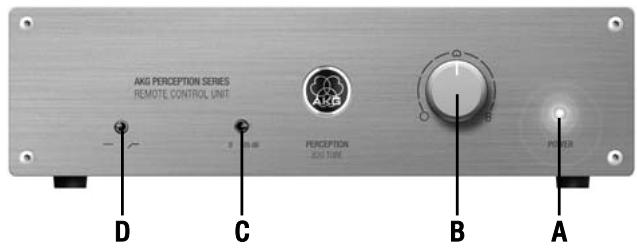
Fig. 1: Controls on the Remote Control Unit front panel.
A POWER LED: This blue LED is lit to indicate that power to the Remote Control Unit is ON.
B Polar pattern selector: This rotary switch lets you select the microphone's polar pattern from omnidirectional (fully CCW) to cardioid (center) to figure eight (fully CW). Between these settings, there are six intermediate patterns. All switch positions are detented, so all settings are easily and unambiguously reproducible.
C Preattenuation switch: This toggle switch lets you increase the microphone's headroom by 20 dB for close-in recording with extremely low distortion. The preattenuation pad prevents the microphone's output level, particularly at low frequencies, from overloading the miniature transformers used in many mixer input stages, etc.
D Bass cut switch: This toggle switch lets you reduce low-end distortion caused by footfall or wind noise, etc. The bass cut filter also minimizes the proximity effect that close-in miking from less than 4 inches causes in any unidirectional microphone. The filter rolls off at 12dB /octave from 80Hz downward.
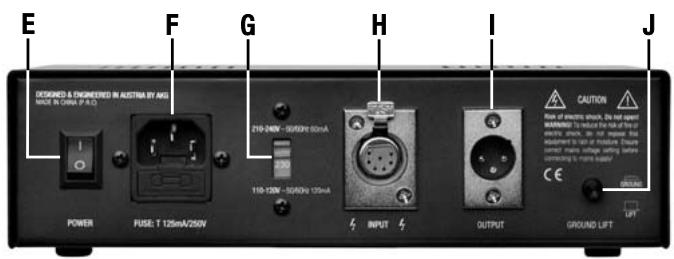
Fig. 2: Controls, inputs, and outputs on the Remote Control Unit rear panel.
Refer to fig. 1.
2.5.2 Rear Panel
Refer to fig. 2.
E POWER switch: Turns power to the unit ON (position "1") and OFF (position "0"). The front panel POWER LED is lit while power is ON and goes out when you turn power to the unit OFF.
F AC input: Standard IEC power receptacle with integrated fuse holder.
- To avoid damage, use replacement fuses of the same type and rating (125 mA/ 250 V, slow-blow) only.
G Power voltage selector: Sets the input power voltage to 210 - 240 VAC ("210-240V" position) or 110 - 120 VAC ("110-120V" position). - To avoid damage, always make sure that the power voltage selector is set to the same voltage as the power voltage available where you are going to use the unit.
H INPUT: 7-pin female XLR connector for connecting the dedicated audio/control cable for the microphone.

Important!

Important!
I OUTPUT: This balanced 3-pin XLR connector provides the microphone output signal.
Refer to fig. 2 on page 5.
2 Description
J GROUND LIFT: This pushbutton switch allows you to remove hum caused by ground loops.
To open the chassis ground connection, press the GROUND LIFT button OUT ("LIFT" position).
To restore the chassis ground connection, press the GROUND LIFT button IN ("GROUND" position).
3 Setting Up
3.1 Important Note
- To avoid damage or electric shock, mount the microphone on a suitable stand and make all audio connections before connecting the Remote Control Unit to power.
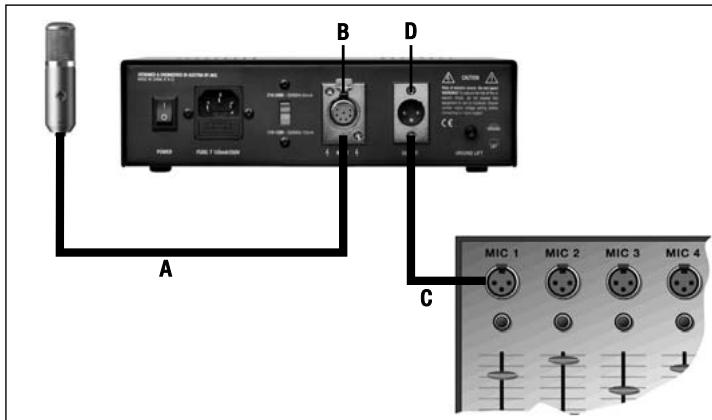
- Use the supplied audio/control cable (A) to connect the microphone output to the INPUT connector(B) on the Remote Control Unit rear panel.
- Use a standard balanced XLR cable (C) (optional) to connect the OUTPUT connector (D) on the Remote Control Unit rear panel to the desired microphone input on your mixer.
- Prior to connecting the Remote Control Unit to power, check what power voltage is available where you are going to use the microphone.
- Set the power voltage selector (G) on the rear panel to the correct position as shown in Table 1 below.
Table 1: Power voltage vs. selector setting and power cord
| Power voltage | Selector setting | Power cord |
| 210 to 240 VAC, 50/60 Hz | 210-240V | UK or European type |
| 110 to 120 VAC, 50/60 Hz | 110-120V | US type |
- Referring to Table 1 above, use the correct power cord to connect the Remote Control Unit to a grounded power outlet.
When on tour, you may encounter power outlets that do not match the power plug on any of the supplied power cords.
Purchase a suitable power cord locally that complies with IEC and local safety standards and has a power plug with a chassis ground pin.
- To avoid damage or electric shock, connect the Remote Control Unit to a grounded power outlet only.
- If in doubt about the power connection, consult a local electrician.
- Set the power switch on the Remote Control Unit rear panel to "1". After about ten seconds, the heating voltage will have reached the specified level and the front panel POWER LED will be lit. About twenty seconds later, the microphone will be ready to operate.
- You may not get the full splendor of the tube sound before the electrodes have reached the required operating temperature. Therefore, we recommend powering up at least
3.2 Connecting
the Microphone
Refer to fig. 3.
3.3 Connecting
the Remote Control Unit
to Power
Refer to fig. 2 on page 5.

Fig. 3: Connecting the microphone to the Remote Control Unit and mixer.
Important!
3.4 Powering Up
Note:
3 Setting Up
five minutes before starting to record. This will allow the tube inside the microphone to heat up properly,
3.5 Powering Down
- Set the power switch on the Remote Control Unit rear panel to "0". The front panel POWER LED will go out.
- Wait for five minutes to allow the tube to cool down to room temperature before moving the microphone. A hot tube will be more susceptible to mechanical damage than a cold one.
4 Using the Microphone
Using vacuum-tube electronics and a large-diaphragm transducer, the PERCEPTION 820 TUBE is suited for a wide range of applications. It will add the typical warmth and richness tube microphones are famous for to female and male voices as well as many instruments. The following sections contain general hints on using the microphone and suggestions on how to place the microphone for voices and various instruments.
- Please remember that vacuum tubes with their heater filaments are more delicate than solid-state components. Even a drop from moderate height may cause the filament to break and the microphone to fail. So always handle the microphone with extreme care.
Refer to fig. 4. Whichever polar pattern you select, it may be good to know which way the transducer axis is facing: the front of the microphone is the side of the body with the AKG logo on it. - When recording wind instruments or vocals, make sure not to blow or sing directly into the microphone.
To get professional sounding results with no unwanted wind and pop noise (exaggerated "p" and "t" sounds), place an optional PF 80 pop screen from AKG between the microphone and vocalist/instrument.
- Keep the microphone dry. Moisture from blowing or singing directly at the capsule from a short distance, or extremely high humidity may cause the microphone to start crackling or go very quiet due to partial short circuits in the polarization voltage.
- If you use the microphone in the open, use an optional AKG W 4000 windscreen to protect the microphone from moisture and reduce wind noise.
-
Loud instruments: You can use this microphone for close-in recording of very loud instruments (brass instruments, kick drum, etc.). Just switch the preattenuation pad in to increase the microphone's capability of handling sound pressure levels to 155 dB.
-
To switch the preattenuation pad in, set the preattenuation switch on the Remote Control Unit front panel to " -20 dB".
-
To switch the preattenuation pad out of circuit, set the preattenuation switch to "0".
-
Low-frequency noise: The supplied spider type shock mount reduces footfall or other mechanical noise to a minimum.
The switchable bass cut filter at 80Hz will effectively suppress any remaining low-frequency noise such as fan noise from air conditioning systems, etc., or floor vibrations, handling noise, etc. without affecting the sound of the recorded voice or instrument on tape.
- To switch the filter in, set the bass cut filter switch on the Remote Control Unit front panel to the "——" position.
- To switch the filter out of circuit, set the bass cut filter switch on the Remote Control Unit front panel to the "——" position.
Note:
4.2 General Hints
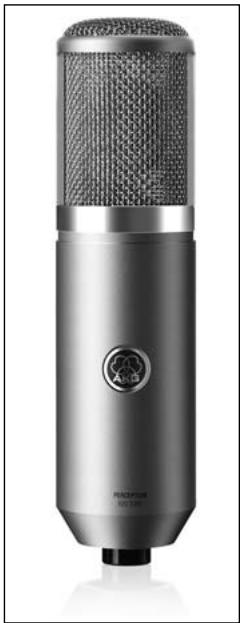
Fig. 4: Microphone front.
4.3 Selecting Polar Patterns
4 Using the Microphone
Each of the PERCEPTION 820 TUBE's selectable polar patterns is virtually frequency independent so that reflected sound, too will be reproduced accurately and uncolored.
- Omnidirectional (left-hand setting): This is the preferred setting for "all around the mic" recording, high quality ambience (audience sound) miking, or far-field recording in exceptionally good-sounding large or small recording rooms, etc.
- Cardioid (center setting): This is a standard setting for recording and gives excellent results on all kinds of voices and a wide range of instruments. Remember to aim the microphone front (see fig. 4 on page 8) at the sound source.
- Figure eight (right-hand setting): The microphone will pick up sounds arriving from the front and rear with equal sensitivity. Use this mode to mic up the side signal in M/S stereo recording or to record two sound sources (talkers, instruments) facing each other. It is also a good choice for cymbal overhead miking.
4.4 Hints on Microphone Placement
Every instrument radiates its sound in a specific way. Therefore, to get the best sound, do not hesitate to experiment with microphone placement.
As an introduction to the "secret science of making good recordings", the following sections describe some proven miking techniques. (Illustrations show generic microphones.)
4.4.1 Lead Vocals
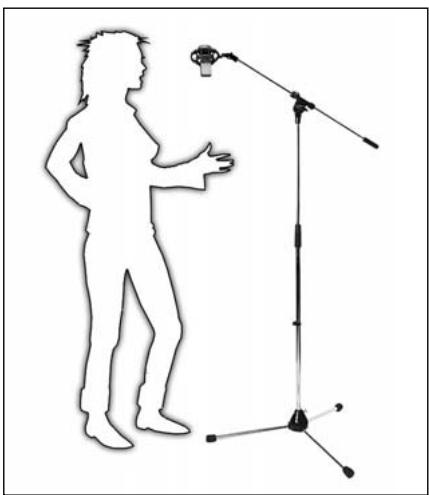
- Place the microphone 6 to 12 in. (15 to 30~cm ) from the vocalist's mouth.
- Select the cardioid polar pattern: set the polar pattern selector to cardioid (O).
- Switch the bass cut filter in: set the bass cut switch to “ ”.
- We strongly recommend placing a PF 80 pop screen (available as an optional accessory) between the microphone and vocalist to eliminate pop noise.
- To give the vocalist better control of their own voice, we recommend adding the vocalist's track to their headphone monitor signal.
Fig. 5: Soloologist.
4.4.2 Choir/ Backing Vocals
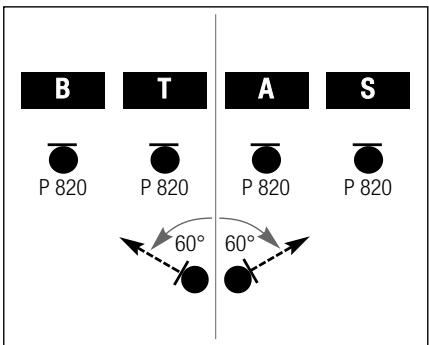
Fig. 6: Miking a large mixed choir.
To record large mixed choirs, we recommend using a pair of cardioid microphones to get a stereo signal, plus one PERCEPTION 820 TUBE each for the soprano, alto, tenor, and bass sections.
- Set each PERCEPTION 820 TUBE to cardioid (O).
- Place each microphone about 5 feet (1.5m) in front of the respective section, about 6 feet (1.8m) above the ground.
- Aim each microphone at the center of its assigned section.
In rooms with good acoustics, a pair of PERCEPTION 820 TUBEs will often do the trick.
-
Set each microphone to cardioid (O).
Use an optional H 50 stereo bar to mount the two microphones on a stand. -
Place the stereo pair about 10 feet (3 m) in front of the choir, about 8 feet (2.4 m) above the ground.
-
Aim the stereo pair at the center of the choir.
Turn the left-hand microphone 60 degrees to the left
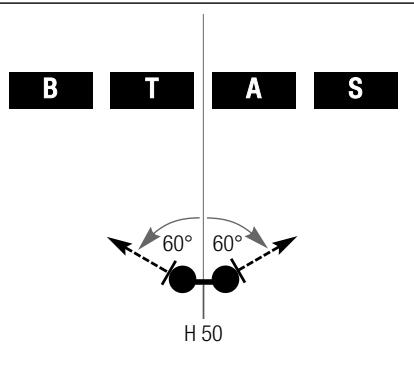
Fig. 7: Using a stereo pair to record a choir.
Backing vocals/technique 1:
Refer to section 4.4.1 Lead Vocals above.
If you have enough tracks available, we recommend overdubbing each voice separately.
Backing vocals/technique 2:
- If you use a separate microphone for each of several vocalists simultaneously, set each microphone to hypercardioid (a position between and 8) to prevent crosstalk, particularly if you place the microphones close to one another.
Backing vocals/technique 3:
Refer to fig. 8. If you use a single microphone for the entire group, select the cardioid (O) or omni (O) pattern and place the vocalists in a semicircle in front of the microphone.
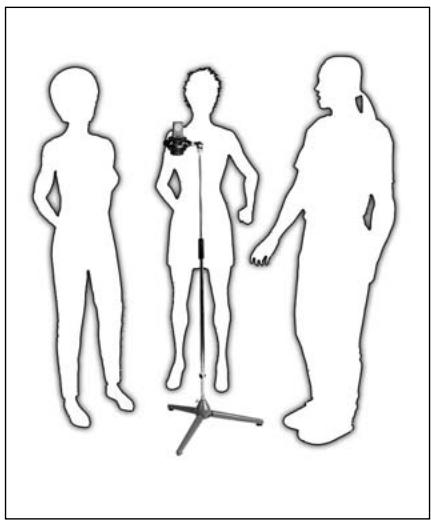
Fig. 8: Backing vocalists sharing a single microphone.
- Place the microphone about 1 foot (30 cm) in front of the instrument, slightly off the bell axis.
- Switch the preattenuation pad in.
To reduce blowing noise, a PF 80 pop screen (available as an optional accessory) between
the microphone and instrument.
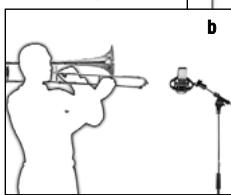
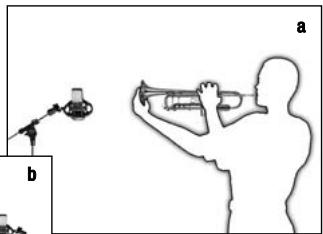
4.4.3 Trumpet, Trombone
Fig. 9: Trumpet (a), trombone (b).
4.4.4 Electric Guitar/Bass
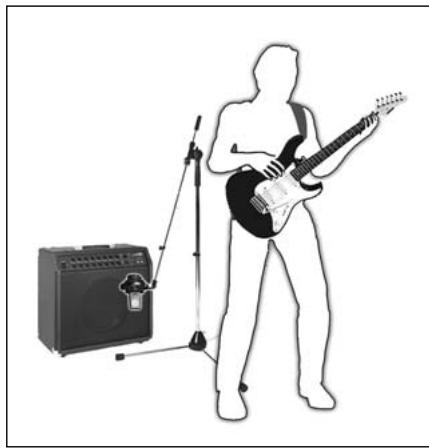
Fig. 10: Electric guitar.
Electric guitar:
- Position the microphone 1 to 6 inches (2.5 to 15~cm ) in front of the speaker, aiming at a point just off the speaker diaphragm center.
- Use the bass cut and preattenuation pad.
- You may want to use an additional distant microphone to capture the sound of the speaker cabinet as it interacts with the room.
Electric bass:
- Use the same technique as for the electric guitar.
- You can use a DI box to add the direct signal of the line output on the bass amp to the microphone signal.
4.4.5 Violin, Viola
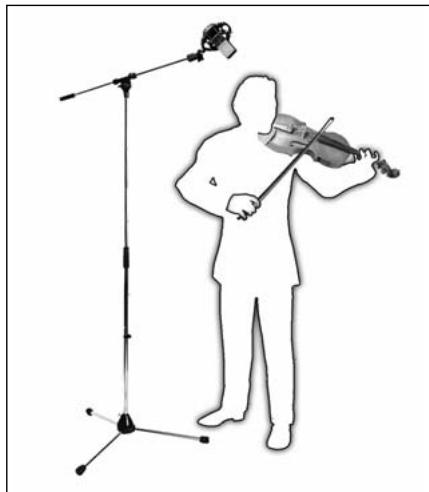
Fig. 11: Violin.
Solo violin:
- Set the polar pattern selector to cardioid (O) or omnidirectional (O).
- Direct the microphone at the f holes from a height of 6 to 8 feet (1.8 to 2.5m ) above the floor.
Viola:
- Set the polar pattern selector to cardioid (O) or omnidirectional (O).
- Direct the microphone to the f holes from a height of 7 to 10 feet (2.2 to 3m ) above the floor.
Large string sections:
- Use a combination of a main microphone in an XY, MS, ORTF, or other stereo configuration and close-in spot microphones.
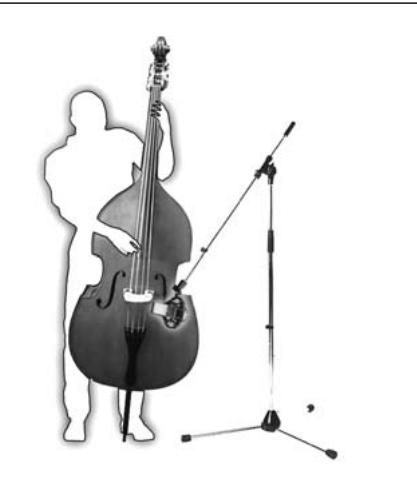
Double bass:
- Align the microphone with one of the f holes from a distance of about 16 inches (40 cm).
- If you need to record the double bass together with an ensemble, place the microphone closer to the instrument and set the polar pattern to hypercardioid (turn the polar pattern selector one notch CW from cardioid ()) to prevent leakage from other instruments into the bass microphone.
Cello/technique 1:
Refer to "Double bass" above.
Cello/technique 2:
Use a close-in microphone as in technique 1 above plus a distant microphone.
- Set the level of the close-in microphone approx. 20 dB lower than the distant mic level.
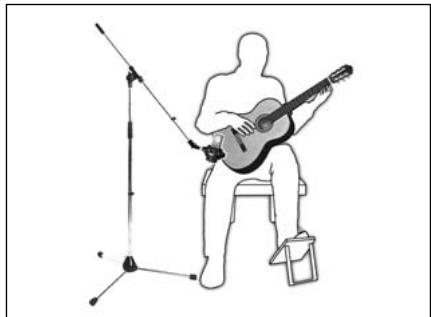
We recommend using two microphones:
- Place one PERCEPTION 820 TUBE 8 to 12 inches (20 to 30~cm ) away from the guitar and aim at the sound hole.
- Aim a small-diaphragm microphone (e.g., a C 451B) at a point near the bridge from a distance of about 3~1/2 feet (1~m) or at the body from a point below and to the rear of the instrument.
We recommend using two microphones:
- Place mic 1 above and to one side of the player (to reduce blowing noise) and align it with the player's mouth
- Aim mic 2 at the instrument from the side.
Refer to fig. 14. If you prefer to use a single microphone, place the microphone about 7 to 8 1/2 feet (2 to 2.5m ) above the floor and aim as mic 1 above.
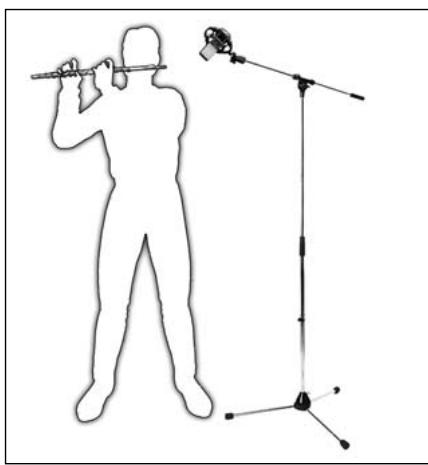
Fig. 12: Double bass.
4.4.7 Acoustic Guitar
Fig. 13: Miking an acoustic guitar with a single microphone.
4.4.8 Flute
Fig. 14: Miking the flute with a single microphone.
4.4.9 Clarinet
4 Using the Microphone
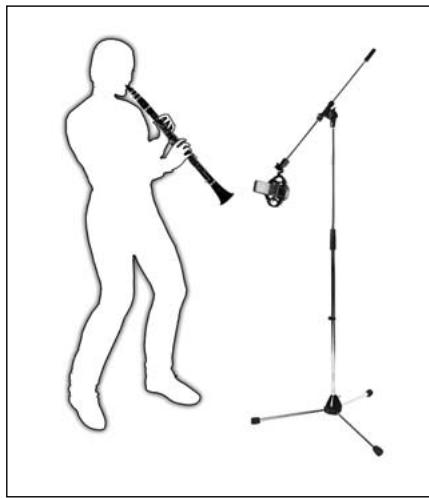
- Point the microphone at the lowest key.
- To minimize key noise, place the microphone a little ways to the side of the instrument.
Fig. 15: Clarinet.
4.4.10 Tenor and Soprano Saxophones
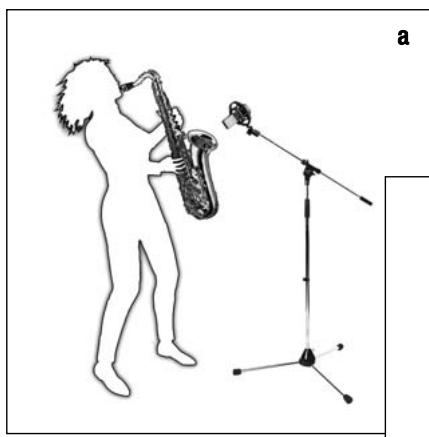
- Aim the microphone at the middle of the instrument from a distance of about 2 to 31 / 2 feet (50~cm to 1)
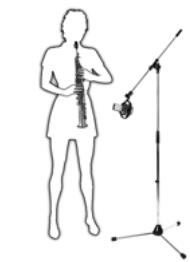
b
Fig. 16: Tenor saxophone (a), soprano saxophone (b).
4.4.11 Grand and Upright Pianos
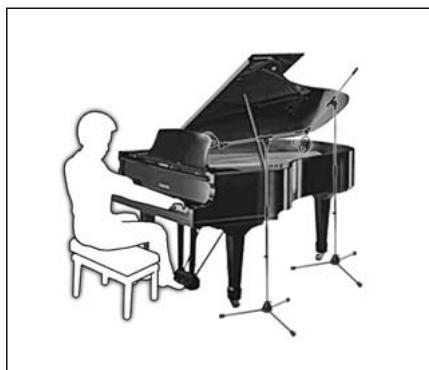
Fig. 17: Grand piano.
Grand piano:
- Aim a single PERCEPTION 820 TUBE or a stereo pair (see section 4.4.2 Choi) at the middle strings from a height of 5 to 7 feet (1.5 to 2 m).
- For a rock/pop sound, place two microhones roughly 8 to 16 in. (20 to 40~cm ) above the strings.
- Align mic 1 with the treble strings and mic 2 with the bass strings, both at a point about 6 inches (15 cm) behind the dampers.
Upright piano:
Use the same technique as for the grand.
- Open the lid and let the microphones "peek into the instrument" from above.
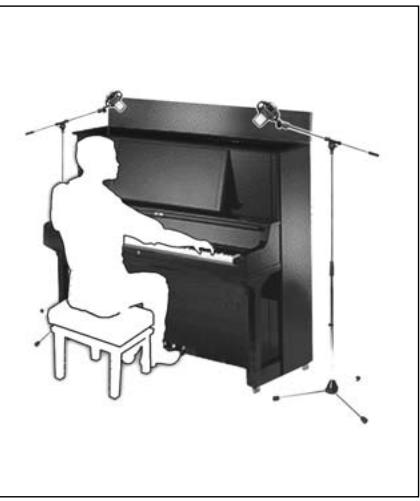
Fig. 18: upright piano.
Overhead miking:
Refer to fig. 19.
- Place two PERCEPTION 820 TUBEs about 31 inches to 4 feet (80 to 120cm ) above the drummer's head.
- Set each microphone to cardioid (O) or omnidirectional (O) mode.
Use little or no EQ! This technique will pick up the entire kit, delivering a highly natural sound.
Cymbals:
To record cymbals on a separate track, consider this technique:
- Place the microphone about 20 inches above and halfway between the crash and ride cyr
- Set the polar pattern selector to figure eight (8).
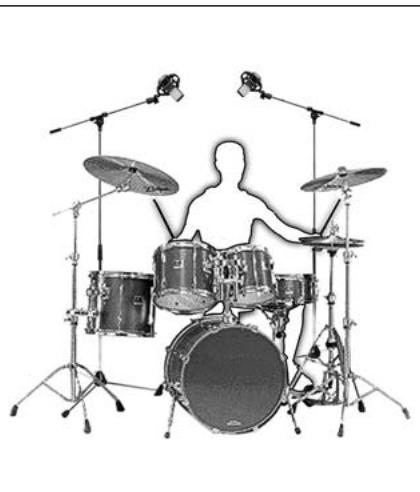
Fig. 19: Typical drum kit.
4.4.12 Drums
- Be sure to place the microphone out of reach of the drumsticks! The impact of a drumstick hitting the microphone may break the heater filament and silence the microphone.

Important!
5 Cleaning
-
To avoid electric shock, make sure to disconnect the Remote Control Unit from power before cleaning the microphone or the Remote Control Unit.
-
Disconnect the power cord from the Remote control Unit.
- To clean the surfaces of the microphone body and Remote Control Unit, use a soft cloth moistened with water.

6 Troubleshooting
6.1 Replacing Fuses
Warning!

- Dangerous voltages may be present inside the Remote Control Unit. To avoid electric shock, injury, and fire, UNDER ALL CIRCUMSTANCES disconnect the power cord from the Remote Control Unit before replacing a fuse.
- To avoid damage, replace blown fuses with new fuses of the same type and rating only.
The fuse protecting the primary circuit is located in the marked fuse compartment below the AC input connector on the Remote Control Unit rear panel.
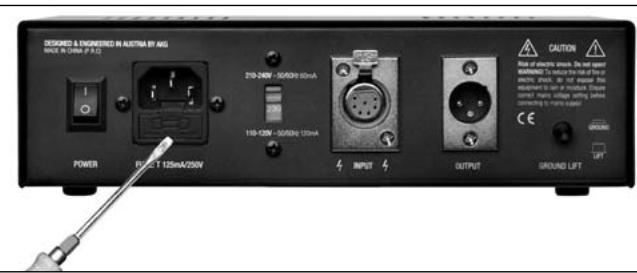
Fig. 20: Opening the fuse compartment.
To replace the fuse,
- Use a flat-blade screwdriver to open the fuse compartment lid.
- Remove the blown fuse.
- Insert a new fuse of the same type and rating (125 mA/250 V slow-blow).
- Close the fuse compartment lid.
6.2 Solving Problems
| Problem | Possible Cause | Remedy |
| No sound. | 1. Power to mixer and/or recording device is off. 2. Channel or master fader on mixer or recording device is at zero. 3. Microphone is not connected to mixer or recording device. 4. Cable connectors are seated loosely. 5. Audio cable or audio/control cable is defective. 6. No supply voltage. 7. Vacuum tube inside microphone is defective. 8. Fuse blown. | 1. Switch power to mixer and/or recording device on. 2. Set channel or master fader on mixer or recording device to desired level. 3. Connect microphone to mixer or recording device. 4. Check cable connectors for secure seat. 5. Check cables and replace damaged cable(s). 6. Check POWER LED. Switch power to Remote Control Unit on. Check audio/control cable and replace if necessary. 7. Contact your nearest AKG Service Center. 8. Check POWER LED. Refer to section 6.1 above or contact your nearest AKG Service Center. |
| Distortion. | 1. Channel gain control on mixer set too high. 2. Microphone too close to sound source. 3. Microphone sensitivity set too high. | 1. Turn gain control down CCW. 2. Move microphone further away from sound source. 3. Switch preattenuation pad in. |
| Crackling noises or low output. | ·Partial short circuits due to excessive humidity. | ·Place microphone in warm, dry room and allow to dry. |
7.1 Microphone
| Type: | 1-inch dual-diaphragm, true condenser pressure-gradient microphone |
| Polar patterns: | omnidirectional, cardioid, figure eight plus six intermediate patterns (selectable on Remote Control Unit) |
| Open-circuit sensitivity at 1kHz (cardioid): | 20 mV/Pa (-34 dBV ±3 dB) |
| Frequency range: | 20 Hz to 20 kHz (see frequency response graphs) |
| Impedance: | ≤ 200 ohms |
| Recommended load impedance: | ≥ 1000 ohms |
| Equivalent noise level to IEC 60268-4 (A-weighted): | 16 dB-A |
| Signal/noise ratio re 1 Pa (A-weighted): | 78 dB |
| Max. SPL: | 135 / 155 dB SPL (0 / -20 dB) |
| Preattenuation pad: | -20 dB (switchable on Remote Control Unit) |
| Bass cut filter slope: | 12 dB/octave, 80 Hz (switchable on Remote Control Unit) |
| Environment: | temperature: -10°C to +60°C R.H.: 80% (+25°C) |
| Powering: | via Remote Control Unit only |
| Connector: | dedicated 7-pin male XLR |
| Dimensions: | 53 dia. x 212 mm high / 2 x 8.3 in. |
| Net weight: | 870 g / 1.9 lbs. |
| Audio/control input: | dedicated 7-pin female XLR connector |
| Audio output: | standard 3-pin male XLR connector, balanced, pin 2 hot |
| Polar pattern selector: | 9-position detented rotary switch |
| Bass cut filter switch: | 2-position toggle switch |
| Preattenuation switch: | 2-position toggle switch |
| Power voltage: | 210-240 VAC or 110-120 VAC, selectable |
| Primary fuse: | 125 mA / 250 V slow-blow |
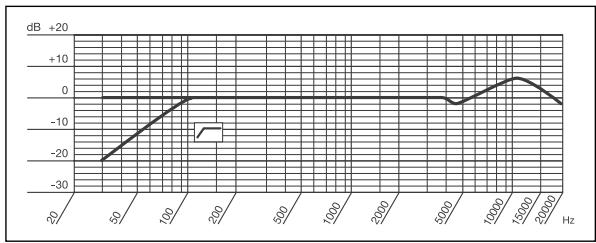
Frequency Response
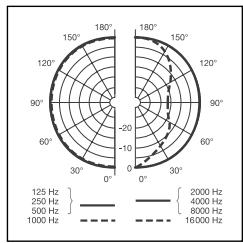
Polar Diagram
Omnidirectional
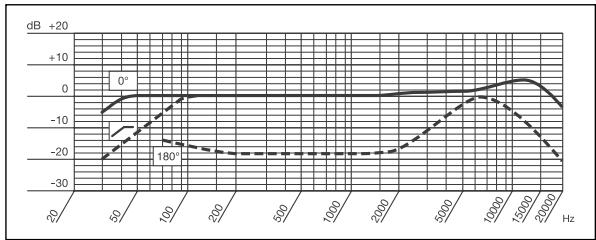
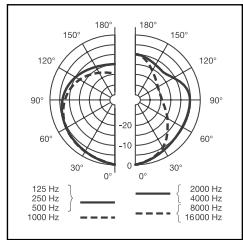
Cardioid
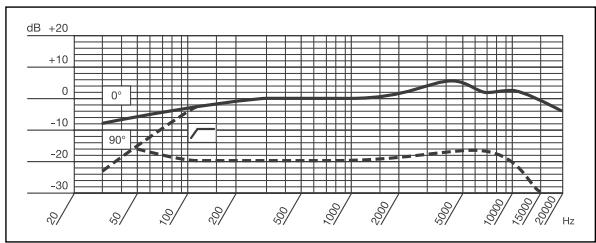
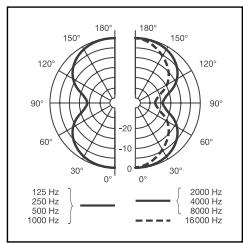
Figure Eight
Page
For other products and distributors worldwide visit www.akg.com


ROHS OK
H A Harman International Company
Technische Änderungen vorbehalten. Specifications subject to change without notice. Ces caractéristiques sont susceptibles de modifications. Ci riserviamo il diritto di effettare modifiche tecniche. Nos reservamos el dato de introduir modificaciones tíncas. Especificações sujeitas a mudanças sem uso prévio.
Printed in China (P.R.C.)
06/08/9100U12480

- Safety and Environment 3
- Description 4
- Setting Up 7
- Using the Microphone 9
- Cleaning 16
- Troubleshooting 16
- Specifications 18
- Conformity 38
- Safety Instructions
- Environment
- Description
- Introduction
- Packing List
- Optional Accessories
- Microphone
- Remote Control Unit
- Front Panel
- Rear Panel
- Setting Up
- Connecting
- the Microphone
- Connecting
- the Remote Control Unit
- to Power
- Important!
- Powering Up
- Note:
- Powering Down
- Using the Microphone
- General Hints
- Selecting Polar Patterns
- Hints on Microphone Placement
- Lead Vocals
- Choir/ Backing Vocals
- Backing vocals/technique 1:
- Backing vocals/technique 2:
- Backing vocals/technique 3:
- Trumpet, Trombone
- Electric Guitar/Bass
- Electric guitar:
- Electric bass:
- Violin, Viola
- Solo violin:
- Viola:
- Large string sections:
- Double bass:
- Cello/technique 1:
- Cello/technique 2:
- Acoustic Guitar
- Flute
- Clarinet
- Tenor and Soprano Saxophones
- Grand and Upright Pianos
- Grand piano:
- Upright piano:
- Overhead miking:
- Cymbals:
- Drums
- Cleaning
- Troubleshooting
- Replacing Fuses
- Solving Problems
- Microphone
- H A Harman International Company
Brand : AKG
Model : PERCEPTION 820 TUBE
Category : Tube Microphone