
XP PRO 1250 VA - Inverter INFOSEC - Free user manual and instructions
Find the device manual for free XP PRO 1250 VA INFOSEC in PDF.


| Brand | INFOSEC |
| Model | XP PRO 1250 VA |
| Product type | Line-interactive UPS |
| Apparent power | 1250 VA |
| Active power | 625 W (power factor 0.5) |
| Output waveform | Pseudo sine wave |
| Dimensions (L x W x H) | 140 x 368.3 x 180.4 mm |
| Weight | 13.8 kg |
| Input voltage | 110-120 V or 220-240 V (selectable) |
| Output voltage | 115 V or 220-240 V (depending on input) |
| Frequency | 50/60 Hz (auto-sensing) |
| Typical battery runtime | 23 minutes (at typical load) |
| Recharge time | 8 h for 90%, 10 h for full charge |
| Battery type | 12 V / 9 Ah x 2 (sealed maintenance-free batteries) |
| Protection | Surge, overload, short circuit, discharge, telephone/fax/modem line protection (RJ45) |
| Number of battery outlets | 4 IEC outlets |
| Number of surge-only outlets | 2 outlets (not battery-backed) |
| Communication interfaces | RS232 and USB |
| Included software | UPSurf Control |
| Noise level | < 40 dB at 1 m |
| Operating temperature | 0 °C to 40 °C |
| Ambient humidity | 0 % to 90 % (non-condensing) |
| Standards | CE, ISO 9001 |
| Special features | Automatic Voltage Regulation (AVR), cold start, energy saver |
Frequently Asked Questions - XP PRO 1250 VA INFOSEC
User questions about XP PRO 1250 VA INFOSEC
0 question about this device. Answer the ones you know or ask your own.
Ask a new question about this device
Download the instructions for your Inverter in PDF format for free! Find your manual XP PRO 1250 VA - INFOSEC and take your electronic device back in hand. On this page are published all the documents necessary for the use of your device. XP PRO 1250 VA by INFOSEC.
USER MANUAL XP PRO 1250 VA INFOSEC
To ensure this product is correctly installed and used appropriately, we highly advise you to read this user guide very carefully.
1. INTRODUCTION
The XP Pro range consists of high performance UPS units with direct connection to the PC via USB port. Every unit is delivered with a high-level control facility at the UPS power supply source. The UPS provides balanced output power with its Auto-Regulation and in this way offers complete protection of your servers and their peripherals, in the event of power variation, power cuts or micro-power cuts. In the event of power failure due to power cuts, power surges, or transient over-voltage, the UPS will very rapidly transfer your computer equipment to an alternative power supply source. This will allow you to make a backup, exit your program and shut the system down correctly. In normal power supply conditions for your equipment, the XP Pro will maintain its battery charge in an on-going way to become completely transparent during all your operations. In other words, this kind of uninterruptible multifunctional power supply will simplify your tasks. You will be able to check its operating status quite easily as well as its charge level using the led. This high-technology UPS guarantees your computer equipment has a proper and reliable power supply. The main features of the XP Pro range are detailed below.
2. MAIN CHARACTERISTICS
- Microprocessor control guaranteeing high reliability
- Equipped with an automatic output voltage regulator (AVR)
Built in USB and RS232 communication ports - It regulates and stabilizes the input voltage
- Compact and light, it will not clutter up your working space
- Multifunctional beeping alarms with led indicator lights
- Anti-lightning-strike, surge, overload and short-circuit protection
- Immediate UPS switch-off in the event of no charge in battery mode
- Phone / modem or network surge protection (RJ45 connectors)
3. SAFETY INSTRUCTIONS
The UPS unit uses potentially hazardous voltages. Do not take this equipment apart. It does not contain accessible components to be repaired by users.
All repairs should be performed by qualified technicians only.
The UPS has its own internal power supply (battery). There is a risk that output sockets may remain live after the UPS has been disconnected from the mains power supply.
The UPS has been designed to power computers. It should not be used to power electronic equipment with inductive loads such as motors and fluorescent lights, or with resistive loads.
Do not connect any non-computer units to the UPS, such as medical equipment for life support, microwaves, vacuum cleaners etc.
Laser printers should not be connected to the UPS as they consume too much power.
Make sure that the power supply required does not exceed the UPS's capacity. We recommend using an optimum power load equivalent to half or one third of the nominal power for longer backup times and longer battery life.
Do not leave any container with liquid on or near the UPS.
Unplug the UPS before proceeding to clean it. Do not directly apply any liquid detergent or sprays.
The UPS should not be used in a damp place, nor exposed to direct sunlight or heat-emitting sources. Do not cover the ventilation slots.
In an emergency, switch the UPS to the "OFF" position and then unplug the power cord from the power socket to disable the UPS completely.
Should the UPS fail to operate correctly, please refer to section 12: Trouble Shooting.
4. STORAGE INSTRUCTIONS
The UPS should be stored with its battery fully recharged. Storage temperatures above 20^ should be avoided as this will significantly shorten battery life. The UPS should be recharged once every 3 months. This is done by leaving it connected to the mains power supply for 24 hours. Batteries kept in storage should be recharged every 3 months, failure to do so could result in battery damage.
5. AFTER SALES SERVICE
IMPORTANT!
When calling the After-Sales Department, please have the following information ready, it will be required regardless of the problem: UPS model, serial number and date of purchase.
Give an accurate description of the problem including the following details: type of equipment powered by the UPS, indicator led status, alarm status, installation and environmental conditions.
You will find the technical information you require on your guarantee or on the identification plate on the back of the unit. If convenient you may enter the details in the following box.
| Model | Serial number | Date of purchase |
| ......XP Pro |
! Please keep the original packaging. It will be required in event the UPS is returned to the After-Sales Department, .
IMPORTANT:
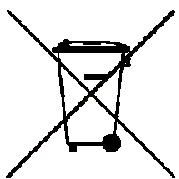
UPS belong to the electronic and electrical equipment category. At the end of their useful lives, they have to be collected separately and should not be discarded with household refuse.
7.DESCRIPTION
FRONT PANEL
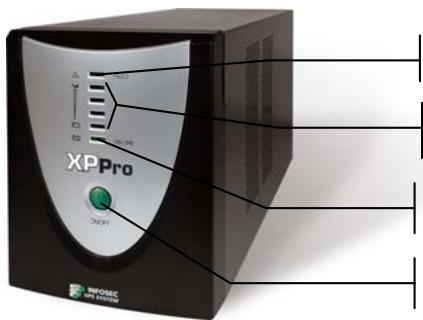
Red led on: Fault
Green leds come on progressively: battery mode
Green led on: AC mode
On/Off switch
BACK PANEL
XPPro1000/XPPro1250
RS232 communication port
Breaker
RJ11/45 Ethernet or Phone/Internet protected outlets
IEC Input outlet
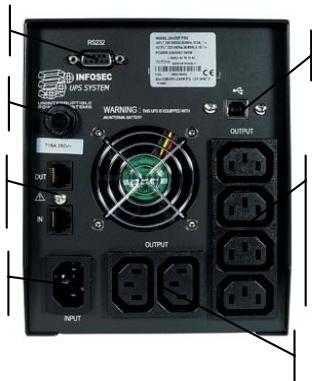
USB communication port
4 IEC protected UPS outlets
2 surge protected UPS outlets
→ XP Pro 1600 / XP Pro 2000
RS232 communication port
Breaker
RJ11/45 Ethernet or Phone/Internet protected outlets
IEC Input outlet
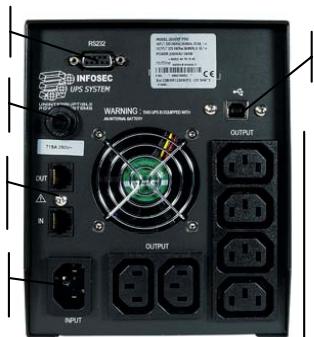
USB communication port
6 IEC protected UPS outlets
1. Checking
When you receive your equipment, open the packaging and check that your UPS has not been damaged. The packaging includes: a UPS unit, 1 input power cord, 3 IEC output cables, 1 communication interface cable (USB connector), 1 RJ11 cable, 1UPSurf Control Software and a user guide. In the event of damage, please submit a standard claim to the after-sales department.
2. Charging the batteries
This unit is shipped from the factory with its internal battery fully charged, however, some charge may be lost during shipping and the battery should be recharged prior to use. Plug the unit into an appropriate power supply and allow the UPS to charge fully by leaving it plugged-in, with no load, for at least 8 hours.
The UPS will automatically recharge its own batteries whenever the switch is in the "ON" position ("ON LINE" green led on). You may use the UPS immediately however the back-up power capacity may be lower than the nominal value required.
3. Where to set up
The UPS has been designed to operate in a protected environment, at temperatures between 0^ C and 40^ C and at a humidity level ranging between 0% and 90% (no condensation).
Do not obstruct the ventilation slots. Install the unit in an environment which is free from dust, chemical vapours and conductors. Moreover, in order to avoid any interference, keep the UPS at least 20cm away from the CPU (central processing unit).
4. Connection
Check on the identification plate at the back of the UPS that the power supply is compatible with network voltage and that the device is powerful enough to protect the given power load. Plug the UPS into a 2-pole, earthed outlet (use the original power cable of your computer or a 2P + E/CEE22/10A power cable is recommended). Then, use the 3 IEC cables to connect one computer-related device to each of the power outlets supplied on the back of the UPS. For XP Pro 1000 and 1250, you may also connect a device that does not require backup, such as an inkjet printer, to one of the surge protected outlets.
5. On/Off
To turn the UPS unit on, lightly press the power switch. To turn it off, press the power switch again.
6. DC Start
XP PRO units are equipped with a built-in DC start function. To start the UPS in the absence of a power supply and with a fully-charged battery, press the button.
7. Power Saving Function
XP Pro comes with a Power Saving Function. If no load connects to the UPS, it will automatically shut down after 5 minutes to save energy during a power failure. The Power switch must be kept in the 'ON' position, otherwise, the UPS will be disabled and your equipment will not be protected during a power failure.
8. Automatic Shutdown software - UPSurf Control
UPSurf Control software CD is included in your package. For more information, go to the website: www.infosec.fr
9. COMPUTER INTERFACE
The USB and RS 232 interfaces at the back of the UPS may alternatively be connected to the computer. Both communication ports enable the computer to directly control UPS status. The main functions are as follows:
- Transmission of a visual alarm in event of power failure
- Automatic file closure prior to the battery going flat
- Computer & UPS shutdown
10. PROTECTION TELEPHONE/FAX/MODEM LINE
If you wish to protect a fax or a modem, connect the telephone cable from the wall outlet to the "IN" jack. Connect the RJ11 cable (provided) from the "OUT" jack to the fax or modem.
Caution : The telephone line lightning arrester could be rendered inoperable if improperly installed. This surge protection device is for indoor use only. Never install telephone wiring during a lightning storm.
If you want to protect a network, use a RJ45 cable (cable not provided).
NB: The UPS functions properly even if you do not use this fax / modem protection option.
11. BATTERY
The battery is the only UPS component which is not in permanent use. It has a useful life of approximately 3 to 5 years. However, frequent major discharges or exposure to temperatures over 20^ will shorten its life span. We therefore recommend that users recharge the battery once every 3 months when the unit is not in use in order to compensate for natural discharging. UPS backup time will depend on the powered load, as well as the age and condition of the batteries.
WARNING!
Batteries should always be replaced by qualified technicians. Batteries have a very high short circuit current: connection errors could cause electric arcs resulting in serious burns.
12. TROUBLE SHOOTING
Should the UPS fail to function correctly we recommend you to perform the following tests before calling the Hot Line.
Check list:
Is the main switch in the "ON" position?
- Is the UPS plugged into the mains power supply?
- Does the power supply fall within specified unit values?
- Has the fuse gone in the mains plug?
Is the UPS overloaded?
Is the battery flat or defective?
| SYMPTOM | POSSIBLE CAUSE | SOLUTIONS |
| No LED display on the front panel. | 1. Battery missing | 1. Charge battery up to 8 hours |
| 2. Faulty battery | 2. Replace with the same type of battery. | |
| 3. Power switch was not pressed for at least 5 seconds | 3. Press and hold power switch for at least 5 seconds. | |
| Alarm buzzer every 1/2 second when AC supply is normal. | 1. UPS overload. | 1. Verify that the load matches the UPS capacity. Remove any non-critical load e.g.: printer. Stop and restart the UPS. |
| In the event of power failure, reduced backup time. | 1. UPS overload or the connected equipment is defective. | 1. Remove any non-critical load. |
| 2. Flat battery. | 2. Recharge the battery 8 hours or more. | |
| 3. Battery defect due to the high temperature of the operating environment, or improper operations. | 3. Replace with the same type of battery. | |
| Mains power normal but led is flashing. | 1. Blown fuse. | 1. Replace with the same type of fuse |
| 2. Power cord is loose. | 2. Reconnect the power cord properly | |
| 3. No mains power supply or UPS is not on. | 3. Check the power supply |
- TECHNICAL SPECIFICATIONS
| 1000 XP PRO | 1250 XP PRO | 1600 XP PRO | 2000 XP PRO | ||
| TECHNOLOGY | Technology | Line Interactive with Automatic Voltage Regulation (AVR) | |||
| Output form | Modified sine wave | ||||
| Protection | Discharge / Overcharge and overload protection+ fax modem line protection | ||||
| Power | 1000 VA | 1250 VA | 1600 VA | 2000 VA | |
| Power factor | 0.6 | 0.5 | 0.5 | 0.5 | |
| PHYSICAL | DimensionsW x D x H | 140 x 368,3 x 180,4 (mm) | |||
| Weight kg | 13.5 | 13.8 | 14.2 | 16 | |
| Output connectors | 2 surge protected outlets4 IEC protected UPS outlets2 surge protected RJ45 | 6 IEC protected UPS outlets2 surge protected RJ45 | |||
| INPUT | Voltage | [110-115-120 V] or [220 - 230 - 240 V] | |||
| Voltage range | [85 - 140 V] or [162 - 290 V] | ||||
| Frequency | 50 - 60 Hz auto detection | ||||
| OUTPUT | Voltage | [115 V] or [220 - 230 - 240 V] | |||
| Regulation | +/- 15 % (line mode) | ||||
| Frequency | 50 or 60 Hz | ||||
| BATTERY | Type | 12V/7AH x 2pcs | 12V/9AH x 2pcs | ||
| Backup time(depending on theload) | 35 mins | 23 mins | 25 mins | 26 mins | |
| Recharge time | 8 hours to 90 % after complete discharge10 hours for a complete charge | ||||
| FILTER | Spike protection | 225 Joules, 2 ms | |||
| EMI/RFI | 10 dB to 0.15 MHz, 50 dB to 30 MHz (EN55022 CLASS A) | ||||
| ENVIRONMENT | Noise level | AC Mode: < 40 dB at 1 meterBackup mode: < 45 dB at 1 meter | |||
| Operatingenvironment | 0° C - 40° C, 0 to 90 % humidity rate(non condensing) | ||||
| INDICATOR | AC Mode | Green led on | |||
| Battery Mode | Green leads come on gradually | ||||
| Fault | Red led on | ||||
| AUDIBLEARLARM | On battery | Sounding every 10 seconds | |||
| Low battery | Sounding every second until automatic stop | ||||
| Defect | Continuously sounding | ||||
| Overload | Sounding every 1⁄2 second | ||||
| SOFTWARE | Auto shut downsoftware | UPSurf Control | |||
| INTERFACE | Communicationport | Smart RS232USB compatible with Windows and Mac | |||
| STANDARDS | Security / Standard | CE - ISO 9001 | |||
Instrukcja obslugi
4 saidas IEC UPS protegidas
2 saidas protegidas UPS
XPPro1600/XPPro2000
6 saidas IEC UPS protegidas
PykoBODCTBO noIb3OBaTeJIa
3. INPABUNI TEXHUNB E3ONACHOCTN
B DaHOM I5I npImeHareTc nToEhuaJbHo onaChoe HnprjKeHne. He pa3bpaTe yctpoCTBO. OHO He coedePKT KOMNoHENTOB, NOJIeKaunx peMOHTy cINaMn NIOlb3OBeTenei.
Bce peMoHTHbI pa6Otbl DoJIxHbI pOn3BOaNTbCra ToJIbKO KBaIIuΦnUpOBaHHbIM TexHnueCKIM nepcoHaJOM.
IbI ObopydOBaH CO6CTBcHHbIM BHyTpEHHM NCTOCHNKOM NITaHnA (akKMyJrTOpOM). IMeETcR pNcToro, YTO pa3bEmbl MOyT 6bIb NOD HaprrKeHem DaKe nocTe OTcOeINHeHn IbIOT cTeI nepeMeHHOro ToKa.
IISII ppeHa3aueH dIJI IITAHN KOMNbIOTePOB.Ero He cIeNyET nCNoIb3OBaTb C 3JIeKTOHHbIMn yCTpoiCTBaMn C INHyKTNBHOH HArpy3KO: DBNrTaTeJlAMn, FJyOpeCteHTHBIMn IaMMaMn N dp., a TaKKe IOd pe3NCtNBHOH HArpy3KO.
He npoklnoaTe K IV5Ie He KOMnbIopeHoe obOpuyObaHne: MeiunHcKoe obOpuyObaHne IJn3HeoBeCneueHn, MIKPOBOJHOBbIe Neu, PbIneocCbI T.I.
He nodknouaTe K I5Pi Ia3epHbIe npInTepbl, TaK KaK OHN NOTpe6JIyOT CNIuKOM MHOOr 3Heprn.
U6eHNTecb, yTO IOTpe6IeMaJ IOKJIIOUeHHbIMyCTpoIcTBaMIMoUHOCTbHe IpeBbIaET MOuHocTn IBI. Mbl peKOMeHdyem NcNoJIb3OBAt b ONTImaJIbHyIO Harpy3ky B pa3Mepe
IIOJBOHbI IIN TpeTOn OT HOMHaJIbHOI MOUHOCTHu yCTPOJCTBa IJRA 6Oonee npoDoJXHTeJIbHOBVPemEHn ABTOHOMHOI pa60TbI N 60JIbWeRo cPoka cnYk6blaKkyMylrTopa.
He cTaBbTe eMkoCTn C kNdkoCTaMn Ha N5Pi nIiN OkOIo Hero.
OTKnHouaTe IbI nepeI er oOcTko. He npImeHJIte JxNdkne MoOuIe cpeIcTa b cnpei.
IbI HeIb3a IcNoIb3OBAt b C NOMEUeHnX C BblcOKoB BlaKHOCTbH, NOBepraTb BO3JeCTBIO npAmoro CoJIHeuHOrO CBeta IIpa3MeUaTb OKOn IO nCTouHnKOB TeIIa. He 3akpbBaTe BEHTINPAUOHhbIe UeJI.
B abapnHoi cnTuaunnepeKIOUHTe I5P B noIooKeHne «BbIKL.» n 3aTeM BbIepHnTe shHy pntAHnN 13 po3ETKn dJa nnHOro OTKJIouChENr I5P.
Пио обнаруженьен Инспавноcteй образитесь к разdenу 12:Устанения Инспавноcte.
4.УКАЗAHЯ NO XPAHEHиO
IbI Heo6xoJIMO xpaHnTb c nonHocTbO 3apJxKeHHbIM aKkyMjYrTopOM. HeJeNaTeJIbHO xpaHnTb npu TempepAtypax BbIe 20°C, TAK KaK 3To 3HaunTeJIbHO cOKpaNTcPCK cNyKbI aKkyMjYrTopa. Heo6xoJIMO nepe3apJkaTb IbI KaKdIbe 3 Mecya. 3To ocUyceCTBJIeTc rnyTEM noKnIOueHIny ycTpoiCTBa K cTeN nITAHnHa 24 yaca. OTdeJIbHO xpaHnIucea aKkyMjYrTopbl Heo6xoJIMO nepe3apJkaTb KaKdIbe 3 Mecya. B IpOTNBHom cIyuee OHN MOyT b6blb NobpeXDeHbl.
5. NOCLENPOJAXHOE OBCJXUBAHNE
BAXHO!
Jus jus jus Jus Jus Jus Jus Jus Jus Jus Jus Jus Jus Jus Jus Jus Jus Jus Jus Jus Jus Jus Jus Jus Jus Jus Jus Jus Jus Jus Jus Jus Jus Jus Jus Jus Jus Jus Jus Jus Jus Jus
aiee eee
a j 111 111 111 111 111 111 111 111 111 111 111 111 111
i 1
a aalalalalalalalalalalalalalalalalalalalalalalalalalalal
ailllll llllllllllllllllllll (cclllllllll) aalall
a aablll lgl 1234567890
I 1
yjlll jolj yj jj jolj jolj UPS jj j j j j j
psu
a aallll lallll lallll lallll lallll UPS 1
UPS
.
s2y 1 y
y
UPS 1jce jao jao jao jao jao jao
12 12 Pps
1_2ab^2 + 3 = b^3 + 3b^2
jzjjlcljai.4
a a a a a a a a a a a a a a a a a a a a a a a a a a a a a a a a a a a a a a a a a a a a a a a a a a
AaBlll llll llaa aee
2.1.12.2.1.2.3.5
P
jIb jIyJg: g yL Jg yIg ball aill cIagall gge IyIg 1aia Juaiaie
- 1
aal aal gao ydo ydo ydo ydo ydo ydo ydo ydo ydo ydo ydo ydo ydo ydo ydo ydo ydo ydo ydo ydo ydo ydo ydo ydo ydo ydo ydo ydo ydo ydo ydo ydo ydo ydo ydo ydo ydo ydo ydo ydo
.1 1
aill aill aill aill aill gle j lalall sglg ale agdo lei i gswll aill ctlogall
Jlll Jglll gllll lglal 1
Ie IEC 3 1 (UPS) 1 (USB Jg) Jg 1
2
ps 8 aL 8 Ls 8 Ls 8 Ls 8 Ls 8 Ls 8 Ls 8 Ls 8 Ls 8 Ls 8 Ls 8 Ls 8 Ls 8 Ls 8 Ls 8 Ls 8 Ls 8 Ls 8 Ls 8 Ls 8 Ls 8 Ls 8 Ls 8 Ls 8 Ls 8 Ls 8 L
3.3
0 0 0 40,0 0
(10%)%90
a a a a a a a a a a a a a a a a a a a a a a a a a a a a a a a a a a a a a a a a a a a
j
J.4
g 150,XP Pro 1000 aeg aagaaa. UPS . (2P+E/CEE22/10A)
5
Jusr jg s Jusr Jusr UPS 1000000000000000000000000000000000000000000
DC.6
JUPS DCaXXP
Jill binal
aalal .7
5 5 5 5 5 5 5 5 5 5 5 5 5 5 5 5 5 5 5 5 5 5 5 5 5 5 5 5 5 5 5 5 5 5 5 5 5 5 5 5 5 5 5 5 5 5 5 5 5 5 5
L = 2
USPurf ::aljlll jlll .8
www.infosec.fr
RS 232, USB 1000 m/s 1000 m/s 1000 m/s 1000 m/s 1000 m/s 1000 m/s 1000 m/s 1000 m/s 1000 m/s 1000 m/s 1000 m/s 1000 m/s 1000 m/s 1000 m/s 1000 m/s 5. UPS 1000 m/s 1000 m/s 1000 m/s 1000 m/s 1000 m/s 1000 m/s 1000 m/s 1000 m/s 1000 m/s 1000 m/s 1000 m/s 1000 m/s 1000 m/s 1000 m/s 4. UPS
: 1
j
Lalai aylll aell llll llll
UPS 1
aLalg aIgai/yslaI bIaIa.10
pIIN"g 100000000000000000000000000000000000000000000000000000000000000000000000000000
A
()RJ45山S
.ups 1
_j,j(b_j,j) .11
yI yI yI yI yI yI yI yI yI yI yI yI yI yI yI yI yI yI yI yI yI yI yI yI yI yI yI yI yI yI yI yI yI yI yI yI yI yI yI yI yI yI yI yI yI yI yI yI yI yI yI
ii jll lla, jae, laa
L 1
gaoJg jbcJc 12
aill g dll aill lal y b jy J 1111 UPS 20 p 1111
:aaalil
四 O N 1
UPS
j
UPS 1j j Jll
Pali 1 aiaia ayjllalaa J
| اللهlder | اللهlder | اللهlder |
| اللهlder8ة الحرفية بधان بधان بधان بधان بधان بधان بधان بधان بधان بधان بधان بधان بधان بधان بधان بधان بधان بधان بधان بधان بधان بधان بधان بधان بधان بधان بधان بधان بधان بधان بधان بधان بधان بधان bधان bधان bधان bधان bधان bधان bधان bधان bधان bधان bधان bधان bधان bधان bधان bधان bधان bधان bधان bधان bधان bधان bधان bधان bधان bधان bधان bधان bधان bधان bधان bधان bधان bchairbch | .1 | Y |
| اللهlderالطيرية بधان بधان bधان bधان bधان bchairbch | .2 | |
| اللهlderالطيرية بधان بधان bchairbch | .3 | |
| UPS 5 5 5 5 5 5 5 5 5 5 5 5 5 5 5 5 5 5 5 5 5 5 5 5 5 5 5 5 5 5 5 5 5 5 5 5 5 5 5 5 5 5 5 5 5 5 5 5 5 5 4 | .1 | K |
| UPS 5 5 5 5 5 5 5 5 5 5 5 5 5 5 5 5 5 5 5 5 5 5 5 5 5 5 5 5 5 5 5 5 5 5 5 5 5 5 5 5 5 5 5 5 5 5 5 4 | .1 | |
| UPS 5 5 5 5 5 5 5 5 5 5 5 5 5 5 5 5 5 5 5 5 5 5 5 5 5 5 5 5 5 5 5 5 5 5 5 5 5 5 5 5 5 5 5 5 5 5 5 | .1 | |
| UPS 5 5 5 5 5 5 5 5 5 5 5 5 5 5 5 5 5 5 5 5 5 5 5 5 5 5 5 5 5 5 5 5 5 5 5 5 5 5 5 5 5 5 5 5 5 4 | .1 | |
| UPPS 5 5 5 5 5 5 5 5 5 5 5 5 5 5 5 5 5 5 5 5 5 5 5 5 5 5 5 5 5 5 5 5 5 5 5 5 5 5 5 5 5 5 5 5 5 5 5 5 5 1 | .1 | |
| UPS 5 5 5 5 5 5 5 5 5 5 5 5 5 5 5 5 5 5 5 5 5 5 5 5 5 5 5 5 5 5 5 5 5 5 5 5 5 5 5 5 5 5 5 5 5 1 | .1 | |
| UPPS 5 5 5 5 5 5 5 5 5 5 5 5 5 5 5 5 5 5 5 5 5 5 5 5 5 5 5 5 5 5 5 5 5 5 5 5 5 5 5 5 5 5 5 5 5 | .1 | |
| UPS 6 6 6 6 6 6 6 6 6 6 6 6 6 6 6 6 6 6 6 6 6 6 6 6 6 6 6 6 6 6 6 6 6 6 6 6 6 6 6 6 6 6 6 6 6 6 6 6 6 6 1 | .1 | |
| UPS 6 6 6 6 6 6 6 6 6 6 6 6 6 6 6 6 6 6 6 6 6 6 6 6 6 6 6 6 6 6 6 6 6 6 6 6 6 6 6 6 6 6 6 6 6 1 | .1 | |
| UPPS 6 6 6 6 6 6 6 6 6 6 6 6 6 6 6 6 6 6 6 6 6 6 6 6 6 6 6 6 6 6 6 6 6 6 6 6 6 6 6 6 6 6 6 6 6 6 6 6 6 4 | .1 | |
| UPS 7 7 7 7 7 7 7 7 7 7 7 7 7 7 7 7 7 7 7 7 7 7 7 7 7 7 7 7 7 7 7 7 7 7 7 7 7 7 7 7 7 7 7 7 7 7 7 7 7 7 1 | .1 | |
| UPS 7 7 7 7 7 7 7 7 7 7 7 7 7 7 7 7 7 7 7 7 7 7 7 7 7 7 7 7 7 7 7 7 7 7 7 7 7 7 7 7 7 7 7 7 7 1 | .1 | |
| UPPS 7 7 7 7 7 7 7 7 7 7 7 7 7 7 7 7 7 7 7 7 7 7 7 7 7 7 7 7 7 7 7 7 7 7 7 7 7 7 7 7 7 7 7 7 7 7 7 7 7 4 | .1 | |
| UPS 8 8 8 8 8 8 8 8 8 8 8 8 8 8 8 8 8 8 8 8 8 8 8 8 8 8 8 8 8 8 8 8 8 8 8 8 8 8 8 8 8 8 8 8 8 8 8 8 8 8 1 | .1 | |
| UPS 9 9 9 9 9 9 9 9 9 9 9 9 9 9 9 9 9 9 9 9 9 9 9 9 9 9 9 9 9 9 9 9 9 9 9 9 9 9 9 9 9 9 9 9 9 9 9 9 9 9 1 | .1 | |
| UPS 10 10 10 10 10 10 10 10 10 10 10 10 10 10 10 10 10 10 10 10 10 10 10 10 10 10 10 10 10 10 10 10 10 10 | .1 | |
| UPS 11 11 11 11 11 11 11 11 11 11 11 11 11 11 11 11 11 11 11 11 11 11 11 11 11 11 11 11 | .1 | |
| UPS 12 12 12 12 12 12 12 12 12 12 12 12 12 12 12 12 12 12 12 12 12 12 12 12 12 12 12 12 | .1 | |
| UPS 13 13 13 13 13 13 13 13 13 13 13 13 13 13 13 13 13 13 | .1 | |
| UPS 14 14 14 14 14 14 14 14 14 14 14 14 | .1 | |
| UPS 15 15 15 15 15 15 15 15 15 15 | .1 | |
| UPS 16 16 16 16 16 16 16 | .1 | |
| UPS 17 17 17 17 17 17 | .1 | |
| UPS 18 18 18 18 18 18 | .1 | |
| UPS 19 19 19 19 | .1 | |
| UPS 20 | .1 | |
| UPS 21 | .1 | |
| UPS 22 | .1 | |
| UPS 23 | .1 | |
| UPS 24 | .1 | |
| UPS 25 | .1 | |
| UPS 26 | .1 | |
| UPS 27 | .1 | |
| UPS 28 | .1 | |
| UPS 29 | .1 | |
| UPS 30 | .1 | |
| UPS 31 | .1 | |
| UPS 32 | .1 | |
| UPS 33 | .1 | |
| UPS 34 | .1 | |
| UPS 35 | .1 | |
| UPS 36 | .1 | |
| UPS 37 | .1 | |
| UPS 38 | .1 | |
| UPS 39 | .1 | |
| UPS 40 | .1 | |
| UPS 41 | .1 | |
| UPS 42 | .1 | |
| UPS 43 | .1 | |
| UPS 44 | .1 | |
| UPS 45 | .1 | |
| UPS 46 | .1 | |
| UPS 47 | .1 | |
| UPS 48 | .1 | |
| UPS 49 | .1 | |
| UPS 50 | .1 | |
| UPS 51 | .1 | |
| UPS 52 | .1 | |
| UPS 53 | .1 | |
| UPS 54 | .1 | |
| UPS 55 | .1 | |
| UPS 56 | .1 | |
| UPS 57 | .1 | |
| UPS 58 | .1 | |
| UPS 59 | .1 | |
| UPS 60 | .1 | |
| UPS 61 | .1 | |
| UPS 62 | .1 | |
| UPS 63 | .1 | |
| UPS 64 | .1 | |
| UPS 65 | .1 | |
| UPS 66 | .1 | |
| UPS 67 | .1 | |
| UPS 68 | .1 | |
| UPS 69 | .1 | |
| UPS 70 | .1 | |
| UPS 71 | .1 | |
| UPS 72 | .1 | |
| UPS 73 | .1 | |
| UPS 74 | .1 | |
| UPS 75 | .1 | |
| UPS 76 | .1 | |
| UPS 77 | .1 | |
| UPS 78 | .1 | |
| UPS 79 | .1 | |
| UPS 80 | .1 | |
| UPS 81 | .1 | |
| UPS 82 | .1 | |
| UPS 83 | .1 | |
| UPS 84 | .1 | |
| UPS 85 | .1 | |
| UPS 86 | .1 | |
| UPS 87 | .1 | |
| UPS 88 | .1 | |
| UPS 89 | .1 | |
| UPS 90 | .1 | |
| UPS 91 | .1 | |
| UPS 92 | .1 | |
| UPS 93 | .1 | |
| UPS 94 | .1 | |
| UPS 95 | .1 | |
| UPS 96 | .1 | |
| UPS 97 | .1 | |
| UPS 98 | .1 | |
| UPS 99 | .1 | |
| UPS 100 | .1 | |
| UPS 101 | .1 | |
| UPS 102 | .1 | |
| UPS 103 | .1 | |
| UPS 104 | .1 | |
| UPS 105 | .1 | |
| UPS 106 | .1 | |
| UPS 107 | .1 | |
| UPS 108 | .1 | |
| UPS 109 | .1 | |
| UPS 110 | .1 | |
| UPS 111 | .1 | |
| UPS 112 | .1 | |
| UPS 113 | .1 | |
| UPS 114 | .1 | |
| UPS 115 | .1 | |
| UPS 116 | .1 | |
| UPS 117 | .1 | |
| UPS 118 | .1 | |
| UPS 119 | .1 | |
| UPS 120 | .1 | |
| UPS 121 | .1 | |
| UPS 122 | .1 | |
| UPS 123 | .1 | |
| UPS 124 | .1 | |
| UPS 125 | .1 | |
| UPS 126 | .1 | |
| UPS 127 | .1 | |
| UPS 128 | .1 | |
| UPS 129 | .1 | |
| UPS 130 | .1 | |
| UPS 131 | .1 | |
| UPS 132 | .1 | |
| UPS 133 | .1 | |
| UPS 134 | .1 | |
| UPS 135 | .1 | |
| UPS 136 | .1 | |
| UPS 137 | .1 | |
| UPS 138 | .1 | |
| UPS 139 | .1 | |
| UPS 140 | .1 | |
| UPS 141 | .1 | |
| UPS 142 | .1 | |
| UPS 143 | .1 | |
| UPS 144 | .1 | |
| UPS 145 | .1 | |
| UPS 146 | .1 | |
| UPS 147 | .1 | |
| UPS 148 | .1 | |
| UPS 149 | .1 | |
| UPS 150 | .1 | |
| UPS 151 | .1 | |
| UPS 152 | .1 | |
| UPS 153 | .1 | |
| UPS 154 | .1 | |
| UPS 155 | .1 | |
| UPS 156 | .1 | |
| UPS 157 | .1 | |
| UPS 158 | .1 | |
| UPS 159 | .1 | |
| UPS 160 | .1 | |
| UPS 161 | .1 | |
| UPS 162 | .1 | |
| UPS 163 | .1 | |
| UPS 164 | .1 | |
| UPS 165 | .1 | |
| UPS 166 | .1 | |
| UPS 167 | .1 | |
| UPS 168 | .1 | |
| UPS 169 | .1 | |
| UPS 170 | .1 | |
| UPS 171 | .1 | |
| UPS 172 | .1 | |
| UPS 173 | .1 | |
| UPS 174 | .1 | |
| UPS 175 | .1 | |
| UPS 176 | .1 | |
| UPS 177 | .1 | |
| UPS 178 | .1 | |
| UPS 179 | .1 | |
| UPS 180 | .1 | |
| UPS 181 | .1 | |
| UPS 182 | .1 | |
| UPS 183 | .1 | |
| UPS 184 | .1 | |
| UPS 185 | .1 | |
| UPS 186 | .1 | |
| UPS 187 | .1 | |
| UPS 188 | .1 | |
| UPS 189 | .1 | |
| UPS 190 | .1 | |
| UPS 191 | .1 | |
| UPS 192 | .1 | |
| UPS 193 | .1 | |
| UPS 194 | .1 | |
| UPS 195 | .1 | |
| UPS 196 | .1 | |
| UPS 197 | .1 | |
| UPS 198 | .1 | |
| UPS 200 | .1 | |
| UPS201 | .1 | |
| UPS202 | .1 | |
| UPS203 | .1 | |
| UPS204 | .1 | |
| UPS205 | .1 | |
| UPS206 | .1 | |
| UPS207 | .1 | |
| UPS208 | .1 | |
| UPS209 | .1 | |
| UPS210 | .1 | |
| UPS211 | .1 | |
| UPS212 | .1 | |
| UPS213 | .1 | |
| UPS214 | .1 | |
| UPS215 | .1 | |
| UPS216 | .1 | |
| UPS217 | .1 | |
| UPS218 | .1 | |
| UPS219 | .1 | |
| UPS220 | .1 | |
| UPS221 | .1 | |
| UPS222 | .1 | |
| UPS223 | .1 | |
| UPS224 | .1 | |
| UPS225 | .1 | |
| UPS226 | .1 | |
| UPS227 | .1 | |
| UPS228 | .1 | |
| UPS229 | .1 | |
| UPS230 | .1 | |
| UPS231 | .1 | |
| UPS232 | .1 | |
| UPS233 | .1 | |
| UPS234 | .1 | |
| UPS235 | .1 | |
| UPS236 | .1 | |
| UPS237 | .1 | |
| UPS238 | .1 | |
| UPS239 | .1 | |
| UPS240 | .1 | |
| UPS241 | .1 | |
| UPS242 | .1 | |
| UPS243 | .1 | |
| UPS244 | .1 | |
| UPS245 | .1 | |
| UPS246 | .1 | |
| UPS247 | .1 | |
| UPS248 | .1 | |
| UPS249 | .1 | |
| UPS250 | .1 | |
| UPS251 | .1 | |
| UPS252 | .1 | |
| UPS253 | .1 | |
| UPS254 | .1 | |
| UPS255 | .1 | |
| UPS256 | .1 | |
| UPS257 | .1 | |
| UPS258 | .1 | |
| UPS259 | .1 | |
| UPS260 | .1 | |
| UPS261 | .1 | |
| UPS262 | .1 | |
| UPS263 | .1 | |
| UPS264 | .1 | |
| UPS265 | .1 | |
| UPS266 | .1 | |
| UPS267 | .1 | |
| UPS268 | .1 | |
| UPS269 | .1 | |
| UPS270 | .1 | |
| UPS271 | .1 | |
| UPS272 | .1 | |
| UPS273 | .1 | |
| UPS274 | .1 | |
| UPS275 | .1 | |
| UPS276 | .1 | |
| UPS277 | .1 | |
| UPS278 | .1 | |
| UPS279 | .1 | |
| UPS280 | .1 | |
| UPS281 | .1 | |
| UPS282 | .1 | |
| UPS283 | .1 | |
| UPS284 | .1 | |
| UPS285 | .1 | |
| UPS286 | .1 | |
| UPS287 | .1 | |
| UPS288 | .1 | |
| UPS289 | .1 | |
| UPS290 | .1 | |
| UPS291 | .1 | |
| UPS292 | .1 | |
| UPS293 | .1 | |
| UPS294 | .1 | |
| UPS295 | .1 | |
| UPS296 | .1 | |
| UPS297 | .1 | |
| UPS298 | .1 | |
| UPS299 | .1 | |
| UPS300 | .1 | |
| UPS301 | .1 | |
| UPS302 | .1 | |
| UPS303 | .1 | |
| UPS304 | .1 | |
| UPS305 | .1 | |
| UPS306 | .1 | |
| UPS307 | .1 | |
| UPS308 | .1 | |
| UPS309 | .1 | |
| UPS310 | .1 | |
| UPS311 | .1 | |
| UPS312 | .1 | |
| UPS313 | .1 | |
| UPS314 | .1 | |
| UPS315 | .1 | |
| UPS316 | .1 | |
| UPS317 | .1 | |
| UPS318 | .1 | |
| UPS319 | .1 | |
| UPS320 | .1 | |
| UPS321 | .1 | |
| UPS322 | .1 | |
| UPS323 | .1 | |
| UPS324 | .1 | |
| UPS325 | .1 | |
| UPS326 | .1 | |
| UPS327 | .1 | |
| UPS328 | .1 | |
| UPS329 | .1 | |
| UPS330 | .1 | |
| UPS331 | .1 | |
| UPS332 | .1 | |
| UPS333 | .1 | |
| UPS334 | .1 | |
| UPS335 | .1 | |
| UPS336 | .1 | |
| UPS337 | .1 | |
| UPS338 | .1 | |
| UPS339 | .1 | |
| UPS340 | .1 | |
| UPS341 | .1 | |
| UPS342 | .1 | |
| UPS343 | .1 | |
| UPS344 | .1 | |
| UPS345 | .1 | |
| UPS346 | .1 | |
| UPS347 | .1 | |
| UPS348 | .1 | |
| UPS349 | .1 | |
| UPS350 | .1 | |
| UPS351 | .1 | |
| UPS352 | .1 | |
| UPS353 | .1 | |
| UPS354 | .1 | |
| UPS355 | .1 | |
| UPS356 | .1 | |
| UPS357 | .1 | |
| UPS358 | .1 | |
| UPS359 | .1 | |
| UPS360 | .1 | |
| UPS361 | .1 | |
| UPS362 | .1 | |
| UPS363 | .1 | |
| UPS364 | .1 | |
| UPS365 | .1 | |
| UPS366 | .1 | |
| UPS367 | .1 | |
| UPS368 | .1 | |
| UPS369 | .1 | |
| UPS370 | .1 | |
| UPS371 | .1 | |
| UPS372 | .1 | |
| UPS373 | .1 | |
| UPS374 | .1 | |
| UPS375 | .1 | |
| UPS376 | .1 | |
| UPS377 | .1 | |
| UPS378 | .1 | |
| UPS379 | .1 | |
| UPS380 | .1 | |
| UPS381 | .1 | |
| UPS382 | .1 | |
| UPS383 | .1 | |
| UPS384 | .1 | |
| UPS385 | .1 | |
| UPS386 | .1 | |
| UPS387 | .1 | |
| UPS388 | .1 | |
| UPS389 | .1 | |
| UPS390 | .1 |