
XP PRO 1000 VA - Inverter INFOSEC - Free user manual and instructions
Find the device manual for free XP PRO 1000 VA INFOSEC in PDF.


| Product type | Line Interactive UPS |
| Brand | INFOSEC |
| Model | XP PRO 1000 VA |
| Nominal power | 1000 VA / 600 W |
| Technology | Line Interactive with automatic voltage regulation (AVR) |
| Waveform | Pseudo sine wave |
| Input voltage | 110-120 V or 220-240 V (auto-detection) |
| Input voltage range | 85-140 V (low) or 162-290 V (high) |
| Output voltage | 115 V or 220-230-240 V |
| Frequency | 50/60 Hz (auto-detection) |
| Battery | 2 x 12 V / 7 Ah (sealed lead-acid) |
| Typical runtime | 35 minutes (depending on connected load) |
| Recharge time | 8 hours to 90% after full discharge |
| Dimensions (L x W x H) | 140 x 368.3 x 180.4 mm |
| Weight | 13.5 kg |
| Output sockets | 2 surge-protected outlets + 4 IEC backup outlets |
| Protection | Overload, short circuit, overvoltage, surge, telephone line RJ11/45 |
| Communication interface | USB and RS232 |
| Included software | UPSurf Control (automatic shutdown) |
| Noise level | < 40 dB at 1 meter |
| Operating temperature | 0 °C to 40 °C |
| Operating humidity | 0 to 90% (non-condensing) |
| Standards | CE, ISO 9001 |
| Special features | Cold start, energy saving mode |
Frequently Asked Questions - XP PRO 1000 VA INFOSEC
User questions about XP PRO 1000 VA INFOSEC
0 question about this device. Answer the ones you know or ask your own.
Ask a new question about this device
Download the instructions for your Inverter in PDF format for free! Find your manual XP PRO 1000 VA - INFOSEC and take your electronic device back in hand. On this page are published all the documents necessary for the use of your device. XP PRO 1000 VA by INFOSEC.
USER MANUAL XP PRO 1000 VA INFOSEC
To ensure this product is correctly installed and used appropriately, we highly advise you to read this user guide very carefully.
1. INTRODUCTION
The XP Pro range consists of high performance UPS units with direct connection to the PC via USB port. Every unit is delivered with a high-level control facility at the UPS power supply source. The UPS provides balanced output power with its Auto-Regulation and in this way offers complete protection of your servers and their peripherals, in the event of power variation, power cuts or micro-power cuts. In the event of power failure due to power cuts, power surges, or transient over-voltage, the UPS will very rapidly transfer your computer equipment to an alternative power supply source. This will allow you to make a backup, exit your program and shut the system down correctly. In normal power supply conditions for your equipment, the XP Pro will maintain its battery charge in an on-going way to become completely transparent during all your operations. In other words, this kind of uninterruptible multifunctional power supply will simplify your tasks. You will be able to check its operating status quite easily as well as its charge level using the led. This high-technology UPS guarantees your computer equipment has a proper and reliable power supply. The main features of the XP Pro range are detailed below.
2. MAIN CHARACTERISTICS
- Microprocessor control guaranteeing high reliability
- Equipped with an automatic output voltage regulator (AVR)
Built in USB and RS232 communication ports - It regulates and stabilizes the input voltage
- Compact and light, it will not clutter up your working space
Multifunctional beeping alarms with led indicator lights - Anti-lightning-strike, surge, overload and short-circuit protection
- Immediate UPS switch-off in the event of no charge in battery mode
- Phone / modem or network surge protection (RJ45 connectors)
3. SAFETY INSTRUCTIONS
The UPS unit uses potentially hazardous voltages. Do not take this equipment apart. It does not contain accessible components to be repaired by users.
All repairs should be performed by qualified technicians only.
The UPS has its own internal power supply (battery). There is a risk that output sockets may remain live after the UPS has been disconnected from the mains power supply.
The UPS has been designed to power computers. It should not be used to power electronic equipment with inductive loads such as motors and fluorescent lights, or with resistive loads.
Do not connect any non-computer units to the UPS, such as medical equipment for life support, microwaves, vacuum cleaners etc.
Laser printers should not be connected to the UPS as they consume too much power.
Make sure that the power supply required does not exceed the UPS's capacity. We recommend using an optimum power load equivalent to half or one third of the nominal power for longer backup times and longer battery life.
Do not leave any container with liquid on or near the UPS.
Unplug the UPS before proceeding to clean it. Do not directly apply any liquid detergent or sprays.
The UPS should not be used in a damp place, nor exposed to direct sunlight or heat-emitting sources. Do not cover the ventilation slots.
In an emergency, switch the UPS to the "OFF" position and then unplug the power cord from the power socket to disable the UPS completely.
Should the UPS fail to operate correctly, please refer to section 12: Trouble Shooting.
4. STORAGE INSTRUCTIONS
The UPS should be stored with its battery fully recharged. Storage temperatures above 20^ should be avoided as this will significantly shorten battery life. The UPS should be recharged once every 3 months. This is done by leaving it connected to the mains power supply for 24 hours. Batteries kept in storage should be recharged every 3 months, failure to do so could result in battery damage.
5. AFTER SALES SERVICE
IMPORTANT!
When calling the After-Sales Department, please have the following information ready, it will be required regardless of the problem: UPS model, serial number and date of purchase.
Give an accurate description of the problem including the following details: type of equipment powered by the UPS, indicator led status, alarm status, installation and environmental conditions.
You will find the technical information you require on your guarantee or on the identification plate on the back of the unit. If convenient you may enter the details in the following box.
| Model | Serial number | Date of purchase |
| ......XP Pro |
! Please keep the original packaging. It will be required in event the UPS is returned to the After-Sales Department, .
IMPORTANT:

UPS belong to the electronic and electrical equipment category. At the end of their useful lives, they have to be collected separately and should not be discarded with household refuse.
7.DESCRIPTION
FRONT PANEL
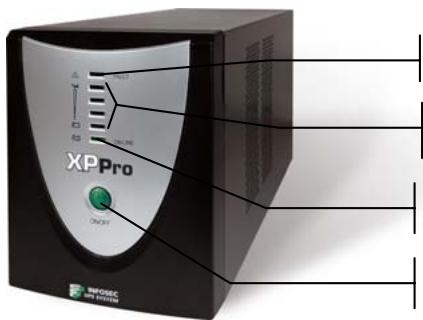
Red led on: Fault
Green leds come on progressively: battery mode
Green led on: AC mode
On/Off switch
BACK PANEL
XP Pro 1000 / XP Pro 1250
RS232 communication port
Breaker
RJ11/45 Ethernet or Phone/Internet protected outlets
IEC Input outlet
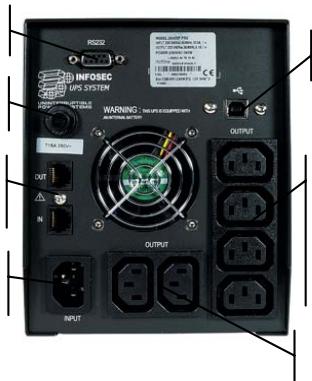
USB communication port
4 IEC protected UPS outlets
2 surge protected UPS outlets
→ XP Pro 1600 / XP Pro 2000
RS232 communication port
Breaker
RJ11/45 Ethernet or Phone/Internet protected outlets
IEC Input outlet
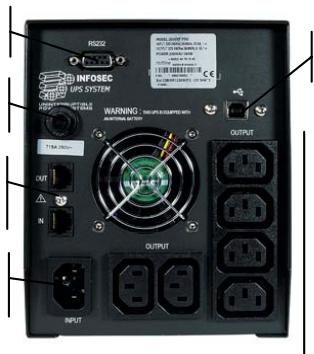
USB communication port
6 IEC protected UPS outlets
1. Checking
When you receive your equipment, open the packaging and check that your UPS has not been damaged. The packaging includes: a UPS unit, 1 input power cord, 3 IEC output cables, 1 communication interface cable (USB connector), 1 RJ11 cable, 1UPSurf Control Software and a user guide. In the event of damage, please submit a standard claim to the after-sales department.
2. Charging the batteries
This unit is shipped from the factory with its internal battery fully charged, however, some charge may be lost during shipping and the battery should be recharged prior to use. Plug the unit into an appropriate power supply and allow the UPS to charge fully by leaving it plugged-in, with no load, for at least 8 hours.
The UPS will automatically recharge its own batteries whenever the switch is in the "ON" position ("ON LINE" green led on). You may use the UPS immediately however the back-up power capacity may be lower than the nominal value required.
3. Where to set up
The UPS has been designed to operate in a protected environment, at temperatures between 0^ C and 40^ C and at a humidity level ranging between 0% and 90% (no condensation).
Do not obstruct the ventilation slots. Install the unit in an environment which is free from dust, chemical vapours and conductors. Moreover, in order to avoid any interference, keep the UPS at least 20cm away from the CPU (central processing unit).
4. Connection
Check on the identification plate at the back of the UPS that the power supply is compatible with network voltage and that the device is powerful enough to protect the given power load. Plug the UPS into a 2-pole, earthed outlet (use the original power cable of your computer or a 2P + E/CEE22/10A power cable is recommended). Then, use the 3 IEC cables to connect one computer-related device to each of the power outlets supplied on the back of the UPS. For XP Pro 1000 and 1250, you may also connect a device that does not require backup, such as an inkjet printer, to one of the surge protected outlets.
5. On/Off
To turn the UPS unit on, lightly press the power switch. To turn it off, press the power switch again.
6. DC Start
XP PRO units are equipped with a built-in DC start function. To start the UPS in the absence of a power supply and with a fully-charged battery, press the button.
7. Power Saving Function
XP Pro comes with a Power Saving Function. If no load connects to the UPS, it will automatically shut down after 5 minutes to save energy during a power failure. The Power switch must be kept in the 'ON' position, otherwise, the UPS will be disabled and your equipment will not be protected during a power failure.
8. Automatic Shutdown software - UPSurf Control
UPSurf Control software CD is included in your package. For more information, go to the website: www.infosec.fr
9. COMPUTER INTERFACE
The USB and RS 232 interfaces at the back of the UPS may alternatively be connected to the computer. Both communication ports enable the computer to directly control UPS status. The main functions are as follows:
- Transmission of a visual alarm in event of power failure
- Automatic file closure prior to the battery going flat
- Computer & UPS shutdown
10. PROTECTION TELEPHONE/FAX/MODEM LINE
If you wish to protect a fax or a modem, connect the telephone cable from the wall outlet to the "IN" jack. Connect the RJ11 cable (provided) from the "OUT" jack to the fax or modem.
Caution : The telephone line lightning arrester could be rendered inoperable if improperly installed. This surge protection device is for indoor use only. Never install telephone wiring during a lightning storm.
If you want to protect a network, use a RJ45 cable (cable not provided).
NB: The UPS functions properly even if you do not use this fax / modem protection option.
11. BATTERY
The battery is the only UPS component which is not in permanent use. It has a useful life of approximately 3 to 5 years. However, frequent major discharges or exposure to temperatures over 20^ will shorten its life span. We therefore recommend that users recharge the battery once every 3 months when the unit is not in use in order to compensate for natural discharging. UPS backup time will depend on the powered load, as well as the age and condition of the batteries.
WARNING!
Batteries should always be replaced by qualified technicians. Batteries have a very high short circuit current: connection errors could cause electric arcs resulting in serious burns.
12. TROUBLE SHOOTING
Should the UPS fail to function correctly we recommend you to perform the following tests before calling the Hot Line.
Check list:
Is the main switch in the "ON" position?
- Is the UPS plugged into the mains power supply?
- Does the power supply fall within specified unit values?
- Has the fuse gone in the mains plug?
Is the UPS overloaded?
Is the battery flat or defective?
| SYMPTOM | POSSIBLE CAUSE | SOLUTIONS |
| No LED display on the front panel. | 1. Battery missing | 1. Charge battery up to 8 hours |
| 2. Faulty battery | 2. Replace with the same type of battery. | |
| 3. Power switch was not pressed for at least 5 seconds | 3. Press and hold power switch for at least 5 seconds. | |
| Alarm buzzer every 1/2 second when AC supply is normal. | 1. UPS overload. | 1. Verify that the load matches the UPS capacity. Remove any non-critical load e.g.: printer. Stop and restart the UPS. |
| In the event of power failure, reduced backup time. | 1. UPS overload or the connected equipment is defective. | 1. Remove any non-critical load. |
| 2. Flat battery. | 2. Recharge the battery 8 hours or more. | |
| 3. Battery defect due to the high temperature of the operating environment, or improper operations. | 3. Replace with the same type of battery. | |
| Mains power normal but led is flashing. | 1. Blown fuse. | 1. Replace with the same type of fuse |
| 2. Power cord is loose. | 2. Reconnect the power cord properly | |
| 3. No mains power supply or UPS is not on. | 3. Check the power supply |
- TECHNICAL SPECIFICATIONS
| 1000 XP PRO | 1250 XP PRO | 1600 XP PRO | 2000 XP PRO | ||
| TECHNOLOGY | Technology | Line Interactive with Automatic Voltage Regulation (AVR) | |||
| Output form | Modified sine wave | ||||
| Protection | Discharge / Overcharge and overload protection+ fax modem line protection | ||||
| Power | 1000 VA | 1250 VA | 1600 VA | 2000 VA | |
| Power factor | 0.6 | 0.5 | 0.5 | 0.5 | |
| PHYSICAL | DimensionsW x D x H | 140 x 368,3 x 180,4 (mm) | |||
| Weight kg | 13.5 | 13.8 | 14.2 | 16 | |
| Output connectors | 2 surge protected outlets4 IEC protected UPS outlets2 surge protected RJ45 | 6 IEC protected UPS outlets2 surge protected RJ45 | |||
| INPUT | Voltage | [110-115-120 V] or [220 - 230 - 240 V] | |||
| Voltage range | [85 - 140 V] or [162 - 290 V] | ||||
| Frequency | 50 - 60 Hz auto detection | ||||
| OUTPUT | Voltage | [115 V] or [220 - 230 - 240 V] | |||
| Regulation | +/- 15 % (line mode) | ||||
| Frequency | 50 or 60 Hz | ||||
| BATTERY | Type | 12V/7AH x 2pcs | 12V/9AH x 2pcs | ||
| Backup time(depending on theload) | 35 mins | 23 mins | 25 mins | 26 mins | |
| Recharge time | 8 hours to 90 % after complete discharge10 hours for a complete charge | ||||
| FILTER | Spike protection | 225 Joules, 2 ms | |||
| EMI/RFI | 10 dB to 0.15 MHz, 50 dB to 30 MHz (EN55022 CLASS A) | ||||
| ENVIRONMENT | Noise level | AC Mode: < 40 dB at 1 meterBackup mode: < 45 dB at 1 meter | |||
| Operatingenvironment | 0° C - 40° C, 0 to 90 % humidity rate(non condensing) | ||||
| INDICATOR | AC Mode | Green led on | |||
| Battery Mode | Green leads come on gradually | ||||
| Fault | Red led on | ||||
| AUDIBLEARLARM | On battery | Sounding every 10 seconds | |||
| Low battery | Sounding every second until automatic stop | ||||
| Defect | Continuously sounding | ||||
| Overload | Sounding every 1/2 second | ||||
| SOFTWARE | Auto shut downsoftware | UPSurf Control | |||
| INTERFACE | Communicationport | Smart RS232USB compatible with Windows and Mac | |||
| STANDARDS | Security / Standard | CE - ISO 9001 | |||
Instrukcja obslugi
4 saidas IEC UPS protegidas
2 saidas protegidas UPS
→ XP Pro 1600 / XP Pro 2000
6 saidas IEC UPS protegidas
PykoBODCTBO noIb3OBaTeJIa
Длпnpавиьногуctанови и Зкпnyataци ДаHHORO ИЗдени NaHCTОТеЛбН peKOMeHdyeM BнIMATEЛьно почNTаь HabToЯш РУКOBODCTBO NOЛьЗВОВЕЛЯ.
1. BBEDEHNE
JIiHneIka npOdyKTOB XP Pro npEcdTabeHa BbICOKpOn3BOJTeNbHbIMN I5PcnpMbIM pOdknUohEnm KIK uepe3 nopT USB. KaJdoe yctpojCTBO nocTabJareTc C Bo3MOXHOCTbU bBicOKoyPOBHeBOrO ynpaBHeHnHa N5P. IBPn pnNOMoUs cNCTeMbI aBTOMaTHueCKO peYIINPOBKn Daet cBaanHCnPOBAHHyU BixOHNHyIO MOChOCbN TEM CaMbIM oBeCneuBaET OJIHyIO 3aunTy BaIHX cepBepOB u nepiFepnHBx yCTpojCTB B cnyae cKaCHOB HapRJeHnA, OTKnUOHEN PNTAHN IIN MNIKPOOTKNUOHEN. B clyuae OTKa3a NITAHN I3-3a OTKIIUOHEN 3JIeKTPo3Heprn, cKaKOB HApRJeHnA ININ DnHAMUeCKO neperpy3kn PO HApRJeHnIO IBP OUYEB 6bICTPO nepeBedeT BaWe KOMlbOTepHOE oOpdyOBaHne Ha aNBtepHaTNBbI NCTOCHNK PNTAHN. 3TO pON3BOINB Bam CdelaTpe3BPbHyO KOINIO DAHHbIX, BBIITN I3 pOrpaMMbI N KopkeTKHO 3ABepShb paBoTy cnCTeMbI. Pn HopMaJIbHbIX YcNOBnx PNTAHN BAwero OBOPyDobAHn XPRo pNDepXInBaET akkMyJlTOp B zapRJeHOM COCTOHN I NOHOCbIg «Ipo3paehN'. INbIMNCbAMn, TakO HeNPpeBIBHMI MHorOFOHKUHOHaJIbHI NCTOCHNK PNTAHN Unpoaaet BaWy paBoTy. BblCMoxKeTe IerKO BUnDeTcTaTyc paBoTbI yCTpojCTBa, a TaKxe YpOBeHb 3apraNo CBeTOBIM INDnKaTopam. DaHbII BbcOKOTexHOrOuHbII IBP rapaHTnpyET npaBnIbHoe IN NaExHoe PNTAHn E BaWero KOMlbOTepHoro OBOpdyOBAHn. OChOBhie xapaKTEpcNTIKI nnHeKN XPro npBVeDeHb HNXe.
2. OCHOBhbIe XAPAKTEPNUCTUNKU
MnKpOnpoceccopHoe ynpaBHeHne rapaHTnpyET BbICOKyU HaJeXHOCTb;
- UcTpoIcTBo OCHaSeHo aBtOMaTHueeCKo peRyJInpOBKo BbIXoHOro HaprrJaKeHnra (AVR);
BCTpoeHHbIe npTbI CBa3N USB n RS232;
- UcpoiCTBO perynpetyet n cta6nln3npyeBxOJHOe HapjKeHne;
KompaKTbI n IeRkn N6Pi Ha 3aMTe MHOro paOchTb;
MHOROyHKUHOHaJIbHbIe 3ByKOBbIe CnHraJIbI u CBETObIe INHdNkATOpbl;
3aunTa oT pa3pIIOB MOHn, cKaUKBOB HAnpJxHeHne, npeperpy3Kn IN KopoTKnX 3AmbikaHn;
- HemeIeHHoe OTKJIouHHe N5B B cIyae OTCytCTBna 3apra npa pa6ote ot aKKymJrTopa;
3aunTa TenefoHa/Moema JInn O T cKaYKOB HapJxHn Ha JInn (pa3beMbRJ45).
3. INPABUNI TEXHUNB E3ONACHOCTN
B DaHOM I5I npImeHareTc noteHuaJbHo onaChoe HnprjKeHne. He pa3bpaTe yctpoiCTBO. OHO He coedePKT KOMnoHToB, NOJIeKaunx peMOHTy CINAMn POJIb3OBeTenei.
Bce peMoHTHbI pa6Otbl DoJIxHbI pOn3BOaNTbCra ToJIbKO KBaIIuΦuIpuBaHHbIM TexHnueCKIM nepcoHaJOM.
IbI OobpyoBaH CO6CTBcHHbIM BByTppeHHM NCTOCHNKOM PNTaHnA (akKMyJrTOpOM). IMeetc npck TOrO, yTo pa3bEmbl MOyT 6bItb NOD HaprrKeHem DaKe nocne OTcoeINHeHn IbIOT cTei nepemehHoro Toka.
IbI npedHa3aueH dIy nITAHN KOMnbIOtePOB.Ero He cIeNyET NcNoIb3OBaTb C 3JIeKToPHnHbIMn yCTpoiCTBaMn C INHyKtNBHOH HArpy3KO: DBNrTaTeJlAMn, FJyOpeCzEHTHBIMn IaMnAmn iDp., a TaKke IOd pe3NCTNBHOH HArpy3KO.
He npoklnoaTe K IV5Ie He KOMnbIopeHoe obOpuyObaHne: MeiunHcKoe obOpuyObaHne IJn3HeoBeCneueHn, MKNPOBOJHOBbIe Neu, PbJIeNecOcbI T.I.
He nodknouaTe K I5Pi Ia3epHbIe npInTepbl, TaK KaK OHN NOTpe6JIyOT CNIuKOM MHOOr 3Heprn.
U6eHNTecb, yTO IOTpe6IeMaJ IOKJIIOUeHHbIMyCTpoIcTBaMIMoUHOCTbHe IpeBbIaET MOuHocTn IBI. Mbl peKOMeHdyem NcNoJIb3OBAt b ONTImaJIbHyIO Harpy3ky B pa3Mepe
IIOJBOHbI IIN TpeTOn OT HOMHaJIbHOI MOUHOCTHu yCTPOJCTBa IJRA 6Oonee npoDoJXHTeJIbHOBVPemEHn ABTOHOMHOI pa60TbI N 6OJIbWeRo cPoka cnYk6blaKkyMylrTopa.
He cTaBbTe eMkoCTn C kNdkoCTaMn Ha N5Pi nIiN OkOIo Hero.
OTKnHouaTe IbI nepeed ero oOncTkO. He npImeHaeTKe JxNkne MoOnuene CpeDcTBa n cInpen.
IbI HeIb3a IcNoIb3OBAt b C NOMEUeHnX C BblcOKoB BlaKHOCTbH, NOBepraTb BO3JeCTBIO npMOrO cOnHeuHoro CBeta nn pa3MeuaTb OKOIO nCTouHnKOB TeNna. He 3akpbBaTe BEHTINPAUOHhie UeJI.
B abapnHoi cnTuaunnepeKIOUHTe I5P B noIooKeHne «BbIKL.» n 3aTeM BbIepHnTe shHy pntAHnI 3 po3ETKn dJa nnHOro OTKJIouChENr I5P.
Пио обнаруженьен Инспавноcteй образитесь к разdenу 12:Устанения Инспавноcte.
4.УКАЗAHЯ NO XPAHEHиO
IbI Heo6xoJIMO xpaHnTb c nonHocTbO 3apJxKeHHbIM aKkyMjYrTopOM. HeJeNaTeJIbHO xpaHnTb npu TempepAtypax BbIe 20°C, TAK KaK 3To 3HaunTeJIbHO cOKpaNTcPCK cNyKbI aKkyMjYrTopa. Heo6xoJIMO nepe3apJkaTb IbI KaKdIbe 3 Mecya. 3To ocUyceCTBJIeTc rnyTEM noKnIOueHIny ycTpoiCTBa K cTeN nITAHIN Ha 24 yaca. OTdeJIbHO xpaHnIucea aKkyMjYrTopbl Heo6xoJIMO nepe3apJkaTb KaKdIbe 3 Mecya. B IpOTNBHom cIyuee OHN MOyT b6blb NobpeXDeHbl.
5. NOCLENPOJAXHOE OBCJXUBAHNE
BAXHO!
При обрашени в OTдел подахного обслухивannah,在япс.Tа,在міт eHarotobcneушунфopmaци -Она NOTpe6yETcH He3aBnCmO OТ npo6JIeMbI: moДь IVI,ceринbli HOMep idata npno6peTeHnA.
ДаиTeToHoe OINcAHne npObIeMbI, BkIIOUaY CNeIyUOuY INHOpMaIuN: TnN O6OpyOBoHnA, NOKIIIOUeHHOrO K I5I, CTaTyc CBeTOdIOndhIx INHdNKaTOPoB, CTaTyc 3ByKObORo CnHaJa, YCIOBnA, B KOTOpbIX HAXOJNTcYCTpOJIcTBO.
Tpe6yemyu Texnueckyo HfOpmauMOxHO oBhApuyKnTb Ha rapaHTmHOM TaIOnHe mN INeHTnFkauONHO TablMKe, paCNOJIOXeHHo Ha 3aJHe cTeHKe yCTpoiCTBa. IInBaUero yDo6CTBa MoKete yka3aTb ee HIXe.
He 3aKpbIbaiTe BeHTnJIaIIOHbIe IeJI. YcTaHaBJIbAIte Ye yCTpoIcTBO B MeCTe, rIe He TbIJI, napOB XmMuecknx CoeINHeHn I TOkOpBoJauX CpeI. KpOme TOrO, dJIra N36ExKaHn BO3HNKHOBeHnI NOMex pa3MeuaIte I5II Ha pacCToRHN He MeHee 20 cm ot LITy (UeHTpaJIbHorO npOceccopa).
4.Подклюсенe
Проверъп данье на щдентфкальнонг tabлчke на за干嘛 сөнcke ИБи и убдnteсь, чтэнржени COOTBETCTByet Baшему Hanржени ceTи,а Harpy3ka He пөвышael MOцноctи yсторьа.
BkIIOUHTe IVB 2-KoHTaKTHyU 3a3eMJIeHHyU po3eTky (ncIOJb3yIte cTeBOI shHpy OT BaIeO KOMNbIOTepe IIN peKOMHeHyEmbl Ka6eBb 2P+E/CEE22/10A).Iocne 3TOr npn nOmoI IN KabeIe CTAnDapTa M3K IOdCoEduHInTe KaKdoe IN KOMNbIOTePhbIX yCTPOIcTB K COOTBeTCTByIoUeMy pa3bemy Ha 3aIHe nnepu IN5P. PpN nCIOJIb3OBAHN moJeI XP Pro 1000 n 1250 Bby TaKKe MeOKeTe NIOKIIIOHTb yCTPOIcTB, KOtOpoe He Tpe6yeT beCsepeBoHOro nITaHn, HApIMep, CtpyHbI pInHTep, K ODNHOy IN3 pa3bEmOB, 3aUNIeHHbIX OT cKaUKOB HApJxKeHn.
5.BkIIOueHne/BBIKIOueHne
Дя Bкючени IVI NaKmTe KhONky BkJOUeHnЯ NITaHnY. Дя BbIKIOUeHnЯ HaxMITE Ha 3Ty KhONky NOBTOpHo.
6. Пуск OT посторно тoka
YcTpoiCTBa XP Pro oCHaSeHbI BcTpoEHHoI yHKUneI nycka ot noCToHHoro Toka. IJIy nycKa IV5II npI OTCyTCTBmI NITaHnI B cETn I NOIHOCtBu 3apJxEHHom aKKyMylrTope, HAXMITE 3Ty KHOKNK.
7.Функцязhecproc6epekeHЯ
YcTpoIcTbX Pro oChaSeHbI fynKUnei 3Heperoc6epeKeHn. EcIn K NbIe He noKnIoueHa Harpy3ka, OH aBtOMaTUnCeckN OTKJIOnHTC Tcepe3 5 MmHT dIpy 3KoHOMn 3Heprn B CnTyae OTKa3a NITAHn. KhONKa BkLIOneHn DOJxHa OCTaBaTbcra B nOIOKeHn «BKJI.》,Inaue IbPi OTKJIOnHTC TcNOHocTbU INBaWe ObOpyDoBaHn He 6byTe 3aunuEHO B Cnyae OTKa3a NITAHn.
8. Поррамнhoe обecneецпдя втOMатиеского заBERшпma pa6otbl - UPSurf Control
B KOMnNeKT NocTaBk yCTpoiCtBA BXoDHT KOMnAKT-DIck C nporpaMMbIM oBeceNeHem UPSurf Control.Дя nOlyuHnДОNoHnTeJIbHо INHΦopMaun NOCeTHe Be6-caIT: www.infosec.fr
- TEXHINUECKNE CNEUINΦNKALUN
Jus jus jus Jus Jus Jus Jus Jus Jus Jus Jus Jus Jus Jus Jus Jus Jus Jus Jus Jus Jus Jus Jus Jus Jus Jus Jus Jus Jus Jus Jus Jus Jus Jus Jus Jus Jus Jus Jus Jus Jus Jus Jus
a 1
a j 11 11 11 11 11 11 11 11 11 11 11 11 11 11 11 11 11 11
i 1
a aalalalalalalalalalalalalalalalalalalalalalalalalalalal
ailllll llllllllllllllllll (eclllllllll) aalall
a aablll lgl 1234567890
I 1
yjlll jolj yj jj jolj jolj UPS jj j j j j j
psu
a aallll lallll lallll lallll lallll UPS
UPS
.
s2y 1 y
y
UPS 1Jc Jc Jc Jc Jc
12 12 Pps
1_2a = 2
jzjjlcljai.4
a a a a a a a a a a a a a a a a a a a a a a a a a a a a a a a a a a a a a a a a a a a a a a a a a a
AaBlll llll llaa!
2.1.12.2.1.2.3.5
P
jIb jIyJg: g yL Jg yIg ball aill cIagall gge IyIg 1aia Juaiaie
. 1
aal aal gao ydo ydo ydo ydo ydo ydo ydo ydo ydo ydo ydo ydo ydo ydo ydo ydo ydo ydo ydo ydo ydo ydo ydo ydo ydo ydo ydo ydo ydo ydo ydo ydo ydo ydo ydo ydo ydo ydo ydo ydo ydo
.1 1
aill aill aill aill aill gle j lalall sglg ale agdo lae iagll aiei tlogall
Jlll Jglll gllll lglal 1
a a a a a a a a a a a a a a a a a a a a a a a a a a a a a a a a a a a a a a a a a a a a a
j
J.4
g 150,XP Pro 1000 aeg aagaaa. UPS . (2P+E/CEE22/10A)
5
Jus Jus Jus Jus Jus Jus Jus Jus Jus Jus
DC 6
JUPS DCaXXP
Jill binal
aalal .7
5 5 5 5 5 5 5 5 5 5 5 5 5 5 5 5 5 5 5 5 5 5 5 5 5 5 5 5 5 5 5 5 5 5 5 5 5 5 5 5 5 5 5 5 5 5 5 5 5 5 5
L//OE
USPurf ::aljlll jlll .8
www.infosec.fr :
RS 232, USB 1000 m/s 1000 m/s 1000 m/s 1000 m/s 1000 m/s 1000 m/s 1000 m/s 1000 m/s 1000 m/s 1000 m/s 1000 m/s 1000 m/s 1000 m/s 1000 m/s 1000 m/s 5. UPS 1000 m/s 1000 m/s 1000 m/s 1000 m/s 1000 m/s 1000 m/s 1000 m/s 1000 m/s 1000 m/s 1000 m/s 1000 m/s 1000 m/s 1000 m/s 1000 m/s 4. UPS
: 1
j
Lalai aylll aell llll llll
UPS 1
aLalg aIgai/yslaI bIaIaI.10
Pali 1 aiaia i jlll J