
IPEL EVOLUTION 700 VA - Inverter INFOSEC - Free user manual and instructions
Find the device manual for free IPEL EVOLUTION 700 VA INFOSEC in PDF.


| Product type | Line-interactive UPS |
| Brand | INFOSEC |
| Model | IPEL EVOLUTION 700 VA |
| Technology | Line-interactive with automatic voltage regulation (AVR Boost and Buck) |
| Waveform | Simulated sine wave |
| Apparent power | 700 VA |
| Active power | 420 W (power factor 0.6) |
| Nominal input voltage | 220-240 V |
| Input voltage range | 162-290 V |
| Input frequency | 45-65 Hz (auto-sensing) |
| Battery mode output | 220-240 V ±10%, 50/60 Hz ±1% |
| Battery | Sealed lead-acid, maintenance-free |
| Runtime | 8 to 30 minutes depending on load |
| Recharge time | 8 hours to 90% after full discharge |
| Output outlets | 3 battery backup outlets + 1 surge-only outlet |
| Telephone protection | 2 RJ11 connectors (in/out) |
| Communication interface | USB port |
| Dimensions (L x D x H) | 100 x 330 x 140 mm |
| Weight | 6 kg |
| Noise level | < 40 dB at 1 m |
| Operating temperature | 0°C to 40°C |
| Operating humidity | 0 to 90% non-condensing |
| Standards | CE, ISO 9001 |
| Special functions | Cold start, energy saving, AVR, automatic restart |
| Management software | UPSurfer Pro (downloadable from www.infosec.fr) |
Frequently Asked Questions - IPEL EVOLUTION 700 VA INFOSEC
User questions about IPEL EVOLUTION 700 VA INFOSEC
0 question about this device. Answer the ones you know or ask your own.
Ask a new question about this device
Download the instructions for your Inverter in PDF format for free! Find your manual IPEL EVOLUTION 700 VA - INFOSEC and take your electronic device back in hand. On this page are published all the documents necessary for the use of your device. IPEL EVOLUTION 700 VA by INFOSEC.
USER MANUAL IPEL EVOLUTION 700 VA INFOSEC
To ensure good installation and maximum use of this product, we highly advise you to read this user's guide very carefully.
1. INTRODUCTION
This UPS is specially designed for multimedia Personal Computers. Its light weight and compact design perfectly fit with limited working environments. IPEL evolution range is equipped with boost and buck AVR to stabilize input voltage range. It is also built-in with DC start function. This function enables the UPS to be started up without AC power supplied. Although it's a small UPS, it's equipped with USB communication port to offer users more benefits. The software helps users monitor UPS status. Main features of iPEL evolution are listed below.
2. MAIN CHARACTERISTICS
- Microprocessor control guarantees high reliability.
- Equipped with boost and buck AVR.
Built-in USB Communication Port. - Green Power Function for energy saving.
DC Start Function. - Auto restart while AC recovery.
- Compact size, light weight.
- Provides modem / phone line surge protection.
3. SAFETY INSTRUCTIONS - Security
The UPS unit is potentially using hazardous voltages. Do not take this equipment apart. It does not contain accessible components to be repaired by users.
All repairs should be performed by qualified technicians only.
The UPS has its own internal power supply (battery). There is a risk that output sockets may still be live after the UPS has been disconnected from the mains power supply.
The UPS has been designed for power computers. It should not be used with power electronic equipment with inductive loads such as motors or fluorescent lights.
Do not connect any non-computer units to the UPS, such as medical equipment for artificial life handling, microwave, vacuum cleaner etc.
Laser printers should not be connected to the UPS as they consume too much power.
Make sure that the power supply required does not exceed the UPS's capacity. We recommend using an optimum power load equivalent to half or one third of the nominal power for longer backup functioning and longer battery life.
Do not leave any container with liquid on the UPS or close to it.
Unplug the UPS before proceeding to its cleaning. Do not use directly any liquid detergent or sprays.
The UPS should not be used in a damp place, nor exposed to direct sunlight or heat-emitting sources. Do not cover the ventilation grills.
In case of emergency, put the UPS on "OFF" position, then unplug the power cord from the power socket to disable the UPS completely.
Should the UPS fail to operate correctly, please refer to section 11: Trouble Shooting.
4. STORAGE INSTRUCTIONS
The UPS should be stored with its battery fully recharged. Storage temperatures above 20^ should be avoided as this will significantly shorten battery life. The UPS should be recharged once every 3 months. This is done by leaving it connected to the mains power supply for 24 hours. Batteries kept in storage should be recharged every 3 months, failure to do so, it could result in battery damage.
5. AFTER SALES SERVICE
IMPORTANT!
When calling the After-Sales Department, please have the following information ready, it will be required anyway: UPS model, serial number and date of purchase.
Accurate description of the problem providing the following details : type of equipment powered by the UPS, indicator led status, alarm status, installation and environmental conditions.
You will find the technical information you require on your guarantee or on the identification plate on the back of the unit. If convenient you may write down the details in the following box.
| Model | Serial number | Date of purchase |
! Please keep the original packaging. In case of return to the After-Sales Department, it will be required.
IMPORTANT :

UPS are part of electronic and electric equipments category. At the end of their lives, they have to be collected separately.
6. DESCRIPTION
FRONT PANEL
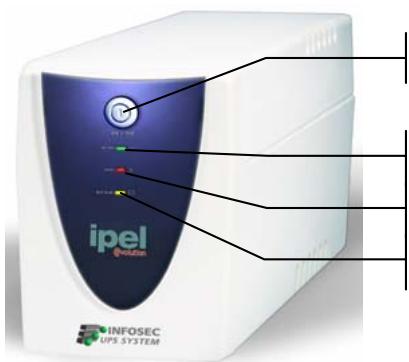
On/Off switch
Green led lighting : AC mode
Red led lighting : Fault
Yellow led lighting : Battery mode
BACK PANEL
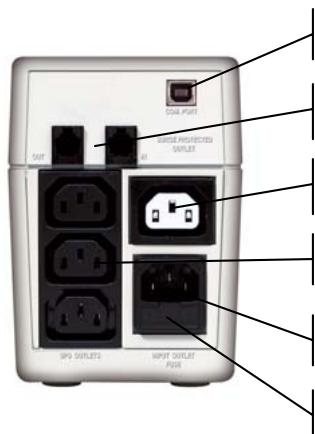
USB communication port
RJ11 connectors (Modem/Phone Line Surge)
Surge protected outlet for auxiliary peripheral
3 protected UPS outlets
Input socket
Fuse
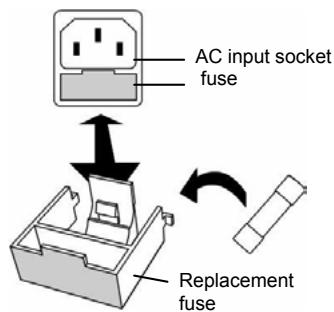
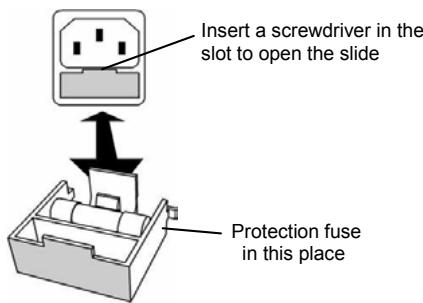
FUSE REPLACEMENT
7. INSTALLATION AND OPERATION
1. Control
When you receive your equipment, open the packaging and check that your UPS has not been damaged. The packaging includes : a UPS unit, a user's guide, a power cable, 3 IEC output cables, 1 RJ11 cable. In case of damage, please submit a standard claim to the after-sales service.
2. Charging
This unit is shipped from the factory with its internal battery fully charged, however, some charge may be lost during shipping and the battery should be recharged prior to use. Plug the unit into an appropriate power supply and allow the UPS to charge fully by leaving it plugged-in for at least 8 hours with no load.
3. Place and installation
The UPS has been designed to operate in a protected environment, at temperatures between 0^ C and 40^ C and at a rate of humidity ranging between 0% and 90% (no condensation).
Do not obstruct the ventilation grills. Install the unit in an environment which is free from dust, chemical vapours and conductors.
Moreover, in order to avoid any interference, keep the UPS at least 20~cm away from the CPU (central processing unit).
4. Connection
Plug the UPS into a 2-pole, 3-wire grounded receptacle. Then connect one computer-related device into each of the power receptacles supplied on the back of the UPS.
You can also connect a device which does not require backup time, like a printer for example, into the surge protected and filtered outlet.
5. Turn On/Off
To turn on the UPS unit, press the power switch lightly. To turn off the UPS unit, press the power switch again.
6. DC Start
All of the iPEL evolution units are equipped with an integrated DC start function. To start the UPS in absence of power supply and with a full battery, press the button.
7. Green Power Function
All iPEL is equipped with Green Power Function. If no load connects to the UPS, it will automatically shut down in 2 minutes for energy saving while power failure. The Power switch must be kept in the 'ON' position, otherwise, the UPS will be disabled and your equipment will not be protected during a power failure.
8.Free Download Software -UPSurf Control
Go to Web sit: www.infosec.fr
8. COMPUTER INTERFACE
The interface USB at the back of the UPS may be connected to the computer. This port enables the computer to control the UPS status. The main functions are as follows :
- Transmission of a visual alarm in case of power failure
Automatic file closure prior to battery running out
UPS shutdown
9. PROTECTION FAX/MODEM LINE
If you wish to protect a fax or a modem, connect the telephone cable from the wall outlet to the "IN" jack. Connect the telephone cable (provided) from the "OUT" jack to the fax or modem.
Caution: The telephone line current lightning feature could be rendered inoperable if improper installed. This surge protection device is for indoor use only and never install telephone wiring during a lightning storm.
Note: This connection is optional. It is not necessary to use this UPS.
10. BATTERY
The battery is the only UPS component which is not in permanent use. It has a product life of approximately 3 to 5 years. However, frequent major discharges or exposure to temperatures over 20^ will shorten its product life. We therefore recommend that users recharge the battery once every 3 months when the unit is not in use in order to compensate for natural discharging. UPS back-up functioning time will depend on the load powered, the age and the condition of the batteries.
WARNING!
Batteries should always be replaced by qualified technicians. Batteries have a very high short circuit current : connection errors could cause electric arcs resulting in serious burns.
11. TROUBLE SHOOTING
Should the UPS fail to function correctly we recommend you to perform the following tests before calling the After Sales Department.
Check list :
- Is the main switch in the « ON » position?
Is the UPS plugged into a powered mains? - Does the power supply fall within specified unit values?
- Has the fuse gone in the mains plug?
Is the UPS overloaded?
Is the battery low or defective?
| SYMPTOM | POSSIBLE CAUSE | SOLUTIONS |
| No LED display on the front panel. | 1. Missing battery. | 1. Charge battery up to 8 hours. |
| 2. Battery defect. | 2. Replace with the same type of battery. | |
| 3. Power switch is not pressed at least 5 seconds. | 3. Press and Hold power switch for at least 5 seconds. | |
| Alarm buzzer beeps continuously when AC supply is normal. | 1. Overload of the UPS. | 1. Verify that the load matches the UPS capability specified in the specs. |
| When power failure, back-up time is shorten. | 1. Overload of the UPS. | 1. Remove some non critical load. |
| 2. Battery voltage is too low. | 2. Charge battery 8 hours or more. | |
| 3. Battery defect due to high temperature operation environment, or improper operation to battery. | 3. Replace with the same type of battery. | |
| Mains normal but LED is flashing. | 1. Fuse is blown. | 1. Replace the same type of fuse. |
| 2. Power cord is loose. | 2. Reconnect the power cord properly. | |
| 3. No main or UPS is not on | 3. Reconnect the power cord properly |
12. TECHNICAL SPECIFICATIONS
| iPEL e 350 | iPEL e 500 | iPEL e 700 | iPEL e 1000 | ||
| TECHNOLOGY | Technology | Line interactive with Auto Voltage Regulation | |||
| Output form | Modified sine wave | ||||
| Protection | discharge / overcharge and overload protection + fax modem line | ||||
| Power | 350 VA | 500 VA | 700 VA | 1000 VA | |
| Power factor | 0,6 | 0,6 | 0,6 | 0,5 | |
| PHYSICAL | Dimensions WxDxH | 100 X 330 X 140 (mm) | |||
| Weight kg | 4,8 | 5 | 6 | 6,5 | |
| Output connectors | 3 UPS protected outlets / 1 surge protected outlet / 2 surge protected RJ11 | ||||
| INPUT | Voltage | [110-115-120 V] or [220 - 230 - 240 V] | |||
| Voltage range | [85 - 140 V] [162 - 290 V] | ||||
| Frequency | 45 - 65 Hz auto detection | ||||
| OUTPUT | Voltage | [110-115-120 V] or [220 - 230 - 240 V] | |||
| Regulation | + / - 10 % (battery mode) | ||||
| Frequency | Battery mode : 50 - 60 Hz +/- 1 Hz | ||||
| BATTERY | Type | Sealed maintenance free | |||
| Backup time | 8 to 30 minutes (depending on the load) | ||||
| Recharge time | 8 hours to 90 % after a complete discharge | ||||
| FILTER | Spike protection | 125 joules | |||
| ENVIRONMENT | Noise level | < 40 dB at 1 meter | |||
| Operating environment | 0° C - 40° C, 0 to 90 % humidity rate (non condensing) | ||||
| INDICATOR | AC Mode | Green led lighting | |||
| Backup Mode | Yellow led flashing | ||||
| Fault | Red led lighting | ||||
| AUDIBLE ALARM | Battery Mode | Sounding every 10 seconds | |||
| Battery replacement | Sounding every 2 seconds | ||||
| Low battery | Sounding second until automatic stop | ||||
| Overload or defect | Every 0,5 second | ||||
| Fault | Continuously sounding | ||||
| INTERFACE | Communication port | USB | |||
| MANUFACTURING | Security / Standard | CE - ISO 9001 - PCT | |||