
PC1550 - Security alarm DSC - Free user manual and instructions
Find the device manual for free PC1550 DSC in PDF.


| Product Type | Security Alarm |
| Brand | DSC |
| Model | PC1550 |
| Power Supply | 120 V AC mains, 12 V backup battery |
| Number of Zones | 6 protection zones |
| Keypad Type | PC1500RK with LED indicators and function keys (F, A, P) |
| Main Functions | Code arming/disarming, quick arm, door chime, alarm test, alarm memory display, zone bypass, fire detection (optional) |
| Maintenance | Dust the keypad with a barely damp cloth; replace the backup battery every 3 years |
| Security | Multiple access codes (1 master + 5 users), one-time-use code, intrusion and fire alarm |
| Recommended weekly test | Yes |
| General Information | Wired alarm system with metal control panel |
Frequently Asked Questions - PC1550 DSC
User questions about PC1550 DSC
0 question about this device. Answer the ones you know or ask your own.
Ask a new question about this device
Download the instructions for your Security alarm in PDF format for free! Find your manual PC1550 - DSC and take your electronic device back in hand. On this page are published all the documents necessary for the use of your device. PC1550 by DSC.
USER MANUAL PC1550 DSC
This manual contains information on limitations regarding product use and function and information on the limitations as to liability of the manufacturer. The entire manual should be carefully read.
About Your Security System
Your security equipment has been designed to give the greatest possible flexibility and convenience. Read this manual carefully and have your installer instruct you on system operation and on which features have been implemented in your system. All users of this system should be equally instructed in its use. Fill out the System Information page and store this manual in a safe place for future reference.
Fire Detection
This equipment is capable of monitoring fire detection devices such as smoke detectors and providing a warning if a fire condition is detected. Good fire detection depends on having adequate number of detectors placed in appropriate locations. This equipment should be installed in accordance with N.F.P.A. standard #74. (N.F.P.A., Batterymarch Park, Quincey MA 02269). Carefully review the Family Escape Planning guidelines in this manual.
NOTE: Your installer must enable the fire detection portion of this equipment before it becomes functional.
Testing
To insure that your system continues to functions as intended, it is important that you test your system weekly. See the testing procedure elsewhere in this manual. If your system does not function properly, call your installing company for service.
General System Operation
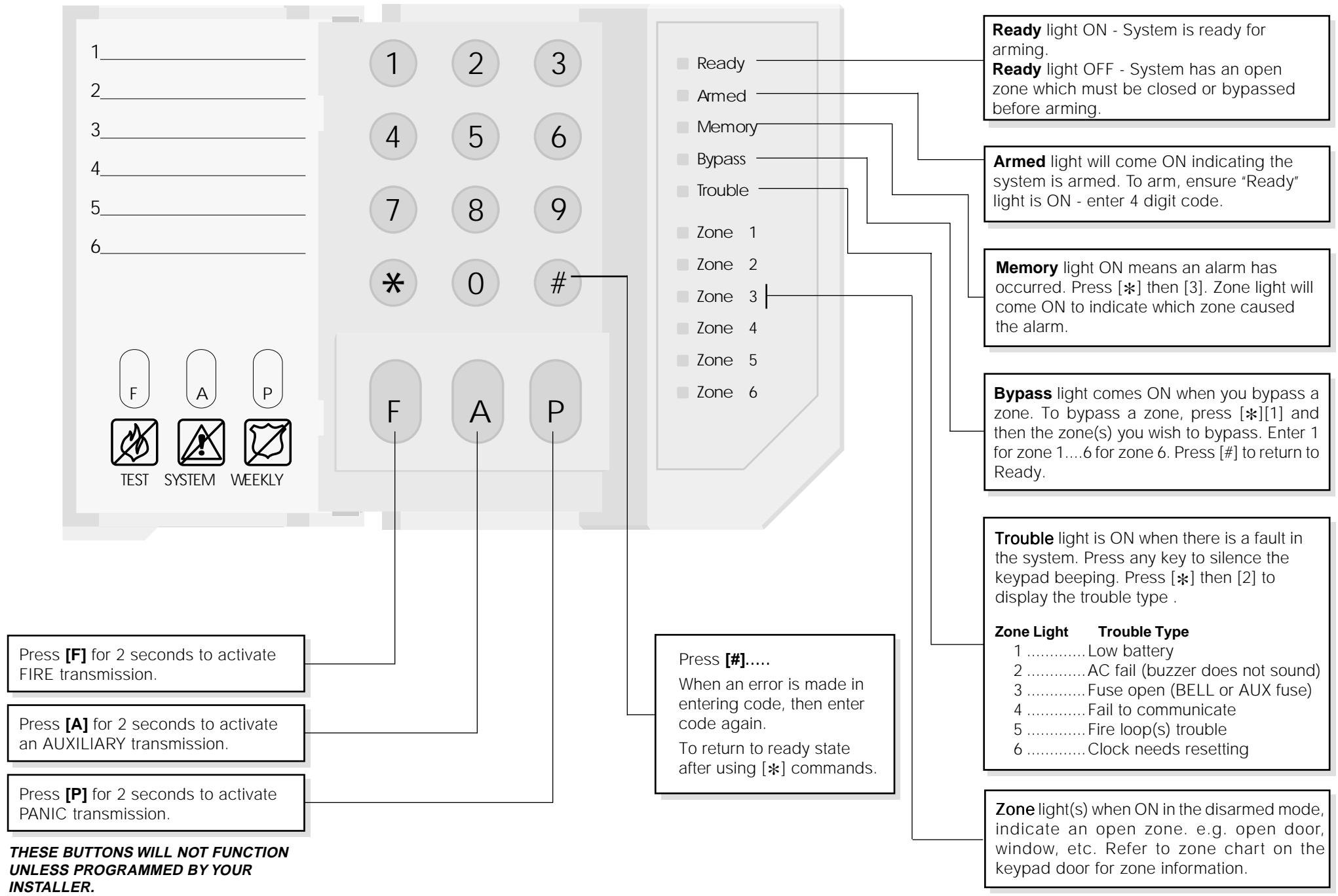
Your security system is made up of a PC1500 or PC1550 control panel, one or more PC1500RK keypads and various sensors and detectors. The control panel will be mounted out of the way in a utility closet or in a basement. The metal cabinet contains the system electronics, fuses and stand-by battery. There is normally no reason for anyone but the installer or serviceman to have access to the control panel. The PC1500RK keypads have an audible indicator (buzzer), a group of zone and system status lights and command entry keys. The keypad is used to send commands to the system and to display the current system status. The security station(s) will be mounted in a convenient location inside the protected premises close to the entry/exit door(s).
The security system has several zones of area protection and each of these zones will have one or more sensors connected to it (motion detectors, glassbreak detectors, door contacts, etc.). When a sensor is in alarm the zone of alarm will be indicated on the PC1500RK (zone lights 1 through 6).
IMPORTANT NOTICE
A security system cannot prevent emergencies. It is only intended to alert you and, if included, a monitoring station, of an emergency situation. Security systems are generally very reliable but they may not work under all conditions and they are not a substitute for prudent security practices or life and property insurance. Your security system should be installed and serviced by qualified security professionals who should instruct you on the level of protection that has been provided and on system operations.
Master Code
The 4 digit Master Code is used to arm and disarm the security system, to program additional security codes and to change other system features. The Master Code will be supplied to you by your installer. All keypad entries are made by pressing one key at a time. (See Additional Codes section)
Arming the System
Check the following items before arming the system:
Bypass light
If the "Bypass" light is ON, insure that zones are intentionally bypassed before arming the system (See zone bypassing section).
Trouble light
If the "Trouble" light is ON, check to see what the trouble condition is and call for service. (See Viewing Trouble Conditions section).
Ready light
If the "Ready" light is NOT ON, check to see that all doors and windows are closed and that motion is stopped in areas covered by motion detectors. The system cannot be armed unless the "Ready" light is ON indicating that all zones are closed.
NOTE: The system may be armed with a zone bypassed or a trouble present but your security protection will be reduced.
To Arm
Enter your 4 digit access code. As each digit is entered, the keypad sounder will beep. If the correct access code is entered, the keypad sounder will beep quickly and the "Armed" light will come ON.
If the access code was entered incorrectly or the "Ready" light comes ON, the keypad buzzer will sound steadily for 2 seconds. If this occurs, press the [#] key and re-enter your access code.
When the correct access code is entered and the "Armed" light comes ON, exit the premises through the door indicated by your installer as the Exit-Entry door.
At the end of the exit delay period, all lights, except the "Armed" light, will go out and the system will be armed. The exit time delay can be changed by your installer.
Auto-Bypass Option - Home-Away Arming
This feature, if selected by your installer, will allow you to arm your system with any valid user code and the system will automatically bypass the interior zones. The "Bypass" light will come on. If you exit within the allowed exit time, the system will automatically activate the interior zones and the "Bypass" light will go out. This feature is designed to save the customer from having to manually bypass interior zones each time they wish to arm the system and remain at home.
In residential applications where the system has been armed and the interior zones are automatically bypassed, the interior zones can be reactivated from a keypad that is outside the interior zone's protection area. To reactivate the interior zones, press [×] then [1] and the "Bypass" light will go out.
Entry Delay Off Arming
If you wish to arm your system and eliminate the entry delay, enter [※][9] before your access code. The "Armed" light will flash as a reminder that the system is armed and has no entry delay. An entry through any zone programmed as a delay zone will create an instant alarm.
e.g. To arm without entry delay, press [][9][access code]
Disarming the System
Enter the premises only through the door(s) designated by your installer as the entry door. Entering by any other door will sound an immediate alarm. As soon as the entry door is opened, the keypad sounder will come on to indicate that the system should be disarmed. Go to the keypad and enter your four digit access code. If an error is made entering the code, press the [#] key and enter your code again. As soon as the correct code is entered, the "Armed" light will go out and the keypad sounder will silence.
The correct access code must be entered before the entry time expires. The entry time delay may be changed by your installer. If an alarm occurred during the period the system was armed, the "Memory" light and the zone light of the zone that caused the alarm will flash for two minutes. After the two minute period, the "Memory" light and zone light will stop flashing and the panel will return to the ready state. Pressing the [#] key during the two minute period will cancel the alarm memory display.
If a trouble is present when the panel is disarmed, the "trouble" light will come ON (See Viewing Trouble Conditions section to determine the source of the trouble.) Note that troubles will not display while the system is in the Alarm Memory Display Mode.
If you return home and find that an alarm has occurred while you were away, it is possible that an intruder may still be on the premises. Go to a neighbour's house, and call the local police to investigate.
Quick Arm Feature
When the Quick-Arm feature is enabled, the system may be armed by simply pressing [※][0] instead of the 4 digit access code. This feature allows a person to arm but not disarm the system.
Enter [][6][Master Code][4] to turn the Quick-Arm feature ON and OFF. When the command is entered, the keypad buzzer will beep 3 times if Quick-Arm is being enabled and will sound one long beep if it is being disabled.
Press [#] to return to Ready.
Door Chime Feature
The door chime feature is used, while the panel is disarmed, to provide a tone from the keypad each time a door or window is opened or closed. The doors and windows which will provide this indication are programmed by your installer.
Enter [][6][Master Code][6] to turn the door chime feature ON and OFF. When the command is entered, the keypad buzzer will beep 3 times if the door chime feature is being enabled, and will sound one long beep if it is being disabled.
Press[#] to return to Ready.
Alarm Test
Enter [串 ] [6][Master Code][8] for a 2-second test of the keypad lights, keypad buzzer, battery and the bell/siren.
Press [#] to return to Ready.
Programming Security Codes
The Master Code
Enter [ ][5][ current Master Code][1][new Master Code]
Press [#] to return to ready
Record your new Master Code on the System Information page in this booklet.
Additional Codes
Up to 5 additional access codes (2 through 6) may be programmed. The 6th access code may be established by your installer as a One-Time use code.
To program a new code:
Enter [ ] [5][Master Code][code number 1 to 6][new 4 digit code]
The [code number] is a single digit either 2, 3, 4, 5 or 6.
Press [#] to return to Ready.
If an access code already exists, it will be replaced by the new code.
Record your new code(s) on the System Information page in this book.
To remove a code:
Enter [][5][Master Code][code number][***]
The [code number] is a single digit either 2, 3, 4, 5 or 6.
Press [#] to return to Ready.
Do not erase the Master Code (code number 1).
NOTE: It is recommended that the factory default Master Code [1234] not be used.
One-Time Use Code
The one-time code is designed for entry and exit of the premises for one occasion only. The panel must be programmed by the installer for this option to be enabled. The 6th access code is the one-time code.
To use this code, enter your one-time code as the 6th access code using the previously described commands. When you leave the premises, arm your system with any access code except the newly entered one-time use code. This one-time code is given to a person (e.g. a maid) who will enter the premises while the system is armed and you are away.
The one-time code user enters the premises and disarms the system using the one-time access code. Upon leaving, the same code is used to arm the system. As soon as the system is armed, the one-time code is erased and can not be used to re-enter the premises. A different code can be provided each time for the one-time user.
Alarm Memory Display
If the "Memory" light is ON, an alarm has occurred during the last armed period. The alarm memory will automatically be displayed when the system is disarmed (See Disarming the System).
Press [ ] then [3] to display the zone which caused the alarm.
Press[#] to return to Ready.
NOTE: The alarm memory is cleared each time the panel is armed so that any alarms showing are alarms that occurred only during the last armed period.
If An Alarm Sounds
Fire Alarm
If your system has been installed with fire detectors and the alarm sounds in a pulsing mode, follow your Emergency Evacuation Plan immediately. See guide for family escape planning elsewhere in this manual.
Intrusion Alarm
If an intrusion alarm sounds (continuous Bell/Siren), the alarm may be silenced by entering your access code. If the alarm was unintentional, call local authorities immediately to avoid and unnecessary response.
You can determine the source of the alarm by following the instructions in the Alarm Viewing section of this manual. Once the source of the alarm has been corrected, the panel can be restored to its original armed state.
Zone Bypassing
Use zone bypassing when access is needed to part of the protected area while the system is armed. Bypassed zones will not cause an alarm. Zones that are temporarily out of service due to damaged wiring or contacts may be bypassed to allow system arming (partial protection) until repairs can be made. Zones cannot be bypassed after the system is armed.
To bypass zones:
Enter [ ][1][Zone~number(s) to be bypassed]
Enter zone number(s) as single digits (1-6).
As each zone is bypassed, the zone light will come ON. If a zone is bypassed in error, press that zone number again and the zone light will go OFF indicating that the zone is not bypassed.
Press[#] to return to Ready.
To recall last group of zones bypassed:
Enter [串 ] [1][9]
Zone lights for the last group of zones bypassed will come ON to show which zones are bypassed. If you wish to add or delete a zone from the group, press [#] to exit then go to zone bypass as described above.
Press[#] to return to Ready.
Zone Bypassing (Continued)
For security reasons, your installer may prevent the bypass command from working on certain zones. The "Bypass" light is ON as long as ONE or more zones are bypassed. Do not unintentionally arm the system with zones bypassed.
Zone bypasses are automatically cancelled each time the system is disarmed and must be re-applied before the next arming.
Viewing Trouble Conditions
The PC1500/PC1550 continuously monitors a number of possible trouble conditions. If one of these trouble conditions occur, the keypad will beep twice every 10 seconds and the keypad "Trouble" indicator will light. Pressing any key on the keypad will silence the sounder but the "Trouble" light will remain ON until the trouble condition is cleared. If you cannot determine the cause of the trouble condition, contact your installer for assistance.
To view type of trouble:
Press [][2] to display the type of trouble. A zone light will come on to indicate which type of trouble exists.
Press [#] to return to Ready.
ZONE LIGHT
TYPE OF TROUBLE
1 Low battery.
2. Loss of AC power ("Trouble" light will come ON, but keypad buzzer will not sound).
3 . Fuse open (BELL or AUX fuse).
4 . Fail to communicate with monitoring station.
5 Fire loop(s) trouble.
6 Loss of time on system clock.
Keypad Zones
There are three keys on the keypad labelled [F] Fire, [A] Auxiliary and [P] Panic. These keys are only functional if they have been programmed by your installer. The installer should indicate which of these keys are functional by placing a coloured label next to the key symbol on the keypad door label.
[F] Fire
Holding this key down for two seconds will sound a Fire Alarm. The alarm will sound pulsing. The keypad will sound three beeps once the panel has accepted the alarm. An auxiliary warning device is also activated if your installer has connected it to your system. To silence the alarm, enter a valid access code.
[A] Auxiliary
Holding this key down for two seconds activates this function if your installer has programmed it. There is no audible alarm and no lights on the keypad will come on. When the panel has accepted the alarm, the keypad will sound a series of beeps. An auxiliary warning device is activated ONLY IF connected to your system by your installer.
[P] Panic
Holding this key down for two seconds causes a steady tone on your siren or bell if your installer has programmed this key for audible operation. An auxiliary warning device is also activated if your installer has connected it to your system. Enter a valid access code to silence the alarm.
Fire Alarm Operations
Alarm
On a fire alarm, the bell/siren will sound pulsing. The digital communicator transmission is delayed for 30 seconds. If the alarm is not acknowledged within the 30 second delay, the communicator will transmit to the monitoring station.
Silence
To silence the bell/siren, press the [#] key. If the alarm is silenced and the smoke detector is not reset, the alarm will resound after 90 seconds.
Reset
To restore the smoke detector(s) to normal, press [※][7] . If the detector still has smoke in it, the alarm will resound and the sequence described above will repeat. If the detector is clear of smoke, the system will return to normal.
NOTE: If you suspect that the communicator has transmitted and there is no fire condition, call the monitoring station to avoid an unnecessary response. If a fire condition is apparent, follow your evacuation plan immediately. If the alarm sounds at night, evacuate immediately.
Testing Your System
It is recommended that you test your system weekly.
NOTE: Perform system tests in the off-peak hours, such as early morning or late evening.
- Inform the monitoring station that you are testing your system.
- Disarm the system ("Ready" light ON).
- Perform a bell/battery test by pressing [][6][Master Code][8] . The signal will sound for about 2 seconds. If a trouble occurs after the test, press [][2] to view the trouble condition.
- Activate each sensor in turn (e.g. open a door/ window or walk in motion detector areas). Observe the zone light come ON when the zone is activated. The zone light will go OFF when the system restores to normal (i.e. door or window closed).
- If they are programmed for operation, press the [F], [A], and [P] keys in turn. The [F] key will sound the bell/siren in a pulsed mode. Enter the access code to silence the alarm. The [A] key is silent. The [P] key may be programmed as silent or audible. If the alarm sounds, enter the access code to silence.
- If the panel has a zone programmed for fire, activation will cause the alarm signal to sound in a pulsed mode.
CAUTION: Do not use an open flame or burn materials to test a smoke detector. Contact your alarm installer for information on safe methods to activate a smoke detector. - Should the system fail to operate properly, call your alarm dealer for service.
- When testing is complete, call and advise the monitoring station.
Maintenance
With normal use, the system requires minimum maintenance. The following points should be observed.
- Do not wash the keypad with a wet cloth. Light dusting with a barely damp cloth should remove normal accumulations of dust.
- The battery/bell test is designed to determine battery condition, however it is recommended that the standby battery be replaced every three years.
- For other system devices such as passive infrared, ultrasonic or microwave motion detectors, glassbreak detectors or smoke detectors, consult the respective manufacturer's literature for testing and maintenance.
Fire Safety In The Home
Most fires occur in the home and to minimize this danger it is recommended that a household fire safety audit be conducted and a family escape plan be developed.
Household Fire Safety Audit
- Are all electrical appliances and outlets in a safe condition? Check for frayed cords, over-loaded lighting circuits, etc. If you are uncertain about the condition of your electrical appliances or household service, have a professional evaluation.
- Are all flammable liquids stored safely in closed containers in a well ventilated cool area? Cleaning with flammable liquids should be avoided.
- Are fire hazardous materials (matches) well out of reach of children?
- Are furnaces and wood burning appliances properly installed, clean and in good working order? Have a professional evaluation.
Family Escape Planning
There is often very little time between the detection of a fire and the time it becomes deadly. It is thus very important that a family escape plan be developed and rehearsed.
- Every family member should participate in developing the escape plan.
- Study the possible escape routes from each location within the house and since many fires occur at night, special attention should be given to the escape routes from sleeping quarters.
-
It is essential that escape from a bedroom be possible without opening the interior door. Consider the following when making your escape plans:
-
Make sure that doors and windows that open to the outside are easily opened. Ensure that they are not painted shut, and that their locking mechanisms operate smoothly.
- If opening the exit or using the exit is too difficult for children, the elderly or handicapped, plans for rescue should be developed. This includes making sure that those who are to perform the rescue can promptly hear the fire warning signal.
-
If the exit is above the ground level, an approved fire ladder or rope should be provided as well as training in its use.
-
Exits on the ground level should be kept clear. Be sure to remove snow from exterior patio doors in winter; outdoor furniture or equipment should not block exits.
- The family should have a predetermined assembly point where everyone can be accounted for; for example, across the street or at a neighbour's house.
- Once everyone is out of the house, call the Fire Department.
- A good plan emphasizes quick escape. Do not investigate first or attempt to fight the fire, and do not attempt to rescue belongings or pets as this takes up valuable time. Once outside, do not re-enter the house. Wait for the fire department.
- Write the plan down and rehearse frequently, so that should an emergency arise, everyone will know what they are to do. Revise the plan as conditions change; for example, when there are more or fewer family members in the home, or if there are changes to the house.
- Make sure your fire warning system is operational by conducting weekly tests as noted elsewhere in this manual. If you are unsure about system operation, contact your installing dealer.
- It is recommended that you contact your local fire department and request further information on home fire safety and escape planning. If available, have your local fire prevention officer conduct an in-house fire safety inspection.
SYSTEM REFERENCE
ZONE PROTECTED AREA
ZONE TYPE
1
2
3
4
5
6
KEYPAD ZONE [F] FIRE
KEYPAD ZONE [A] AUXILIARY
PROGRAMMED CODE NUMBERS:
[2] [3]
[4] [5]
[6]
MASTER CODE NUMBER:
SYSTEM ENTRY TIME SECONDS
SYSTEM EXIT TIME SECONDS
FOR SERVICE:
Call:
Phone:
FCC COMPLIANCE STATEMENT
CAUTION: Changes or modifications not expressly approved by Digital Security Controls Ltd. could void your authority to use this equipment.
This equipment has been tested and found to comply with the limits for a Class B digital device, pursuant to Part 15 of the FCC Rules. These limits are designed to provide reasonable protection against harmful interference in a residential installation. This equipment generates, uses and can radiate radio frequency energy and, if not installed and used in accordance with the instructions, may cause harmful interference to radio communications. However, there is no guarantee that interference will not occur in a particular installation. If this equipment does cause harmful interference to radio or television reception, which can be determined by turning the equipment off and on, the user is encouraged to try to correct the interference by one or more of the following measures:
Re-orient the receiving antenna.
- Increase the separation between the equipment and receiver.
- Connect the equipment into an outlet on a circuit different from that to which the receiver is connected.
Consult the dealer or an experienced radio/television technician for help.
The user may find the following booklet prepared by the FCC useful: "How to Identify and Resolve Radio/Television Interference Problems". This booklet is available from the U.S. Government Printing Office, Washington D.C. 20402, Stock # 004-000-00345-4.
IMPORTANT INFORMATION
This equipment complies with Part 68 of the FCC Rules. On the side of this equipment is a label that contains, among other information, the FCC registration number of this equipment.
NOTIFICATION TO TELEPHONE COMPANY The customer shall notify the telephone company of the particular line to which the connection will be made, and provide the FCC registration number and the ringer equivalence of the protective circuit.
FCC Registration Number: F53CAN-61031-AL-E
Ringer Equivalence Number: 0.1B
USOC Jack: RJ31X
TELEPHONE CONNECTION REQUIREMENTS Except for the telephone company provided ringers, all connections to the telephone network shall be made through standard plugs and telephone company provided jacks, or equivalent, in such a manner as to allow for easy, immediate disconnection of the terminal equipment. Standard jacks shall be so arranged that, if the plug connected thereto is withdrawn, no interference to the operation of the equipment at the customer's premises which remains connected to the telephone network shall occur by reason of such withdrawal.
INCIDENCE OF HARM Should terminal equipment or protective circuitry cause harm to the telephone network, the telephone company shall, where practicable, notify the customer that temporary disconnection of service may be required; however, where prior notice is not practicable, the telephone company may temporarily discontinue service if such action is deemed reasonable in the circumstances. In the case of such temporary discontinuance, the telephone company shall promptly notify the customer and will be given the opportunity to correct the situation.
ADDITIONAL TELEPHONE COMPANY INFORMATION The security control panel must be properly connected to the telephone line with a USOC RJ-31X telephone jack.
The FCC prohibits customer-provided terminal equipment be connected to party lines or to be used in conjunction with coin telephone service. Interconnect rules may vary from state to state.
CHANGES IN TELEPHONE COMPANY EQUIPMENT OR FACILITIES The telephone company may make changes in its communications facilities, equipment, operations or procedures, where such actions are reasonably required and proper in its business. Should any such changes render the customer's terminal equipment incompatible with the telephone company facilities the customer shall be given adequate notice to the effect modifications to maintain uninterrupted service.
RINGER EQUIVALENCE NUMBER (REN) The REN is useful to determine the quantity of devices that you may connect to your telephone line and still have all of those devices ring when your telephone number is called. In most, but not all areas, the sum of the RENs of all devices connected to one line should not exceed five (5.0). To be certain of the number of devices that you may connect to your line, you may want to contact your local telephone company.
EQUIPMENT MAINTENANCE FACILITY If you experience trouble with this telephone equipment, please contact the facility indicated below for information on obtaining service or repairs. The telephone company may ask that you disconnect this equipment from the network until the problem has been corrected or until you are sure that the equipment is not malfunctioning.
Digital Security Controls Ltd. 160 Washburn St., Lockport, NY 14094
LIMITED WARRANTY
Digital Security Controls Ltd. warrants the original purchaser that for a period of twelve months from the date of purchase, the product shall be free of defects in materials and workmanship under normal use. During the warranty period, Digital Security Controls Ltd. shall, at its option, repair or replace any defective product upon return of the product to its factory, at no charge for labour and materials. Any replacement and/or repaired parts are warranted for the remainder of the original warranty or ninety (90) days, whichever is longer. The original owner must promptly notify Digital Security Controls Ltd. in writing that there is defect in material or workmanship, such written notice to be received in all events prior to expiration of the warranty period.
International Warranty
The warranty for international customers is the same as for any customer within Canada and the United States, with the exception that Digital Security Controls Ltd. shall not be responsible for any customs fees, taxes, or VAT that may be due.
Warranty Procedure
To obtain service under this warranty, please return the item(s) in question to the point of purchase. All authorized distributors and dealers have a warranty program. Anyone returning goods to Digital Security Controls Ltd. must first obtain an authorization number. Digital Security Controls Ltd. will not accept any shipment whatsoever for which prior authorization has not been obtained.
Conditions to Void Warranty
This warranty applies only to defects in parts and workmanship relating to normal use. It does not cover:
- damage incurred in shipping or handling;
- damage caused by disaster such as fire, flood, wind, earthquake or lightning;
- damage due to causes beyond the control of Digital Security Controls Ltd. such as excessive voltage, mechanical shock or water damage;
- damage caused by unauthorized attachment, alterations, modifications or foreign objects;
- damage caused by peripherals (unless such peripherals were supplied by Digital Security Controls Ltd.);
- defects caused by failure to provide a suitable installation environment for the products;
- damage caused by use of the products for purposes other than those for which it was designed;
- damage from improper maintenance;
- damage arising out of any other abuse, mishandling or improper application of the products.
Digital Security Controls Ltd.'s liability for failure to repair the product under this warranty after a reasonable number of attempts will be limited to a replacement of the product, as the exclusive remedy for breach of warranty. Under no circumstances shall Digital Security Controls Ltd. be liable for any special, incidental, or consequential damages based upon breach of warranty, breach of contract, negligence, strict liability, or any other legal theory. Such damages include, but are not limited to, loss of profits, loss of the product or any associated equipment, cost of capital, cost of substitute or replacement equipment, facilities or services, down time, purchaser's time, the claims of third parties, including customers, and injury to property.
Disclaimer of Warranties
This warranty contains the entire warranty and shall be in lieu of any and all other warranties, whether expressed or implied (including all implied warranties of merchantability or fitness for a particular purpose) And of all other obligations or liabilities on the part of Digital Security Controls Ltd. Digital Security Controls Ltd. neither assumes nor authorizes any other person purporting to act on its behalf to modify or to change this warranty, nor to assume for it any other warranty or liability concerning this product.
This disclaimer of warranties and limited warranty are governed by the laws of the province of Ontario, Canada.
WARNING: Digital Security Controls Ltd. recommends that the entire system be completely tested on a regular basis. However, despite frequent testing, and due to, but not limited to, criminal tampering or electrical disruption, it is possible for this product to fail to perform as expected.
Out of Warranty Repairs
Digital Security Controls Ltd. will at its option repair or replace out-of-warranty products which are returned to its factory according to the following conditions. Anyone returning goods to Digital Security Controls Ltd. must first obtain an authorization number. Digital Security Controls Ltd. will not accept any shipment whatsoever for which prior authorization has not been obtained.
Products which Digital Security Controls Ltd. determines to be repairable will be repaired and returned. A set fee which Digital Security Controls Ltd. has predetermined and which may be revised from time to time, will be charged for each unit repaired.
Products which Digital Security Controls Ltd. determines not to be repairable will be replaced by the nearest equivalent product available at that time. The current market price of the replacement product will be charged for each replacement unit.
WARNING Please Read Carefully
Note to Installers
This warning contains vital information. As the only individual in contact with system users, it is your responsibility to bring each item in this warning to the attention of the users of this system.
System Failures
This system has been carefully designed to be as effective as possible. There are circumstances, however, involving fire, burglary, or other types of emergencies where it may not provide protection. Any alarm system of any type may be compromised deliberately or may fail to operate as expected for a variety of reasons. Some but not all of these reasons may be:
Inadequate Installation
A security system must be installed properly in order to provide adequate protection. Every installation should be evaluated by a security professional to ensure that all access points and areas are covered. Locks and latches on windows and doors must be secure and operate as intended. Windows, doors, walls, ceilings and other building materials must be of sufficient strength and construction to provide the level of protection expected. A reevaluation must be done during and after any construction activity. An evaluation by the fire and/or police department is highly recommended if this service is available.
Criminal Knowledge
This system contains security features which were known to be effective at the time of manufacture. It is possible for persons with criminal intent to develop techniques which reduce the effectiveness of these features. It is important that a security system be reviewed periodically to ensure that its features remain effective and that it be updated or replaced if it is found that it does not provide the protection expected.
■ Access by Intruders
Intruders may enter through an unprotected access point, circumvent a sensing device, evade detection by moving through an area of insufficient coverage, disconnect a warning device, or interfere with or prevent the proper operation of the system.
■ Power Failure
Control units, intrusion detectors, smoke detectors and many other security devices require an adequate power supply for proper operation. If a device operates from batteries, it is possible for the batteries to fail. Even if the batteries have not failed, they must be charged, in good condition and installed correctly. If a device operates only by AC power, any interruption, however brief, will render that device inoperative while it does not have power. Power interruptions of any length are often accompanied by voltage fluctuations which may damage electronic equipment such as a security system. After a power interruption has occurred, immediately conduct a complete system test to ensure that the system operates as intended.
Failure of Replaceable Batteries
This system's wireless transmitters have been designed to provide several years of battery life under normal conditions. The expected battery life is a function of the device environment, usage and type. Ambient conditions such as high humidity, high or low temperatures, or large temperature fluctuations may reduce the expected battery life. While each transmitting device has a low battery monitor which identifies when the batteries need to be replaced, this monitor may fail to operate as expected. Regular testing and maintenance will keep the system in good operating condition.
Compromise of Radio Frequency (Wireless) Devices
Signals may not reach the receiver under all circumstances which could include metal objects placed on or near the radio path or deliberate jamming or other inadvertent radio signal interference.
System Users
A user may not be able to operate a panic or emergency switch possibly due to permanent or temporary physical disability, inability to reach the device in time, or unfamiliarity with the correct operation. It is important that all system users be trained in the correct operation of the alarm system and that they know how to respond when the system indicates an alarm.
Smoke Detectors
Smoke detectors that are a part of this system may not properly alert occupants of a fire for a number of reasons, some of which
follow. The smoke detectors may have been improperly installed or positioned. Smoke may not be able to reach the smoke detectors, such as when the fire is in a chimney, walls or roofs, or on the other side of closed doors. Smoke detectors may not detect smoke from fires on another level of the residence or building.
Every fire is different in the amount of smoke produced and the rate of burning. Smoke detectors cannot sense all types of fires equally well. Smoke detectors may not provide timely warning of fires caused by carelessness or safety hazards such as smoking in bed, violent explosions, escaping gas, improper storage of flammable materials, overloaded electrical circuits, children playing with matches or arson.
Even if the smoke detector operates as intended, there may be circumstances when there is insufficient warning to allow all occupants to escape in time to avoid injury or death.
Motion Detectors
Motion detectors can only detect motion within the designated areas as shown in their respective installation instructions. They cannot discriminate between intruders and intended occupants. Motion detectors do not provide volumetric area protection. They have multiple beams of detection and motion can only be detected in unobstructed areas covered by these beams. They cannot detect motion which occurs behind walls, ceilings, floor, closed doors, glass partitions, glass doors or windows. Any type of tampering whether intentional or unintentional such as masking, painting, or spraying of any material on the lenses, mirrors, windows or any other part of the detection system will impair its proper operation.
Passive infrared motion detectors operate by sensing changes in temperature. However their effectiveness can be reduced when the ambient temperature rises near or above body temperature or if there are intentional or unintentional sources of heat in or near the detection area. Some of these heat sources could be heaters, radiators, stoves, barbeques, fireplaces, sunlight, steam vents, lighting and so on.
Warning Devices
Warning devices such as sirens, bells, horns, or strobes may not warn people or waken someone sleeping if there is an intervening wall or door. If warning devices are located on a different level of the residence or premise, then it is less likely that the occupants will be alerted or awakened. Audible warning devices may be interfered with by other noise sources such as stereos, radios, televisions, air conditioners or other appliances, or passing traffic. Audible warning devices, however loud, may not be heard by a hearing-impaired person.
Telephone Lines
If telephone lines are used to transmit alarms, they may be out of service or busy for certain periods of time. Also an intruder may cut the telephone line or defeat its operation by more sophisticated means which may be difficult to detect.
Insufficient Time
There may be circumstances when the system will operate as intended, yet the occupants will not be protected from the emergency due to their inability to respond to the warnings in a timely manner. If the system is monitored, the response may not occur in time to protect the occupants or their belongings.
■ Component Failure
Although every effort has been made to make this system as reliable as possible, the system may fail to function as intended due to the failure of a component.
Inadequate Testing
Most problems that would prevent an alarm system from operating as intended can be found by regular testing and maintenance. The complete system should be tested weekly and immediately after a break-in, an attempted break-in, a fire, a storm, an earthquake, an accident, or any kind of construction activity inside or outside the premises. The testing should include all sensing devices, keypads, consoles, alarm indicating devices and any other operational devices that are part of the system.
Security and Insurance
Regardless of its capabilities, an alarm system is not a substitute for property or life insurance. An alarm system also is not a substitute for property owners, renters, or other occupants to act prudently to prevent or minimize the harmful effects of an emergency situation.
© 1997, 2000 Digital Security Controls Ltd.
Printed in Canada
29000078 R008
- About Your Security System
- Fire Detection
- Testing
- General System Operation
- IMPORTANT NOTICE
- Master Code
- Arming the System
- Bypass light
- Trouble light
- Ready light
- To Arm
- Auto-Bypass Option - Home-Away Arming
- Entry Delay Off Arming
- Disarming the System
- Quick Arm Feature
- Door Chime Feature
- Alarm Test
- Programming Security Codes
- The Master Code
- Additional Codes
- To program a new code:
- To remove a code:
- One-Time Use Code
- Alarm Memory Display
- Fire Alarm
- Intrusion Alarm
- Zone Bypassing
- To bypass zones:
- To recall last group of zones bypassed:
- Zone Bypassing (Continued)
- Viewing Trouble Conditions
- ZONE LIGHT
- TYPE OF TROUBLE
- Keypad Zones
- [F] Fire
- [A] Auxiliary
- [P] Panic
- Fire Alarm Operations
- Alarm
- Silence
- Reset
- Testing Your System
- Maintenance
- Fire Safety In The Home
- Household Fire Safety Audit
- Family Escape Planning
- SYSTEM REFERENCE
- ZONE PROTECTED AREA
- ZONE TYPE
- PROGRAMMED CODE NUMBERS:
- FOR SERVICE:
- FCC COMPLIANCE STATEMENT
- IMPORTANT INFORMATION
- LIMITED WARRANTY
- International Warranty
- Warranty Procedure
- Conditions to Void Warranty
- Disclaimer of Warranties
- Out of Warranty Repairs
- WARNING Please Read Carefully
- Note to Installers
- System Failures
- Inadequate Installation
- Criminal Knowledge
- ■ Access by Intruders
- ■ Power Failure
- Failure of Replaceable Batteries
- Compromise of Radio Frequency (Wireless) Devices
- System Users
- Smoke Detectors
- Motion Detectors
- Warning Devices
- Telephone Lines
- Insufficient Time
- ■ Component Failure
- Inadequate Testing
- Security and Insurance
Brand : DSC
Model : PC1550
Category : Security alarm