EXTERNAL HARD DRIVE ESATA-USB 2.0 COMBO - External hard drive VERBATIM - Free user manual and instructions
Find the device manual for free EXTERNAL HARD DRIVE ESATA-USB 2.0 COMBO VERBATIM in PDF.


User questions about EXTERNAL HARD DRIVE ESATA-USB 2.0 COMBO VERBATIM
0 question about this device. Answer the ones you know or ask your own.
Ask a new question about this device
Download the instructions for your External hard drive in PDF format for free! Find your manual EXTERNAL HARD DRIVE ESATA-USB 2.0 COMBO - VERBATIM and take your electronic device back in hand. On this page are published all the documents necessary for the use of your device. EXTERNAL HARD DRIVE ESATA-USB 2.0 COMBO by VERBATIM.
USER MANUAL EXTERNAL HARD DRIVE ESATA-USB 2.0 COMBO VERBATIM
External Hard Drive eSATA & USB 2.0 Combo
User Guide
English
Contents
Introduction 3
Controls, Connectors and Indicators 3
Front Panel Area 3
Rear Panel Area 3
About the Hard Drive 4
Locating the Drive on your desk 4
Connecting to your computer 5
Disconnecting your Hard Drive 6
For Windows Users 6
For Mac OS Users 6
Technical Support 7
Limited Warranty Terms 7
WEEE Notice 8
FCC Compliance 8
CE Declaration 9
ROHS Compliance 10
Before you begin to use the drive there are a few important things to learn about your new external hard drive.
Controls, Connectors and Indicators
First familiarize yourself with the features of the unit.
Front Panel Area
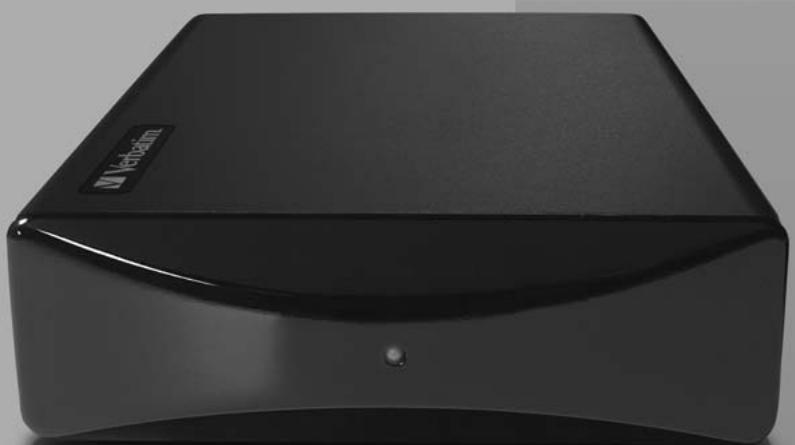
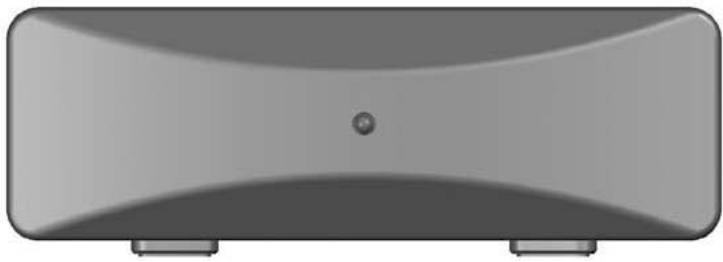
The front panel contains only the Activating LED, as illustrated below. The green LED will come on to indicate the power-on state. The LED will flash during data access.
Rear Panel Area
Along the rear panel you will find the ON/OFF button and interface connectors. Refer to the figure below.

- ON/OFF Button. Once the AC Adapter has been properly connected to the drive and an AC outlet, you can press the ON/OFF button to power on the drive. To turn off the drive, press the ON/OFF button again.
- DC Input Connector. Connect the DC cable of your included AC Adapter to the DC Input Connector.
- USB Connector. Use this connector to attach the drive to your computer via USB.
- eSATA connector. Use this connector to attach the drive to your computer via eSATA.
About the Hard Drive
The hard drive comes pre-formatted in FAT32 format. This format allows for operation with either Windows or Mac OS.
Note: Capacity dependent on model. 1 MB = 1,000,000 bytes/1 GB = 1,000,000,000 bytes/1 TB = 1,000,000,000,000 bytes. Some capacity used for pre-loaded software, formatting and other functions, and thus is not available for data storage. As a result, and due to differing calculation methods, your operating systems may report as fewer megabytes / gigabytes / terabytes.
Locating the Drive on your desk
Place the drive on a sturdy desk or table that is free from clutter that could block airflow around the unit. The drive is designed to lie flat on its rubber feet, or may stand upright. In either orientation take care not to block any air vents.
Connecting to your computer
This Verbatim external hard drive provides both USB 2.0 and eSATA connections. You can connect your drive to a computer with either USB or eSATA, but not both at the same time.
To connect to your computer follow the steps below:
- Make sure your PC or laptop is switched off.
- Connect the included AC Adapter to the drive, and then to a wall outlet.
- Connect the data cable. Connect the included USB cable from the USB port on the drive to an available USB port on your computer. For eSATA, connect the included eSATA cable from the eSATA port on the drive to an available eSATA port on your computer.
- Next press the ON/OFF button on the back of the drive, and then switch on your PC or Laptop.
- The hard drive will mount automatically, and a new icon will appear in My Computer (Windows) or a new icon will appear on the desktop (Mac).
Depending on your computer's operating system and the interface type you are using, the following special notes may apply:
Note 1: USB under Windows. If you are using a USB 1.1 port on your Windows computer, the following cautionary note may appear on your display: Hi-Speed USB Device plugged into non-Hi-Speed USB hub. This does not indicate a problem because the drive is compatible with both USB 1.1 and USB 2.0 ports. Simply close the message and proceed. However, in this case the drive will operate only at USB 1.1 speeds.
Note 2: USB under Mac OS 9.2.x. Mac OS versions 9.2.x do not support USB 2.0 Hi-Speed mode. For these Mac OS versions the drive will operate only at USB 1.1 speeds.
Note 3: USB or eSATA under Mac OS X 10.2. Mac OS X version 10.2 will not mount any single FAT32-formatted (MS-DOS) partition greater than 128GB. To work around this OS limitation, you may partition the drive into smaller FAT32 partitions, or you may reformat the drive to HFS+ format.
Note 4: eSATA. Though the eSATA interface standard provides for "hot-plugging" of the drive, some computers may not follow the standard precisely. If you find that your drive does not mount after attaching to a computer that is powered on, then shut down the computer, attach and power on the drive, and then boot up your computer.
Disconnecting your Hard Drive
Your External Hard Drive is hot-swappable. It can be connected and disconnected without restarting your computer. To disconnect your drive at any time, perform the following steps. You can also disconnect your hard drive at any time while your computer is powered off.
Note: Please be careful to follow the correct procedure when disconnecting your unit. Simply unplugging the unit without first following the instructions below may result in damage to your unit and/or loss of data.
For Windows Users:
- If you have files located on your drive open in any applications, close them.
- Click the Unplug or Eject Hardware button in the System Tray.
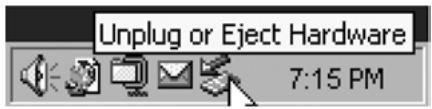
- Select your drive from the menu that appears.
- After a moment, Windows will display a message that your hardware can be safely removed.
For Mac OS Users:
- If you have files located on your drive open in any applications, close them.
- Locate the icon for your drive on the desktop, and drag it to the trash.
If you are experiencing difficulty installing or using your Verbatim product, please visit the main Verbatim Technical Support website at www.verbatim-europe.com. From this page you can access our library of user documentation, read answers to frequently asked questions, and download available software updates. Although most of our customers find this content sufficient to put them back on the right track, this page also lists ways in which you can contact the Verbatim Technical Support Team directly.
Europe: For technical support in Europe e-mail drivesupport@verbatim-europe.com or call 00 800 3883 2222 in the following countries: Austria, Belgium, Denmark, Finland, France, Germany, Hungary, Italy, Luxembourg, Monaco, Netherlands, Norway, Poland, Portugal, Republic of Ireland, Spain, Sweden, Switzerland and the United Kingdom. All other countries call +353 61 226586.
Limited Warranty Terms
Verbatim Limited warrants this product to be free from defects in material and workmanship for a period of 2 years from date of purchase. This warranty excludes batteries. If this product is found to be defective within the warranty period, it will be replaced at no cost to you. You may return it with your original cash register receipt to the place of purchase or contact Verbatim.
In the following European countries, Austria, Belgium, Denmark, Finland, France, Germany, Greece, Hungary, Italy, Luxembourg, Monaco, Netherlands, Norway, Poland, Portugal, Republic of Ireland, Spain, Sweden, Switzerland, and the United Kingdom call 00 800 3883 2222. All other European countries call +353 61 226586. You can email drivesupport@ verbatim-europe.com.
Product replacement is your sole remedy under this warranty, and this warranty does not apply to normal wear or to damage resulting from abnormal use, misuse, abuse, neglect or accident, or to any incompatibility or poor performance due to the specific computer software or hardware
used. VERBATIM WILL NOT BE LIABLE FOR DATA LOSS OR ANY INCIDENTAL, CONSEQUENTIAL OR SPECIAL DAMAGES, HOWEVER CAUSED, FOR BREACH OF WARRANTYES OR OTHERWISE. This warranty gives you specific legal rights and you may also have other rights which vary from state to state or country to country
WEEE Notice
The Directive on Waste Electrical and Electronic Equipment (WEEE), which entered into force as European law on 13th February 2003, resulted in a major change in the treatment of electrical equipment at end-of-life.

The WEEE logo (shown at the left) on the product or on its box indicates that this product must not be disposed of or dumped with your other household waste. For more information about electronic and electrical waste equipment disposal, recovery, and collection points, please contact your local municipal household waste disposal service or shop from where you purchased the equipment.
FCC Compliance
This equipment has been tested and found to comply with the limits for a Class B digital device, pursuant to Part 15 of the FCC Rules. These limits are designed to provide reasonable protection against harmful interference in a residential installation. This equipment generates, uses and can radiate radio frequency energy and, if not installed and used in accordance with the instructions, may cause harmful interference to radio communications. However, there is no guarantee that interference will not occur in a particular installation. If this equipment does cause harmful interference to radio or television reception, which can be determined by turning the equipment off and on, the user is encouraged to try to correct the interference by one or more of the following measures:
Reorient or relocate the receiving antenna.
Increase the separation between the equipment and receiver.
Connect the equipment into an outlet on a circuit different from that to which the receiver is connected.
Consult the dealer or an experienced radio/TV technician for help.
CE Declaration
EC DECLARATION OF CONFORMITY
It is hereby declared that this product complied with the essential protection requirements of Council Directive 89/336/EEC and its amendments on the approximation of the laws of the Member States relating to electromagnetic compatibility.
This declaration applies to all specimens manufactured identical to the model submitted for testing/evaluation.
EN 55022: 1998 + A1: 2000 +A2: 2003
EN 61000-3-3:1995 + A1: 2001
EN 55024: 1998 + A1: 2001 + A2: 2003
IEC 61000-4-2: 1995 + A1: 1998 + A2: 2000
IEC 61000-4-3:2002 + A1:2002
IEC 61000-4-4: 1995 + A1: 2000 + A2: 2001
IEC 61000-4-5: 1995 + A1: 2000
IEC 61000-4-6: 1996 + A1: 2000
IEC 61000-4-8: 1993 + A1: 2000
IEC 61000-4-11: 1994 + A1: 2000
This product is in compliance with Directive 2002/95/EC of the European Parliament and of the Council of 27 January 2003, on the restriction of the use of certain hazardous substances in electrical and electronic equipment (RoHS) and its amendments.