
INCOGNITO MULTI-ROOM - Multiroom audio system CAMBRIDGE AUDIO - Free user manual and instructions
Find the device manual for free INCOGNITO MULTI-ROOM CAMBRIDGE AUDIO in PDF.


User questions about INCOGNITO MULTI-ROOM CAMBRIDGE AUDIO
0 question about this device. Answer the ones you know or ask your own.
Ask a new question about this device
Download the instructions for your Multiroom audio system in PDF format for free! Find your manual INCOGNITO MULTI-ROOM - CAMBRIDGE AUDIO and take your electronic device back in hand. On this page are published all the documents necessary for the use of your device. INCOGNITO MULTI-ROOM by CAMBRIDGE AUDIO.
USER MANUAL INCOGNITO MULTI-ROOM CAMBRIDGE AUDIO
Source connections 8
Sub-zones 9
Advanced system options. 10
Local source connections 10
AS10 active speakers. 11
Connecting an external amplifier/active subwoofer
to your system 12
CCTV 12
Larger systems 13
Planning your system. 14
Pre-installation notes. 16
System specifications. 19
FAQs. 22
Limited warranty. 23
System details 24
Installer details. 25
INTRODUCTION
The Incognito multi-room system is a whole-house entertainment system capable of distributing audio and video* throughout a home.
The system consists of KP10 keyboards with built-in amplifiers connected to a central AH10 audio hub unit by Cat-5/5e cable.
Source components (CD players, DVD players etc) from almost any manufacturer can be used and are connected to the AH10 hub unit by standard stereo RCA/phono leads. Sources connected to the central hub are distributed to the remote rooms (throughout the guide referred to as main and sub-zones), so that different rooms may listen to different things at the same time.
The KP10 keypads are mounted in-the-wall in standard back-boxes and connected to in-wall, in-ceiling or conventional speakers with standard speaker cable. The keypads do not require local power and are powered via the cable from the hub.
The AH10 hub and KP10 keypad utilize A-BUS™ technology, and can be switched between Incognito A-BUS or standard A-BUS mode (switches located on the underside of the AH10 and rear of KP10 respectively). A-BUS is a standard which provides compatibility between systems from various manufacturers. When using Incognito A-BUS mode and our own keypads, some extra features are possible such as changing sources from the keypad itself and the fitment of local input modules. When used with other A-BUS keypads it should be set to standard A-BUS mode or they will not work.
If video distribution is required a VH10 video switcher can be added which sends video over RG6/CT100 co-axial cable to each room required. Again, different rooms can watch different things at the same time.
One AH10 hub supports four main-zones and four sub-zones (eight rooms in total). Each sub-zone output is tied to a main zone output and always receives the same source as its main zone. Sub-zones are used for instances such as en-suite bathrooms (the bedroom being a main zone) where it is desired to have an area that automatically follows the same source as another but can be independently turned on and off, has individual bass and treble etc.
Up to four AH10 (and VH10 where fitted) can be chained for a system maximum of 16 main zones plus 16 sub-zones.
Enjoy!

Matthew Bramble Technical Director
- requires VH10 video switcher
Incognito is a trademark of Cambridge Audio Ltd. All rights reserved.
A-BUS is a registered trademark of LeisureTech Electronics Pty Ltd Australia
SAFETY PRECAUTIONS
Before laying cable or installing an Incognito system it is important that you check and comply with all building regulations or building code applicable to your country, state or area. If you are in any doubt contact your local building regulations/code officer and/or seek professional advice from a suitably qualified person.
Read instructions - All the safety and operating instructions should be read before the product is operated.
Retain instructions - The safety and operating instructions should be retained for future reference.
Heed warnings - All warnings on the product and the operating instructions should be adhered to.
Follow instructions - All operating and use instructions should be followed.
Cleaning - Unplug all system components from the wall outlet before cleaning any part of the system. Do not use liquid cleaners or aerosol cleaners. Use a damp cloth for cleaning.
Attaches - Do not use attachments which are not recommended by the manufacturer as they may cause hazards.
Water and moisture - Do not install the AH10/PS10 near water - for example, near a bath tub, wash bowl or kitchen sink; in a wet basement, or near a swimming pool etc.
Wall or ceiling mounted loudspeakers - should be mounted to a wall or ceiling only as recommended by the manufacturer. Installer's should also ensure that all building regulations are strictly adhered to as cutting a hole for a loudspeaker may affect the fire rating of a ceiling or wall.
Accessories - Do not install any part of the system on an unstable surface, stand, bracket or table. The product may fall, causing serious injury to child or adult, and serious damage to the product. Use only a surface, stand bracket or table recommended by the manufacturer, or sold with the product. Any mounting of the product should follow the manufacturer's instructions, and should use a mounting accessory recommended by the manufacturer.
A product and stand combination should be moved with care. Quick stops, excessive force, and uneven surfaces may cause the combination to overturn.
Ventilation - Slots and openings in the cabinets/enclosures are provided for ventilation and to ensure reliable operation of the product and to protect them from overheating. These openings must not be blocked or covered. The openings should never be blocked by placing the product on a soft surface. The AH10 should not be placed in a built-in installation such as a bookcase or rack unless proper ventilation is provided and the manufacturer's instructions have been adhered to. For all components, the manufacturers instructions on ventilation must be adhered to.
Power sources – The PS10 should be operated only from the type of power source indicated on the marking label. If you are not sure of the type of power supply to your home, consult your product dealer or local power company.
Grounding or polarization - In some countries the PS10 may be equipped with a polarized alternating-current line plug (a plug having one pin wider than the other). This plug will fit into the power outlet only one way. This is a safety feature. If you are unable to insert the plug into the outlet, try reversing the plug. If the plug still
does not fit, contact your electrician to replace your obsolete outlet. Do not defeat the safety purpose of the polarized plug.
Power-cord protection - Power supply cords should be routed so that they are not likely to be walked on or pinched by items placed upon or against them, paying particular attention to cords at plugs, mains sockets/outlets, and the point where they exit from the product.
Protective attachment plug - In some countries product may be equipped with a plug having overload protection (fuse). This is a safety feature. If replacement of the plug is required, be sure the service technician has used a replacement plug specified by the manufacturer that has the same overload protection as the original plug.
Lightning - For added protection for this product during a lightning storm, or when it is left unattended and unused for long periods of time, unplug it from the wall outlet. This will prevent damage to the product due to lightning and power-line surges.
Overloading - Do not overload wall outlets, extension cords, or integral mains sockets/outlets as this can result in a risk of fire or electric shock.
Object and liquid entry - Never push objects of any kind into this product through openings as they may touch dangerous voltage points or short-out parts that could result in a fire or electric shock. Never spill liquid of any kind on the product.
Servicing - Do not attempt to service this product yourself as opening or removing covers may expose you to dangerous voltage or other hazards. Refer all servicing to an authorised service agent.
Damage requiring service - Refer any part of this system requiring repair to an authorised Incognito service agent only.
Heat - The product should be situated away from heat sources such as radiators, heat registers, stoves, or other products (including amplifiers) that produce heat.
AUDIO CONNECTIONS
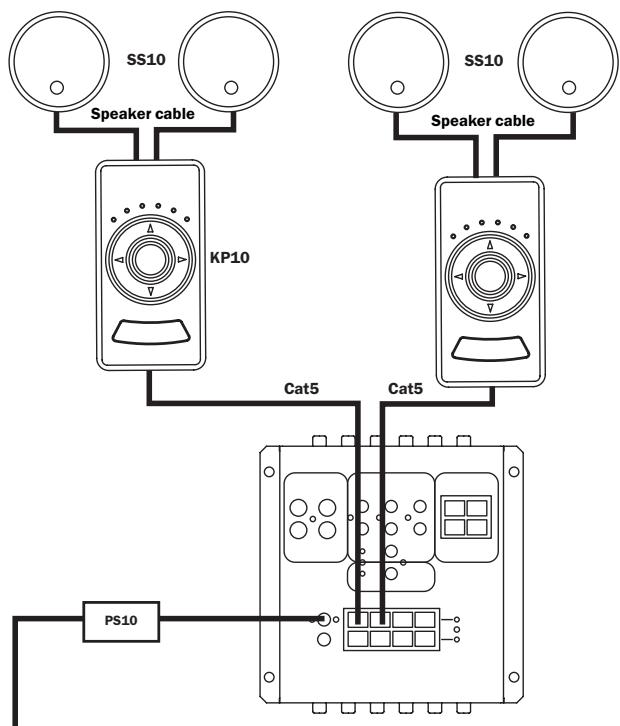
Connections for one AH10 with two main zones attached
PS10 power supply to AH10
For each AH10 with up to four main zones connected (and no sub-zones) one PS10 is required.
Sub-zones require a separate PS10 power supply.
For each AH10 (with both main and sub-zones connected) two x PS10 power supplies are required.
AH10 to KP10
Using a single Cat-5e cable, connect each KP10 to the AH10 via an RJ45 plug using the EIA/TIA 568A wiring standard (see below) at the AH10, and an eight-way colour-coded connection at the keypad.
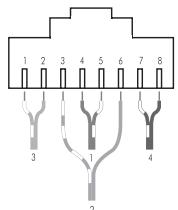
1-white/green 5-white/blue
2 - green 6 - orange
3-white/orange 7-white/brown
4 - blue 8 - brown
The Cat-5 connection from AH10 to KP10 should not exceed 30m/100 ft.
Sub-zones connections are made in the same way as main zone connections but from the sub-zone sockets (see illustration on page 9).
KP10 to SS10 or other loudspeakers
Connect the KP10 to a pair of speakers with two runs of standard high-quality speaker cable.
VIDEO CONNECTIONS
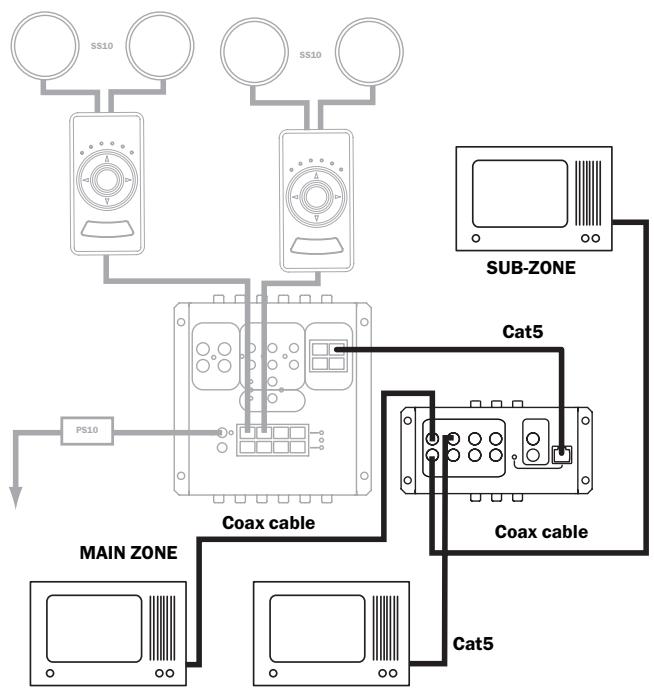
Connections between AH10 and VH10 with two main zones and a sub-zone attached
Where a VH10 video switcher has been specified
The VH10 is linked to the AH10 via a Cat-5e patch cable (supplied with the VH10), connected to the expansion sockets on both units. This provides power, and input switching commands direct from the system remote control or KP10.
Main video displays are connected to the VH10 at the 'main zone' sockets via high quality RG6/CT100 co-axial cable terminated at the VH10 by a phono/RCA plug. No external power is required by the VH10 it is powered by the AH10.
Sub-zone video displays are connected in the same way, but to the four sub-zone sockets on the VH10.
SOURCE CONNECTIONS
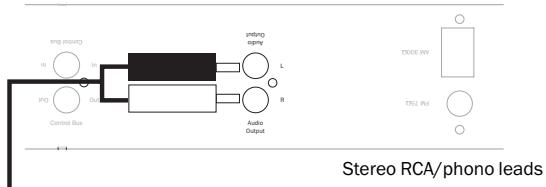
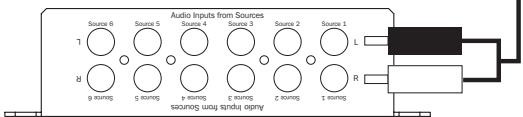
Detail of audio connections between a tuner and AH10
Side 1 connections of AH10
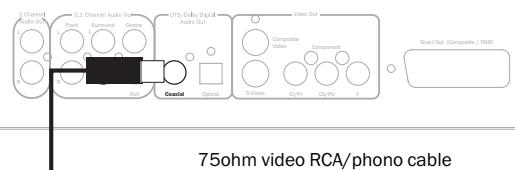
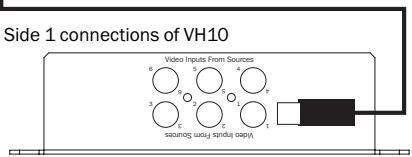
Detail of video connections between a DVD player and VH10
Audio source connections
It is possible to connect a total of six audio source components to the AH10. The connections are made from a line level output on the source equipment to one of the six inputs on the AH10 using RCA/phono to RCA/phono cables.
Video source connections
When using a VH10 each of the six sources can also supply video.
The connections are made from a composite video output on the source equipment to one of the six inputs on the VH10 using good quality 75ohm RCA/phono to RCA/phono video cables.
Remote control of source equipment through the KP10
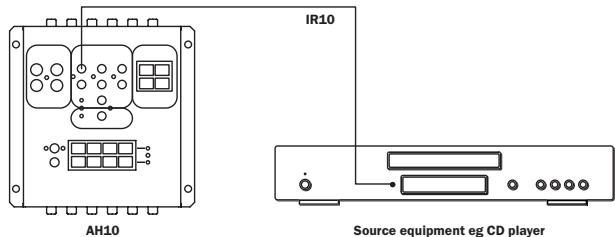
For remote control of the source equipment, six routed IR outputs are provided. Individual IR emitters are plugged into the appropriate IR output (corresponding to the respective audio input) the other end is stuck to the IR receiving window of the source equipment (see below).
SUB-ZONES
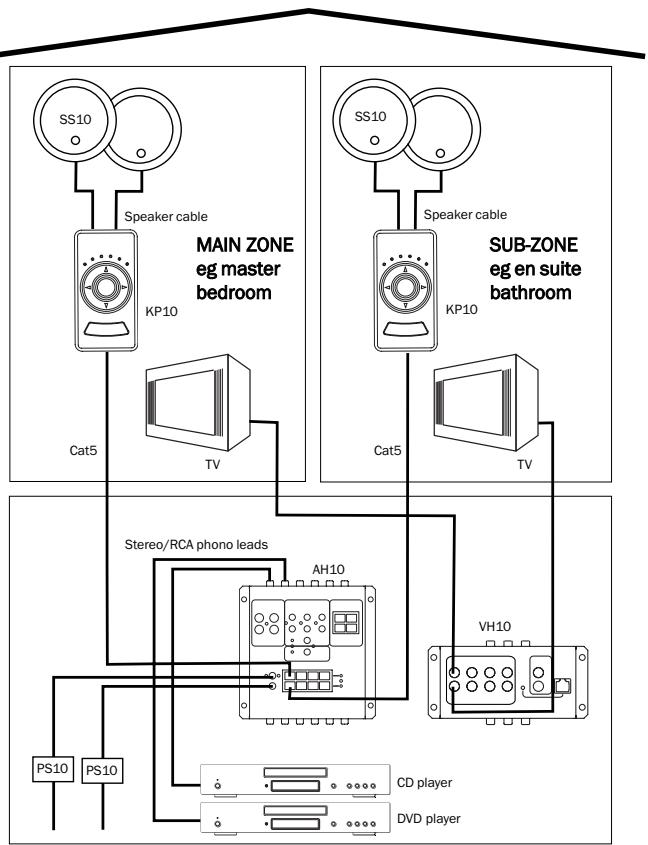
Sub-zone connections
One AH10 hub supports four main-zones and four sub-zones (eight rooms in total). Each sub-zone output is tied to a main zone output and always receives the same source as its main zone (A2 sub-zone output always receives the same source as A1, B2 always follows B1 etc).
Sub-zones are used for instances such as en suite bathrooms (the bedroom being a main zone) where it is desired to have an area that automatically follows the same source as another but can be independently turned on and off, has individual bass and treble etc.
Any main zone can have a sub-zone.
ADVANCED SYSTEM OPTIONS
Local source connections
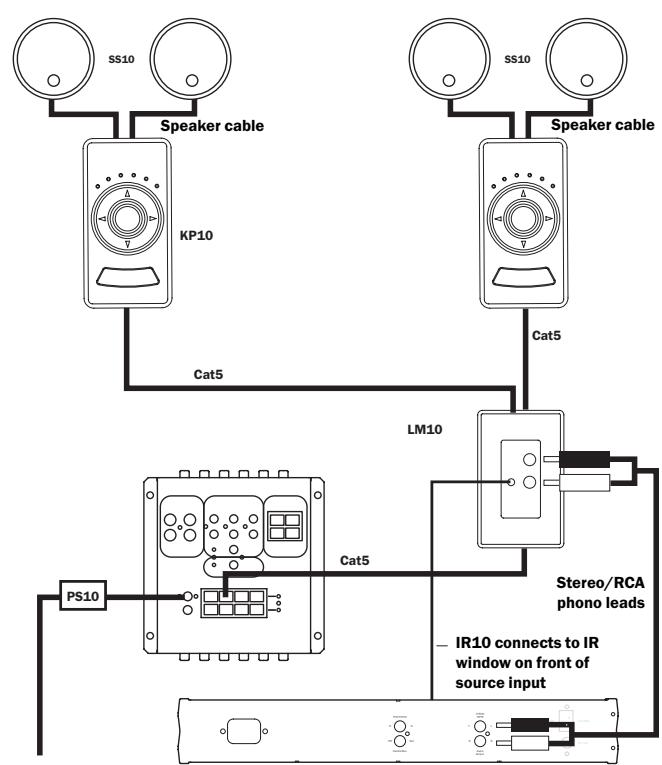
The LM10 Local Input Module (LIM) is an optional in-wall module that allows the user to add additional local sources to those distributed by the AH10. The local source may only be heard in the room where it is connected and the corresponding sub-zone (if connected) and is not distributed to other rooms. LM10s can be fitted in as many rooms as are desired. The LM10 connects between the audio hub and a KP10 amplified control module using Cat-5/5e wiring.
Each main zone can support two LM10s, giving you the option of listening to one or two local sources (eg. Playstation, MP3 player). Each local source can be controlled through the Incognito remote and/or keypad.
Full details of installation, connection, operation and special features can be found in the guide that accompanies the LM10 module.
Note: The AH10 and KP10s must be in Incognito A-BUS mode in order to use an LM10.
ADVANCED SYSTEM OPTIONS
AS10 Active Speakers
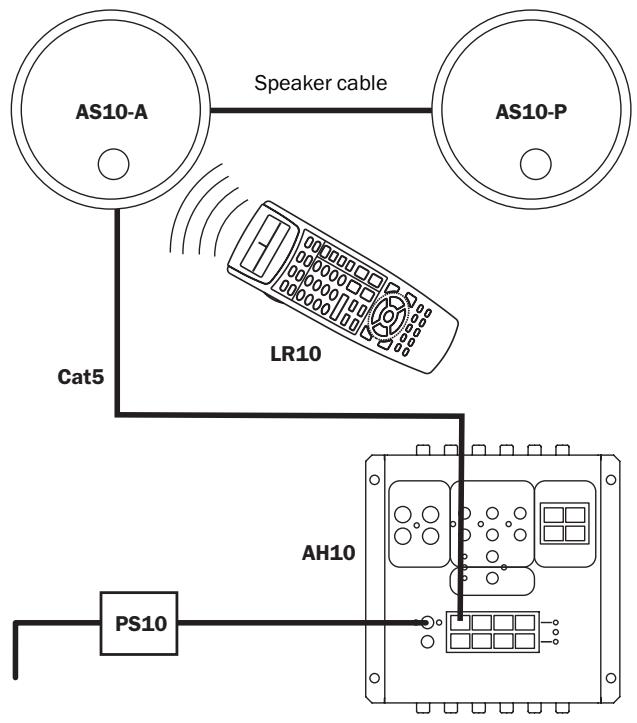
The AS10 active speakers can be used where it is not desired to have a keypad fitted in the wall. The AS10 active speakers feature an IR receiver and amplifier in one of the speakers and like the KP10 keypad do not require mains power.
- Using a single Cat-5e cable, connect the AS10-A to the AH10/VH10 via an RJ45 plug at the AH10, and the eight-way colour-coded punch down connection at the AS10-A.
The RJ45 hub connection should be wired to EIA/TIA568A standard as shown in the wiring guide on page 6.
The Cat-5 connection from AH10 to the AS10-A should not exceed 30m / 100ft .
- The AS10-A is then connected to the AS10-P using either Cat-5e cable terminated at eight-way colour-coded punch down connections (all eight cores must be connected) or using a run of standard speaker cable.
Only one method of connection between the active and passive speaker is necessary.
Full details of installation, connection, operation and special features can be found in the guide that accompanies the AS10 speakers.
ADVANCED SYSTEM OPTIONS
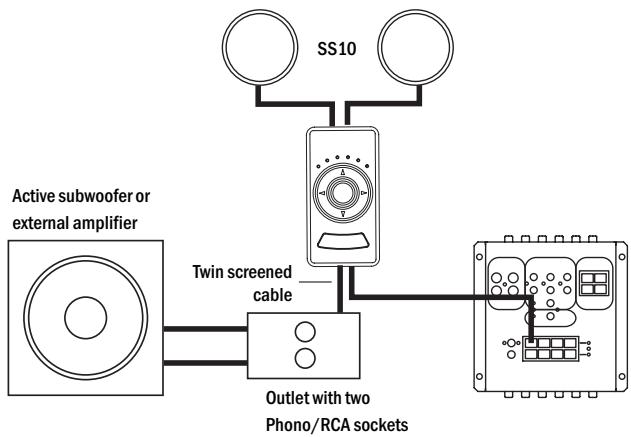
Connecting an external amplifier/active subwoofer to your system
Should extra amplification power, or, an active subwoofer be required, a line level pre-amp output is provided on the back of the KP10.
Using high-quality audio interconnect cable, an external power amplifier may be connected to the KP10 pre-amp output screw terminals.
A fader function on the KP10 can be used to adjust the level between the speakers connected to the KP10 and the external amplifier/active subwoofer, so that the balance between the two can be adjusted.
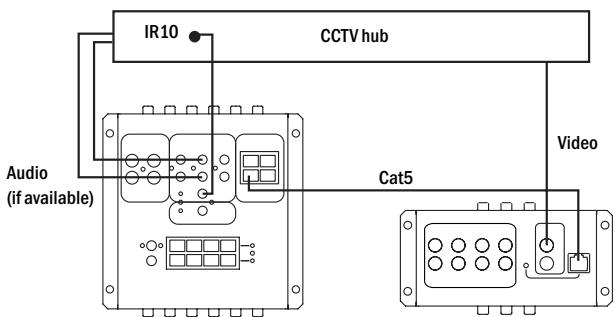
CCTV
A CCTV system may be connected to the Incognito Multi-Room system.
Connect the monitor/TV video signal output to the VH10 at the CCTV IN socket located on the top surface of the unit allowing the live video feed to be viewed in all connected zones.
If sound is also required, the audio signal output of the CCTV system may be connected to the EXT/CCTV inputs on the AH10.
If the CCTV system is to be remote controlled connect an IR-1 infrared emitter to the ALL COMMANDS output on the AH10 and stick the emitter over the IR receiver of the CCTV system. This will allow the user to control the CCTV system from any room in the house.
LARGER SYSTEMS
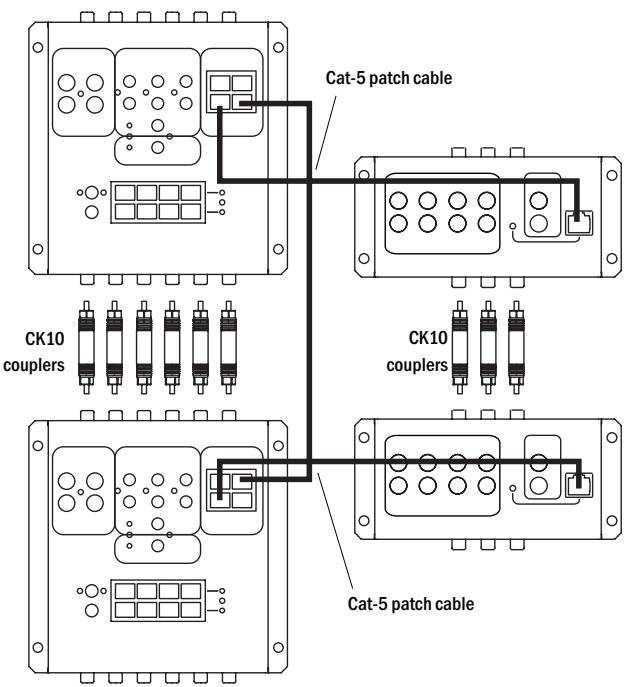
Connections between AH10 and VH10 to allow eight main zones and eight sub-zones
Linking Units
For large installations which require more than four main zones and four sub-zones, an AH10 'linking' facility is provided. Units are linked via a Cat-5e patch cable to the 'Hub Link' in and out sockets on the top right hand corner of each AH10.
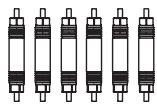
In order to share audio input sources with the first AH10, the second may be joined using Incognito CK10 audio couplers (see diagram). These double-ended phono plugs simply connect the 'Loop out' sockets of the first AH10, to the 'Audio input' sockets of the second, allowing both to access the same sources and distribute them to all available zones.
Up to four AH10s may be linked together in this way, providing audio for a maximum of 16 main zones for the AH10, or 16 main zones and 16 sub-zones for the AH10.
VH10 Linking
Should video also be required in more than the four main zones and four sub-zones provided by the VH10, then these units may also be linked. Each VH10 must be connected to a corresponding AH10 via the Cat-5e patch cable, in order to provide power and switching commands.
Video input sources may then be shared between both VH10 units by using Incognito CK10 couplers (See diagram). These double-ended phono plugs simply connect the 'Loop out' sockets of the first VH10 to the 'Video input' sockets of the second, allowing both to access the same sources and distribute them to all available zones.
Up to four VH10s may be linked together with the corresponding four AH10s in this way, providing video for a maximum of 16 main zones for the AH10.
When installing your Incognito multi-room entertainment system, consideration should be given to detailed advance planning. We strongly suggest you read this entire manual before commencing any work.
AH10 A-BUS audio hub
The AH10 is located alongside source components which means you have two AH10 location options:
- Locate AH10 and source components in any convenient discreet location with adequate ventilation within the home (such as an under-stair cupboard, service room or cabinet), or...
- If it is desired to use the same sources for the Incognito system as are being used by a conventional stereo or surround sound system it is possible to route source equipment through the AH10 for output through existing hi-fi or home cinema amplifiers whilst also distributing them to the rest of your home via the Incognito system.
Should this be required, your existing audio source equipment would be first connected to the AH10 and then routed from the six loop out sockets on the AH10 to the amplifier/receiver in your system via high quality audio interconnect cable terminated at each end by phono/RCA plugs.
Similarly video source equipment may be connected to the VH10 and then routed from the six loop out sockets on the VH10 to the AV receiver in a home cinema setup using phono/RCA cables designed for video use.
For this configuration the AH10 should be located behind your existing system.
The AH10 is compact and can be mounted either horizontally, or vertically, such as on a wall, and is powered by a dedicated power supply (Incognito PS10).
Try to ensure that the AH10 and it's source components are powered from the same set of mains outlets.
VH10 video hub
The VH10 video hub works in conjunction with the AH10 to provide video signals to all connected zones, via RG6/CT100 co-axial cabling. Up to six video input sources and a CCTV input may be connected and distributed, with their corresponding audio signals routed through the AH10 as one of its dedicated six inputs.
The VH10 may be mounted either horizontally or vertically in the same manner as the AH10, and power is provided by the AH10 via a Cat-5e patch cable, so no extra power supply or mains socket is required.
When deciding upon a location for the AH10 and VH10 units consideration should be given to space constraints, and power points for the source equipment and AH10, as well as integration into any existing setups.
KP10 A-BUS keypad
Simple and intuitive control is provided by the KP10 A-BUS keypad.
Housed in a stylishly designed casing, the KP10 fits into any wall and is available with different finishes to compliment various decorative schemes. Control of your source equipment, volume, bass, treble and other functions can be performed by the KP10.
Each KP10 may be used as a main zone or sub-zone controller, with the only difference being that the sub-zone must listen to/watch the same source as the main zone.
Should extra amplification power, or an active subwoofer be required (to provide more bass), a line level pre-amp output is provided on the back of the KP10.
AS10/SS10 speakers
When placing the ceiling-mounted speakers, thought should be given to positions which give the best desired sound coverage throughout a room, while not interfering with existing or planned light fittings or joists.
It is advisable to plan all aspects of installation in advance of work beginning, preferably with the house/flat building schematics if available.
CCTV system connection
It is possible to connect a CCTV camera to your multi-room system. Refer to the section on 'Advanced system options' for details. Please note that extra cabling will be required in addition to that explained in the installation notes.
PRE-INSTALLATION NOTES
Please read these notes before commencing installation.
AH10 A-BUS audio hub
A-BUS is a standard that allows some compatibility between different manufacturers A-BUS multi-room products. The AH10 can be switched between Incognito A-BUS or standard A-BUS mode. The Incognito A-BUS position is for use with our own Incognito KP10 keypad and gives extra functions. When used with other manufacturers A-BUS keypads it should be set to standard A-BUS or they will not work. The switch is located on the rear of the AH10 (see below).

Important!
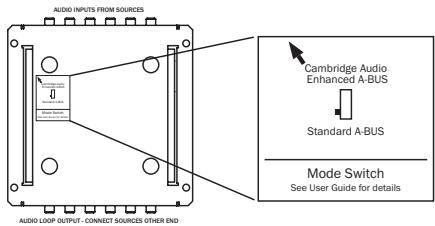
Fix to a hard surface such as a cupboard surface, not to carpet or a soft-lined surface, as this will inhibit airflow through the unit. Do not situate in close proximity to any installation which will produce excessive electrical noise such as dimmer racks etc (these may interfere with the unit). Situate within three metres of a power socket.
VH10 video hub
Locate in close proximity to the AH10 (maximum of five metres away). Fix to a hard surface such as a cupboard surface, not to carpet or a
soft-lined surface, as this will inhibit airflow through the unit.
Do not situate in close proximity to any installation which will produce excessive electrical noise such as dimmer racks etc; these may interfere with the unit.
Wiring to zones
Run a Cat-5e cable from the AH10 to each wall control unit.
Fit a single-gang back box for each KP10.
Run two standard speaker cables from the KP10 to mounted loudspeakers. If video is required, run CT100/RG6 high-quality coaxial cable from the VH10 main zone connection either directly to the video display, or to a wall-mounted panel fitted with a suitable phono/RCA connector.
Cabling tips
Cat5e cable should be run through the installation in electrical conduit, either metal, non-metallic, rigid or intermediate, wherever possible. Should conduit not be available or impractical, cabling running through frames or beams must be a minimum of 25mm / 1 inch from the nearest edge of that structure. If the frame or beam is metallic, then the cable should be protected by a bush or grommet.
When routing cables around the installation, care must be taken to prevent kinking and trapping. Any cable ties used must not be tightened any more than is necessary to hold the cable in place.
Always re-check the colour code of the Cat5e cable connections to ensure they are correct.
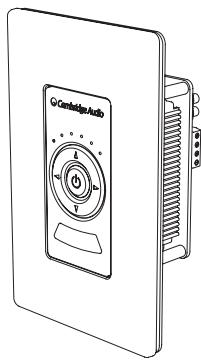
KP10 CU version
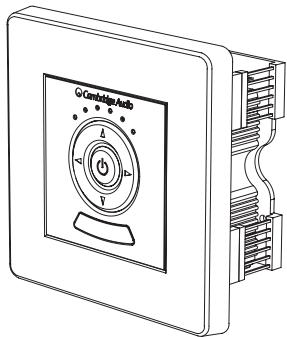
KP10 EU version
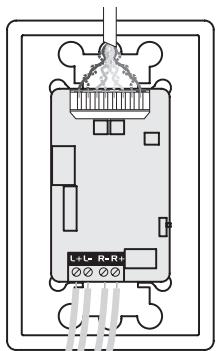
Cat-5 cable
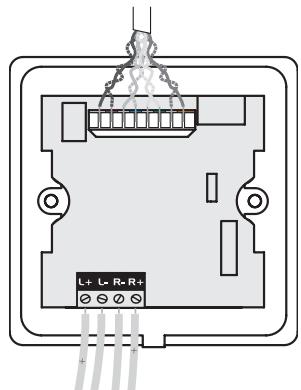
Cat-5 cable
Speaker cable
Speaker cable
KP10 A-BUS keypad
The KP10 EU version should be fitted into a standard single UK (square) 47mm deep back-box (the stainless steel/silver KP10 EU should be fitted into a 50-60mm deep back-box/pattress).
The KP10 CU version should be fitted into a standard single US J-box.
The Cat5 cable running from the AH10 is terminated at the 8-way colour-coded punch down connection on the rear face of the KP10.
Speaker cable is connected via screw terminals on the rear of the KP10.
The KP10 should be positioned at a height of 138cm from the floor finish (to centre of keypad) or taking into account light switch locations etc.
It should also be placed 25-35cm away from the outer edge of any door frame or wall edge.
Locate away from direct, bright sunlight which may affect infra-red performance.
Full instructions for installing your KP10 are supplied with the keypad.
AS10/SS10
207mm diameter mounting hole
AS10/SS10 in-ceiling speakers
Standard installation would specify AS10/SS10 ceiling mounted speakers which are matched to the Incognito system for optimum audio performance. However, virtually any customer-specified speaker units may be used.
Where ceiling or wall-mounted speakers are used, care should be taken to ensure that all building regulations are followed.
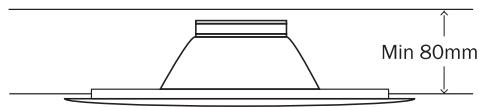
When mounting speakers flush to a ceiling or wall, ensure that enough depth/clearance is available in the respective cavity. A clearance of at least 80mm is necessary when mounting pairs of AS10/SS10 speakers.
When deciding upon a ceiling or wall placement, care should be taken to avoid joists, load bearing beams etc.
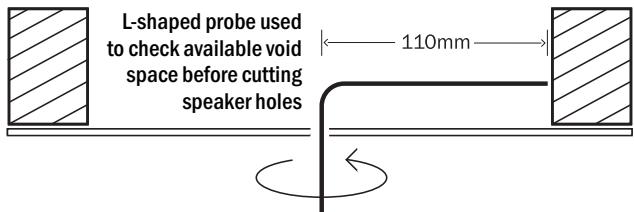
Before cutting ceiling loudspeaker holes it is suggested that the area is tested for clearance by making an L-shaped probe from strong wire (eg a coat hanger), drilling a small hole in the target area, inserting the probe and slowly turning. Any obstructions will be immediately obvious, so that the target area can be moved to a more suitable position.
Also, locate loudspeakers taking into account location of furnishings for optimal stereo reproduction.
Full details of installation, connection, operation and special features can be found in the guide that accompanies the speakers.
SYSTEM SPECIFICATIONS
Cambridge Audio's policy is one of continuous improvement. Design and specifications are therefore subject to change without prior notice.
AH10
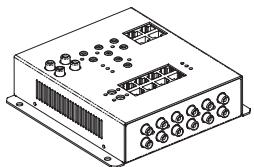
No. of source inputs: 6
No of loop outputs: 6
No. of external inputs/loop outputs/CCTV: 1
No. of zones per hub: 4 main + 4 sub
System zone maximum (4 chained AH10s): 16 main + 16 sub
Frequency response: 20kHz - 20kHz
Trigger output: 12V @ 100mA
Required power input: 24V dc (via supplied PS10)
Note: second PS10 required for sub-low power
Dimensions (W x D x H): 165 x 172 x 48
Weight (net): 1.14kg / 2.5 lbs
VH10
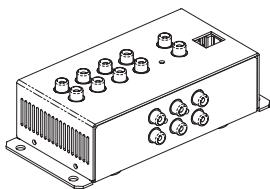
No. of source inputs: 6
No. of loop outputs: 6
Source input specification: 75 ohm, composite video
Video bandwidth: 10 MHz
Maximum cable run to zone: 50m / 150ft
Recommended cable type to zone: RG6/CT100 75 ohm co-axial
Required power input: Powered by AH10
Dimensions (W x D x H): 165 x 74 x 44 mm
Weight (net): 0.6kg
SYSTEM SPECIFICATIONS
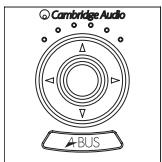
KP10 EU version
KP10 CU version
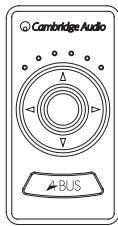
Frequency response: 20Hz - 20Hz
Volume control range: - 80 dB 32 steps
Bass control range: + / - 16 dB 2 dB steps
Treble control range: + / - 16dB2dB steps
Balance control range: + / - 40dB 9 steps both ways
IR pass-through : 34 - 40 kHz and 54 - 58 kHz modulation
Required power input: powered from AH10 via Cat5 cable
AS10
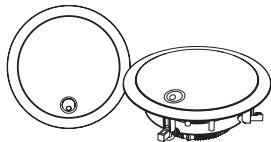
Frequency Response: 60Hz - 20kHz (+/- 2dB)
THD: <0.25% @ 5W, 1kHz
Signal/Noise ratio: > 80dB
Input impedance (local input): 33K Ohms
Volume control range: 0 to -78dB in 31 steps
Pre-amp output: Variable, following volume setting
IR passthrough: 34-40kHz and 54-58kHz frequencies supported
Speaker impedance: 40hms
Power requirement: +24V DC @ 1A max from hub
Weight (AS10-A): 1.4kg / 3.1lbs
Weight (AS10-P): 1.1kg / 2.4lbs
Dimensions: 240 × 75 mm , 9.4 × 3 inches
SYSTEM SPECIFICATIONS
SS10
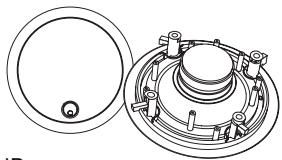
Frequency response: 58Hz - 20Hz + / - 3dB
Sensitivity: 90 dB SPL @ 1 watt/ 1 metre
Nominal impedance: 4 ohms
Power handling: 15-80 watts
Enclosure type: In-ceiling infinite baffle
Drive components: 1 x 1.3 cm tweeter, 1 x 16.5 cm woofer
Crossover frequency: 4.5kHz
Mounting depth required (min): 75 mm
Cutout dimensions: 207 mm
Recommended back air or volume: 22 litres
Weight: 1.5kg
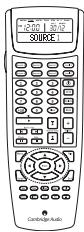
LR10
Battery: 4 AAA/LR03 alkaline batteries
Dimensions (W× H× D) .. 65× 25× 190mm (approx)
Weight: 200g (inc batteries)
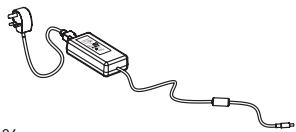
PS10
Input: 100-240V AC 50/60Hz
Output: 24V DC @ 2.5A
Efficiency: 80% , Line/load regulation: 5%
Approvals: UL, CE, T Mark, TUV, FCC Class B, EN 55022B,
EN 5008-1: 1997, EN 61000-4-2/3/4/5/6, Level 2, EN 61000-4-11
CK10
Unit length: coupler - 39 mm
FAQs
- What entertainment equipment can I connect?
The Incognito system is compatible with almost any type of hi-fi or video separate that uses 34-40kHz or 54-58kHz IR system (nearly all).
- What is the difference between a main zone and a sub-zone?
A sub-zone can only listen to the same audio source as is being listened to in the main zone. The sub-zone has independent power, volume and tone controls from the main zone.
- How many rooms can a system serve?
Each AH10 supports four main and four sub-zones. Four AH10s can be chained together supporting up to a maximum of 16 main zones and 16 sub-zones. If a larger system is required it is possible to have two or more separate systems running independently giving unlimited expandability.
- Do I have to use Incognito speakers?
No, but it is highly recommended as the Incognito speakers are optimised and impedance matched to the keypad amplifiers.
- How many remote controls can the system have?
There is no limit to the amount of remotes you can have. If required you can have a remote in each room.
- What advice can you give for keypad location?
When locating a keypad you should avoid putting in direct sunlight or in close proximity to plasma screens. Care should also be taken locating it near to devices that produce electrical noise such as mechanical dimmers. See planning section on page 17.
- Is there a maximum cable run from AH10 to each KP10?
Yes, the maximum cable run is 30 metres / 100 feet.
LIMITED WARRANTY
Cambridge Audio warrants this product to be free from defects in materials and workmanship (subject to the terms set forth below). Cambridge Audio will repair or replace (at Cambridge Audio's option) this product or any defective parts in this product. Warranty periods may vary from country to country. If in doubt consult your dealer and ensure that you retain proof of purchase.
To obtain warranty service, please contact the Cambridge Audio authorised dealer from which you purchased this product. If your dealer is not equipped to perform the repair of your Cambridge Audio product, it can be returned by your dealer to Cambridge Audio or an authorised Cambridge Audio service agent. You will need to ship this product in either its original packaging or packaging affording an equal degree of protection.
Proof of purchase in the form of a bill of sale or receipted invoice, which is evidence that this product is within the warranty period, must be presented to obtain warranty service.
This warranty is invalid if (a) the factory-applied serial number has been altered or removed from this product or (b) this product was not purchased from a Cambridge Audio authorised dealer. You may call Cambridge Audio or your local country Cambridge Audio distributor to confirm that you have an unaltered serial number and/or you purchased from a Cambridge Audio authorised dealer.
This warranty does not cover cosmetic damage or damage due to acts of God, accident, misuse, abuse, negligence, commercial use, or modification of, or to any part of, the product. This warranty does not cover damage due to improper operation, maintenance or installation, or attempted repair by anyone other than Cambridge
Audio or a Cambridge Audio dealer, or authorised service agent which is authorised to do Cambridge Audio warranty work. Any unauthorised repairs will void this warranty. This warranty does not cover products sold AS IS or WITH ALL FAULTS.
REPAIRS OR REPLACEMENTS AS PROVIDED UNDER THIS WARRANTY ARE THE EXCLUSIVE REMEDY OF THE CONSUMER. CAMBRIDGE AUDIO SHALL NOT BE LIABLE FOR ANY INCIDENTAL OR CONSEQUENTIAL DAMAGES FOR BREACH OF ANY EXPRESS OR IMPLIED WARRANTY IN THIS PRODUCT. EXCEPT TO THE EXTENT PROHIBITED BY LAW, THIS WARRANTY IS EXCLUSIVE AND IN LIEU OF ALL OTHER EXPRESS AND IMPLIED WARRANTYES WHATSOEVER INCLUDING, BUT NOT LIMITED TO, THE WARRANTY OF MERCHANTABILITY AND FITNESS FOR A PRACTICAL PURPOSE.
Some countries and US states do not allow the exclusion or limitation of incidental or consequential damages or implied warranties so the above exclusions may not apply to you. This warranty gives you specific legal rights, and you may have other statutory rights, which vary from state to state or country to country.
SYSTEM DETAILS
Zone/room details
Sub-zones/room
Hub 1 - A1 main zone keypad
Hub 1-A2 sub-zone keypad
Hub 1-B1 main zone keypad
Hub 1 - B2 sub-zone keypad
Hub 1 - C1 main zone keypad
Hub 1 - C2 sub-zone keypad
Hub 1 - D1 main zone keypad
Hub 1 - D2 sub-zone keypad
Hub 2 - A1 main zone keypad
Hub 2 - A2 sub-zone keypad
Hub 2 - B1 main zone keypad
Hub 2 - B2 sub-zone keypad
Hub 2 - C1 main zone keypad
Hub 2 - C2 sub-zone keypad
Hub 2 - D1 main zone keypad
Hub 2 - D2 sub-zone keypad
Hub 3 - A1 main zone keypad
Hub 3 - A2 sub-zone keypad
Hub 3-B1 main zone keypad
Hub 3 - B2 sub-zone keypad
Hub 3 - C1 main zone keypad
Hub 3 - C2 sub-zone keypad
Hub 3 - D1 main zone keypad
Hub 3 - D2 sub-zone keypad
Hub 4-A1 main zone keypad
Hub 4 - A2 sub-zone keypad
Hub 4-B1 main zone keypad
Hub 4 - B2 sub-zone keypad
Hub 4 - C1 main zone keypad
Hub 4 - C2 sub-zone keypad
Hub 4 - D1 main zone keypad
Hub 4 - D2 sub-zone keypad
INSTALLER DETAILS
Name
Address
AH10 Serial No/s
Source equipment details
Source (1)
Source (2)
Source (3)
Source (4)
Source (5)
Source (6)
Contact name
Email
Telephone number