
AZUR 640A V2 - Integrated amplifier CAMBRIDGE AUDIO - Free user manual and instructions
Find the device manual for free AZUR 640A V2 CAMBRIDGE AUDIO in PDF.


| Product type | Stereo integrated amplifier |
| Brand | Cambridge Audio |
| Model | Azur 640A V2 |
| Output power | 2 x 75 W into 8 ohms (both channels driven) |
| Frequency response | 10 Hz - 50 kHz ±1 dB |
| Total harmonic distortion (THD) | < 0.002% (at 1 kHz, 80% power) |
| Signal-to-noise ratio | > 100 dB (A-weighted) |
| Audio inputs | 7 line inputs (including 1 MM phono), 1 record input |
| Audio outputs | 2 pairs of speaker terminals, 1 preamp output, 1 headphone output |
| Phono input | Yes, for MM cartridges |
| Controls | Volume, input selector, tone control (bass/treble), direct mode |
| Remote control | Yes, included |
| Dimensions (W x H x D) | 430 x 85 x 350 mm |
| Weight | 8.5 kg |
| Power supply | Toroidal transformer section, power consumption 450 W max |
| Standby consumption | < 1 W |
| Care and cleaning | Unplug the unit before cleaning. Use a soft dry cloth. Do not use any chemical or abrasive products. |
| Safety | Do not expose to moisture. Ensure adequate ventilation. Do not obstruct ventilation slots. |
| Spare parts and repairability | Contact an authorized repairer. Parts available according to after-sales service policy. |
| General information | Manufacturer: Cambridge Audio. Warranty: 2 years (depending on country). |
Frequently Asked Questions - AZUR 640A V2 CAMBRIDGE AUDIO
User questions about AZUR 640A V2 CAMBRIDGE AUDIO
0 question about this device. Answer the ones you know or ask your own.
Ask a new question about this device
Download the instructions for your Integrated amplifier in PDF format for free! Find your manual AZUR 640A V2 - CAMBRIDGE AUDIO and take your electronic device back in hand. On this page are published all the documents necessary for the use of your device. AZUR 640A V2 by CAMBRIDGE AUDIO.
USER MANUAL AZUR 640A V2 CAMBRIDGE AUDIO
Integrated amplifier
User's manual

Cambridge Audio
CONTENTS
Introduction 3
Safety precautions. 4
Important safety instructions. 5
Rear panel connections. 6
Connecting. 8
Front panel controls. 10
Remote control. 12
Custom installation use 12
Multi-Room 13
CAP5 protection system 14
Troubleshooting. 16
Technical specifications 17
Limited warranty 18
INTRODUCTION
Thank you for purchasing this Cambridge Audio Azur range amplifier. These version 2 models are part of our commitment to the on-going development of the Azur range. We hope that you will appreciate the results and enjoy many years of listening pleasure from them.
For these version 2 models we have been able to further improve the audio quality and make them more powerful through many detailed changes and enhancements developed as a result of our on-going research programme. We have also added some new features, including support for Multi-Room use. All this proprietary engineering is housed within our low resonance, acoustically damped chassis. An Azur Navigator remote control is also provided, giving full remote control of your amplifier in an attractive and easy to use handset.
About the 540A V2.0
The 540A V2.0 features a new preamp stage with buffered inputs for lower crosstalk and improved stereo imaging, whilst the headphone output is now provided by a separate Class A headphone driver circuit. The amplifier stage has been revised with new low-noise input transistors, special driver stage PSU regulation, a new voltage amplifier topology and separate current sources for the voltage amplifier and predriver stages. These enhancements to the original circuits all work to elevate the sound quality to a new level. A new heatsink and transformer are employed and the power output is now 60 watts per channel (from 50 wpc on the V1 model).
About the 640A V2.0
Featuring all of the above enhancements, the 640A V2.0 also features separate transformer secondaries for left and right channels, twin rectifiers and separate PSU's for dual mono operation of the left and right power amplifiers. An even larger heatsink and transformer are employed and power output is now 75 watts per channel (from 65wpc on the V1 model).
Incognito Ready / Custom Install Use
Both the 540A V2.0 and 640A V2.0 now feature outputs for the new Cambridge Audio Incognito system. By plugging in one or two external Incognito Keypads and a power supply unit your V2.0 amplifier can become the hub of a simple multi-room system. In addition, Control Bus Input/Output and IR Emitter Input are provided to make it easy to integrate these units into Custom Installation systems.
Your V2.0 amplifier can only be as good as the system it is connected to. Please do not compromise on your source equipment, speakers or cabling. Naturally we particularly recommend models from the Cambridge Audio Azur range, which have been designed to the same exacting standards as our amplifiers. Your dealer can also supply excellent quality Cambridge Audio interconnects to ensure your system realises its full potential.
Thanks for taking the time to read this manual, we do recommend you keep it for future reference.

Matthew Bramble
Technical Director
SAFETY PRECAUTIONS
Checking the Power Supply Rating
For your own safety please read the following instructions carefully before attempting to connect this unit to the mains.
Check that the rear of your unit indicates the correct supply voltage. If your mains supply voltage is different, consult your dealer.
This unit is designed to operate only on the supply voltage and type that is indicated on the rear panel of the unit. Connecting to other power sources may damage the unit.
This equipment must be switched off when not in use and must not be used unless correctly earthed. To reduce the risk of electric shock, do not remove the unit's cover (or back). There are no user serviceable parts inside. Refer servicing to qualified service personnel. If the power cord is fitted with a moulded mains plug the unit must not be used if the plastic fuse carrier is not in place. Should you lose the fuse carrier the correct part must be reordered from your Cambridge Audio dealer.
The lightning flash with the arrowhead symbol within an equilateral triangle is intended to alert the user to the presence of un-insulated 'dangerous voltage' within the product's enclosure that may be of sufficient magnitude to constitute a risk of electric shock to persons.

The exclamation point within an equilateral triangle is intended to alert the user to the presence of important operating and maintenance instructions in the service literature relevant to this appliance.
This product complies with European Low
Voltage (73/23/EEC) and Electromagnetic Compatibility (89/336/EEC) Directives when used and installed according to this instruction manual. For continued compliance only Cambridge Audio accessories should be used with this product and servicing must be referred to qualified service personnel.

The crossed-out wheeled bin is the European Union symbol for indicating separate collection for electrical and electronic equipment. This product contains electrical and electronic equipment which should be reused, recycled or recovered and should not be disposed of with unsorted regular waste. Please return the unit or contact the authorised dealer from whom you purchased this product for more information.

Plug Fitting Instructions (UK Only)
The cord supplied with this appliance is factory fitted with a 13 amp mains plug fitted with a 3 amp fuse inside. If it is necessary to change the fuse, it is important that a 3 amp one is used. If the plug needs to be changed because it is not suitable for your socket, or becomes damaged, it should be cut off and an appropriate plug fitted following the wiring instructions below. The plug must then be disposed of safely, as insertion into a 13 amp socket is likely to cause an electrical hazard. Should it be necessary to fit a 3-pin BS mains plug to the power cord the wires should be fitted as shown in this diagram. The colours of the wires in the mains lead of this appliance may not correspond with the coloured markings identifying the terminals in your plug. Connect them as follows:
The wire which is coloured BLUE must be connected to the terminal which is marked with the letter 'N' or coloured BLACK.
The wire which is coloured BROWN must be connected to the terminal which is marked with the letter 'L' or coloured RED.
The wire which is coloured GREEN/YELLOW must be connected to the terminal which is marked with the letter 'E' or coloured GREEN.
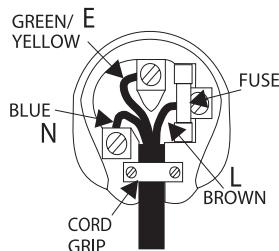
If your model does not have an earth wire, then disregard this instruction.
If a 13amp (BS 1363) plug is used, a 3amp fuse must be fitted, or if any other type of plug is used a 3amp or 5amp fuse must be fitted, either in the plug or adaptor, or on the distribution board.
IMPORTANT SAFETY INSTRUCTIONS
Please take a moment to read these notes before installing your Azur amplifier, they will enable you to get the best performance and prolong the life of the product. We advise you follow all instructions, heed all warnings and keep the instructions for future reference.
The unit is of Class 1 construction and must be connected to a Mains socket outlet with a protective earthing connection.
The unit requires ventilation above and below. Do not situate it on a rug or other soft surface and do not obstruct any air inlet or outlet grilles on the underside and top cover. Do not place in an enclosed area such as a bookcase or in the cabinet.
Do not install near any heat sources such as radiators, heat register, stove, or other apparatus (including amplifiers) that produce heat.
Do not defeat the safety purpose of the polarized or grounding type plug. A polarized plug has two blades with one wider than the other. A grounding type plug has two blades and a third grounding prong. The wide blade or third prong are provided for your safety. If the provided plug does not fit your outlet, consult an electrician for replacement of the obsolete outlet.
WARNING - To reduce the risk of fire or electric shock, do not expose this unit to rain or moisture. This unit must not be exposed to dripping or splashing water or other liquids. No objects filled with liquid, such as vases, shall be placed on the unit. In the event, switch off immediately, disconnect from the mains supply and contact your dealer for advice.
Ensure that small objects do not fall through any ventilation grille. If this happens, switch off immediately, disconnect from the mains supply and contact your dealer for advice.
Do not route the power cable so that it can be walked upon or damaged by other items near it.
It is recommended that when bi-amping, the same type power amplifiers are used.
This unit must be disconnected from the mains socket to be turned off completely. If you do not intend to use this unit for a long period of time, unplug it from the mains socket. Unplug this unit during lightning storms.
To clean the unit, wipe its case with a moist, lint-free cloth. Do not use any cleaning fluids containing alcohol, ammonia or abrasives. Do not spray an aerosol at or near the amplifier.
This unit is not user serviceable, never attempt to repair, disassemble or reconstruct the unit if there seems to be a problem. Servicing is required when the unit has been damaged in any way, such as power-supply cord or plug is damaged, liquid has been spilled or objects have fallen into it, the unit has been exposed to rain or moisture, does not operate normally or has been dropped. A serious electric shock could result if this precautionary measure is ignored.
This unit should be installed on a sturdy, level surface. Due to stray magnetic fields turntables should not be located nearby due to interference.
REAR PANEL CONNECTIONS
Cambridge Audio
Designated in bold, formatted
www.cambridge-audio.com
Max Power Consumption:

一
:
1
Power
∴ m = 3/11
on
∴ m = 3/11
Mains Voltage Selector Switch 1.15V(23V)AC-50/60Hz
115V/230V AC-50/60A2


30V AC-5


/

1


1

1

1

1

| x - 2x| = 1/2x2 + 1/2x2 - 4x

(1)
i=
Protection/LED
Protection LED
indicators:
Fault requiring
code(PG)
∴ m = 3/11
OVER TEMPERATURE
∴ m = 3/11 ;
1
Temporary ovenhead
Loudspeaker short
Vol Auto
Please refer to:
y
your calls. Manual
for more information
sugg
∴ m = 3/11
H
1
10
8
∴ m = 3/11 ;
举一反三
1
∴ m = 3/11 ;
4.2.1
。
.
A
A
/
∴ m = 3/11 ;
/
。
。
一
1
1
)
1
+
(
()
( 2)
1
)
()
1
。
1
。
1
)
1.
C
②
/
。
C
∴ m = 3/11 ;
/
A
-
/
(1)
(1)
]
A
,
∴ m = 3/11
A
∴ m = 3/11 ;
- 实验原理
.
A
∴ m = 3/11 ;
A
13/14
∴ m = 3/11 ;
∴ m = 3/11 ;
1
13/14
∴ m = 3/11
A
∴ m = 3/11 ;
12/12
∴ m = 3/11
∴ m = 3/11 ;
∴ m = 3/11 ;
∴ m = 3/11 ;
∴ m = 3/11 ;
∴ m = 3/11 ;
∴ m = 3/11
( )
∴ m = 3/11 ;
(
∴ m = 3/11 ;
()
∴ m = 3/11 ;
13/14
∴ m = 3/11 ;
13/14
∴ m = 3/11 ;
C
∴ m = 3/11 ;
- 实验原理
∴ m = 3/11 ;
∴ m = 3/11 ;
,
∴ m = 3/11 ;
∴ m = 3/11 ;
∴ m = 3/11
∴ m = 3/11 ;
1
:
.
.
right
A
Let
∴ m = 3/11
Right
B
Inn
and
8 ohms.
,
(一)
terminals
当
Important
Please ensure that loudspeaker terminals are fully tightened
∴ m = 3/11
(1)
6
IP
1
[Tab]
1
a
izur
640
A lnt
Con
rol B
US
图
Out.
(2)
.
1
()
(
∴ m = 3/11 ;
∴ m = 3/11 ;
…
X
05
A
.
1
》
(
)
1
…
.
CD
A
IB Emitto
D6
1
K
rod1
Xe
and
1
(1)
(1)
.
1
Con
FOL B
US
In
Out
6
0
(
∴ m = 3/11 ;
∴ m = 1;
…
X
05
A
(
1
》
1
(1)
A
∴ m = 3/11 ;
∴ m = 3/11
Cui
Ion
Risk
of elec
图1
No
0001
A
%
(简历)
lecbc
C
tive
No
98.01
Acht
ung
Norm
affy
on does
letz
1
∴ m = 3/11 ;
-
-
-
1/2x - 1 > 0
1/2x - 1 > 0
1/2x - 1 > 0
1/2 =
1/2 =
一
.
or
to
th
31
cn
QI
ds
ou
us
in
in
Ina
AI
。
∴ m = 3/11 ;
arc
C
are
5
.
.
ten
m
.
ec:
10
66
2.16
als
ar
45
a1
ers
V
1
∴ m = 3/11 ;
p2
air
µ
all
6.
0
8
···
+
ms
to
1
D
∴ m = 3/11 ;
1
ore
in
BIC
1
640 Cont In 10000000000000000000000000000000000000000000000000000000000000000000000000
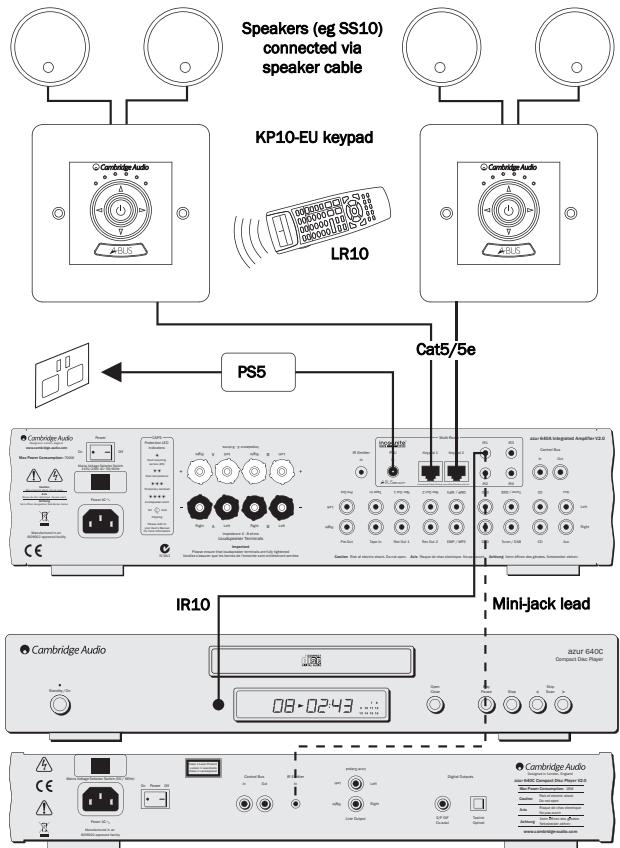
PSU - Connect an Incognito PS5 to supply power to the connected multi-room keyboards/speakers.
Keypad 1/2 - Connect one or two Incognito A-BUS KP10 keypads (or other A-BUS compatible keypads) using CAT5/5e cable. Incognito AS10 Active Ceiling Speakers can also be connected here.
IR - Four IR outputs for remote control of source equipment.
Please refer to the 'Multi-Room' section of this manual for more information on connections and set-ups.
⑦ Control Bus
In - Allows un-modulated commands from multi-rooms systems or other components to be received by the unit.
Out - Loop out for control bus commands to another unit.
⑧ Pre-Out
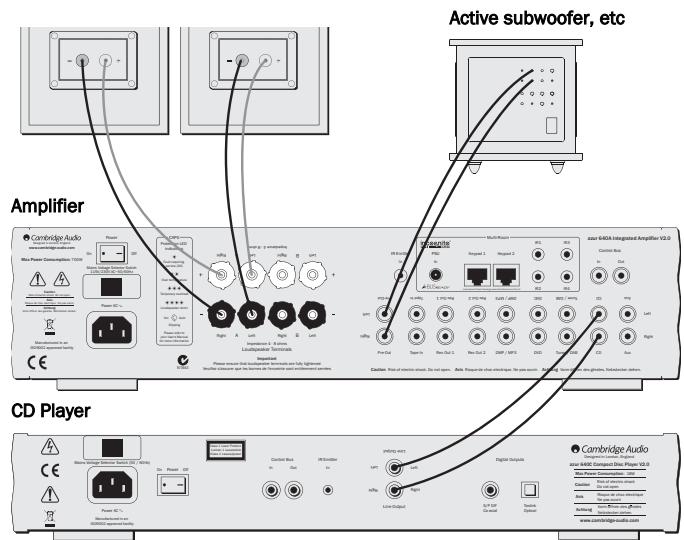
Connect these sockets to the inputs on an external power amplifier(s) or active subwoofer etc.
⑨ Tape In
Connect to a tape deck or to the analog output sockets on a MiniDisc, portable digital music player or CD recorder using an interconnect cable from the recorder's Line Out sockets to the amplifier's Tape In sockets.
The Tape Input circuit of the 540A/640A V2.0 is a "monitor" type, different from the other 5 inputs. For the 5 normal inputs, the source selected for listening to will be sent out of the Rec 1/Rec 2 outputs for
recording. The source currently being listened to and (optionally) recorded is then shown on the front panel by a corresponding blue LED.
However, when the Tape Mon Input is selected a second LED will illuminate indicating that the Tape Monitor Input is now being listened to with a different source being sent out of the Rec1/Rec2 outputs for recording. The recording source is shown by the first LED and can be changed by pressing the other source buttons. To switch Tape Monitor off, simply press the Tape Mon button again, toggling this function off.
This feature is most useful when using 3-head analog cassette decks which allow the signal being recorded to be played back live off tape (via a 3rd head) whilst it is simultaneously recorded. It is then possible by toggling the Tape Monitor input on and off to compare directly in real time the original and recorded signal so that adjustments to the recording parameters of the tape machine can be made (consult the manual of your 3-head analog cassette deck for full details).
10 Record Out 1/2
These two identical output sockets can be connected to a tape deck or to the analog Record In sockets on a MiniDisc or CD recorder.
DMP/MP3, DVD, Tuner/DAB, CD, Aux
These inputs are suitable for any 'line level' source equipment such as digital music players (DMP) and MP3 players, CD players, DAB or FM/AM tuners etc.
Note: These inputs are for analog audio signals only. They should not be connected to the digital output of a CD player or any other digital device.
CONNECTING
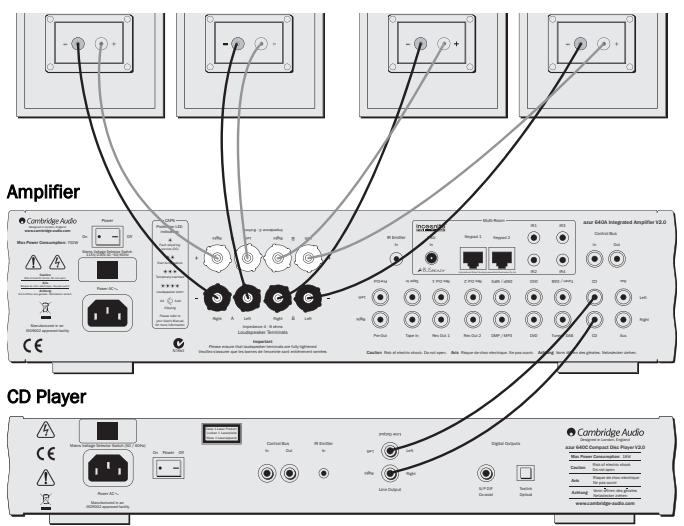
When designing our amplifiers we have tried to include features that allow you to connect your system in various ways. The inclusion of features such as Pre-Out and Speaker B connections mean that you can flexibly configure your system depending on your requirements. The following diagrams are designed to make connection easy.
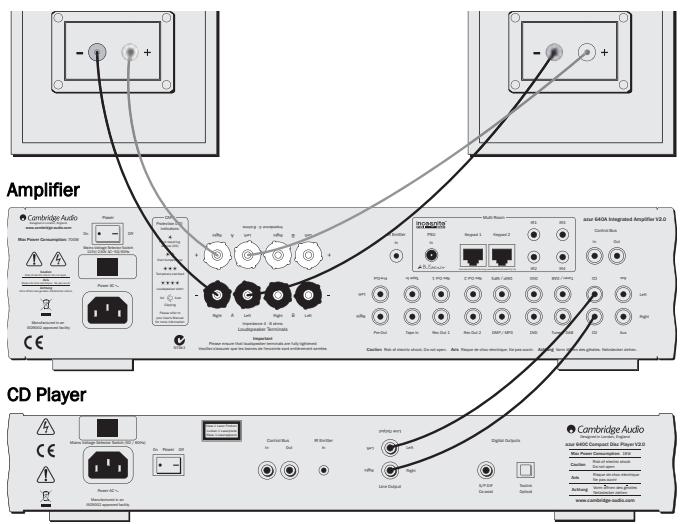
Basic connection
The diagram below shows the basic connection of your amplifier to a CD player and a pair of loudspeakers.
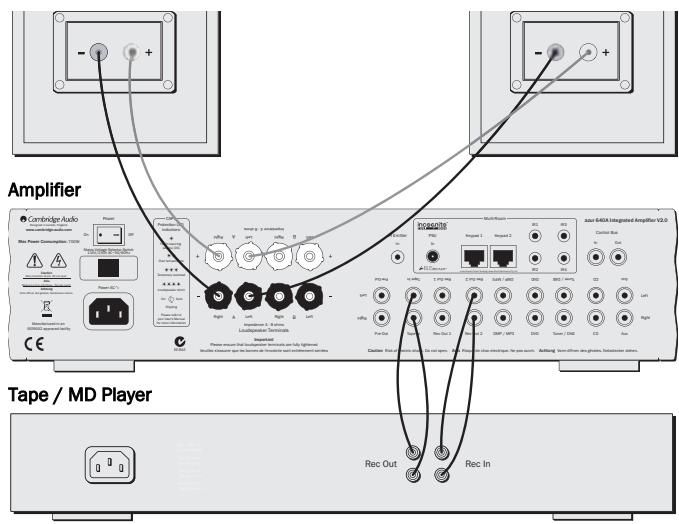
Tape connection
The diagram below shows how to connect the amplifier to a tape recorder or other source with a record and monitor connection.
Please note that either of the tape loop outputs can be used (as they are both the same signal in parallel).
Speaker B connections
The Speaker B connections on the back of the amplifier allow for a second set of speakers to be used (ie speakers located in another room). The Speaker B button on the front panel allows this second set of speakers to be switched on and off.
Note: When using two pairs of speakers, use speakers with a nominal impedance of between 6-8 ohms each.
Pre-Out connections
The Pre-Out sockets are for connecting to the input sockets of a power amplifier or active subwoofer. The diagram below shows how to connect the amplifier to an active subwoofer via the Line In inputs on the subwoofer.
FRONT PANEL CONTROLS

Cambridge Audio

① Standby/On
Switches the unit between Standby mode (indicated by dim power LED) and On (indicated by bright power LED). Standby is a low power mode where the power consumption is less than 10 Watts. The unit should be left in Standby mode when not in use.
② Infrared sensor
Receives IR commands from the supplied Azur remote control.
③ Phones
Allows for the connection of headphones with a 1/4 Jack plug connector. When the headphones are connected, the loudspeaker relay is released switching off the output to the loudspeakers (speakers A and B).
④ Protection
LED flashes to indicate activation of CAP5 protection system. Refer to the CAP5 section of this manual for more information.
⑤ Speaker B
Turns on/off the secondary set of loudspeaker terminals on the back panel. This can be used for listening to an extra set of loudspeakers in another room.
Please note that care should be taken when selecting if two loudspeakers are going to be used on each channel. If the combined resistance measured on the loudspeaker terminals is too low the amplifier may not switch out of Standby mode until a suitable load resistance is detected. For more information refer to the CAP5 section of this manual.
Note: When using two pairs of speakers, use speakers with a nominal impedance of between 6-8 ohms each.
(6) Direct
This control gives the audio signal a more direct path to the power amplifier stage of your amplifier, bypassing the tone control circuits for the purest possible sound quality.
⑦ Bass and Treble
These controls allow subtle adjustments to the tonal balance of the sound. In the central position these controls have no effect. These controls only modify the sound through your loudspeakers and the Pre-Out sockets, they do not affect the signals sent through the Tape Out connections. With a well produced CD and a good system the tone controls are unnecessary and can be switched out by the Direct switch. If the musical recording is of poor quality or other factors are affecting the sound quality, it may be necessary to adjust the tone controls to compensate.
Volume
Use to increase/decrease the level of the sound from the outputs of the amplifier. This control affects the level of the loudspeaker output, the pre-amp output and the headphone output. It does not affect the Tape Out connections. It is advisable to turn the Volume control fully anticlockwise before switching the amplifier on.
Balance
This control allows you to adjust the relative output levels of the left and right channels. In the central position the output from each channel is equal. This control only modifies the sound through your loudspeakers and the Pre-Out sockets, it does not affect the signals sent through the Tape Out connections.
10 Aux, CD, Tuner/DAB, DVD, DMP/MP3
Push the appropriate input selection button to select the source component that you wish to listen to. The signal selected is also fed to the Tape Out sockets so that it may be recorded. The input should not be changed whilst recording (but the recorded signal can be checked using the tape input Tape Monitor).
11 Tape Monitor
This control lets you listen to the output signal from a tape recorder or signal processor connected to the amplifier's Tape In/Rec Out sockets. When Tape Monitor is selected, the source component chosen by the input selection push buttons continues to be routed to the Rec Out sockets for recording or processing.
REMOTE CONTROL
The 540A/640A V2.0 is supplied with an Azur Navigator remote control that operates both this amplifier and Cambridge Audio Azur range CD players. Insert the supplied AAA batteries to activate. The functions relevant to the amplifier are as follows:
Standby/On
Switches the amplifier between On and Standby mode.
Mute
Mutes the audio on the amplifier. The mute mode is indicated by the channel LED flashing. Press again to cancel mute.
Volume controls
Increase or decrease the volume of the amplifier output.
Aux, CD, Tuner/DAB, DVD, DMP/MP3, Tape Mon
The six source select buttons are used to change the input source to the amplifier.

CUSTOM INSTALLATION (C.I.) USE
The 540A V2.0 and 640A V2.0 feature a Control Bus input/output that allow un-modulated remote control commands (positive logic, TTL level) to be received electrically by the unit and looped to another unit if desired. These control commands are typically generated by custom installation (multi-room) systems or remote IR receiver systems.
The Control Bus sockets are colour-coded orange. An IR Emitter Input is also provided that allows modulated IR remote control commands to be received electrically by the unit. Commands on this input operate the unit only and are not looped out demodulated on the Control Bus Output.
In addition the units feature 'direct' IR/Control codes as well as toggle codes for some of their features to simplify programming custom installation systems. Special direct On/Off and Mute commands can be accessed on the supplied remote control for teaching into C.l. systems as follows:
- Press and hold the Standby button. The remote first generates it's standby (toggle) command. Keep the button held down, after 12 seconds an amplifier "On" command will be generated. If the button is kept held down for a further 12 seconds, an amplifier player "Off" command is generated.
- Press and hold the Mute button. The remote first generates it's mute (toggle) command. Keep the button held down, after 12 seconds a "Mute on" command will be generated. If the button is kept held down for a further 12 seconds, a "Mute off" command is generated.
A full code table for this product is available on the Cambridge Audio website at www.cambridge-audio.com.
MULTI-ROOM
The Azur V2.0 amplifiers feature Incognito Ready™ / A-BUST™ Ready outputs, allowing multi-room capability. One or two amplified keypads (and an external PSU power supply) can be plugged into the amplifier (using Cat5/5e cable and RJ45 plugs) to provide multi-room audio in one or two secondary rooms or zones. The keypads are powered by an external PSU via Cat5/5e cables and no mains connection is required in the secondary rooms.
The keypads operate independently of the amplifier in terms of volume/bass/treble etc and can be independently turned on and off, however they can only listen to the same source as selected on the amplifier.
A-BUS is a standard that allows compatibility between different manufacturers equipment, so A-BUS compatible keypads from other manufacturers can be used. If used with our own Incognito KP10 keypads, there are some extra features such as the ability to change source on the amplifier from the keypad.
To allow control of your source equipment from the remote rooms an IR emitter (IR10) is plugged into one of the IR outputs on the rear of the unit and then attached over the IR window of the source unit. Alternatively, on our own products that feature IR emitter Inputs, a mini-jack to mini-jack lead can be used. Commands received by the keypads can now be sent back to the source equipment via the amplifier. It is then possible to control the source equipment from the remote rooms by using the source equipment's own remote controls or through a learning remote. The Incognito LR10 can fully control the keypads, "learn" the source's remote controls and change source input on the amplifier etc.
For full details on the Incognito multi-room system please contact your local Cambridge Audio dealer.
CAP5 - FIVE WAY PROTECTION SYSTEM
Cambridge Audio has developed a proprietary protection system to ensure reliability and a long life to its amplifiers. This protection system comprises of five main protection methods:
1. DC detection
Indicator - Unit has switched off during operation, protection LED constantly flashes in single bursts.
Description - CAP5 offers loudspeaker protection if the output of the amplifier goes to a high constant voltage (DC) because of some internal fault. This is a rare fault although detecting it could just save those expensive loudspeakers.
Remedy - Due to the necessary sensitivity of the DC protection circuit, hard clipping of the amplifier may cause DC protection to be triggered. If this fault occurs please switch the unit off, power up again and check operation with a reduced volume level. If the DC fault occurs again please contact your dealer for service.
2. Over temperature detection
Indicator - Unit has switched off during operation, protection LED constantly flashes in bursts of two.
Description - CAP5 includes temperature detection which constantly monitors the heat generated by the output transistors. If the monitored temperature reaches a high level (suitably within the limits of the output devices) the amplifier will automatically switch into a fault mode. The unit should ideally be left for 15 minutes in this state to cool down adequately. If the unit has not fully cooled down then the temperature may reach the limit soon after the amplifier is powered up. If the loudspeaker impedance is low the temperature of the amplifier may rise faster as the
amplifier is working harder. If the amplifier is mounted in a cabinet or the ventilation slots are obstructed the over temperature detection may activate/reactivate after a short listening time.
Remedy - User related fault. The internal temperature of the output transistors has reached the over temperature limit. The unit is not damaged, although it should be left for 15 minutes to cool down before being switched out of Standby.
3. Overvoltage/overcurrent detection
Indicator - The unit attempts to come out of Standby mode, the protection LED flashes in bursts of three.
Description - CAP5 offers V/I protection by constantly monitoring the output transistors to keep them working inside their Safe Operating Area (SOA). The SOA is a set of limits given by the output transistor manufacturer to ensure reliability. Many amplifier designers include V/I limiting in the signal path which can degrade the signal by compressing dynamics. The CAP5 system operates outside the signal path and when triggered shuts down the amp rather than limits the size of the signal passing through the amp (signal compression). V/I also protects the amplifier against short circuits on the speaker terminals during use.
Remedy - The resistance on the loudspeaker terminals is too low. Check to see if there is a short circuit between the loudspeaker terminals.
Note: If the indication remains the same and multiple loudspeakers are being used on each loudspeaker output then please remove a pair and retry. If too many loudspeakers are connected to any amplifier causing the load resistance to drop too low the amplifier will overheat. CAP5 will detect this situation. If the indication remains the same with only one set of loudspeakers connected, there may be a fault with one or both of the loudspeakers.
4. Short circuit detection
Indicator - Unit has switched off during operation, protection LED flashes constantly in bursts of four.
Description - During power up from Standby CAP5 performs a check on the loudspeaker terminals to see if a short across the terminals has been accidentally introduced. If the resistance measured across the loudspeaker terminals is too low the unit will stay in Standby mode until the fault has been removed and Power up is re-attempted.
Remedy - User related fault. There may be a short circuit between the loudspeaker terminals. Check all loudspeaker connections before attempting to switch the unit out of Standby.
5. Intelligent clipping detection
Indicator - Volume is nudged down automatically.
Description - CAP5 has the ability to detect when the amplifier starts to clip or overdrive at it's output, which can damage loudspeakers, and degrade the sound. Clipping distortion is caused at high volume levels when the output signal briefly goes outside the maximum voltage that the amplifier can provide, causing the tops of the signal to flatten off. When CAP5 detects clipping the volume will be automatically nudged down until CAP5 detects an undistorted output.
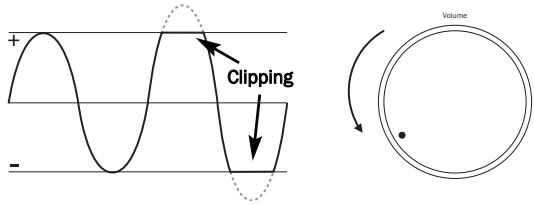
It is possible to disable the clipping detection feature by holding down the Standby/On button during power up (whilst plugging the unit into the mains power). The unit will indicate this by flashing the protection LED for several seconds.
Note: Disabling the clipping detection is not advised as this feature has been added deliberately to protect the amplifier and loudspeakers.
TROUBLESHOOTING
There is no power
Ensure the AC power cord is connected securely.
Ensure the plug is fully inserted into the wall socket and is switched on.
Check fuse in the mains plug or adaptor.
There is no sound
Make sure the unit is not in Standby mode.
Check that source component is properly connected.
Check that 'TAPE MON' is not switched on (unless tape input is required).
Check that your speakers are properly connected.
If using Speaker B terminals check they are switched on.
If channel LED is flashing turn mute off.
There is no sound on one channel
Ensure that balance control is in the correct position.
Check speaker connections.
Check interconnects.
There is a loud buzz or hum
Check turntable or tone arm for ground and connection lead fault.
Ensure no interconnects are loose or defective.
Ensure that your tape deck/turntable is not too close to the amplifier.
Unable to make or play tape recordings
Check that TAPE MON and TAPE OUT have been connected correctly.
There is weak bass or diffused stereo imaging
Ensure that speakers are not wired out of phase.
Protection LED flashing
See section on CAP5 protection system.
TECHNICAL SPECIFICATIONS
| 540A V2.0 | 640A V2.0 | ||
| Power output | 60 watts (into 8Ω)90 watts (into 4Ω) | Power output | 75 watts (into 8Ω)120 watts (into 4Ω) |
| THD (unweighted) | <0.002% @ 1kHz, of rated power<0.070% 20Hz - 20kHz, of rated power<0.025% 20Hz - 20kHz @ 10w | THD (unweighted) | <0.002% @ 1kHz, of rated power<0.050% 20Hz - 20kHz, of rated power<0.020% 20Hz - 20kHz @ 10w |
| Frequency response (-1dB) | 5Hz - 50kHz | Frequency response (-1dB) | 5Hz - 50kHz |
| S/N ratio (ref 1w) | >85dB | S/N ratio (ref 1w) | >90dB |
| Input impedances | 47kohms | Input impedances | 47kohms |
| Power Amp damping factor | >100 | Power Amp damping factor | >100 |
| Max power consumption | 650w | Max power consumption | 700w |
| Min/On power consumption | <35w (no signal) | Min/On power consumption | <35w (no signal) |
| Standby power consumption | <10w | Standby power consumption | <10w |
| Bass/Treble controls | Shelving, ultimate boost/cut + /-7.5dB@ 20Hz and 20kHz | Bass/Treble controls | Shelving, ultimate boost/cut + /-7.5dB@ 20Hz and 20kHz |
| Dimensions | 100 x 430 x 310mm(3.9 x 16.9 x 12.2") | Dimensions | 100 x 430 x 310mm(3.9 x 16.9 x 12.2") |
| Weight | 7.4kg (16.3Lbs) | Weight | 7.4kg (16.3Lbs) |
LIMITED WARRANTY
Cambridge Audio warrants this product to be free from defects in materials and workmanship (subject to the terms set forth below). Cambridge Audio will repair or replace (at Cambridge Audio's option) this product or any defective parts in this product. Warranty periods may vary from country to country. If in doubt consult your dealer and ensure that you retain proof of purchase.
To obtain warranty service, please contact the Cambridge Audio authorised dealer from which you purchased this product. If your dealer is not equipped to perform the repair of your Cambridge Audio product, it can be returned by your dealer to Cambridge Audio or an authorised Cambridge Audio service agent. You will need to ship this product in either its original packaging or packaging affording an equal degree of protection.
Proof of purchase in the form of a bill of sale or receipted invoice, which is evidence that this product is within the warranty period, must be presented to obtain warranty service.
This Warranty is invalid if (a) the factory-applied serial number has been altered or removed from this product or (b) this product was not purchased from a Cambridge Audio authorised dealer. You may call Cambridge Audio or your local country Cambridge Audio distributor to confirm that you have an unaltered serial number and/or you purchased from a Cambridge Audio authorised dealer.
This Warranty does not cover cosmetic damage or damage due to acts of God, accident, misuse, abuse, negligence, commercial use, or modification of, or to any part of, the product. This Warranty does not cover damage due to improper operation, maintenance or installation, or attempted repair by anyone other than Cambridge Audio or a
Cambridge Audio dealer, or authorised service agent which is authorised to do Cambridge Audio warranty work. Any unauthorised repairs will void this Warranty. This Warranty does not cover products sold AS IS or WITH ALL FAULTS.
REPAIRS OR REPLACEMENTS AS PROVIDED UNDER THIS WARRANTY ARE THE EXCLUSIVE REMEDY OF THE CONSUMER. CAMBRIDGE AUDIO SHALL NOT BE LIABLE FOR ANY INCIDENTAL OR CONSEQUENTIAL DAMAGES FOR BREACH OF ANY EXPRESS OR IMPLIED WARRANTY IN THIS PRODUCT. EXCEPT TO THE EXTENT PROHIBITED BY LAW, THIS WARRANTY IS EXCLUSIVE AND IN LIEU OF ALL OTHER EXPRESS AND IMPLIED WARRANTYES WHATSOEVER INCLUDING, BUT NOT LIMITED TO, THE WARRANTY OF MERCHANTABILITY AND FITNESS FOR A PRACTICAL PURPOSE.
Some countries and US states do not allow the exclusion or limitation of incidental or consequential damages or implied warranties so the above exclusions may not apply to you. This Warranty gives you specific legal rights, and you may have other statutory rights, which vary from state to state or country to country.
This guide is designed to make installing and using this product as easy as possible. Information in this document has been carefully checked for accuracy at the time of printing; however, Cambridge Audio's policy is one of continuous improvement, therefore design and specifications are subject to change without prior notice. If you notice any errors please feel free to email us at: support@cambridgeaudio.com
This document contains proprietary information protected by copyright. All rights are reserved. No part of this manual may be reproduced by any mechanical, electronic or other means, in any form, without prior written permission of the manufacturer. All trademarks and registered trademarks are the property of their respective owners.
Incognito and Incognito Ready are trademarks of Cambridge Audio Ltd. All rights reserved.
Copyright Cambridge Audio Ltd 2006
A-BUS and A-BUS Ready are registered trademarks of LeisureTech Electronics Pty Ltd Australia.

- CONTENTS
- INTRODUCTION
- ABOUT THE 540A V2.0
- ABOUT THE 640A V2.0
- INCOGNITO READY / CUSTOM INSTALL USE
- SAFETY PRECAUTIONS
- CHECKING THE POWER SUPPLY RATING
- PLUG FITTING INSTRUCTIONS (UK ONLY)
- IMPORTANT SAFETY INSTRUCTIONS
- REAR PANEL CONNECTIONS
- ⑦ CONTROL BUS
- ⑧ PRE-OUT
- ⑨ TAPE IN
- 10 RECORD OUT 1/2
- DMP/MP3, DVD, TUNER/DAB, CD, AUX
- CONNECTING
- BASIC CONNECTION
- TAPE CONNECTION
- SPEAKER B CONNECTIONS
- PRE-OUT CONNECTIONS
- FRONT PANEL CONTROLS
- ① STANDBY/ON
- ② INFRARED SENSOR
- ③ PHONES
- ④ PROTECTION
- ⑤ SPEAKER B
- DIRECT
- ⑦ BASS AND TREBLE
- VOLUME
- BALANCE
- 10 AUX, CD, TUNER/DAB, DVD, DMP/MP3
- 11 TAPE MONITOR
- REMOTE CONTROL
- STANDBY/ON
- MUTE
- VOLUME CONTROLS
- AUX, CD, TUNER/DAB, DVD, DMP/MP3, TAPE MON
- CUSTOM INSTALLATION (C.I.) USE
- MULTI-ROOM
- CAP5 - FIVE WAY PROTECTION SYSTEM
- DC DETECTION
- OVER TEMPERATURE DETECTION
- OVERVOLTAGE/OVERCURRENT DETECTION
- SHORT CIRCUIT DETECTION
- INTELLIGENT CLIPPING DETECTION
- TROUBLESHOOTING
- THERE IS NO POWER
- THERE IS NO SOUND
- THERE IS NO SOUND ON ONE CHANNEL
- THERE IS A LOUD BUZZ OR HUM
- UNABLE TO MAKE OR PLAY TAPE RECORDINGS
- THERE IS WEAK BASS OR DIFFUSED STEREO IMAGING
- PROTECTION LED FLASHING
- TECHNICAL SPECIFICATIONS
- LIMITED WARRANTY
Brand : CAMBRIDGE AUDIO
Model : AZUR 640A V2
Category : Integrated amplifier