
GA300 - Video game steering wheel SWEEX - Free user manual and instructions
Find the device manual for free GA300 SWEEX in PDF.


User questions about GA300 SWEEX
0 question about this device. Answer the ones you know or ask your own.
Ask a new question about this device
Download the instructions for your Video game steering wheel in PDF format for free! Find your manual GA300 - SWEEX and take your electronic device back in hand. On this page are published all the documents necessary for the use of your device. GA300 by SWEEX.
USER MANUAL GA300 SWEEX
GA300 Sweex Steering wheel force vibration USB
Introduction
- Do not expose the Steering Wheel Wireless to extreme temperatures. Do not place the device in direct sun light or close to heating elements.
- Do not use the Steering Wheel Wireless in extremely dusty or moist environments.
- Prevent hard shocks or impacts of the device, as this can cause damage to the internal electronics.
- Never try to open the device yourself, this voids the warranty.
Installation
Place the Sweex CD-ROM in the computer The CD-ROM will start automatically and display a menu.
To install the drivers press "Drivers XP and Vista". Follow the installation procedure and then connect the Steering Wheel to an USB port. Windows will install the drivers for the device. When the green light is lit the Steering Wheel Wireless is connected correctly.
Testing and configuration
If testing or configuration of the Steering Wheel is required, double click the icon on your desktop

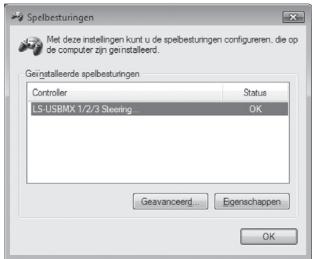
or go to "Start" - "Control Panel" and double click on "Game Controllers"

Click "Properties" to test or configure the Steering Wheel Wireless.
Vibration function (Rumble)
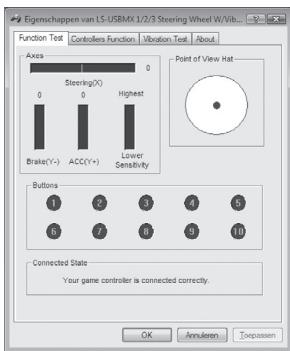
On the Steering Wheel there is a "Rumble" button to switch the vibration function on and off. This function only works when the drivers are installed correctly.
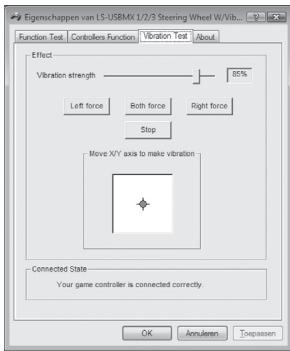
Vibration test
The Analog button switches the analog mode on and off. When the light is lit the analog mode is on.
The paddles behind the steering wheel always have the same function as the gas and brake pedal.
Warranty
For all Sweex products a warranty period of 3 years applies. We do not give support or warranty on supplied software, rechargeable batteries and batteries. Transaction of warranty only takes place at the sales point where the product is bought.
All brand names and associated rights mentioned in this manual are and stay property of the rightful owner.