
AX1200I 80PLUS PLATINUM - Computer power supply CORSAIR - Free user manual and instructions
Find the device manual for free AX1200I 80PLUS PLATINUM CORSAIR in PDF.



| Product Type | Computer Power Supply |
| Brand | Corsair |
| Model | AX1200i 80PLUS PLATINUM |
| Dimensions (L x W x H) | 200 x 150 x 86 mm |
| Nominal Power | 1200 W |
| Certification | 80 PLUS® Platinum |
| Fan | 140 mm thermically controlled, silent mode at low load |
| Cable Modularity | Fully modular |
| Control Technology | Digital (DSP) with Corsair Link™ |
| 12 V Rail | Single rail, 100.4 A, up to 1204.8 W |
| Overvoltage Protection (OVP) | Yes |
| Overcurrent Protection (OCP) | Yes, configurable (single or multi-rail) |
| Overtemperature Protection (OTP) | Yes |
| Short Circuit Protection (SCP) | Yes |
| ATX 24-pin Connectors | 1 (20+4) |
| EPS/ATX 12 V 8-pin Connectors | 2 (4+4) |
| PCI-E 8-pin (6+2) Connectors | 6 |
| SATA Connectors | 12 (3 cables of 4) |
| Peripheral 4-pin Connectors | 12 (3 cables of 4) |
| Floppy Drive Connector | 2 (cable with 2 connectors) |
| Self-Test Feature | Yes, switch with indicator light |
| Corsair Link™ Compatibility | Yes, real-time monitoring and control |
| MTBF | 100,000 hours |
| Approvals | FCC, CE, UL, TUV, CB, CCC, etc. |
Frequently Asked Questions - AX1200I 80PLUS PLATINUM CORSAIR
User questions about AX1200I 80PLUS PLATINUM CORSAIR
0 question about this device. Answer the ones you know or ask your own.
Ask a new question about this device
Download the instructions for your Computer power supply in PDF format for free! Find your manual AX1200I 80PLUS PLATINUM - CORSAIR and take your electronic device back in hand. On this page are published all the documents necessary for the use of your device. AX1200I 80PLUS PLATINUM by CORSAIR.
USER MANUAL AX1200I 80PLUS PLATINUM CORSAIR
DIGITAL ATX POWER SUPPLY
MANUAL • MANUEL • MANUALE
MANUELLE • MANUAL DE • РУКОВОДСТВО

CORSAIR®
corsair.com
English 4
Français 11
Deutsch 19
Italiano 27
Español 34
Россию 41
Congratulations on the purchase of your new Corsair Professional Series AX1200i digital ATX power supply.
The Corsair AX1200i is a groundbreaking new design. It is a departure from traditional PSU designs and is packed with features that will make building your ultimate dream PC even more enjoyable. The AX1200i introduces some new and exciting technologies, so please read below for more information.
Product Features
Digitally Controlled Power
Unlike traditional power supply designs, the Corsair AX1200i uses a Digital Signal Processor (DSP) for optimized efficiency and tighter voltage regulation, which improves overall system stability and component reliability.
Quiet, Efficient Operation
Upgrading to digital provides increased efficiency. The AX1200i is certified 80 PLUS® Platinum, which results in lower heat generation and a quieter fan profile. The AX1200i is so efficient that the 140mm fan doesn't even spin at low loads for completely noiseless power delivery.
Corsair Link™
The built-in Corsair Link™ functionality shows you how your AX1200i is performing at any given moment and lets you quickly tweak its performance. Server-inspired diagnostic tools monitor real-time efficiency, power usage, configurable over-current protection points and fan profiles.
Brilliant Design
The fully modular cables make it easy to install and the self-test switch lets you quickly determine if the AX1200i is functioning normally before you even attach cables to your motherboard.
Technology and Benefits
- Digital Control
The AX1200i Digital ATX Power Supply features an advanced control architecture to produce outstanding dynamic response. It features a true digital engine that provides superior on-the-fly performance optimization across the full operating range while maintaining stable operation.
• 80 PLUS® Platinum Efficiency
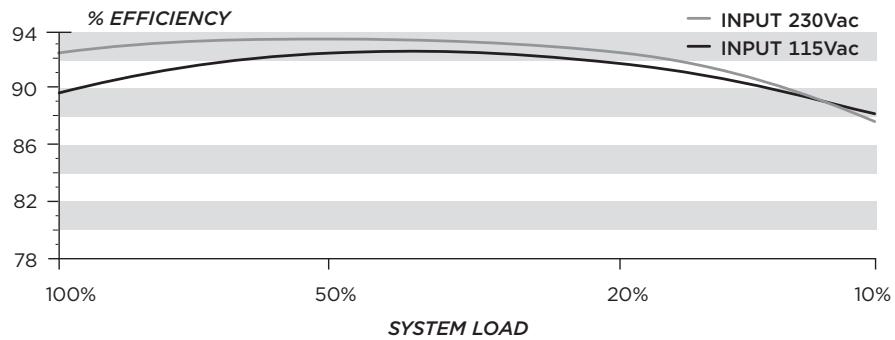
The sophisticated electrical design, incorporating advanced hybrid digital control and state of the art magnetics delivers extremely high energy efficiency (92% and above).
• User-Selectable Over-Current Protection
The AX1200i has a massive 100.4 Amp (1204.8 Watt) single +12V rail, which makes it the ideal power supply for ultra-high end multi-GPU systems based around power-hungry CPUs. If you prefer multi-rail architecture, the PCI-E Over-Current Protection trip points can be configured individually via the Corsair Link™ Dashboard software.
• Outstanding DC Voltage Regulation
Due to its digital design, the AX1200i delivers exceptionally stable power over the whole load range and automatically compensates for DC output cable voltage drop,
ensuring tight DC output voltage regulation without the ripple/noise, transient response, and converter stability drawbacks associated with conventional power supply designs.
• Low DC Output Voltage Ripple and Noise
The AX1200i features individual DC-DC regulation for 3.3V, 5V and 12V rails, and secondary side synchronous rectification, utilizing MOSFETs that have lower losses than the conventional output rectification schemes. An advanced 4-layer modular connector board PCB ensures a better ground return plane, lower resistance and low voltage drops. This, combined with circuit trace optimization and advanced filtering techniques, helps to minimize ripple and noise.
• Reduced Component Count and Increased Reliability
The digital control of the AX1200i eliminates many external components required by more conventional PSU solutions to offer an extremely small, high density, high reliability solution that allows incremental space to add extra features - like real time parameter monitoring and power supply control.
User Friendly Features
• Fully Modular Cable System
The fully-modular, low-profile cable system provides maximum flexibility when building or upgrading your PC, and maximum airflow through your chassis. This allows you to utilize only the cables that you need, reducing cable clutter and maximizing the cooling performance of your PC.
• Ultra Low Noise Design
The AX1200i utilizes a low-noise, thermally-controlled 140mm fan, and employs sophisticated techniques to enhance cooling performance and reduce noise. This includes a specially designed PCB that channels airflow to reduce back-pressure and maximize the cooling effect of the airflow. The fan remains off under light load conditions and can be controlled via a graphical user interface.
• Self Test Switch
The power supply can be validated prior to system installation via a self test switch, which confirms all DC output voltage rails are present and the fan is functional.
Safety and Protection
• Over-Voltage Protection (OVP)
Over-voltage protection for the 12V, 5V and 3.3V DC outputs is required to comply with the ATX specification. OVP shuts down the PSU in the event that the DC outputs exceed a set level, determined by the PSU manufacturer. The minimum voltage levels required for compliance are 13.4V for the +12V rail(s), 5.74V for the +5V rail and 3.76V for the 3.3V rail.
• Over-Current Protection (OCP)
The AX1200i features OCP on the 3.3V, 5V and 12V rails. OCP ensures that the output of the DC voltage rails remains within safe operating limits. The AX1200i can be configured as a single rail or multi-rail OCP solution.
• Over-Temperature Protection (OTP)
OTP ensures that the PSU will shut down when the internal temperature reaches a set point. This is usually as a result of internal current overloading or a fan failure.
• Short-Circuit Protection (SCP)
A short-circuit is defined as any output impedance of less than 0.1 ohms. Amongst other things, SCP ensures that the PSU shuts down should the 3.3V, 5V and 12V rails short to any other rail, or to ground. It also ensures that no damage should occur to the unit, or your PC's components, in the event of a short.
Power Supply Specifications
• Dimensions: 150mm(W) x 86mm(H) x 200mm(L)
• MTBF: 100,000 Hours
Package Contents
• Corsair Professional Series power supply unit
- Modular cable set
- User Manual
- AC power cord
- Cable ties
- Mounting screws
- Corsair case badge
- Carrying bag
• Corsair Link™ Digital interface cable
• Corsair Link™ USB Dongle

natural_image
Pure mechanical shaft diagram without any text, numbers, or symbolsCorsair Link™ Digital interface cable

Corsair Cable Configuration
| AX1200i | |||
| Qty | Length | Connector/Cable | |
| 1 | 610mm ± 10mm | 1 | ATX Cable 24-PIN (20+4) |
| 2 | 650mm ± 10mm | 1 | EPS/ATX12V Cable 8-PIN (4+4) |
| 6 | 600mm ± 10mm | 1 | PCI-E Cable 8PIN (6+2) |
| 3 | 700mm ± 10mm | 4 | SATA Cable (4 SATA) |
| 1 | 850mm ± 10mm | 4 | SATA Cable (4 SATA) |
| 3 | 750mm ± 10mm | 4 | Peripheral Cable (4 PIN) |
| 2 | 101mm ± 5mm | 1 | Floppy Drive Cable (4 PIN) |
| 1 | 800mm ± 10mm | 1 | PMBUS Cable (4PIN) |
Power Supply Efficiency
line
| SYSTEM LOAD | INPUT 230Vac | INPUT 115Vac | | ----------- | ------------ | ------------ | | 100% | 93.5 | 90.0 | | 50% | 94.0 | 93.5 | | 20% | 93.5 | 92.5 | | 10% | 89.0 | 88.5 |Power Supply Fan Noise Curve
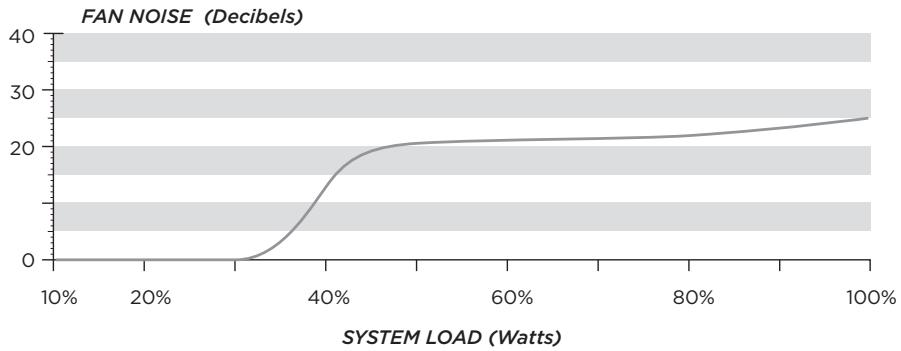
line
| SYSTEM LOAD (Watts) | FAN NOISE (Decibels) | | ------------------- | -------------------- | | 10% | 0 | | 20% | 0 | | 30% | 0 | | 40% | 15 | | 50% | 20 | | 60% | 21 | | 70% | 21.5 | | 80% | 22 | | 90% | 23 | | 100% | 25 |Using the Self Test Feature
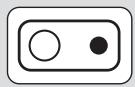
SELF TEST
In order to use the self-test feature, please follow the steps below.
- Connect the PSU to an AC power source, and flip the power indicator on the back of the PSU to the On position (I).
- Press the self-test button on the modular connector side of the PSU.
- If the button lights up green and the fan spins for a moment, you're good to go!
- If the button lights up red or does not light up at all, please contact Corsair customer service for further technical support.
Installing your New AX1200i
Step A: Removing your existing power supply
If you are building a new system, skip to Step B.
- Disconnect the AC power cord from your wall outlet or UPS and from the existing power supply.
- Disconnect all the power cables from your video card, motherboard and all other peripherals.
- Follow the directions in your chassis manual and uninstall your existing power supply.
- Proceed to Step B.
Step B: Installing the Corsair Gaming Series power supply
- Make sure the power supply's AC power cable is not connected.
- Follow the directions in your chassis manual and install the power supply with the screws provided.
- The main 24-pin power cable has a detachable 4-pin mechanism in order to support either a 24-pin or a 20-pin socket on the motherboard.
a. If your motherboard has a 24-pin socket, you may connect the 24-pin main power cable from the power supply directly to your motherboard.
b. If your motherboard has a 20-pin socket, you must detach the four-pin cable from the 24-pin connector, and then plug the 20-pin cable onto your motherboard without connecting the four-pin connector. - Connect the eight-pin +12V (EPS12V) cable to the motherboard..
a. If your motherboard has an eight-pin +12V socket, connect the eight-pin cable directly to your motherboard.
b. If your motherboard has a four-pin socket, detach the four-pin from the eight-pin cable, and then plug this four-pin cable directly to your motherboard.
WARNING: The detachable four-pin from the 24-pin main connector is not a "P4" or "+12V" connector. Serious damage can be caused if you use it in place of a "P4" or "+12V" connector.
- Connect the peripheral cables, PCI-Express cables, and SATA cables.
a. Connect the peripherals cables to your hard drive and CD-ROM/DVD-ROM power sockets.
b. Connect the SATA cables to your SATA SSD or hard drive's power sockets.
c. Connect the PCI-Express cables to the power sockets of your PCI-Express video cards if required.
d. Connect the peripheral cables to any peripherals requiring a small 4-pin connector.
e. Make sure all the cables are tightly connected.
- Connect the AC power cord to the power supply and turn it on by pushing the switch to the ON position (marked with "I").
Using Corsair Link™ with your New AX1200i
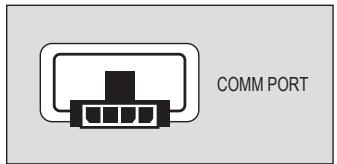
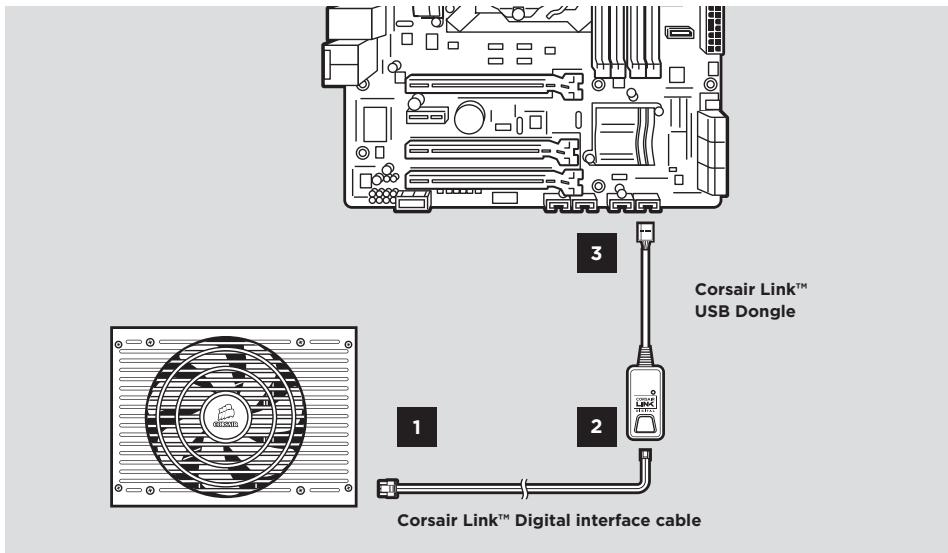
Before you are able to monitor your new PSU with Corsair Link™ you must connect the power supply to an internal USB header using the Digital Interface Cable and USB Dongle.
- Plug one end of the Digital Interface Cable into the COMM PORT of the AX1200i, seen here:
- Plug the other end of this cable into the USB Dongle, as shown below.
- Plug the other end of the USB Dongle into a standard USB header on your motherboard. (Check your motherboard manual for locations and compatibility).
- Download the Corsair Link Dashboard software from www.corsair.com and follow the instructions.
Important Safety Information CAUTION ELECTRIC SHOCK HAZARD!

- Install in accordance with all manufacturer instructions and safety warnings. Failure to do so may result in damage to your power supply or system, and may cause serious injury or death.
- High voltages are present in the power supply. Do not open the power supply case or attempt to repair the power supply; there are no user-serviceable components.
- This product is designed for indoor use only.
- Do not use the power supply near water, or in high temperature or high humidity environments.
- Do not install near any heat sources such as radiators, heat registers, stoves, or other apparatus that produce heat.
- Do not insert any objects into the open ventilation or fan grill area of the power supply.
- Do not modify the cables and/or connectors included with this power supply.
- If this power supply uses modular cables, use only manufacturer supplied cables. Other cables might not be compatible and could cause serious damage to your system and power supply.
- The 24-pin main power connector has a detachable 4-pin connector. This 4-pin connector is not a P4 or ATX 12V connector. Do not force this cable in the P4 or ATX +12V socket on the motherboard.
- Failure to comply with any manufacturer instructions and/or any of these safety instructions will immediately void all warranties and guarantees.
Safety and Agency Approvals
| FCC | FCC Rules Part 15, Class B |
| ICES | ICES-003 |
| CE | EN 55022:2006 + A1:2007, Class BEN61000-3-2:2006+A1:2009+A2:2009 Class AEN61000-3-3: 2008EN55024:1998 + A1:2001 + A2:2003IEC61000-4-2IEC61000-4-3IEC61000-4-4IEC61000-4-5IEC61000-4-6IEC61000-4-11 |
| UL / CUL | UL 60950-1 |
| CSA | C22.2 NO. 60950-1 |
| C-Tick/RCM | AS/NZS CISPR 22:2009AS/NZS 4417 |
| TUV | EN 60950-1 |
| CB | IEC 60950-1 |
| CCC | GB4943GB9254GB17625.1 |
| BSMI | CNS14336CNS13438 |
| GOST | R IEC 60950-1-2005R 51318.22-99R 51318.24-99R 51317.3.2-2006R 51317.3.3-99 |
| IRAM | IEC 60950-1 |
| KC Mark | K 60950-1(2006-12), K00022(2009-12), K00024(2009-12) |
| ROHS | 2002/95/EC, Restriction of Hazardous Substances Directive |
| WEEE | 2002/96/EC, Waste Electrical and Electronic Equipment Directive |
| ROHS (China) | China Order No.39, Administration on the Control of Pollution Caused By Electronic Information Products |
The sophisticated electrical design, incorporating advanced hybrid digital control and state of the art magnetics delivers extremely high energy efficiency (92% and above).
line
| SYSTEMLAST (Watt) | LÜFTERS (db) | | ----------------- | ------------ | | 10% | 0 | | 20% | 0 | | 30% | 0 | | 40% | 15 | | 50% | 20 | | 60% | 21 | | 70% | 22 | | 80% | 23 | | 90% | 24 | | 100% | 25 |natural_image
Pure electrical circuit lines without any symbolsnatural_image
Pure electrical circuit lines without any symbolsCable de interfaz digital Corsair Link™

natural_image
Pure electrical circuit lines without any symbolsEMAIL: support@corsair.com
FACEBOOK: facebook.com/corsair
BLOG: blog.corsair.com

FORUM: forum.corsair.com
TWITTER: twitter.com/corsairmemory
PSU PAGE: corsair.com/powersupplyunits
USA and CANADA: (800) 205-7657
INTERNATIONAL: (510) 657-8747
FAX: (510) 657-8748

CORSAIR®
46221 Landing Parkway • Fremont • California • 94538 • USA
- DIGITAL ATX POWER SUPPLY
- CORSAIR®
- Product Features
- Digitally Controlled Power
- Quiet, Efficient Operation
- Corsair Link™
- Brilliant Design
- Technology and Benefits
- - Digital Control
- • 80 PLUS® Platinum Efficiency
- • User-Selectable Over-Current Protection
- • Outstanding DC Voltage Regulation
- • Low DC Output Voltage Ripple and Noise
- • Reduced Component Count and Increased Reliability
- User Friendly Features
- • Fully Modular Cable System
- • Ultra Low Noise Design
- • Self Test Switch
- Safety and Protection
- • Over-Voltage Protection (OVP)
- • Over-Current Protection (OCP)
- • Over-Temperature Protection (OTP)
- • Short-Circuit Protection (SCP)
- Power Supply Specifications
- Package Contents
- Using the Self Test Feature
- Installing your New AX1200i
- Step A: Removing your existing power supply
- Step B: Installing the Corsair Gaming Series power supply
- Using Corsair Link™ with your New AX1200i
- Important Safety Information CAUTION ELECTRIC SHOCK HAZARD!
Brand : CORSAIR
Model : AX1200I 80PLUS PLATINUM
Category : Computer power supply