
PBN3320X - Built-in oven PROGRESS - Free user manual and instructions
Find the device manual for free PBN3320X PROGRESS in PDF.



| Product type | Built-in oven |
| Brand | PROGRESS |
| Model | PBN3320X |
| Capacity | 53 liters |
| Built-in dimensions (H x W x D) | 335 x 395 x 400 mm |
| Power supply | 230 V, 50 Hz, 1875 W |
| Convection power | 1825 W |
| Top/bottom heat power | 1800 W |
| Grill power | 1650 W |
| Fan grill power | 1675 W |
| Bottom heat power | 1000 W |
| Interior lighting | 25 W, E14 bulb, resistant to 300°C |
| Cooking functions | Convection, top/bottom heat, bottom heat, grill, fan grill, defrost |
| Electronic timer | Yes, with duration and end of cooking programming |
| Number of levels | 4 |
| Control type | Retractable knobs (push-pull) |
| Door | Removable, double glazing |
| Safety | Safety thermostat, cooling fan |
| Cleaning | Folding heating grid for ceiling cleaning |
| Included accessories | Baking tray, drip pan, grid |
| Customer service | Original spare parts available, repairs by approved service |
Frequently Asked Questions - PBN3320X PROGRESS
User questions about PBN3320X PROGRESS
0 question about this device. Answer the ones you know or ask your own.
Ask a new question about this device
Download the instructions for your Built-in oven in PDF format for free! Find your manual PBN3320X - PROGRESS and take your electronic device back in hand. On this page are published all the documents necessary for the use of your device. PBN3320X by PROGRESS.
USER MANUAL PBN3320X PROGRESS
natural_image
Illustration of a finger pressing down on a computer monitor with an arrow indicating rotation (no text or symbols)

natural_image
Line drawing of a hand holding a tool against a wall (no text or symbols)

natural_image
Illustration of a hand using a tool to adjust or install a mechanical component, with an arrow indicating rotation (no text or symbols present)
natural_image
Line drawing of a hand using a tool to adjust or install a mechanical component (no text or symbols present)


natural_image
Diagram showing two views of a mechanical component with arrows indicating direction (no text or symbols present)natural_image
Diagram of a hand holding a mechanical component with arrows indicating motion (no text or symbols)
natural_image
Line drawing of a hand holding a coiled track with directional arrows indicating motion (no text or symbols)natural_image
Diagram of a refrigerator interior showing airflow direction and component placement (no text or symbols)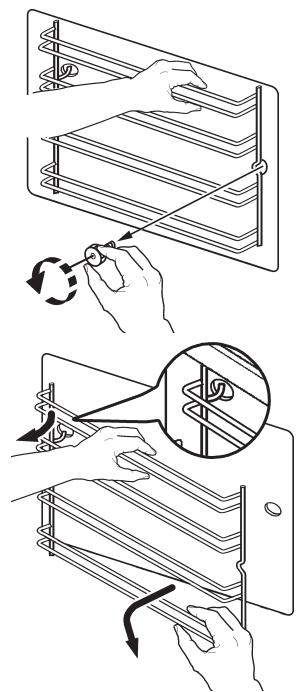
natural_image
Illustration showing two steps of a mechanical assembly: one with hand manipulation and rotation, the other with magnified detail (no text or symbols)natural_image
Pure electrical connector diagram without any text or symbolsnatural_image
Diagram of a rectangular device with internal compartments and directional arrows indicating flow or movement (no text or symbols)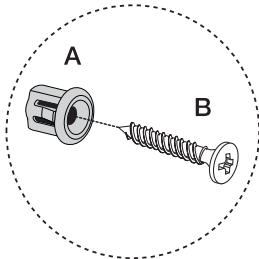
Klantenservice
natural_image
Line drawing of an oven with a fan inside, showing ventilation slots and a door (no text or symbols)Contents
Warnings and important safety instructions 30
Description of the appliance 32
Operation 33
Before using for the first time.... 34
Electronic timer 35
Using the oven 40
Cooking tables 44
Cleaning and maintenance 46
Troubleshooting 51
Technical data 52
Instructions for the installer 53
Installation instructions 54
Customer service 55
Applicable Directives

Safety information

Step-by-step instructions

Practical tips

Environmental information
This appliance conforms to the following EEC Directives:
- 2006/95 (Low-voltage Directive);
- 89/336 (EMC Directive);
- 93/68 (General Directive);
and subsequent amendments.
MANUFACTURER:
ELECTROLUX HOME PRODUCTS ITALY S.p.A.
Viale Bologna, 298
47100 FORLÏ (Italy)

Warnings and important safety instructions
Always keep these user instructions with the appliance. If the appliance is given or sold to a third party, or if you move house and leave the appliance in a former residence, it is extremely important that the new owner is provided with these user instructions.
These warnings are provided for the safety of the users and co-residents. So read them carefully before connecting and/or using the appliance.
Installation
• Installation must be undertaken by a qualified engineer in compliance with the current regulations. The individual steps for installing the appliance are described under the instructions for the installer.
• Installation and connection of the appliance should only be carried out by a qualified engineer who will be aware of the currently applicable Directives.
- Any modifications to the power supply, which may be necessary to install the appliance, must also be carried out by a qualified engineer.
- Depending on the model, this oven was designed to operate as an individual appliance or in combination with an electric hob and must be connected to a single-phase 230V power supply.
Operation
- This oven is designed for food preparation; never use it for any other purpose.
- Use the oven with care. Owing to the extreme heat generated by the heating elements, the oven shelf and other parts become very hot.
- If, for any reason, aluminium foil is to be used in food preparation, it should never come into direct contact with the floor of the oven.
- When cleaning the oven, proceed with care: never spray anything onto the grease filter (if fitted), the heating elements or the thermostat sensor.
-
It is dangerous to modify this appliance or any of its features.
-
During baking, roasting and grilling the oven window and other parts become very hot. Children should therefore be kept away from the appliance. When connecting other electrical appliance to sockets near the oven, ensure that the cables do not come into contact with hot cooking surfaces or become jammed in the hot oven door.
• Always use oven gloves to remove fire-resistant hot dishes and pans from the oven. - Regular cleaning prevents deterioration of the surface materials.
- Before cleaning the oven, either switch the power off or pull out the plug.
- Ensure that the oven is switched to the "OFF" position when not in use.
- The appliance should never be cleaned using a superheated steam or steam jet cleaner.
- Never use abrasives or sharp metal scrapers. You might scratch the door panels and cause the glass to shatter.
People safety
- This appliance is intended for use by adults. It is dangerous to allow children to use or play with it.
- Keep children away from the oven while it is in use. Even when you have switched the oven off, the door remains hot for some time.
- This appliance is not intended for use by children or other persons whose physical, sensory or mental capabilities or lack of experience and knowledge prevents
them from using the appliance safely without supervision or instruction by a responsible person to ensure that they can use the appliance safely.
Disposal

Packaging material
- The packaging materials are environmentally friendly and recyclable. The plastic parts are coded, e. g. >PE>, >PS< etc. Dispose of the packaging materials according to their code in the collection bins provided at communal waste disposal centres.

Old appliances
- The symbol / on the product or on its packaging indicates that this product may not be treated as household waste. Instead it should be taken to the appropriate collection point for the recycling of electrical and electronic equipment. By ensuring this product is disposed of correctly, you will help prevent potential negative consequences for the environment and human health, which could otherwise be caused by inappropriate waste handling of this product. For more detailed information about recycling of this product, please contact your local council, your household waste disposal service or the shop where you purchased the product.

Warning: Before disposing of an old appliance, ensure it no longer represents any danger by making it unusable.
To do so, disconnect from the mains and remove the power cable from the appliance.
Customer service
- The appliance must only be serviced and/or repaired by our authorised service centres. Only original replacement parts may be used.
- Never attempt to repair the appliance yourself in the event of a malfunction or damage. Repairs carried out by untrained persons may cause damage or injury.
Description of the appliance

- Control panel
- Oven regulator
- Electronic timer
- Temperature regulator
- Mains on indicator
-
Temperature regulator indicator
-
Cooling fan ventilation slots
- Grill
- Interior light
- Oven fan
- Rating plate
Accessories
natural_image
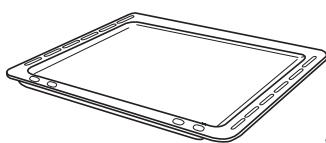
Line drawing of a tablet device with no text or symbolsBaking tray

natural_image
Line drawing of a tablet device with a star-shaped screen on the screen (no text or symbols)Dripping pan

natural_image
Pure technical line drawing of a rectangular grid pattern without any text, numbers, or symbolsOven shelf
Retractable knobs
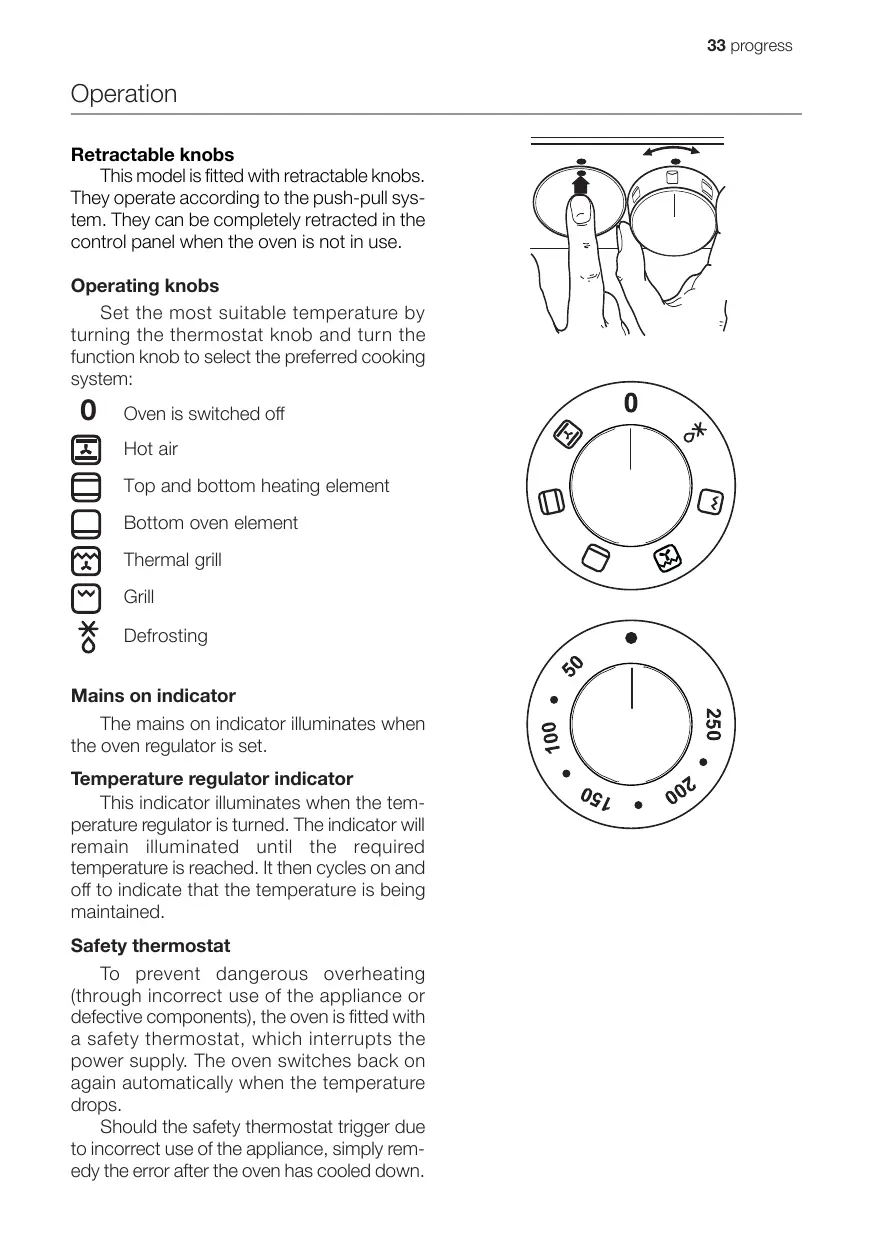
This model is fitted with retractable knobs. They operate according to the push-pull system. They can be completely retracted in the control panel when the oven is not in use.
Operating knobs
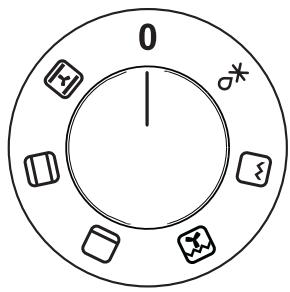
Set the most suitable temperature by turning the thermostat knob and turn the function knob to select the preferred cooking system:

Oven is switched off

Hot air

Top and bottom heating element

Bottom oven element

Thermal grill

Grill

Defrosting
Mains on indicator
The mains on indicator illuminates when the oven regulator is set.
Temperature regulator indicator
This indicator illuminates when the temperature regulator is turned. The indicator will remain illuminated until the required temperature is reached. It then cycles on and off to indicate that the temperature is being maintained.
Safety thermostat
To prevent dangerous overheating (through incorrect use of the appliance or defective components), the oven is fitted with a safety thermostat, which interrupts the power supply. The oven switches back on again automatically when the temperature drops.
Should the safety thermostat trigger due to incorrect use of the appliance, simply remedy the error after the oven has cooled down.


However, if the thermostat has been triggered by a faulty component, please contact customer services.
Cooling fan
The fan cools the oven and control panel. The fan switches on automatically after a few minutes of cooking. Hot air is extracted through the vents near the oven door handle. When the oven has been switched off, the fan may continue to run to cool the operating elements. This is absolutely normal.

The action of the cooling fan will depend on how long the oven has been used and at what temperature. It may not cut in at all at lower temperature settings or continue to run if the oven has only been used for a short time.
Before using for the first time

Remove all packaging materials in and outside the oven before use.
Before using for the first time, the empty oven should be heated up.
During this time, an unpleasant odour may be emitted. This is absolutely normal. It is caused by manufacturing residues.

The oven will only function when the clock has been set to the time of day.
Ensure that the kitchen is well ventilated.

-
Store the clock time in the electronic programme memory (see the chapter entitled "Electronic timer")
-
Turn the oven regulator to hot air

-
Turn the temperature regulator to 250^ C.
-
Open a window for ventilation.
-
Allow the oven to run empty for approximately 45 minutes.
Repeat the procedure for top and bottom heating ☐ and thermal grill 🙏 for about 5-10 minutes.

Then let the oven cool down. Now dampen a soft cloth with warm water and mild washing-up liquid and clean the oven cavity.

Before using for the first time, carefully wash the oven accessories as well.
natural_image
Line drawing of a hand holding a curved object against a wall (no text or symbols)
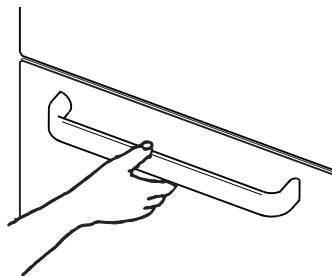
Always grasp the handle in the middle to open the door.

- Function selector button ↻
- Button “_”
- Button “+”
- Display
- “Cooking time” pilot lamp |→|
- “End of cooking time” pilot lamp →
- “Minute minder” pilot lamp ✉
- “Clock” pilot lamp ⏻
The oven will only work when the clock has been set.
However, the oven can also be operated without any programme having been selected.
In the event of a power failure, all settings (clock time, programme setting or programme in operation) will be cancelled. When the power supply is restored again, the numbers in the display flash. If this happens, the clock and timer must be re-set.
Setting the clock ⏻
When the power is switched on or if a power failure occurs, the "Clock" pilot lamp will flash ⏻ in the display.
To set the clock:
- Press the button “+” or “—”.
- Then wait 5 seconds: the "Clock" pilot lamp ⏻ will go out and the display will show the set time. The appliance is now ready for use.
To reset the correct clock time:
- Press the button 📋 repeatedly to select the "Clock" function. The relevant pilot lamp will start flashing. Then proceed as described above.
The clock time can only be reset if no automatic function (cooking time || or end of cooking time | ) has been set.

Cooking time |→|
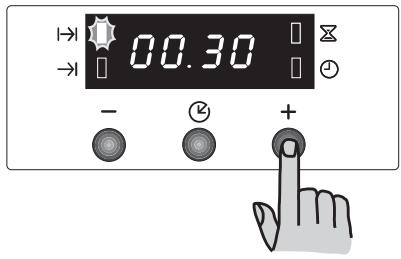
When this function is selected, the oven switches off automatically at the end of a programmed cooking time. Place the food in the oven, select a cooking function and set the cooking temperature required. Press the button 2 repeatedly to select the “Cooking time” function. The relevant pilot lamp will start flashing.
Then, proceed as follows:
To programme the cooking time:
- Press the “+” button or “—”.
- After you have set the cooking time, wait 5 seconds: the "Cooking time" pilot lamp |→| will light up and the display will revert to the clock time.
- When the set cooking time has expired, the oven automatically switches off. An acoustic signal sounds and the pilot lamp flashes. Turn the oven and temperature regulators to zero.
Cancel the acoustic signal by pressing any button.
NOTE: When the acoustic signal is switched off, the oven reverts to manual operation. If the oven and temperature regulators are not set to zero, the oven will re-heat.
To cancel a programmed cooking time:
- Press the button 📋 repeatedly to select the "Cooking time" function. The relevant pilot lamp |→| will flash and show the remaining cooking time.
- Press the “—” button until “0:00” appears in the display. After 5 seconds the pilot lamp will go out and the display will revert to the clock time.

End of cooking time →
With this function, you can set the oven to switch off automatically when a programmed end of cooking time is reached. Place the food in the oven, select a cooking function and set the required cooking temperature.
Press the button ⏻ repeatedly to select the “End of cooking” function. The relevant pilot lamp →| will start flashing.
Then, proceed as follows:
To set the end of cooking time:
- Press the “+” or “—” button.
- After you have set the end of cooking time, wait 5 seconds: the "End of cooking time" pilot lamp →| will light up and the display will revert to the clock time.
- When the set time has expired, the oven automatically switches off. An acoustic signal sounds and the pilot lamp flashes. Turn the oven and temperature regulators to zero.
Cancel the acoustic signal by pressing any button.
NOTE: When the acoustic signal is switched off, the oven reverts to manual operation. If the oven and temperature regulators are not set to zero, the oven will re-heat.
To cancel the programmed end of cooking time:
- Press the button 📋 repeatedly to select the “End of cooking time” function. The relevant pilot lamp →| will flash and the display will show the programmed end of cooking time.
- Press the “—” button until the clock time appears in the display.
An acoustic signal sounds and the pilot lamp goes out.

Combination of “Cooking time” |→| and “End of cooking time” →|
The “Cooking time” and “End of cooking time” functions can be used at the same time so that the oven automatically switches on and off at a later time.
- Using the "Cooking time" function || set the cooking time (as described in the relevant chapter). Then, press the button ②: the display will show the programmed setting.
- Using the “End of cooking time” function → set the end of cooking time (as described in the relevant chapter).
The relevant pilot lamps will light up and the display will show the clock time. The oven will switch on and off according to the set programmes.
Minute minder
The minute minder signal beeps at the end of a set time; but the oven remains switched on ready for use.
To set the minute minder:
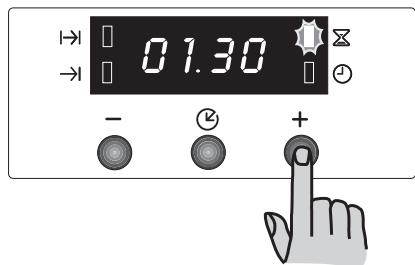
- Press the button ⏻ repeatedly to select the “Minute minder” function. The relevant pilot lamp ✗ will start flashing.
- Then, press the “+” button or “—” button (maximum time: 2 hours, 30 minutes).
- After you have set the minute minder, wait 5 seconds: the "Minute minder" pilot lamp ✕ lights up.
- When the end of the set time is reached, the display begins to flash and an acoustic signal sounds. To cancel the acoustic signal, press any button.
To cancel the minute minder:
- Press the button 📊 repeatedly to select the “Minute minder” function. The relevant pilot lamp ✕ will flash and the display will show the remaining time.
- Press the “____” button until “0:00” appears in the display. After 5 seconds the pilot lamp will go out and the display will revert to the clock.

To switch off the display
- Press the two programming buttons at the same time and hold them down for about 5 seconds. The display will switch off.
- To switch on the display again, press any button.
The display can be switched off only if no other functions have been set.


Important! - Do not line the oven with aluminium foil and do not place a baking tray etc. on the oven floor as the oven enamel may be damaged by the build up of heat. Always place dishes and pans, heat-resistant dishes and pans and aluminium sheets on the shelf inserted in one of the shelf runners. As food is heated, steam is released as in a kettle. When the steam comes into contact with the glass in the oven door, it condenses and creates water droplets.
To reduce condensation, always preheat the empty oven for 10 minutes.
We recommend you wipe the water droplets away after every cooking process.

The oven door must be closed during cooking.
Open the oven door with care. Never let the oven door "fall open", but use the door handle until the door is completely opened.

The oven has four shelf levels.
The shelf positions are counted from the floor of the oven upwards, as shown in the diagram.
It is essential that the shelves are inserted properly (see diagram).
Never put dishes and pans directly on the oven floor.

Top and bottom heating element

- Turn the oven regulator to the required function ☐.
- Turn the temperature regulator to the required temperature.
- Heat circulates best around the middle shelf level. If foods should be browned underneath, simply select a lower shelf level. If the food is to be browned on the top, choose a higher shelf level.
- The material and finish of the baking tray and the dishes used will affect the degree of base browning. The bottom of dishes cooked in enamelled, dark, heavy and uncoated tins and cookware will brown more than those in glass, shiny aluminium or polished steel containers as these reflect the heat and therefore permit only minimum browning on the underside.
- Place dishes in the middle shelf position to get even browning.
- Always use baking trays of adequate size so that no liquids can leak on to the oven floor. This will also save on cleaning.
- Never put dishes, tins or trays directly on to the oven floor as this becomes very hot and damage may occur. On this setting, heat is generated by the upper and lower heating elements. You therefore only require one shelf level for the cooking process. This setting is particularly suitable for dishes which must also be browned underneath, like quiches and pies.
This setting is also excellent for lasagne and other dishes cooked au gratin, which have to be browned on top.
Bottom oven element

- Turn the oven regulator to switch on the oven ☐.
- Turn the temperature regulator to the required temperature.
This function is particularly useful when pastry has to be baked blind. It can also be used for quiches and pies because it guarantees that the pastry base is cooked through.

The temperature regulator LED lights up until the correct temperature has been reached. It then cycles on and off to indicate that the temperature is being maintained.
Hot air

- Turn the oven regulator to switch on the oven 📁.
-
Turn the temperature regulator to the required temperature.
-
The food is cooked by convection, with hot air distributed evenly round the oven interior by a fan in the oven rear wall.
- The heat reaches all oven zones quickly and evenly. This means you can simultaneously bake, roast and stew different foods on several levels. Cooking by convection quickly eliminates moisture; the dry oven air prevents the different flavours and aromas of one dish being transmitted to the others.
- Being able to cook on several levels means that you can simultaneously bake different dishes and up to three types of cake or mini-pizzas for eating or freezing.
- Naturally, you can also use just one shelf in the oven. In this case, you should use the lowest shelf position so that you can keep a closer eye on the baking process.
- The oven is also particularly suitable for sterilising preserves, cooking homemade jams and -drying mushrooms and fruit.
Grilling
- Most foods should be placed on the grid in the grill pan to ensure the best possible air circulation and to ensure that the food is not lying in fat and its own juices. Fish, liver and kidneys can also be laid directly in the grill pan if required.
- The food should be as dry as possible before it is grilled to avoid spitting. Coat lean meat or fish lightly with oil or melted butter so that the grilled food remains moist during cooking.
- Accompanying vegetables like tomatoes and mushrooms can be laid underneath the grid when grilling meat.
- Bread should be toasted on the highest shelf setting.
- The food should be turned from time to time during grilling.
Using the grill
The grill rapidly provides direct heat to the middle section of the grill pan. The grill is ideal for cooking smaller amounts. This also helps to save energy.
- Turn the oven regulator to switch on the oven ⚪.
- Turn the temperature regulator to the required temperature.
- Select the right shelf position for the grid and grill pan, depending on whether the food to be grilled is flat or thick. Then follow the grilling instructions.
The grill element is regulated by the thermostat. During grilling, the grill switches itself on and off at regular intervals to avoid overheating.
Thermal grill

When using the thermal grill, set a maximum temperature of 200^ C.
- Turn the oven regulator to switch on the

- Turn the temperature regulator to the required temperature.
This function offers an alternative method of cooking food items normally cooked on a conventional grill. The grill element and the fan function alternately so that hot air circulates in the oven.
Defrosting

The fan works without heat and circulates the air at room temperature in the cooking chamber.
Make sure that the temperature regulator is set to the OFF position.

Practical tips
Baking:
Most baking is done at a medium temperature (150°C - 200°C). The oven must therefore be preheated for about 10 minutes.
Do not open the oven door before 3/4 of the baking time has expired.
Short-crust pastry is baked in a spring-form tin or on a tray for up to 2/3 of the baking time and then garnished before being fully baked. This further baking time depends on the type and amount of topping or filling. Sponge mixtures must be of slow dropping consistency. Too much liquid would prolong the baking time unnecessarily.
If two baking trays with pastries or biscuits are inserted into the oven at the same time, there must be a gap of one shelf level between the trays.
If two loaded baking trays are inserted in the oven at the same time, the positions of the top and bottom trays must be swapped and turned about 2/3 through the baking time.
Roasting:
Do not roast joints weighing less than 1 kg. Smaller pieces could dry out when roasting. Dark meat that should be well cooked on the outside but remain medium to rare on the inside must be roasted at a higher temperature (200°C - 250°C).
White meat, poultry and fish, on the other hand, require a lower temperature (150°C - 175°C). For shorter cooking times, the ingredients for sauces are added to the roasting tin right at the beginning. Otherwise add them in the last half hour.
You can use a spoon to test whether the meat is cooked: If it makes no indent, the meat is cooked through. Roast beef and fillet of beef, which should remain pink inside, must be roasted at a higher temperature for a shorter time.
If meat is to be cooked directly on the oven shelf, insert the roasting pan in the shelf level below to catch the juices.
Before carving, leave the joint to rest for at least 15 minutes, so that the meat juices do not run out.
To reduce the build up of smoke in the oven, it is recommended to pour a little water in the roasting pan. To prevent condensation forming, add water several times. The plates can be kept warm in the oven at minimum temperature until required for serving.

Important!
Do not line the oven with aluminium foil and do not place baking trays, cookware, etc. on the oven floor, as the heat that builds up will damage the oven enamel.
Cooking times
Cooking times may vary, depending on the composition, ingredients and amount of liquid in the individual dishes.
Make a note of the settings you used during your first cooking and roasting attempt so that you can record your experiences for the next time you want to prepare the same foods.
Based upon your own experiences, you will be able to modify the values given in the tables.
Top and bottom heating element and hot air

Timings do not include pre-heating.
Always preheat the oven for 10 minutes.
| TYPE OF DISH | Top and bottom heating element | Hot air | Cooking time in minutes | NOTE | ||
 | Temp. (°C) |  | Temp. (°C) | |||
| CAKES | ||||||
| Cake mixture | 2 | 170 | 2 (1und3)* | 160 | 45-60 | Cake tin |
| Short-crust pastry | 2 | 170 | 2 (1und3)* | 160 | 20-30 | Cake tin |
| Buttermilk cheesecake | 1 | 175 | 2 | 165 | 60-80 | Cake tin |
| Apple cake | 1 | 170 | 2 (1und3)* | 160 | 90-120 | Cake tin |
| Strudel | 2 | 180 | 2 | 160 | 60-80 | Baking tray |
| Jam tart | 2 | 190 | 2 (1und3)* | 180 | 40-45 | Cake tin |
| Fruit cake | 2 | 170 | 2 | 150 | 60-70 | Cake tin |
| Sponge cake | 1 | 170 | 2 (1und3)* | 165 | 30-40 | Cake tin |
| Stollen | 1 | 150 | 2 | 150 | 120-150 | Cake tin |
| Plum cake | 1 | 175 | 2 | 160 | 50-60 | Bread tin |
| Small cakes | 3 | 170 | 2 | 160 | 20-35 | Baking tray |
| Biscuits | 2 | 160 | 2 (1und3)* | 150 | 20-30 | Baking tray |
| Meringue | 2 | 135 | 2 (1und3)* | 150 | 60-90 | Baking tray |
| Cookies | 2 | 200 | 2 | 190 | 12~20 | Baking tray |
| Pastries Choux pastry | 2 or 3 | 210 | 2 (1und3)* | 170 | 25-35 | on the baking tray |
| Tartlets | 2 | 180 | 2 | 170 | 45-70 | In cake tins |
| BREAD AND PIZZA | ||||||
| White bread | 1 | 195 | 2 | 185 | 60-70 | |
| Rye bread | 1 | 190 | 1 | 180 | 30-45 | Bread tin |
| Rolls | 2 | 200 | 2 (1und3)* | 175 | 25-40 | Baking tray |
| Pizza | 2 | 200 | 2 | 200 | 20-30 | Baking tray |
| FLANS, Soufflés | ||||||
| Pasta flan | 2 | 200 | 2 (1und3)* | 175 | 40-50 | Baking tin |
| Vegetable flan | 2 | 200 | 2 (1und3)* | 175 | 45-60 | Baking tin |
| Quiches | 1 | 210 | 1 | 190 | 30-40 | Baking tin |
| Lasagne | 2 | 200 | 2 | 200 | 25-35 | Baking tin |
| Cannelloni | 2 | 200 | 2 | 200 | 25-35 | Baking tin |
| MEAT | ||||||
| Beef | 2 | 190 | 2 | 175 | 50-70 | Shelf |
| Pork | 2 | 180 | 2 | 175 | 100-130 | Shelf |
| Veal | 2 | 190 | 2 | 175 | 90-120 | Shelf |
| English roast beef, medium rare | 2 | 210 | 2 | 200 | 50-60 | Shelf |
| medium | 2 | 210 | 2 | 200 | 60-70 | Shelf |
| well done | 2 | 210 | 2 | 200 | 70-80 | shelf |
| Shoulder of pork | 2 | 180 | 2 | 170 | 120-150 | with crackling |
| Knuckle of pork | 2 | 180 | 2 | 160 | 100-120 | 2 pieces |
| Lamb | 2 | 190 | 2 | 175 | 110-130 | Leg |
| Chicken | 2 | 190 | 2 | 200 | 70-85 | Whole |
| Turkey | 2 | 180 | 2 | 160 | 210-240 | Whole |
| Duck | 2 | 175 | 2 | 220 | 120-150 | Whole |
| Goose | 2 | 175 | 1 | 160 | 150-200 | Whole |
| Rabbit | 2 | 190 | 2 | 175 | 60-80 | In pieces |
| Hare | 2 | 190 | 2 | 175 | 150-200 | In pieces |
| Pheasant | 2 | 190 | 2 | 175 | 90-120 | Whole |
| Meat loaf | 2 | 180 | 2 | 170 | 150 in total | Bread tin |
| FISH | ||||||
| Trout / sea bream | 2 | 190 | 2 (1und3)* | 175 | 40-55 | 3-4 Fish |
| Tuna / salmon | 2 | 190 | 2 (1und3)* | 175 | 35-60 | 4-6 Filets |
The temperatures given are guidelines. The temperature must be modified as necessary to suit your personal requirements.
(*) If you are cooking several foods at the same time, we recommend that you place them on the levels given in brackets.

Timings do not include pre-heating.
Always preheat the empty oven for 10 minutes.
Grilling
| TYPE OF DISH | Quantity | Grilling | Cooking time in minutes | |||
| Pieces | g | Level | Temp. (°C) | 1st side | 2nd side | |
| Fillet steaks | 4 | 800 | 3 | 250 | 12~15 | 12~14 |
| Beef steak | 4 | 600 | 3 | 250 | 10~12 | 6~8 |
| Grilled sausage | 8 | / | 3 | 250 | 12~15 | 10~12 |
| Pork cutlets | 4 | 600 | 3 | 250 | 12~16 | 12~14 |
| Chicken (in 2 halves) | 2 | 1000 | 3 | 250 | 30~35 | 25~30 |
| Kebabs | 4 | / | 3 | 250 | 10~15 | 10~12 |
| Chicken breast | 4 | 400 | 3 | 250 | 12~15 | 12~14 |
| Hamburgers* | 6 | 600 | 2 | 250 | 20-30 | |
| *Preheat 5'00'' | ||||||
| Fillet of fish | 4 | 400 | 3 | 250 | 12~14 | 10~12 |
| Toasted sandwiches | 4~6 | / | 3 | 250 | 5~7 | / |
| Slices of white bread | 4~6 | / | 3 | 250 | 2~4 | 2~3 |
Thermal grill

When using the thermal grill, set a maximum temperature of 200^ C.
| TYPE OF DISH | quantity (g) | Level [57wx] | Temp. °C | Cooking time in minutes | |
| bottom side | top side | ||||
| Rolled joints (Turkey) | 1000 | 3 | 200 | 30 ~ 40 | 20 ~ 30 |
| Chicken (in 2 halves) | 1000 | 3 | 200 | 25 ~ 30 | 20 ~ 30 |
| Chicken drumsticks | - | 3 | 200 | 15 ~ 20 | 15 ~ 18 |
| Quail | 500 | 3 | 200 | 25 ~ 30 | 20 ~ 25 |
| Vegetables au gratin pieces. Scallops | - | 3 | 200 | 20 ~ 25 | - |
| - | 3 | 200 | 15 ~ 20 | - | |
| Mackerel | - | 3 | 200 | 15 ~ 20 | 10 ~ 15 |
| Fish slices | 800 | 3 | 200 | 12 ~ 15 | 8 ~ 10 |

The temperatures given are guidelines. Temperatures must be modified as necessary to suit your personal requirements.

Before cleaning, switch the oven off and let it cool down.

The appliance must not be cleaned with a superheated steam cleaner or a steam jet cleaner.
Important: Before cleaning the appliance must be disconnected from the mains.
To prolong the service life of your appliance, follow the cleaning procedure below:
- Only perform when the oven has cooled down.
- Clean the enamelled parts with soapy water.
- Do not use abrasive cleaners.
- Dry the stainless steel parts and glass with a soft cloth.
- If there are stubborn stains, use commercially available cleaning agents for stainless steel or warm vinegar.
The oven's enamel is extremely durable and stain-resistant. Nevertheless, hot fruit juices (lemons, plums etc.) can leave dull, rough stains if left on the surface of the enamel. However, such marks in the brightly polished surface of the enamel do not affect the operation of the oven. Clean the oven thoroughly after every use. Dirt is then easy to clean off. It prevents dirt being burnt on.
Detergents
Before using any detergents, always ensure that they are suitable for your oven and recommended by the manufacturer.
Cleaners that contain bleach should not be used as they may dull the surface finishes. Harsh abrasives should also be avoided.
External cleaning
Regularly wipe over the control panel, oven door and door seal using a soft cloth well wrung out in warm water to which a little liquid detergent has been added.
To avoid damage to the oven glass door, never use any of the following:
• Household cleaners and bleaches
- Impregnated cleaning pads that are unsuitable for non-stick coated saucepans.
• Brillo/Ajax pads or steel wool pads
• Chemical oven cleaners or aerosols
- Rust removers
• Stain removers for sinks / wash basins
Clean the outer and inner surfaces of the glass door using warm soapy water. If the inner surface of the glass door is very dirty, use cleaning products such as “Hob Brite”. Do not use paint scrapers to remove soilage.

DO NOT clean the oven door while the glass panels are warm. If this precaution is not observed the glass panels may shatter.

If the glass panel has cracks or deep scratches, the structure of the glass is compromised. The panel must be replaced to avoid any risk of shattering. Contact your local customer services who will be pleased to advise further.
Oven cavity
It is best to clean the enamelled floor of the oven cavity while the oven is still warm.
Wipe the oven with a soft cloth which should be washed in warm, soapy water after every use. The oven must be cleaned thoroughly from time to time. Use a conventional oven cleaner for this.
Oven door
The oven door comprises two glass panels. For easy cleaning, the oven door can be unhinged and the internal panels removed.

Caution: the oven door must be disassembled before cleaning. The oven door may suddenly slam shut if you attempt to remove the inner panels while the oven door is still in position.

To remove the door, proceed as follows:
- Open the door completely.
- Locate the two door hinges.
- Lift the levers on the hinges and fold them forwards.
- Hold the door by the two outside edges and close the door by about 45^ only.
- Pull the door forwards out of its seat.
- Lie the door on a firm surface and protect the surface of the handle with a soft cloth.

- Use the bolts to remove the inner panels.
- Turn both locking screws by 90^ and remove them.
- Carefully lift the top panel slightly and remove the panel which is framed on all 4 sides by an ornamental border.
Clean the oven door with luke-warm water and a soft cloth. Do not use metal pads, metal wool, abrasive pads or acids to clean the oven door as they will damage the special heat-reflective surfaces of the inner panels.
After cleaning the inner panels, re-insert them in the door. Refit the oven door; to do so, repeat the above sequence in reverse. Ensure the panels are the right way round.

Then, proceed as follows:
a) The inner panel with the frame on 4 sides must be inserted so that the printing on the screen is facing to the outside of the oven. You will know the panel is properly in place if, when you touch the visible surface with your fingers, it doesn't feel rough where the printing is.
The inner panel must be inserted in positionas shown in the diagram. After inserting the panel in the oven door, fix in position as described under point 8.

Never clean the oven door when it is warm as the panels might shatter. If you can see scratches or cracks in the glass panel, call your nearest service centre immediately to have the panel replaced.

natural_image
Illustration of a hand turning a mechanical component with an arrow indicating rotation (no text or symbols present)
natural_image
Line drawing of a hand using a tool to adjust or install a mechanical component (no text or symbols present)


natural_image
Diagram showing two views of a mechanical component with arrows indicating direction (no text or symbols present)Models in stainless steel or aluminium:
Clean the oven door and operating panel in stainless steel or aluminium with a damp sponge and then dry carefully with a soft cloth. Never use metal pads, metal wool, acids or abrasives for cleaning because they may scratch the surfaces.
Cleaning the oven door seal
A seal is attached around the opening of the oven.

Regularly check the condition of the seal. Clean the seal if necessary without using any abrasive materials or objects. If you find that the seal is damaged, call your nearest service centre immediately. Do not use the oven until the seal has been changed.
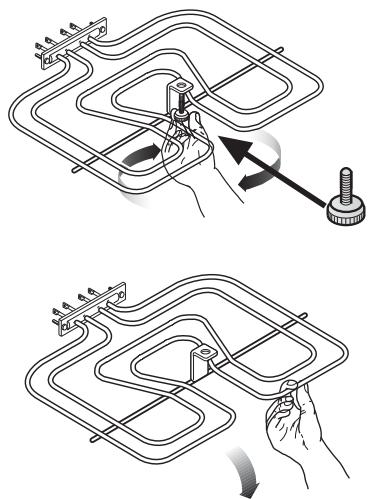
Grill heating element
This model has been fitted with a hinged grill element to enable you to clean the roof of the oven easily.

First ensure that the oven has cooled down and has been disconnected from the mains.
- Loosen the screw that fixes the grill element in position. When carrying out this operation for the first time, we recommend using a screwdriver.
- Carefully lower the grill element so that the oven roof becomes accessible.
- Clean the oven roof with a suitable cleaner and wipe dry before replacing the hinged grill element.
- Gently push the grill element back into place and firmly screw into position with the retaining nut.

Ensure the retaining nut on the grill element is properly tightened so that it does not fall down when in use.
natural_image
Two technical diagrams showing a mechanical assembly with rotating parts and a hand holding a tool (no text or symbols present)Changing the interior light bulb

Separate the appliance from the power supply by switching off the fuse.
If the oven light needs replacing, the new bulb must have the following specifications:
- Electric power: 15 W / 25 W
- Electric voltage: 230 V (50 Hz)
- Heat resistance to 300 °C
- Type of connection: E14
These replacement bulbs can be purchased from your dealer.

To change the oven light:
- First ensure that the oven has cooled down and has been disconnected from the mains.
- Turn the glass cover of the light counterclockwise.
- Remove the used bulb and insert a new one.
- Replace the glass cover and reconnect the oven to the mains.
Oven shelves and shelf supports
Immerse the oven shelves in warm soapy water to clean them and remove stubborn dirt with a sponge thoroughly impregnated with soap.
Rinse well and dry with a soft cloth.
The shelf supports are to be removed for cleaning.

Proceed as follows:
- First ensure that the oven has cooled down and has been disconnected from the mains.
- Remove the front screw, holding the grill support with the other hand.
- Disengage the rear hook and take off the shelf support.
- Re-insert the shelf supports after cleaning; to do so, reverse the above sequence.
Before inserting the oven shelves, ensure that the retaining nuts have been properly tightened.

natural_image
Diagram of a kitchen appliance with a valve and handle, showing internal airflow direction (no text or labels)
natural_image
Illustration showing three steps of a mechanical assembly: wire winding, rotating arm, and connecting rod (no text or symbols)If the appliance is not working properly, please check the following before contacting the Electrolux service centre.
| PROBLEM | SOLUTION |
| ■ The oven does not come on. | ◆ Check whether a cooking function and temperature have been selected or◆ make sure the appliance is properly connected and the plug switch or mains supply to the oven is set to ON. |
| ■ The LED for the oven temperature does not light up. | ◆ Select a temperature using the temperature regulator,or◆ select a function using the oven regulator. |
| ■ The interior oven light does not come on. | ◆ select a function using the oven regulator.or◆ check the light bulb and replace it if necessary (see "Changing the interior light bulb"). |
| ■ The foods take too long to cook, or are cooking too quickly. | ◆ Change the temperature if necessary,or◆ consult the content of this user manual for advice, especially the chapter “Using the oven”. |
| ■ Steam and condensation are collecting on the foods and in the oven cavity. | ◆ Do not leave foods in the oven after the cooking process for longer than 15 - 20 minutes. |
| ■ The oven fan is too noisy. | ◆ Check that shelves and bake-ware are not vibrating in contact with the oven back panel. |
| ■ The electronic timer does not work. | ◆ Check the timer instructions. |
| ■ The display shows “12.00”. | ◆ Set the clock time (see the chapter “Setting the clock”). |
Heat output
| Bottom oven element | 1000 W |
| Top and bottom heating element | 1800 W |
| Grill | 1650 W |
| Hot air | 1825 W |
| Thermal grill | 1675 W |
| Oven light | 25 W |
| Hot air fan motor | 25 W |
| Cooling fan motor | 25 W |
| Total mains rating | 1875 W |
| Operating voltage (50 Hz) | 230 V |
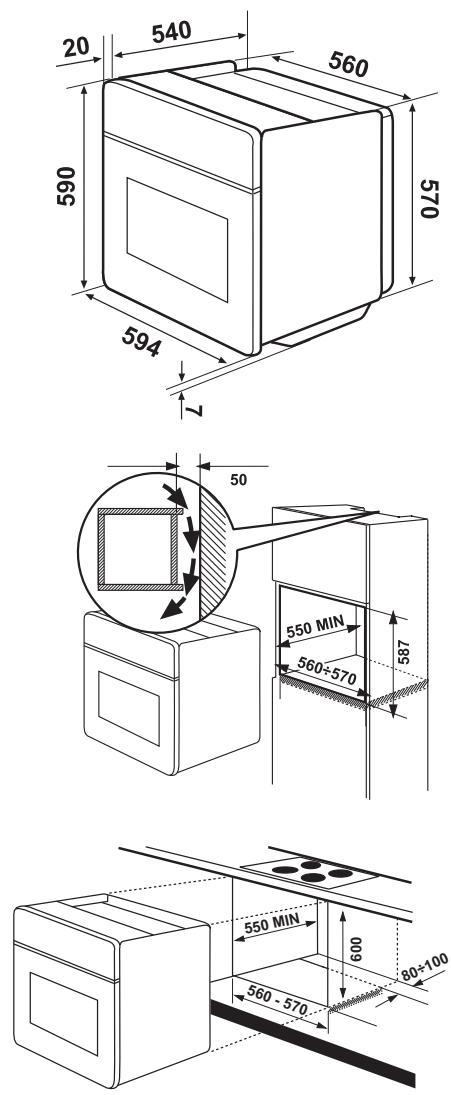
Dimensions of the recess
| Height | lower top edge in the recess | 600 mm 587 mm |
| Width | 560 mm | |
| Depth | 550 mm |
Built-in oven
| Height | 335 mm |
| Width | 395 mm |
| Depth | 400 mm |
| Oven capacity | 53 l |

Installation and connection must be done in compliance with the regulations in force. Any interventions must be carried out when the appliance is switched off. Repairs should only be carried out by authorised service engineers.
The manufacturer disclaims all liability if these safety measures are not observed.
Connecting to the electrical supply
Before connection to the mains, please ensure the following:
- The fuse and the domestic electrical installation must be designed for the max. load of the appliance (see Rating plate).
- The domestic electrical installation must be equipped with a proper earth connection in accordance with the regulations in force.
- The plug socket or multi-pole off switch must be easily accessible once the appliance has been installed.
This appliance is supplied with a connection cable incorporating a standard plug, suitable for the total electric load shown on the rating plate. The plug is to be inserted into a suitable wall socket.
The following connection cables are suitable taking account of the respective nominal profiles required:
H07RN-F, H05RN-F, H05RR-F, H05VV-F, H05V2V2-F (T90), H05BB-F.
If the appliance is connected without a plug, or if the plug is not accessible, a multipole off switch (e.g. fuses, circuit breaker) with a minimum gap of 3 mm between the contacts must be installed between the appliance and mains cable. The switch must not interrupt the earth wire at any point. The yellow-green earth wire must be 2-3 cm longer than all other cables.
The power cable must also be designed so that at no point does it reach 50^ C (above room temperature).
Once connected, the heating elements must be tested by being operated for about 3 minutes.
Terminal block
The oven is to be fitted with an easily accessible terminal block designed for operating with single-phase power supply of 230 V.

natural_image
Pure electrical connector diagram without any text or symbolsTo ensure that the built-in appliance operates properly, the kitchen furniture or the recess in which the appliance is installed, must have compatible dimensions.
In accordance with the regulations in force, all parts which ensure the shock protection of live and insulated parts must be fastened in such a way that they cannot be undone without tools.
These also include the fixing of any end walls at the beginning or end of a line of built-in units.
Building in the appliance should itself ensure shock protection.
The rear or one side wall of the appliance may line up with higher kitchen cabinets, appliances or walls. However, only other appliances or cabinets of the same height as the appliance can be placed against the other side wall.
Oven dimensions (see diagram)
Installation instructions
To ensure that the built-in appliance operates properly, the kitchen furniture or the recess in which the appliance is installed, must have compatible dimensions.
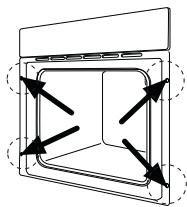
Securing the oven in the cabinet
- Open the oven door.
- Fix the oven in the cabinet using the four spacers (see Figure - A).
These fit exactly in the holes in the frame. Then tighten the four wood screws supplied (see Figure - B).
natural_image
Diagram of a rectangular device with internal compartments and directional arrows indicating flow or movement (no text or symbols)
Customer service
If the problem persists after the checks described, contact your nearest service centre and describe the fault, appliance model (Mod.), product number (Prod. No.) and series number (Ser. No.) which you will find on the oven rating plate.

natural_image
Line drawing of an oven with ventilation grilles and a fan, showing internal structure without any text or symbols- Klantenservice
- Contents
- Applicable Directives
- MANUFACTURER:
- Warnings and important safety instructions
- Installation
- Operation
- People safety
- Disposal
- Packaging material
- Old appliances
- Customer service
- Description of the appliance
- Accessories
- Retractable knobs
- Operating knobs
- Mains on indicator
- Temperature regulator indicator
- Safety thermostat
- Cooling fan
- Before using for the first time
- The oven will only function when the clock has been set to the time of day.
- The oven will only work when the clock has been set.
- Setting the clock ⏻
- To set the clock:
- To reset the correct clock time:
- Cooking time |→|
- To programme the cooking time:
- To cancel a programmed cooking time:
- End of cooking time →
- To set the end of cooking time:
- To cancel the programmed end of cooking time:
- Combination of “Cooking time” |→| and “End of cooking time” →|
- Minute minder
- To set the minute minder:
- To cancel the minute minder:
- To switch off the display
- To reduce condensation, always preheat the empty oven for 10 minutes.
- The oven door must be closed during cooking.
- Top and bottom heating element
- Bottom oven element
- Hot air
- Grilling
- Using the grill
- Thermal grill
- When using the thermal grill, set a maximum temperature of 200° C.
- Defrosting
- Practical tips
- Baking:
- Roasting:
- Important!
- Cooking times
- Top and bottom heating element and hot air
- Timings do not include pre-heating.
- Always preheat the oven for 10 minutes.
- Always preheat the empty oven for 10 minutes.
- Detergents
- External cleaning
- Oven cavity
- Oven door
- Models in stainless steel or aluminium:
- Cleaning the oven door seal
- Grill heating element
- Changing the interior light bulb
- Separate the appliance from the power supply by switching off the fuse.
- Oven shelves and shelf supports
- Connecting to the electrical supply
- Terminal block
- Oven dimensions (see diagram)
- Installation instructions
- Securing the oven in the cabinet
Brand : PROGRESS
Model : PBN3320X
Category : Built-in oven