ACTION - Smartwatch SEAC - Free user manual and instructions
Find the device manual for free ACTION SEAC in PDF.



| Product type | Dive computer watch type |
| Brand | SEAC |
| Model | ACTION ACTION HR |
| Category | Connected watch / dive computer |
| Display | Transflective matrix LCD, segments and icons, adjustable contrast |
| Backlight | Adjustable LED |
| Power supply | CR2450 battery, 3V, 600mAh, non-rechargeable, user-replaceable |
| Buttons | 4 |
| Alarm | Audible and visual |
| PC connection | Serial via USB with dedicated cable (optional) |
| Maximum depth | 100 m / 328 ft |
| Decompression algorithm | Bühlmann ZHL-16C for Air/Nitrox |
| Managed blends | Air/Nitrox, O2 max 99% |
| Diving modes | Scuba, Gauge, Free (freediving) |
| Safety stop | Customizable (depth and duration) |
| Deep Stop | Yes, based on maximum depth reached |
| Alarms | MOD violation, ascent rate, deco stop violation |
| Log sampling | 5 seconds in Scuba/Gauge |
| Conservatism | Adjustable via gradient factors |
| Update | Supported via serial USB port |
| Power saving mode | Configurable factory mode |
| Water type | Salt water / fresh water |
| Maintenance | Rinse with fresh water after use, avoid pressing on the sensor grid |
| Safety | Do not share the computer between divers, check the battery before diving |
| Spare parts | CR2450 battery, O-ring; replacement recommended at authorized service center |
Frequently Asked Questions - ACTION SEAC
User questions about ACTION SEAC
0 question about this device. Answer the ones you know or ask your own.
Ask a new question about this device
Download the instructions for your Smartwatch in PDF format for free! Find your manual ACTION - SEAC and take your electronic device back in hand. On this page are published all the documents necessary for the use of your device. ACTION by SEAC.
USER MANUAL ACTION SEAC
Contents
ACTION MANUAL....3
GENERAL WARNINGS....3
SWITCHING ON THE ACTION......6
HARDWARE 6
APPLICATION SOFTWARE....7
TECHNICAL CHARACTERISTICS......8
Dive modes 8
Decompression Algorithm 9
Levels of Protection 9
Repetitive Dives 9
Dives with Surfacing 9
NDL - NonDecompressionLimit 9
Safety Stop 10
Deep Stop....11
TTS 11
Ascent Speed Alarm....12
MOD Exceeded Alarm....12
Deco Violation Alarm....13
Locking the Computer....13
No-fly time....14
Desaturation Time....14
Permitted Altitude Indicator....15
Battery/Run-time 15
Time and Time Zones....16
Planner 17
DiveLogger 17
KEYS NOMENCLATURE....17
MENU AND SETTINGS....18
User Data Memory 18
Stopwatch....19
Logbook 20
Mixes (MIX) 20
Dive parameters (DIVESET)....22
Dive planner (PLANNER) 23
Alarms (ALARMS)......24
Display 24
System Settings (SYS SET) 25
PC Mode....26
Info mode 26
Reset 26
OFF (FACTORY MODE) 27
USER SETTINGS RANGE 28
ACTION DURING THE DIVE 29
SCUBA (OC) DIVE 30
-
NDL Dive....31
-
Deep Stop....32
-
Safety Stop 33
-
DECO Dive 34
-
Mix change during the dive 35
DIVE IN GAUGE MODE 36
DIVE IN FREE MODE 37
AFTER THE DIVE....38
Desaturation Time....38
NoFly Time....39
Logbook 40
Connect your ACTION computer to your
Mac or PC 41
REPLACING THE BATTERY....42
ACTION SERIAL NUMBER....43
CE CERTIFICATION......43
CARE AND MAINTENANCE....43
CERTIFICATE OF WARRANTY....44
ACTION MANUAL
Congratulations on your purchase of a SEAC diving computer.
The SEAC ACTION dive computer is a technologically advanced device designed and manufactured to provide all the information that every diver needs.
Periodically check www.seacsub.com for any updates to this manual.
GENERAL WARNINGS
- WARNING!
Read the user manual fully before using the SEAC computer.
Using the computer incorrectly will void the warranty and can permanently damage the computer.
- WARNING!
Only use the dive computer after you have read all sections of the instruction manual and you have understood how it works.
- WARNING!
The dive computer is not a substitute for diver training and should only be used by divers who have been properly trained and who have earned the appropriate license issued by a Certified Teaching Association.
- WARNING!
The computer does not replace an understanding of decompression tables, which divers must always carry with them for safety, along with a depth gauge and a dive watch.
- WARNING!
The SEAC computer is an auxiliary device during a dive. Therefore, it is crucial that each diver always carry with them a suitable table that will enable them to conduct the decompression phase if the unit should malfunction.
- WARNING!
Freediving entails risks of syncope, taravana, pulmonary edema, and hemoptysis, while diving with a respirator involves risks related to decompression sickness, oxygen toxicity, nitrogen narcosis, and in general other risks connected to the dive itself: even a thorough reading of this manual and use of the instrument does not exclude potential dangers.
- WARNING!
The computer cannot take into account individual physiological changes that can change from one day to the next. For this reason it's good practice to use the device conservatively and cautiously, remaining within the limits shown by the computer in order to minimize the risks.
- WARNING!
It is strictly forbidden to freedive in the 12 hours after diving with scuba equipment!
Violating this rule could considerably increase the risk of decompression sickness.
- WARNING!
Do not share one computer between two divers during the dive. Every diver must have their own instrument to provide information and save only that diver's data.
- WARNING!
Before diving, you must check the battery charge. Do NOT dive if the low battery icon is shown on the display. Always check that the display shows no signs of any malfunction and that it is clearly legible.
The Battery icon on the display has 2 segments:
Segment 1: Battery Outline ==> Battery lower than Minimum Voltage (do not dive).
Segment 2: First Bar from the bottom ==> Battery lower than 2.1V (Low level. The voltage could plummet during a dive in especially cold water).
- WARNING!
Always check that the settings are correct for your dive, and don't allow anyone else to tamper with your computer before the dive. If it has been tampered with by another person, check that your settings are correct.
- WARNING!
It is important to keep in mind that your body undergoes changes, even daily changes, that a computer cannot account for. If your physical condition is not excellent, or if you feel any physical problems, do not dive!
- WARNING!
The normal functions of the product could be disturbed by strong electromagnetic interference.
In this case, simply reboot the product to restore normal function, following the instructions provided in this manual (see "Reset") and use the product in another position.
- WARNING!
Strictly avoid pressing on the side grill of the sensor with your fingers, especially if the sensor compartment is full of water, because this could distort the measurement of zero, and could therefore result in an incorrect measurement of depth during the next dive, with the consequence that the NDL/Deco data may also be inaccurate.
In DIVE mode, if you notice a measurement of anything other than zero on the surface, you need to reset the device to zero out the sensor measurement (see the instructions and warnings on using the RESET further on in this manual) or wait a few hours for the system to reestablish the correct zeroing.
- WARNING!
From the CLOCK screen, to avoid accidental operation, the HR, LR and LL keys must be pressed for 2 seconds to be activated.
SWITCHING ON THE ACTION
If the display is off, press the "LL" and "HR" buttons at the same time to turn it on.

HARDWARE
| Type: | Wristwatch computer. |
| Screen: | LCD Icons/Segments/Transflective matrix with user-adjustable contrast. |
| Backlighting: | LED, user-adjustable. |
| Battery: | CR2450, non-rechargeable, 3V 600mAh, user-replaceable (we strongly recommend that you have this done at an authorized SEAC center, also replacing the O-ring in the battery compartment). |
| Buttons: | 4 |
| Alarm Type: | Audible and visual. |
| PC/Mac connection: | Serial via USB with special dedicated cable (optional). |
| Maximum operating depth | 100 meters/328 ft |
APPLICATION SOFTWARE
| Updates: | Supported through serial port via USB. |
| Factory mode: | Supported to save energy, can be set by the user. |
| Auto Recovery: | Automatic reboot if software locks. |
| Restore: | Manual, though combination of buttons/time. |
| Decompression Algorithm: | Buhlmann ZHL-16C for Air/Nitrox. |
| Levels of conservatism: | Yes, based on Gradient Factor. |
| Mixes Managed: | Air/Nitrox, #2 ( O2 maximum 99%). |
| Dive modes: | Scuba, Gauge and Free (Apnea). |
| Safety Stop: | Yes, user-customizable (depth and duration). |
| Deep Stop: | Yes, based on maximum depth reached. |
| Water Type: | Salt/Fresh. |
| Alarms: | MOD Violation, Ascent Speed, Deco Stop Violation. |
| LogBook Sampling: | Scuba/Gauge => 5 seconds; Free (Apnea) => 2 seconds. |
| LogBook Capacity: | Capacity approx. 40 hours (Scuba/Gauge mode) or approx. 18 hours (Free mode). |
| Planner: | NDL Air/Nitrox Calculation. |
| Stopwatch: | START / STOP / RESET / LAP. |
| Set Backlighting: | Auto / Manual / Dive. |
| Units: | Metric / Imperial. |
| Watch: | 24/12 hour format, dual time. |
| Reset: | Tissues/Settings. |
TECHNICAL CHARACTERISTICS
Dive modes
The computer manages three dive modes:
I. Scuba mode:
Dive: when depth exceeds 150 cm/5 ft.
Emerge: when depth is less than 90 cm/3 ft.
II. Gauge mode:
Dive: when depth exceeds 150 cm/5 ft.
Emerge: when depth is less than 90 cm/3 ft.
III. Free Mode:
Dive: when depth exceeds 100 cm/3.3 ft.
Emerge: when depth is less than 50 cm/1.6 ft.
After a dive in SCUBA / GAUGE mode, the Computer stays on the SCUBA / GAUGE screen for 10 minutes after emerging, and therefore you cannot access the menu and submenu.
After a dive in FREE mode, the Computer stays on the FREE screen for 15 minutes after emerging, and therefore you cannot access the menu and submenu.
After a dive in SCUBA or GAUGE mode, FREE mode is inhibited and is not accessible for the next 12 hours.
After a dive in GAUGE mode, because tissue saturation is calculated assuming that the dive uses mix number 1, SCUBA mode is available.
After a dive in GAUGE mode, the Desaturation and NoFly times are updated with the new tissue saturation data. In particular, the NoFly time is set to 24 hours, as a precaution in favor of safety, regardless of the type of profile that was run.
After a dive in FREE mode, the residual Desaturation and NoFly time, if any existed before the dive in FREE mode, will be left unchanged.
If you Reset the Settings, the Computer will automatically start in SCUBA mode.
When the Computer is in Watch mode and you dive without manually entering dive mode (using the LR button), the Computer will automatically launch the mode you selected most recently.
Decompression Algorithm
The computer uses the original Buhlmann ZHL-16C Decompression Algorithm, unmodified.
Levels of Protection
The Action allows you to select 6 levels of protection (conservatism), from 0 to 5. Level 5 provides the maximum protection.
Repetitive Dives
All dives taken within a 48-hour period are considered "Repetitive Dives".
Dives with Surfacing
"Surfacing" is defined as the situation in which the diver emerges after having begun a Scuba type of dive.
Surfacing ends if the diver dives again within a period of fewer than ten minutes from emerging; beyond this limit the current dive is considered ended.
If you change mixes during the dive and dive again within the 10 minute Surfacing time, the mix in use is reset to the starting mix.
NDL - NonDecompressionLimit
The "NonDecompressionLimit" is defined as the time that remains at the current depth and breathing the mix that is currently set to avoid requiring decompression.
To avoid requiring decompression stops, the time required for the ascent must be subtracted from the NDL.
Safety Stop
The user can set both the depth and the duration of the Safety Stop.
NOTES:
a) The Safety Stop is calculated and proposed if the maximum depth reached is greater than 12 meters/40 ft.
b) The Safety Stop is shown when the diver comes within 9 meters/30 ft of the surface.
c) The countdown begins if the diver arrives within +2 meters/+6.5 ft and -2 meters/-6.5 ft of the stop depth set. For example: If the stop set is 5 meters/16.5 ft, the countdown starts between 7 meters/32 ft and 3 meters/10 ft. In this case then, if you go to a depth of less than 3 meters/10 ft., the stop will be canceled.
d) The Safety Stop is not calculated and is not proposed if at least one deco stop is underway within 9 meters/30 ft from the surface.
e) If the current dive includes one or more decompression stops, and if these decompression stops are cleared during the ascent (before reaching 9 meters/30 ft) because of a very slow ascent or in any case a multilevel dive, then the Safety Stop is calculated and proposed at the time and duration set by the user.
f) If the Diver again exceeds a depth of 9 meters/30 ft after having performed the stop, the Safety Stop is recalculated and reproposed in accordance with the rules described above.
g) If the Diver descends to a depth greater than 9 meters/30 ft during the countdown, it will be reset and recalculated according to the rules above.
Deep Stop
If the Deep Stop is enabled, it is calculated as a 2-minute-and-30-second stop at half the maximum depth reached if the following conditions are met:
- Maximum depth reached greater than 18 meters/59 ft.
- There are no mandatory decompression stops during the ascent.
NOTES:
a) The Deep Stop is displayed at +5 meters/+16.5 ft and -3 meters/-10 ft from the calculated stop. In other words, if the Deep Stop is at 20 meters/66 ft, it is displayed in the range from 17 meters/56 ft to 25 meters/82 ft.
b) The countdown to the stop begins when the diver arrives in a range of +2 meters/+6.5 ft and -2 meters/-6.5 ft from the calculated stop depth. For example: if the stop is calculated at 25 meters/83 ft, the count down is performed in the range of 27 meters/89 ft to 23 meters. If the Diver moves -2 meters/-6.5 ft from the stop depth (meaning lower than 23 meters/75.5 ft), it is canceled. If the Diver arrives within 27 meters/89 ft - 31 meters/102 ft, the countdown is suspended.
c) If the Diver again exceeds the stop depth by more than 6 meters/20 ft (or in any case, 18 mt/59 ft), the stop will be recalculated according to the rules above.
TTS
The "TTS" is the total time to surface, and accounts for the entire time for executing mandatory decompression stops (calculated according to user settings) and the ascent time (calculated at a constant velocity of 9m/min - 30 ft/min).
Ascent Speed Alarm
The standard maximum ascent speed is set at 9 meters/minute - 30 ft/min.
The Ascent Speed Alarm indicates the ascent speed using icons, and is only available in SCUBA mode.
The Ascent Rate icon consists of 3 arrows.
The Ascent Speed Alarm is both visual and audible.
The visual alarm cannot be disabled.
Users can disable the audible alarm.
The rules for the Ascent Speed Alarm are:
- Speed <= 3m/min - 10ft/min: No indication
- 3m/min - 10 ft/min < Speed <= 6m/min - 20 ft/min: One arrow
- 6m/min - 20 ft/min < Speed <= 9m/min - 30 ft/min: Two arrows
- 9m/min - 30 ft/min < Speed <= 12m/min - 40 ft/min: Three arrows
- Speed > 12m/min - 40 ft/min: Three flashing arrows + Audible alarm
MOD Exceeded Alarm
The "MOD" defines the maximum operating depth for the mix in use and is calculated as a function of the real surface atmospheric pressure and the PpO2 (oxygen partial pressure) set for the mix in use.
The alarm for Exceeding the MOD is visual and audible.
The visual alarm cannot be disabled; this is indicated by the field for the current depth flashing.
Users can disable the audible alarm.
Both alarms are activated as soon as the MOD is exceeded.
Deco Violation Alarm
The Deco Violation Alarm will trigger when the Diver reaches a depth (in absolute value) less than that set by the mandatory decompression stop.
The Deco Violation Alarm is visual and audible.
The visual alarm cannot be disabled; this is indicated by the field for the current depth flashing.
Users can disable the audible alarm.
Both alarms will trigger when the Diver reaches a depth (in absolute value) less than 0.5 meters/1.6 ft of the mandatory decompression stop indicated.
The alarm does not trigger for Deep Stops and Safety Stops, because these stops are not mandatory.
Locking the Computer
If decompression stops are omitted, rather than immediately switching to lock mode like other dive computers, Action applies penalty points that eventually result in locking the SCUBA mode upon reaching 150 points.
The penalty points are assigned as follows:
- 5 points for every 5 seconds, if the diver's current depth is lower than one meter/3 ft from the stop level indicated.
- 10 points for every 5 seconds, if the diver's current depth is lower than two meters/6.5 ft from the stop level indicated.
This means that for an ongoing violation, Action will enter lock mode after about 2 minutes at a depth lower than one meter/3 ft, and after about 1 minute if the stop depth violation is 2 meters/6.5 ft, naturally only if the violation is occurring in the direction of the surface.
Once it reaches 150 points, the computer switches to lock mode.
The diver will be notified during the dive with an "Alert" icon and a message, alternating with information about remaining decompression, indicated by the words "WARNING DECO VLT".
Decompression will still be calculated until the end of the dive where anticipated by the Buhlmann mathematical model.
- WARNING:
two repetitive dives with surface times of fewer than 10 minutes are considered to be a single dive.
If the mandatory decompression stop is violated during the dive and the computer switches to lock mode, SCUBA mode will not be available for 18 hours.
After this period, the counter to put the watch out of service will be reset at the beginning of the next dive.
If you begin a new dive in SCUBA mode before this interval, when the computer is still in lock mode, the "Alert" icon and the message reading "WARNING DECO VLT" will be displayed for the entirety of the dive, without alternating with the decompression data.
Whenever the computer is locked, the NoFly and Desaturation times are not shown.
No-fly time
NoFly time is calculated according to the following rules:
- 12 hours for a single dive (no dive in the preceding 48 hours) within the node-compression limits.
- 18 hours for repetitive dives without decompression on the same day or multiday.
- 24 hours for repetitive dives with decompression on the same day or multiday.
For more information, consult the "No-fly Time" section in the "After the Dive" chapter.
Desaturation Time
The tissue Desaturation Time is calculated immediately at the end of the dive.
It is defined as the time necessary for the nitrogen inert gas pressure to be lower than the Partial pressure of nitrogen (PpN2) breathed, increased by a tolerance factor.
For more information, consult the "Desaturation Time" section in the "After the Dive" chapter.
Permitted Altitude Indicator
The Permitted Altitude is calculated and updated after dives in any mode.
The Permitted Altitude icon is shown in Watch mode, and is managed as follows:
- Max 1000 m/3290 ft: 1 triangle on.
- Max 2000 m/6580 ft: 2 triangles on.
- Max 3000 m/9870 ft: 3 triangles on.
- No Limit: icon off (not displayed).
Battery/Run-time
The computer is powered by a 3V CR2450 MAXCELL Asia Product battery with a nominal capacity of 600mAh .
The battery capacity varies based on environmental conditions.
The battery run-time varies depending on how the product is used and which functions are used.
The run-time drops noticeably when backlighting, audible alarms, PC connections, and updates are used.
When the Software Application is launched, a test of the battery under load is performed. When this happens you may notice the backlighting turn on temporarily. If the battery voltage under load is less than 2.0V (Minimum Voltage), the device will remain off or locked, on a screen with the words "LOW BAT": In some cases you may see a continuing Reset for a few cycles.
If the battery voltage under load is below 1.8V (Start Voltage), the backlighting may remain on continuously until the computer battery is completely drained. In this case, the computer will not turn on at all and no text appears on the LCD.
The Battery icon on the display has 2 segments:
Segment 1: Battery Outline ==> Battery lower than Minimum Voltage (do not dive).
Segment 2: First Bar from the bottom ==> Battery lower than 2.1V (Low level. The voltage could plummet during a dive in especially cold water).
Theoretical run-time, linked strictly to the quality of the battery installed:
| Mode | Theoretical average run-time (years) |
| Factory Mode | 8.4 |
| Watch | 3.0 |
| 100 dives/year | 2.9 |
| 200 dives/year | 2.7 |
| 300 dives/year | 2.1 |
The data indicated above:
refer to a new battery of recent manufacture (and therefore not subject to excessive auto-draining);
refer to use at 25° C/ 77° F;
refer to use that does not entail direct exposure to sunlight;
do not include consumption by backlighting and audible alarms.
Time and Time Zones
The computer can handle two time zones:
Local Time: Time at the user's location.
Home Time: The time at home.
The reference time is always the LOCAL time, and is indicated in the center of the Watch screen, or in secondary screens during SCUBA/GAUGE/FREE dives.
The Home time can only be changed by editing the value of the "UTC HOME" time zone in the "SYS SET" menu.
If "UTC LOC" and "UTC HOME" are the same, only one time is shown on the Watch screen.
If the two parameters do not match, the LOCAL Time is shown in the center of the screen (the date indicated refers to this Time), while the HOME time is shown on the lower right.
If the date for each of the two Times is different, the date offset from the HOME Time will be shown on the lower right: "+1 / -1".
Planner
Action's Planner lets you simulate and plan a dive, displaying the NDL time (within non-decompression limits) depending on the depth set.
The Planner allows you to plan Air/Nitrox with NDL only, meaning within the non-decompression limits, and therefore requiring no decompression time.
The input data (mix, Max PpO2 , and level of conservatism) are entered in the various submenus ("MIX", "DIVE SET") and are used to calculate the NDL.
The calculated NDL accounts for descent performed at 18 meters/minute 59 ft/minute.
The calculated NDL does not include the time required for the ascent.
In Planning mode, you can only change the dive depth and the surface time.
The NDL Time display is updated immediately whenever the dive depth or surface interval is changed.
Depths greater than 45 meters/150 ft cannot be entered.
DiveLogger
Dive data can be downloaded to be saved, viewed, and processed. The software for both Windows 10 and Mac is available for free download on the website www.seacsub.com. However, to connect the Action to a PC you need a special USB cable that can be purchased separately.
KEYS NOMENCLATURE

MENU AND SETTINGS
Methods for entering all the settings menus listed below:
- From the "watch" display, press the LL (Mode) key once. LOG will appear on the display. From here, press the LR button multiple times (RESET/-) until the name of the desired function appears on the display. At this point, to enter the corresponding setting/editing submenu, confirm your choice with the LL button (Mode).
- From any position you're in, press the LL (Mode) and LR (Reset/-) buttons at the same time to return to the main screen (watch).

User Data Memory:
The computer settings data that the users enters/edits, the tissue data, and the current date/time are saved every 15 minutes.
Therefore, if you change the battery, the data that is restored on reboot are at most 15 minutes old, so the time will only need to be adjusted manually by a few minutes.
Stopwatch
The stopwatch can only be activated from WATCH, GAUGE DIVE, and FREE DIVE modes, and not from SCUBA DIVE mode.
To switch to the stopwatch function, press the HR button from one of the modes listed above.

Logbook
The computer memory intended for saving SCUBA/GAUGE/FREE dives taken is limited to:
- approx. 40 hours (Scuba/Gauge mode). Sampling time every 5 seconds.
- approx. 18 hours (Freedive mode). Sampling time every 2 seconds.
If the memory becomes completely full, the oldest dives will be deleted to make room for new dives.
When you enter the "Logbook" submenu, you will see:
- at the top: the duration of the dive, the max depth, and the mode icon (OC, GAUGE, or FREE).
- in the center: No. of the dive displayed in the memory, and date and time of the dive.
- at the bottom: the temperature and average depth of the dive.
When you press the LL button on the lower left, in place of the temperature you will see the oxygen percentage set for that dive.
Mixes (MIX)
Action manages up to two gas mixes with oxygen percentages ( O2 ) from 21% to 99% and oxygen partial pressure ( PpO2 ) from 1.2 to 1.6 bar.
When you enter the "MIX1" submenu, the number of the oxygen percentage for this gas mix will flash. This can be set by using the HR (+) and LR (-) buttons. Fields for setting O2 from 21% to 99%. The upper right of the screen shows the MOD, meaning the maximum operating depth for the O2 percentage selected and for the PpO2 selected, which can be set by pressing the LL button (Mode) once: the PpO2 number will flash, and you can select the desired value using the HR (+) and LR (-) buttons. Setting range from 1.2 to 1.6 bar in increments of 0.5 bar. When the PO2 is also selected, press the LL button once to move to the "MIX2" screen. Using the same methods used for MIX1, set the O2 and PO2 percentage. Then you can press the LL button (Mode) once to activate MIX2 by selecting ON or OFF with the HR or LR buttons.
- WARNING!
Changing these settings requires special training on the use of enriched breathing mixes. If you have not received this training, do not dive with enriched breathing mixes!
Do not dive using breathing mixes other than those set in your diving computer. Using mixes other than those set makes it impossible to calculate the decompression correctly!

Dive parameters (DIVESET)
When you have entered the "MODE" submenu, use the HR (+) or LR (-) buttons to select the type of dive: using an open-circuit respirator (OC) "SCBA", or in Instrument/Gauge mode (depth gauge/timer only) "GAGE", or again for "FREE" dives. Confirm your choice of dive type with the LL button (Mode). The appropriate icon (OC, GAUGE, or FREE) will turn on at the top of the screen during the dive to display your choice. The "SFT LEV" screen will appear with a flashing number. On this screen you can select the desired level of safety, from 0 to 5. In other words, you can choose whether you prefer your Action to be more or less conservative when calculating the safety or decompression curve. Selecting 5 means that you want to be as conservative as possible, while 0 is the minimum value.
Once you have selected the value you want, press the LL button once to switch to the S.S.TIME screen, where you can set the Safety Stop time in minutes, meaning the safety stop to take before emerging. Values can be set with the HR and LR buttons from 0 (no Safety Stop) to 5 minutes.
Pressing the LL button will switch you to the page for selecting the Safety Stop depth: S.S.DPT. This can be set from 3 to 6 meters in depth using the HR and LR buttons.
Press the LL button once. The DEEP STP screen will appear, where you can select ON-OFF to decide whether or not to activate the Deep Stop. If you select ON, Action will calculate the depth and time automatically. Confirm your choice by pressing the LL button once.
The WATER screen will appear, in which you can select the water type, either sea (SLT) or fresh (FRH). Confirm your choice with the LL button, or press the LL and LR buttons at the same time to return to the main screen.

- WARNING!
For safety reasons, it is NOT possible to set FREE mode as the main mode unless 12 hours have elapsed since the most recent SCUBA or GAUGE dive.
Dive planner (PLANNER)
When you enter this SET, first the depth setting field flashes. This can be changed using the HR (+) and LR (-) buttons. In Planner mode, you can only change the depth of the dive.
You cannot enter depths greater than those permitted by the MOD for the mix set (shown at the bottom of the screen).
The input data (mix, Max PpO2 , and level of conservatism) are entered in the various submenus ("MIX", "DIVE SET") and are used to calculate the NDL.
Alarms (ALARMS)
- WARNING!
Action allows you to suppress audible alarms. However, we recommend that you only make this choice after careful consideration and with full awareness. Audible alarms are an important warning for possible violations and behavior errors during the dive that could result in accidents, even serious ones.
All the audible alarms can be enabled (ON) or disabled (OFF) using the HR buttons or LR and confirmed using the LL button.
- WARNING!
Except for special situations, we do not recommend disabling audible alarms.
DECO VLT: decompression stop violation alarm signaled by the Action.
MOD VLT: alarm indicating violation of maximum operating depth permitted for the gas mix in use.
ASC SPD: excessive ascent speed alarm.

Display
BACKLIGHT BRIGHTNESS LEVEL (BKL LEV): Levels available from 0 to 3 (if you select "0" backlighting will not activate).
BKL TIME: duration of the backlight in seconds in AUTO mode; selectable from 2" to 60".
BKL MODE: 3 modes:
AUTO: by choosing this option, the backlight will remain on for the preset time.
MAN: the backlighting will be turned on/off manually using the HL button.
In watch mode, the backlighting will turn off automatically after 600 seconds.
DIVE: by activating this option, the backlighting will activate automatically when the dive beings and will remain on for the full duration of the dive.
- WARNING:
intense use of the backlight will consume the battery faster, so it will not last as long.
CNTRAST: 5 display contrast levels can be selected.
For each mode, set the choice using the HR (+) and LR (-) buttons and confirm with the LL button (Mode) and move to the next selection. Press LL and LR at the same time to return to the main view.

System Settings (SYS SET)
The settings below are possible in this mode: hour/minute (TIME), date (DATE), UTC second time zone (UTC LOC), UTC primary time (UTC HOME), 12/24 hour format (FORMAT), unit of measure meters MTR or feet IMP (UNITS).
The reference time is always the LOCAL time, and is indicated in the center of the watch screen, or in secondary screens SCUBA/GAUGE/FREE during the dive.
The Home time can only be changed by editing the value of the "UTC HOME" time zone in the "SYS SET" menu.
If "UTC LOC" and "UTC HOME" are the same, only one time is shown on the watch screen.
If the two parameters do not match, the LOCAL time is shown in the center of the screen (the date indicated refers to this time), while the HOME time is shown in the lower right.
If the date for each of the two times is different, the date offset from the HOME time be shown on the lower right: "+1 / -1".
For each mode, set the choice using the HR (+) and LR (-) buttons and confirm with the LL button (Mode) and move to the next selection. Press LL and LR at the same time to return to the main view.
PC Mode
To connect your Action to a PC or Mac to link with the Dive Logger software and download your data, your Action must be set to this mode before you connect it to the computer with the special USB cable (optional).
Info mode
The Info screen shows: the name of the model, the serial number (which is also laser engraved on the back of the case), and the firmware version installed.
Reset
Resetting tissues and user settings is a risky procedure, especially if the diver is taking repetitive dives. Therefore you have to confirm twice before a reset will be performed:
enter a four-digit security code. The security code is "5555".
If the code entered is valid, before performing a reset, you will need to confirm the operation.
If the operation is successful, the message "RESET DONE" will appear.
- WARNING!
On the watch screen, the icon of the "WARNING" symbol will appear on the lower left to alert the diver and remind them that the computer was reset. This symbol will disappear after the next SCUBA/GAUGE/FREE dive.
- WARNING! DANGER!
Do NOT perform the tissue saturation reset if the device will be used soon by the same person!
This can lead to the risk of accidents, including fatal ones.
The tissues can only be reset if the Action will be used by a person who has not taken any dives in the previous 48 hours.
OFF (FACTORY MODE)
"Factory Mode" is a special function for reducing energy consumption to a minimum and helping the battery last as long as possible.
The computer will be "off", while still keeping all settings, storage, and time calculation in memory.
On the screen that reads "EXECUTE", you can confirm the choice to switch the Action OFF using the LR button (YES) or reject the selection with the LL button (NO).
To exit "Factory mode" and reactivate the Action, press the LL and HR buttons at the same time.

USER SETTINGS RANGE
| MENU | PARAMETER | RANGE | DEFAULT | UNIT | NOTES |
| MIX | MIX 1 O2 % | 21-99 | 21 | % | |
| MIX 1 PPO2 | 1.20-1.60 | 1.40 | bar | ||
| MIX 2 O2 % | 21-99 | 50 | % | ||
| MIX 2 PPO2 | 1.20-1.60 | 1.60 | bar | ||
| MIX 2 ON/OFF | ON/OFF | OFF | |||
| MENU | PARAMETER | RANGE | DEFAULT | UNIT | NOTES |
| DIVE SET | MODE | SCUBA/GAUGE/FREE | SCUBA | ||
| SFT LEVEL | 0-5 | 0 | Level ofconservatism ofthe algorithm | ||
| S.S. TIME | 0-5 | 3 | Min | ||
| S.S DPT | 3-6 | 5 | m/ft | ||
| DEEP STP | ON/OFF | OFF | |||
| WATER | SALT/FRESH | SALT | |||
| MENU | PARAMETER | RANGE | DEFAULT | UNIT | NOTES |
| ALARMS | DECO VLT | ON/OFF | ON | Decompressionstop violation | |
| MOD VLT | ON/OFF | ON | Violation ofmaximumoperating depthfor breathed mix | ||
| ASC SPD | ON/OFF | ON | Ascent rateviolation | ||
| DISPLAY | BKL LEV | 0-3 | 3 | ||
| BKL TIME | 2-60 | 3 | Seconds | ||
| BKL MODE | AUTO/MAN/DIVE | AUTO | |||
| CNTRAST | 0-5 | 0 | |||
| MENU | PARAMETER | RANGE | DEFAULT | UNIT | NOTES |
| SYS SET | TIME | - | - | ||
| DATE | - | - | |||
| UTC LOC | -12:00 /+14:00 | +1:00 | GMT +1 | ||
| UTC HOME | -12:00 /+14:00 | +1:00 | GMT +1 | ||
| FORMAT | 24-12 | 24 | |||
| UNITS | METRIC/IMP | METRIC |
ACTION DURING THE DIVE
- WARNING!
This manual does NOT replace adequate training!
- WARNING:
Before diving, always check that the dive mode has been set correctly for the dive you are about to take (SCUBA-OC, Gauge, or Free) by pressing the LR button from watch mode and checking that the icon showing at the top is the correct one, or you can check and make a selection in the "DIVESET" set.
- WARNING!
This check is important, because if you begin a dive in the wrong mode (for example, FREE instead of OC-SCUBA), firstly you will not have the correct information which could compromise your safety if you continue the dive, and even if you resurface immediately you need to wait out the time planned for the end of the dive, meaning 10 minutes for a dive set to SCUBA/GAUGE and 15 minutes for a dive set to FREE.
If you do not switch to dive mode manually by pressing the LR button once from watch mode, the Action will automatically activate dive mode when you descend past 1.5 meters.
SCUBA (OC) DIVE
- WARNING!
This manual does NOT replace adequate training.
- WARNING!
Do not dive with the Action if the battery charge is low, meaning with only Segment 1 lit: Battery Outline ==> Battery lower than Minimum Voltage.
When only the first block from the bottom is lit, this means a low battery charge. Avoid diving in especially cold water, because the voltage could plummet.
1. NDL Dive
| Screen 1 | Data displayed: |
 | Dive time – current depthNDL timeOxygen percentage of the current mix – Maximum depth reached |
| Screen 2 | |
 | Dive time – current depthNDL timeOxygen percentage of the current mix – PpO2 |
| Screen 3 | |
 | Dive time – current depthNDL timeCurrent temperature – Average depth |
| Screen 4 | |
 | Dive time – current depthNDL time% value of CNS O2 - Current time |
2. Deep Stop
If the Deep Stop function is set, it will be displayed 5m / 16.5 ft before the actual depth required in the central line on the display, and will be removed (if not performed) 5m / 16.5 ft after the depth required.
| DS 1 Screen | Data displayed: |
 | Dive time – current depthDeep Stop depth – Deep Stop timeOxygen percentage of the current mix – Maximum depth reached |
| DS 2 Screen | |
 | Dive time – current depthDeep Stop depth – Residual Deep Stop timeOxygen percentage of the current mix – PpO2 |
| DS 3 Screen | |
 | Dive time – current depthDeep Stop depth – Residual Deep Stop timeCurrent temperature – Average depth |
| DS 4 Screen | |
 | Dive time – current depthDeep Stop depth – Residual Deep Stop time% value of CNS O2 - Current time |
3. Safety Stop
If the Safety Stop has been set (recommended), it will be shown on the display in the center line of the computer during the ascent beginning at a depth of 9 meters/30 ft. The safety stop is automatically omitted if the dive requires decompression.
| SS 1 Screen | Data displayed: |
 | Dive time – current depthSafety Stop depth – Safety Stop timeOxygen percentage of the current mix – Maximum depth reached |
| SS 2 Screen | |
 | Dive time – current depthSafety Stop depth – Residual Safety Stop timeOxygen percentage of the current mix – PpO2 |
| SS 3 Screen | |
 | Dive time – current depthSafety Stop depth – Residual Safety Stop timeCurrent temperature – Average depth |
| SS 4 Screen | |
 | Dive time – current depthSafety Stop depth – Residual Safety Stop time% value of CNS O2 - Current time |
4. DECO Dive
| Screen 1 | Data displayed: |
 | Dive time – current depthTTS (total time to surface) – first stop depth – DECO time of the first stopOxygen percentage of the current mix – Maximum depth reached |
| Screen 2 | |
 | Dive time – current depthTTS (total time to surface) – first stop depth – DECO time of the first stopOxygen percentage of the current mix – PpO2 |
| Screen 3 | |
 | Dive time – current depthTTS (total time to surface) – first stop depth – DECO time of the first stopCurrent temperature – Average depth |
| Screen 4 | |
 | Dive time – current depthNDL time% value of CNS O2 - Current time |
5. Mix change during the dive
If a second mix is also set in addition to the bottom mix, Action will alert the user at best time to make the change by flashing the % O2 on the lower left of the main dive screen.
To confirm the mix change, select YES by pressing the LR button. To reject the change, select NO with the LL button.
Once the change is made, the new Mix will be displayed in the lower left corner.
 | When it is possible to switch to the second mix, the field on the lower left that usually displays the O2 % of the current mix will begin to flash.You can only access the mix change menu when this field is flashing. Press the LL button to confirm. |
 | Dive time – current depthProposed mix changeConfirm or reject with the corresponding LR or LL buttons |
DIVE IN GAUGE MODE
- WARNING!
This manual does NOT replace adequate training.
- WARNING!
Adequate training is required to use Action in GAUGE mode!
In GAUGE mode, Action does not calculate NDL or decompression. It only shows the following information on two screens:
 | Dive time – current depthAverage depthTemperature – maximum depth reached during the current dive |
 | Dive time – current depthAverage depthTemperature – current time |
DIVE IN FREE MODE
- WARNING!
This manual does NOT replace adequate training.
- WARNING!
For safety reasons, Free mode cannot be selected unless at least 12 hours have passed since the most recent dive in OC or GAUGE mode.
In FREE mode, Action provides the information a freediver needs. Action does not provide the minimum suggested surface time between one dive and the next.
The information is displayed on two screens, and is the following:
 | Dive time – current depthSurface time; the timer begins as soon as the dive startsTemperature – maximum depth reached during the current dive |
 | Dive time – current depthSurface time; the timer begins as soon as the dive startsTemperature – current time |
AFTER THE DIVE
After a dive in SCUBA / GAUGE mode, the Computer stays on the SCUBA / GAUGE screen for 10 minutes after emerging, and therefore you cannot access the menu and submenu.
After a dive in FREE mode, the Computer stays on the FREE screen for 15 minutes after emerging, and therefore you cannot access the menu and submenu.
After a dive in SCUBA or GAUGE mode, FREE mode is inhibited and is not accessible for the next 12 hours.
After a dive in GAUGE mode, because tissue saturation is calculated assuming that the dive uses mix number 1, SCUBA mode is available.
After a dive in GAUGE mode, the Desaturation and NoFly times are updated with the new tissue saturation data. In particular, the NoFly time is set to 24 hours, as a precaution in favor of safety, regardless of the type of profile that was run.
After a dive in FREE mode, the residual Desaturation and NoFly time, if any existed before the dive in FREE mode, will be left unchanged.
Desaturation Time
The tissue Desaturation Time is calculated immediately at the end of the dive.
It is defined as the time necessary for the nitrogen inert gas pressure to be lower than the Partial pressure of nitrogen (PpN2) breathed, increased by a tolerance factor.
All calculations refer to the atmospheric pressure measured at the end of the dive.
NOTE: When using the DAN Protocol to calculate the NoFly time, for some dive profiles it is likely that the NoFly time will be higher than the Desaturation Time, which might not appear consistent. This is due to the fact that the NoFly time might derive from a protocol and not from an exact mathematical calculation. Therefore, in order to avoid creating confusion for the end user, if the NoFly time calculated at the end of the dive is greater than the Desaturation Time, the algorithm corrects the Desaturation Time so that it is equal to the NoFly time. This calculation is to achieve a higher level of safety.
NoFly Time
Under the DAN protocol, the NoFly time is calculated according to the following rules (Revised Flying After Diving Guidelines for Recreational Diving – May 2002):
- 12 hours for a single dive (no dive in the preceding 48 hours) within the node-compression limits.
- 18 hours for repetitive dives without decompression on the same day or multiday.
- 24 hours for repetitive dives with decompression on the same day or multiday.
Since the scenarios that have been studied are limited and the Dive Computer allows you to assess exactly the load in each individual tissue, the following strategy will be adopted, in favor of safety:
- The NoFly time is calculated according to the Buhlmann algorithm.
- If the time calculated is lower than the time indicated by the DAN protocol, then the time obtained from the DAN protocol is used.
- If the time calculated is higher than the time indicated by the DAN protocol, then the time obtained from the Buhlmann algorithm is used.
The calculation method according to the Buhlmann algorithm will be done using 0.550 bar as the cabin pressure. This is the minimum pressure recorded in commercial aircraft.
Special cases:
- If you have not taken any dive, in any mode, in the previous 48 hours:
a. If you take a dive in GAUGE mode, the NoFly time will be 24 hours.
b. If you take a dive in FREE mode, the NoFly time will not be calculated. - If you took a SCUBA dive (of any kind):
a. If you take another dive in GAUGE mode before the NoFly time expires, after the dive in GAUGE mode the NoFly time will be 24 hours.
Logbook
The computer memory intended for saving SCUBA/GAUGE/FREE dives taken is limited to:
- approx. 40 hours (Scuba/Gauge mode). Sampling time every 5 seconds.
- approx. 18 hours (Freedive mode). Sampling time every 2 seconds.
If the memory becomes completely full, the oldest dives will be deleted to make room for new dives.
The alert symbol will be displayed:
1) If before the dive in any mode, a RESET was performed.
2) If a DECO violation occurred during a SCUBA dive.
| Display logbook - Scuba dive (OC) | ||
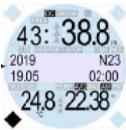 |  | Dive mode (SCUBA/OC)Dive duration – Maximum depthDate – no. of dives in memory – time of the diveTemperature or O2 % on screen 2 – average depth |
| Display logbook - GAUGE dive | ||
 | Dive mode (GAUGE)Dive duration – Maximum depthDate – no. of dives in memory – time of the diveTemperature – average depth | |
| Display logbook - FREE dive | ||
 | Dive mode (FREE)Dive duration – Maximum depthDate – no. of dives in memory – time of the diveTemperature – average depth | |
Connect your ACTION computer to your Mac or PC
The Action can be connected to your Mac or PC through the DiveLogger program to download dives and run updates.
Updating your Action Dive Computer.
It's very important to keep your Action Dive Computer consistently up to date with the most recent version of the software.
The Action must be connected to a Mac or PC using the USB cable to run the updates.
- WARNING!
If an update is available, a new version of the operating system will be installed.
After every update:
- Check that the Action settings (mix, algorithm, deco stops, etc.) are correct for the next dive.
- After each update, the Action resets the settings and tissues (see RESET in this manual).

After connecting your Action to your Mac or PC using the special USB cable and having set the Action to computer mode, when "PC LINK ON" appears you can start the data transfer.
REPLACING THE BATTERY
- WARNING!
Batteries should always be replaced by an authorized SEAC Center, because this is a delicate operation with a high probability of subsequent flooding of the Action if performed by inexpert personnel.
SEAC declines all responsibility for problems resulting from changing the battery.
- WARNING!
When replacing the CR2450 battery, it's a good idea to also replace the O-ring of the battery cap an original SEAC O-ring.
a) Unscrew and remove the four screws from the battery compartment.
b) Insert a small flathead screwdriver into the special opening located on the bottom of the cap to lift the lid.
c) If needed, again using the small flathead screwdriver, prize up the battery from its housing and remove it.
d) Insert the new battery, snapping it into its housing and making sure that the "+" polarity sign is facing outward.
e) Remove the old O-ring from the housing in the metal cover and replace it with the new one. Make sure that the O-Ring is not damaged, and once inserted make sure it isn't twisted at any point.
f) Position the cover on the Action case, and press it evenly downward. Make sure that in the area around the screws, the cover is flush with the case.
g) Keep the cover pressed down on the Action case while replacing the four screws. Although the four screws are screwed through four metal inserts fixed in the case, we recommend not tightening with excessive force to reduce the risk of stripping. The recommended torque is 12 Ncm. The O-ring seal on the battery compartment is radial, so excessive closing force on the compartment screws is not necessary.
NOTE
Do not dispose of used batteries in the environment or discard them as ordinary waste; we recommend using special battery disposal services.
ACTION SERIAL NUMBER
The Action serial number is engraved on the back of the case and can also be viewed on the display in the "INFO" function along with the version of the firmware installed.
CE CERTIFICATION
The Action is compliant with EC Directives.
The EU Declaration of Conformity is available at: www.seacsub.com
CARE AND MAINTENANCE
- Keep your computer clean and dry. Do not expose the computer to chemical agents, including alcohol. Use only fresh water to clean your computer, removing all saline deposits. Leave the computer to dry naturally; do not use jets of hot or cold air. A jet of pressurized air hitting the pressure sensor could damage it irreparably.
- Do not expose the computer directly to the sun or to sources of heat above 50°C / 122°F . Store the computer in a cool (5°C - 25°C / 41°F - 77°F) and dry place.
- Do not place the computer in a hyperbaric chamber.
The computer is designed for a reading accuracy of +/- 2% . The degree of accuracy required by the European standards is +/- 3.5% .
European standards require that the unit be checked periodically to monitor the precision of its depth and time readings.
- The warranty will be forfeited if the computer is opened by an unauthorized service center.
- The computer is manufactured to withstand use in seawater, but after the dive you must rinse it thoroughly in fresh water and not expose it to direct sunlight or sources of heat to dry it.
- Check that there are no signs of humidity inside the display.
- Do not attempt to open, modify, or repair the computer yourself. Always contact an Authorized Center or SEAC directly.
- WARNING!
If you observe any humidity inside the mineral glass, the Action must be taken to an authorized SEAC center immediately.
- WARNING!
The mineral glass is subject to possible scratches resulting from improper use.
- WARNING!
Do not use jets of compressed air to dry or clean the Action. This could damage the pressure sensor.
- WARNING!
Do NOT use solvents to clean the product. Use only running water.
CERTIFICATE OF WARRANTY
The warranty has a duration of two (2) years for the non-professional end user in accordance with current European regulations.
To exercise the warranty, you must display a copy of your proof of purchase upon request.
SEAC guarantees the correct operation of this product as described in this document.
The warranty herein can be exercised according to the conditions and limits expressly indicated below:
-
The warranty has a duration of two (2) years starting from the time the product is purchased at a SEAC authorized dealer and requires no prior or subsequent formal validation.
-
The warranty is acknowledged only to the original buyer of the product at a SEAC authorized dealer. The warranty is strictly individual; it is not transferable to third parties unless previously and explicitly authorized by SEAC.
-
The warranty covers all damage to the device caused by malfunctions arising from factory defects. Each device is tested in a hyperbaric chamber before it is made available for purchase.
The warranty covers operating defects deriving from:
- Intrinsic defects caused by the use of materials considered unsuitable.
- Clear errors in the design, manufacturing, or assembling of the product or its components.
-
Incorrect or inadequate instructions and recommendations for use.
-
Any repairs, modifications, transformations, adjustments or tampering in general carried out on the finished product or parts of it that are not authorized in advance by SEAC or that are carried out by non-authorized personnel automatically and immediately void the warranty.
- The warranty entitles you to assistance and free repair in the shortest possible time, or to a full free replacement of the product (at the sole discretion of SEAC) or parts of it whenever a malfunctioning defect specifically described in item 3 above is acknowledged by SEAC.
- This warranty may also be exercised by shipping the product believed to be defective to SEAC. The authorized intermediary for this operation must be the SEAC dealer where the product was purchased. If this is not practically possible, solely upon authorization from SEAC, customers may by authorized to send the defective product to any other SEAC dealer or directly to SEAC itself.
In order to exercise the warranty, the product must be accompanied by proof of purchase in the form of a copy of the receipt or invoice (or other equivalent fiscal record showing the name of the authorized SEAC dealer from which the product was purchased as well as the date of purchase).
Whenever SEAC receives a product which:
- is not accompanied by proof of purchase having the above mentioned characteristics;
- is in such condition as to determine the termination of the warranty in accordance with the provisions of item 4 above;
- has defects resulting from external and additional causes as compared to the ones specifically mentioned at item 3 above;
- has been used improperly and/or for uses other than those for which the product was designed;
- has clearly been damaged or deteriorated through intensive use or normal wear.
SEAC will not carry out any investigations on the product, and will advise the sender/authorized dealer.
If the sender still wishes an inspection to be performed, a request to that effect must expressly state that he/she is willing to bear all the costs relevant to said inspection (labor, spare parts if any, and shipping charges).
Failing this, SEAC will return the product at the expense and care of the recipient.
The warranty always excludes defects or imperfections deriving from:
- Damage caused by water seepage resulting from improper use; for example, dirty, damaged, or badly mounted seals resulting from changing the battery, incorrect closure of the battery compartment, etc.
- Rupture or scratching of the case, glass, or strap as a result of strong impacts.
- Damage resulting from excessive exposure to elevated or low temperatures.
- Damage caused by the use of compressed air to dry and/or clean the dive computer.
- Improper use or excessive stress.
- Failure to follow the usage instructions.
- External agents, such as damage due to transport, blows or falls, atmospheric agents, natural phenomena, or chemical agents.
- Unauthorized personnel performing maintenance or repairs or opening the device.
- Pressure testing out of the water.
- Accidents while diving.
- Use other than that intended for the product, or other than that indicated in the instruction manual. The warranty does not cover depletion of batteries.
Repairs or replacements made during the warranty period do not imply any right to an extension of the warranty itself.
⚠ WARNING
- INGESTION HAZARD: This product contains a button cell or coin battery
- DEATH or serious injury can occur if ingested.
- A swallowed button cell or coin battery can cause Internal Chimical Burns in as little 2 hours.
- KEEP new and used batteries OUT OF REACH of CHILDREN
- Seek immediate medical attention if a battery is suspected to be swallowed or inserted inside any part of the body.
- Battery: CR2450
• Nominal voltage: 3Vcc

Note:
- "Remove and immediately recycle or dispose of used batteries according to local regulations and keep away from children. Do NOT dispose of batteries in household trash or incinerate."
- "Even used batteries may cause severe injury or death."
- "Call a local poison control center for treatment information."
- Identification of compatible battery type
- Nominal battery voltage
- "Non-rechargeable batteries are not to be recharged."
- "Do not force discharge, recharge, disassemble, heat above (manufacturer's specified temperature rating) or incinerate. Doing so may result in injury due to venting, leakage or explosion resulting in chemical burns."
- "Ensure the batteries are installed correctly according to polarity (+ and -)."
- "Do not mix old and new batteries, different brands or types of batteries, such as alkaline, carbon-zinc, or rechargeable batteries."
- "Remove and immediately recycle or dispose of batteries from equipment not used for an extended period of time according to local regulations."
• "Always completely secure the battery compartment.
If the battery compartment does not close securely, stop using the product, remove the batteries, and keep them away from children."
NOTES
NOTES
sea
sea is calling


Headquarter: SEACSUB S.p.a. Via D. Norero, 29 - San Colombano Certenoli (GE) 16040 - Italy Phone +39 0185 356301 - Fax +39 0185 356300 www.seacsub.com - seacsub@seacsub.com
U.S.A. Branch: SEAC USA Corp. 7855 NW 12th Street, Suite 211 - Miami, FL 33126 - USA Phone +1 786 580 3695 seac.usa@seacusa.com

- CONTENTS
- ACTION MANUAL
- GENERAL WARNINGS
- WARNING
- SWITCHING ON THE ACTION
- TECHNICAL CHARACTERISTICS
- DIVE MODES
- SCUBA MODE
- GAUGE MODE
- FREE MODE
- DECOMPRESSION ALGORITHM
- LEVELS OF PROTECTION
- REPETITIVE DIVES
- DIVES WITH SURFACING
- NDL - NONDECOMPRESSIONLIMIT
- SAFETY STOP
- NOTES
- DEEP STOP
- TTS
- ASCENT SPEED ALARM
- MOD EXCEEDED ALARM
- DECO VIOLATION ALARM
- LOCKING THE COMPUTER
- NO-FLY TIME
- DESATURATION TIME
- PERMITTED ALTITUDE INDICATOR
- BATTERY/RUN-TIME
- TIME AND TIME ZONES
- PLANNER
- DIVELOGGER
- MENU AND SETTINGS
- USER DATA MEMORY
- STOPWATCH
- LOGBOOK
- MIXES (MIX)
- DIVE PARAMETERS (DIVESET)
- DIVE PLANNER (PLANNER)
- ALARMS (ALARMS)
- DISPLAY
- SYSTEM SETTINGS (SYS SET)
- PC MODE
- INFO MODE
- RESET
- WARNING! DANGER
- OFF (FACTORY MODE)
- ACTION DURING THE DIVE
- SCUBA (OC) DIVE
- NDL DIVE
- DECO DIVE
- MIX CHANGE DURING THE DIVE
- DIVE IN GAUGE MODE
- DIVE IN FREE MODE
- AFTER THE DIVE
- NOFLY TIME
- SPECIAL CASES
- CONNECT YOUR ACTION COMPUTER TO YOUR MAC OR PC
- REPLACING THE BATTERY
- NOTE
- ACTION SERIAL NUMBER
- CE CERTIFICATION
- CARE AND MAINTENANCE
- CERTIFICATE OF WARRANTY
- ⚠ WARNING
- SEA
- SEA IS CALLING
Brand : SEAC
Model : ACTION
Category : Smartwatch