
Khronos Ecosystem (iPhone 16 Pro / Pro Max) - Smartphone accessory Tilta - Free user manual and instructions
Find the device manual for free Khronos Ecosystem (iPhone 16 Pro / Pro Max) Tilta in PDF.



User questions about Khronos Ecosystem (iPhone 16 Pro / Pro Max) Tilta
0 question about this device. Answer the ones you know or ask your own.
Ask a new question about this device
Download the instructions for your Smartphone accessory in PDF format for free! Find your manual Khronos Ecosystem (iPhone 16 Pro / Pro Max) - Tilta and take your electronic device back in hand. On this page are published all the documents necessary for the use of your device. Khronos Ecosystem (iPhone 16 Pro / Pro Max) by Tilta.
USER MANUAL Khronos Ecosystem (iPhone 16 Pro / Pro Max) Tilta
KHRONOS
Thank you for purchasing KHRONOS products.
Before using this product, please carefully read this document to ensure that the product has been set up correctly. The final interpretation of this document and all related documents for this product belongs to KHRONOS. For updates, please visit the official website at www.tilta.com for the latest product information. KHRONOS reserves the right to modify any information in this manual at any time without prior notice and without assuming any responsibility.
By using this product, you are deemed to have carefully read the disclaimer and warnings, understood, agreed, and accepted all the terms and content of this statement. You promise to take full responsibility for the use of this product and any consequences that may arise. You commit to using this product only for legitimate purposes and agree to these terms as well as any related regulations, policies, and guidelines set by KHRONOS.
KHRONOS is not responsible for any damages, injuries, or legal liabilities caused directly or indirectly by the use of this product. Users should follow all safety guidelines mentioned in this document, including but not limited to those mentioned.
Despite the above provisions, consumer rights are still protected by local laws and regulations are not affected by this disclaimer.
Prior to using this product, please strictly adhere to the following instructions. KHRONOS assumes no responsibility for any consequences resulting from improper operation or misuse.
Accessory Notices
- Some product kits include the KHRONOS Focus PD Handle for iPhone (TK-IP-PH), which features a built-in 7.4V 37Wh 5000mAh lithium battery.
- The KHRONOS Cooling System (TK-IP-CS2) (optional) and KHRONOS Multi-Functional Magnetic Backplate are compatible with MagSafe and can magnetically attach to MagSafe-enabled iPhones.
• The KHRONOS Cooling System for iPhone (TK-IP-CS2) (optional) may generate slight heat during operation. This is normal.
Accessory Requirements
- Charging environment temperature higher than 40°C or lower than 5°C may lead to battery performance degradation, expansion, leakage, overheating and other damages.
- Do not store the battery in an environment that exceeds 60°C . The ideal ambient temperature for storage is 22°C to 28°C .
Operating Environment
- Use the battery in an environment where the temperature is between -20°C and 45°C . Higher temperatures may cause abnormalities in the battery. Excessive temperatures may cause abnormal expansion, fire, or even explosion of the battery. It is recommended to fully charge the battery at room temperature before using it in a low-temperature environment.
- Do not place the device near flammable or combustible materials (e.g. carpets and wooden products) for charging. Keep an eye on the charging process to prevent accidents.
- Store the device in a dry environment. Ideally, the device should be stored in an environment with a humidity of no more than 40% .
Battery Safety
⚠ [Warning]
- KHRONOS Focus PD Handle for iPhone (TK-IP-PH) is equipped with a non-removable built-in battery. Please do not attempt to replace the battery yourself to avoid damaging the battery or the device.
- Do not expose the battery to high temperatures or around heat generating devices such as sunlight, heaters, microwaves, ovens or water heaters. Overheating of the battery may cause an explosion.
Battery Safety
⚠ [Warning]
- Do not disassemble or modify the battery, insert foreign objects, or immerse it in water or other liquids, as this may cause the battery to leak, overheat, catch fire, or explode.
• The electrolyte inside the battery is highly corrosive. If it accidentally comes into contact with your skin or eyes, rinse immediately with clean water for at least 15 minutes and seek medical attention. - Do not throw the battery into fire, as this can cause it to catch fire and explode.
- Do not drop, squeeze, or puncture the battery. Avoid subjecting the battery to external pressure, which may cause internal short circuits and overheating.
- Do not use damaged batteries.
- Do not store the battery for an extended period after it has been completely discharged, to avoid entering a deep discharge state that can cause damage to the battery cells, rendering it unable to be used again.
- Be sure to fully discharge the battery before disposing of it in a designated battery recycling bin. Batteries are hazardous chemicals and must not be disposed of in regular trash bins. For details, please follow the local laws and regulations regarding battery recycling and disposal.
• If the battery cannot be fully discharged, do not dispose of it directly in a battery recycling bin; instead, contact a professional battery recycling company for further processing.
Maintenance & Care
- Please keep the device clean and free of sand, dust, and other foreign objects. Use a clean, dry cloth to promptly clean any debris on the product.
- Do not subject the device and its accessories to strong impacts or vibrations, as this may damage them and cause device failure.
04
KHRONOS IPHONE 16 PRO/PRO MAX CASE—ACCESSORIES & SCREEN PROTECTOR INSTALLATION GUIDE

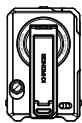
KHRONOS iPhone 16 Pro Case ×1
KHRONOS Multi-Functional Magnetic ×1
Backplate for iPhone 16 Pro


iPhone 16 Pro Screen Protector ×2
Cleaning Kit and Dust Removal Sticker ×2

User Guide ×1
Or
KHRONOS iPhone 16 Pro Max Case ×1
KHRONOS Multi-Functional Magnetic ×1
Backplate for iPhone 16 Pro Max


iPhone 16 Pro Max Screen Protector ×2
Cleaning Kit and Dust Removal Sticker ×2

User Guide ×1
ASSEMBLING THE SCREEN PROTECTOR

Use the Cleaning Kit and Dust Removal Sticker to clean the screen first.

Peel off the protective film, align the Screen Protector with the edges of the screen, and slowly press it down.

Press lightly on the center to allow the Screen Protector to adhere to the screen.

Use fingers or card to remove any remaining air bubbles. Then peel off the film of the Screen Protector to complete the installation.

Note: KHRONOS iPhone 16 Pro/Pro Max cases are compatible only with Screen Protectors up to 0.5mm thick or the included Screen Protector.
KHRONOS IPHONE16 PRO CASE

PRODUCT SPECIFICATIONS
● Material: Aluminum Alloy + Plastic + Silicone
- Dimensions: 158 × 79 × 14.3mm
• Weight: 58.5g (Case);
115g (Case + Multi-Functional Magnetic Backplate)
- Colors: Space Gray/Titanium White/Black/Forest Green/Orange

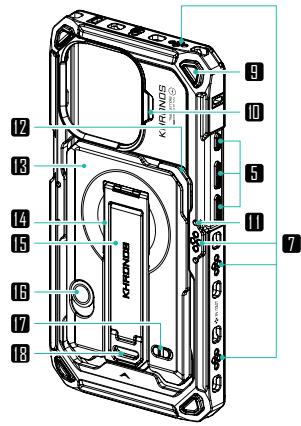
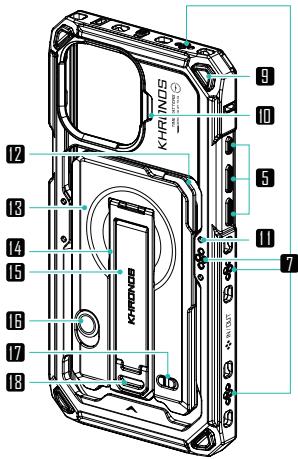
1 Release Button
2 Phone Case Top Cover
3 Safety Slot for Mounting Plate
4 Quick-Release Mounting Points
5 Smartphone Button Access
6 Camera Control Bar
7 Electronic Contact Points
8 Lanyard Points
9 Protective Padding
10 Anti-rotation Slot
11 Cooling System
Locating Points
12 Flat Head Screwdriver
13 Multi-Functional Magnetic Backplate
14 Kickstand
15 Finger Strap
16 Utility Knife Unlock Button
17 Kickstand Locking Button
18 Finger Strap Release Button
19 USB-C Port Slot
KHRONOS IPHONE16 PRO MAX CASE

PRODUCT SPECIFICATIONS
● Material: Aluminum Alloy + Plastic + Silicone
- Dimensions: 171.6 × 85.5 × 14.1mm
• Weight: 67g (Case);
127.5g (Case + Multi-Functional Magnetic Backplate)
- Colors: Space Gray/Titanium White/Black/Forest Green/Orange


(1) Detach the top and bottom sections of the phone case
Remove the phone case from the packaging and slide the unlock button ①. Apply pressure ● on the top cover to unlock ②, then detach the top and bottom sections.

(2) Assembly
Insert the phone into the case, align and securely snap the top cover into place ③.
(steps continue on
the next page)


(3) Locking completed
Ensure that the top and bottom covers are aligned and fit together.
Apply pressure (①②) on the top cover to lock it in place ④.
(You will hear a "click" when locked), then slide the unlock button ⑤ to complete the assembly.
Unlock and Remove the Phone

Slide the unlock button Ⓐ to unlock, apply pressure ● on the top cover to detach Ⓑ.
Separate the top and bottom covers to take the phone out.
Feature 1 : Foldable Kickstand
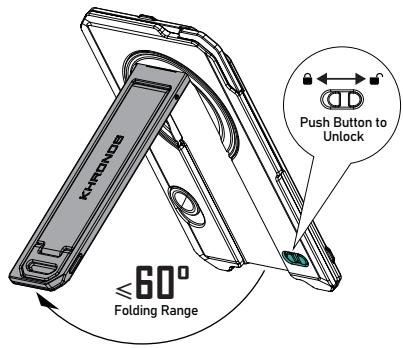
Function 2 : Phone Finger Strap

Slide the lever to expand the finger strap
Function 2 : Utility Knife
Utility Knife (Unsharpened)
Hold the unlock button to use the knife.
Release the button to automatically retract the knife.

Flat Head Screwdriver

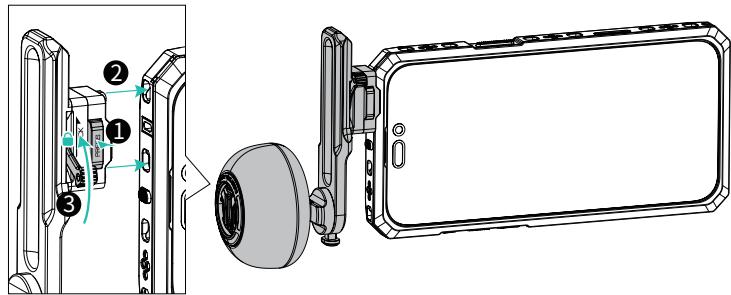
Example: assembling Khronos Multi-Functional Magnetic Backplate for iPhone 16 Pro Max. Attach the backplate magnetically to the back of the phone ①, slide the plate upward ② to secure it into the safety lock on the case to complete the assembly.
(The backplate can also directly attach to MagSafe-compatible iPhones.)
31
MEET KHRONOS COOLING SYSTEM V2 FOR IPHONE (OPTIONAL)


1 Function Indicator Light
3 Cooling Function Button
5 Wireless Charging Function Button
7 Cooling Panel
2 Cooling Vent
4 USB-C Port (PD Input 27W)
6 Electronic Contact Pins (Input 6-12V)
8 Locating Pins

The cooling system does not include a battery and does not have a built-in battery; it requires an external power source for operation.
PRODUCT SPECIFICATIONS
● Material: Aluminum Alloy
- Weight: 100g
- Dimensions: 74.9×58.4×23mm
- Colors: Space Gray/Black
BUTTON FUNCTION

Wireless Charging Function Button
1st level (single click): Outputs 5W, white light
2nd level (single click again): Outputs 10W bright white light

Cooling Function Button
1st level (single click): Standard cooling, blue light
2nd level (single click again): Increased cooling, dark blue light
ASSEMBLING THE COOLING SYSTEM

[KHRONOS iPhone 16 Pro Max Case] Align the cooling system ① with the locating points and contact points on the back of the phone case ②, and magnetically attach it to the back of the phone to complete the assembly.
USB-C PORT POWER SUPPLY

< WITH PHONE CASE >
The USB-C port and an external power supply provides power to both the cooling system and the phone case (also powers the phone via MagSafe).
PHONE CASE POWER SUPPLY

< WITH PHONE CASE >
The Focus PD Handle powers the phone case and cooling system through contact points.
MAGSAFE POWER SUPPLY

< WITHOUT PHONE CASE >
The USB-C port and an external power supply provides power to the cooling system, and also powers the phone via MagSafe.
MEET KHRONOS FOCUS PD HANDLE FOR IPHONE (OPTIONAL)


USB-C Port
(PD Dual-directional Fast Charging)
2 3.5mm Microphone Port (for 4-Pole 3.5mm Audio Cables)
3 Dial
4 Locating Pins
5 Clamp
6 Electronic Contact Pins
7 USB-C Power Cable (Output only) (70mm)
8 Status Indicator Light
9 Power Indicator Light
10 Power/Record Button
Function Button
12 Clamp Release Button (Press to unlock)
13 Locking Lever
PRODUCT SPECIFICATIONS
● Material: Aluminum Alloy+SUS304+Silicone+ABS+PC
- Dimensions: 103.8×49×65.1mm
- Weight: 300g
- Colors: Space Gray/Black
FEATURE DESCRIPTION

Function Button
01 Single Click: Toggle between ZOOM and FOCUS functions in the Blackmagic Cam APP.
02 Double Click: Switch between Bluetooth HID mode and APP mode.
(HID mode controls the native camera; APP mode controls Blackmagic Cam).
03 Long Press: Toggle the USB-C power cable on/off to supply power to the phone.
04 Triple Click: Clear phones paired through HID and APP modes. After clearing, the status indicator will flash red and green ⏻ for 3 seconds. (After clearing, the paired phones will not reconnect automatically to the handle; the phone must re-pair.)

Power/Record Button
01 Hold for 3 seconds: Power on/off
02 Single click: In HID mode, when using the camera interface, one click takes a photo; when using video interface, one click starts recording. In APP mode, one click starts recording.

Dial
01 APP mode: Control zoom and focus in Blackmagic Camera App.
02 HID mode: Control zoom in native camera of certain Android devices.
INDICATOR LIGHT
Hold the [Power/Record] button for 3 seconds to power on — the red or green light will illuminate.
Double click the [Function] button to switch modes — APP mode (solid red light ●) or HID mode (solid green light ●).
Triple click the [Function] button to unpair devices — red and green lights Ⓧ will flash for 3 seconds.
Bluetooth connection confirmed — red light ● flashes (APP mode) or green light ● flashes (HID mode).
Firmware update status — yellow light ⚙ turns on and then flashes ⚙.
34
ASSEMBLING KHRONOS FOCUS PD HANDLE FOR IPHONE

Power the smartphone via the handle's built-in USB-C cable. Connect the power cable ①, press the handle's clamp release button ② to attach it to the phone case's quick-release ports ③ (as shown in the image), and then lock the lever ④ to secure the handle.
Horizontal Shooting Mode


Note: The KHRONOS iPhone 16 PRO Case is not compatible with vertical shooting setups when used with the focus handle.
Vertical Shooting Mode

POWER INFORMATION

BATTERY CAPACITY
7.4V 37Wh 5000mAh
(1) Operating temperature: Charging: 0°C\~45°C;
Discharging: -20°C\~60°C
(2) Storage temperature: -20°C 45°C
(3) Operating humidity: 90\~95% (Max.)
(4) Storage relative humidity: ≤70%RH
(5) Warranty period: fewer than 200 cycle counts (12 months)

USB-C POWER INPUT/OUTPUT RANGE
Input 30W (When powered on, maximum input 5W; when powered off, maximum input 30W)
Output 20W (When powered on, maximum output 5W; when powered off, maximum output 20W)

USB-C POWER CABLE OUTPUT RANGE
Output 20W
FIRMWARE UPDATES
- Download the latest firmware from the TILTA official website. If you have any installation queries, please consult TILTA's official customer service. (TILTA Official Website: www.tilta.com)
- With the handle powered off, press and hold the [Function] button and the [Power/Record], button at the same time until the indicator light turns yellow ⚙ and starts to flash ⚙;
- Connect the handle to a personal computer using a data cable via the Type-C port. Move the downloaded firmware update to the handle's drive to complete the update process.
35
KHRONOS FOCUS PD HANDLE FOR IPHONE - BLUETOOTH CONNECTION OVERVIEW

Connect the handle


Hold the [Power/Record] button for 3 seconds to power on

Double click the [Function] button to switch modes
01 After mounting the handle to the phone, hold the [Power/Record] button for 3 seconds to power on the device, and wait for the status indicator to light up.
Double click the [Function] button to switch modes — APP mode (steady red light ●) or HID mode (steady green light ●)
02 APP Mode — Control Blackmagic Cam APP


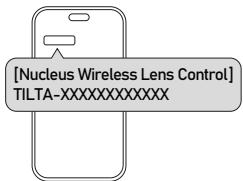


When the handle is in APP mode, open the Blackmagic Cam APP on the phone and go to [Settings]>[Accessories]>[Nucleus Wireless Lens Control] to link the handle.
Once connected, indicated by a flashing red light Ⓞ, the handle's [Record] button can start/stop recording, and the [Dial] adjusts focus and zoom in the APP.
(When operating in App Mode, switching modes or restarting the device requires manual Bluetooth reconnection in Blackmagic Camera App.)
03 HID Mode — Control Native Camera


When the handle is in HID mode, activate the phone's Bluetooth on the phone and from the available device list, choose the handle for pairing. Once connected (green light ● flashes), the handle's [Record] button can control the phone's native camera for video and photos, and the [Dial] can adjust zoom in native camera on select Android models.
(When the controller is in HID mode and has been previously paired with the mobile phone's Bluetooth, upon reopening the phone's Bluetooth, the system will automatically connect to the controller's Bluetooth.)

- The handle's current mode is indicated by the startup light; red for APP mode or green for HID mode.
- Mode settings are retained after a reboot.
- The handle has distinct Bluetooth names for each mode due to different MAC addresses.
(e.g., TILTA-000000000001 for APP, TILTA-000000000002 for HID)
- In HID mode, the handle can also trigger recording in the Black-magic Cam APP via [Settings]> Camera >using the volume keys.

Clamp
2 Locating Pins
3 Electronic Contact Pins
4 HDMI Port
5 USB-C Power Input (External power supply, maximum input of 20V/5A 100W, supports PD 3.0 protocol)
6 USB-C Ports
● Material: Aluminum Alloy
- Weight: 99.5g

The USB-C Hub does not include a battery and does not have a built-in battery; it requires an external power source for operation.
7 USB-C Port (Connects to smartphone)
8 Locking Lever
9 Release Button
10 3.5mm Audio Port (For 4-Pole 3.5mm Audio Cables)
11 Arca Plate
12 Dual Right Angle USB-C Cable
● Dimensions: 55×32×17.6mm
- Colors: Space Gray/Black

Assemble the USB-C Hub
(1) Press the USB-C Hub's release button ①, attach the USB-C Hub to the phone case's quick-release mounting points with dual electronic contacts ②, and lock the lever ③ to complete the assembly.
(2) Connect both ends of the configured Dual Right Angle USB-C cable ④ to the designated USB-C ports on the smartphone and the hub.
Horizontal Shooting Mode

Vertical Shooting Mode

37
QUICK RELEASE USB-C HUB EXTERNAL POWER SUPPLY INSTRUCTIONS

After assembling the hub according to the previous description (see 1 2 3 4 for the assembly order), an iPhone series focus power handle or other power sources can be connected to power the hub.
For the KHRONOS Focus PD Handle for iPhone
- powered by Cable
(1) Insert the handle's USB-C power cable into the hub's power input port 5.
(2) Press the release button 6 on the handle, attach the handle to the phone case's quick-release mounting points with dual electronic contacts 7, and then lock the lever 8 to secure the handle.
(3) Hold the power button D on the handle for 3 seconds to activate the handle.
(4) The handle powers both the hub and the phone case through the handle's USB-C power cable.


For the KHRONOS Focus PD Handle for iPhone
- powered by Electronic Contact Pins
(1) Dangle the handle's USB-C power cable A.
(2) Assemble the hub Ⓑ and the handle Ⓐ onto the phone case.
(3) Hold the power button D on the handle for 3 seconds to activate the handle.
(4) The handle powers both the hub and the phone case through the handle's electronic contact pins.
QUICK RELEASE USB-C HUB POWER SPECIFICATIONS

STANDARD HUB INSTALLATION
When the Hub is Installed in the Standard Orientation on the Phone Case:
(1) If PD < 45W (with 15W reserved by the product)
— Enables phone charging but disables power via electronic contacts.
(2) If 45W ≤ PD ≤ 65W (with 15W reserved by the product)
— Disables phone charging but enables power via electronic contacts.
(3) If PD > 65W (with 15W reserved by the product)
— Enables both phone charging and power via electronic contacts.


REVERSE HUB INSTALLATION
When the Hub is Installed in the Reverse
Orientation on the Phone Case:
No power occurs through electronic contacts.

MEET KHRONOS NATO BRACKET WITH WOODEN HANDLE (OPTIONAL)

NATO Rail
2 Handgrip
3 Locating Pins
4 Clamp
5 Clamp unlock button
6 Locking Lever
7 Rotary Unlock Button
ASSEMBLING THE NATO BRACKET WITH WOODEN HANDLE

Press the clamp release button ①, attach the NATO Bracket with Wooden Handle to the quick-release mounting points ② of the phone case, and then lock the lever ③ to complete the assembly.
MOUNTING NUCLEUS NANO II HAND WHEEL CONTROLLER

As shown, mount the hand wheel onto the NATO Bracket with Wooden Handle's NATO rail ① and lock the lever on the wheel ② to complete the assembly.

Assembling the universal quick-release adapter
(Cold shoe quick release adapter/NATO quick release adapter/ARCA quick release adapter)
Press the release button ① on the quick-release adapter, attach the adapter to the quick-release mounting points ② on the case, then lock the lever ③ to complete the assembly.
Cold shoe quick release adapter (TK-CSA-SG)

ARCA quick release adapter (38mm) (TK-ARCA-38-SG)
41
》》》》》
MEET KHRONOS ADJUSTABLE HANDLE (OPTIONAL)

1 1/4"-20 Thread with Locating Points
2 Handle
3 Position Knob
(Secures the handle's vertical adjustment)
4 Locating Pins
5 Clamp
7 Locking Lever
8 Rotation Button
By pressing the rotation button, the handle can rotate within a range of +90° to -90° (featuring 5 positions at 45° increments)
6 Release Button
6 Release Button
ASSEMBLING THE ADJUSTABLE HANDLE

Press and hold the release button on the handle ①, attach the handle to the quick-release mounting points of the phone case ②, lock the lever ③ and complete the assembly.
Horizontal Shooting Mode

Vertical Shooting Mode

MEET THE MINI LED PANEL/CIRCULAR WOODEN HANDLE/UNIVERSAL SSD HOLDER (OPTIONAL)
MINI LED PANEL

| Dimensions: 53×52×17.6mm | Color Temperature: 6500±300K |
| Material: Aluminum Alloy/SUS304/Silicone/Rubber/Graphite Nylon/PC | Luminous Flux: 67.9lm (level 1), 94.1lm (level 2), 129.2lm (level 1) |
| Weight: 36.5g | Power: 2W |
| Colors: Space Gray/Black | Voltage: 6-12V compatible |
| LED Color: White | Current: 0.16A at 6V (level 1), 0.16A at 6V (level 2), 0.35A at 6V (level 3) |
| Number of LEDs: 32pcs | |
| Illumination Distance: 5m | Surface Temperature Increase (at ambient 24°C): by 33.6°C (level 1), 36.5°C (level 2), 41°C (level 3) |
| Color Rendering Index (CRI): 95RA |

● Material: Aluminum Alloy
● Dimensions: 60.25×20×30.26mm
- Weight: 29.5g
- Colors: Space Gray/Black
CIRCULAR WOODEN HANDLE
• Material: Aluminum Alloy
- Dimensions: 63.1×55.8×55.8mm
- Weight: 110g
- Colors: Space Gray/Black
Assembling the MINI LED PANEL(TK-MLP-DL-SG)
Press the release button ① on the light, then mount the light onto the case with the quick-release mounting points ② equipped with dual electronic contacts (as shown), completing the assembly. Long press the power button to activate.
Assembling the Universal SSD Holder (TK-USH-SG)
Press the release button ③ on the SSD holder, then mount the holder onto a quick-release mounting points ④ on the case (as shown), completing the assembly.
Assembling the CIRCULAR WOODEN HANDLE (TK-CWH-SG)
Press the release button ⑤ on the circular wooden handle, then mount the handle onto the case with the quick-release mounting points ⑥ (as shown), and lock the lever ⑦ to complete the assembly.
ASSEMBLING KHRONOS IPHONE16 PRO/PRO MAX LENS ADAPTER (OPTIONAL)

Assembling the iPhone 16 Pro/Pro Max Lens Adapter
After adjusting the lens mount adapter to the appropriate angle ①, press the release button on the lens adapter ② and attach it to the quick-release mounting points ③ on the case as shown in the illustration, then press the anti-rotation clip of the adapter ④ into the anti-rotation slot on the phone case to secure the adapter and complete the assembly. (The lens adapter allows for 180° angle adjustment.)
NOTE

AFTER ASSEMBLY — UNLOCKING
THE ANTI-ROTATION CLIP

Hold the anti-rotation clip A to unlock and adjust the adapter's angle of rotation B.
44 ASSEMBLING KHRONOS QUICK RELEASE FILTER TRAY FOR IPHONE 16 PRO/PRO MAX AND KHRONOS FILTER FOR IPHONE(OPTIONAL)

Assembling the Khronos Quick Release Filter Tray for iPhone 16 Pro/Pro Max
After adjusting the filter tray to the appropriate angle ①, press the release button on the filter tray ②, attach it to the designated quick -release mounting points ③ on the case as shown in the illustration, and press the filter tray's anti-rotation clip ④ into the phone case's anti-rotation slot to secure the adapter to complete the assembly. (The lens adapter allows for 180° angle adjustment.)
NOTE

Press the filter tray's anti-rotation clip ④ into the phone case's anti-rotation slot to secure the filter tray.
AFTER ASSEMBLY — UNLOCKING
THE ANTI-ROTATION CLIP

Assembling the iPhone Filter
Align the filter with the guide slot A on the filter holder, magnetically attach the filter B to the filter holder, and complete the assembly.

感谢您购买KHRONOS的产品。
KHRONOS iPhone 16 Pro 手机壳 ×1 iPhone 16 Pro 磁吸多功能背板 ×1

iPhone 16 Pro 钢化膜 ×2 屏幕清洁套装和除尘贴 ×2

用户使用手册 ×1
或

KHRONOS iPhone 16 Pro Max 手机壳 ×1 iPhone 16 Pro Max 磁吸多功能背板 ×1

iPhone 16 Pro Max 钢化膜 ×2 屏幕清洁套装和除尘贴 ×2
用户使用手册 ×1
安装钢化膜

<正面>
<背面>
规格参数
- 材质:铝合金+塑胶+硅胶
- 尺寸:158×79×14.3mm
- 重量:58.5g(手机壳)/115g(手机壳+背板)
- 颜色配置: 深空灰/钛白色/黑色/丛林绿/警示橙
<底部>

<正面>
<背面>
规格参数
- 材质:铝合金+塑胶+硅胶
- 尺寸:171.6×85.5×14.1mm
- 重量:67g(手机壳)/127.5g(手机壳+背板)
- 颜色配置: 深空灰/钛白色/黑色/丛林绿/警示橙
<底部>

装配KHRONOS iPhone 16 Pro/Pro Max 手机壳

<正面>

<背面>
功能指示灯
3 制冷功能按键
5 无线充电功能按键
7 制冷面板
2 散热孔
4 Type-C接口(PD输入27W)
6 电子弹针(输入6-12V)
8 定位柱

以KHRONOS iPhone 16 Pro Max专用手机壳为例,
<正面>

<背面>
竖拍装配

装配手柄

长按3秒【电源/录制键】开机
双击【功能键】切换模式


竖拍装配

装配通用拓展坞

<拓展坞反装>
17
认识和装配KHRONOS手机壳通用原力N2快拆手托(选配)

1 NATO滑条
5 卡扣解锁按键
2 手托
6 锁紧扳扣
3 定位柱
7 旋转解锁按键
4 卡扣
装配手托
装配手机壳通用快拆转接件
竖拍装配

通用 mini补光灯

固态硬盘支架




- KHRONOS
- ACCESSORY NOTICES
- ACCESSORY REQUIREMENTS
- OPERATING ENVIRONMENT
- BATTERY SAFETY
- ⚠ [WARNING]
- MAINTENANCE & CARE
- KHRONOS IPHONE 16 PRO/PRO MAX CASE—ACCESSORIES & SCREEN PROTECTOR INSTALLATION GUIDE
- OR
- ASSEMBLING THE SCREEN PROTECTOR
- PRODUCT SPECIFICATIONS
- LOCKING COMPLETED
- MEET KHRONOS COOLING SYSTEM V2 FOR IPHONE (OPTIONAL)
- BUTTON FUNCTION
- ASSEMBLING THE COOLING SYSTEM
- USB-C PORT POWER SUPPLY
- PHONE CASE POWER SUPPLY
- MAGSAFE POWER SUPPLY
- MEET KHRONOS FOCUS PD HANDLE FOR IPHONE (OPTIONAL)
- FEATURE DESCRIPTION
- FUNCTION BUTTON
- POWER/RECORD BUTTON
- DIAL
- INDICATOR LIGHT
- ASSEMBLING KHRONOS FOCUS PD HANDLE FOR IPHONE
- POWER INFORMATION
- BATTERY CAPACITY
- V 37WH 5000MAH
- USB-C POWER INPUT/OUTPUT RANGE
- USB-C POWER CABLE OUTPUT RANGE
- FIRMWARE UPDATES
- KHRONOS FOCUS PD HANDLE FOR IPHONE - BLUETOOTH CONNECTION OVERVIEW
- APP MODE — CONTROL BLACKMAGIC CAM APP
- HID MODE — CONTROL NATIVE CAMERA
- ASSEMBLE THE USB-C HUB
- QUICK RELEASE USB-C HUB EXTERNAL POWER SUPPLY INSTRUCTIONS
- FOR THE KHRONOS FOCUS PD HANDLE FOR IPHONE
- QUICK RELEASE USB-C HUB POWER SPECIFICATIONS
- MEET KHRONOS NATO BRACKET WITH WOODEN HANDLE (OPTIONAL)
- ASSEMBLING THE NATO BRACKET WITH WOODEN HANDLE
- MOUNTING NUCLEUS NANO II HAND WHEEL CONTROLLER
- ASSEMBLING THE UNIVERSAL QUICK-RELEASE ADAPTER
- MEET KHRONOS ADJUSTABLE HANDLE (OPTIONAL)
- ASSEMBLING THE ADJUSTABLE HANDLE
- MEET THE MINI LED PANEL/CIRCULAR WOODEN HANDLE/UNIVERSAL SSD HOLDER (OPTIONAL)
- CIRCULAR WOODEN HANDLE
- ASSEMBLING THE MINI LED PANEL(TK-MLP-DL-SG)
- ASSEMBLING THE UNIVERSAL SSD HOLDER (TK-USH-SG)
- ASSEMBLING THE CIRCULAR WOODEN HANDLE (TK-CWH-SG)
- ASSEMBLING KHRONOS IPHONE16 PRO/PRO MAX LENS ADAPTER (OPTIONAL)
- ASSEMBLING THE IPHONE 16 PRO/PRO MAX LENS ADAPTER
- ASSEMBLING KHRONOS QUICK RELEASE FILTER TRAY FOR IPHONE 16 PRO/PRO MAX AND KHRONOS FILTER FOR IPHONE(OPTIONAL)
- ASSEMBLING THE KHRONOS QUICK RELEASE FILTER TRAY FOR IPHONE 16 PRO/PRO MAX
- ASSEMBLING THE IPHONE FILTER
- 或
- 安装钢化膜
- 规格参数
- 装配KHRONOS IPHONE 16 PRO/PRO MAX 手机壳
- 装配通用拓展坞
- 认识和装配KHRONOS手机壳通用原力N2快拆手托(选配)
- 装配手托
- 装配手机壳通用快拆转接件
Brand : Tilta
Model : Khronos Ecosystem (iPhone 16 Pro / Pro Max)
Category : Smartphone accessory