
Cage for Sony FX2 - Camera accessory Tilta - Free user manual and instructions
Find the device manual for free Cage for Sony FX2 Tilta in PDF.


| Product type | Complete cage for Sony FX2 camera |
| Brand | Tilta |
| Model | TA-T88 |
| Compatibility | Sony FX2 |
| Dimensions | 159.4 × 74.3 × 109.6 mm |
| Net weight | 250 g |
| Material | Aluminum alloy with non-slip silicone pads |
| Power supply | None (passive mechanical accessory) |
| Main functions | Protection, accessory mounting, cable supports, vertical mode switching |
| 1/4"-20 mounting points | Multiple points with positioning |
| 3/8"-16 mounting points | Present with positioning |
| NATO rails | One top rail and one side rail |
| M3 threading | For lens adapter support |
| Wrist strap anchor | Yes |
| Camera mounting points | Mounting screws on the bottom and left side |
| HDMI cable clamp | Yes |
| MULTI + USB-C cable clamp | Yes |
| Cold shoe receiver | Yes |
| Thread adapter | 3/8"-16 to 1/4"-20 adapter included |
| Magnetic screwdriver | Dual-format, built-in |
| Bottom plate | Arca-Swiss standard |
| Mounting modes | Horizontal (plate underneath) and vertical (plate on the left side) |
| Maintenance and cleaning | Clean with a soft, dry cloth, avoid abrasive products |
| Safety | Check screw tightness before each use and do not exceed the recommended load |
| Spare parts and repairability | Standard screws and accessories replaceable, contact the manufacturer |
| General information | Made by Shenzhen Tilta Technology Co., Ltd., customer service available |
Frequently Asked Questions - Cage for Sony FX2 Tilta
User questions about Cage for Sony FX2 Tilta
0 question about this device. Answer the ones you know or ask your own.
Ask a new question about this device
Download the instructions for your Camera accessory in PDF format for free! Find your manual Cage for Sony FX2 - Tilta and take your electronic device back in hand. On this page are published all the documents necessary for the use of your device. Cage for Sony FX2 by Tilta.
USER MANUAL Cage for Sony FX2 Tilta
DISCLAIMER
Thank you for purchasing TILTA products.
Before using this product, please carefully read this document to ensure that the product has been set up correctly. The final interpretation of this document and all related documents for this product belongs to TILTA. For updates, please visit the official website at www.tilta.com for the latest product information.
TILTA reserves the right to modify any information in this manual at any time without prior notice and without assuming any responsibility.
By using this product, you are deemed to have carefully read the disclaimer and warnings, understood, agreed, and accepted all the terms and content of this statement. You promise to take full responsibility for the use of this product and any consequences that may arise. You commit to using this product only for legitimate purposes and agree to these terms as well as any related regulations, policies, and guidelines set by TILTA.
TILTA is not responsible for any damages, injuries, or legal liabilities caused directly or indirectly by the use of this product. Users should follow all safety guidelines mentioned in this document, including but not limited to those mentioned.
Despite the above provisions, consumer rights are still protected by local laws and regulations and are not affected by this disclaimer.
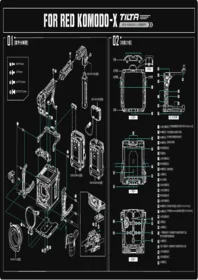
OVERVIEW


1/4"-20 Thread with Locating Points
02 NATO Rail (Top)
03 M3 Thread
(For mounting lens adapter support)
04 Wrist Strap Port
05 Camera Mounting Point (Side)
06 1/4"-20 Thread with Locating Points
07 3/8"-16 Thread with Locating Points
08 HDMI Cable Clamp
Product Specifications

09 NATO Rail (Side)
10 Cable Clamp (MULTI + USB-C)
Silicone Anti-Slip Pad
12 Cold Shoe Receiver
13 3/8"-16 to 1/4"-20 Thread Adapter
14 Magnetic Screwdriver
15 Arca-Swiss Bottom Plate
| SKU | DIMENSIONS | NET WEIGHT |
| TA-T88 | 159.4×74.3×109.6mm (6.28×2.93×4.32 in) | 250g (8.82 oz) |
ASSEMBLING THE FULL CAGE
01


To install the NATO rail, attach it to the top of the camera cage to provide mounting space for a top handle. If you need to install the original top handle, simply remove the NATO rail from the camera cage.

INSTALLING THE CABLE CLAMP AND THE BOTTOM PLATE
02


免责声明
感谢您购买TILTA产品。

安装线夹与底板
02


Address (China): 1st and 2nd Floor, Building B, Qiaode High Technology Park, No.7 Road, Guangming New Dist, Shenzhen, 518125
Address (United States) : 1901 W Magnolia Blvd, Burbank, CA 91506
Address (Germany) : Lise-Meitner-Allee 13.Bochum, North Rhine-Westphalia 44801
Address (United kingdom) : Room 3, Unit 11, Woodland Business Park, Ystradgynlais, Swansea SA9 1JW
Official website : https://tilta.com/
https://eu.tilta.com/
https://tilta.uk/




Brand : Tilta
Model : Cage for Sony FX2
Category : Camera accessory