DEFINE S2 VISION - Computer Case Fractal Design - Free user manual and instructions
Find the device manual for free DEFINE S2 VISION Fractal Design in PDF.


| Product Type | Computer Case |
| Brand | Fractal Design |
| Model | DEFINE S2 VISION |
| Form Factor | Mid-Tower |
| Motherboard Compatibility | ATX, Micro-ATX, Mini-ITX |
| Dimensions (H x W x D) | 475 x 233 x 506 mm |
| Weight | 13.5 kg (29.8 lbs) |
| Power Supply Type | ATX (bottom mount) |
| Expansion Slots | 7 |
| Drive Bays | 2x 3.5"/2.5" + 6x 2.5" (max) |
| Front Panel I/O | 1x USB 3.1 Gen 2 Type-C, 2x USB 3.0, audio jacks |
| Included Fans | 2x 140 mm PWM fans (Dynamic X2 GP-14 PWM) |
| Optional RGB Version | Prisma AL-14 PWM fans with Adjust R1 RGB Controller |
| Fan Hub | PWM Fan Hub included for centralized control |
| Radiator Support | 120, 140, 240, 280, 360 mm options |
| Water Cooling | Custom loop compatible with mounting brackets |
| Dust Filtration | Front, top, bottom washable dust filters |
| Side Panel Options | Tempered glass and ventilated panels interchangeable |
| Cable Management | Velcro straps and integrated routing |
| Warranty | 24 months limited |
Frequently Asked Questions - DEFINE S2 VISION Fractal Design
User questions about DEFINE S2 VISION Fractal Design
0 question about this device. Answer the ones you know or ask your own.
Ask a new question about this device
Download the instructions for your Computer Case in PDF format for free! Find your manual DEFINE S2 VISION - Fractal Design and take your electronic device back in hand. On this page are published all the documents necessary for the use of your device. DEFINE S2 VISION by Fractal Design.
USER MANUAL DEFINE S2 VISION Fractal Design
DEFINE S2 VISION
User Guide
Anwenderleitfaden / Guide de l'utilisateur / Guía del usuario / Användarguide /
For more information and product specifications, visit www.fractal-design.com
V1.2
Builder's Guide
Accessory Box Contents
Zubehörbox - Inhalt / Contenu de la boîte d'accessoires / Contenido de la caja de accesorios / Innehåll i tillbehörsbox / Комплектация коробки с аксессуарами / アクセサリ ボックスの内容 / 配件包内容 / 配件包内容

x13
Motherboard and Reservoir Bracket Screw
Additional motherboard standoff
Optional side panel screws
Accessory Box Contents
Zubehörbox - Inhalt / Contenu de la boîte d'accessoires / Contenido de la caja de accesorios / Innehåll i tillbehörsbox / Комплектация коробки с аксессуарами / アクセサリ ボックスの内容 / 配件包内容 / 配件包内容

x1
SATA Power Extension Cable
x1
Adjust R1 RGB Controller
RGB-Regler
Contrôleur RVB
Controlador RGB
RGB kontroll
RGB-контроллер
RGBコントローラー
RGB控制器
RGB控制器


x1
Top Filter
Top-Filter
Filtre supérieur
Filtro superior
Topp filter
Верхний фильтр
上部フィルター
顶部过滤器
頂部過濾器

x1
Top Fan/Radiator Bracket
Install the Power Supply
Installation Netzteil / Installer le bloc d'alimentation / Instale la fuente de alimentación / Installera nätaggregatet / Установите блок питания / 電源装置の取り付け / 安装电源 / 安装電源供應器


1.

2.
Prepare the Motherboard
Vorbereitung Hauptplatine / Préparer la carte mère / Prepare la placa base / Förbered moderkortet / Подготовьте matérinskую плату / マザーボードの準備 / 准备主板 / 準備主機板


2.
Install the I/O Shield
Installieren Sie die I/O Schild / installer le plaque d'E/S / Instale la protección de E/S / Installera I/O-plåten / Установите ввода / вывода пластину / I/O シールドの取り付け / 安装I/O 挡板 / 安装I/O 撓板
1x

Install the Motherboard Assembly
Installation Hauptplatinenzubehör / Installer l'ensemble carte mère / Instale la placa base / Installera moderkortet / Установите сборку материнской платы / マザーボード アセンブリの取り付け / 安装主板組件 / 安装主機板組件

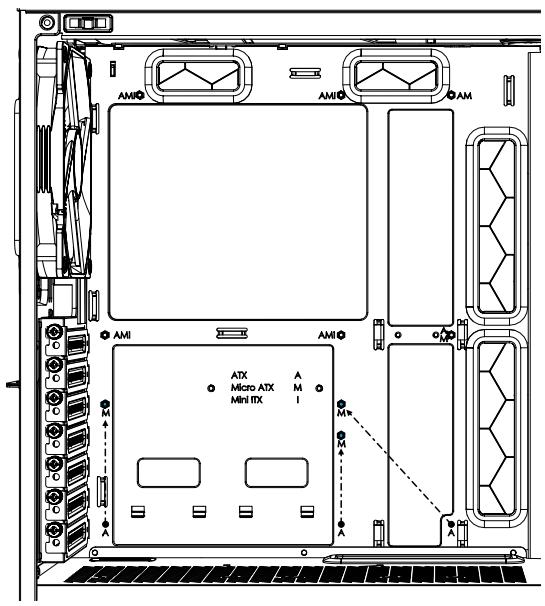
M-ATX: A → M
1.


2.
Connect Cables for Front I/O
Anschlusskabel für Front-E/A / Connecter les câbles aux E/S frontales / Conecte los cables para E/S frontal / Koppla in kablar till fronten / Подсоедините кабели передних устройств ввода-вывода / 前面 I/O 用の接続ケーブル / 为 I/O 前面板连接电线 / 正面 I/O 的連接線

Connect PWM Fan Hub
PWM-Lüfter-Hub-Anschluss / Branchement du moyeu du ventilateur du PWM / Conectar el concentrador del ventilador PWM / Anslut PWM-fläkthub / Подключение ШИМ-узла для вентиляторов / PWMファンハブを接続 / 连接PWM风机毂 / 连接 PWM 風扇殻

Connecting RGP Strip and LED Fans *
Anschluss RGB-Gebläse und LED-Leiste / Connexion des ventilateurs du RVB et de la bande de LED / Conecte los ventiladores RGB y la tira LED / Ansluta RGB fläktar och LED-list / Подключение RGB-ventiляторов и LED-полосы / RGBファンとLEDストリップを接続 / 连接 RGB风扇和 LED光条 / 連接RGB風扇和LED燈帯


3.
Included in RGB version or sold separately / In RGB-Version eingeschlossen oder separat angeboten / Compris dans la version RVB ou vendu séparément
Se incluye en la versión RGB o se vende por separado / Inkluderad i RGB versionen eller säljs separat / Входит в комплект RGB-версии или продается отдельно
Install the Graphics Card
1.

2.
Install a 2.5" Drive
Installation 2,5-Zoll-Laufwerke / Installer des disques 2.5 / Instale las unidades de 2,5" / Installera 2,5" enheter / Установите 2,5" приводы или диски / 2.5 インチ ドライブの取り付け / 安装2.5" 硬碟 / 安装 2.5" 磁碟


1.

2.
Install a 2.5" or 3.5" Drive

2A.


2B.


3.

Optional Steps
Optionale Schritte / Étapes facultatives / Pasos opcionales / Frivilliga moment / Возможные ангрейды / 任意の手順 / 可选步骤 / 選項步驟
Securing Side Panels for Transportation
Transportsicherung Seitenbleche / Fixation des panneaux latéraux pour le transport / Fijando los paneles laterales para su transporte / Säkra sidopaneler för transport / Защита боковых панелей для транспортировки / 輸送用にサイドパネルを固定 / 确保側面板安全运输 / 保護側板以進行運輸


Removing the Top Glass Panel for Easier Access
Obere Glasplatte für den einfachen Zugriff abnehmen / Retrait du panneau de verre supérieur pour faciliter l'accès / Extracción del panel de vidrio superior para facilitar el acceso / Ta bort toppens glaspanel för lättare åtkomst / Удаление верхней стеклянной панели для удобного доступа / 手軽なアクセス用に上部ガラスパネルを取外し / 取下顶部玻璃嵌板,更加便捷 / 卸下頂部玻璃面板以便於操作

Alternative Placement of Graphics Card
Alternative Grafikkartenanordnung / Emplacement alternatif pour la carte graphique / Ubicación alternativa de la tarjeta gráfica / Alternativ placering av grafikkort / Альтернативное размещение графической платы / グラフィックスカードの代替配置 / 可选择安装显卡 / 顯示卡替代放置

2x

2x


Not included / Nicht im Lieferumfang enthalten / Non inclus / No incluido / Ej inkluderad / в комплект не входит /含まれません / 不包含 / 不包含

1.


2.
Alternative Placement of 2.5" Drives
Alternative Anordnung von 2,5"-Laufwerkseinschüben / Emplacement alternatif pour les plateaux de disques durs de 2,5" / Ubicación alternativa de las bandejas de unidades de 2,5" / Alternativ placering av 2,5" fästplatta / Альтернативное размещение лотков для 2,5" дисков / 2.5" ドライブトレイの代替配置 / 可选择安装2.5英寸硬盘 / 2.5吋磁碟架替代放置

Replacing Glass Panel With Ventilated Panel
Austausch der Glasplatte gegen die belüftete Platte / Remplacement du panneau en verre par un panneau ventilé / Sustitución del panel de vidrio por un panel con ventilación / Byta ut glaspanel till ventilerad panel / Замена стеклянной панели вентилируемой панелью / ガラスパネルを換気パネルに切換 / 以玻璃嵌板取代通风式嵌板 / 使用通風面板更換玻璃面板

1.


Replacing Glass Panel With Ventilated Panel
Austausch der Glasplatte gegen die belüftete Platte / Remplacement du panneau en verre par un panneau ventilé / Sustitución del panel de vidrio por un panel con ventilación / Byta ut glaspanel till ventilerad panel / Замена стеклянной панели вентилируемой панелью / ガラスパネルを換気パネルに切換 / 以玻璃嵌板取代通风式嵌板 / 使用通風面板更換玻璃面板


3.


4.
Remove PSU Shroud Plate
PSU-Haubenblech ausbauen / Enlever la plaque de recouvrement du bloc d'alimentation / Retire la placa protectora PSU / Montera bort lucka för PSU shroud / Снять пластину кожуха блока питания / PSU シュラウド プレートを取り外す / 拆除PSU护罩面板 / 移除 PSU 側板

1.

3.

2.

4.
Adding a Water Cooling Fillport
Zusätzlicher Wasserkühlung-Einfüllstutzen / Ajout d'un port de remplissage pour l'eau de refroidissement / Añadiendo un puerto de llenado de agua refrigerante / Montera fyllnadsport för vattenkylning / Установка заправочного отверстия для водяной системы охлаждения / 水冷用の給水口を追加 / 可添加一个水冷却注水口 / 加入水冷加注口


Using the Reservoir Mounting Brackets
Verwendung der Reservoir-Haltebügel / Utilisation des supports de montage du réservoir / Uso de los soportes de la reserva / Användning av fästelementen för reservoarer / Krepление резервуара скобами / タンク マウント ブラケットの使用 / 使用儲水器安装架 / 使用儲存器安装支架


Additional Info
Weitere Informationen / Informations supplémentaires / Información adicional / Övrig information / Дополнительная информация / 追加情報 / 附加信息 / 其他資訊
Possible Fan Locations
Mögliche Lüfteranordnung / Emplacements possibles des ventilateurs / Posibles ubicaciones de los ventiladores / Möjliga fläktpositioner / Mesta для установки вентиляторов / ファンを設置できる場所 / 支援风扇的位置 / 支援風扇的位置

120mm


140mm

Water Cooling Radiator Options
Optionen für Wasserkühlungen / Options de radiateurs de refroidissement par eau / Opciones de radiadores para refrigeración líquida / Vattenkylningsmöjligheter / Установка радиатора водяного охлаждения / 水冷却ラジエーター オブション / 水冷却器选项 / 水冷散熱器選項

Possible Water Cooling Setup
Mögliche Wasserkühlung-Setups / Possibilité d'installer des systèmes de refroidissement par eau / Posibles posiciones para refrigeración líquida / Exempel på vattenkylningssystem / Возможные настройки водяного охлаждения / 水冷却のセットアップ / 可能的水冷散热装置安装位 / 可安装水冷散熱装置

120x120 + 240x120 + 240x120

360x120 + 360x120
Dust Maintenance
Staubschutz / Dépoussiérage / Limpieza del polvo y mantenimiento / Underhåll av dammfilter / Защита от пыли / 防塵メンテナンス / 防尘保养 / 防塵保養


4.

CPU Cooler Limitations
CPU-Kühlung Grenzwerte / Limitations du refroidissement du processeur / Limitaciones del refrigerador de la CPU / Restriktioner för CPU-kylare / Ограничения для кулеров ЦП / CPU クーラーの制限事項 / CPU 冷却器的局限性 / CPU 散熱器限制

Graphics Card Limitations
Grafikkarte Grenzwert / Limitations de carte graphique / Limitaciones de la tarjeta gráfica / Restriktioner för grafikkort / Ограничения для графических плат / グラフィック カードの制限事項 / 显卡的局限性 / 顯示卡的限制

Specifications
Technische Daten / Spécifications / Especificaciones / Specifikationer / Texнические характеристики / 仕様 / 規范 / 規格
Dynamic X2 GP-14 PWM

Rotational speed: 500-1700 RPM
Acoustical noise: 33.7 dB(A)
Maximum air flow: 105.9 CFM
Maximum air pressure: 1.95 mm H2O
Maximum rated input current: 0.25 A
Actual input power: 1.7 W
Nominal input voltage: 12 V
Minimum startup voltage: 6 V
Prisma AL-14 PWM*

Rotational speed: 500-1700 RPM
Acoustical noise: 34.1 dB(A)
Maximum air flow: 103.9 CFM
Maximum air pressure: 2.38 mm H2O
Fan max. rated input current: 0.18 A
Fan input power: 2.16 W
Fan nominal input voltage: 12 V
Fan minimum startup voltage: 7 V
LED input voltage: 5 V
LED max. rated input power: 0.30 A
LED input power: 1.5 W
Specifications
Technische Daten / Spécifications / Especificaciones / Specifikationer / Технические характеристики / 仕様 / 規范 / 規格
Adjust R1 RGB Controller*

Input voltage: 5V
Input current: 2.6A
Serial LEDs supported: 40
Included in RGB version or sold separately / In RGB-Version eingeschlossen oder separat angeboten /
Input voltage: 12 V
Output voltage: 12 V
Maximum power output: 36 W
Maximum current: 3 A
Notes
Support and Service
Support und Kundendienst / Assistance technique et maintenance / Soporte y servicio técnico / Support och service / Поддержка и обслуживание / サポートとサービス / 支持与服务 / 支援和服務
For Assistance, Please Contact
Unterstützung erhalten Sie hier: / Pour l'assistance technique, veuillez contacter / Para obtener ayuda, por favor contacte / För assistans, var god kontakta / Если необходима помощь, пожалуйста, свяжитесь с нами / サポートが必要な場合は、お問い合わせください / 如需帮助,敬请联系 / 如需協助,敬请聯絡

https://support.fractal-design.com
Limited Warranty and Limitations of Liability
This product is guaranteed for twenty four (24) months from the date of delivery to end-user, against defects in materials and/or workmanship. Within this limited warranty period, the product will either be repaired or replaced at Fractal Design's discretion. Warranty claims must be returned to the agent who sold the product, shipping prepaid.
The warranty does not cover:
• Products which have been used for rental purposes, misused, handled carelessly or applied in such a way that is not in accordance with its stated intended use.
• Products damaged from an Act of Nature including, but not limited to, lightning, fire, flood and earthquake.
- Products whose serial number and/or the warranty sticker have been tampered with or removed.
• Products which have not been installed in accordance to the user manual
Fractal Design's maximum liability is limited to the current market value of the product (depreciated value, excluding shipping, handling, and other fees). Fractal Design shall not be liable for any other damage or loss, including but not limited to loss of profit, revenue, or data, or incidental or consequential damage, even if Fractal Design has been advised of the possibility of such damages.


- DEFINE S2 VISION
- USER GUIDE
- BUILDER'S GUIDE
- ACCESSORY BOX CONTENTS
- INSTALL THE POWER SUPPLY
- PREPARE THE MOTHERBOARD
- INSTALL THE I/O SHIELD
- INSTALL THE MOTHERBOARD ASSEMBLY
- CONNECT CABLES FOR FRONT I/O
- CONNECT PWM FAN HUB
- CONNECTING RGP STRIP AND LED FANS
- INSTALL THE GRAPHICS CARD
- INSTALL A 2.5" DRIVE
- INSTALL A 2.5" OR 3.5" DRIVE
- OPTIONAL STEPS
- SECURING SIDE PANELS FOR TRANSPORTATION
- REMOVING THE TOP GLASS PANEL FOR EASIER ACCESS
- ALTERNATIVE PLACEMENT OF GRAPHICS CARD
- ALTERNATIVE PLACEMENT OF 2.5" DRIVES
- REPLACING GLASS PANEL WITH VENTILATED PANEL
- REMOVE PSU SHROUD PLATE
- ADDING A WATER COOLING FILLPORT
- USING THE RESERVOIR MOUNTING BRACKETS
- ADDITIONAL INFO
- POSSIBLE FAN LOCATIONS
- WATER COOLING RADIATOR OPTIONS
- POSSIBLE WATER COOLING SETUP
- DUST MAINTENANCE
- CPU COOLER LIMITATIONS
- GRAPHICS CARD LIMITATIONS
- SPECIFICATIONS
- NOTES
- SUPPORT AND SERVICE
- FOR ASSISTANCE, PLEASE CONTACT
- LIMITED WARRANTY AND LIMITATIONS OF LIABILITY
- THE WARRANTY DOES NOT COVER
Brand : Fractal Design
Model : DEFINE S2 VISION
Category : Computer Case