ERA - Computer Case Fractal Design - Free user manual and instructions
Find the device manual for free ERA Fractal Design in PDF.


| Product Type | Small Form Factor Computer Case |
| Brand | Fractal Design |
| Model | ERA |
| Case Volume | 16 liters |
| Dimensions (W x H x D) | 325 x 166 x 310 mm |
| Net Weight | Approximately 3.5 kg |
| Motherboard Support | Mini ITX |
| Graphics Card Support | Up to 295 mm long, 125 mm wide, 47 mm thick |
| Power Supply Support | ATX, SFX-L, SFX |
| CPU Cooler Height Limit | Up to 120 mm (91 mm with HDD) |
| Storage Options | 4 x 2.5" SSD / 2 x 3.5" HDD |
| Water Cooling Support | 1 x 240 mm or 2 x 120 mm radiators |
| Front I/O Ports | USB Type-C, 2x USB 3.0, 3.5 mm CTIA audio/mic |
| Expansion Slots | 1 PCI slot |
| Fan Locations | Top and bottom fan support |
| Dust Filter Maintenance | Removable side panels with filters |
| Radiator Bracket | Removable, supports 240 mm radiator |
| Drive Bracket | Removable, supports 2.5"/3.5" drives |
| PSU Bracket | Removable for easy installation |
| Included Accessories | 20x motherboard screws, 2.5" drive screws |
| Warranty | 24 months limited warranty |
Frequently Asked Questions - ERA Fractal Design
User questions about ERA Fractal Design
0 question about this device. Answer the ones you know or ask your own.
Ask a new question about this device
Download the instructions for your Computer Case in PDF format for free! Find your manual ERA - Fractal Design and take your electronic device back in hand. On this page are published all the documents necessary for the use of your device. ERA by Fractal Design.
USER MANUAL ERA Fractal Design
ERA
User Guide
Anwenderleitfaden / Guide de l'utilisateur / Guía del usuario / Användarguide /
For more information and product specifications, visit www.fractal-design.com
Introduction
Einführung / Présentation / Introducción / Introduktion / Bведение / はじめに / 介绍 / 簡介
Builder's Guide
Case Volume 16-liter
Dimensions 325 x 166 x 310 mm
Motherboard Mini ITX
Graphics Card Up to 295 mm long x 125 mm wide x 47 mm thick
Power Supply ATX / SFX-L / SFX
Water-Cooling 1 x 240 mm or 2 x 120 mm radiators
CPU Cooler Up to 120 mm height, 91 mm max with HDD
Storage 4 x 2.5" SSD or 2 x 3.5" HDD
Front I/O USB Type-C, 2x USB 3.0, Power LED and
3.5mm CTIA combined audio/mic
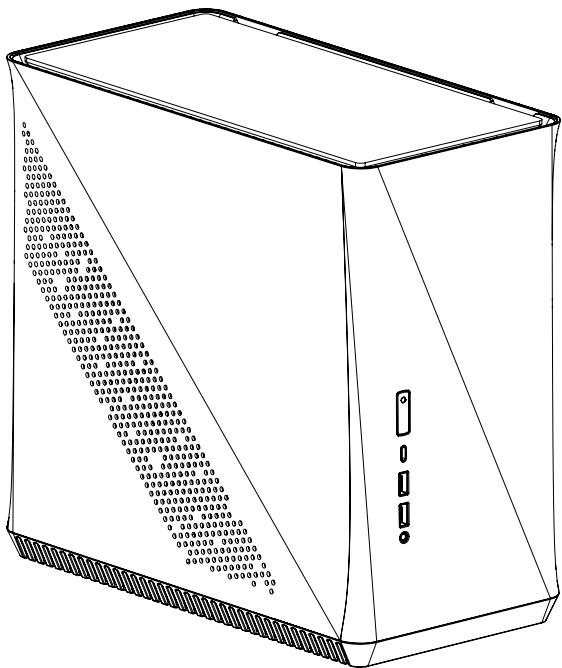
1 Chassis
2 Side panels and filters
Seitenplatten und Filter / Panneaux latéraux et filtres / Filtros y paneles laterales / Sidopanel och filter / Боковые панели и фильтры / サイドバネルとフィルター / 側板和过滤器 / 側板和過濾器
6 PCI Cover Bracket
PCI-Abdeckungshalter / Support du couvercle de l'interface PCI / Soporte de cubierta PCI / PCI täckbricka / Скоба крышки PCI / PCI カバーブラケット / PCI 盖支架 / PCI 蓋板支架
10 PSU Extension Cord
PSU-Verlängerungsschnur / Cordon du bloc d'alimentation / Cable alargador de la PSU / Nätaggregatsförlängningssladd / Удлинительный шнур блока питания / PSU延長コード / PSU延长线 / PSU 延長線
14 Front I/O
ATX Build
ATX PSU
120mm Radiator + Fan
Full Length GPU
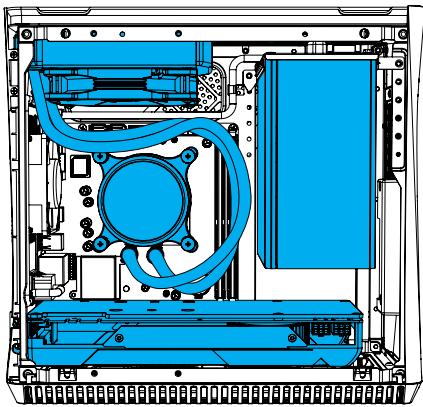

Double Rad Build
SFX PSU
2x 120mm Radiator + Fan
Full Length GPU
Air Build
SFX/SFX-L PSU
Low Profile Air Cooler
Full Length GPU


High Airflow Build
SFX/SFX-L PSU
240mm Radiator + Fan
2x 140mm Fans
1 Slot PCI-Card
Accessory Box Contents
Zubehörbox - Inhalt / Contenu de la boîte d'accessoires / Contenido de la caja de accesorios / Innehåll i tillbehörsbox / Комплектация коробки с аксессуарами / アクセサリ ボックスの内容 / 配件包内容 / 配件包内容
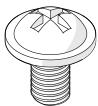
x20
Motherboard Screw / 2.5" Drive Screw
Remove Drive Bracket
Ausbau der Festplattenklammer / Enlever le support de disque dur / Retire el soporte del disco duro / Montera av fästplattan för hårddiskar / Снимите скобу привода жесткого диска / ハードドライブ ブラケットの取り外し / 折下硬盘支架 / 拆除硬碟支架


Remove PSU Bracket
PSU-Halter herausnehmen / Retirez le support du bloc d'alimentation / Retirar el soporte de la PSU / Ta bort PSU fästplatta / Снятие скобы блока питания / PSU ブラケットの取り外し / 拆除 PSU 支架 / 卸除 PSU 支架


Prepare the Motherboard
Vorbereitung Hauptplatine / Préparer la carte mère / Prepare la placa base / Förbered moder-kortet / Подготовьте материнскую плату / マザーボードの準備 / 准备主板 / 準備主機板

1.

2.
Install the I/O Shield
Installieren Sie die I/O Schild / installer le plaque d'E/S / Instale la protección de E/S / Installera I/O-plåten / Установите ввода / вывода пластину / I/O シールドの取り付け / 安装I/O 挡板 / 安装I/O 撓板
1x

Install the Motherboard Assembly
Installation Hauptplatinenzubehör / Installer l'ensemble carte mère / Instale la placa base / Installera moderkortet / Установите сборку материнской платы / マザーボード アセンブリの取り付け / 安装主板組件 / 安装主機板組件

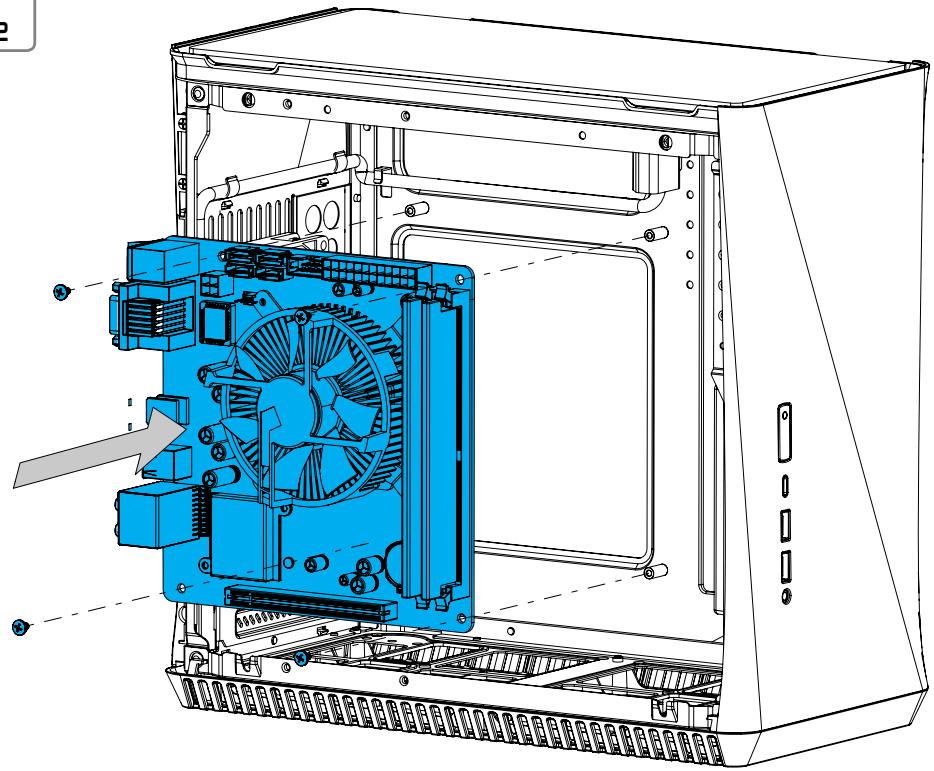

Connect Cables for Front I/O
Anschlusskabel für Front-E/A / Connecter les câbles aux E/S frontales / Conecte los cables para E/S frontal / Koppla in kablar till fronten / Подсоедините кабели передних устройств ввода-вывода / 前面 I/O 用の接続ケーブル / 为 I/O 前面板连接电线 / 正面 I/O 的連接線

Install Drives In SFX Bracket
Laufwerke in SFX-Halter montieren / Installez les lecteurs sur le support SFX / Instalar unidades en el soporte SFX / Installera härdiskar i SFX-fästplattan / Установка приводов в SFX-скобу / SFXプラケットへのドライブ挿入 / 在SFX支架中安装驱动器 / 在 SFX 支架中安装磁碟機


A


B
Install the SFX Power Supply
Installation Netzteil / Installer le bloc d'alimentation / Instale la fuente de alimentación / Installera nätaggregatet / Установите блок питания / 電源装置の取り付け / 安装电源 / 安装電源供應器


1.
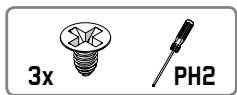

2.
Install the ATX Power Supply
Installation Netzteil / Installer le bloc d'alimentation / Instale la fuente de alimentación / Installera nätaggregatet / Установите блок питания / 電源装置の取り付け / 安装电源 / 安装電源供應器


1.


2.
Install the Graphics Card
Remove Radiator Bracket
Lüfterhalter herausnehmen / Retirez le support du radiateur / Retirar el soporte del radiador / Ta bort radiatorfästplatta / Снятие скобы радиатора / ラジエーターブラケットの取り外し / 拆除散热器支架 / 卸除散熱器支架


Install Top Fans
Obere Lüfter einsetzen / Installez les ventilateurs supérieurs / Instalar los ventiladores superiores / Installera topp fläktar / Установка верхних вентиляторов / 上部ファンのインストール / 安装顶部风扇 / 安装頂端風扇


1.


2.
Install Radiator
2.
Install a 2.5" or 3.5" Drive


Reinstall the Drive Bracket
Laufwerkhalter einbauen / Réinstallez le support des lecteurs / Reinstalar el soporte de la unidad / Äterinstallera hårddiskfästplattan / Повторная установка скобы привода / ドライブブラケットの再インストール / 重新安装驱动器支架 / 重新安装磁碟機支架


Optional Steps
Optionale Schritte / Étapes facultatives / Pasos opcionales / Frivilliga moment / Возможные апрейды / 任意の手順 / 可选步骤 / 選項步驟
Change Top Panel
Obere Platte tauschen / Changez le panneau supérieur / Cambiar el panel superior / Byta ut toppanelen / Смена верхней панели / 上部パネルの変更 / 更換頂板 / 更換頂端面板


Change Power Supply Position
Netzteilposition ändern / Modifiez la position du bloc d'alimentation / Cambiar la posición de la fuente de alimentación / Ändra positionen på nätverksaggregatet / Изменение места монтажа блока питания / 電源配置の変更 / 改变电源位置 / 更換電源供應器位置


Remove Front I/O for Easier GPU Installation
Vorderen I/O für einfachere GPU-Installation ausbauen / Retirez l'E/S avant pour faciliter l'installation du processeur graphique / Retirar la E/S frontal para una instalación más fácil de la GPU / Ta bort främre I/O för enklare grafikkortsinstallation / Снятие передней панели ввода/вывода для облегчения установки графической платы / 手軽にGPUをインストールするためのフロントI/Oの取り外し / 拆除前置I/O,以便轻易安装GPU / 卸除前端I/O 以便於安裝GPU


Remove Drive Bracket From SFX Bracket
Laufwerkhalter aus SFX-Halter lösen / Retirez le support du lecteur du support SFX / Retirar el soporte de la unidad del soporte SFX / Ta bort hårddiskfästplatta från SFX-fästplattan / Снятие скобы привода с SFX-скобы / SFXプラケットからのドライブプラケットの取り外し / 折除SFX支架上的驱动器支架 / 従 SFX 支架上卸除磁碟機支架


Install Bottom Fans
Untere Lüfter einsetzen / Installez les ventilateurs inférieurs / Instalar los ventiladores inferiores / Installera botten fläktar / Установка нижних вентиляторов / 下部ファンのインストール / 安装底部风扇 / 安装底部風扇


Additional Info
Weitere Informationen / Informations supplémentaires / Información adicional / Övrig information / Дополнительная информация / 追加情報 / 附加信息 / 其他資訊
Possible Fan Locations
Mögliche Lüfteranordnung / Emplacements possibles des ventilateurs / Posibles ubicaciones de los ventiladores / Möjliga fläktpositioner / Mesta для установки вентиляторов / ファンを設置できる場所 / 支援风扇的位置 / 支援風扇的位置

Water Cooling Options
Optionen für Wasserkühlungen / Options de radiateurs de refroidissement par eau / Opciones de radiadores de refrigeración líquida / Vattenkylningsmöjligheter / Установка радиатора водяного охлаждения / 水冷却ラジエーター オプション / 水冷却器选项 / 水冷散熱器選項


Dust Maintenance
Staubschutz / Dépoussiérage / Limpieza del polvo y mantenimiento / Underhåll av dammfilter / Защита от пыли / 防塵メンテナンス / 防尘保養 / 防塵保養


1.
2.
Dust Maintenance
Staubschutz / Dépoussiérage / Limpieza del polvo y mantenimiento / Underhåll av dammfilter / Защита от пыли / 防塵メンテナンス / 防尘保養 / 防塵保養

CPU Cooler Limitations
CPU-Kühlung Grenzwerte / Limitations du refroidissement du processeur / Limitaciones del refrigerador de la CPU / Restriktioner för CPU-kylare / Ограничения для кулеров ЦП / CPU クーラーの制限事項 / CPU 冷却器的局限性 / CPU 散熱器限制


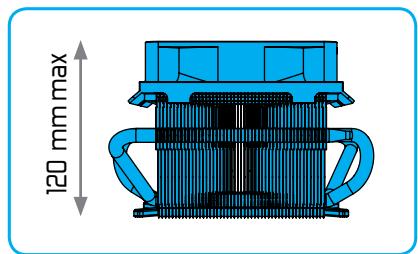
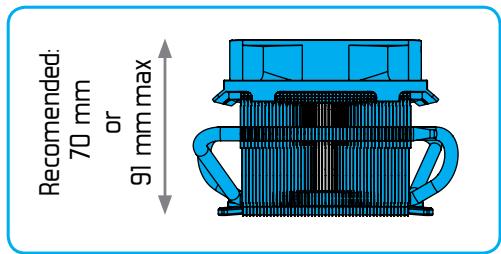
Graphics Card Limitations
Grafikkarte Grenzwert / Limitations de carte graphique / Limitaciones de la tarjeta gráfica / Restriktioner för grafikkort / Ограничения для графических плат / グラフィック カードの制限事項 / 显卡的局限性 / 顯示卡的限制
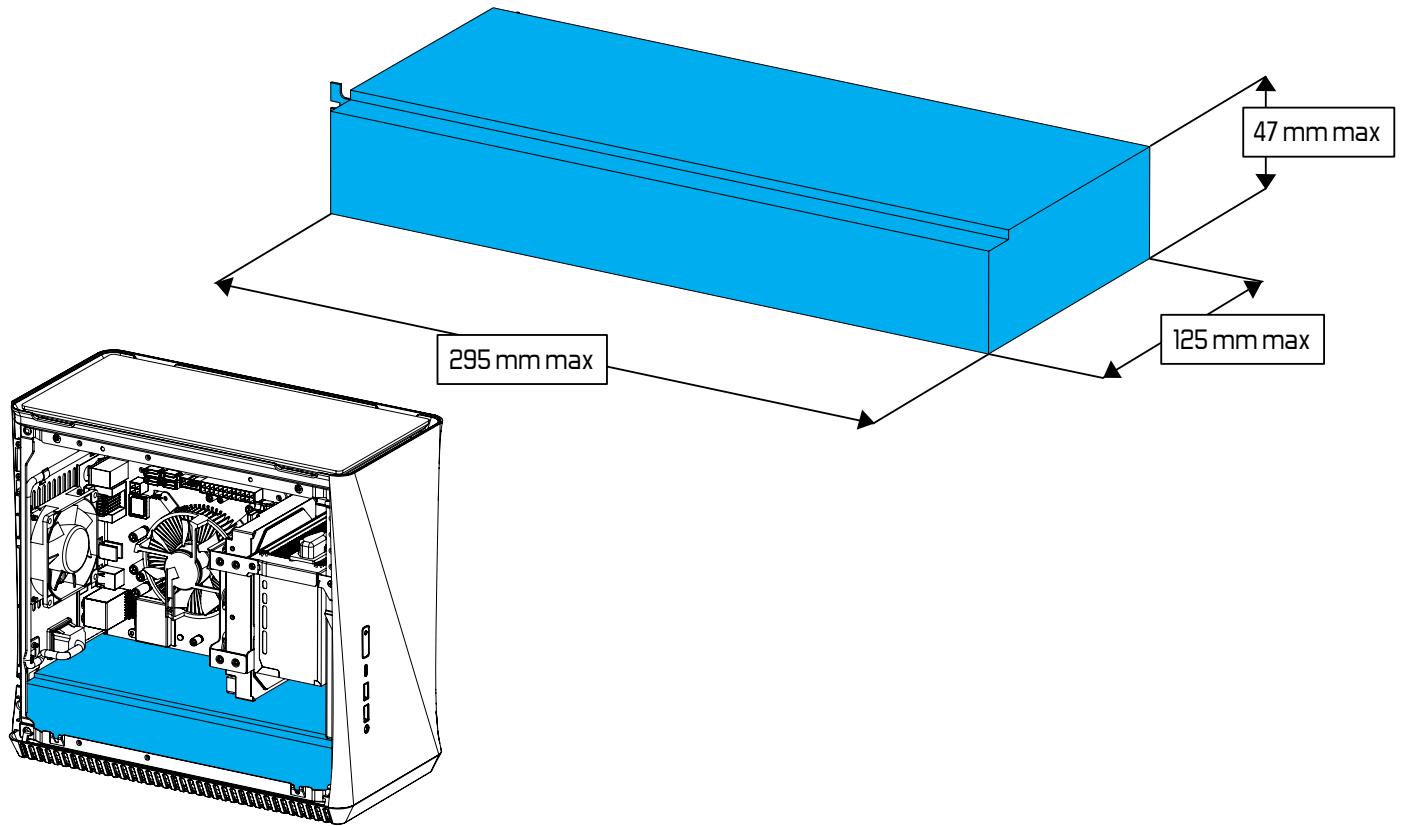
Silent Series R3 80mm

| Rotational speed: | 1600 RPM |
| Acoustical noise: | 18.1 dB(A) |
| Maximum air flow: | 20.2 CFM |
| Maximum air pressure: | 0.99 mm H2O |
| Maximum rated input current: | 0.06 A |
| Actual input power: | 0.5 W |
| Nominal input voltage: | 12V |
| Minimum startup voltage: | 6V |
| MTBF: | 40,000 hours |
Support and Service
Support und Kundendienst / Assistance technique et maintenance / Soporte y servicio técnico / Support och service / Поддержка и обслуживание / サポートとサービス / 支持与服务 / 支援和服務
For Assistance, Please Contact
Unterstützung erhalten Sie hier: / Pour l'assistance technique, veuillez contacter / Para obtener ayuda, por favor contacte / För assistans, var god kontakta / Если необходима помощь, пожалуйста, свяжитесь с нами / サポートが必要な場合は、お問い合わせください / 如需帮助,敬请联系 / 如需協助,敬请聯絡

1 STEP 1: Go to "support.fractal-design.com"

2 STEP 2: Click on "New support ticket"

Submit a ticket

3 STEP 3: Fill in ticket request and submit
Limited Warranty and Limitations of Liability
This product is guaranteed for twenty four (24) months from the date of delivery to end-user, against defects in materials and/or workmanship. Within this limited warranty period, the product will either be repaired or replaced at Fractal Design's discretion. Warranty claims must be returned to the agent who sold the product, shipping prepaid.
The warranty does not cover:
• Products which have been used for rental purposes, misused, handled carelessly or applied in such a way that is not in accordance with its stated intended use.
• Products damaged from an Act of Nature including, but not limited to, lightning, fire, flood and earthquake.
- Products whose serial number and/or the warranty sticker have been tampered with or removed.
• Products which have not been installed in accordance to the user manual
Fractal Design's maximum liability is limited to the current market value of the product (depreciated value, excluding shipping, handling, and other fees). Fractal Design shall not be liable for any other damage or loss, including but not limited to loss of profit, revenue, or data, or incidental or consequential damage, even if Fractal Design has been advised of the possibility of such damages.

- ERA
- USER GUIDE
- INTRODUCTION
- BUILDER'S GUIDE
- CHASSIS
- SIDE PANELS AND FILTERS
- PCI COVER BRACKET
- PSU EXTENSION CORD
- FRONT I/O
- ATX BUILD
- DOUBLE RAD BUILD
- AIR BUILD
- HIGH AIRFLOW BUILD
- ACCESSORY BOX CONTENTS
- REMOVE DRIVE BRACKET
- REMOVE PSU BRACKET
- PREPARE THE MOTHERBOARD
- INSTALL THE I/O SHIELD
- INSTALL THE MOTHERBOARD ASSEMBLY
- CONNECT CABLES FOR FRONT I/O
- INSTALL DRIVES IN SFX BRACKET
- INSTALL THE SFX POWER SUPPLY
- INSTALL THE ATX POWER SUPPLY
- INSTALL THE GRAPHICS CARD
- REMOVE RADIATOR BRACKET
- INSTALL TOP FANS
- INSTALL RADIATOR
- INSTALL A 2.5" OR 3.5" DRIVE
- REINSTALL THE DRIVE BRACKET
- OPTIONAL STEPS
- CHANGE TOP PANEL
- CHANGE POWER SUPPLY POSITION
- REMOVE FRONT I/O FOR EASIER GPU INSTALLATION
- REMOVE DRIVE BRACKET FROM SFX BRACKET
- INSTALL BOTTOM FANS
- ADDITIONAL INFO
- POSSIBLE FAN LOCATIONS
- WATER COOLING OPTIONS
- DUST MAINTENANCE
- CPU COOLER LIMITATIONS
- GRAPHICS CARD LIMITATIONS
- SUPPORT AND SERVICE
- FOR ASSISTANCE, PLEASE CONTACT
- SUBMIT A TICKET
- LIMITED WARRANTY AND LIMITATIONS OF LIABILITY
- THE WARRANTY DOES NOT COVER
Brand : Fractal Design
Model : ERA
Category : Computer Case