
AM100 Sig - Audio Amplifier Atoll - Free user manual and instructions
Find the device manual for free AM100 Sig Atoll in PDF.


| Type of product | Power amplifier |
| Brand | Atoll |
| Model | AM100 Signature (AM100 Sig) |
| Dimensions | 440 × 291 × 95 mm |
| Weight | 11 kg |
| Power supply | 2 × 340 VA transformers; total capacitors 32,247 µF |
| Power output | 100 W/ch at 8 Ω; 140 W/ch at 4 Ω |
| Impulse power | 180 W/ch |
| Number of inputs | 2 |
| Power consumption | 0 W off; 11 W - 500 W on |
| Input impedance | 47 kΩ |
| Sensitivity | 1.77 V |
| Signal-to-noise ratio | 100 dBA |
| Distortion at 1 kHz | 0.05% (10 W) |
| Bandwidth | 5 Hz - 100 kHz |
| Rising time | 1.3 µs |
| Main functions | Stereo and bridged mono operation; 12V trigger input; loudspeaker protection relay |
| Connectivity | Amplifier input, amplifier output for bi-amping, right/left channel outputs, 12V trigger input |
| Safety | Do not connect while powered on; avoid short circuits; respect polarity; do not connect speakers in parallel |
| Maintenance and cleaning | Switch off before cleaning; use a soft dry cloth; never use solvents or abrasive agents |
| Spare parts and repairability | 2-year warranty covers labour and replacement of faulty parts |
| General information | Manufactured by ATOLL ELECTRONIQUE, a French company designing and producing its products in France |
Frequently Asked Questions - AM100 Sig Atoll
User questions about AM100 Sig Atoll
0 question about this device. Answer the ones you know or ask your own.
Ask a new question about this device
Download the instructions for your Audio Amplifier in PDF format for free! Find your manual AM100 Sig - Atoll and take your electronic device back in hand. On this page are published all the documents necessary for the use of your device. AM100 Sig by Atoll.
USER MANUAL AM100 Sig Atoll
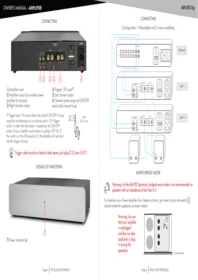
CONNECTING

1) Amplifier input.
2) Amplifier output (to another power amplifier for bi-amp).
3) Right channel output.
(1) Trigger input: This input allows the control ON/OFF of your amplifier simultaneously to any device with a 12V Trigger outlet. In order that the system is operating, the ON/OFF button of your Amplifier must remain in position OFF (0). If the switch is in the ON position (1), the amplifier will work but not the Trigger function.
4) Trigger 12V input (1) .
5) Left channel output.
6) General power plug and ON/OFF switch (with internal fuse).


Trigger cable must be a Male to Male stereo jack plug ∅ 3,5 mm (1/8").
DETAILS OF FUNCTIONS

7) Power indicator led.
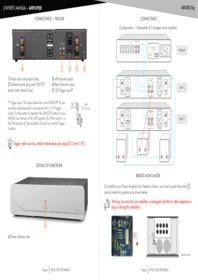
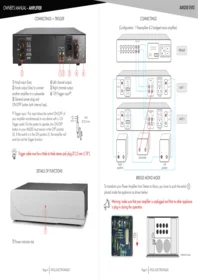
CONNECTING
(Configuration: 1 Preamplifier and 2 mono amplifiers).

MONO BRIDGE MODE

Warning: for the AM100 Signature, bridged mono mode is not recommended on speakers with an impedance of less than 6 Ω.
To transform your Power Amplifier from Stereo to Mono, you have to push the switch ⓐ placed inside the appliance as shown below:
Warning: be sure that your amplifier is unplugged and that no other appliance is plug in during this operation.

Internal view.
E.C. MARKING
E.C. marking certified the conformity with low tension directive 73/23/CEE, directive CEM 89/336/CEE and national transpositions.
WARRANTY CONDITIONS
ATOLL ELECTONIQUE warranty is two years period from the date of purchase; date and stamp of the seller being authentic. We recommend you to keep your proof of purchase (invoice). The warranty, as well as the terms of service, should be specified at the time of purchase by your dealer who will advise you, in case of faulty behaviour or failure. This warranty covers labour and replacement of parts acknowledged to be faulty, and not the normal wear and tear caused.
Devices with traces of disassembly, drop, immersion, abnormal voltage or any cause of degradation and damage resulting from a contrary use of the indications included in this owner manual, automatically lose the benefit of the guarantee.
CLEANING
Before any cleaning, switch off your appliance. Use a soft and dry rag to clean up the device. Never use acetone, white-spirit, ammoniac, or any kind of product containing an abrasive agent. Never try to clean up inside the appliance.

TECHNICAL DATA
Power: 100 W /ch. /8Ω
140 W /ch. /4Ω
Impulse power: 180 W /ch.
Supply: 2 × 340 VA
Total of capacitors: 32 247 µ F
Number of inputs: 2
Switch OFF consumption: 0 W
ON consumption: 11 W - 500 W
Input impedance: 47 kΩ
Sensibility: 1,77 V
Signal/Noise ratio: 100 dBA
Distortion at 1kHz: 0,05% / (10 W)
Bandwidth: 5 Hz - 100 kHz
Rising time: 1,3 µ s
Dimensions: 440 × 291 × 95 mm
Weight: 11 Kg

CAUTIONS
- Do not make any connections when your device is powered on.
- Put your amplifier in a dry and well ventilated place, far from source of heat.
- Do not put something on your amplifier.
- Avoid any short-cut.
- Respect polarity ⊕ & ⊖ and switch left & right:
- Do not plug in two speakers in parallel on the same output.

ADVICES
- To optimize the performance of your device, you should switch it on at least half an hour before any listening, the time for the power stage to reach its ideal working temperature. Your device will give you optimal listening quality after this time-lapse. Between two uses, it is, therefore, preferable to let the device on so that it remains at its optimum temperature. At night or when you leave your home, it is best to use the main switch to turn off the device.
- To optimize the sound quality of your system, we recommend that you choose good-quality connection cords. Do not hesitate to ask your specialist dealer for advice.
- Your Amplifier is equipped with a temporised switch on. A relay protects loudspeakers on output power stage from over-voltage.
You have just bought an amplifier with exceptional audiophile performance. We really thank you for your confidence in our products. To get the best part of your amplifier, please read carefully this manual.

YOU WILL FIND ENCLOSED
– A power amplifier AM100 Signature.
- One power cord.
- This manual with the warranty certificate.
Latest update: 10th June 2024
ATOLL ELECTRONIQUE®
is a French Company that designs, manufactures, and commercializes all its products.


TROUBLESHOOTING
Problem encountered
Possible solutions
The power-on indicator does not light up.
- The main switch (6) is in the wrong position.
– The power cord is not properly connected. - Check the fuse in the general power plug (6).
One of the speakers remains silent.
- Check the quality of the connections between the amplifier and the speaker in question.
- Check the quality of the connections between the preamplifier and the amplifier.

WARRANTY FORM \~ AM100 Sig
To present to your dealer with the invoice when returning back the appliance:
ATOLL ELECTRONIQUE®
Bd des Merisiers
50370 BRECEY
FRANCE
Date of purchase:
Place of purchase:
Buyer signature:
Dealer Stamp
OWNER'S MANUAL
AM100 SIGNATURE
POWER AMPLIFIER

ELECTRONIQUE
www.atoll-electronique.com


Brand : Atoll
Model : AM100 Sig
Category : Audio Amplifier