
IN300 EVO - Audio Amplifier Atoll - Free user manual and instructions
Find the device manual for free IN300 EVO Atoll in PDF.


| Type | Integrated amplifier-preamplifier |
| Power output (8 Ω) | 150 Wrms per channel |
| Power output (4 Ω) | 260 Wrms per channel |
| Bandwidth | 5 Hz - 100 kHz |
| Signal-to-noise ratio | 100 dB |
| Total harmonic distortion | 0.05% (1 kHz, 10 W) |
| Input impedance | 220 kΩ |
| Maximum input level | 3.5 Vrms (line), 4.7 Vrms (XLR) |
| Audio inputs | Line, XLR, Phono (optional), CD, Tuner, DVD, Tape, BY-PASS, Coaxial (x2), Optical (x2), USB, Bluetooth |
| Audio outputs | Speaker outputs, preamp outputs, headphone jack, 12V trigger |
| Supported digital formats | PCM up to 32-bit/384 kHz, DSD64/128/256 (USB); PCM up to 24-bit/192 kHz (optical/coaxial) |
| Power supply | 2 × 440 VA + 10 VA transformers; total capacitance 86,150 μF |
| Power consumption | Standby <0.5 W; preheating 27 W; operation 29-700 W; off 0 W |
| Dimensions | 440 × 365 × 103 mm |
| Weight | 16 kg |
| Remote control | Supplied with 2 CR2032 lithium batteries; controls all Atoll devices |
| Display | Front panel display shows selected source and volume level |
| BY-PASS function | Turns the IN300 into a power amplifier for use with an AV preamp |
| Headphone output | Automatically disconnects speaker outputs when in use |
| USB input | Asynchronous USB type B; requires free XMOS driver for Windows, not for Mac |
| Bluetooth | Built-in Bluetooth receiver for wireless audio streaming |
| Maintenance | Clean with a soft dry cloth; never use solvents or abrasives |
| Safety | Avoid connections while powered; keep in dry, ventilated area; respect polarity |
| Warranty | 2 years from date of purchase |
| Country of manufacture / Repair | Designed and manufactured in France by ATOLL ELECTRONIQUE |
Frequently Asked Questions - IN300 EVO Atoll
User questions about IN300 EVO Atoll
0 question about this device. Answer the ones you know or ask your own.
Ask a new question about this device
Download the instructions for your Audio Amplifier in PDF format for free! Find your manual IN300 EVO - Atoll and take your electronic device back in hand. On this page are published all the documents necessary for the use of your device. IN300 EVO by Atoll.
USER MANUAL IN300 EVO Atoll
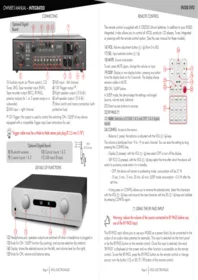
CONNECTING

1) Auxiliary inputs (or Phono option), CD, Tuner, DVD, Tape recorder input (PLAY), Tape recorder output (REC), BY-PASS, preamp outputs (to 1 or 2 power amps or a subwoofer).
2) XLR input - right channel.
3) XLR input - left channel.
4) 12V Trigger output (1).
5) Right speaker output (⊕ & ⊖).
6) Left speaker output (⊕ & ⊖).
7) Main switch and mains connection (with protective fuse).
(1) 12V Trigger: this output is used to control the switching ON / SLEEP of any device equipped with a compatible Trigger input (see instructions for use).

Trigger cable must be a Male to Male stereo jack plug ∅ 3,5 mm (1/8").
Optional Digital Board:
8) Bluetooth receiver.
10) Optical inputs 1 & 2.
9) Coaxial inputs 1 & 2.
11) USB input (B type).

DETAILS OF FUNCTIONS

12) Headphones jack: speakers outputs are switched off when a headphone is plugged in.
13) Knob for ON / SLEEP function (by pushing), and sources selection (by rotation).
14) Display: shows the selected source (on the left), and volume level (on the right).
15) Knob for ON, volume and balance setup.
REMOTE CONTROL
The remote control is supplied with 2 CR2032 Lithium batteries. In addition to your IN300 Integrated, it also allows you to control all ATOLL products: CD players, Tuner, Integrated or preamps with the remote control option. (See the user manual for these models).
16) VOL: Volume adjustment button ⊕ / ⊖ (from 0 to 80).
17) SEL: Input selection button ⊕ / ⊖.
18) MUTE: Sound mute button.
To exit, press MUTE again, change the volume or input.
19) DISP: Display or non-display button: pressing any button turns the display back on for 5 seconds. The display always remains visible in MUTE.
20) ON / SLEEP button.
In SLEEP mode, the device keeps the settings unchanged (source, volume level, balance).
21) Direct access buttons to sources.
22) BY-PASS (*)
23) NUM: Selection of COAX 1 & 2 and OPT 1 & 2 digital inputs.
24) CONFIG: Access to the menus:
- Balance (1 press): the balance is adjusted with the VOL ⊕ / ⊖ keys.
The volume is distributed from -9 to +9 on each channel. You can save this setting by long pressing the CONFIG key.
- Display (2 presses): with the VOL ⊕ / ⊖ keys select OFF to turn off the display.
- SBY ECO (3 presses): with the VOL / keys select the time after which the device will switch to economy mode when it is in standby.
- OFF: the device will remain in preheating mode: consumption will be 27 W.
- 10 sec, 5 min, 15 min, 30 min, 60 min: SLEEP mode consumption <0.5 W after the set time.
- A long press on CONFIG allows you to rename the selected entry. Select the characters with the VOL ⊕ / ⊖ keys and move to the next character with the SEL ⊕ / ⊖ keys and validate by pressing CONFIG again.
(*) USING THE BY-PASS INPUT

Warning: reduce the volume of the source connected to BY-PASS before any use of the BY-PASS Input.
The BY-PASS input allows you to use your IN300 as a power block (to be connected to the output of an audio-video preamp for example). This input is selected via the front panel or by the BY-PASS button on the remote control. Once this input is selected, the word "BY-PASS" is displayed on the screen and no other function is accessible via the remote control. To exit the BY-PASS, press the BY-PASS button on the remote control or change source: turn the button (13) or SEL ⊕ / ⊖ button of the remote control.

USB INPUT
Your device is equipped with an asynchronous USB (type B) input (11). You will only be able to use it after installing the correct driver on your computer. This driver can be downloaded freely from our website:

https://www.atoll-electronique.com/en/xmos-specific-driver-usb/
You will find attached an explanatory note on its installation.
This driver is not required for Macintosh computers.
In order to avoid problems with high quality format transfers (24 bits / 192kHz), it is recommended to use a USB connection cable with ferrite.

ACCEPTED FORMATS
- Accepted format on Optical and Coaxial inputs: 16-24 bits (44,1 kHz, 48 kHz, 88,2 kHz, 96 kHz, 176,4 kHz and 192 kHz).
• Accepted format on USB input:
– DSD: DSD64, DSD128 & DSD256. - PCM: 16-32 bits (44,1 kHz, 48 kHz, 88,2 kHz, 96 kHz, 176,4 kHz, 192 kHz, 352,8 kHz, 384 kHz).
BLUETOOTH®
Your appliance allows the reception of audio signals sent since any device having a Bluetooth® transmitter (Smartphone, tab, computer...).
First time association:
- Activate Bluetooth connectivity on your sending device. BT 📷 is displayed.
- Select it from the list of devices (named IN300).
- Once the connection is made, the symbol BT 🔍 appears.
All the audio signals that will be played on your source device will then be transmitted to your device. The device remains paired until the IN300 is turned off or the connection is terminated. It will remain visible to your transmitter.
Association of another emitter:
- Once associated with any transmitter, it is essential to completely turn off your device at the ON/SLEEP (preheating) switch to be able to make it visible to another transmitter.
For better reception quality, avoid being more than 5 meters from your device.

CAUTIONS
- Do not make any connections when your device is powered on.
- Put your device in a dry and well ventilated place, far from a source of heat.
- Avoid any short-cut.
- Strictly respect polarity & , as well as the left and right
- Do not plug-in two speakers in parallel on the same output.

ADVISES
- Your device will provide you with optimal listening quality approximately half an hour after switching it on, the time it takes for the power stages to reach their ideal operating temperature. Between two uses, it is therefore preferable to use the rest position so that the power stages remain at their optimal temperature. At night or when you leave your home, it is preferable to use the main switch to turn off the device.
- We recommend you to choose good quality connection cables (to other devices as well as to speakers). Do not hesitate to seek advice from your specialist dealer.
You have just bought an Amp-Preamp. Integrated IN300 with exceptional audiophile performances. We really thank you for your confidence in our products. To get the best part of your amplifier, please read this manual carefully.
CONCERNING THIS OWNER'S MANUAL
Paragraphs with grey and blue frames concerns only appliance getting the optional Digital board installed.

YOU WILL FIND ENCLOSED
- An IN300 EVO integrated amplifier-preamplifier.
- A power cord.
- An ATOLL global remote control supplied with 2 CR2032 Lithium batteries.
- This user manual accompanied by a warranty certificate.
Latest update: 25th September 2024
ATOLL ELECTRONIQUE®
is a French Company that designs, manufactures, and commercializes all its products.


TECHNICAL DATA
| Power in Wrms/channel/8Ω (230v): | 150 W |
| Power in Wrms/channel/4Ω (230v): | 260 W |
| Supply: | 2 × 440 VA + 10 VA |
| Total of capacitors: | 86 150 μF |
| Switch OFF consumption: | 0 W |
| Power consumption in STANDBY (ECO): | <0,5 W |
| Power consumption in preheating mode: | 27 W |
| Power consumption in operation: | 29 W - 700 W |
| Input impedance: | 220 kΩ |
| Maximum input level: | 3,5 Vrms line4,7 Vrms XLR |
| Sensitivity: | 450 mV |
| Signal/noise ratio: | 100 dB |
| Distorsion à 1 kHz : | 0,05% / (10 W) |
| Bandwidth: | 5 Hz - 100 kHz |
| Rising time: | 2,0 μs |
| Dimensions: | 440×365×103 mm |
| Weight: | 16 Kg |
(technical data are subject to changes)
E.C. MARKING
E.C. marking certified the conformity with low tension directive 73/23/CEE, directive CEM 89/336/CEE and national transpositions.
WARRANTY CONDITIONS
The guarantee is two years period from date of purchase. We recommend you to ask your dealer to fill the guarantee and to conserve it. The guarantee is only available for appliances which have been use correctly.
MAINTENANCE
Before any maintenance operation, unplug your appliance from the mains socket (7). A soft, dry cloth is sufficient for cleaning the apparel. Do not use any product that contains acetone, mineral spirits, ammonia, or abrasives.
Never try to clean the inside of the device.

WARRANTY FORM \~ INTEGRATED IN300 EVO
To present to your dealer with the invoice when returning back the appliance:
ATOLL ELECTRONIQUE®
Bd des Merisiers
50370 BRECEY
FRANCE
Date of purchase:
Place of purchase:
Buyer signature:
Dealer Stamp
OWNER'S MANUAL
IN300 Evolution
INTEGRATED
AMP-PREAMP.

ELECTRONIQUE
www.atoll-electronique.com
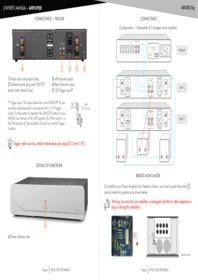
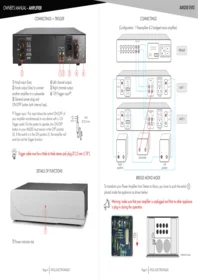
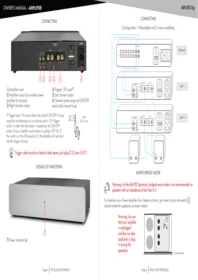


- CONNECTING
- TRIGGER CABLE MUST BE A MALE TO MALE STEREO JACK PLUG ∅ 3,5 MM (1/8")
- OPTIONAL DIGITAL BOARD
- DETAILS OF FUNCTIONS
- REMOTE CONTROL
- (*) USING THE BY-PASS INPUT
- WARNING: REDUCE THE VOLUME OF THE SOURCE CONNECTED TO BY-PASS BEFORE ANY USE OF THE BY-PASS INPUT
- USB INPUT
- ACCEPTED FORMATS
- BLUETOOTH®
- CAUTIONS
- ADVISES
- CONCERNING THIS OWNER'S MANUAL
- YOU WILL FIND ENCLOSED
- ATOLL ELECTRONIQUE®
- TECHNICAL DATA
- E.C. MARKING
- WARRANTY CONDITIONS
- MAINTENANCE
- WARRANTY FORM \~ INTEGRATED IN300 EVO
- OWNER'S MANUAL
- IN300 EVOLUTION
Brand : Atoll
Model : IN300 EVO
Category : Audio Amplifier