
INTEGRATED - Audio Amplifier Atoll - Free user manual and instructions
Find the device manual for free INTEGRATED Atoll in PDF.


Pick your language and provide your email: we'll send you a specifically translated version.
| Product Type | Integrated Stereo Amplifier |
| Brand | Atoll |
| Model | INTEGRATED |
| Amplifier Class | Class A/AB discrete output stage |
| Power Output RMS (8 ohms) | 2 x 100 W |
| Power Output RMS (4 ohms) | 2 x 160 W |
| Total Harmonic Distortion | Less than 0.05 percent at 1 kHz |
| Signal-to-Noise Ratio | Greater than 95 dB (weighted) |
| Frequency Response | 5 Hz to 100 kHz at +/- 1 dB |
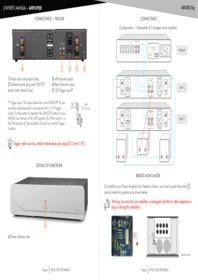
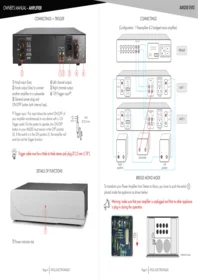
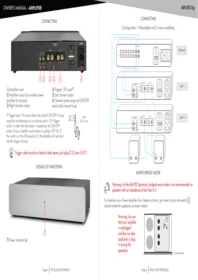
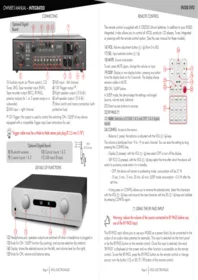
| Inputs | 5 x RCA line inputs, 1 x MM phono input |
| Outputs | 2 speaker terminal sets (A/B), 1 x pre-out, 1 x headphone jack |
| Speaker Impedance | 4 to 16 ohms |
| Input Sensitivity | 200 mV for rated power |
| Dimensions (W x H x D) | 440 x 105 x 350 mm |
| Weight | 12 kg |
| Power Supply | 230 V / 50 Hz |
| Power Consumption | 350 W max, less than 1 W in standby |
| Remote Control | Included: source selection, volume, mute, standby |
| Finish | Black anodized aluminum front panel, steel chassis |
| Maintenance and Cleaning | Disconnect before cleaning; use a soft dry cloth; avoid solvents |
| Safety Precautions | Keep ventilation clear; do not expose to moisture or direct heat |
| Spare Parts and Repairability | Long-term parts availability, modular PCB construction for easy service |
| Country of Manufacture | France |
Frequently Asked Questions - INTEGRATED Atoll
How do I connect my speakers to the Atoll INTEGRATED amplifier?
Turn off the amplifier, then connect the positive speaker terminal on the left output to the red binding post and the negative terminal to the black binding post. Ensure no stray wires touch adjacent terminals. For banana plugs, insert them directly; for bare wire, unscrew the collar, insert the wire, and retighten. Use 4 to 16 ohm speakers.
Does the INTEGRATED include a phono stage for a turntable?
Yes, the INTEGRATED has an MM phono input on the rear panel. Connect a turntable with a moving magnet cartridge to the PHONO socket using low-capacitance RCA cables. If your turntable has a moving coil cartridge, use an external step-up transformer or phono preamp.
Can I power a pair of 4 ohm speakers?
Yes, the Atoll INTEGRATED is stable into 4 ohm loads. It delivers close to 160W RMS per channel into 4 ohms. Avoid connecting both speaker pairs and using extreme volume if the total impedance drops too low.
How should I clean the amplifier?
Disconnect the power before cleaning. Wipe the chassis with a soft, lint-free cloth, slightly damp if necessary. Never use alcohol, benzene, abrasive cleaners, or spray liquids. Avoid cleaning the ventilation slots with liquids; use a soft brush or vacuum cleaner.
Is a remote control provided?
Yes, the Atoll INTEGRATED comes with a compact remote control that manages source selection, volume, mute, and standby. Replace the batteries with fresh ones when the operating distance decreases.
Can I bi-wire or use two pairs of speakers?
The amplifier has two binding post sets labelled A and B. They may be used for bi-wiring or switching between two speaker pairs. Do not connect two pairs at very low impedance simultaneously; never short the terminals.
What is the standby power consumption?
In standby mode, the power consumption is less than 1 watt, which meets modern energy-saving requirements. The main amplifier can draw up to 350W at high output levels. For full standby shutdown, use the rear rocker switch or unplug the unit.
Why does the amplifier become warm during normal use?
The INTEGRATED uses a Class A/AB output stage biased for low distortion, which naturally generates heat. Provide at least 10 cm of free space around the amplifier and do not place other equipment directly on top of it.
How can I get spare parts or service?
Atoll supplies original spare parts for many years after purchase. Contact your local dealer or Atoll customer service with the serial number. Many circuits are mounted on individual PCBs for easy repair, reducing environmental impact.
What input should I use for a CD player or DAC?
Use one of the line-level RCA inputs labelled CD, AUX, or LINE. Connect the CD or DAC with high-quality RCA cables and select the corresponding source on the remote or front control. Do not connect speaker wires to line outputs.
User questions about INTEGRATED Atoll
0 question about this device. Answer the ones you know or ask your own.
Ask a new question about this device
No questions yet. Be the first to ask one.
Download the instructions for your Audio Amplifier in PDF format for free! Find your manual INTEGRATED - Atoll and take your electronic device back in hand. On this page are published all the documents necessary for the use of your device. INTEGRATED by Atoll.
USER MANUAL INTEGRATED Atoll

Manual assistant
Powered by Anthropic
Waiting for your message
Product information
Brand : Atoll
Model : INTEGRATED
Category : Audio Amplifier