
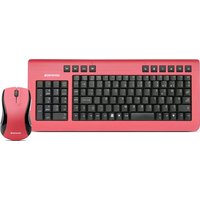
77363 - Keyboard Soyntec - Free user manual and instructions
Find the device manual for free 77363 Soyntec in PDF.


Pick your language and provide your email: we'll send you a specifically translated version.
| Product Type | Keyboard |
| Brand | Soyntec |
| Model | 77363 |
| Interface | USB wired |
| Keyboard Layout | QWERTY |
| Number of Keys | 104 keys |
| Multimedia Keys | Yes |
| Key Design | Low-profile keys |
| Compatibility | Windows, macOS, Linux |
| Cable Length | 1.8 m |
| Dimensions (W x H x D) | 450 x 25 x 160 mm |
| Weight | 480 g |
| Power Source | USB powered |
| Material | ABS plastic |
| Color | Black |
| Connection | Plug and play |
| Operating Temperature | 0°C to 40°C |
| Storage Temperature | -20°C to 60°C |
| Maintenance | Soft dry cloth |
| Safety Compliance | RoHS |
| Repairability | Replaceable keycaps |
| Warranty | 1 year |
Frequently Asked Questions - 77363 Soyntec
How do I connect the Soyntec 77363 keyboard to my computer?
Plug the USB connector into an available USB port on your computer. The keyboard is plug and play, so no additional drivers are required. Your system will automatically recognize it.
Is the Soyntec 77363 compatible with Mac computers?
Yes, it works with Windows, macOS, and Linux. The keys are mapped to a standard QWERTY layout. For Mac, the Windows key may act as the Command key.
How do I clean the keyboard?
Unplug the keyboard and use a soft, dry cloth to wipe the surface. Avoid using liquid cleaners or submerging the keyboard.
What should I do if some keys are not working?
First, check the USB connection and try another port. If the issue persists, gently remove the keycap and clean the area with compressed air. If the problem continues, the keyboard may need repair or replacement.
Can I use this keyboard with a tablet or smartphone?
It depends on the device's support for USB keyboards. If your tablet has an OTG adapter, you can connect it. Smartphones may require a powered USB hub.
The keyboard has multimedia keys. How do I use them?
The multimedia keys allow you to control volume, play/pause, and other media functions directly. Some models may require pressing the Fn key simultaneously.
Is the keyboard wireless or wired?
The Soyntec 77363 is a wired keyboard with a USB connection. This ensures a stable and reliable connection without latency.
Does the keyboard require batteries?
No, the keyboard is USB powered and does not need batteries. It draws power directly from the USB port.
Can I use the keyboard while my computer is booting up?
Yes, because it is a USB wired keyboard, it is recognized in the BIOS and during system startup, as long as the USB port is available.
How long is the cable? Can I extend it?
The keyboard comes with a USB cable of approximately 1.8 meters. You can use a USB extension cable if you need more length.
User questions about 77363 Soyntec
0 question about this device. Answer the ones you know or ask your own.
Ask a new question about this device
No questions yet. Be the first to ask one.
Download the instructions for your Keyboard in PDF format for free! Find your manual 77363 - Soyntec and take your electronic device back in hand. On this page are published all the documents necessary for the use of your device. 77363 by Soyntec.
USER MANUAL 77363 Soyntec


Manual assistant
Powered by Anthropic
Waiting for your message
Product information
Brand : Soyntec
Model : 77363
Category : Keyboard