ITB037BO - Soundbar iLive - Free user manual and instructions
Find the device manual for free ITB037BO iLive in PDF.


Pick your language and provide your email: we'll send you a specifically translated version.
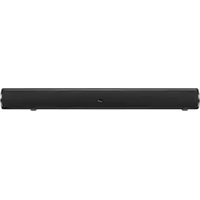
| Product Type | Soundbar |
| Brand | iLive |
| Model | ITB037BO |
| Color | Black |
| Design | Compact soundbar for TV and media |
| Connectivity | Bluetooth 5.0, AUX 3.5mm, RCA audio inputs |
| Audio Channels | 2.0 stereo |
| Output Power | 40W total RMS |
| Frequency Response | 20Hz - 20kHz |
| Signal-to-Noise Ratio | >70dB |
| Power Supply | AC adapter 100-240V 50/60Hz |
| Dimensions (W x H x D) | 965 x 76 x 64 mm (38" x 3" x 2.5") |
| Weight | 1.6 kg (3.5 lbs) |
| Mounting Options | Tabletop or wall-mountable |
| Control | Remote control included, manual buttons on top |
| Additional Features | Built-in equalizer presets, LED indicator |
| Maintenance | Wipe with a soft, dry cloth |
| Safety | Keep away from water, moisture, and heat sources |
| Spare Parts | Contact iLive customer service for accessories |
| Repair | Refer to qualified service personnel |
Frequently Asked Questions - ITB037BO iLive
How do I connect my iLive ITB037BO soundbar to my TV via Bluetooth?
Press the Bluetooth button on the soundbar or remote to enter pairing mode. The LED will flash. Go to your TV’s Bluetooth settings and select ILIVE ITB037BO. Once paired, the LED stays steady.
Can I use the soundbar with any TV?
Yes, the ITB037BO features multiple inputs including AUX, RCA, and Bluetooth, making it compatible with virtually any TV, smartphone, or tablet.
What is the maximum power output?
The soundbar delivers 40W total RMS power, providing an immersive audio experience for your home entertainment.
How do I mount the soundbar on the wall?
The ITB037BO includes wall mounting brackets. Secure the brackets to the wall using the included instructions and screws, then attach the soundbar to the brackets.
Why is there no sound coming from the soundbar?
Check the volume level on both the soundbar and your source device. Ensure the correct input is selected. If using Bluetooth, confirm the device is paired. Also, verify the power adapter is securely connected.
How do I reset the soundbar?
To reset, turn off the soundbar and unplug it for 30 seconds. Plug it back in and power on. This will clear any temporary glitches.
Can I control the soundbar with my TV remote?
The soundbar is not equipped with HDMI-CEC. To control it with your TV remote, use a 3.5mm AUX or RCA cable and set your TV’s audio output to that connection. Alternatively, use the included remote control.
How do I clean the soundbar?
Use a soft, dry cloth to wipe the exterior. Do not use any liquid cleaners or abrasive materials that could damage the finish.
What is the power consumption?
The soundbar uses a 100-240V AC adapter with 50/60Hz input. The typical power consumption is 20W during use and less than 0.5W on standby.
Does the soundbar have a built-in subwoofer?
No, the ITB037BO is a 2.0 channel soundbar without a separate subwoofer. However, it features enhanced Bass Boost technology for deeper low-end frequencies.
User questions about ITB037BO iLive
0 question about this device. Answer the ones you know or ask your own.
Ask a new question about this device
No questions yet. Be the first to ask one.
Download the instructions for your Soundbar in PDF format for free! Find your manual ITB037BO - iLive and take your electronic device back in hand. On this page are published all the documents necessary for the use of your device. ITB037BO by iLive.
USER MANUAL ITB037BO iLive


Manual assistant
Powered by Anthropic
Waiting for your message
Product information
Brand : iLive
Model : ITB037BO
Category : Soundbar