
IT202B - Soundbar iLive - Free user manual and instructions
Find the device manual for free IT202B iLive in PDF.


| Product Type | Soundbar |
| Brand | iLive |
| Model | IT202B |
| Dimensions (W x H x D) | 30 x 3 x 2.5 inches |
| Weight | 3.5 lbs |
| Power Supply | AC 100-240V, 50/60Hz |
| Power Output | 40W total |
| Audio Channels | 2.0 stereo |
| Connectivity | Bluetooth 5.0, AUX 3.5mm, USB, Optical |
| Built-in Subwoofer | Yes |
| Remote Control | Included |
| Wall Mountable | Yes (brackets included) |
| Frequency Response | 50Hz - 20kHz |
| Input Voltage | 100-240V |
| Care & Cleaning | Wipe with soft dry cloth; avoid liquids |
| Safety Precautions | Do not expose to rain or moisture; unplug during thunderstorms |
| Spare Parts Available | Remote control, power cord, mounting brackets |
| Repair Service | Contact iLive support or authorized service centers |
| General Information | Compatible with TVs, smartphones, tablets; Bluetooth range 30ft |
Frequently Asked Questions - IT202B iLive
User questions about IT202B iLive
0 question about this device. Answer the ones you know or ask your own.
Ask a new question about this device
Download the instructions for your Soundbar in PDF format for free! Find your manual IT202B - iLive and take your electronic device back in hand. On this page are published all the documents necessary for the use of your device. IT202B by iLive.
USER MANUAL IT202B iLive
natural_image
Black cylindrical electronic device with speaker grille and control buttons (no visible text or symbols)IT202B
32" HD Sound Bar with Built-in Subwoofer
For the most up-to-date version of this User's Guide, go to www.iLiveElectronics.com
Warnings and Precautions
CAUTION: TO PREVENT ELECTRIC SHOCK, MATCH WIDE BLADE OF PLUG TO WIDE SLOT, FULLY INSERT.
WARNING: To reduce the risk of fire or electric shock, do not expose this apparatus to rain or moisture.
CAUTION: Use of any controls or adjustments or performance of procedures other than those herein specified may result in hazardous radiation exposure.
WARNING: Changes or modifications to this unit not expressly approved by the party responsible for compliance could void the user's authority to operate the equipment.
WARNING: Do not place the unit on top of any soft, porous, or sensitive surfaces to avoid damaging the surface. Use a protective barrier between the unit and surface to protect the surface.
WARNING: Use of this unit near fluorescent lighting may cause interference regarding use of the remote. If the unit is displaying erratic behavior move away from any fluorescent lighting, as it may be the cause.
CAUTION: Danger of explosion if battery is incorrectly replaced. Replace only with the same or equivalent type.
WARNING: The battery, batteries, and battery pack shall not be exposed to excessive heat such as sunshine, fire, or the like.
WARNING: Lithium batteries, like all rechargeable batteries are recyclable and should be recycled or disposed of in normal household waste. Contact your local government for disposal or recycling practices in your area. They should never be incinerated since they might explode.
WARNING: Shock hazard - Do Not Open.
AVIS: RISQUE DE CHOC ÉLECTRIQUE - NE PAS OUVRIR
Mains Plug or Direct plug-in adapter is used as disconnect device and it should remain readily operable during intended use. In order to disconnect the apparatus from the mains completely, the Mains Plug or Direct plug-in adapter should be disconnected from the mains socket outlet completely.
The lightning flash with arrowhead symbol, within an equilateral triangle, is intended to alert the user to the presence of uninsulated "dangerous voltage" within the product's enclosure that may be of sufficient magnitude to constitute a risk of electric shock to persons.

The exclamation point within an equilateral triangle is intended to alert the user to the presence of important operating and maintenance (servicing) instructions in the literature accompanying the appliance.
Important Safety Instructions
- Read these Instructions.
- Keep these Instructions.
- Heed all Warnings.
- Follow all instructions.
- Do not use this apparatus near water.
- Clean only with a dry cloth.
- Do not block any ventilation openings. Install in accordance with the manufacturer's instructions.
- Do not install near any heat sources such as radiators, heat registers, stoves, or other apparatus (including amplifiers) that produce heat.
- Do not defeat the safety purpose of the polarized or grounding - type plug. A polarized plug has two blades with one wider than the other. A grounding type plug has two blades and a third grounding prong. The wide blade or the third prong are provided for your safety. When the provided plug does not fit into your outlet, consult an electrician for replacement of the obsolete outlet.
- Protect the power cord from being walked on or pinched particularly at plugs, convenience receptacles, and the point where they exit from the apparatus.
- Only use attachments/accessories specified by the manufacturer.
12.

Use only with a cart, stand, tripod, bracket, or table specified by the manufacturer, or sold with the apparatus. When a cart is used, use caution when moving the cart/apparatus combination to avoid injury from tip-over.
- Unplug this apparatus during lightning storms or when unused for long periods of time.
- Refer all servicing to qualified service personnel. Servicing is required when the apparatus has been damaged in any way, such as power-supply cord or plug is damaged, liquid has been spilled or objects have fallen into the apparatus, the apparatus has been exposed to rain or moisture, does not operate normally, or has been dropped.
Special note: When placing your unit on a lacquered or natural finish, protect your furniture with a cloth or other protective material.
FCC Warnings
WARNING: Changes or modifications to this unit not expressly approved by the party responsible for compliance could void the user's authority to operate the equipment.
NOTE: This equipment has been tested and found to comply with the limits for a Class B digital device, pursuant to Part 15 of the FCC Rules. These limits are designed to provide reasonable protection against harmful interference in a residential installation. This equipment generates, uses, and can radiate radio frequency energy and, if not installed and used in accordance with the instructions, may cause harmful interference to radio communications. However, there is no guarantee that interference will not occur in a particular installation. If this equipment does cause harmful interference to radio or television reception, which can be determined by turning the equipment off and on, the user is encouraged to try to correct the interference by one or more of the following measures:
- Reorient or relocate the receiving antenna.
- Increase the separation between the equipment and receiver.
- Connect the equipment into an outlet on a circuit different from that to which the receiver is connected.
- Consult the dealer or an experienced radio/TV technician for help.
Additional Warnings
The apparatus shall not be exposed to dripping or splashing and that no objects filled with liquids, such as vases, shall be placed on apparatus.
Battery shall not be exposed to excessive heat such as sunshine, fire or the like.
This symbol indicates that this product incorporates double insulation between hazardous mains voltage and user accessible parts.
IT202B
Features
• Built-in subwoofer
- FM Radio (PLL)
• 2.1 channel stereo sound
• Optical digital audio input
• RCA stereo audio inputs
• 3.5mm audio input
- Remote
- Subwoofer output
- Wall mountable
• LED source indicators
- Bass controls
- Treble controls
• Built-in FM wire antenna
• Digital volume control - Learning remote control capability
- DC power input: requires an AC/DC power adapter (included)
Includes
- Remote control: requires a CR2025 battery (pre-installed)
• RCA stereo audio cable
• Wall-mount hardware and instructions - AC/DC power adapter
Setup
Power Remote
AC power input: requires an AC/DC power adapter (included)

natural_image
Line drawing of a cable and electrical wiring connection (no text or symbols)Requires a CR2025 battery (pre-installed)
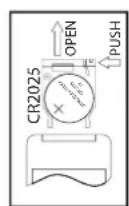
▼ RELEASE


OPEN

PUSH
LED Indicators
| Status Indicator | |
| Power Off No Light | |
| Optical Mode Amber Light | |
| Aux In Mode White light | |
| Line In Mode Blue Light | |
| Radio Mode Green Light |
Mounting
We recommend having this bar speaker professionally mounted.
The included spacers should be used at your discretion to extend the face of the bar speaker farther from the wall. These are typically used when mounting the bar speaker under a television, and the face of the bar speaker needs to be flush with the face of the television.
Introduction


Power Press to turn the unit on or off.
Line
Press to switch to Line In mode.
Optical
Press to switch to Optical mode.
Scan
Press to scan for available radio stations in FM Radio mode.
Music
Press to switch to the EQ optimized for music.
Treble
Press to adjust the treble up or down.
Bass
Press to adjust the bass up or down
Aux
Press to switch to aux mode.
Mute
Press to mute the volume.
FM
Press to switch to FM Radio mode.
Channel +/-
Press to adjust the channel up or down.
Voice
Press to switch to the EQ optimized for dialogue.
Movie
Press to switch to the EQ optimized for movie sound.
Volume
Press to adjust the volume.
Audio Inputs, Radio & Sub Out
Using the Stereo RCA Inputs
When connecting two products using an RCA Cable, match the colored ports with the same colored connection.
- Connect the RCA Cable to the RCA Stereo Inputs located on the back of the unit, and to the audio outputs on the television.
- Press the Power button to power on the unit.
- Press the Source button repeatedly to enter AUX Mode, indicated by an white light.
- Audio played through the television will now be heard through the speakers.
Using the Optical Input
You will need: An audio source with an Optical Audio Output and a Digital Optical Audio Cable (not included)
- Connect the Digital Optical Audio Cable to the optical output on the audio source and to the Optical Input on the speaker bar.
- Press the Power button to power the unit on.
- Press the Source button repeatedly to switch to SPDIF Mode, indicated by a amber light.
- Using the native controls on your connected device, make sure the audio settings are set to PCM or Optical Audio and are turned On.
- Audio from the connected audio source will now be played through the speakers.
Tuning the Radio
- Press the Source button repeatedly to enter FM Radio Mode, indicated by a green light.
- Press the Scan button on the remote.
- The bar speaker will scan for all available stations, and store them.
- Press the Channel +/- buttons to browse through stored stations.
Using the Line In
- Plug one end of a 3.5 mm audio input cable into the Line In on the unit.
3.5 mm audio input cable not included. - Plug the other end of the cable into the audio output/headphone output on an MP3 Player or other audio source.
- Press the Power button to power the unit on.
- Press the Source button repeatedly to enter LINE IN Mode, indicated by a blue light.
- Audio played through the connected device will now be heard through the speakers.
Using the Subwoofer Output
- Use an RCA cable (included) to connect an external subwoofer to the Subwoofer Output.
- When audio is played through any source, the bar speaker will automatically use the connected subwoofer.
Learn Feature
Understanding the Learn feature
What is the Learn feature?
The Learn feature captures remote commands from your television remote, and teaches your bar speaker to operate when these commands are pressed. Power, volume and mute are a few examples of commands that the bar speaker can learn.
Why use the Learn feature?
Teaching the bar speaker remote commands will reduce the number of remotes needed, save time searching for remote codes, and improve the ease of operation.
Using the Learn Feature
- With the power Off, press the Learn button on the unit.
An indicator will flicker red.
- Press the button you desire to be learned on the included remote.
For example: Volume+
The red light will continue to flicker, and another indicator will display a blue light.
- Press the corresponding button on your remote.
The red light will continue to flicker, and another indicator will display a green light.
-
Press the Learn button on the unit.
-
The programmed button on your remote will now be able to control your sound bar.
Note: It is necessary to program each button i.e. channel and volume + and - separately.
To start over, press and hold the learn key for over 3 seconds. If the sound bar has failed to learn a command, all the LED indicators will display a light for two seconds to signal the learning function has been reset.
Note: Not all functions of the sound bar will be available through your own remote control, such as bass and treble. Use the included remote for these functions.
Note: While IT202B is able to learn most IR protocols, not all can be programmed.
Company Information
International Support
To download this User's Guide in English, Spanish, and French, or to get answers to frequently asked questions, visit the support section at:
www.iLiveElectronics.com
For Warranty Information and the most up-to-date version of this User's Guide, go to:
www.iLiveElectronics.com
Green Initiative

protect for today • sustain for tomorrow
Copyright © 2012 Digital Products International (DPI, Inc.) | All other trademarks appearing herein are the property of their respective owners. Specifications are subject to change without notice


- IT202B
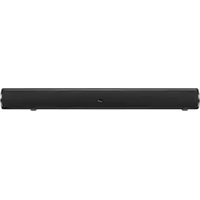
- 32" HD Sound Bar with Built-in Subwoofer
- Warnings and Precautions
- Important Safety Instructions
- FCC Warnings
- Additional Warnings
- Features
- Includes
- Setup
- Power Remote
- Mounting
- Introduction
- Line
- Optical
- Scan
- Music
- Treble
- Bass
- Aux
- Mute
- FM
- Channel +/-
- Voice
- Movie
- Volume
- Audio Inputs, Radio & Sub Out
- Using the Stereo RCA Inputs
- Using the Optical Input
- Tuning the Radio
- Using the Line In
- Using the Subwoofer Output
- Learn Feature
- Understanding the Learn feature
- What is the Learn feature?
- Why use the Learn feature?
- Using the Learn Feature
- Company Information
- International Support
- Green Initiative
Brand : iLive
Model : IT202B
Category : Soundbar