
GeoVision 5066 - Gps PRESTIGIO - Free user manual and instructions
Find the device manual for free GeoVision 5066 PRESTIGIO in PDF.


Pick your language and provide your email: we'll send you a specifically translated version.
| Product Type | Portable GPS Navigation System |
| Brand | Prestigio |
| Model | GeoVision 5066 |
| Display | 5-inch touchscreen LCD with 480x272 pixel resolution |
| Dimensions | Approximately 143 x 87 x 17 mm (5.6 x 3.4 x 0.7 inches) |
| Weight | Around 220 grams (7.8 ounces) |
| Power Supply | Built-in rechargeable lithium battery, 12V/24V car charger |
| Battery Life | Up to 2.5 hours of continuous use on a full charge |
| Map Coverage | Preloaded with detailed maps for Europe (varies by region) |
| GPS Receiver | High-sensitivity GPS chipset with SiRF Star III technology |
| Navigation Features | Turn-by-turn voice guidance, 2D/3D map view, speed limit alerts |
| Connectivity | Mini-USB port for PC connection and charging, SD card slot |
| Additional Functions | Built-in speaker, photo viewer, MP3 player, and multimedia playback |
| Storage | Onboard flash memory plus expandable via microSD/SD card (up to 32GB) |
| Mounting | Windshield suction cup mount and dashboard disc included |
| Languages Supported | Multiple language options for both interface and voice |
| Maintenance | Clean screen with soft dry cloth, avoid water and harsh chemicals |
| Safety | Internal safety circuit with overcharge and over-temperature protection |
| Spare Parts and Repairability | Standard car charger, USB cable, and screen protector readily available |
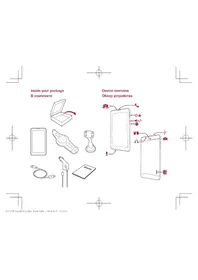
| Package Contents | GPS device, car charger, USB cable, windshield mount, user manual |
Frequently Asked Questions - GeoVision 5066 PRESTIGIO
How do I update the maps on my Prestigio GeoVision 5066?
To update maps, visit the official Prestigio website and download the latest map update tool. Connect your device to a computer via USB, run the tool, and follow the on-screen instructions. Ensure you have a stable internet connection and enough free storage space.
Can I charge the GPS while driving?
Yes, the GeoVision 5066 comes with a 12V/24V car charger that keeps the device charged during use. Simply plug the charger into the vehicle's cigarette lighter socket and connect it to the GPS.
It is recommended to use the original charger to avoid damaging the battery.
It is recommended to use the original charger to avoid damaging the battery.
How long does the battery last on a full charge?
The built-in rechargeable battery typically provides about 2.5 hours of continuous use on a single charge. Actual battery life may vary depending on screen brightness, volume, and usage conditions. For longer trips, keep the car charger connected.
Why is my GPS not getting a satellite signal?
Make sure you are outdoors or near a window with a clear view of the sky. Obstructions like tall buildings, tunnels, or heavy clouds can block signals. Try moving the device to a different location, wait a few minutes, and ensure the GPS antenna is not covered by any metal objects.
How do I reset the device if it freezes?
If the device becomes unresponsive, press and hold the power button for 10 seconds to perform a forced reset. If that does not work, use a paper clip to press the reset hole located on the back or bottom of the unit. This will clear temporary glitches and restore normal function.
Can I use the device as a regular MP3 player?
Yes, the GeoVision 5066 includes a built-in multimedia player that supports both MP3 audio and photo viewing. You can copy files to the internal memory or an SD card, then access them from the main menu. Note that navigation functions and multimedia playback are not available simultaneously.
How do I install the windshield mount?
Clean the windshield surface, then press the suction cup firmly against the glass and lock the lever. Adjust the angle to secure the GPS. If the suction cup loses grip, wash it with warm soapy water, dry it, and reattach. Some mounts have a spin-lock for extra stability.
What should I do if the touchscreen does not respond correctly?
First, clean the screen with a soft, dry cloth to remove dust or grease. If the issue persists, perform a touchscreen calibration from the settings menu. In some cases, a soft reset (as described above) may also resolve touch responsiveness problems.
Is the device compatible with microSD cards?
Yes, the GeoVision 5066 has a microSD card slot that supports cards up to 32GB. You can use the card to expand storage for maps, multimedia files, and other data. Ensure the card is formatted in FAT32 for best compatibility.
How can I improve battery life?
To extend battery life, reduce the screen brightness to a comfortable level, lower the speaker volume, and avoid using the multimedia functions when navigation is active. Also, turn off the device when not in use. Keeping the battery fully charged and avoiding extreme temperatures will help maintain its capacity over time.
User questions about GeoVision 5066 PRESTIGIO
0 question about this device. Answer the ones you know or ask your own.
Ask a new question about this device
No questions yet. Be the first to ask one.
Download the instructions for your Gps in PDF format for free! Find your manual GeoVision 5066 - PRESTIGIO and take your electronic device back in hand. On this page are published all the documents necessary for the use of your device. GeoVision 5066 by PRESTIGIO.
USER MANUAL GeoVision 5066 PRESTIGIO
Manual assistant
Powered by Anthropic
Waiting for your message
Product information
Brand : PRESTIGIO
Model : GeoVision 5066
Category : Gps