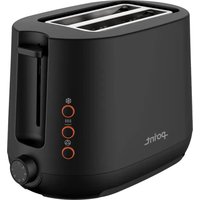
POT5010BK - Toaster Point - Free user manual and instructions
Find the device manual for free POT5010BK Point in PDF.


Pick your language and provide your email: we'll send you a specifically translated version.
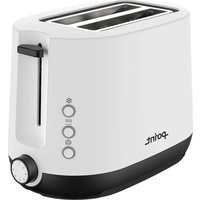
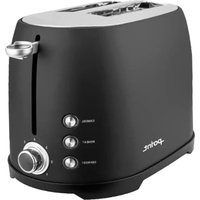
| Product Type | Toaster |
| Brand | Point |
| Model Number | POT5010BK |
| Color | Black |
| Number of Slots | 2 |
| Power Consumption | 850 W |
| Voltage | 220-240 V, 50/60 Hz |
| Cord Length | 0.85 m |
| Dimensions (H x W x D) | Approximately 190 x 290 x 320 mm |
| Weight | Approximately 1.5 kg |
| Housing Material | Stainless steel and plastic |
| Browning Control | 6 variable settings |
| Functions | Cancel, defrost, reheat |
| Self-Centering Bread Carriage | Yes |
| Removable Crumb Tray | Yes |
| High Lift Feature | Yes |
| Cool-Touch Exterior | Yes |
| Anti-Slip Feet | Yes |
| Automatic Shut-Off | Yes |
| Safety Protection | Overheating protection |
| Cleaning and Maintenance | Wipe exterior with a soft cloth and empty the crumb tray regularly |
| Spare Parts and Repairability | Replacement crumb tray and heating elements available through Point support |
Frequently Asked Questions - POT5010BK Point
How do I clean my Point POT5010BK toaster?
Unplug the toaster and allow it to cool completely. Remove and empty the crumb tray, then wipe the exterior with a damp soft cloth. Never immerse the toaster in water or place it in a dishwasher.
What do the browning settings mean?
The browning control has 6 levels, from light (1) to dark (6). Lower levels produce lightly toasted bread, while higher levels give a darker, crispier result. Adjust according to your preference and bread type.
Can I toast frozen bread without thawing it first?
Yes, use the defrost function. Place the frozen bread in the slot, press the defrost button, and the toaster will automatically adjust the toasting time to evenly toast frozen slices.
How do I reheat toast without making it too brown?
The reheat function warms your toast without adding extra browning. Simply insert the toast and press the reheat button; the toaster will stop automatically once reheated.
Why does my toaster turn off by itself?
This is a safety feature. The toaster automatically shuts off when the toasting cycle is complete or if the lever is released. It also prevents overheating by switching off if the internal temperature exceeds safe levels.
How do I use the cancel button?
Press the cancel button at any time to stop the toasting cycle immediately. This is useful if you see smoke or want to remove the bread before the preset time ends.
Can I toast bagels in this toaster?
This toaster does not have a dedicated bagel mode, but you can still toast bagels using the normal slot. Place the bagel cut-side in and select a medium browning level for best results.
Why is my toast darker on one side than the other?
Make sure the bread is centered in the slot. The self-centering bread carriage helps align slices, but uneven thickness or an unbalanced position can cause uneven browning. Try adjusting the bread or selecting a lower browning level.
How do I store the toaster when not in use?
Wrap the power cord around the cord storage at the base, and place the toaster in a dry, clean location. Always empty the crumb tray and let the appliance cool before storing.
What should I do if the toaster is not heating?
Check that it is plugged in and the socket is working. If the lever does not stay down, the internal trigger may be defective. Contact Point support or a qualified technician to replace the heating element or inspect the control mechanism.
User questions about POT5010BK Point
0 question about this device. Answer the ones you know or ask your own.
Ask a new question about this device
No questions yet. Be the first to ask one.
Download the instructions for your Toaster in PDF format for free! Find your manual POT5010BK - Point and take your electronic device back in hand. On this page are published all the documents necessary for the use of your device. POT5010BK by Point.
USER MANUAL POT5010BK Point
Manual assistant
Powered by Anthropic
Waiting for your message
Product information
Brand : Point
Model : POT5010BK
Category : Toaster