POT5020BK - Toaster Point - Free user manual and instructions
Find the device manual for free POT5020BK Point in PDF.


Pick your language and provide your email: we'll send you a specifically translated version.
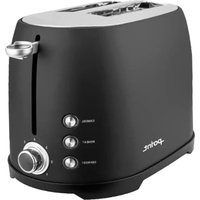
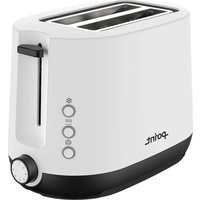
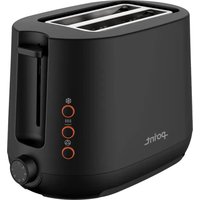
| Product Type | Toaster |
| Brand | Point |
| Model | POT5020BK |
| Color | Black |
| Number of Slices | 2 |
| Power Consumption | 800 W |
| Voltage | 220-240 V ~ 50/60 Hz |
| Cord Length | 0.8 m |
| Dimensions (approx.) | 25 x 18 x 18 cm |
| Weight | 1.1 kg |
| Browning Control | Variable thermostat with 7 levels |
| Functions | Reheat, defrost, cancel button |
| Crumb Tray | Removable, easy to clean |
| Housing Material | Heat-resistant plastic |
| Self-Centering Racks | Yes, for even toasting |
| Auto Shut-Off | Yes, with pop-up mechanism |
| Cool-Touch Exterior | Yes, for safe handling |
| Cleaning | Wipe with damp cloth; do not immerse |
| Spare Parts | Available from Point service centers |
| Warranty | 1 year manufacturer warranty |
Frequently Asked Questions - POT5020BK Point
How do I adjust the browning level on my Point POT5020BK toaster?
Turn the browning control dial to select from 7 levels. Lower numbers produce lighter toast, higher numbers give darker, crispier results. Start with a middle setting and adjust to taste.
Can I toast frozen bread slices with this toaster?
Yes, press the defrost button after inserting frozen bread. The toaster will automatically adjust the toasting time to achieve the same browning level as fresh bread.
How do I reheat toast without further browning it?
Use the reheat function by inserting the toast and pressing the reheat button. This warms the bread gently without activating the browning cycle.
Is it safe to leave the toaster unattended while in use?
No, always stay nearby during operation. The toaster has auto shut-off and a pop-up mechanism, but you should never leave small appliances unattended for safety reasons.
How do I clean the crumb tray?
Unplug the toaster and wait for it to cool completely. Slide out the removable crumb tray at the bottom, empty it, and wash it with warm soapy water. Dry thoroughly before reinserting.
Can I use the toaster to toast bagels or thick bread?
Yes, the toaster has self-centering racks that adjust to accommodate bread of varying thickness. For bagels, place the cut side facing the heating elements.
What should I do if the toast pop-up does not work?
First, unplug the toaster and check if the cancel button is stuck. If the mechanism still fails, contact Point customer support. Do not attempt to force the lever or open the casing.
Is the exterior of the toaster cool to the touch during operation?
The toaster features a cool-touch housing, but the top and slots may become hot. Always handle with care and avoid touching metal parts while in use.
Can I toast more than two slices at a time?
This model is designed for 2 slices. Toasting more may result in uneven browning and overload the unit. Use it as intended for best results.
How do I store the toaster when not in use?
Unplug the toaster, allow it to cool, and wind the power cord around the base. Store it upright in a dry place, and avoid placing heavy objects on top to protect the controls.
User questions about POT5020BK Point
0 question about this device. Answer the ones you know or ask your own.
Ask a new question about this device
No questions yet. Be the first to ask one.
Download the instructions for your Toaster in PDF format for free! Find your manual POT5020BK - Point and take your electronic device back in hand. On this page are published all the documents necessary for the use of your device. POT5020BK by Point.
USER MANUAL POT5020BK Point
Manual assistant
Powered by Anthropic
Waiting for your message
Product information
Brand : Point
Model : POT5020BK
Category : Toaster