
METAL - Bluetooth Accessory BLUETREK - Free user manual and instructions
Find the device manual for free METAL BLUETREK in PDF.


| Product type | Wireless Bluetooth headset (earpiece) |
| Brand | BLUETREK |
| Model | METAL |
| Bluetooth technology | Bluetooth 2.0 |
| Supported profiles | Headset, Hands-Free |
| Buttons | TALK, Volume +, Volume - |
| Indicator light | Red (charging), Blue (on), Red/Blue alternating (pairing) |
| Initial charging time | Approximately 4 hours |
| Subsequent charging time | Approximately 2 hours |
| Battery life | Approximately 500 charge cycles |
| Low battery indication | Regular low beep and flashing red light |
| Standby operating period | Not specified |
| Maximum talk time | Not specified |
| Default PIN code | 0000 |
| Included accessories | 2 ear hooks (different sizes), 6 Ergobuds |
| Features | Hands-free calling, call rejection, last number redial, call transfer, call hold, mute |
| Operating temperature | 0 to 40 °C |
| Usage precautions | Do not expose to moisture, extreme temperatures, fire; do not disassemble |
| Maintenance | Keep away from dust and dirt |
| Repairability | After-sales service by authorized BLUETREK dealers |
| Warranty | Use of another charger voids the warranty |
Frequently Asked Questions - METAL BLUETREK
User questions about METAL BLUETREK
0 question about this device. Answer the ones you know or ask your own.
Ask a new question about this device
Download the instructions for your Bluetooth Accessory in PDF format for free! Find your manual METAL - BLUETREK and take your electronic device back in hand. On this page are published all the documents necessary for the use of your device. METAL by BLUETREK.
USER MANUAL METAL BLUETREK
Bluetooth® wireless headset for mobile devices
Before using your headset for the first time
-You must charge it continuously for about 4 hours, until the red indicator light turns off. Please refer to the "Charging the BLUETREK METAL" section of this manual.
-Pair the headset with a mobile phone. Please refer to the "Pairing the BLUETREK METAL®" section of this manual.
Introduction
The BLUETREK METAL® headset is a wireless headset based on the Bluetooth® technology. It complies with Bluetooth® 2.0 protocol, supporting Headset and Hands-free profile.
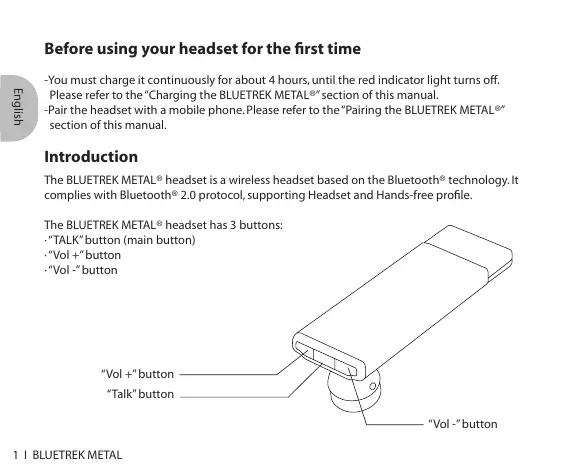
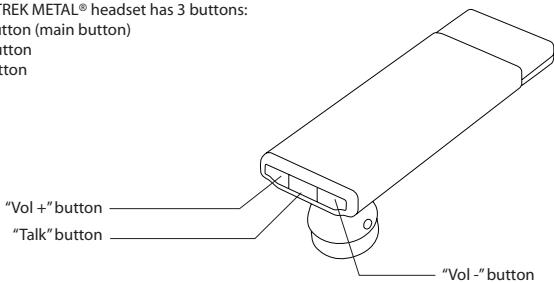
The BLUETREK METAL® headset has 3 buttons:
-TALK" button (main button)
"Vol ^+ button
"Vol - button
Charging the BLUETREK METAL®
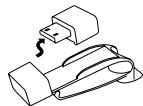
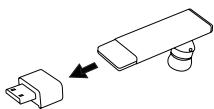
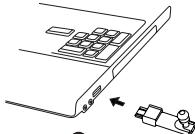
Please insert the adapter in the main body. Then connect the USB connector to a powered USB slot.
During the charge, the red Bluetooth indicator is switched on. The indicator light will turn off when the charge is complete.
During subsequent charges, the charging should take approximately 2 hours.
When you hear a low-tone beep in your headset at regular intervals, and the indicator light flashes in red, your headset needs to be recharged.
1
2
3
In some cases, you have to charge by the USB cable.

Important:
- If your headset is fully charged, the red indicator light will not turn on when plugging into the charger.
- To maximize battery lifetime, it is recommended to recharge your headset to full capacity only when the battery is low, since a battery has a lifetime of about 500 charging cycles.
- If you leave your headset battery empty for an extended period of time, it could excessively discharge the battery. In this case, charge your headset for 2 hours or more until the battery recovers and recharges completely. When you first charge the headset after prolonged storage, it may take few minutes for the red indicator light to turn on.
- Do not charge your headset for more than 10 hours.
- The use of any other charger will automatically suspend the warranty. It is strictly forbidden and can be very dangerous.
Switching the BLUETREK® METAL ON and OFF
Switching BLUETREK® METAL ON
When your headset is off, press and hold the TALK button for about 3 seconds until the blue indicator light is on. A beep (2 tones) can be heard in the speaker.
Release the TALK button.
Switching BLUETREK® METAL OFF
When your headset is on, press and hold the TALK button for about 7 seconds until the red indicator light is on. A beep (2 tones) can be heard in the speaker then release the TALK button.
Pairing the BLUETREK® METAL
Before using the BLUETREK® METAL headset, you must pair it with your Bluetooth® mobile phone.
Pairing is the process of linking 2 Bluetooth® devices, so that they can communicate.
To initiate pairing:
Place the BLUETREK® METAL and your mobile phone within 0.3 meter (1 foot) from each other.
Switch on your phone and select its Bluetooth discover mode (refer to the Bluetooth mobile phone user manual).
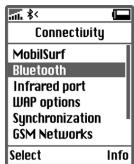
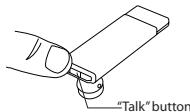
When the BLUETREK® METAL is switched off, press and hold the TALK button for about 7 seconds until the indicator light flashes red and blue alternately. And a sound can be heard in the speaker.
Once the mobile phone detects the headset, a "BLUETREK METAL" message will be displayed. Follow the phone instructions to accept the pairing. The PIN code (or passkey) is 0000, then press "yes" or "ok".
5 For some phones, you may need to select "Connect".
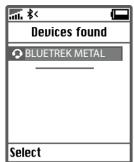
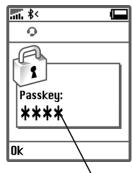
"0000"
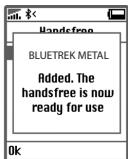
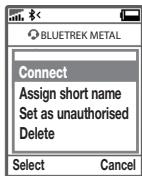
If you haven't started the discovery mode within 5 minutes, the headset will go to the standby mode. You must then switch off your headset and start the pairing again.
If pairing was successful, the indicator light will switch to blue and flashes slowly. The headset will connect automatically to the mobile phone.
Making a call
Mobile phone with voice recognition
- Make sure the voice recognition function on your mobile is activated and your voice tags have been recorded with the phone. To enter these, please refer to your phone's manual
- When there is no incoming or active call, press once on the TALK button
- Wait for the audio signal sent by the mobile phone (generally a short tone).
- Speak the name of person you wish to call.
Mobile without voice recognition
- Make sure both the headset and the mobile phone are ON and in stand-by mode.
- Dial the number on the phone keypad, after approximately 2 seconds the audio connection will be established.
This function may not be available on some phones, please refer to the trouble shooting frequent asked questions in our website: www.bluetrek.com. to find out more.
Answering a call
When the headset rings, press once on the TALK button to take the call.
Ending a call
Press once on the TALK button to end an active call.
Adjusting the volume
To increase the volume during an active call, press the "VOL+" button on the headset. To decrease the volume during an active call, press the "VOL-" button on the headset.
Muting the microphone
To mute the microphone during an active call
During an active call, press and hold the VOL+ button for approximately 3 seconds. A periodic tone can be heard in the speaker when the microphone is muted.
To end the mute function
When the microphone is muted, quickly press the VOL+ button once on the BLUETREK METAL. The periodic tone will end.
Transferring a call from BLUETREK® METAL to the mobile phone
With a phone in Headset Profile
During an active call, to transfer it to the phone, simply turn off your headset.
With a phone in Hands-Free Profile
During an active call, to transfer it to the phone, press the TALK button for about 2 seconds.
Transferring a call from the mobile phone to the BLUETREK® METAL
With a phone in Headset Profile
Switch on your headset.
With a phone in Hands-Free Profile
During an active call on the mobile phone, press the TALK button for about 2 seconds to transfer the call.
This function may not be available depending on your phone.
Call waiting
When you hear a call waiting alert while you are on a call, press approx. 3 seconds on the TALK button to accept the second call and place the current call on hold.
To switch between an active call and a hold call, press approx. 3 seconds on the TALK button.
To end the active call and take the hold call, press once on the TALK button.
This function may not be available, depending on your phone. However, you can always answer the second call from your phone keypad.
Wearing the BLUETREK® METAL
Two different sizes of ear hooks are included in the pack to suit your ear size.
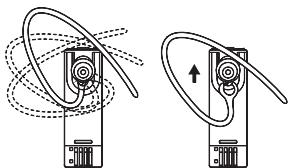
Fitting the Ergobud*
6 different sizes of Ergobud* are included in the pack to suit your ear size. You can adjust the Ergobud position that you feel the most comfortable.


To replace the Ergobud*,remove the speaker cover by pulling gently out from the speaker.
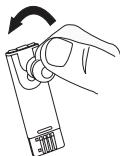
Place the Ergobud* back onto the speaker by inserting the bottom part first.
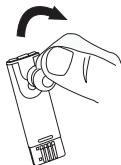
Additional features with some phones
Rejecting a call
Press the TALK button for about 2 seconds to reject a call.
Redial the last number
When there is no incoming or active call, press the TALK button for about 3 seconds until you hear a beep.
Troubleshooting guide
The first thing you should do when encountering a problem that you cannot solve with this manual, is to switch off your headset and your mobile phone, and switch them on again.
To find out more, please refer to the trouble shooting frequent asked questions in our website: www.bluetrek.com.
For better sound quality, avoid placing the METAL too close to your face as the mic may rub with face and generate noise.
Guidelines for safe use: Read those guidelines before using your headset.
- The volume level of the Bluetooth® headset may vary, depending on your mobile phone. Before using your headset for the first time, adjust the headset volume to the lowest, then increase the volume gradually until you reach to an acceptable level.
- High levels of volume may result in hearing loss, avoid using the headset at high volume continuously. If you experience ringing in your ears or muffled speech, consult your doctor immediately and stop using the headset.
- Do not drop or try to alter the shape of your headset.
- Do not expose your headset to liquid or moisture.
- Do not expose your headset to extreme temperatures. Temperature range: 0-40C.
- Do not expose your headset to fire or open flames.
- Do not try to disassemble your headset. Service and Maintenance can only be performed by authorized BLUETREK® dealers.
- Keep your headset away from dust and dirt.
- Do not let children play with your headset, since it contains small parts that could become detached and create a choking hazard.
- Check the regulation in your area if you plan to use your headset while driving.
- Turn off your headset before boarding an airplane.
- CAUTION: Danger of explosion if battery is incorrectly replaced. Dispose of batteries according to local regulations. Do not dispose as household waste.