
M2 - Wireless Earbuds BLUETREK - Free user manual and instructions
Find the device manual for free M2 BLUETREK in PDF.


| Product Type | Bluetooth Wireless Headset |
| Brand | BLUETREK |
| Model | M2 |
| Bluetooth Version | 1.2 |
| Bluetooth Profiles | Headset, Hands-Free |
| Buttons | Talk (main), Volume +, Volume - |
| Indicator Light | Red (charging), Blue (on/paired), Purple (favorite number recording) |
| Pairing Code | 0000 |
| Charging Duration | About 2 h 40 min (first charge: 4 h) |
| Operating Temperature | 0 to 40 °C |
| Main Functions | Answer/end a call, adjust volume, mute, reject call, redial last number, call waiting, call transfer, store 2 favorite numbers |
| Care and Cleaning | Do not expose to water or moisture. Clean with a soft dry cloth. |
| Safety | Do not disassemble. Keep out of reach of children. Avoid extreme temperatures. Do not throw into fire. Follow local regulations for batteries. |
| Country of Origin | Hong Kong (declaration of conformity) |
Frequently Asked Questions - M2 BLUETREK
User questions about M2 BLUETREK
0 question about this device. Answer the ones you know or ask your own.
Ask a new question about this device
Download the instructions for your Wireless Earbuds in PDF format for free! Find your manual M2 - BLUETREK and take your electronic device back in hand. On this page are published all the documents necessary for the use of your device. M2 by BLUETREK.
USER MANUAL M2 BLUETREK
Thank you for choosing the BLUETREK® M2, we hope you will enjoy the convenience we are bringing to you. The BLUETREK® M2 offers many functions, please read this manual before getting started.
EC-Declaration of Conformity
We, Innovi Technologies Ltd of
31/F China Online Centre,
333 Lockhart Road,
Wan Chai, Hong Kong
declare under our sole responsibility that our product
BLUETREK M2
to which this declaration refers is in conformity with the appropriate standards
EN300 328-02
EN301 489-17
EN301 489-01
EN50371
EN60950
Following the provisions of Radio and Telecommunications Terminal Equipment directive 1999/5/EC.
July 2006
Guillaume Ponticelli, Director of Development
FCC Statement
This device complies with Part 15 of the FCC rules. Operation is subject to the following two conditions: (1) This device may not cause harmful interference. (2) This device must accept any interference received, including interference that may cause undesired operation.
Caution: Changes or modifications to this Bluetooth® headset not expressly approved by the party responsible for compliance could void the user's authority to operate it.
Industry Canada notice to users and product statements
To prevent radio interference with the licensed service, this device is intended for operated indoors and away from windows to provide maximum shielding. Equipment (or its transmit antenna) that is installed outdoors is subject to licensing.
In compliance with Industry Canada regulations, technical specifications have been provided in a declaration of conformity. This does not imply that Industry Canada approved the equipment.
Bluetooth® is a trademark owned by Bluetooth SIG, Inc. and is used by the manufacturer under license.
BEFORE USING YOUR HEADSET FOR THE FIRST TIME
- You must charge it continuously for about 4 hours, until the red indicator light turns off. Please refer to the "Charging the BLUETREK® M2" section of this manual.
- Pair the headset with a mobile phone. Please refer to the "Pairing BLUETREK® M2" section of this manual.
Introduction
The BLUETREK® M2 headset is a wireless headset based on the Bluetooth® technology. It complies with Bluetooth® 1.2 protocol, supporting Headset and Hands-free profile.
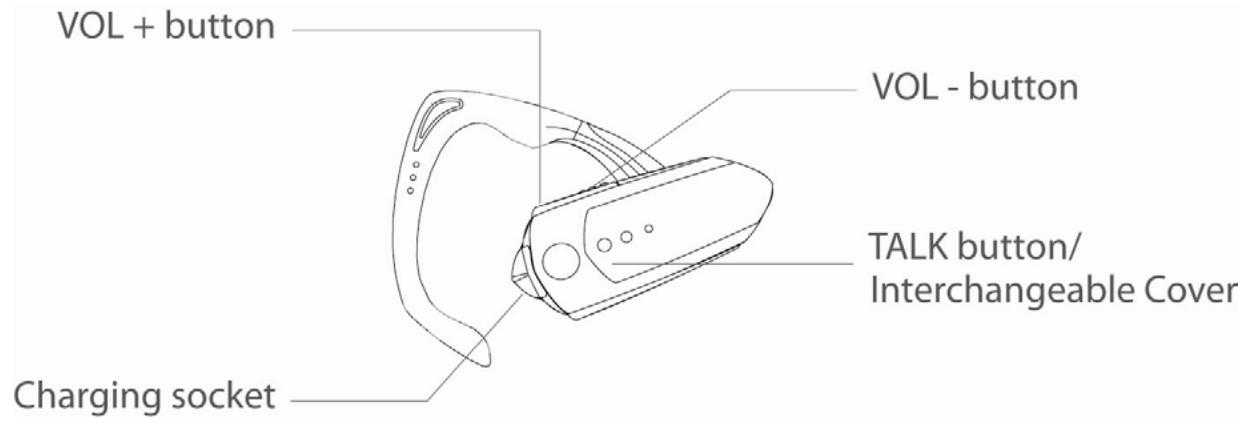
The BLUETREK® M2 headset has 3 buttons:
TALK "button (main button),
1 "VOL+ button,
1 "VOL- "button.
Charging the BLUETREK® M2
Please connect the charger to the headset and to the mains. During the charge, the indicator light is red. The indicator light will turn off when the charge is complete. During subsequent charges, the charging should take approximately 2 hour 40 minutes.
When you hear a light beep in your headset at regular intervals, and the indicator light flashes in red, your headset needs to be recharged.
Important:
- If your headset is fully charged, the red indicator light will not turn on when plugging into the charger.
(To check whether your headset is fully charged, press the TALK button for approx. 2 seconds, once released, the red indicator light will turn on for approx. 3 seconds.) - To maximize battery lifetime, it is recommended to recharge your headset to full capacity only when the battery is low, since a battery has a lifetime of about 500 charging cycles.
- If you leave your headset battery empty for an extended period of time, it could excessively discharge the battery. In this case, charge your headset for 3 hours or more until the battery recovers and recharges completely. When you first charge the headset after prolonged storage, it may take few minutes for the red indicator light to turn on.
- Do not charge your headset for more than 10 hours.
- The use of any other charger will automatically suspend the warranty. It is strictly forbidden and can be very dangerous.
Pairing the BLUETREK® M2
Before using the BLUETREK® M2 headset, you must pair it with your Bluetooth® mobile phone. Pairing is the process of linking 2 Bluetooth® devices, so that they can communicate.
To initiate pairing:
- Place the BLUETREK® M2 and your mobile phone within 0.3 meter (1 foot) from each other.
- Switch on your phone and select its Bluetooth® discover mode (refer to the Bluetooth® mobile phone user manual).
- When the BLUETREK® M2 is switched off, press and hold the TALK button for about 7 seconds until the indicator light flashes red and blue alternatively. And a sound can be heard in the speaker.
- Once the mobile phone detects the headset, a "BLUETREK M2" message will be displayed. Follow the phone instructions to accept the pairing. The PIN code (or passkey) is 0000, then press "yes" or "ok".
If pairing was successful, the indicator light will switch to blue and flashes slowly.
If you haven't started the discovery mode within 5 minutes, the headset will switch off. You must then switch on your headset and start the pairing again.
Wearing the BLUETREK® M2
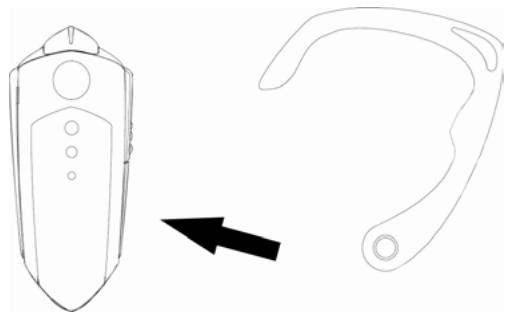
For your convenience, the ear clamp of BLUETREK M2 is designed to be adjustable and removable which allows the headset to be worn on either ear comfortably. BLUETREK® M2, as packaged, is ready to be worn on your right ear.
For left ear, simply unsnap the ear clamp from the headset by pulling gently at the base of the ear clamp ring.
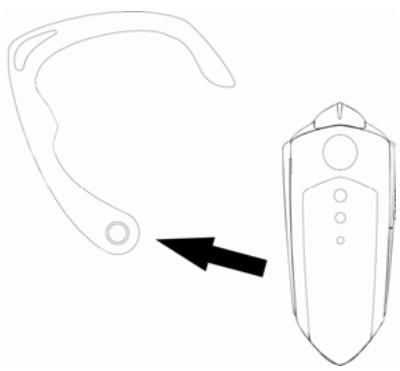
Flip the ear clamp over, and snap it back onto the headset by applying gentle pressure on the base of the ear clamp ring.
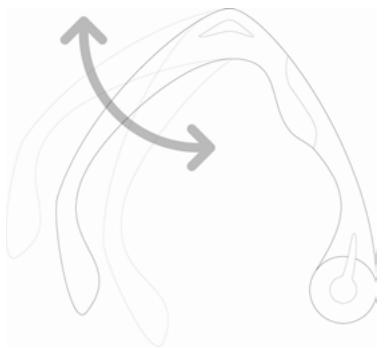
The ear hook is made of a soft material which can be shaped to fit your ear. Please refer to the above diagram of how it can be adjusted.
Switching the BLUETREK® M2 ON and OFF
Switching BLUETREK® M2 ON
When your headset is off, press and hold the TALK button for about 2 seconds until the blue indicator light is on. A beep (2 tones) can be heard in the speaker. Release the TALK button.
To check if your headset is ON, press once on the TALK button. If the indicator light flashes blue, it means your headset is ON.
Switching BLUETREK® M2 OFF
When your headset is on, press and hold the TALK button for about 5 seconds until the red indicator light is on after the quick blue flashes. A beep (2 tones) can be heard in the speaker then release the TALK Button.
Making a call
*Mobile phone with voice recognition
. Make sure the voice recognition function on your mobile is activated and your voice tags have been recorded with the phone. To enter these, please refer to your phone's manual
. When there is no incoming or active call , press once on the TALK button
. Wait for the audio signal sent by the mobile phone (generally a short tone).
. Speak the name of person you wish to call.
Mobile without voice recognition
. Make sure both the headset and the mobile phone are ON and in stand-by mode.
. Dial the number on the phone keypad, after approximately 2 seconds the audio connection will be established.
*This function may not be available on some phones, please refer to the trouble shooting frequent asked questions in our website: www.bluetrek.com. to find out more.
Answering a call
When the headset rings, press once on the TALK button to take the call.
Ending a call
Press once on the TALK button to end an active call.
Adjusting the volume
To increase the volume during an active call, press the "VOL+" button on the headset.
To decrease the volume during an active call, press the "VOL-" button on the headset.
Muting the microphone
To mute the microphone during an active call
During an active call, press and hold the VOL+ button for approximately 2 seconds. A periodic tone can be heard in the speaker when the microphone is muted.
To end the mute function
When the microphone is muted, quickly press the VOL+ button on the BLUETREK® M2. The periodic tone will end.
Transferring a call from BLUETREK® M2 to the mobile phone
During an active call, press the TALK button for about 2 seconds. (This function only works in the Hands-Free Profile.)
In the Headset profile, you can simply turn off your headset.
Transferring a call from the mobile phone to the BLUETREK® M2
During an active call on the mobile phone, press once on the TALK button to transfer the call.
Pre-registered numbers feature
This feature allows you to store your 2 favorite numbers in your BLUETREK® M2 headset and to dial these numbers directly from your headset.
(Important: This feature is only available in the Hands-free profile).
Storing your favorite numbers
- Ensure your BLUETREK® M2 headset is paired and connected with your phone.
- Enter numbers following the syntax describe below as your mobile phone name
(Pleases refer to your mobile number manual to change your phone name. In most phones, the mobile phone name is under the "Bluetooth" menu.
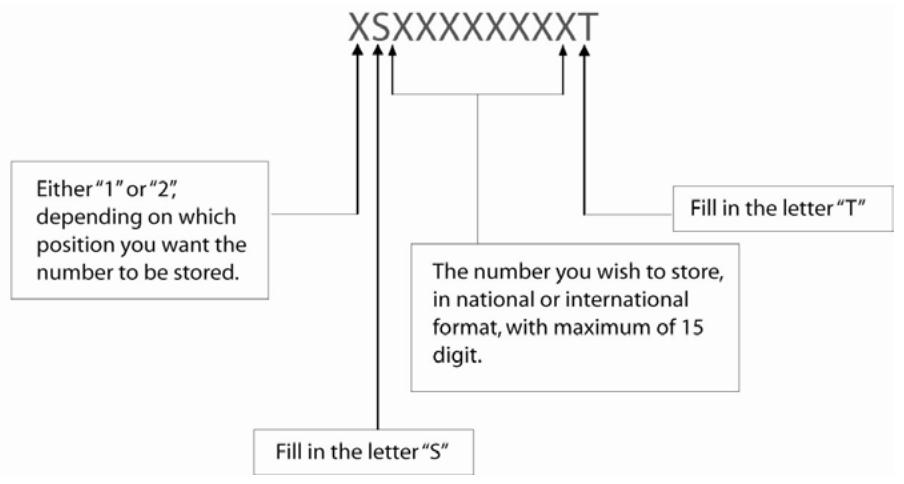
Example 1: To store "0123456789" in position 1 = 1 S0123456789T
Example 2: To store “+44123456789” in position 2 = 2S + 44123456789 T
- Press and hold the "Vol - " button on your BLUETREK® M2 headset for approx. 3 seconds until the purple indicator light is on. (A beep can be heard in the speaker).
- If the number is correct and have stored in the headset, you will hear:
1 beep in the speaker and the blue indicator light will flash once if the number has been stored in position 1.
OR
2 beeps in the speaker and the blue indicator light will flash twice if the number has been stored in position 2.
If the number is incorrect, it will not store in the headset. You will head a long low-tone beep in the speaker and the red indicator light will flash twice.
Note:
- Only 1 telephone number can be stored at one time. To store the second number, simply repeat from Step 2.
- Maximum of 2 favorite numbers can be stored and can be replaced by repeating the above steps.
- Remember to change back your mobile phone name once you have stored the numbers.
Making a call to one of the stored numbers
-
Ensure your BLUETREK® M2 headset is paired and connected with your phone.
-
Press and hold the "Vol +" button on your BLUETREK® M2 headset until you hear:
-
1 beep to call your number stored in position 1;
- 2 beeps to call your number stored in position 2.
Call waiting
When you hear a call waiting alert while you are on a call, press approx. 3 seconds on the TALK button to accept the second call and place the current call on hold.
To switch between an inactive call and a hold call, press approx. 3 seconds on the TALK button.
This function may not be available, depending on your phone. However, you can always answer the second call from your phone keypad.
Additional features with some phones
Rejecting a call
When the headset rings, press the TALK button for about 2 seconds.
Redial the last number
When there is no incoming or active call, press the TALK button for about 2 seconds until you hear a beep.
Troubleshooting guide
The first thing you should do when encountering a problem that you cannot solve with this manual, is to switch off your headset and your mobile phone, and switch them on again.
To find out more, please refer to the trouble shooting frequent asked questions in our website: www.bluetrek.com.
Guidelines for safe use
Read those guidelines before using your headset.
- Do not drop or try to alter the shape of your Headset.
- Do not expose your headset to liquid or moisture.
- Do not expose your headset to extreme temperatures. Temperature range: 0-40C.
- Do not expose your headset to fire or open flames.
- Do not try to disassemble your headset. Service and Maintenance can only be performed by authorized BLUETREK® dealers.
- Keep your headset away from dust and dirt.
- Do not let children play with your headset, since it contains small parts that could become detached and create a choking hazard.
- Check the regulation in your area if you plan to use your headset while driving.
- Turn off your headset before boarding an airplane.
CAUTION : Danger of explosion if battery is incorrectly replaced. Dispose of batteries according to local regulations. Do not dispose as household waste.