
ES120 - Projection screen Vevor - Free user manual and instructions
Find the device manual for free ES120 Vevor in PDF.


Pick your language and provide your email: we'll send you a specifically translated version.
| Brand | Vevor |
| Model | ES120 |
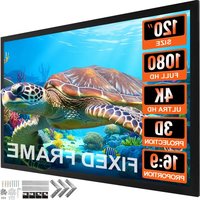
| Product Type | Projection Screen |
| Screen Diagonal | 120 inches (304.8 cm) |
| Aspect Ratio | 16:9 |
| Screen Material | Matte White PVC |
| Gain | 1.1 |
| Viewing Angle | 160 degrees |
| Housing Dimensions | 280 x 8 x 8 cm |
| Viewable Screen Size | 266 x 149 cm |
| Total Weight | 8.2 kg |
| Mounting Type | Wall or Ceiling Mount (brackets included) |
| Operation Type | Manual Pull-Down |
| Power Source | None required |
| Main Features | Scratch-resistant surface, black light-blocking back, adjustable lock latch |
| Included Components | Screen, mounting brackets, screws, instruction manual |
| Cleaning | Wipe with soft dry cloth; do not use water or solvents |
| Safety | Keep children away, retract slowly to avoid mechanism damage |
| Spare Parts & Repairability | Replacement hooks and brackets available; durable aluminum housing |
| General Applications | Home theater, office presentations, classroom use |
Frequently Asked Questions - ES120 Vevor
How do I install the Vevor ES120 projection screen?
Attach the included ceiling or wall brackets to a sturdy surface, then hang the screen housing on the brackets and tighten the screws. Make sure it is level before use.
What is the aspect ratio and viewing area of the ES120?
The ES120 has a 16:9 aspect ratio with a 120-inch (304.8 cm) diagonal. The viewable area is approximately 266 x 149 cm, ideal for HD projection.
Does the ES120 require electricity to operate?
No, it is a manual pull-down screen. Pull the lower bar to extend the screen, and it locks at the desired height. No power supply is needed.
How do I clean the projection screen?
Use a soft, dry microfiber cloth to wipe dust. Do not use water or chemical cleaners, as they may damage the matte PVC surface.
Can I project onto the screen during daylight?
The screen has a black backing that helps block light from behind, reducing washout. However, for the best contrast, dim the room lights during use.
Is the screen washable?
No, the screen surface is not meant to be washed. Avoid liquids and only use gentle dry cleaning methods to preserve the material.
What is the weight of the ES120 screen?
The screen weighs about 8.2 kg, so ensure the mounting surface is strong enough. The included brackets are designed for drywall or concrete.
Can I use this screen outdoors?
It is best suited for indoor use. For outdoor use, place it in a wind-protected area and never leave it extended when not in use.
Does the screen come with a warranty?
Vevor provides a 1-year warranty covering manufacturing defects. Contact Vevor support if the screen material or mechanism fails.
How do I retract the screen after use?
Gently pull the lower bar downward a few centimeters to release the lock, then guide it back up slowly. Never let it snap back into the housing.
User questions about ES120 Vevor
0 question about this device. Answer the ones you know or ask your own.
Ask a new question about this device
No questions yet. Be the first to ask one.
Download the instructions for your Projection screen in PDF format for free! Find your manual ES120 - Vevor and take your electronic device back in hand. On this page are published all the documents necessary for the use of your device. ES120 by Vevor.
USER MANUAL ES120 Vevor



Manual assistant
Powered by Anthropic
Waiting for your message
Product information
Brand : Vevor
Model : ES120
Category : Projection screen