
KH 994 - Alarm Clock EBENCH - Free user manual and instructions
Find the device manual for free KH 994 EBENCH in PDF.


| Product Type | Clock Radio |
| Brand | EBENCH |
| Model | KH 994 |
| Main Power | 230 V, 50 Hz |
| Backup Power | 9 V block battery (not included) |
| Frequency Ranges | FM/VHF: 87.5–108 MHz AM/MW: 530–1650 kHz |
| Main Functions | FM/AM radio, alarm (radio or tone), timer (1 min – 1h59) |
| Display | Digital with PM indicator |
| Mounting | Under-cabinet mounting (mounting plate included) or shelf use |
| Antenna | Wire antenna (unrollable) |
| Care and Cleaning | Wipe with a dry or slightly damp cloth |
| Safety | Do not expose to moisture, do not open the housing, unplug during storms |
| Disposal Instructions | Used batteries: separate collection or return to store |
Frequently Asked Questions - KH 994 EBENCH
User questions about KH 994 EBENCH
0 question about this device. Answer the ones you know or ask your own.
Ask a new question about this device
Download the instructions for your Alarm Clock in PDF format for free! Find your manual KH 994 - EBENCH and take your electronic device back in hand. On this page are published all the documents necessary for the use of your device. KH 994 by EBENCH.
USER MANUAL KH 994 EBENCH
IMPORTANT SAFETY ADVICE

Please read these important safety advice notes carefully before you fix in place or use your kitchen radio for the first time and if necessary pass them on to third parties.
Fix your radio in place only with the mounting plate supplied.
Do not position the radio mounting plate directly over a hob or sink.
Connect the kitchen radio to a 230 volt / 50 Hz socket.
Keep the mains lead away from sharp edges or sources of heat (hob etc.). Position the mains lead and the wire aerial so that they do not cause a trip hazard.
Never use the equipment if it is damaged or not working properly. Do not unscrew the radio housing. If the radio becomes defective, have it checked over and repaired at a service centre.
To avoid causing injuries and damage, ensure that defective mains leads are repaired by a competent tradesman. Never operate the equipment with a damaged mains lead or plug.
The manufacturer accepts no responsibility for damage caused by misuse of the equipment or the non-observation of these safety advice notes.
Do not allow the radio to come into contact with moisture. If this happens there is the danger of electric shock. Therefore you must not operate the radio with wet hands.
Similarly, the radio must not be exposed to water splashes or spray.
If the radio is used as a stand alone unit, do not place any water-filled objects (e.g. vases) or sources of open flame (e.g. candles) on top of it.
In the event of a thunderstorm we recommend that you remove the plug from the mains socket.
Keep the batteries away from children and do not throw the batteries into a fire.
Dispose of exhausted batteries in an environmentally-friendly manner. Shops that sell batteries have appropriate containers for old batteries. They can also be disposed of at a public collection facility.
OPERATING FEATURES
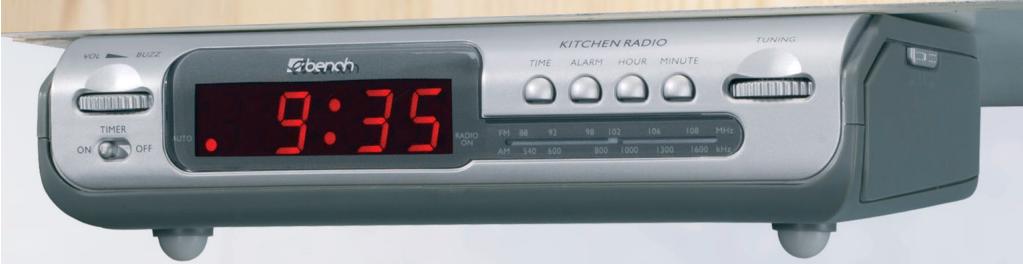
1 Wake-up time button
Time button
3 Station /Frequency display
4 Display
Mounting plate
Station selector
Band selector
Volume control
Display "Radio on"
10 Minutes button
Hours button
12 Display "Auto"
Timer button
14 On/Off switch
PREPARATION / MOUNTING
Find a suitable place to attach your kitchen radio.
You can use the underside of a wall cupboard, shelf or similar for fixing. To protect the radio from moisture and heat, do not mount it directly over a hob or sink.
Of course you can also use the kitchen radio as a stand-alone device on a shelf etc.
1) Slide the mounting plate ⑤ towards the rear of the radio and then lift it off.
2) Hold the plate in place at the mounting position. Ensure that there is approx. 8mm free at the front edge so that the radio can be fitted later. Make sure that the correct side is at the front.
3) Mark the four positions for the holes.
4) Make suitable holes, e.g. with a punch.
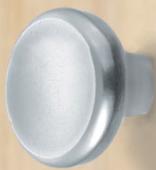
5) Screw on the mounting plate (see Fig.).
Power failure backup:
The power failure backup batteries ensure that the time and wake-up time settings are preserved during short-term power failures. You require a 9 V block battery.
1) Slide the battery compartment cover to the side.
2) Connect the battery. Always pay attention to the correct polarity.
3) Close the battery compartment cover.
Fixing the radio in position:
- Place the radio on to the mounting plate and slide it to the rear.
Power supply:
- Insert the plug into a 230V / 50Hz supply socket.
Wire aerial:
- Unwind the wire aerial fully and fix it in place using e.g. adhesive tape.
SETTING THE TIME
Press and hold down the time button 2 and press the hours button 1 or the minutes button 10 as required to set the correct time. PM is indicated by a small dot in the upper left corner of the display.
RADIO
Switching on the radio: Slide the On/Off switch 4 into the RADIO ON position. A dot 9 lights up on the display 4 to indicate that the radio is switched on.
Band selection: Use the band selector to select the band (FM = VHF, AM = MW).
Station selection: Set the radio to the required station using the STATION selector ⑥. You can read the frequency set on the scale ③. It may be necessary for you to adjust the position of the aerial. When you find good reception, you can fix the aerial in place with some adhesive tape.
Volume adjustment: Use the volume control to change the volume.
TIMER
- Your kitchen radio has an integrated timer. You can set any time you like between 1 minute and 1 hour and 59 minutes. Time is counted down and the remaining time is shown in the display
Setting the time:
1) First of all make sure that the RADIO switch is set to ON or OFF (and not to AUTO!).
2) Slide the timer switch 18 to ON.
First the display 4 shows a standard value of 0.59 - which means a countdown period of 59 minutes.
3) To increase the countdown period press the hours button ①. The display ④ now shows t:53 - this is the maximum countdown period.
4) To change the minutes setting, press the minutes button 10. As you hold down the minutes button 10, the minutes are automatically decreased. Release the minutes button 10 when the required countdown period is shown.
Stopping the timer:
1) When the set countdown period has elapsed, the radio sounds a tone.
2) To switch off the tone or to terminate the countdown timer before the end, slide the timer switch ⑧ to OFF. The display ④ returns to showing the current time.
ALARM
You can use the kitchen radio as an alarm clock. You can choose whether to be woken by the radio or by an alarm tone.
Setting the wake-up time:
Press and hold down the wake-up time button 1 and press the hours button 1 or the minutes button 0 as required to set the correct wake-up time.
Wake-up with radio:
1) First set the radio to the required station using the STATION selector ⑥. You can read the frequency set on the scale ③.
2) Use the volume control ③ to set the volume at which you would later wish to be woken.
3) Slide the On/Off switch into the AUTO position. A dot lights up on the display to indicate that the alarm is switched on.
4) The radio will now switch on at the set wake-up time.
Wake-up with alarm tone:
1) Rotate the volume control in the quiet direction until it reaches the stop - make sure you can hear the volume control engage.
2) Slide the On/Off switch 4 into the AUTO position. A dot 2 lights up on the display 4 to indicate that the alarm is switched on.
3) The radio will sound an alarm tone at the set wake-up time.
4) The alarm tone will switch itself off automatically after approx. 2 hours. Of course, you can switch of the alarm tone before this. Further details can be found in the next section.
Switching off the alarm tone:
- Press the wake-up time button to switch off the alarm tone.
- The set wake-up time remains unaltered. The set time for the alarm signal or the radio is retained for the next day.
- To switch off the alarm function, slide the On/Off switch into the OFF position.
- Do not forget to reset the volume control if you wish to listen to the radio in the meantime.
MAINTENANCE
For cleaning and maintenance, all that is required is to wipe the radio from time to time with a dry or slightly damp cloth.
TECHNICAL INFORMATION
Power supply: 230V 50Hz
Backup: 9 volt block battery (not supplied)
Frequency range: FM/VHF = 87.5 to 108 MHz
AM/MW = 530 to 1650 KHz
DECLARATION OF CONFORMITY (€
We, Kompernaß Handelsgesellschaft mbH, Burgstr. 21, D-44867 Bochum, Germany, declare that this product complies with the following EU directives:
Low Voltage Directive (73/23 EEC, 93/68 EEC), Electromagnetic Compatibility (89/336 EEC, 93/68 EEC) in accordance with the applicable standards, and confirm this with the CE mark.
Type/description: Kitchen radio KH 994
Bochum, 31.01.2003

Hans Kompernaβ
- Managing Director -
- IMPORTANT SAFETY ADVICE
- OPERATING FEATURES
- PREPARATION / MOUNTING
- Power failure backup:
- Fixing the radio in position:
- Power supply:
- Wire aerial:
- SETTING THE TIME
- RADIO
- TIMER
- Setting the time:
- Stopping the timer:
- ALARM
- Setting the wake-up time:
- Wake-up with radio:
- Wake-up with alarm tone:
- Switching off the alarm tone:
- MAINTENANCE
- TECHNICAL INFORMATION
- DECLARATION OF CONFORMITY (€
Brand : EBENCH
Model : KH 994
Category : Alarm Clock