
KH 2243 - Radio EBENCH - Free user manual and instructions
Find the device manual for free KH 2243 EBENCH in PDF.


| Product type | Portable radio |
| Brand | EBENCH |
| Model | KH 2243 |
| Dimensions (L x H x D) | 20 x 12 x 5 cm |
| Weight | 400 g |
| Power supply | 4 AA batteries (1.5 V) or AC adapter (6 V, 300 mA) |
| Frequency ranges | FM 87.5-108 MHz, AM (MW) 520-1710 kHz |
| Output power | 1 W RMS |
| Speaker | 1 x 3 inches (8 cm) |
| Headphone jack | 3.5 mm jack |
| Antenna | FM: telescopic, AM: built-in ferrite |
| Display | Digital (frequency, indicators) |
| Controls | Volume, station, on/off, FM/AM modes |
| Special functions | Automatic station search, sleep timer |
| Housing material | ABS plastic |
| Maintenance | Clean with a soft, dry cloth; avoid moisture and solvents |
| Safety | Do not expose to rain, very high temperatures, or excessive humidity |
| Spare parts | Batteries, AC adapter, antenna (available from customer service) |
| Repairability | Contact EBENCH customer service or an authorized center |
| Design year | 2006 |
| Manual language | English (original version), translations available |
Frequently Asked Questions - KH 2243 EBENCH
User questions about KH 2243 EBENCH
0 question about this device. Answer the ones you know or ask your own.
Ask a new question about this device
Download the instructions for your Radio in PDF format for free! Find your manual KH 2243 - EBENCH and take your electronic device back in hand. On this page are published all the documents necessary for the use of your device. KH 2243 by EBENCH.
USER MANUAL KH 2243 EBENCH
Instructions for use

Kompernaß GmbH
Burgstrasse 21
D-44867 Bochum
Deutschland/Germany
www.kompernass.com
- Safety instructions 4
- Scope of delivery 6
- Usage 6
- Technical data 6
- Operating controls.. 7
6.Preparing the radio for use. 8 - Radio operation 11
- Turning the radio off 12
- Connecting headphones 12
- Cleaning the radio 13
- Troubleshooting 13
12.Disposing of the radio 16
1. Safety instructions

Danger!
Do not place the radio ...
in areas exposed to direct sunlight! Otherwise the radio could overheat and be damaged beyond repair. This could cause a fire!
in the immediate vicinity of heat sources such as ovens, heaters and similar devices or vent openings of other electrical devices! Otherwise the radio could be damaged beyond repair. This could cause a fire!
in damp areas or near water. Otherwise moisture could enter the radio. This could cause danger of electrical shock and fire!

Danger!
The radio can be operated using AC power from a wall outlet with a power cable sold separately. Operating the radio using the wrong power cable could cause risk of electrical shock! The radio could also be damaged beyond repair!
Warning!
The radio contains no user-serviceable parts. The warranty is void if the casing of the radio is opened! For repairs, please contact our service partner nearest you. You will find the addresses of our service partners on the warranty card. The warranty card is included in delivery of the radio.
Note:
No liability will be taken and no guarantee will be made for damages ...
due to opening the case of the radio
resulting from repair attempts not made by qualified experts
use of the radio for purposes other than intended!
Note:
Battery acid could leak out, especially if the batteries are old. Therefore you should remove all batteries if you do not plan to use the radio for long periods of time. This protects the radio from battery acid leakage.
2. Scope of delivery
Radio
These instructions for use
Warranty card
3. Usage
The radio is exclusively intended ...
as an entertainment device
as a receiver for medium wave (AM) and frequency modulation (FM) radio stations
for private non-commercial use.
4. Technical data
Direct Current (DC): 4,5V (3× AA / M ignon batteries)
Power supply (Adaptor):
Input: 230V /50Hz
Output: 4,5 V DC, min. 220 mA
FM frequency range: 87.5-108 MHz
AM frequency range: 540-1600 kHz
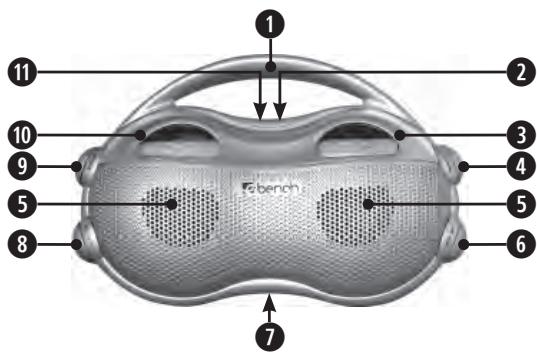
5. Operating controls
Carrying handle
2 3.5 mm headphone jack (on the back of the radio)
3 Frequency range scale
Tuning knob
Loudspeakers
Frequency range selection switch
Battery compartment (on the back of the radio)
On/Off switch
Volume control knob
10 Volume display
11 Power input connection for direct current (on the back of the radio)
6. Preparing the radio for use
Carefully remove the radio from the packaging. Do not drop the radio! Otherwise it could be damaged beyond repair.
Only place the radio on a level, flat, scratchproof, non-slip surface.
Danger!
Do not place the radio ...
in areas exposed to direct sunlight! Otherwise the radio could overheat and be damaged beyond repair. This could cause a fire!
in the immediate vicinity of heat sources such as ovens, heaters and similar devices or vent openings of other electrical devices! Otherwise the radio could be damaged beyond repair. This could cause a fire!
in damp areas or near water. Otherwise moisture could enter the radio. This could cause danger of electrical shock and fire!
Warning!
Do not place radio in areas exposed to extreme physical shock or constant vibrations. Physical shock and constant vibrations could lead to malfunctions and long-term damage.
6.1. Battery-powered operation
To operate the radio using batteries:
1 If the radio is turned on: Turn the on/off switch to the off position.
2 If the radio is connected to a power outlet with a power cable: Unplug the power plug from the electrical outlet.
3 Open the battery compartment on the back of the radio.
4 Insert three AA/LR6/Mignon type batteries in the battery compartment. Please insert the batteries as shown in the picture.
5 Close the battery compartment again. Now the radio is ready for operation.


Note:
The batteries should be replaced if...
playback volume decreases without having adjusted the volume control knob
the sound is distorted during playback or
radio reception is interrupted abruptly.
In order to obtain maximum performance from the radio: always replace all three batteries.
6.2. Operating the radio using an AC power supply
The radio can be operated using AC power from a wall outlet with a power cable sold separately. You can obtain the required cable at any specialist shop. Pay attention to polarity of the power supply. This is printed on the radio casing beside the power input connection for DC power. Rechargeable batteries cannot be charged via the battery connection.

Danger!
Operating the radio using the wrong power cable could cause risk of electrical shock! The radio could also be damaged beyond repair!
To operate the radio using a power adapter in a power outlet:
1 If the radio is turned on: Turn the on/off switch to the off position.
2 If batteries have been inserted in the battery compartment: Remove all batteries from the battery compartment.
3 Plug the power adapter into the radio power input connection.
4 Insert the power cable plug into an electrical outlet. Now the radio is ready for operation.
7. Radio operation
7.1. Receiving radio stations
To receive a radio station:
1 Turn the radio to the on position using the on/off switch.
2 Switch the frequency range selection switch to the frequency range FM (frequency modulation) or AM (medium wave) as desired.
3 Search for a radio station with good reception by turning the tuning knob. You can see the currently selected frequency on the frequency range scale.
4 Set the desired volume using the volume control knob.
7.2. Improving radio station reception
The radio has an integrated antenna for radio reception. Simply turn the radio until reception of the radio station has improved.
8. Turning the radio off
Turn the on/off switch to the off position to turn the radio off.
9. Connecting headphones
If you would like to connect headphones to the radio: Insert the 3.5mm plug of the headphones in the headphones jack of the radio. The loudspeakers on the radio will be automatically turned off upon connecting headphones. Adjust the volume of the headphones using the volume control knob.
10. Cleaning the radio
Clean the radio casing only using a slightly damp cloth. To remove persistent dirt, add a few drops of mild dishwashing liquid to the damp cloth. When cleaning the device, make sure that no moisture seeps into the radio!
Warning!
If moisture enters the radio, it could cause electric shock and a fire!
11.Troubleshooting
11.1. The radio is not functioning at all
For battery-powered operation
A Make sure the batteries have been inserted in the battery compartment according to the picture.
B The batteries may be old. If this is the case, replace the batteries. As an alternative you can operate the radio using a power adapter. For further information pertaining to power adapter operation, please refer to chapter 6.2.
For operation using a power adapter
A Make sure the power cable has been plugged into the radio and the power outlet correctly.
B Make sure that the electrical outlet that you inserted the power plug in carries electrical current. To do this, connect a device which is known to be functioning to this power outlet.
11.2. No reception or poor reception quality
A Carry out the steps described in chapter 7.2.
B Search for a radio station with better reception by turning the tuning knob.
11.3. No sound
Increase the volume by turning the volume control knob.
11.4. Other malfunctions
Please contact your nearest service partner if ...
the malfunctions described in sections 11.1. to 11.3. can not be rectified as described or
other malfunctions occur upon operating the radio.
You will find the addresses of our service partners on the warranty card delivered with the radio.
1 Warning!
The radio contains no user-serviceable parts. The warranty is void if the casing of the radio is opened! For repairs, please contact our service partner nearest you. You will find the addresses of our service partners on the warranty card. The warranty card is included in delivery of the radio.
No liability will be taken and no guarantee will be made for damages ...
due to opening the case of the radio
resulting from repair attempts not made by qualified experts
use of the radio for purposes other than intended!
12. Disposing of the radio

Do not dispose of the radio in the household waste!
Please contact those responsible for waste management in your city or community and ask how to properly dispose of electronic devices.

Note:
You should remove all batteries before disposing of the radio. Do not dispose of the batteries in the household waste! Return the used batteries to an appropriate recycling collection center. Used batteries can usually be returned to the store in which they were bought.
- Safety instructions
- Danger!
- Warning!
- Note:
- Scope of delivery
- Usage
- Technical data
- Operating controls
- Preparing the radio for use
- Battery-powered operation
- Operating the radio using an AC power supply
- Radio operation
- Receiving radio stations
- Improving radio station reception
- Turning the radio off
- Connecting headphones
- Cleaning the radio
- 11.Troubleshooting
- The radio is not functioning at all
- For operation using a power adapter
- No reception or poor reception quality
- No sound
- Other malfunctions
- Warning!
- Disposing of the radio
Brand : EBENCH
Model : KH 2243
Category : Radio