
BOV800XL - Convection Oven BREVILLE - Free user manual and instructions
Find the device manual for free BOV800XL BREVILLE in PDF.


| Product Type | Smart Convection Oven (Smart Oven) |
| Brand | Breville |
| Model | BOV800XL |
| Power | 1800 W (estimated), 120 V, 60 Hz |
| Capacity | 6 slices of bread, pizza up to 13 inches |
| Cooking Functions | Toasting (TOAST), BAGEL, Baking (BAKE), Roasting (ROAST), Broiling (BROIL), Pizza, Cookies (COOKIES), Reheating (REHEAT), Warming (WARM) |
| Cooking Technology | IQMC element (automatic power adjustment), convection |
| Display | ACL (blue standby, orange operating) |
| Settings | Temperature: 50-230 °C (120-450 °F) in 5 °C/10 °F increments, Timer: up to 2 h |
| Rack Positions | 3 positions (upper, middle, lower) with Auto-Eject automatic ejection system in middle position |
| Included Accessories | Rack, crumb tray, enamel broiler pan, enamel baking pan, 13-inch non-stick pizza pan |
| Care and Cleaning | Clean with a soft sponge, do not immerse, do not use metal scouring pads, wash accessories by hand |
| Safety | Grounded plug (Assist Plug), automatic shut-off, hot surfaces, do not use near flammables |
| Warranty | Limited one-year warranty |
| Country of Origin | Not specified (designed by Breville) |
Frequently Asked Questions - BOV800XL BREVILLE
User questions about BOV800XL BREVILLE
0 question about this device. Answer the ones you know or ask your own.
Ask a new question about this device
Download the instructions for your Convection Oven in PDF format for free! Find your manual BOV800XL - BREVILLE and take your electronic device back in hand. On this page are published all the documents necessary for the use of your device. BOV800XL by BREVILLE.
USER MANUAL BOV800XL BREVILLE
4 Breville recommends safety first
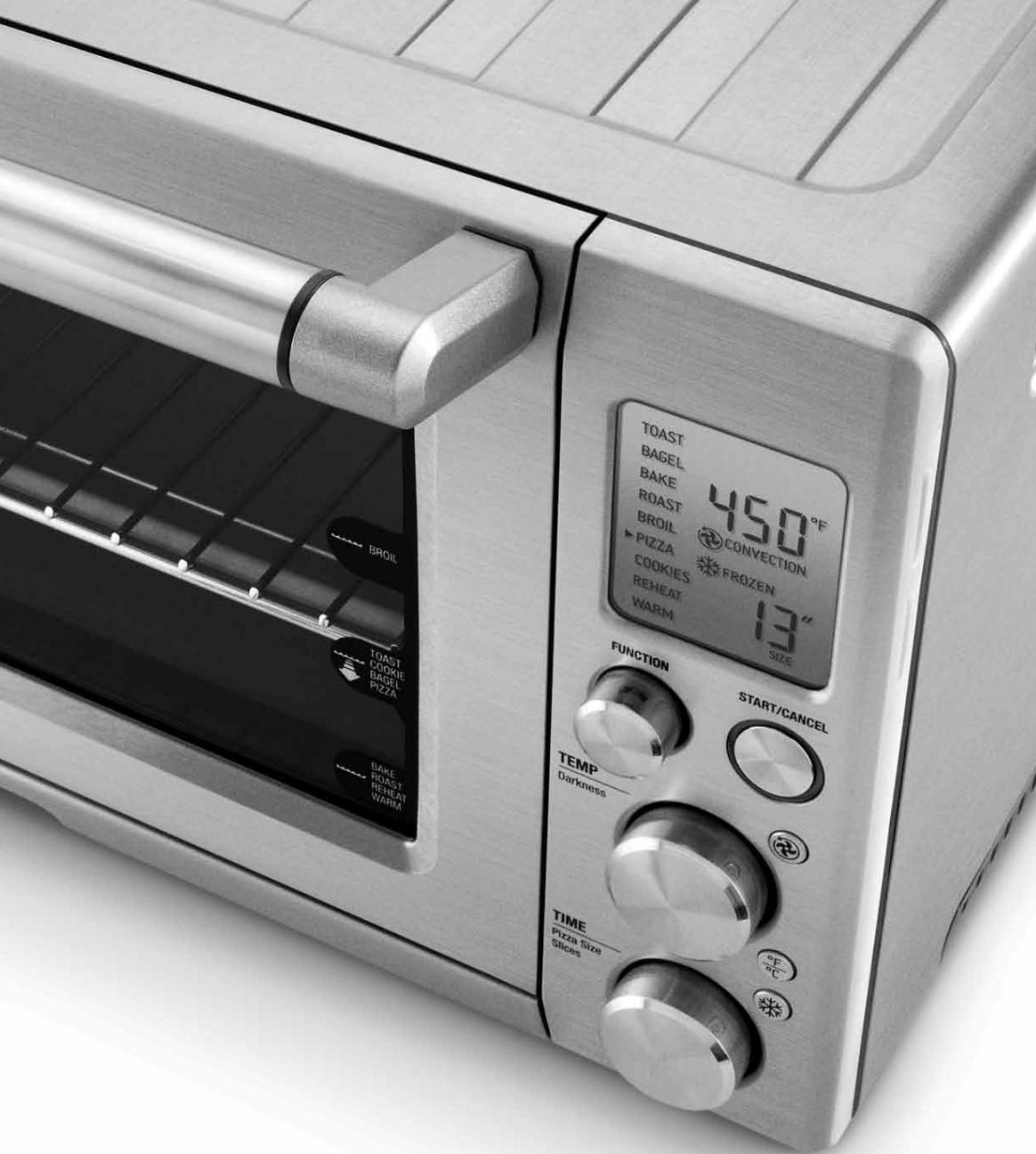
7 Know your Breville Smart Oven™
10 Before first use
- Preparing the oven for use
- A note on cooking times
- A note on rack height positions
- A note on standby mode
- A note on optional settings
18 Operating your Breville Smart Oven™
19 - TOAST function
21 - BAGEL function
23 - BAKE function
26 - ROAST function
28 - BROIL function
31 -PIZZA function
34 - COOKIES function
37 - REHEAT function
39 - WARM function
42 Using the plate warming tray
44 Care and cleaning
- Cleaning the outer body and door
- Cleaning the interior
- Cleaning the crumb tray
- Cleaning the wire rack, broil rack, baking pan and pizza pan.
- Storage
48 Troubleshooting
50 Recipes
76 One year limited warranty
IMPORTANT SAFEGUARDS
We at Breville are very safety conscious. We design and manufacture consumer products with the safety of you, our valued customer, foremost in mind.
READ ALL INSTRUCTIONS BEFORE USE AND SAVE FOR FUTURE REFERENCE

When using electrical appliances, basic safety precautions should always be followed including:
- Remove and safely discard any packing materials and promotional labels before using the oven for the first time.
- To eliminate a choking hazard for young children, remove and safely discard the protective cover fitted to the power plug of this appliance.
- Do not place the oven near the edge of a bench or table during operation. Ensure the surface is level, clean and free of water, flour, etc.
- Always operate the oven on a stable, heat resistant surface. Do not use on a cloth-covered surface, near curtains or other flammable materials.
Always use extreme caution when removing any of the accessories or disposing of hot grease. Allow the oven to cool before handling. - A fire may occur if the oven is covered or touches flammable material, including curtains, draperies, walls, and the like, when in operation.
- Do not place the oven on or near a hot gas or electric burner, or where it could touch another heated oven.
-
Do not let the power cord hang over the edge of a table or counter, or touch hot surfaces.
-
To protect against electric shock do not immerse the oven, power cord or power plug in water or any other liquid.
- When operating the oven, keep a minimum distance of 4^ (10cm) of space on both sides of the appliance. This will allow for adequate air circulation and help prevent the possibility of wall discoloration due to radiated heat.
- Do not touch hot surfaces. Appliance surfaces, including the door and outer surface of the oven are hot during and after operation. To prevent burns or personal injury, always use protective hot pads or insulated oven mitts, or use handles and knobs where available, when inserting, removing or handling items from the oven. Alternatively, allow the oven to cool down before handling.
- Extreme caution must be used when removing pans, dishes and accessories such as the included broil rack and baking pan, that contain hot oil or other hot liquids.
- The glass of the oven door has been specially treated to make it stronger, more durable and safer than ordinary glass, however it is not unbreakable. If struck extremely hard, it may break or weaken, and could at a later time, shatter into many small pieces without apparent cause.
- Do not leave the door standing open for extended periods of time when the oven is turned ON.
BREVILLE RECOMMENDS SAFETY FIRST
- The top of the oven is very hot during and after operation. Do not store any item on top of the oven when in operation. The only exceptions are described on Page 43 - one layer of ceramic plates for warming, and the optional Cutting Board accessory provided by Breville for use in the ribbed section on top of the oven. If the ribbed section is used as a warming tray during operation, protective hot pads or insulated oven mitts should be used when removing heated items. Alternatively, allow the oven to cool down before handling.
- Do not place cardboard, plastic, paper, or other flammable materials in the oven.
- Caution should be exercised when using pans and dishes constructed of materials other than metal. If using ceramic or glass pans or dishes it is important that they are oven safe to prevent cracking.
- Caution should be exercised when using lids in the oven, as pressure build up in a covered pan or dish may cause hot ingredients to expel or the dish to crack.
- Oversized foods and metal utensils must not be inserted in the oven as they may create fire or risk of electric shock.
- Metal utensils such as knives should not be inserted in the oven to remove food residue from the quartz tube elements. This can damage the elements as well as lead to electrocution.
- It is recommended to use only the accessories supplied with this oven. When broiling, the broil rack must be inserted into the supplied baking pan
- The use of any accessory attachments not recommended by Breville may cause injuries.
-
Do not use the toast function for purposes other than toasting foods.
-
Do not place hands inside the oven during operation.
- This appliance is for household use only.
- Do not use the appliance for anything other than its intended purpose as described in this booklet. Do not use outdoors. Do not use in moving vehicles or boats.
- Do not attempt to operate the oven by any method other than those described in this booklet.
- Do not leave the appliance unattended when in use.
- Close supervision is necessary when the appliance is used by or near children.
- This appliance is not intended for use by persons (including children) with reduced physical, sensory or mental capabilities or lack of experience and knowledge, unless they have been given supervision or instruction concerning use of the appliance by a person responsible for their safety.
- To turn OFF the oven, press the START/CANCEL button on the control panel. The oven is OFF when the button surround illumination is OFF and LCD is blue.
- To disconnect from the wall outlet, first turn OFF the oven, and then remove the power plug from the wall outlet.
- When the oven is not in use or when left unattended, disconnect the oven from the wall outlet.
- Before attempting to move the oven, or before assembling or disassembling parts, cleaning or storing, turn OFF the oven, allow to cool, and disconnect from the wall outlet.
- Strictly follow the Care and Cleaning instructions on Page 45.
BREVILLE RECOMMENDS SAFETY FIRST
- Do not clean with metal scouring pads. Pieces can break off the pad and touch electrical parts, creating a risk of electric shock.
- Regularly clean the crumb tray to discard crumbs. Ensure to turn OFF the oven, remove the power plug from the wall outlet and allow the oven to cool before pulling the crumb tray out.
- Always ensure the crumb tray is thoroughly dried after cleaning. Ensure to re-insert the crumb tray before operating the oven.
- Do not store any materials other than the supplied accessories in the oven when not in use.
- This appliance is equipped with a power cord having a grounding wire with a grounding plug. The appliance must be grounded using a 3-hole properly grounded outlet. In the event of an electrical short circuit, grounding reduces the risk of electrical shock.
- If the power outlet is a standard 2-prong wall outlet, it is your personal responsibility and obligation to have it replaced with a properly grounded 3-prong wall outlet.
- Do not, under any circumstances, cut or remove the third (ground) prong from the power cord or use an adapter.
- Consult a qualified electrician if the grounding instructions are not completely understood, or if doubt exists as to whether the appliance is properly grounded.
- The installation of a residual current device (safety switch) is recommended to provide additional safety protection when using electrical appliances. It is advisable that a safety switch with a rated residual operation current not exceeding 30mA be installed in the electrical circuit supplying the appliance. See your electrician for professional advice.
- Regularly inspect the supply cord, plug and actual appliance for any damage. Do
not operate if damaged in anyway or after the appliance malfunctions. Immediately cease use of the appliance and call Breville Customer Service at 1-866-BREVILLE for examination, repair or adjustment.
- For any maintenance other than cleaning, call Breville Customer Service at 1-866-BREVILLE.
Your Breville appliance comes with a unique Assist™ Plug, conveniently designed with a finger hole in the power plug for easy and safe removal from the wall outlet. For safety reasons it is recommended you plug your Breville appliance directly into its own electrical outlet on a dedicated circuit separate from other appliances. If the electric circuit is overloaded with other appliances, your appliance may not function properly. Use in conjunction with a power strip or extension cord is not recommended.
SHORT CORD INSTRUCTIONS
Your Breville appliance is fitted with a short power supply cord as a safety precaution to prevent personal injury or property damage resulting from pulling, tripping or becoming entangled with a longer cord. Do not allow children to use or be near this appliance without close adult supervision. If an extension cord is used, (1) the marked electrical rating of the cord set or extension cord should be at least as great as the electrical rating of the appliance, (2) the cord should be arranged so that it will not drape over the countertop or tabletop where it can be pulled on by children or tripped over unintentionally and (3) the extension cord must include a 3-prong grounding plug.
SAVE THESE INSTRUCTIONS
KNOW
your Breville Smart Oven™
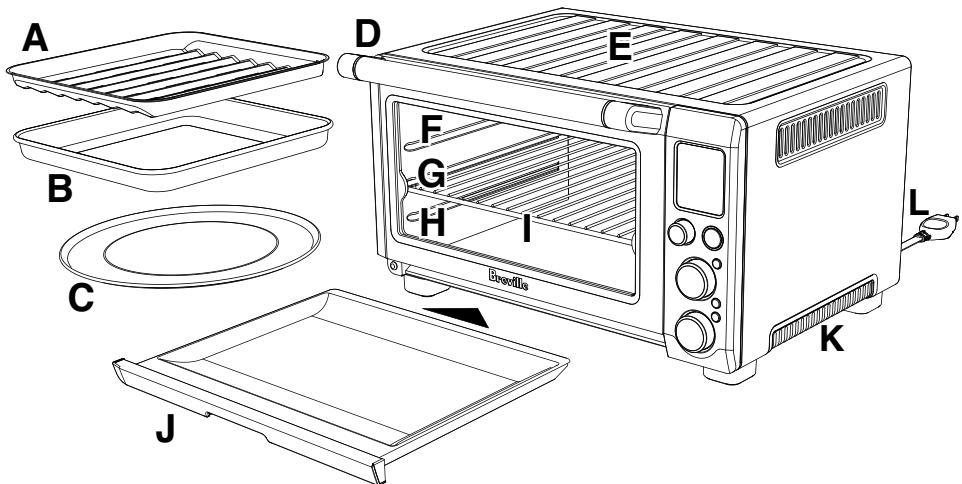
A. 12'' × 12'' enamel broil rack.
B. 12'' × 12'' enamel baking pan.
C. 13" non-stick pizza pan.
D. Door handle.
THE OUTER SURFACE OF THE OVEN, INCLUDING THE OVEN DOOR, IS HOT DURING AND AFTER OPERATION. ALWAYS USE PROTECTIVE HOT PADS OR INSULATED OVEN MITTS WHEN INSERTING, REMOVING OR HANDLING ITEMS FROM THE OVEN.
E. Ribbed plate warming tray.
NOTE:
Only place items in the ribbed section on top of the oven as described on Page 43.
The Breville Bamboo Cutting Board and Serving Tray accessory for the top of the oven is available from Breville. Visit www.breville.com and refer to the Accessories Card enclosed for more information.
F. Top rack height position: BROIL function.
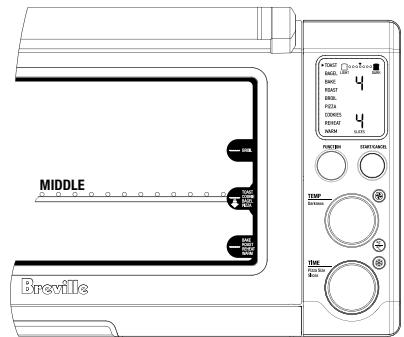
G. Middle rack height position: TOAST, BAGEL, PIZZA and COOKIE functions.
NOTE:
When the wire rack is inserted into the middle position, the Magnetic Auto-Eject Rack automatically ejects the wire rack halfway out of the oven when the oven door is opened. This is so your toasted items can be safely and easily removed. Always open the door slowly and in a controlled manner to prevent the wire rack from ejecting too quickly.
H. Bottom rack height position: BAKE, ROAST, REHEAT and WARM functions.
I. Wire rack.
J. Crumb tray.
K. Ventilation slots
L. Breville Assist Plug™
M. LCD screen.
KNOW YOUR BREVILLE SMART OVENTM
NOTE:
When the oven is plugged into a wall outlet, the oven alert will sound twice and the LCD screen will illuminate blue for 10 minutes before entering standby mode. Press the START/CANCEL button on the control panel to activate any of the functions.
The oven is ON (cooking) when the oven alert sounds and the button surround is illuminated red, and is OFF when the START/CANCEL button is pressed a second time and the button surround illumination goes out and the LCD is blue.
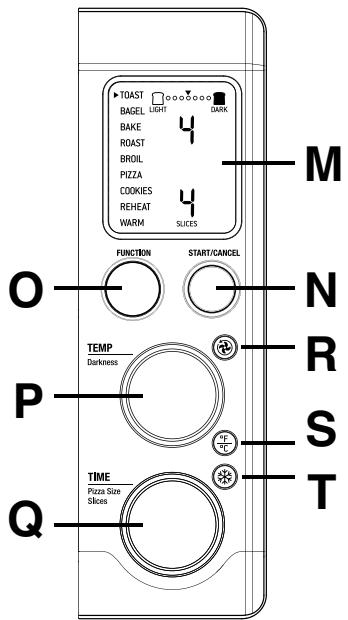
N. START/CANCEL button.
0. FUNCTION dial.
P. TEMPERATURE dial / toast and bagel browning control.
Q. TIME dial / toast and bagel slice selection / pizza size selection.
R CONVECTION button.
S TEMPERATURE CONVERSION button.
T FROZEN FOODS BUTTON.
DO NOT TOUCH HOT SURFACES. THE OUTER SURFACE OF THE OVEN, INCLUDING THE OVEN DOOR, IS HOT DURING AND AFTER OPERATION. ALLOW THE OVEN TO COOL DOWN BEFORE HANDLING.
BEFORE FIRST USE
of your Breville Smart Oven™
BEFORE FIRST USE
PREPARING THE OVEN FOR USE
- Remove and safely discard any packing material, promotional labels and tape from the oven.
- Remove the crumb tray, wire rack, broil rack, baking pan and pizza pan from the polyfoam packaging. Wash them in warm soapy water with a soft sponge, rinse and dry thoroughly. Insert the crumb tray into the oven.
- Wipe the interior of the oven with a soft damp sponge. Dry thoroughly.
- Place the oven on a flat, dry surface. Ensure there is a minimum distance of 4'' (10cm) of space on both sides of the appliance. Ensure there are no items on top of the oven.
NOTE:
Due to the high temperatures of the oven, Breville does not recommend placing the oven in enclosed areas. Placing the oven in an enclosed area, such as a cabinet or wall recess may cause overheating of the appliance, surface damage and wall discoloration due to radiated heat and steam from around oven door.
- Unwind the power cord completely and insert the power plug into a grounded wall outlet.
- The oven alert will sound twice and the LCD screen will illuminate orange. The function options will appear with an indicator on the preset TOAST function.
NOTE:
In order to remove any protective substances on the heating elements, it is necessary to run the oven empty for 15 minutes.
NOTE:
Ensure the area is well ventilated as the oven may emit vapors. These are safe and not detrimental to the performance of the oven.
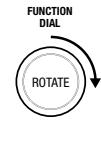
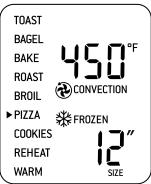
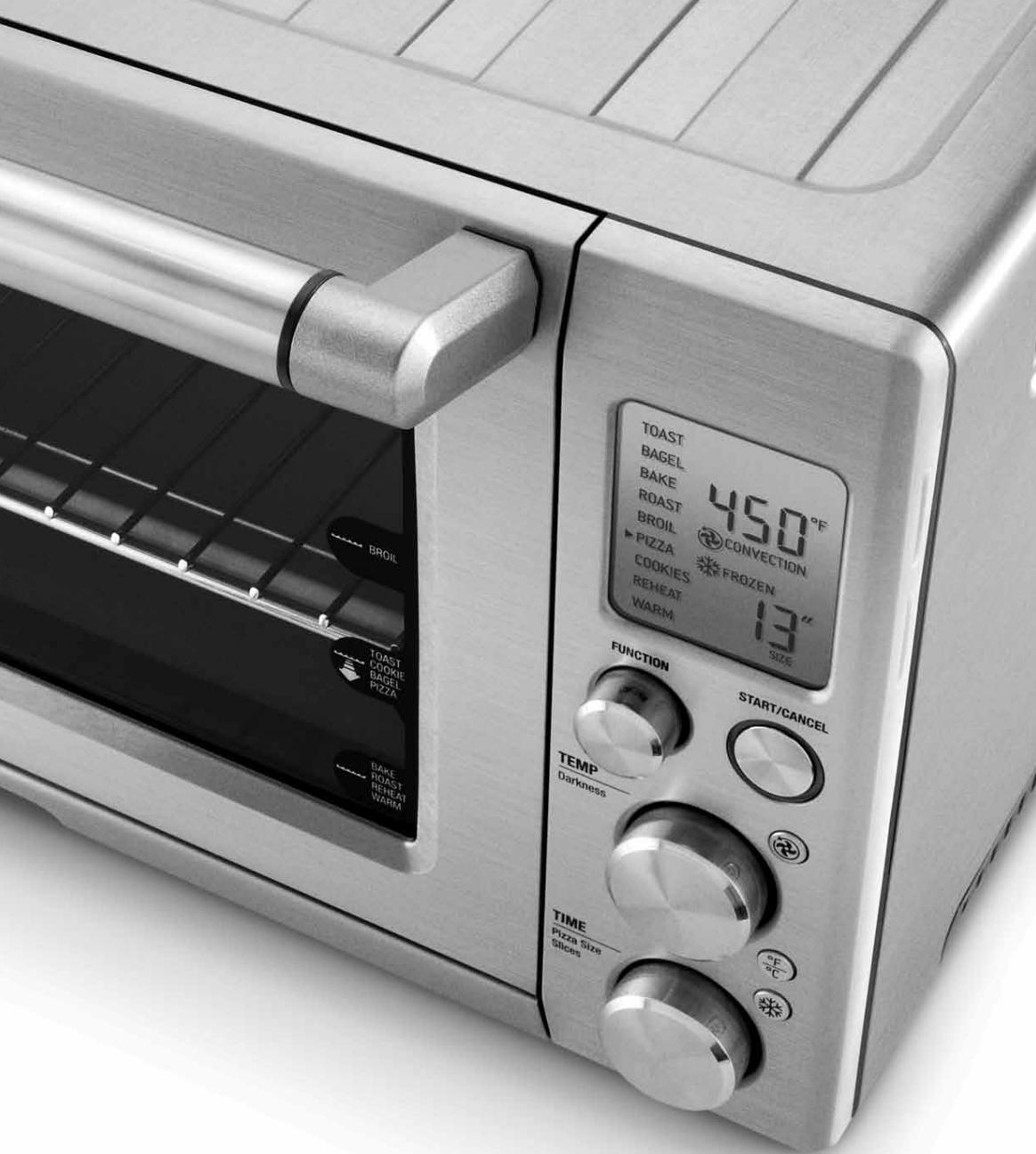
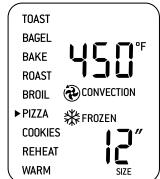
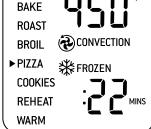
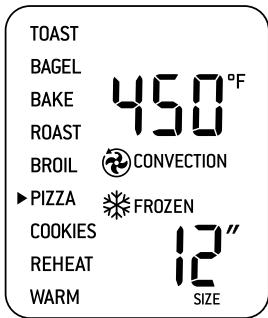
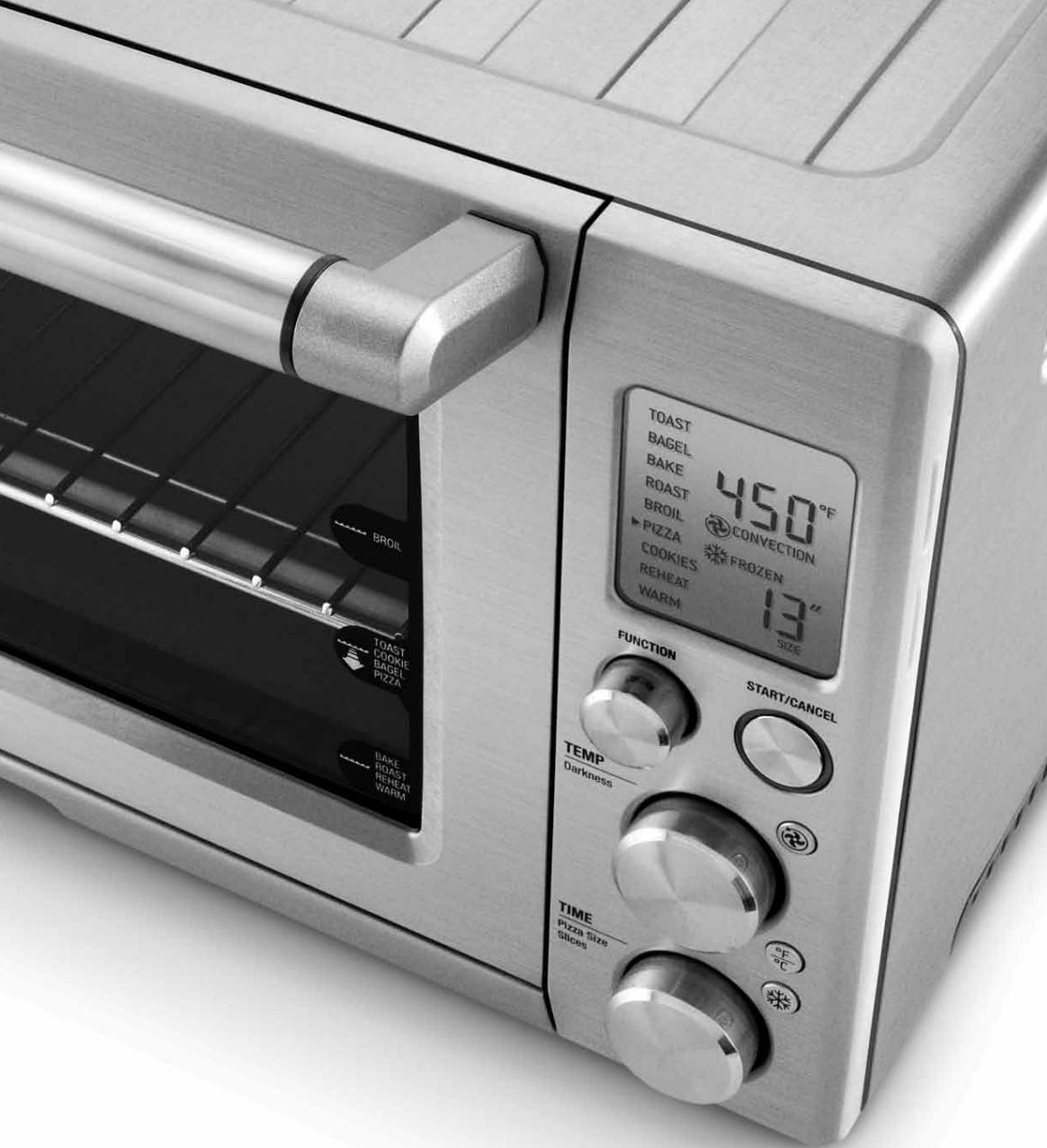
- Turn the FUNCTION dial to the right until the indicator reaches the PIZZA function. The top figure on the LCD screen indicates the preset temperature of '450°F', while the bottom figure on the LCD screen indicates the preset '12 SIZE'.
The preset CONVECTION setting and preset FROZEN FOODS setting will also be displayed. - Press the START/CANCEL button to activate this setting. The button surround will illuminate red, the oven alert will sound and the LCD screen will illuminate orange.
- The LCD screen will indicate a blinking 'PREHEATING'. Once the oven has reached the set temperature, the temperature alert will sound.
- The timer alert will be displayed and automatically begin to count down in one minute increments.
BEFORE FIRST USE
- At the end of the pizza cycle, the oven alert will sound three times. The START/CANCEL button surround will no longer illuminate red and LCD screen will illuminate blue.
- The oven is now ready to use.
NOTE:
The cooking cycle can be stopped at any time by pressing the START/CANCEL button. This will cancel the cycle. The button surround illumination will go out and the LCD screen will illuminate blue.
A NOTE ON COOKING TIMES
The Breville Smart Oven™ features Element IQ™ - a unique cooking technology that adjusts the power of the cooking elements for optimum results.
Broil
High temperature top heat: melts and browns.
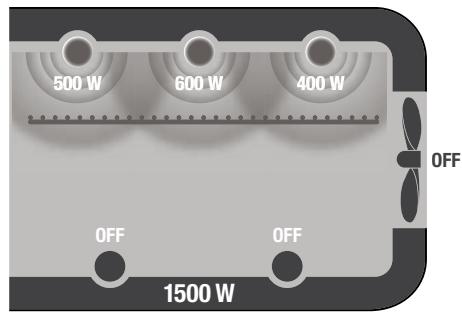
Toast
Searing top and bottom heat: seals and crisps.
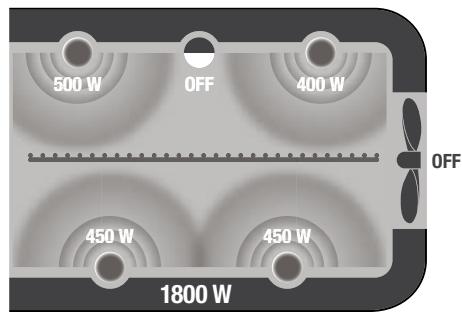
BEFORE FIRST USE
Bake
Even convection heating: cooks right through.
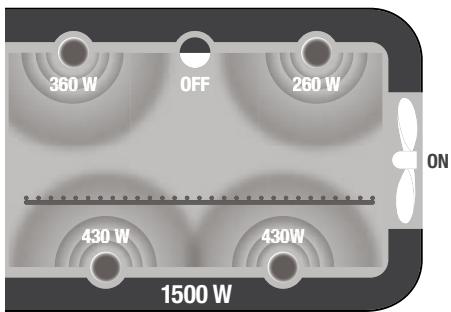
It is normal to notice the following occur during the cooking cycle:
- It is normal that during the BROIL function, the bottom set of elements turn off while the top set is heating at full power.
- It is normal that the ends of each heating element will glow more brightly than the middle of the element.
- It is normal that the elements are heating even if they are not lighting up.
This cooking technology allows foods to cook more evenly and quickly, significantly reducing cooking times. The oven's preset cooking temperatures and times, as well as the cooking temperature and time directions on pre-packaged foods, may need to be changed depending on the recipe, the amount of food and your personal taste.
We recommend experimenting with the temperature and time settings to produce the desired results.
The cooking temperature and time can be adjusted before or during the cooking cycle:
a) The cooking temperature is displayed as the top figure on the LCD screen.
- Turn the TEMPERATURE dial to the left to reduce the temperature, or to the right to increase the temperature.
- The cooking temperature can be adjusted in 10^ increments, from 120^ to a maximum of 450^ (or in the Celsius mode, 5^ increments, from 50^ to a maximum 230^ ).
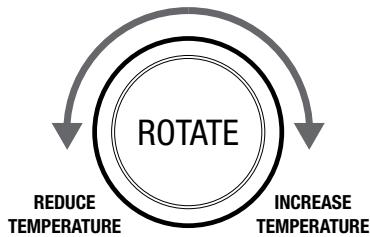
TEMPERATURE DIAL
b) The cooking time is displayed as the bottom figure on the LCD screen.
- Turn the TIME dial to the left to reduce the cooking time, or to the right to increase the cooking time.
- The cooking time can be adjusted in one minute increments up to 1 hour, and in 5 minute increments between 1 and 2 hours.
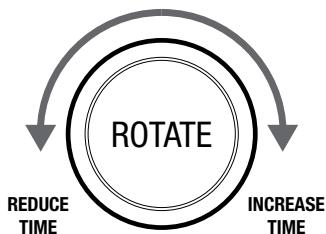
TIME DIAL
A NOTE ON RACK HEIGHT POSITIONS
Cooking results are significantly affected by the position of the wire rack as this determines how close the food is to the heating elements. We highly recommend following the rack height position for each function as printed on the right hand side of the oven door's glass window. However, these are a guide only. Certain foods may require a different rack height position depending on the recipe, the amount and size of the food and your personal taste.
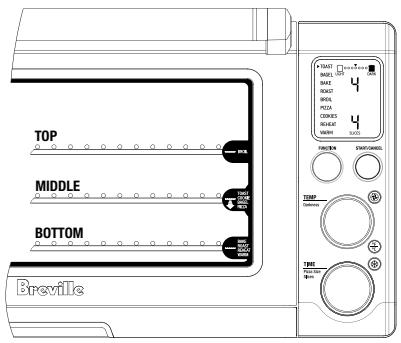
Top rack height position: BROIL function.
Middle rack height position: TOAST, BAGEL, PIZZA and COOKIE functions.
Bottom rack height position: BAKE, ROAST, REHEAT and WARM functions.
NOTE:
When using metal foil to cover accessories, pans, and dishes, it is recommended that the wire rack be in the middle or bottom location.
NOTE:
When the wire rack is inserted into the middle rack height position, the Magnetic Auto-Rack Eject automatically ejects the wire rack halfway out of the oven when the oven door is opened. This is so your toasted items can be safely and easily removed.
Always open the door slowly and in a controlled manner when the wire rack is inserted into this rack height position to prevent the wire rack from ejecting too quickly.
For optimum cooking results:
- The wire rack should always be inserted into the rack height position with the spokes facing upwards.
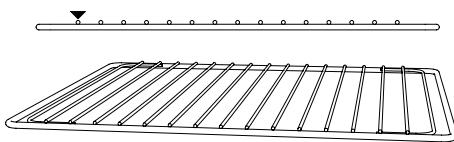
- Food should be positioned on the center of the wire rack, broil rack, baking tray or pizza tray to let maximum airflow reach the food.
A NOTE ON COLOR CHANGING LCD
The LCD screen will illuminate orange when the oven is ON (preheating and cooking) and will illuminate blue when the oven is OFF (standby mode).
BEFORE FIRST USE
A NOTE ON STANDBY MODE
When the oven is plugged into a wall outlet and turned ON, the oven alert will sound twice and the LCD screen will illuminate blue for 10 minutes before entering standby mode. When in standby mode, the LCD screen will cease to illuminate, however all function options will still be visible.
To re-activate the oven out of standby mode, press the START/CANCEL button on the control panel, or turn any dial. The LCD screen will re-illuminate blue. Press the START/CANCEL button to activate the oven.
The oven is ON (preheating and cooking) when the oven alert sounds, the button surround is illuminated red and the LCD screen illuminates orange. The oven is OFF when the START/CANCEL button is pressed a second time, the button surround no longer illuminates red, and the LCD screen illuminates blue.
A NOTE ON OPTIONAL SETTINGS

Convection Button
Convection cooking uses fan assistance to circulate heated air around the food. This produces faster, more even, more energy efficient cooking.
Convection cooking is the default setting on the BAKE, ROAST, PIZZA, COOKIE and REHEAT functions. The setting can be deselected by pressing the
CONVECTION button, or re-selected by pressing the CONVECTION button a second time.
Convection cooking is not the default setting on the WARM function, however it can be selected by pressing the
CONVECTION button.
The convection symbol is displayed on the LCD screen whenever this setting is selected.
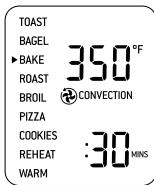
CONVECTION 'ON'

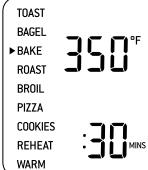
CONVECTION 'OFF'
Convection cooking can reduce cooking times. Some foods may not be ideal for convection cooking – refer to recipes Page 50. We recommend experimenting with the convection, temperature and time settings to produce the desired results.
For optimum results:
- Use oven-proof baking dishes, roasting pans, pizza pans or cookie sheets with very low sides, and place on the center of the wire rack to let maximum airflow reach the food.
- For the same reason, do not cover foods with metal foil or any other type of lid or covering for maximum airflow.
- Most recipes recommend reducing temperatures by 25^ F when using convection cooking. Always check the food 10 minutes before the suggested cooking time is complete to avoid overcooking.

Temperature Conversion Button
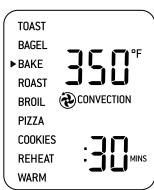
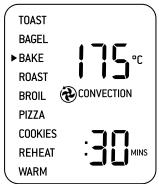
The temperature reading on the oven is preset to Fahrenheit. Pressing the
TEMPERATURE CONVERSION button allows the Fahrenheit temperature reading to be converted to Celsius. The corresponding 'C' or 'F' symbol is displayed on the LCD screen.
BEFORE FIRST USE
The TEMPERATURE CONVERSION button may be selected when using the BAKE, ROAST, BROIL, PIZZA, COOKIE, REHEAT and WARM functions.
NOTE:
The TEMPERATURE CONVERSION button can be used as an electronic temperature conversion tool, particularly convenient for international recipes.
NOTE:
If you have changed the default Fahrenheit temperature reading to Celsius, the setting will remain in the memory of the oven until the
TEMPERATURE CONVERSION button is pressed a second time or the oven is unplugged from the wall outlet. When the oven is plugged back into the wall outlet, the temperature reading will automatically return to the preset Fahrenheit setting.

Frozen Foods Button
The ®FROZEN FOODS button adds the recommended, additional time required to defrost and then toast frozen bread or bagels and cook frozen pizza or cookie dough.
The ®FROZEN FOODS button may be selected when using the TOAST, BAGEL
and COOKIE functions, and is the default setting on the PIZZA function.
On the TOAST, BAGEL and COOKIE functions, the ® FROZEN FOODS button can be selected before or during the cycle. The setting can be de-selected by pressing the ® FROZEN FOODS button a second time. The frozen symbol ® is displayed on the LCD screen whenever this setting is selected.
NOTE:
If you have selected the ※ FROZEN FOODS button and the frozen symbol ※ is displayed on the LCD screen, the setting will remain in the memory of the oven and be activated for each subsequent TOAST/BAGEL/COOKIE cycle until the ※ FROZEN FOODS button is pressed a second time, or the oven is unplugged from the wall outlet. When the oven is plugged back into the wall outlet, the function will automatically return to the preset TOAST/BAGEL/COOKIE function without the ※ FROZEN FOODS setting.
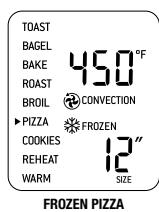
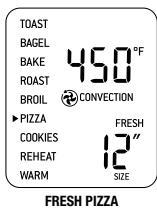
On the PIZZA function, ®FROZEN FOODS is the default setting, and the frozen symbol ®is displayed on the LCD screen. When cooking fresh pizzas, the setting can be de-selected by pressing the ®FROZEN FOODS button.
BEFORE FIRST USE
The 'FRESH' symbol will be displayed on the LCD screen.
NOTE:
If you have de-selected the FROZEN FOODS setting and the 'FRESH' symbol is displayed on the LCD screen, the setting will remain in the memory of the oven and be activated for each subsequent PIZZA cycle until the FROZEN FOODS button is pressed a second time, or the oven is unplugged from the wall outlet. When the oven is plugged back into the wall outlet, the function will automatically return to the preset PIZZA function with the FROZEN FOODS setting.
OPERATING
your Breville Smart Oven™
OPERATING YOUR BREVILLE SMART OVENTM - TOAST
TOAST FUNCTION
Elements
Top and bottom heating elements cycle on and off to regulate the correct temperature. The top middle element is off.
Rack Position
Middle rack height position.
Optional Settings
FROZEN FOODS button.
The TOAST function browns and crisps the outside of your bread while keeping the inside soft and moist. This function is also ideal for English muffins and frozen waffles
- Insert the wire rack into the middle rack height position. The wire rack should be positioned with the spokes facing upwards.
- If toasting 1-3 slices, center the slices on the wire rack. If toasting 4-6 slices, evenly space them with 2-3 slices at the front of the wire rack and 2-3 slices at the back of the rack.
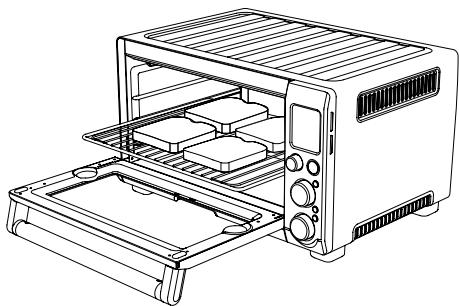
3.Close the oven door.
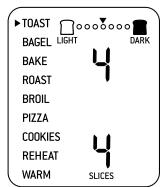
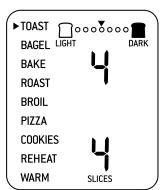
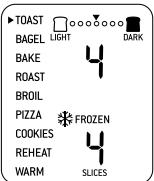
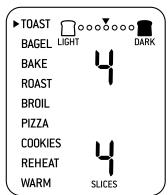
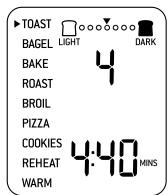
4. Turn the FUNCTION dial until the indicator on the LCD screen reaches the TOAST function. The top figure on the LCD screen indicates the preset browning setting '4', while the bottom figure on the LCD screen indicates the preset number of slices '4'.
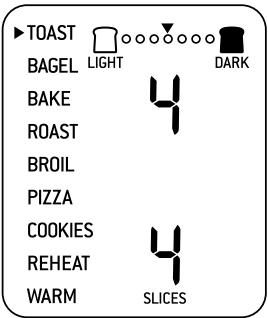
- The browning setting and number of slices can be adjusted before or during the toasting cycle.
a) The browning setting is displayed as the top figure on the LCD screen.
Turn the TEMPERATURE dial to the left to reduce the browning setting, or to the right to increase the browning setting. The browning settings are indicated by the row of circles at the top of the LCD screen. The arrow above the circles will move according to the selected setting.
NOTE:
The browning settings range from '1' (lightest) to '7' (darkest).
As a general guide:
| Desired Toast Color | Setting |
| Light color toast | 1 or 2 |
| Medium color toast | 3, 4 or 5 |
| Dark color toast | 6 or 7 |
When using the TOAST function for the first time, we recommend toasting on the preset browning setting '4' so you can adjust the browning setting to your preference - considering the type, thickness and freshness of the bread.
OPERATING YOUR BREVILLE SMART OVENTM - TOAST
For example, raisin toast, white light-textured breads or thinly sliced bread may require a lighter setting, whilst heavier textured rye, whole wheat or fresh breads may require a darker setting.
b) The number of slices is displayed as the bottom figure on the LCD screen. Turn the TIME dial to the left to reduce the number of slices, or to the right to increase the number of slices. The number of slices range from '1' to '6'.
NOTE:
Your customized TOAST browning setting and number of slices will remain in the memory of the oven until you change them or unplug the oven from the wall outlet. When the oven is plugged back into the wall outlet, the TOAST function will automatically return to the preset browning setting '4' and preset number of slices '4'.
- Press the START/CANCEL button to activate this setting. The button surround will illuminate red, the oven alert will sound and the LCD screen will illuminate orange.
- The timer will be displayed and begin to count down. The time can be adjusted during the toasting cycle by turning the TIME dial.
NOTE:
Element IQ^TM will automatically adjust the toasting time depending on the heat already present inside the oven. For example, if the oven is already warm after one cycle of toasting, the toasting time for the second cycle will be less.
During the toasting cycle, condensation may form on the oven door and steam may be emitted. This is normal. Condensation and steam occur as a result of the moisture content of the bread. Freshly baked and frozen breads generally produce more condensation.
- At the end of the toasting cycle, the oven alert will sound three times. The START/CANCEL button surround will no longer illuminate red and LCD screen will illuminate blue.

THE OUTER SURFACE OF THE OVEN, INCLUDING THE OVEN DOOR, IS HOT DURING AND AFTER OPERATION. ALWAYS USE PROTECTIVE HOT PADS OR INSULATED OVEN MITTS WHEN INSERTING, REMOVING OR HANDLING ITEMS FROM THE OVEN.
- The toasting cycle can be stopped at any time by pressing the START/CANCEL button. This will cancel the cycle. The button surround illumination will go out and the LCD screen will illuminate blue.
OPERATING YOUR BREVILLE SMART OVENTM - BAGEL
BAGEL FUNCTION
Elements
Top and bottom heating elements cycle on and off to regulate the correct temperature.
Rack Position
Middle rack height position.
Optional Settings
FROZEN FOODS button.
The BAGEL function crisps the insides of your cut bagel while only lightly toasting the outside. This function is also ideal for toasting crumpets or thick sliced specialty breads which require one side to be toasted more than the other.
NOTE:
If you like your bagel halves equally crisp on both the top and bottom, we recommend using the TOAST function to toast your cut bagel.
- Insert the wire rack into the middle rack height position. The wire rack should be positioned with the spokes facing upwards.
- Slice each bagel into two equal halves.
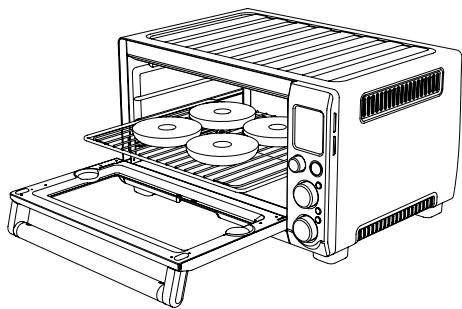
- If toasting 1-3 bagel halves, center the halves on the wire rack. If toasting 4-6 halves, evenly space them with 2-3 halves at the front of the wire rack and 2-3 halves at the back of the rack.
NOTE:
The inside (cut side) of the bagel must always face upwards towards the top heating elements. This allows the cut side to be crisp while the crust is only lightly toasted.
4.Close the oven door.
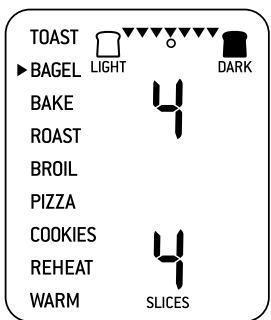
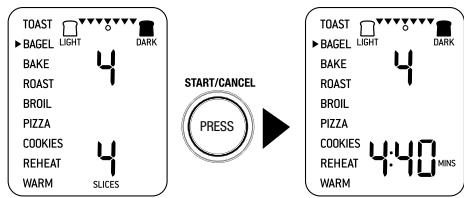
Turn the FUNCTION dial until the indicator on the LCD screen reaches the BAGEL function. The top figure on the LCD screen indicates the preset browning setting '4', while the bottom figure on the LCD screen indicates the preset number of bagel halves '4'.
- The browning setting and number of bagel halves can be adjusted before or during the bagel cycle.
a) The browning setting is displayed as the top figure on the LCD screen. Turn the TEMPERATURE dial to the left to reduce the browning setting, or to the right to increase the browning setting. The browning settings are indicated by the row of circles at the
OPERATING YOUR BREVILLE SMART OVEN™ - BAGEL
top of the LCD screen. The arrow above the circles will move according to the selected setting.
NOTE:
The browning settings range from '1' (lightest) to '7' (darkest).
As a general guide:
| Desired Bagel Color | Setting |
| Light color bagel | 1 or 2 |
| Medium color bagel | 3, 4 or 5 |
| Dark color bagel | 6 or 7 |
When using the BAGEL function for the first time, we recommend toasting on the preset browning setting '4' so you can adjust the browning setting to your preference - considering the type and freshness of the bagel.
b) The number of bagel halves is displayed as the bottom figure on the LCD screen.
Turn the TIME dial to the left to reduce the number of bagel halves, or to the right to increase the number halves. The number of bagel halves range from '1' to '6'.
NOTE:
Your customized BAGEL browning setting and number of bagel halves will remain in the memory of the oven until you change them or unplug the oven from the wall outlet. When the oven is plugged back into the wall outlet, the BAGEL function will automatically return to the preset browning setting '4' and preset number of bagel halves '4'.
- Press the START/CANCEL button to activate this setting. The button surround will illuminate red, the oven alert will sound and the LCD screen will illuminate orange.
- The timer will be displayed and begin to count down. The time can be adjusted during the bagel cycle by turning the TIME dial.
NOTE:
During the BAGEL function, Element IQ™ will automatically adjust the power of the cooking elements for optimum results. It is normal to notice the bottom set of elements turn off while the top set is heating at full power. This ensures the inside of the bagel is crisp while the crust is only lightly toasted.
NOTE:
Element IQ^TM will automatically adjust the toasting time depending on the heat already present inside the oven. For example, if the oven is already warm after one cycle of toasting, the toasting time for the second cycle will be less.
- At the end of the bagel cycle, the oven alert will sound three times. The START/CANCEL button surround will no longer illuminate red and LCD screen will illuminate blue.
OPERATING YOUR BREVILLE SMART OVENTM - BAKE
THE OUTER SURFACE OF THE OVEN, INCLUDING THE OVEN DOOR, IS HOT DURING AND AFTER OPERATION. ALWAYS USE PROTECTIVE HOT PADS OR INSULATED OVEN MITTS WHEN INSERTING, REMOVING OR HANDLING ITEMS FROM THE OVEN.
- The bagel cycle can be stopped at any time by pressing the START/CANCEL button. This will cancel the cycle. The button surround illumination will go out and the LCD screen will illuminate blue.
BAKE FUNCTION
Elements
Top and bottom heating elements cycle on and off to regulate the correct temperature. The top middle element is off.
Rack Position
Bottom rack height position.
Optional Settings
CONVECTION button.
TEMPERATURE CONVERSION button.
The BAKE function cooks food evenly throughout. This function is ideal for baking cakes, muffins, brownies and pastries. The BAKE function is also ideal for cooking pre-packaged frozen meals including lasagna and pot pies.
- Insert the wire rack into the bottom rack height position. The wire rack should be positioned with the spokes facing upwards.
NOTE:
We recommend using the bottom rack height position during the BAKE function. However this is a guide only. The position of the rack may vary depending on the type and size of food being baked. Some baked goods such as brownies or pastries may be more suited to the middle rack height position.
2.Close the oven door.
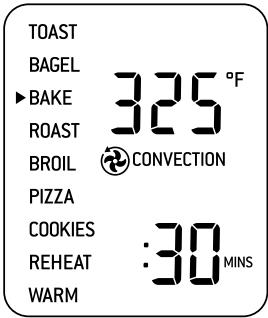
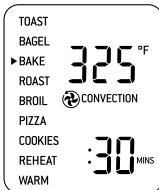
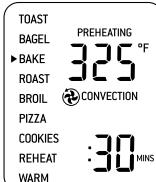
3. Turn the FUNCTION dial until the indicator on the LCD screen reaches the BAKE function. The top figure on the LCD screen indicates the preset BAKE temperature of '325°F', while the bottom figure on the LCD screen indicates the
OPERATING YOUR BREVILLE SMART OVENTM - BAKE
preset time of ':30 MINS'. The preset CONVECTION setting will also be displayed.
- The baking temperature and time can be adjusted before or during the baking cycle:-
a) The baking temperature is displayed as the top figure on the LCD screen. Turn the TEMPERATURE dial to adjust the baking temperature in 10^ increments, from 120^ to a maximum of 450^ (or in the Celsius mode, 5^ increments, from 50^ to a maximum 230^ ).
b) The baking time is displayed as the bottom figure on the LCD screen. Turn the TIME dial to adjust the baking time in one minute increments up to 1 hour, and in 5 minute increments between 1 and 2 hours.
NOTE:
Your customized BAKE temperature and time settings will remain in the memory of the oven until you change them or unplug the oven from the wall outlet. When the oven is plugged back into the wall outlet, the BAKE function will automatically return to the preset temperature of '325°F', preset time of '30 MINS' and preset CONVECTION setting.
- Press the START/CANCEL button to activate this setting. The button surround will illuminate red, the oven alert will sound and the LCD screen will illuminate orange.
- The LCD screen will indicate a blinking 'PREHEATING'. Once the oven has reached the set temperature, the temperature alert will sound.
- Place food, positioned on the Breville enamel baking pan or in an oven-proof dish, on the center of the wire rack so air flows around the sides of the food.
THE OUTER SURFACE OF THE OVEN, INCLUDING THE OVEN DOOR, IS HOT DURING AND AFTER OPERATION. ALWAYS USE PROTECTIVE HOT PADS OR INSULATED OVEN MITTS WHEN INSERTING, REMOVING OR HANDLING ITEMS FROM THE OVEN.
NOTE:
The following bakeware will fit into the oven:
- 1 / 4 sheet tray
- 1 / 4 sheet-sized accessories with no side handles
- 13x9 baking tins with no side handles
-bundt pan - 6 cup muffin pan
- 9 pie pan
- 9 loaf pan
NOTE:
For questions regarding the use of oven safe and specialty bakeware in compact ovens, please contact the bakeware manufacturer directly.
OPERATING YOUR BREVILLE SMART OVENTM - BAKE
NOTE:
Citric acid, found in foods such as orange, lemon and lime juice, may damage the porcelain enamel finish of the baking pan and broiling rack. When cooking foods with high citric acid content, we strongly recommend lining the enamel surfaces with foil or baking paper to extend the life of these accessories.
NOTE:
Caution should be exercised when using metal foil to cover accessories, pans, and dishes. Be sure that the metal foil is fitted securely as close contact with the oven's heating elements can cause overheating and risk of fire.
NOTE:
When using metal foil to cover accessories, pans, and dishes, it is recommended that the wire rack be in the middle or bottom location.
NOTE:
It may be necessary to lightly grease or line the enamel baking pan with baking paper or foil to prevent food from sticking.
NOTE:
Caution should be exercised when using pans and dishes constructed of materials other than metal. If using ceramic or glass pans or dishes it is important that they are oven safe to prevent cracking.
NOTE:
Caution should be exercised when using lids in the oven, as pressure build up in a covered pan or dish may cause hot ingredients to expel or the dish to crack.

START/CANCE


m - 1 0 ;
CONVECTION

PREHEATING
WHEN AT EMPERATURE

- After the PREHEATING alert has sounded, the timer will automatically begin to count down in one minute increments. The temperature and time can be adjusted during the baking cycle by turning the corresponding TEMPERATURE and TIME dial.
- At the end of the baking cycle, the oven alert will sound three times. The START/CANCEL button surround will no longer illuminate red and LCD screen will illuminate blue.
- The baking cycle can be stopped at any time by pressing the START/CANCEL button. This will cancel the cycle. The button surround illumination will go out and the LCD screen will illuminate blue.
ROAST FUNCTION
Elements
Top and bottom heating elements cycle on and off to regulate the correct temperature. The top middle element is off.
Rack Position
Bottom rack height position.
Optional Settings
CONVECTION button.
TEMPERATURE CONVERSION button.
The ROAST function is ideal for cooking a variety of meats and poultry that are tender and juicy on the inside and roasted to perfection on the outside.
- Insert the wire rack into the bottom rack height position. The wire rack should be positioned with the spokes facing upwards.
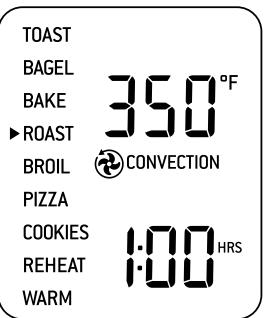
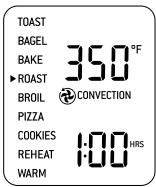
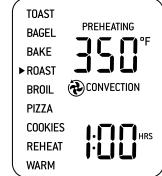
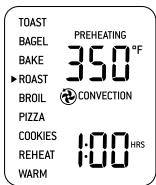
2.Close the oven door. - Turn the FUNCTION dial until the indicator on the LCD screen reaches the ROAST function. The top figure on the LCD screen indicates the preset ROAST temperature of '350°F', while the bottom figure on the LCD screen indicates the preset time of '1:00 HRS'. The preset CONVECTION setting will also be displayed.
- The roasting temperature and time can be adjusted before or during the roasting cycle.
a) The roasting temperature is displayed as the top figure on the LCD screen. Turn the TEMPERATURE dial to adjust the roasting temperature in 10^ increments, from 120^ to a maximum of 450^ (or in the Celsius mode, 5^ increments, from 50^ to a maximum 230^ ).
b) The roasting time is displayed as the bottom figure on the LCD screen. Turn the TIME dial to adjust the roasting time in one minute increments up to 1 hour, and in 5 minute increments between 1 and 2 hours.
NOTE:
Use the table below as a guide only to estimate and plan cooking times. We recommend checking doneness with a reliable meat thermometer.
| Type/Cut | Roasting time per 1lb (500g) |
| Beef - Rib Eye, Round or Rib Roast | 30 minutes |
| Pork - Loin (bone in/out) | 35 minutes |
| Lamb - Leg (bone in/out) | 30 minutes |
| Chicken - Whole | 30 minutes |
NOTE:
We recommend limiting the weight of meats and poultry to be roasted to 4.5 lbs (2kg). However the actual maximum weight will vary depending on the type, cut, shape and size of the meat.
NOTE:
Your customized ROAST temperature and time settings will remain in the memory of the oven until you change them or unplug the oven from the wall outlet. When the oven is plugged back into the wall outlet, the ROAST function will automatically return to the preset temperature of '350°F', preset time of '1:00 HRS' and preset CONVECTION setting.
NOTE:
Citric acid, found in foods such as orange, lemon and lime juice, may damage the porcelain enamel finish of the baking pan and broiling rack. When cooking foods with high citric acid content, we strongly recommend lining the enamel surfaces with foil or baking paper to extend the life of these accessories.
- Press the START/CANCEL button to activate this setting. The button surround will illuminate red, the oven alert will sound and the LCD screen will illuminate orange.
- The LCD screen will indicate a blinking 'PREHEATING'. Once the oven has reached the set temperature, the temperature alert will sound.
- Place food, positioned on the Breville enamel baking pan or in an oven-proof dish, on the center of the wire rack so air flows around the sides of the food.
NOTE:
Caution should be exercised when using metal foil to cover accessories, pans, and dishes. Be sure that the metal foil is fitted securely as close contact with the oven's heating elements can cause overheating and risk of fire.

OUTER SURFACE OF THE OVEN, INCLUDING THE OVEN DOOR, IS HOT DURING AND AFTER OPERATION. ALWAYS USE PROTECTIVE HOT PADS OR INSULATED OVEN MITTS WHEN INSERTING, REMOVING OR HANDLING ITEMS FROM THE OVEN.
NOTE:
When using metal foil to cover accessories, pans, and dishes, it is recommended that the wire rack be in the middle or bottom location.
NOTE:
When roasting, the Breville enamel broil rack may be inserted into Breville enamel baking pan. When assembled together, the broil rack is designed to drain grease and fats away from meats for healthier cooking. The baking pan collects these pan drippings and helps prevent spattering.
NOTE:
It may be necessary to lightly grease or line the enamel baking pan with baking paper or foil to prevent food from sticking.
NOTE:
Caution should be exercised when using pans and dishes constructed of materials other than metal. If using ceramic or glass pans or dishes it is important that they are oven safe to prevent cracking.
NOTE:
Caution should be exercised when using lids in the oven, as pressure build up in a covered pan or dish may cause hot ingredients to expel or the dish to crack.
START/CANCEL

WHEN AT TEMPERATURE
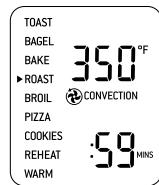
- After the PREHEATING alert has sounded, the timer will automatically begin to count down in one minute increments. The temperature and time can be adjusted during the roasting cycle by turning the corresponding TEMPERATURE and TIME dial.
- At the end of the roasting cycle, the oven alert will sound three times. The START/CANCEL button surround will no longer illuminate red and LCD screen will illuminate blue.
NOTE:
Check doneness with a reliable meat thermometer. Use an independent timer to remind you to check the meat temperature.
- The roasting cycle can be stopped at any time by pressing the START/CANCEL button. This will cancel the cycle. The button surround illumination will go out and the LCD screen will illuminate blue.
BROIL FUNCTION
Elements
Top heating elements cycle on and off to regulate the correct temperature.
Rack Position
Top rack height position.
Optional Settings
TEMPERATURE CONVERSION button.
The BROIL function is ideal for open sandwiches, small cuts of meat, poultry, fish, sausages and vegetables. Broiling can also be used to brown the tops of casseroles and gratins.
- Insert the wire rack into the top rack height position. The wire rack should be positioned with the spokes facing upwards.
NOTE:
We recommend using the top rack height position during the BROIL function. However this is a guide only. Certain foods may require the middle rack height position depending on the recipe, the amount and size of the food and your personal taste.
For example, the middle rack height position may be more appropriate for taller foods that may touch the heating elements, thicker foods such as hamburger patties, marinated foods such chicken wings, or foods that require a gentle broil.
We recommend experimenting with the rack height position, as well as the temperature and time settings to produce the desired results.
OPERATING YOUR BREVILLE SMART OVENTM - BROIL
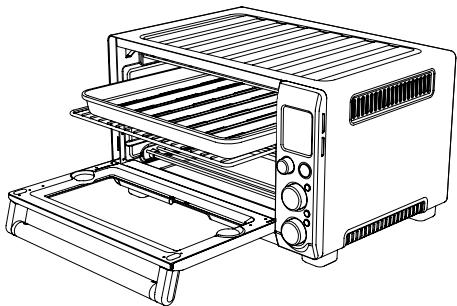
- Insert the Breville enamel broil rack into the enamel baking pan. Place food on the assembled broil rack or in an oven-proof dish, then place on the center of the wire rack so air flows around the sides of the food.
NOTE:
It may be necessary to lightly grease or line the enamel baking pan with baking paper or foil to prevent food from sticking.
NOTE:
When broiling, the enamel broil rack must be inserted into the Breville enamel baking pan. When assembled together, the broil rack is designed to drain grease and fats away from meats for healthier cooking. The baking pan collects these pan drippings and helps prevent spattering.
NOTE:
Caution should be exercised when using metal foil to cover accessories, pans, and dishes. Be sure that the metal foil is fitted securely as close contact with the oven's heating elements can cause overheating and risk of fire.
NOTE:
When using metal foil to cover accessories, pans, and dishes, it is recommended that the wire rack be in the middle or bottom location.
NOTE:
Caution should be exercised when using pans and dishes constructed of materials other than metal. If using ceramic or glass pans or dishes it is important that they are oven safe to prevent cracking.
NOTE:
Caution should be exercised when using lids in the oven, as pressure build up in a covered pan or dish may cause hot ingredients to expel or the dish to crack.
3.Close the oven door.

ALWAYS ENSURE THE OVENDOOR IS COMPLETELYCLOSED WHEN USING THEBROIL FUNCTION.
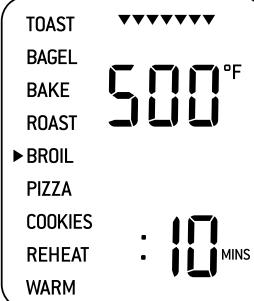
- Turn the FUNCTION dial until the indicator on the LCD screen reaches the BROIL function. The top figure on the LCD screen indicates the preset temperature of 500^ , while the bottom figure on the LCD screen indicates the preset time of '10 MINS'.
OPERATING YOUR BREVILLE SMART OVENTM - BROIL
- The broiling temperature and time can be adjusted before or during the broiling cycle.
a) The broiling temperature is displayed as the top figure on the LCD screen.
Turn the TEMPERATURE DIAL to adjust broiling to one of three preset temperatures: 500^ (HIGH), 400^ (MEDIUM), 300^ (LOW).
NOTE:
The three preset broiling temperatures allow you to change the broiling speed - how quickly the tops of your food brown - depending on the food to be broiled, quantity of food and your personal taste. While we suggest most foods should be broiled using the preset 500^ , we recommend experimenting with the broiling temperature and time settings to produce the desired results.
b) The broiling time is displayed as the bottom figure on the LCD screen.
Turn the TIME dial to adjust the broiling time in one minute increments up to a maximum of 20 minutes.
| Type/Cut | Weight / thickness | Grilling time |
| Beef | ||
| Sirloin | 1” (2.5cm) | 12-15 mins |
| Hamburger | 1” (2.5cm) | 10-15 mins |
| Pork | ||
| Chops | 1” (2.5cm) | 15 mins |
| Ribs | 1 rack | 20 mins |
| Bacon | 3 rashers | 10 mins |
| Lamb | ||
| Neck chops | 4 pieces | 15 mins |
| Cutlets | 8 pieces | 10-12 mins |
| Sausages | ||
| Thin | 8 pieces | 8 mins |
| Thick | 6 pieces | 12 mins |
| Chicken | ||
| Wings | 1lb (500g) | 12-15 mins |
| Breast or | 0.5lbs (250g) | 20 mins |
| Thigh | ||
| Fish | 0.5lbs (250g) | 8 mins |
| 1lb (500g) | 8-10 mins | |
| Cheese Melt | 3-5 mins |
NOTE:
Your customized BROIL
temperature and time settings will remain in the memory of the oven until you change them or unplug the oven from the wall outlet. When the oven is plugged back into the wall outlet, the BROIL function will automatically return to the preset temperature of 500^' , and preset time of '10MINS'.
- Press the START/CANCEL button to activate this setting. The button surround will illuminate red, the oven alert will sound and the LCD screen will illuminate orange.
OPERATING YOUR BREVILLE SMART OVENTM - PIZZA
- The timer will be displayed and begin to count down in one minute increments. The temperature and time can be adjusted during the broiling cycle by turning the corresponding TEMPERATURE and TIME dial.
NOTE:
Depending on the food being broiled, it may be necessary to turn food over half way through the cooking time to achieve even cooking and browning.
- At the end of the broiling cycle, the oven alert will sound three times. The START/CANCEL button surround will no longer illuminate red and LCD screen will illuminate blue.

THE OUTER SURFACE OF THE OVEN, INCLUDING THE OVEN DOOR, IS HOT DURING AND AFTER OPERATION. ALWAYS USE PROTECTIVE HOT PADS OR INSULATED OVEN MITTS WHEN INSERTING, REMOIVING OR HANDLING ITEMS FROM THE OVEN.
- The broiling cycle can be stopped at any time by pressing the START/CANCEL button. This will cancel the cycle. The button surround illumination will go out and the LCD screen will illuminate blue.
PIZZA FUNCTION
Elements
Top and bottom heating elements cycle on and off to regulate the correct temperature.
Rack Position
Middle rack height position.
Optional Settings
CONVECTION button
TEMPERATURECONVERSIONbutton
FROZENFOODSbutton
The PIZZA function melts and browns cheese and toppings, while crisping the pizza crust.
1. Insert the wire rack into the middle rack height position. The wire rack should be positioned with the spokes facing upwards.
2.Close the oven door.
3. Turn the FUNCTION dial until the indicator on the LCD screen reaches the PIZZA function. The top figure on the LCD screen indicates the preset PIZZA temperature of '450°F', while the bottom figure on the LCD screen indicates the preset '12 SIZE'. The preset CONVECTION setting and preset FROZEN FOODS setting will also be displayed (see Page 16 if cooking fresh pizza).
OPERATING YOUR BREVILLE SMART OVENTM - PIZZA
- The pizza cooking temperature and size can be adjusted before or during the cooking cycle.
a) The cooking temperature is displayed as the top figure on the
LCD screen. Turn the TEMPERATURE dial to adjust the cooking temperature in 10^ increments, from 120^ to a maximum of 450^ (or in the Celsius mode, 5^ increments, from 50^ to a maximum 230^ ).
b) The cooking time is displayed as the bottom figure on the LCD screen.
The size of the pizza determines the cooking time. Turn the TIME dial to adjust the size of the pizza: 6, 8, 10, 12 or 13.
NOTE:
Due to the wide variety of pizzas available, you will need to consider whether you are cooking a fresh or frozen pizza or a thin crust or deep dish, and adjust the cooking time to produce the ideal result.
For example, frozen pizzas may need additional cooking time. Thick crust pizzas may also require slightly more cooking time.
NOTE:
Your customized PIZZA temperature and size settings will remain in the memory of the oven until you change them or unplug the oven from the wall outlet. When the oven is plugged back into the wall outlet, the PIZZA function will automatically return to the preset temperature of ^ 450^ F , preset '12 SIZE' and preset CONVECTION and FROZEN FOODS setting.
-
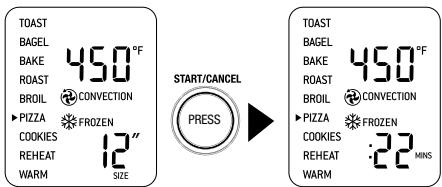
Press the START/CANCEL button to activate this setting. The button surround will illuminate red, the oven alert will sound and the LCD screen will illuminate orange.
-
The LCD screen will indicate a blinking 'PREHEATING'. Once the oven has reached the set temperature, the temperature alert will sound.
-
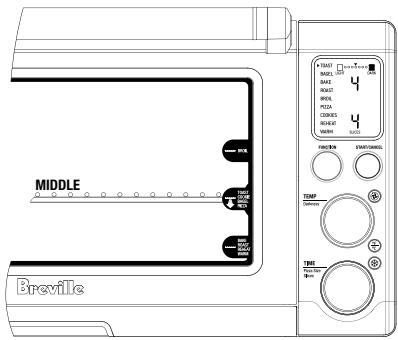
Place the Breville pizza tray or pizza on the center of the wire rack so air flows around the sides of the food.
NOTE:
If cooking a fresh pizza, use the Breville pizza pan. You may sprinkle the pan with cornmeal or lightly spray it with cooking oil to make removing the pizza dough easier.
If cooking a pre-purchased fresh or frozen pizza, use the Breville pizza pan. Do not use the disposable metal foil pizza pan that may be provided with a pre-purchased pizza as it may cause the oven to overheat.
OPERATING YOUR BREVILLE SMART OVENTM - PIZZA
NOTE:
If cooking a frozen pizza, ensure to remove all packaging, including cardboard, plastic, paper, or other flammable materials before placing the pizza in the oven.
Use a pizza pan when cooking a pizza. It is not recommended to cook pizzas directly onto the wire rack as melted cheese and other ingredients may come into contact with elements and create a potential fire risk.
- After the PREHEATING alert has sounded, the timer will automatically begin to count down in one minute increments. The temperature and time can be adjusted during the cooking cycle by turning the corresponding TEMPERATURE and TIME dial.
NOTE:
Some large pizzas may brown unevenly in compact ovens. Open the oven door half way through the cooking time and carefully turn. the pizza 90 degrees for more even browning.
- At the end of the pizza cycle, the oven alert will sound three times. The START/CANCEL button surround will no longer illuminate red and LCD screen will illuminate blue.
- The pizza cycle can be stopped at any time by pressing the START/CANCEL button. This will cancel the cycle. The button surround illumination will go out and the LCD screen will illuminate blue.
A note on pizza stones
When using a pizza stone, it is necessary to first heat the stone (without a pizza) for optimum results.
- Insert the wire rack into the middle rack height position. The wire rack should be positioned with the spokes facing upwards.
- Place the pizza stone on the center of the wire rack so air flows around the sides of the stone.
3.Close the oven door. - Turn the bottom dial to the 6 pizza size. The top figure on the LCD screen indicates the preset temperature of '450°F', while the bottom figure on the LCD screen indicates the '6 SIZE'. The preset CONVECTION setting and preset FROZEN FOODS setting will also be displayed.
- Press the START/CANCEL button to activate this setting. The button surround will illuminate red, the oven alert will sound and the LCD screen will illuminate orange.
OPERATING YOUR BREVILLE SMART OVENTM - COOKIE
- The LCD screen will indicate a blinking 'PREHEATING'. Once the oven has reached the set temperature, the temperature alert will sound.
- The timer will be displayed and automatically begin to count down in one minute increments.
- At the end of the pizza stone heating cycle, the oven alert will sound three times. The START/CANCEL button surround will no longer illuminate red and LCD screen will illuminate blue.
- Now carefully place the frozen pizza on the heated pizza stone.
NOTE:
If cooking a fresh pizza, we recommend using protective hot pads or insulated oven mitts to remove the entire wire rack with pizza stone, and place on the open oven door or bench. This will assist in transferring the fresh pizza dough onto the heated pizza stone. Always use protective hot pads or insulated oven mitts to re-insert the wire rack with pizza stone and pizza, inside the oven.
- Select the desired pizza setting and press the START/CANCEL button to restart the pizza cycle.
COOKIE FUNCTION
Elements
Top and bottom heating elements cycle on and off to regulate the correct temperature. The top middle element is off.
Rack Position
Middle rack height position.
Optional Settings
CONVECTION button
TEMPERATURECONVERSIONbutton
FROZENFOODSbutton
The COOKIE function is ideal for baking homemade or commercially prepared cookies and other baked treats.
Ready-to-bake crescent rolls, cinnamon scrolls, biscuits and strudels are ideally baked using this function.
- Insert the wire rack into the middle rack height position. The wire rack should be positioned with the spokes facing upwards.
- Close the oven door.
- Turn the FUNCTION dial until the indicator on the LCD screen reaches the COOKIE function. The top figure on the LCD screen indicates the preset temperature of '350°F', while the bottom figure on the LCD screen indicates the preset time of '11 MINS'. The preset CONVECTION setting will also be displayed.
OPERATING YOUR BREVILLE SMART OVENTM - COOKIE
TOAST
BAGEL
BAKE
ROAST
BROIL
PIZZA
COOKIES
REHEA
WARM


- The baking temperature and time can be adjusted before or during the baking cycle.
a) The baking temperature is displayed as the top figure on the LCD screen. Turn the TEMPERATURE dial to adjust the baking temperature in 10^ increments, from 120^ to a maximum of 450^ (or in the Celsius mode, 5^ increments, from 50^ to a maximum 230^ ).
b) The baking time is displayed as the bottom figure on the LCD screen. Turn the TIME dial to adjust the bake time in one minute increments up to maximum of 1 hour.
NOTE:
Due to the wide variety of cookie types, you will need to consider whether you're baking fresh, refrigerated or frozen cookie dough, and adjust the baking time to produce the ideal result.
For example, frozen cookie dough may need additional baking time. The amount of dough per cookie or the thickness of the cookie many also vary the cooking time.
NOTE:
Your customized COOKIE temperature and time settings will remain in the memory of the oven until you change them or unplug the oven from the wall outlet. When the oven is plugged back into the wall outlet, the COOKIE function will automatically return to the preset temperature of 350^ , preset time of '11 MINS' and preset CONVECTION setting.
- Press the START/CANCEL button to activate this setting. The button surround will illuminate red, the oven alert will sound and the LCD screen will illuminate orange.
- The LCD screen will indicate a blinking 'PREHEATING'. Once the oven has reached the set temperature, the temperature alert will sound.
- Place food on the Breville enamel baking pan, Breville non-stick 13 pizza pan, or in an oven-proof dish, then place on the center of the wire rack so air flows around the back, as well as the front of the food.
OPERATING YOUR BREVILLE SMART OVENTM - COOKIE
NOTE:
It may be necessary to lightly grease or line the enamel baking pan with baking paper to prevent cookies from sticking.
NOTE:
Caution should be exercised when using metal foil to cover accessories, pans, and dishes. Be sure that the metal foil is fitted securely as close contact with the oven's heating elements can cause overheating and risk of fire.
NOTE:
When using metal foil to cover accessories, pans, and dishes, it is recommended that the wire rack be in the middle or bottom location.
NOTE:
Caution should be exercised when using pans and dishes constructed of materials other than metal. If using ceramic or glass pans or dishes it is important that they are oven safe to prevent cracking.
NOTE:
Caution should be exercised when using lids in the oven, as pressure build up in a covered pan or dish may cause hot ingredients to expel or the dish to crack.
-
After the PREHEATING alert has sounded, the timer will automatically begin to count down in one minute increments. The temperature and time can be adjusted during the baking cycle by turning the corresponding TEMPERATURE and TIME dial.
-
At the end of the cookie cycle, the oven alert will sound three times. The START/CANCEL button surround will no longer illuminate red and LCD screen will illuminate blue.

THE OUTER SURFACE OF THE OVEN, INCLUDING THE OVEN DOOR, IS HOT DURING AND AFTER OPERATION. ALWAYS USE PROTECTIVE HOT PADS OR INSULATED OVEN MITTS WHEN INSERTING, REMOVING OR HANDLING ITEMS FROM THE OVEN.
- The cookie cycle can be stopped at any time by pressing the START/CANCEL button. This will cancel the cycle. The button surround illumination will go out and the LCD screen will illuminate blue.
OPERATING YOUR BREVILLE SMART OVENTM - REHEAT
REHEAT FUNCTION
Elements
Top and bottom heating elements cycle on and off to regulate the correct temperature. The top middle element is off.
Rack Position
Bottom rack height position.
Optional Settings
CONVECTION button
TEMPERATURECONVERSIONbutton
The REHEAT function is ideal for reheating leftovers without browning.
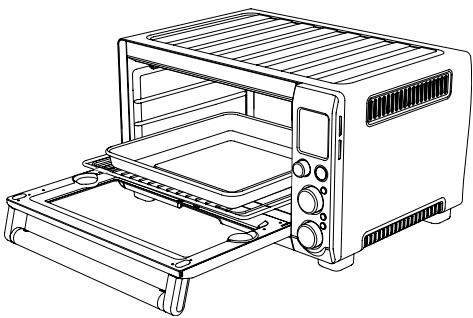
- Insert the wire rack into the bottom rack height position. The wire rack should be positioned with the spokes facing upwards.
- Place food on the Breville enamel baking pan or in an oven-proof dish, then place on the center of the wire rack so air flows around the sides of the food.
NOTE:
Caution should be exercised when using metal foil to cover accessories, pans, and dishes. Be sure that the metal foil is fitted securely as close contact with the oven's heating elements can cause overheating and risk of fire.
NOTE:
When using metal foil to cover accessories, pans, and dishes, it is recommended that the wire rack be in the middle or bottom location.
NOTE:
Caution should be exercised when using pans and dishes constructed of materials other than metal. If using ceramic or glass pans or dishes it is important that they are oven safe to prevent cracking.
NOTE:
Caution should be exercised when using lids in the oven, as pressure build up in a covered pan or dish may cause hot ingredients to expel or the dish to crack.
3.Close the oven door.
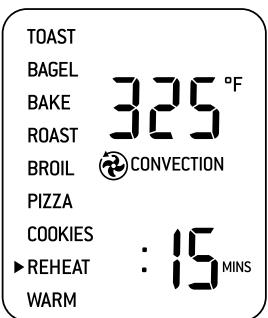
4. Turn the FUNCTION dial until the indicator on the LCD screen reaches the REHEAT function. The top figure on the LCD screen indicates the preset temperature of '325°F', while the bottom figure on the LCD screen indicates the preset time of '15 MINS'. The preset CONVECTION setting will also be displayed.
5. The reheating temperature and time can be adjusted before or during the reheating cycle.
OPERATING YOUR BREVILLE SMART OVENTM - REHEAT
a) The reheating temperature is displayed as the top figure on the LCD screen.
Turn the TEMPERATURE dial to adjust the baking temperature in 10^ increments, from 120^ to a maximum of 450^ (or in the Celsius mode, 5^ increments, from 50^ to a maximum 230^ ).
b) The reheating time is displayed as the bottom figure on the LCD screen. Turn the TIME dial to adjust the reheating time in one minute increments up to 1 hour, and in 5 minute increments between 1 and 2 hours.
NOTE:
Your customized REHEAT temperature and time settings will remain in the memory of the oven until you change them or unplug the oven from the wall outlet. When the oven is plugged back into the wall outlet, the REHEAT function will automatically return to the preset temperature of 325^ , preset time of '15 MINS' and preset CONVECTION setting.
- Press the START/CANCEL button to activate this setting. The button surround will illuminate red, the oven alert will sound and the LCD screen will illuminate orange.
-
The timer will be displayed and begin to count down in one minute increments. The temperature and time can be adjusted during the reheating cycle by turning the corresponding TEMPERATURE or TIME dial.
-
At the end of the reheating cycle, the oven alert will sound three times. The START/CANCEL button surround will no longer illuminate red and LCD screen will illuminate blue.
THE OUTER SURFACE OF THE OVEN, INCLUDING THE OVEN DOOR, IS HOT DURING AND AFTER OPERATION. ALWAYS USE PROTECTIVE HOT PADS OR INSULATED OVEN MITTS WHEN INSERTING, REMOVING OR HANDLING ITEMS FROM THE OVEN. - The reheating cycle can be stopped at any time by pressing the START/CANCEL button. This will cancel the cycle. The button surround illumination will go out and the LCD screen will illuminate blue.
OPERATING YOUR BREVILLE SMART OVENTM - WARM
WARM FUNCTION
Elements
Top and bottom heating elements cycle on and off to regulate the correct temperature. The top middle element is off.
Rack Position
Bottom rack height position.
Optional Settings
CONVECTION button
TEMPERATURECONVERSIONbutton
The WARM function maintains hot foods at the recommended temperature to prevent bacterial growth (160°F or above).
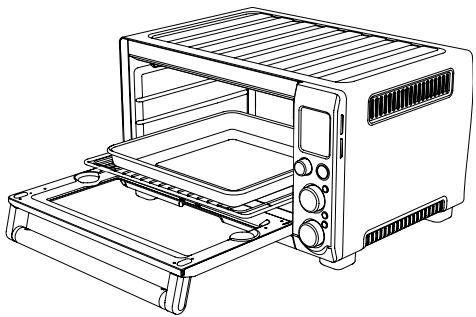
- Insert the wire rack into the bottom rack height position. The wire rack should be positioned so the spokes face upwards.
- Place food on the Breville enamel baking pan or in an oven-proof dish, then place on the center of the wire rack so air flows around the sides of the food.
NOTE:
Caution should be exercised when using metal foil to cover accessories, pans, and dishes.
Be sure that the metal foil is fitted securely as close contact with the oven's heating elements can cause overheating and risk of fire.
NOTE:
When using metal foil to cover accessories, pans, and dishes, it is recommended that the wire rack be in the middle or bottom location.
NOTE:
Caution should be exercised when using pans and dishes constructed of materials other than metal. If using ceramic or glass pans or dishes it is important that they are oven safe to prevent cracking.
NOTE:
Caution should be exercised when using lids in the oven, as pressure build up in a covered pan or dish may cause hot ingredients to expel or the dish to crack.
3.Close the oven door.
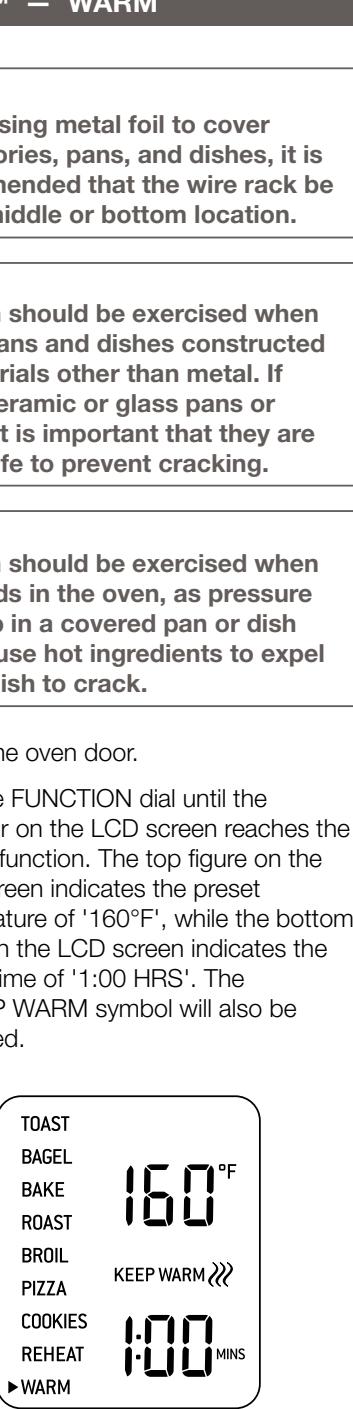
4. Turn the FUNCTION dial until the indicator on the LCD screen reaches the WARM function. The top figure on the LCD screen indicates the preset temperature of '160°F', while the bottom figure on the LCD screen indicates the preset time of '1:00 HRS'. The KEEP WARM symbol will also be displayed.
TOAST
BAGEL
BAKE
ROAST
BROIL
PIZZA
COOKIES
REHEAT
WARM
KEEP WARM
OPERATING YOUR BREVILLE SMART OVENTM - WARM
- The warming temperature and time can be adjusted before or during the warming cycle.
a) The warming temperature is displayed as the top figure on the LCD screen.
Turn the TEMPERATURE dial to adjust the warming temperature in 10^ increments, from 120^ to a maximum of 450^ (or in the Celsius mode, 5^ increments, from 50^ to a maximum 230^ ).
b) The warming time is displayed as the bottom figure on the LCD screen.
Turn the TIME dial to adjust the baking time in one minute increments up to 1 hour, and in 5 minute increments between 1 and 2 hours
- Press the START/CANCEL button to activate this setting. The button surround will illuminate red, the oven alert will sound and the LCD screen will illuminate orange.
- The timer will be displayed and begin to count down in one minute increments. The temperature and time can be adjusted during the warming cycle by turning the corresponding TEMPERATURE and TIME dial.
- At the end of the warming cycle, the oven alert will sound three times. The START/CANCEL button surround will no longer illuminate red and LCD screen will illuminate blue.
THE OUTER SURFACE OF THE OVEN, INCLUDING THE OVEN DOOR, IS HOT DURING AND AFTER OPERATION. ALWAYS USE PROTECTIVE HOT PADS OR INSULATED OVEN MITTS WHEN INSERTING, REMOVING OR HANDLING ITEMS FROM THE OVEN.
- The warming cycle can be stopped at any time by pressing the START/CANCEL button. This will cancel the cycle. The button surround illumination will go out and the LCD screen will illuminate blue.
USING THE PLATE WARMING TRAY
of your Breville Smart Oven™
USING THE PLATE WARMING TRAY
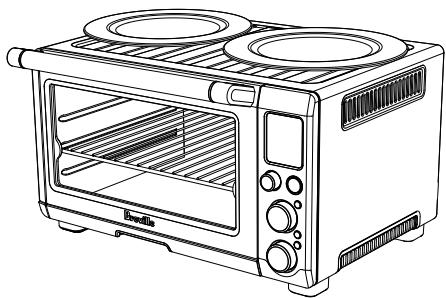
The top of the oven is very hot during and after operation. Do not store any item on top of the oven when in operation.
The only exceptions are:
- One layer of ceramic plates for warming.
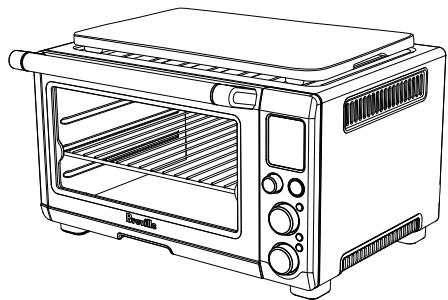
- The optional Bamboo Cutting Board and Serving Tray accessory provided by Breville for use in the ribbed section on top of the oven. Visit www.breville.com. for more information and refer to the Accessories Card enclosed.
THE USE OF ANY ACCESSORY ATTACHMENTS NOT RECOMMENDED BY BREVILLE MAY CAUSE INJURIES.
THE OUTER SURFACE OF THE OVEN, INCLUDING THE OVEN DOOR, IS HOT DURING AND AFTER OPERATION. ALWAYS USE PROTECTIVE HOT PADS OR INSULATED OVEN MITTS WHEN INSERTING, REMOVIDING OR HANDLING ITEMS FROM THE OVEN. ALTERNATIVELY, ALLOW THE OVEN TO COOL DOWN BEFORE HANDLING.
CARE & CLEANING
your Breville Smart Oven™
CARE & CLEANING YOUR BREVILLE SMART OVEN™
Ensure the oven is turned OFF by pressing the START/CANCEL button on the control panel. The oven is OFF when the button surround illumination goes out. Remove the power plug from the wall outlet. Allow the oven and all accessories to cool completely before disassembling and cleaning.
NOTE:
Do not use abrasive cleansers, metal scouring pads or metal utensils on any of the interior or exterior surfaces of the oven, including the crumb tray.
Do not use abrasive cleansers, metal scouring pads or metal utensils to clean any of the accessories as they may damage the porcelain enamel finish of the baking pan and broiling rack or scratch the non-stick coating on the pizza pan.
Cleaning the outer body and door
- Wipe the outer body with a soft, damp sponge. A non-abrasive liquid cleanser or mild spray solution may be used to avoid build-up of stains. Apply the cleanser to the sponge, not the oven surface, before cleaning.
- To clean the glass door, use a glass cleaner or mild detergent and a soft, damp sponge or soft plastic scouring pad. Do not use an abrasive cleanser or metal scouring pad as these will scratch the oven surface.
- Let all surfaces dry thoroughly prior to inserting the power plug into a wall outlet and turning the oven ON.

DO NOT IMMERSE THE BODY, POWER CORD OR POWER PLUG IN WATER OR ANY OTHER LIQUID AS THIS MAY CAUSE ELECTROCUTION
Cleaning the interior
- The walls on the inside of the oven feature a non-stick coating for easy cleaning. To clean any spattering that may occur while cooking, wipe the walls with a soft, damp sponge. A non-abrasive liquid cleanser or mild spray solution may be used to avoid build-up of stains. Apply the cleanser to the sponge, not the oven surface, before cleaning. Avoid touching the quartz heating elements.

USE EXTREME CAUTION WHEN CLEANING THE QUARTZ HEATING ELEMENTS. ALLOW THE OVEN TO COOL COMPLETELY, THEN GENTLY RUB A SOFT, DAMP SONGE OR CLOTH ALONG THE LENGTH OF THE HEATING ELEMENT. DO NOT USE ANY TYPE OF CLEANER OR CLEANING AGENT. LET ALL SURFACES DRY THOROUGHLY PRIOR TO INSERTING THE POWER PLUG INTO A WALL OUTLET AND TURNING THE OVEN ON.
- Let all surfaces dry thoroughly prior to inserting the power plug into a wall outlet and turning the oven ON.
Cleaning the crumb tray
- After each use, slide out the crumb tray and discard crumbs. Wipe the tray with a soft, damp sponge. A non-abrasive liquid cleanser may be used to avoid build-up of stains. Apply the cleanser to the sponge, not the tray, before cleaning. Dry thoroughly.
- To remove baked-on grease, soak the tray in warm soapy water then wash with a soft sponge or soft plastic scouring pad. Rinse and dry thoroughly.
- Always ensure to re-insert the crumb tray into the oven after cleaning and prior to inserting the power plug into a wall outlet and turning the oven ON.
Cleaning the wire rack, broil rack, baking pan and pizza pan
- Wash all accessories in warm soapy water with a soft sponge or soft plastic scouring pad. Rinse and dry thoroughly.
- To extend the life of your accessories, we do not recommend that these be placed in the dishwasher.
Storage
- Ensure the oven is turned OFF by pressing the START/CANCEL button on the control panel. The oven is OFF when the button surround illumination goes out. Then remove the power plug from the wall outlet.
- Allow the oven and all accessories to cool completely.
- Ensure the oven and all accessories are clean and dry.
-
Ensure the crumb tray is inserted into the oven, the broil rack is inserted into the baking pan and resting on the wire rack in the middle rack height position.
-
Ensure the door is closed.
- Store the appliance in an upright position standing level on its support legs. Do not store anything on top.
TROUBLESHOOTING
| POSSIBLE PROBLEM | EASY SOLUTION |
| Oven will not switch "ON" | ·Check that the power plug is securely inserted into the outlet ·Insert the power plug into an independent outlet ·Insert the power plug into a different outlet ·Reset the circuit breaker if necessary |
| I would like to have the oven LCD default settings back | ·The oven will remember the last setting used for each function unless you remove the plug from the wall outlet. ·To restore the oven's default settings for each function, remove the plug from the wall outlet. Wait 5 seconds, then plug back in. |
| The LCD display light has gone out | ·The oven goes into standby mode if not used for 10 minutes. When in standby mode, the LCD screen will cease to illuminate, however all function options will still be visible. ·To re-activate the oven out of standby mode, press the START/CANCEL button on the control panel, or turn any dial. The LCD screen will re-illuminate. |
| The pizza does not cook evenly | ·Some large pizzas may brown unevenly in compact ovens. Open the oven door half way through the cooking time and turn the pizza 90 degrees for more even browning. |
| The Magnetic Auto-Rack Eject comes out too far when I open the door | ·Always open the door slowly and in a controlled manner when the wire rack is inserted into this rack height position to prevent the wire rack from ejecting too quickly. |
| I cannot select the FROZEN FOODS button | ·The FROZEN FOODS button is only selectable during the TOAST, BAGEL, PIZZA and COOKIE functions. |
| Steam is coming out from the top of the oven door | ·This is normal. The door is vented to release steam created from high-moisture content foods such as frozen breads. |
TROUBLESHOOTING
| POSSIBLE PROBLEM | EASY SOLUTION |
| The heating elements appear to be pulsing | ·Element IQ™ accurately controls the heat inside the oven by pulsing the power in the heating elements in short bursts. This is normal. |
| Water is dripping onto benchtop from under door | ·This is normal. The condensation created from high moisture content foods such as frozen breads will run down the inside of the door and can drip onto the bench. |
| The LCD screen displays 'E01' | ·The LCD screen will display 'E01' when there is a non-resettable issue with the appliance. Should this occur, immediately remove the power cord from the wall outlet and call the Breville Customer Service Center (1-866-BREVILLE). |
| The LCD screen displays 'E02' | ·The LCD screen will display 'E02' when there is a non-resettable issue with the appliance. Should this occur, immediately remove the power cord from the wall outlet and call the Breville Customer Service Center (1-866-BREVILLE). |
| The LCD screen displays 'E03' | ·The LCD screen will display 'E03' if the oven temperature is above the set maximum limit. Remove the plug from the wall outlet, allow the oven to cool for 15 minutes, then plug back in. ·Call Breville Customer Service (1-866-BREVILLE) if the 'E03' message continues. |
| The LCD screen displays 'E04' | ·The LCD screen will display 'E04' if the room temperature is below the set minimum. Unplug the oven and relocate to a warmer area. |
| The LCD screen displays 'E05' | ·The LCD screen will display 'E05' when there is a non-resettable issue with the appliance. Should this occur, immediately remove the power cord from the wall outlet and call the Breville Customer Service Center (1-866-BREVILLE) |
RECIPES
BAGELCHIPS
Function: TOAST
Setting: #3 darkness, 2 slices
3 Bagels assorted flavors
12 Cup (125 ml) Olive oil
1 Teaspoon (5 ml) Kosher salt
Pinch Cayenne pepper
2 Tablespoon (30 ml) Dried basil
112 Teaspoon (2.5ml) Garlic powder
1/4 Teaspoon (1 ml) Paprika
- In a small bowl, combine the olive oil, kosher salt, cayenne pepper, dried basil, garlic powder and paprika. Set aside.
- Set one bagel on a cutting board and using a serrated knife, cut the bagel vertically into 18 inch thick slices.
Brush with the oil mixture and set aside. Repeat with remaining bagels. - Arrange the slices onto the Breville non-stick pizza pan in a single layer. Position the wire rack in the middle rack heigh position. Turn the function dial until the indicator on the LCD screen points to the TOAST function. Select #3 darkness and set the number of slices to 2. Press the START/CANCEL button to activate.
- Remove the bagel chips from the oven and place them on a cooling rack. The chips will crisp up as they cool.
- Store the bagel chips in an airtight container.
NOTE:
Bagel chips are a great snack on their own and even better accompanied with assorted cheeses and spreads. Try them with our crab dip recipe (Page 52).
1 Cup (250 ml) Pumpkin seeds
- Spread pumpkin seeds onto the Breville non-stick pizza pan.
- Set the wire rack in the middle rack height position and turn the function dial until the indicator on the LCD screen points to the TOAST function. Select #2 darkness, and set to #1 slice.
- Press START/CANCEL button to activate. The pumpkin seeds will make popping sounds as it nears the end of the toasting time.
- Allow pumpkin seeds to cool before using.
NOTE:
Toasted pumpkin seeds add crunch to a velvety soup. Also try them in your favorite salad.
RECIPES
SPICED CROUTONS
Function: TOAST
Setting: #3 darkness, 2 slices
Yield: 4 cups
4 Cups 12 inch cubed sour dough bread 14 Cup (60 ml) Olive oil
3 Tablespoons (45 ml) Spice Blend (see below)
- In a large bowl, toss together the cubed sour dough bread and olive oil. Sprinkle the spice blend over the croutons and toss to evenly coat.
- Spread the croutons in an even layer onto the Breville non-stick pizza pan.
- Set the wire rack in the middle rack height position and turn the function dial until the indicator on the LCD screen points to the TOAST function. Set the darkness to #3 and number of slices to #2. Press START/CANCEL button to activate.
NOTE:
Try the Spiced Croutons in the Roasted Butternut Squash Soup (Page 60) or use it in place of a stuffing for chicken or Cornish hen.
SPICE BLEND
Function: TOAST
Setting: #2 darkness, 1 slice
Yield: 12 cup
14 Cup (60 ml) Fennel seeds
1 Tablespoon (15 ml) Coriander seeds
1 Tablespoon (15 ml) Black pepper corns
1/4 Teaspoon (2.5 ml) Chili powder
2 Tablespoon (30 ml) Kosher salt
2 Tablespoon (30 ml) Ground cinnamon
- Spread the fennel seeds, coriander seeds and black peppercorns onto the Breville non-stick pizza pan.
- Set the wire rack in the middle rack height position and turn the function dial until the indicator on the LCD screen points to the TOAST function. Set the darkness to #2 and number of slices to 1. Press START/CANCEL to activate. The spices will make popping sounds when it nears the end of the toasting time.
- Allow to cool prior to grinding using a food processor or coffee grinder.
BAKED CRAB DIP
Function: BAKE
Temperature: 375^ (192°C)
Cooking Time: 20-25 minutes
Convection Fan: OFF
Yield: 2 cups
4 oz (115 g) Cream cheese, room temperature
12 Cup (125 ml) Mayonnaise
12 Cup (125 ml) Shredded cheddar cheese
1 ½ Cup (375 ml) Crab meat
2 Tablespoons (30 ml) Lemon juice
1 / 2 Teaspoon (2.5ml) Hot sauce
1 Teaspoon (5 ml) Worcestershire sauce
2 Green onions, finely sliced
14 Cup (60 ml) Fresh basil, chopped
- Cream the cheese in a medium sized bowl. Add mayonnaise, cheddar cheese, lemon juice, hot sauce, and Worcestershire sauce. Gently fold in the crab, basil and green onions.
- Turn the dip into a 4-cup baking dish.
RECIPES
- Set the wire rack in the bottom rack height position and turn the FUNCTION dial until the indicator on the LCD screen points to BAKE. Set the temperature to 375^ (192^) and the timer to 20 minutes. Press the START/CANCEL button to activate.
- Bake the dip until it bubbles and the top is golden.
- Serve with bagel chips (Page 51) and an assortment of cold vegetables
CRAB STUFFED CREMINI MUSHROOM CAPS
Function: BAKE and BROIL
Temperature: 375^ (192°C)
Cooking Time: 20-25 minutes
Convection Fan: ON
Yield: 24 medium sized mushroom caps
2 Cups (500 ml) Crab Dip Recipe, not baked (Page 52)
14 Cup plus 3 tablespoons (80 ml) Bread crumbs
1 Pound (454 g) Cremini mushrooms 2 inch round size
3 oz (85 g) Asiago Cheese, shredded
12 Lemon
- Lightly brush off any dirt with a dry dish towel. Gently snap off the stem taking care not to break the cap. Discard stem or save them for another use.
- Fold together 14 cup bread crumbs and crab dip recipe. Spoon the filling into each mushroom cap. Arrange in a single layer and place on the Breville non stick pizza pan.
-
Set the wire rack in the bottom rack height position and turn the FUNCTION dial until the indicator on the LCD screen points to the BAKE function.
-
Turn convection fan on and set the temperature to 375^ F ( 192^ C ) and the timer for 20 minutes. Press the START/CANCEL button to activate.
- When the mushrooms are a golden color remove from the oven and sprinkle 1 / 4 cup shredded Asiago cheese and 3 tablespoons of the breadcrumbs on top of the cheese. Set the wire rack to the top rack height position and turn the FUNCTION dial until the indicator on the LCD screen points to BROIL. Set the temperature to 400^ F ( 205^ C ) and broil for 1-2 minutes, or until the cheese melts.
- Remove the mushrooms from the oven and squeeze the lemon over the filled mushroom caps.
NOTE:
Citric acid, found in foods such as orange, lemon and lime juice, may damage the porcelain enamel finish of the baking pan and broiling rack. When cooking foods with high citric acid content, we strongly recommend lining the enamel surfaces with foil or baking paper to extend the life of these accessories.
RECIPES
BRUSCHETTA WITH ROASTED GARLIC BUTTER, CHERRY TOMATOES AND ROASTED YELLOW PEPPER
Function: ROAST, BROIL and TOAST Yield: 24 pieces
Ingredients
1 French baguette
40 Cherry or grape tomatoes
1 Roasted Garlic Butter
(See recipe below)
1 Roasted yellow pepper
2 Tablespoons (30 ml) Olive oil
1 / 2 Teaspoon (2.5 ml) Salt
1/4 Teaspoon (1 ml) Black pepper
14 Cup (60 ml) Fresh basil, chopped
2.5 oz. (70 g) Goat cheese (optional)
Ingredients for Roasted Garlic Butter
1 Garlic bulb, whole
1 Tablespoon (15 ml) Olive oil
1/4 Teaspoon (2.5 ml) Salt
Pinch Black pepper
2 Sprigs of thyme
1 Bay leaf
1 Square foot piece of foil
14 Cup (60 ml) Unsalted butter, softened
Roasting the yellow pepper
- Cut the yellow pepper in half and remove the seeds and stem. Flatten each half onto the roasting pan lined with foil. Set the wire rack in the top rack height position and turn the FUNCTION dial until the indicator on the LCD screen points to BROIL.
-
Set the temperature to 500^ (260^) . Set the timer for 7 minutes. Press the START/CANCEL button.
-
Broil the pepper until the skin is blacked.
- Remove the pepper from the oven and enclose it in the foil. The moisture from the steam will enable the skin to loosen easily from the flesh.
- When cool enough to handle peel away the skin. Cut the pepper in small dices.
Preparing the Roasted Garlic Butter
- Place the garlic bulb in the center of the foil. Drizzle with olive oil, season with salt and pepper. Place the thyme and bay leaf on the bulb. Bring the sides of the foil together tightly, forming a pouch and place on the Breville pizza pan. Set the wire rack in the bottom rack height position and turn the FUNCTION dial until the indicator on the LCD screen points to ROAST.
- Set the temperature to 400^ (205^) and the timer to 30 minutes. Press the START/CANCEL button to activate.
- Remove from the oven when the garlic is soft. Allow to cool then in a small bowl, squeeze the bulb until the pulp is released. Combine with butter and season with salt and pepper.
- Cut the cherry or grape tomatoes in half and then in thirds. Place in a medium-sized bowl. Add sliced roasted yellow peppers and olive oil. Season with salt, pepper and add fresh basil. Set aside.
RECIPES
Putting the bruschetta together
- Cut the baguette diagonally into 1 / 2 inch slices. Generously spread a layer of the garlic butter on one side of the toast slices. Arrange butter side up in a single layer on the wire rack and position in the middle rack height position. Turn the function dial until the indicator on the LCD screen points to TOAST. Set the darkness to #4 and the number of slices to 6. Press the START/CANCEL button to activate.
- Remove from the oven and when easy to handle, place a heaping tablespoon of the tomato yellow pepper mixture onto the baguette.
OPTIONAL
If desired, top with crumbled goat cheese and set the wire rack in the top rack height position. Turn the function dial until the indicator points to BROIL. Set the temperature to 300^ (150^) for 4 minutes. Press the START/CANCEL button to activate.
ROASTED TOMATO HALVES
Function: ROAST
Temperature: 325^ (162^)
Cooking Time: 30 minutes
Convection Fan: ON
Yield: 4 cups (approximately)
2 Pounds (1 kg) Ripe plum tomatoes
1 Teaspoon (5 ml) Kosher salt
14 Teaspoon (2.5 ml) Black pepper
2 Tablespoons (30 ml) Olive oil
3 Garlic cloves, sliced
- Cut the plum tomatoes in half lengthwise. Discard seeds and liquid. Place tomatoes cut side up onto the Breville baking pan.
- Drizzle with olive oil, season with salt and pepper and dot with sliced garlic.
- Insert the wire rack into the bottom rack height position and turn the FUNCTION dial until the indicator on the LCD screen points to the ROAST function.
- Adjust the temperature to 325^ (162^) . Set the timer at 25 minutes. Activate the convection and press the START/CANCEL button.
- Roast for the time indicated or until the tomatoes soften.
RECIPES
TOASTED CHICKEN SANDWICH WITH BALSAMIC CARAMELIZED ONION AND CAMEMBERT
Ingredients for Sandwich
1 French baguette
14 Cup (60 ml) Fig jam
2 tablespoons (30 ml) Unsalted butter, softened
2 Roasted Chicken Breasts (see recipe below)
3 Cups (750 ml) Loosely packed baby arugula leaves
6 oz (170g) Camembert
Balsamic Caramelized Onions (see recipe below)
Ingredients for Balsamic Caramelized Onions
1 Small Onion, sliced
2 Tablespoons (30 ml) Olive oil
2 Tablespoons (30 ml) Water
3 Tablespoons (45ml) Balsamic vinegar
1 / 2 Teaspoon (2.5 ml) Salt
1 Teaspoon (5 ml) Granulated sugar
Ingredients for Roasted Chicken Breasts
2 Boneless, skinless chicken breasts
2 Tablespoons (30 ml) Olive oil
1 / 2 Teaspoon (2.5 ml) Salt
14 Teaspoon (1 ml) Pepper
Procedure for Balsamic Caramelized Onions
- In a small sauté pan, heat the olive oil and sauté the onions for 1 minute. Add water, balsamic vinegar, salt and sugar and continue to cook on low heat for about 20 minutes, stirring occasionally.
Procedure for Roasted Chicken Breasts
- Brush the chicken breasts with olive oil and season with salt and pepper. Set the wire rack in the bottom rack height position. Turn the FUNCTION dial until the indicator on the LCD screen points to the ROAST function.
- Set the temperature to 375^ F ( 192^ C ) with convection fan turned on. Press START/CANCEL button to activate. Bake for approximately 20 minutes, or until no longer pink inside. Allow the chicken breast to rest 10 minutes before slicing.
Assembling the Sandwich
- Slice through the French baguette lengthwise then cut the baguette in half. Spread softened butter on the top two sides of the bread and fig jam on the bottom two sides of the bread.
- Slice the chicken breasts diagonally in 14 inch slices. Arrange chicken on the fig jam side of the bread. Spread the balsamic caramelized onions on the chicken and top with sliced Camembert cheese.
- Place the four halves side by side onto the Breville non-stick pizza pan. Insert the wire rack in the middle rack height position and turn the FUNCTION dial until the indicator on the LCD screen points to the TOAST function. Set the darkness to #4 and the number of slices to 2. Press the START/CANCEL button to activate.
RECIPES
- Remove the sandwich from the oven and arrange the arugula on top of the side that has the Camembert. Place buttered side of bread on top. Cut each sandwich in half.
TOMATO SAUCE FOR PIZZA
Yield: 4 cups (approximately)
1 Portion Roasted Tomato Halves (Page 55)
1 Garlic clove, minced
2 Tablespoons (30 ml) Olive oil
1 Teaspoon (5 ml) Salt
14 Teaspoon (1ml) Pepper
14 Cup (60 ml) Fresh basil, chopped
- Follow the recipe for the Roasted Tomato Halves (Page 55). Peel and discard the skin of the roasted tomatoes. Place tomatoes and all the juices in a blender or food processor and puree until smooth.
- Heat a medium saucepan with the olive oil. Add garlic and cook for 30 seconds. Add the tomato puree and bring the sauce to a boil. Turn the sauce down to a simmer and season with salt and pepper.
- Add fresh basil and continue cooking for 5 minutes.
Cool the sauce prior to using for the pizza recipes that follow.
RECIPES
PIZZA DOUGH
Yield: Two 13 pizza doughs
3 / 4 Cup + 2 tablespoons (210 ml) Warm water
1 3/4 Teaspoons (8 ml) Quick Rise Instant Yeast
1 Teaspoon (5 ml) Honey
2 Cups (500 ml) Unbleached all purpose flour
3 Tablespoons (45 ml) Yellow cornmeal (optional)
1 Teaspoon (5 ml) Kosher salt
- In a small bowl, dissolve the honey in water. Sprinkle the yeast on top of the water and let stand for 3 minutes. In a medium bowl, mix together the flour, cornmeal (if using) and salt. Pour the water/yeast mixture into the flour and mix to form a ball. Transfer the contents onto a working surface and knead the dough for approximately 7 to 10 minutes or until you have formed a smooth and elastic dough.
- Grease the bottom and sides of a clean medium size bowl with olive oil (approximately 1 teaspoon).
- Place the ball inside the bowl; turn it over to grease the underside. Cover the bowl lightly with plastic wrap and set aside. Allow the dough to rise approximately 30 minutes.
- When the dough is proofed, divide it in half. Stretch the dough to fit the Breville non-stick pizza pan and top with your favorite toppings.
- To bake the pizza turn the funtion dial until the indicator on the LCD screen points to PIZZA function.
- De-select the FROZEN and CONVECTION settings. Bake the pizza for the default temperature time.
TIP: For a crispier crust, add one more minute.
PIZZA RECIPE SUGGESTIONS
There are no right or wrong pizza combinations. The best ingredients could be the leftovers found in your very own fridge. Here are some of our suggestions to wet your palate.
Margherita
12 cup Tomato Sauce (Page 57), 34 cup torn bocconcini cheese, fresh basil and fresh oregano for garnish. Drizzle with olive oil. Bake using the default PIZZA setting, de-select the FROZEN and CONVECTION settings and press START/CANCEL to activate.
Moda
Spread 12 cup Tomato Sauce (Page 57) on the dough, decorate with torn fresh basil, sprinkle 12 cup mozzarella cheese, 13 cup crumbled goat cheese, 13 cup Balsamic Caramelized Onions (Page 56), 14 cup dry black olives, 10 cherry tomato halves (seeded and water removed) or Roasted Yellow Peppers (Page 54) and 13 cup Roasted Chicken Breast (Page 56).
Bake using the default PIZZA setting, de-select the FROZEN and CONVECTION settings and press START/CANCEL to activate.
Parma-Zola
Drizzle olive oil on the rolled pizza dough. Spread artichoke puree and top with three slices torn Prosciutto di Parma, thinly sliced sundried tomatoes and dot with Gorgonzola cheese and lightly toasted walnuts. Bake using the default PIZZA setting, de-select the FROZEN and CONVECTION settings and press START/ CANCEL to activate.
After baked, drizzle with basil oil.
RECIPES
Troppo Picante
Spread 34 cup Tomato Sauce (Page 57), 5 slices hot soppresatta salami, sliced green olives, hot peppers, and smoked mozzarella cheese. Bake using the default PIZZA setting, de-select the FROZEN and CONVECTION settings and press START/ CANCEL to activate. If desired, serve with a drizzle of hot oil.
Tre-Funghi
Spread 34 cup Tomato Sauce for pizza (Page 57). Sauté button, oyster and Portobello mushrooms in butter with garlic, freshly chopped rosemary and thyme.
Season with salt and pepper and allow to cool before spreading on the pizza. Top with mozzarella. Bake using the default PIZZA setting, de-select the FROZEN and CONVECTION settings and press START/ CANCEL to activate.
Al Salmone
Spread the dough on the pizza pan. Brush with olive oil and bake using the default PIZZA setting, de-select the FROZEN and CONVECTION settings and press START/ CANCEL to activate.
In a small bowl, combine 14 of a small red onion sliced thin, 1 tablespoon capers, 2 tablespoons olive oil and 12 tablespoon white balsamic vinegar, season with salt and pepper. Toss to coat.
Remove pizza from oven and blanket with smoked salmon, and decorate with onion mixture. Garnish with fresh dill.
DESSERT PIZZAS
Banana Chocolate
Brush melted butter on the pizza dough and sprinkle with 1 tablespoon of sugar and 1 / 2 teaspoon cinnamon. Bake using the default PIZZA setting, de-select the FROZEN and CONVECTION settings and press START/CANCEL to activate.
Remove cooked crust from the oven and top with sliced bananas, drizzle with melted chocolate.
If desired, serve with vanilla ice cream.
Caramelized Pear with Walnut
Brush melted butter on the pizza dough and sprinkle 1 tablespoon sugar.
Bake using the default PIZZA setting, de-select the FROZEN and CONVECTION settings and press START/CANCEL to activate.
Remove cooked crust from the oven and spread 12 cup mascarpone cheese sweetened with honey. Sautéed thinly sliced pears in butter and 1 tablespoon sugar until caramelized. Top pizza with caramelized pears and toasted walnuts.
RECIPES
ROASTED BUTTERNUT SQUASH SOUP
Function: ROAST
Temperature: 400^ (205^)
Cooking Time: 30 minutes
Convection Fan: ON
Yield: 1.5 litres
Roasting vegetables in the BREVILLE SMART OVEN™ intensifies the flavor by drawing out the natural sugars through caramelization.
1.5 lbs (750 g) Butternut squash, peeled and cut into 1 inch cubes
1 Small Yellow onion, chopped
2 Tablespoons (30 ml) Olive oil
1 / 2 Teaspoon (2.5ml) Salt
14 Teaspoon (1 ml) Ground black pepper
4 Sprigs Fresh thyme
1 Apple, peeled and chopped in 1 inch cubes
1 leek
2 Tablespoons (30 ml) Unsalted butter
2 Teaspoons (10 ml) Curry powder
1 Cup (250 ml) Apple cider
4 Cups (1 litre) Chicken stock
1 Cup (250 ml) Sour cream
Toasted Pumpkin Seeds, (Page 51) or
2 Cups (500 ml) Spiced Croutons (Page 52)
-
In a large bowl toss cubed butternut squash, apple, yellow onion, pepper and fresh thyme in olive oil to coat.
-
Place the ingredients into the roasting pan. Set the wire rack to the bottom rack height position. Turn the function dial until the indicator on the LCD screen points to the ROAST function. Set the temperature to 400^ (205^) and the timer to 30 minutes. Press START/CANCEL to activate.
-
In the meantime, using only the white part of the leek, slice it in half lengthwise. Rinse under cold running water to clean off any dirt that may be trapped in between the layers. Slice into 14 inch slices.
- In a medium stockpot, on low-medium heat, melt the butter until it becomes foamy. Add the sliced leek and cook until softened, about 7 minutes. Add the curry powder, salt and pepper and continue to cook for 1 minute. Add the roasted butternut squash, apple and onion to the stockpot and mix to coat with the spices.
- Deglaze with apple cider, scraping the bottom of the pot to release any stuck on bits. Add stock and bring to a boil. Turn down to a simmer and cook for 20 minutes with the lid on. Allow the soup to cool before pureeing in a blender or food processor.
- Divide amongst bowls and garnish with a dollop of sour cream or mascarpone cheese. Sprinkle 1 tablespoon of Toasted Pumpkin Seeds (Page 51) or Spiced Croutons (Page 52).
RECIPES
RATATOUILLE GRATIN
Function: ROAST and BAKE
Temperature: 400^ (205^) and 350^ (175^)
Cooking Time: 50 minutes
Convection Fan: ON
Yield: 6 to 8 servings
This dish is even better the next day. Use the re-heat setting to warm through.
1 Pound (500 g) Plum tomatoes
3 Baby eggplants, cut in 1 inch cubes
14 Cup (60 ml) Olive oil
1 Large Yellow onion, thinly sliced
1 Large Red bell pepper, cored, seeded, thinly sliced
2 Garlic cloves, thinly sliced
12 Teaspoon (2.5 ml) Herbes de Provence
1 Cup (250 ml) Fresh basil leaves, chopped
2 Small zucchini, thinly sliced
1 Teaspoon (5 ml) Salt
12 Teaspoon (2.5 ml) Black pepper
Gratin
14 Cup (60 ml) Fresh bread crumbs
2 Tablespoons (30 ml) Freshly grated Parmesan cheese
2 tablespoons (30 ml) Fresh basil, chopped
1 Tablespoon (15 ml) Olive oil
14 Teaspoon (2.5ml) Salt
Pinch Black pepper
- In the roasting pan, combine 2 tablespoons of the olive oil and diced eggplant. Toss to coat. Set the wire rack to the bottom rack height position. Turn the function dial until the indicator on the LCD screen points to the ROAST function. Set the temperature to 400^ (205^) and the timer to 20 minutes. Turn convection on and press the START/CANCEL button to activate. Roast the eggplants for 20 minutes, turning occasionally.
For the Gratin
- In a small bowl, combine bread crumbs, cheese, fresh basil, salt, pepper and olive oil. Mix together using a fork. Set aside.
- Meanwhile, thinly slice two tomatoes and set aside. Chop remaining tomatoes and set aside. In a sauté pan, heat 1 tablespoon olive oil, add onions and cook for 5 minutes. Add bell peppers, sliced zucchini, garlic, herbs de Provence and cook for an additional 5 minutes. Add the chopped tomatoes and cook until juices are beginning to evaporate.
- Remove from the heat. Add roasted eggplant, basil, salt and pepper. Place the vegetables inside a 13 × 9 × 3 inch heat proof dish. Press firmly using the back of a wooden spoon.
- Arrange sliced tomatoes on top, overlapping slightly. Sprinkle with "Gratin". Turn the function dial until the indicator on the LCD screen points to the BAKE function. Set the temperature to 350^ (175^) with CONVECTION turned on and set the timer for 30 minutes. Press the START/CANCEL button to activate.
- Bake until the cheese is melted and the top is golden and crispy.
RECIPES
SPINACH AND CHEESE CANNELLONI
Function: BAKE
Temperature: 400^ (200^)
Cooking Time: 30 minutes
Convection Fan: ON
Yield: 5 servings
Ingredients for the Filling
3 Tablespoons (45 ml) Olive oil
1 Small Onion
2 Garlic cloves, minced
10 oz (280 g) Fresh baby spinach
1 314 Cups (420 ml) Fresh ricotta
1 Large Egg, lightly beaten
12 Cup (125 ml) Fresh Italian parsley, chopped
3 oz (90 g) Sliced prosciutto (optional)
14 Teaspoon (1.5ml) Salt
Pinch Black pepper
12 Cup (125 ml) Freshly grated parmesan cheese
10, 6 x 4 inch Fresh Lasange sheets
Ingredients for Béchamel Sauce (White Sauce)
2 Tablespoons (30 ml) Unsalted butter
2 Tablespoons (30 ml) Unbleached all purpose flour
4 Cups (1 litre) Milk
114 Teaspoon (1 ml) Salt
1/4 Teaspoon (1 ml) Black pepper
1/8 Teaspoon (.5 ml) Freshly grated nutmeg
12 Cup (125 ml) Parmesan cheese, grated
Procedure for Béchamel Sauce
- Heat butter in a heavy saucepot over medium-low heat. Add the flour to the butter and whisk together. Cook the "roux" for one minute.
- Gradually add the milk to the roux, beating constantly. Bring the sauce to a boil.
- Reduce heat to a simmer and cook for 5 more minutes, stirring constantly (the sauce will thicken). Remove from heat and whisk in salt, pepper, nutmeg and the cheese.
- Strain the sauce. Keep covered and set aside.
Procedure for Cannelloni
- In a sauté pan set over medium heat, heat the oil. Add onion and cook for five minutes, or until lightly browned. Add garlic and cook for another 30 seconds. Add baby spinach and stir until wilted.
- Remove from heat and cool completely.
- Combine spinach, ricotta, egg, parsley, prosciutto, salt, pepper and all but remaining 2 tablespoons of Parmesan cheese. Set aside.
- Bring a large pot of salted water to a boil. Gently drop 2 Lasange sheets into the boiling water stirring to separate. Cook for 2 minutes. Remove pasta using a slotted spoon and place directly into an ice-water bath to stop the cooking.
- Remove from the bowl and lay flat onto kitchen towels.
- Spread 1/3 cup (80 ml) of the ricotta filling alongside one short edge. Roll up to enclose the filling.
- Repeat with remaining ingredients.
RECIPES
- Butter the bottom of a 9x13x3 inch baking dish and pour 1 cup of béchamel sauce. Arrange the cannelloni in a single layer and pour 2 cups of the béchamel sauce on top. Sprinkle with remaining grated parmesan cheese.
- Cover tightly with foil.
- Set the wire rack to the bottom rack height position. Turn the function dial until the indicator on the LCD screen points to BAKE. Set the temperature to 400^ (205^) and the timer to 30 minutes. Press the START/CANCEL button to activate.
- Reheat the remaining béchamel sauce using a little more milk if necessary to thin it out.
- When serving cannelloni, drape with reserved béchamel sauce over the cannelloni.
CODDLLED EGGS WITH SAUTEED MUSHROOMS AND SPINACH
Function: BAKE
Temperature: 325^ (162°C)
Cooking Time: 18-20 minutes
Convection Fan: On
Yield: 4 servings
1 Shallot, finely diced
4 eggs
2 Tablespoons (30ml) Unsalted butter
1 Cup (250 ml) Finely sliced mushrooms
1 Cup (250 ml) Loosely packed baby spinach
14 Cup (60 ml) Heavy cream
1 oz (30 g) Gorgonzola cheese
Pinch Grated nutmeg
114 Teaspoon (2ml) Salt
Pinch Pepper
2 Tablespoons (30 ml) Chopped chives
4 × 1/2 Cup capacity (4 x 125 ml capacity)
Ramekins
- In a medium sauté pan, melt the butter. Add shallots and sauté 1 minute. Add mushrooms and cook until the water evaporates. Add spinach and cook until wilted. Season with salt and pepper. Set aside.
- In a small sauce pan heat the cream and gorgonzola cheese, stirring until the cheese melts. Pour 1 tablespoon into each ramekin. Divide the mushroom and spinach mixture amongst the ramekins and make a well using the back of a spoon. Crack one egg in each ramekin. Cover with the remaining gorgonzola cream.
- Set the wire rack in the bottom rack height position and turn the FUNCTION dial until the indicator on the LCD screen points to the BAKE function.
- Set the temperature to 325^ (162°C) with CONVECTION turned ON and set the timer to 25 minutes. Press the START/CANCEL button to activate.
- The coddled eggs are done when the whites are nearly set and the yolks are still soft.
Serve with a toasted slice of bread.
RECIPES
SAFFRON HALIBUT WITH TROPICAL SALSA
Function: BAKE
Temperature: 400^ (205°C)
Cooking Time: 13 minutes (approximately)
Convection Fan: ON
Yield: 4 Servings
4 x 6 oz (4x175 g) Halibut fillets
1 Teaspoon (5 ml) Kosher salt
12 Teaspoon (2.5 ml) Black pepper
1 Teaspoon (5 ml) Ground cumin
12 Teaspoon (2.5 ml) Turmeric
Generous pinch Saffron threads
1/4 Teaspoon (1 ml) Chili powder
2 Tablespoons (30 ml) Light olive oil
1 Lime, quartered
Tropical Salsa
1 Cup (250 ml) Pineapple, small dice
12 Cup (125 ml) Mango, small dice
12 Cup (125 ml) Papaya, small dice
2 Kiwi fruit, small dice
1 Avocado, peeled and coarsely chopped
14 Cup (60 ml) Cilantro, finely chopped
14 Cup (60 ml) Red onion, finely diced
1 Jalapeno, seeded and finely chopped
Juice and zest of 1 lime
1 Teaspoon (5 ml) Honey
Salt and pepper to taste
- Combine the salt, pepper, cumin, turmeric, saffron threads, and chili powder. Rub olive oil over the fillets, and sprinkle with the spice mixture. Gently rub the mixture into the flesh.
- Lightly oil the bottom of the roasting pan (or line with parchment paper).
Place the fillets onto the roasting pan skin side down.
- Set the wire rack to the bottom rack height position. Turn the function dial until the indicator on the LCD screen points to the BAKE function.
- Set the temperature to 400^ (205^) and the timer to 13 minutes. Turn convection fan ON and press the START/CANCEL button to activate.
Tropical Salsa:
- Combine all the salsa ingredients into a medium sized bowl. Toss together and season to taste with salt and pepper.
- Serve the Halibut with the quartered lime and 2 generous tablespoons of salsa (or more if desired).
RECIPES
RIBS WITH ASIAN BARBECUE SAUCE
Function: BAKE
Temperature: 350^ (175^)
Cooking Time: 25 minutes
Convection Fan: ON
Yield: 2 racks of ribs
13 Cup (80 ml) Plum sauce
12 Cup (125 ml) Hoisin sauce
14 Cup (60 ml) Low sodium soya sauce
14 Cup (60 ml) Oyster sauce
14 Cup (60 ml) Honey
2 Tablespoons (30ml) Ginger, grated
2 Cloves of garlic, minced
2 Tablespoons (30 ml) Sesame oil
2 Tablespoons (30 ml) Cider vinegar
1 Tablespoon (15 ml) Orange rind
1 Teaspoon (5 ml) Hot pepper sauce (optional)
2 Racks back ribs
- Bring a large pot of water to a boil. Prepare the ribs by trimming visible fat.
- Remove the white membrane from the underside of the rack by pulling it from one side and tearing it off. To get a better grip, use a paper towel. Removing this membrane allows the marinade to penetrate through the meat. Repeat with second rack of ribs.
- Once the water begins to boil, gently place the ribs into the boiling water. Turn the heat to medium/low and boil the ribs for 45 minutes. This process will draw out the fat.
-
Remove ribs from the water using a set of tongs, and rinse under cool running water. Cut the ribs into single or double-bones.
-
Place in a re-sealable plastic bag. Pour 34 of the marinade into the bag. Close the bag and rub the marinade around each rib. Refrigerate for at least 4 hours or up to 24 hours.
- Remove the ribs from the plastic bag and discard marinade. Place the ribs on the broil rack inserted in the baking pan. Set the wire rack in the bottom rack height position and turn the function dial until the indicator on the LCD screen points to the BAKE setting.
- Set the oven temperature at 350^ (175^) for 30 minutes. Press the START/CANCEL button to activate.
- Ten minutes before the ribs are done, baste with remaining marinade.
RECIPES
BANANA LEAF PACKETS WITH PINEAPPLE AND CHICKEN
Function: TOAST AND BAKE
Temperature: 350^ (175°C)
Cooking Time: 20-25 minutes
Convection Fan: ON
Yield: 4 Packets
Banana leaves are found in the frozen section of Asian grocery markets. This exotic fragrant mix of ingredients is baked inside banana leaf pouches. Parchment paper or foil can be used to make pouches if you cannot find banana leaves.
1 Package Banana leaves, cut into 8 one-foot square pieces
2 Boneless, skinless chicken breasts, cut into 1 inch size pieces
1 Red pepper cut into 12 inch cubes
1 Cup (250 ml) Fresh pineapple, cut into 12 inch cubes
For Marinade
6 oz Coconut milk
2 Tablespoons (30 ml) Fish sauce
2 Kaffir lime leaves, cut into thin strands
1 Green chili (more or less as desired)
3 Garlic cloves, minced
2 Tablespoons (30 ml) Grated ginger
1 Teaspoon (5 ml) Low sodium soy sauce
1 Teaspoon (5 ml) Ground coriander
1 Lime, zested
12 Cup (125 ml) Fresh coriander, chopped
12 Cup (125 ml) Fresh basil, chopped
Garnish
14 Cup (60 ml) Unsweetened shredded coconut, toasted
1 Lime, cut in four pieces
12 Cup (125 ml) Fresh coriander, chopped
12 Cup (125 ml) Fresh basil, chopped
For the Toasted Coconut
- In an even layer sprinkle unsweetened shredded coconut on the bottom of the Breville pizza pan.
-
Set the wire rack in the bottom rack height position. Turn the function dial until the indicator on the LCD screen points to the TOAST function. Select #2 darkness setting and set the number of slices to
-
Press the START/CANCEL button to activate.
- Once toasted, place in a bowl and set aside.
For the Marinade
- Place ingredients for marinade in a blender or food processor and blend for 7 seconds.
- Place the chicken, red pepper, and pineapple inside a glass bowl and pour marinade over the chicken and mix to coat. Allow to sit for a few minutes or refrigerate up to 8 hours.
Make the Pouches
- Place two one-foot square pieces of banana leaf on top of each other on a work surface. Spoon one quarter of the chicken mixture onto the center of the banana leaves. Fold sides over the mixture; then fold the ends. Secure with butcher's twine or a toothpick. Repeat with remaining leaves until you have four packets.
RECIPES
- Set the wire rack in the bottom rack height position.
- Place the packets onto the roasting pan and turn the function dial until the indicator on the LCD screen points to the BAKE function. Set the temperature to 350^ (175°C) with convection turned on. Press START/CANCEL button to activate.
- Bake for 20-25 minutes (or until the chicken is no longer pink inside).
- When ready to serve, place the packets onto the serving plate. Using a knife, cut a slit in the center of the pouch. With your finger, push the sides of the packet together (towards the centre) to push up the filling.
- Garnish with the toasted coconut, fresh basil and coriander.
Serve with a wedge or two of lime and Jasmine rice.
BEEF RIB ROAST
Function: ROAST
Temperature: 425^ (218°C) for 20
minutes, and 325^ (162°C) for 1 hour 20 minutes
Cooking Time: 1 hour 40 minutes (approximately)
Convection Fan: ON
Yield: 6 servings
4 lb (1.8 kg) Beef rib roast, 2 ribs
-
Place the Rib Roast bone side down onto the broil rack inserted in the baking pan (to catch the drippings).
-
Set the wire rack in the bottom rack height position. Turn the function dial until the LCD indicator points to ROAST, set the temperature to 425^ (218°C) and the timer for 20 minutes. Press the START/CANCEL button to activate.
- After 20 minutes turn the temperature down to 325^ (162°C) and roast for 1 hour and 20 minutes, or until a meat thermometer inserted into the thickest part of the meat (not near the bone) registers your preferred doneness. (Please see NOTE).
- Remove the roast and tent with foil. Allow the roast to rest for 20 minutes before carving.
NOTE:
To reach the desired doneness of a roast, it is best to remove the roast from the BREVILLE SMART OVEN™ when the internal temperature is 10^ (6°C) below the desired temperature reading. The roast will continue cooking. The term is called "carry-over cooking". The internal temperature will continue to rise and cook the interior part of the meat. It is also extremely important to allow the roast to rest at least 20 minutes prior to carving. This allows the roast to relax and hold in its juices.
RECIPES
HERBED LEG OF LAMB
Function: ROAST
Temperature: 425^ (218°C) for 20
minutes, and 325^ (162°C) for 1 hour 20 minutes
Cooking Time: 1 hour 40 minutes (approximately)
Convection Fan: ON
Yield: 6 to 8 servings
4 lb (1.8 kg) Leg of lamb
4 Garlic cloves, chopped
2 Teaspoons (10 ml) Kosher salt
1 Teaspoon (5 ml) Black pepper
3 Tablespoons (45 ml) Dijon mustard
14 Cup (60 ml) Olive oil
14 Cup (60 ml) Fresh rosemary, loosely packed
3 Tablespoons (45 ml) Fresh oregano
3 Tablespoons (45 ml) Fresh parsley
2 Tablespoons (30 ml) Honey
- In a blender or food processor, pulse together garlic, salt, pepper, Dijon mustard, rosemary, oregano, parsley and honey. Keep blending while you drizzle in olive oil. Place the lamb onto a glass dish and pour the marinade over the lamb. Be sure to completely coat the lamb. Cover with plastic wrap and marinade at least 4 hours or up to 24 hours.
- Place the lamb on the broil rack in the baking pan to catch the drippings.
-
Set the wire rack in the bottom rack height position and turn the function dial until the indicator on the LCD screen points to the ROAST function. Set the temperature to 425^ (218°C) and set the timer for 20 minutes. Press START/CANCEL button to activate.
-
After 20 minutes turn the temperature down to 325^ (162°C) and roast for 1 hour and 20 minutes, or until a meat thermometer inserted into the thickest part of the meat (not near the bone) registers your preferred doneness.
- Remove the roast and tent with foil. Allow to rest for 20 minutes before carving.
NOTE:
To reach the desired doneness of a roast, it is best to remove the roast from the BREVILLE SMART OVEN™ when the internal temperature is 10^ (6°C) below the desired temperature reading. The roast will continue cooking. The term is called "carry-over cooking". The internal temperature will continue to rise and cook the interior part of the meat. It is also extremely important to allow the roast to rest at least 20 minutes prior to carving. This allows the roast to relax and hold in its juices.
RECIPES
FLATTED CORNISH HEN
Function: ROAST
Temperature: 375^ (192^)
Cooking Time: 35 minutes
Convection Fan: ON
Yield: 4 servings
2 Cornish hens
2 Teaspoons (10 ml) Salt
12 Teaspoon (2.5 ml) Black pepper
2 Tablespoons (30 ml) Butter, melted
1 Lemon or ruby red grapefruit
Boning Cornish Hens
Ask your butcher to bone the Cornish hens for you. If you feel up to the challenge, follow these easy steps on how to remove the breast bone and rib cage of the Cornish hen. The results are very rewarding.
- On a clean cutting board, hold the Cornish hen up by the tail. Using a sharp kitchen knife or kitchen shears, cut through the bones, all they way to the neck. Split the hen open. Cut off the back bone. Run the boning knife between the rib cage and flesh to free the rib cage.
- Next, remove the wish bone around the neck either by using your fingers, or scrape the bone with the knife. The bones in the thighs will remain intact. Discard or save the bones for another use. Repeat with the other hen.
Roasting Cornish Hens
-
Rub melted butter all over the hen. Lightly grease the drip tray and insert the roasting pan to catch the drippings. Season the hens with salt and pepper. Place skin side up.
-
Set the wire rack in the bottom height position. Turn the function dial until the indicator on the LCD screen points to the ROAST function.
- Set the temperature to 375^ (192^) with convection turned on. Set the timer for 30 minutes. Press the START/CANCEL button to activate.
- Roast the chicken for 30 minutes or until a meat thermometer inserted into the thickest part of the thigh (not near the bone) registers 170^ (76^) .
- For a crispier skin, brush 2 tablespoons of melted butter on the skin and broil at 400^ (205^) for 1-2 minutes, taking care not to burn the skin.
Serve with wedges of lemon, ruby red grapefruit and pan drippings.
RECIPES
TANDOORI CHICKEN
Function: ROAST
Temperature: 375^ (192^)
Cooking Time: 35 minutes
Convection Fan: ON
Yield: 6 servings
10-12 Bone-in skinless chicken thighs
1 Cup (250 ml) Balkan style yogurt
2 Lemons, juiced
1 Tablespoon (15 ml) Ginger, freshly grated
1 Tablespoon (15 ml) Garlic
2 Teaspoons (10 ml) Ground coriander
2 Teaspoons (10 ml) Ground cumin
2 Teaspoons (10 ml) Garam masala
1 ½ Teaspoons (7 ml) Kosher salt
12 Teaspoon (2.5 ml) Black pepper
1 Teaspoon (5 ml) Paprika
1 / 2 Teaspoon (2.5ml) Cayenne
2 Tablespoons (30 ml) Honey
- In a medium sized bowl, combine yogurt, lemon juice, ginger, garlic, coriander, cumin, garam masala, kosher salt, black pepper, paprika, Cayenne and honey.
- Cut three diagonal slits on each thigh cutting nearly to the bone. Pour the marinade into a re-sealable plastic bag.
- Place the chicken thighs into the bag and coat with the marinade. Refrigerate at least 2 hours or up to 12 hours.
- Place the chicken onto the broil rack inserted into the baking pan to catch drippings.
-
Set the wire rack in the bottom rack height position. Turn the function dial until the indicator on the LCD screen points to the ROAST function.
-
Set the temperature to 375^ (192^) with convection turned on. Set the timer for 35 minutes. Press the START/CANCEL button to activate.
- Roast the chicken for 35 minutes or until a meat thermometer registers 170^ (76^) when inserted into the deepest part of the chicken thigh.
Tandoori Chicken can be enjoyed on its own with steamed basmati rice, or use the Tandoori Chicken in the Tikka Masala (Butter Chicken Sauce) recipe (Page 71).
NOTE:
Citric acid, found in foods such as orange, lemon and lime juice, may damage the porcelain enamel finish of the baking pan and broiling rack. When cooking foods with high citric acid content, we strongly recommend lining the enamel surfaces with foil or baking paper to extend the life of these accessories.
RECIPES
TIKKA MASALA (BUTTER CHICKEN)
2 Tablespoons Unsalted butter
2 inch piece of fresh ginger, peeled and grated
2 Garlic cloves, minced
1 Onion, finely diced
2 Teaspoons (30 ml) Paprika
3 Tablespoons (45 ml) Ground cumin Pinch Cayenne pepper (optional)
1 ½ Tablespoons (17 ml) Garam masala
1 Tablespoon (15 ml) Granulated sugar
2 Teaspoons (10 ml) Salt
12 Teaspoon (2.5 ml) Black pepper
1 portion of Roasted Tomato Halves (Page 55)
34 Cup (180 ml) Heavy cream
14 Cup (60 ml) Ground cashews (optional)
12 Cup (125 ml) Fresh cilantro, finely chopped (optional)
10-12 Tandoori Chicken Thighs (Page 70) bones removed
- Make 1 portion of the Roasted Tomato Halves (Page 55). When cool enough to handle, remove the skin.
- Place the flesh and juices into a blender or food processor and process until smooth. Use 3 12 cups of the puree tomatoes. Set aside.
- In a large sauce pan on medium heat, melt the butter. Add onions when the butter becomes foamy, cooking the onion until it takes on a golden colour.
-
Add garlic and ginger and continue to cook for 1 minute stirring occasionally. Add the spices: paprika, cumin, cayenne pepper, and garam masala stirring for 30 seconds or until the spices begin darken.
-
Add tomato sauce, sugar, salt and pepper and bring the sauce to a boil. Turn the heat down to a low simmer and continue cooking for 15 minutes. Add the cream and ground cashews (optional) and cook for an additional 5 minutes stirring occasionally.
- Cut Tandoori Chicken into large pieces and put them into the sauce and cook for 10 minutes occasionally stirring gently.
Serve the Tikka Masala (Butter Chicken) over fragrant steamed basmati rice decorated with freshly chopped cilantro.
RECIPES
TRIPLE CHOCOLATE CHIP COOKIES
Function: COOKIE
Temperature: 350^ (175^)
Cooking Time: 9 minutes
Convection Fan: ON
Yield: 36 cookies
13 Cup (80 ml) Granulated sugar
314 Cup (180 ml) Brown sugar
3 / 4 Cup (180 ml) Unsalted butter, softened
1 Egg
1 Teaspoons (5 ml) Pure vanilla extract
2 oz (60 g) Bittersweet chocolate, melted
1 3/4 Cups (420 ml) Unbleached flour
34 Teaspoon (7 ml) Baking soda
2 Teaspoons (10 ml) Cornstarch
3/4 Teaspoon (7 ml) Salt
1 Cup (250 ml) Semi-sweet chocolate chips
1 Cup (250 ml) Milk chocolate chips
- In a large bowl, cream together the granulated sugar, brown sugar and unsalted butter. Beat in the egg.
- Add vanilla and melted chocolate and mix until combined. In a medium bowl, sift together the flour, baking soda, cornstarch and salt.
- Add the dry ingredients and chocolate chips to the creamed butter mixture. Using a wooden spoon or rubber spatula, mix the ingredients until just combined.
-
Drop by tablespoon onto the Breville non-stick pizza pan, spacing the cookies about 2 inches apart.
-
Position the rack in the middle rack height position. Turn the function dial until the indicator on the LCD screen points to the COOKIE function. Set the temperature to 350^ (175°C) and the timer to 9 minutes. Press the START/CANCEL button to activate.
- Allow cookies to cool on the pizza pan for 1 minute then remove with a nylon spatula and transfer to a cooling rack.
NOTE:
Bake an additional minute for crispier cookies.
TIP:
Use a medium sized ice cream scoop to portion the cookies evenly onto a cookie sheet lined with parchment paper. Freeze the cookie dough balls until firm, and then store them in a re-sealable plastic bag. Bake using the default cookie setting with convection and frozen setting turned on.
RECIPES
BANANAS WRAPPED IN PHYLLO WITH CHOCOLATE SAUCE
Function: BAKE
Temperature: 350^ (175^)
Cooking Time: 20 minutes
Convection Fan: ON
Yield: Makes 4 generous portions, or 8 smaller ones
14 Cup (60 ml) Dried cherries
12 Cup (125 ml) Hot water
4 oz (125 g) Cream cheese, room temperature
2 Tablespoons (30 ml) Granulated sugar
112 Teaspoon (2.5 ml) Pure vanilla extract
8 Sheets Phyllo pastry
14 Cup (60 ml) Unsalted butter, melted
3 oz (90 g) Semi-sweet chocolate, roughly chopped
4 Small Bananas
Chocolate Sauce
1 Cup 250 ml Water
12 Cup 160 ml Granulated sugar
12 Cup 125 ml Cocoa powder
2 tablespoons 30 ml Strong espresso coffee or
1 teaspoon instant coffee granules
12 Cup 125 ml Heavy cream
- Soak dried cherries in hot water for 5 minutes. Squeeze the water out of the cherries. Set aside.
- In a small bowl, cream the cheese, sugar and vanilla together. Set aside.
- Peel the bananas and cut each one in half lengthwise. Set aside.
- Cut the 8 sheets of phyllo pastry pastry in half and cover with a damp towel.
Assembling the packets
- Place one piece of the cut phyllo dough onto a work surface and brush lightly with melted butter. Place another sheet of pastry on top and lightly brush with butter. Repeat until you have 4 layers.
- Spread one quarter of the cream cheese in the center of the pastry. Sprinkle one quarter of the chocolate and one quarter of the dried cherries over the cream cheese.
- Place two banana slices side by side (lengthwise), on top of the filling. Fold edges inwards. Fold the front half over on top of the banana and tightly roll creating a rectangle package. Lightly brush the parcels with butter.
- Position the wire rack on the bottom rack height position. Turn the function dial until the indicator on the LCD screen points to the BAKE function. Set the temperature to 350^ (180°C) with convection turned on and set the timer for 20 minutes. Press the START/CANCEL button to activate.
- Bake until golden brown.
- Meanwhile, make the chocolate sauce. Combine the water and sugar and bring to a boil stirring to dissolve the sugar. Boil for 5 minutes.
- Reduce heat to medium and whisk in coffee and cocoa powder until smooth. Add cream whisking to combine and cook until the sauce thickens, about 3 minutes.
- Remove from heat and cool.
- Remove the packets from the oven and transfer to a cooling rack. To serve, cut them diagonally, drizzled with chocolate sauce and a light dusting of icing sugar. Garnish with a few raspberries or toasted sliced hazelnuts.
RECIPES
HEAVENLY LEMONY CHEESECAKE WITH FRESH BERRIES
Function: BAKE
Temperature: 350^ (175°C) for cookie crumb crust and 325^ (162°C) for the cheesecake
Cooking Time: 7 minutes for crumb crust and 55 minutes for the cheesecake Convection Fan: OFF
Yield: One 8" round cheesecake
1 12 Cups (375 ml) Dry vanilla cookie crumbs or graham wafer crumbs
3 Tablespoons (45 ml) Melted butter
24 oz (750 g) Cream Cheese, room temperature
1 Cup (250 ml) Sour cream
3% Cup (180 ml) Granulated sugar
2 Tablespoons (30 ml) Lemon zest
2 Tablespoons (30 ml) Lemon juice
3 Eggs, separated
- Grease the bottom and sides of an 8 inch round springform pan. Combine cookie crumbs and melted butter and press onto the bottom and a third up the sides of the pan.
- Set the wire rack in the bottom rack height position. Turn the FUNCTION dial until the indicator on the LCD screen points to BAKE. Set the temperature to 350^ (175°C) and the time to 7 minutes. Deselect the convection fan setting. Press the START/CANCEL button to activate.
- Remove the cookie crust from the oven and allow to cool completely.
-
Meanwhile, to make the cream cheese filling, separate the egg yolks from the egg whites.
-
Using a food processor or stand mixer, cream the cheese first, and then add the sugar. Scrape sides of bowl and blades or beaters and add egg yolks one at a time. Scrape again to ensure a smooth texture is achieved without overbeating. Add lemon zest and lemon juice and mix to combine. Add sour cream.
- In a separate bowl, beat the egg whites until stiff peaks form. Gently fold in one third the egg whites into the cream cheese to lighten the mixture. Add the rest of the egg whites, folding gently, taking care not to deflate the bubbles. Turn the mixture into the cooled cookie crust.
- Set the wire rack in the bottom rack height position. Turn the FUNCTION dial until the indicator on the LCD screen points to BAKE. Set the temperature to 325^ (162°C) and the time to 55 minutes. Deselect the convection fan setting. Press the START/CANCEL button to activate. Bake the cheesecake for 55 minutes or until it is set but still wobbly in the center.
- Remove the cheesecake from the oven and allow to completely cool on a wire rack before refrigerating for at least 6 hours.
- For a simple topping, combine 1 cup of each: strawberries, blueberries and raspberries, 3 tablespoons sugar and 1 tablespoon lemon juice in a small bowl. Toss to coat and let sit 10 minutes.
10.Slice the cheesecake and mound 3 tablespoons of the berries on the top.
RECIPES
BITTERSWEET CHOCOLATE CRÈME BRULEE
Function: BAKE
Temperature: 325^ (162°C)
Cooking Time: 40 to 45 minutes
Convection Fan: OFF
Yield: 6 Servings
2 Cups (500 ml) Heavy cream
4 Egg yolks
3 Tablespoons (45 ml) Granulated sugar
3 oz (90 g) Bittersweet chocolate
1 Teaspoon (5 ml) Pure vanilla extract
2 tablespoons (30 ml) Sugar for brulee Boiling water
6 x 1/2 cup capacity (6 x 125 ml capacity)
Ramekins
- In a sauce pot, heat the cream until bubbles begin to form. Remove from heat and add the chocolate, stirring to melt.
- In a separate bowl, whisk together the egg yolks and sugar until the mixture turns a pale yellow, about 5 minutes. With one ladle at a time, slow dribble the hot cream into the egg yolk mixture whisking constantly. Strain the mixture into a clean bowl. Stir in vanilla, whisking constantly.
- Divide the custard amongst six ramekins.
- Place the ramekins inside a 13x9x3 inch pan to fill. Pour enough boiling water into the pan to fill 13 up the sides of the ramekins.
- Cover loosely with foil or parchment paper. Set the wire rack in the bottom rack height position. Carefully place the pan in oven.
- Turn the function dial until the indicator on the LCD screen points to the BAKE
function. Turn the convection fan off. Set the temperature to 325^ (162^) and press START/CANCEL button to activate.
- Bake approximately 40 to 45 minutes or until the custards are set, but still wobbly in the center. As they cool the custards will firm up.
- Refrigerate at least 4 hours. Wrapped in plastic the crème brulees can be refrigerated for up to 3 days.
- When ready to serve, sprinkle 1 teaspoon of sugar on top of each crème brulee.
- Using a kitchen blow torch, slowly move the flame over the sugar from side to side until the sugar begins to melt and takes on a caramel color.
ONE YEAR LIMITED WARRANTY
Subject to the conditions below, HWI Breville® warrants for one year from the date of purchase that this Breville® appliance is free of defects in material and workmanship. This warranty does not cover damages to the appliance or to any of its parts that are caused by abuse, misuse, neglect, wear and tear, including damages caused by using the appliance in a manner not contemplated by the instruction manual, including use on current or voltage other than that marked on the product, or by failing to follow safety, operating, care or cleaning instructions or alteration or repair not authorized by HWI Breville®. Where applicable, this warranty covers the repair and/or replacement of a defective product at HWI Breville®'s option.
This warranty provides specified rights. Consumers may also have other rights which vary from state to state, or province to province.
TERM OF WARRANTY:
The warranty extends for one year from the date of original purchase by a consumer, and does not apply to purchases by retailers or distributors, or to purchases for commercial use. If a replacement product is sent, it will carry the remaining warranty of the original product.
Please contact our Customer Service Center at www.Breville.com or call the toll free number below for instructions on the repair and/or replacement of the appliance if a covered defect occurs within the one year warranty period.
CONDITIONS:
In order to be eligible for this warranty, the consumer must purchase the Breville® appliance from an "Authorized Retailer" and must provide proof that the product was purchased within one year prior to making any claim under the warranty. Registering the product with HWI Breville®, while appreciated, is not required, and is not a substitute for proof of purchase.
DISCLAIMER:
This warranty covers the repair and/or replacement of products. HWI Breville® expressly disclaims all responsibility for consequential damages for incidental losses caused by use of this appliance. Some states or provinces do not allow this exclusion or limitation for incidental or consequential losses, so the foregoing disclaimer may not apply to you.
FITNESS & MERCHANTABILITY:
Any warranty of merchantability or fitness with respect to this product is also limited to the one year limited warranty period. The warranties set forth herein are exclusive and no other warranties, express or implied, are made by HWI Breville® or are authorized to be made with respect to the product.
If the appliance should become defective within the warranty period, do not return the appliance to the store. Please visit us online at www.Breville.com or:
TOLL FREE PHONE NUMBER:
USA:
1-866-BREVILLE (1-866-273-8455)
Canada:
1-866-BREVILLE (1-866-273-8455)
E-MAIL:
USA:
AskUs@BrevilleUSA.com
Canada:
AskUs@Breville.ca
NOUS VOUS FÉLICITONS
Bouton FROZEN FOODS (Aliments congelez)
Bouton FROZEN FOODS (Aliments congelez)
Réglage: DARKNESS (coloration) #3, 2 branches
Réglage: DARKNESS (coloration) #2, 1 tranche
Quantite: 1 tasse
Réglage: DARKNESS (coloration) #3, 2 branches
Quantité: 4 tasses
4 tasses de pain de levain rassis coupé en cubes de 12 po
Réglage: DARKNESS (coloration) #2, 1 tranche
CHAMPIGNONS CREMINI FARCIS AU CRABE
Réglage: DARKNESS (coloration) #4, 2 branches
Quantité: 6 to 8 portions
FLETAN AU SAFRAN AVEC SALSA TROPICALE
Breville Customer Service Center
US Customers
Mail: Breville USA
19400 S.Western Ave
Torrance CA
CA 90501-1119
Phone: Customer Service
1 (866) BREVILLE
Email: Customer Service:
askus@brevilleusa.com
Canada Customers
Mail: Breville Canada
Phone: Customer Service:
1 (866) BREVILLE
Email: Customer Service:
askus@breville.ca
www.breville.com