POIH3030I2N - Cooker Point - Free user manual and instructions
Find the device manual for free POIH3030I2N Point in PDF.


Pick your language and provide your email: we'll send you a specifically translated version.
| Brand | Point |
| Model | POIH3030I2N |
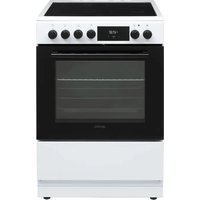
| Product type | Freestanding cooker with oven and hob |
| Energy source | Electric (230 V) |
| Hob type | Induction hob |
| Number of cooking zones | 4 |
| Oven type | Multifunction electric oven |
| Oven capacity | 72 L |
| Oven functions | Conventional heating, grill, fan, defrost |
| Control type | Touch controls with digital display |
| Dimensions (H × W × D) | 85 × 60 × 60 cm |
| Weight | 52 kg |
| Power supply | 220–240 V, 50/60 Hz |
| Maximum connected load | 10.2 kW |
| Timer | Yes |
| Child lock | Yes |
| Residual heat indicator | Yes |
| Oven cleaning | Enamel interior, removable door |
| Hob cleaning | Smooth glass ceramic surface |
| Safety features | Overheat protection, automatic switch-off |
| Spare parts availability | Original parts via Point after-sales service |
| Documentation | Free PDF user manual (105 pages) |
Frequently Asked Questions - POIH3030I2N Point
How do I switch on the induction hob on my Point POIH3030I2N?
Place a suitable pan on the cooking zone, touch the power button and select the zone. Use induction-compatible cookware with a ferromagnetic base for best performance.
What should I do if the hob does not heat up?
Check that the pan is magnetic and large enough for the zone. Verify the appliance is plugged in and the child lock is off. If the fault persists, contact Point after-sales support.
How do I clean the oven interior?
Remove the oven racks and wipe the interior with warm soapy water and a non-abrasive cloth. Use a soft sponge and mild detergent; never use abrasive pads. Rinse and dry thoroughly.
Can I use aluminium pans on the induction hob?
No, aluminium pans are not induction-compatible. Use pans with a ferrous base, such as cast iron or stainless steel with a magnetic bottom.
Why does the oven fan run after I switch it off?
The cooling fan continues to run for a few minutes to protect electronic components. This is normal. Wait until it stops before cleaning.
How do I set the timer on the cooker?
Use the timer control on the control panel to set the desired cooking time. The oven will switch off automatically when the countdown reaches zero. See the manual for details.
What does the residual heat indicator mean?
It warns that the hob surface is still hot after use. Do not touch the zone until the indicator goes out.
Can I install the cooker myself?
Installation must be performed by a qualified electrician and must comply with local regulations. The cooker must be connected to a suitable power supply and earthed.
How do I remove and clean the oven door?
Open the door fully, lift the locking clips, and slide the door out. Clean the glass with a mild cleaner and reinstall it in reverse order. Always ensure the oven is cool.
What should I do if a cooking zone stays red or does not stop?
Switch off the cooker immediately, disconnect the power and contact Point service. Do not use the appliance. This may indicate a control board fault.
User questions about POIH3030I2N Point
0 question about this device. Answer the ones you know or ask your own.
Ask a new question about this device
No questions yet. Be the first to ask one.
Download the instructions for your Cooker in PDF format for free! Find your manual POIH3030I2N - Point and take your electronic device back in hand. On this page are published all the documents necessary for the use of your device. POIH3030I2N by Point.
USER MANUAL POIH3030I2N Point
Manual assistant
Powered by Anthropic
Waiting for your message
Product information
Brand : Point
Model : POIH3030I2N
Category : Cooker