
AB2750 - Vacuum Cleaner SOLAC - Free user manual and instructions
Find the device manual for free AB2750 SOLAC in PDF.


| Brand | SOLAC |
| Model | AB2750 |
| Type | Canister vacuum cleaner |
| Power supply | Mains (power cord) |
| Suction power | Adjustable (electronic and mechanical regulator) |
| Dust bag | With hygienic closure, replaceable |
| Motor protection filter | Washable, clean 1 to 2 times per year |
| Exhaust air filter | Washable, clean 1 to 2 times per year |
| Bag full indicator | Yes, red when the bag is full |
| Cord rewinder | Automatic, rewind button |
| Telescopic tube | Metal, adjustable |
| Floor brush | Retractable, suitable for all floor types |
| Parquet brush | Natural bristle |
| Crevice tool | Included |
| Upholstery tool | Included |
| Carrying handle | Integrated |
| Power control on handle | Yes, mechanical |
| Safety instructions | Unplug before maintenance, do not vacuum liquids or sharp objects, do not use without bag or filters |
| Maintenance | Change the bag when the indicator is red; clean filters regularly |
| Spare parts available | Dust bags, motor protection and exhaust air filters |
Frequently Asked Questions - AB2750 SOLAC
User questions about AB2750 SOLAC
0 question about this device. Answer the ones you know or ask your own.
Ask a new question about this device
Download the instructions for your Vacuum Cleaner in PDF format for free! Find your manual AB2750 - SOLAC and take your electronic device back in hand. On this page are published all the documents necessary for the use of your device. AB2750 by SOLAC.
USER MANUAL AB2750 SOLAC
5- 8 • ESPAÑOL
9-12 • ENGLISH
13-16 • FRANÇAIS
17-20 • DEUTSCH
21-24 • PORTUGUÊS
25-28 • ITALIANO
29-32 • NEDERLANDS
33-36 • ČESKY
37-40 • POLSKA
41-44 • SLOVENSKY
45-49 • MAGYAR
50-53 • българск
54-56 • HRVATSKA
57-60 • ROMANA
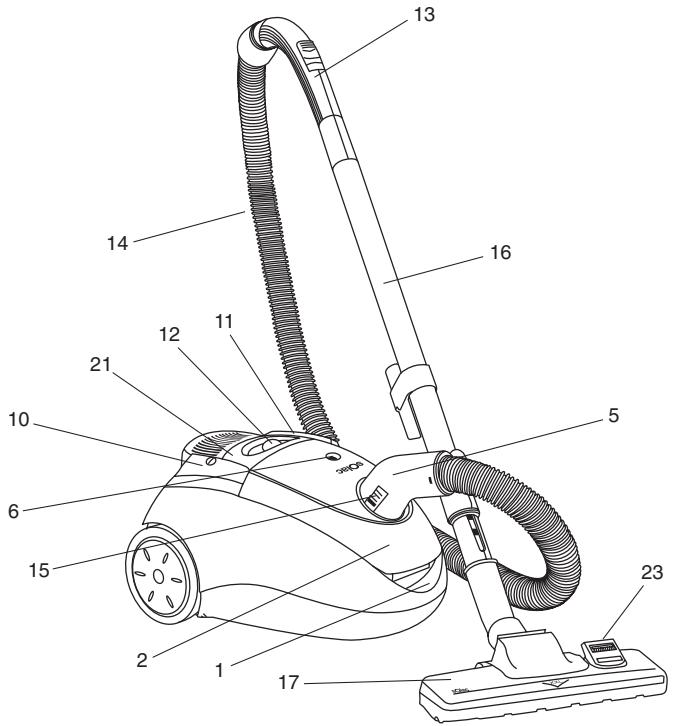
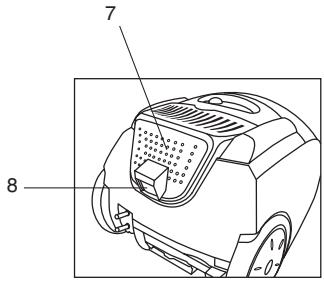
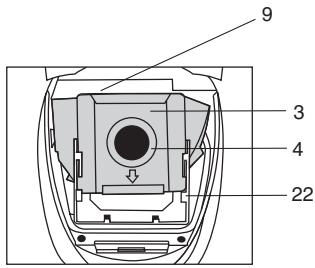
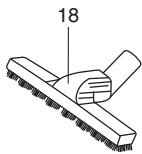
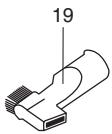
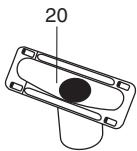
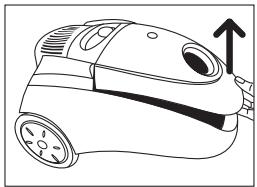
Fig. 1
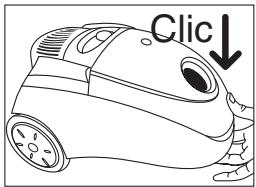
Fig. 2
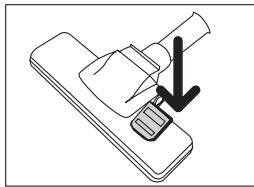
Fig. 3
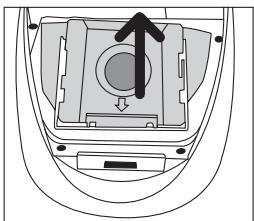
Fig. 4

Fig. 5

Fig. 6

Fig. 7

Fig. 8
ATENCIÓN
- Read these instructions before switching on the appliance.
- Check that the voltage in your home matches that stated on the appliance's specifications plate.
- Never use without the paper bag or the protective filters correctly fitted.
- Never vacuum live ash, splinters, sharp objects, or liquids.
- Always unplug after use and before cleaning the appliance or changing the filters. Always pull on the plug, not on the cord.
- Keep away from heat.
- Do not pull hard on the cord, and never beyond the red marking indicating the end.
- If the flexible power-supply cable is damaged, it must be replaced by a Technical Service centre authorized by the manufacturer, since this requires special tools.
- Never handle the vacuum cleaner or the plug with wet hands.
- Do not immerse or wet the appliance.

IMPORTANT: When you want to dispose of the appliance, NEVER throw it in the rubbish. Instead, go to your closest CLEAN POINT or waste collection centre for subsequent treatment. In this way, you will be contributing to looking after the environment.
MAIN COMPONENTS
- Dust bag-container opening latch
- Bag compartment
- Dust-bag
- Hygienic dust-bag seal
- Connection for the vacuum cleaner's flexible tube
- Dust-bag full indicator
- Air outlet filter
- Air outlet filter cover button
- Motor protection filter
- On-off button
- Cord-winder button
- Electronic power regulator
- Handle with mechanical power regulator
- Flexible tube
-
Release tabs for the flexible tube
-
Telescopic metal tube
- Brush for floors, carpets, ...
- Special brush for wood and parquet flooring.
- Tip for vacuuming grooves, corners, ...
- Upholstery brush
- Carry handle
- Dust-bag holder
- Brush button
USER INSTRUCTIONS
- Check that the dust-bag container (3) and filters (7 and 9) are fitted correctly. See the following section (Changing the dust bag, the motor protection filter and the air outlet filter).
- A safety catch prevents the vacuum cleaner from closing if the dust bag-container is not fitted.
- To open the bag compartment (2), press the dust bag-container opening latch (1) and lift the cover (fig. 1).
- To close the compartment (2), lower its cover and press down on the opening space with your hand (1), until you hear a click (fig. 2).
- Fit the flexible hose (14), placing the end in the connection opening (5), until you hear a click.
- Before using the vacuum cleaner, prepare the heads for the surface to be cleaned. They snap together with a gentle turn. The heads can be placed directly on the flexible tube (14) or, for out-of-reach surfaces, fit the telescopic metallic tube (16).
- The suction brush (17) on these models can be used for all types of floors, carpets, and rugs. This brush is retractable depending on the surface to be vacuumed. To change the cleaning position of the brush, press the brush button (23) with your foot (fig. 3). We recommend cleaning hard floors, wood and parquet with the fibre brush activated, and cleaning carpets and rugs with the fibre brush hidden.
- The special brush for PARQUET (18), with natural bristles, can be used for wooden and parquet flooring.
- This model also incorporates a suction head for narrow spaces, grooves and corners (19), and a head for upholstered surfaces (20). These accessories fit directly onto the flexible pipe (14) or onto the telescopic metal pipe (16).
- The vacuum cleaner can now be plugged in: To do so, pull out the cord and press the button (10) to switch it on.
- Use the regulator (12) to adjust the suction power.
- Suction power can also be adjusted by opening or closing the device on the handle (13).
- When finished, switch the appliance off by pressing button (10). Unplug it and press button (11) to wind up the cord. Hold the cord plug in your hand to prevent it from banging against the vacuum cleaner housing.
- If you wish, use the handle (21) to carry the vacuum cleaner while using it, and to get in to difficult places.
CHANGING THE DUST-BAG, THE MOTOR PROTECTION FILTER AND THE AIR OUTLET FILTER
CHANGING THE DUST-BAG (3)
-
When the indicator (6) is completely red, a new paper bag must be installed in the vacuum cleaner. This indicator may show red if something is stuck in the flexible tube or in an attachment. To find out if that is the case, unplug the vacuum cleaner, remove the flexible pipe, and turn the vacuum cleaner on again. If the indicator does not show red, clean the flexible tube and its attachment.
• To change the paper bag, unplug the vacuum cleaner and proceed as follows: -
Open the dust-bag container by pressing on the latch (1), and lifting the cover (fig. 1).
-
The paper bag has a hygienic seal on its intake opening to ensure maximum hygiene. When removing the bag, hold it tightly by the side edges and pull the central cardboard piece upwards (fig. 4).
-
Place the new paper bag on the dust-bag carrier fitting (22). Make sure the arrow on the bottom edge of the bag is pointing downwards, and check that the cardboard edge of the bag is inside the guide of the dust-bag carrier accessory (22), slide the bag until the end of the accessory guide (22) (fig. 5). The bag must be fitted correctly: confirm this by checking the cardboard edge on the bag. It must match the intake opening on the vacuum cleaner.
THE MOTOR PROTECTION FILTER (9)
- When the motor protection filter (9) is dirty (once or twice a year, depending on use), open the vacuum cleaner and remove the vertical filter (8) by pulling the top upward (fig. 6). Shake the protection filter well or wash it if it is very dirty, and leave it to dry completely. Never use the vacuum cleaner without the motor protection filter.
CHANGING THE AIR OUTLET FILTER (7)
- The air outlet filter (7) must also be changed once or twice a year. Remove the air outlet filter cover (7) by pressing on the top of the cover-opening button (8) until you hear a click (fig. 7) and remove the filter. Shake the protection filter well, or wash it if very dirty, and allow it to dry completely; refit it when clean. Never use the vacuum cleaner without the air outlet filter.
- Put the filter and cover back in place. To do so, lift the carry handle (21) and align the tabs on the air outlet filter cover with the holes located in the top of the vacuum cleaner; press down on the filter cover opening button (8) until you hear a click (fig. 8).
ATTENTION


Brand : SOLAC
Model : AB2750
Category : Vacuum Cleaner