
DW682 - Planer DEWALT - Free user manual and instructions
Find the device manual for free DW682 DEWALT in PDF.
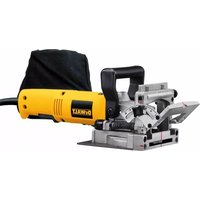


Pick your language and provide your email: we'll send you a specifically translated version.
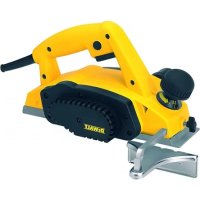
| Type of product | Portable electric planer |
| Brand | DEWALT |
| Model | DW682 |
| Cutting width | 82 mm (3.25 inches) |
| Depth of cut | 0 - 2 mm (0 - 1/16 inch) |
| Power | 700 W |
| No-load speed | 16,000 RPM |
| Voltage | 220-240 V |
| Frequency | 50/60 Hz |
| Weight | 3.0 kg (6.6 lbs) |
| Dimensions (L x W x H) | 290 x 175 x 160 mm |
| Blade diameter | 82 mm |
| Number of blades | 2 |
| Dust extraction | Connection for vacuum cleaner |
| Sole plate | Precision-machined aluminum |
| Adjustable depth | Micrometer adjustment for precise cutting |
| Bevel cutting | Support for up to 45° bevels |
| Power cord length | 2.5 m |
| Includes | Parallel guide, dust bag, hexagonal key |
| Warranty | 3 years (with registration) |
Frequently Asked Questions - DW682 DEWALT
How do I change the blades on the DEWALT DW682 planer?
To replace the blades, first unplug the planer. Use the supplied hexagonal key to loosen the two screws on the blade holder. Carefully slide out the old blade and insert the new one, ensuring the sharp edge is facing the correct direction (aligned with the front sole). Tighten the screws evenly. Check that the blade sits flat and adjust if necessary.
What is the correct way to adjust the depth of cut on the DW682?
Turn the knob on the front of the tool to adjust the cutting depth. Each full rotation typically changes the depth by a certain amount. Refer to the scale and set the desired depth (0-2 mm). Always make a test cut on a scrap piece to verify the depth before working on the final workpiece.
How can I avoid tear-out and chipping when planing wood?
To minimize tear-out, plane in the direction of the wood grain. Use sharp blades and make shallow cuts. Additionally, you can attach a dust extraction system and work with a slower feed rate for a smoother finish.
Can I use the DEWALT DW682 as a jointer?
The DW682 is a handheld planer, not a stationary jointer. However, you can use it with a guide fence or by securing the workpiece to achieve a straight edge. For accurate jointing, it's often easier to use a dedicated jointer or a router with a straight bit.
How do I connect a vacuum or dust collector to the planer?
The planer has a built-in dust extraction port located on the side. Simply attach the vacuum adapter or the dust bag to this port. For best results, use a compatible hose with a 35 mm diameter connection. Ensure the vacuum is turned on during operation.
What is the power consumption of the DW682?
The DEWALT DW682 is powered by a 700-watt motor, which provides sufficient performance for most planing tasks. It operates on a standard 220-240 V AC power supply.
How should I maintain the carbon brushes?
Over time, carbon brushes may wear out and need replacement. To check, remove the brush caps using a screwdriver and pull out the brushes. If they are shorter than 6 mm or show cracks, replace them with new ones. Always use identical spare parts and reinstall carefully.
What safety precautions should I follow when using the planer?
Always wear safety glasses, ear protection, and a dust mask. Keep the cord away from flammable materials and avoid contact with sharp blades. Never operate the planer without the blade guard in place. Ensure the workpiece is securely clamped and support long boards to prevent kickback.
How do I make a bevel cut with the DW682?
The front sole can be adjusted for bevel cuts. Loosen the lever on the front, tilt the shoe to the desired angle (marked on the scale), and tighten. Set the depth accordingly and run the planer along the edge of the workpiece. Make practice cuts on scrap wood first.
What should I do if the planer doesn't start?
First, check the power cord and plug for damage. Ensure the switch is in the 'on' position and the power outlet is live. If the tool still doesn't start, inspect the carbon brushes and the fuse. If necessary, contact an authorized DEWALT service center for professional repair.
User questions about DW682 DEWALT
0 question about this device. Answer the ones you know or ask your own.
Ask a new question about this device
No questions yet. Be the first to ask one.
Download the instructions for your Planer in PDF format for free! Find your manual DW682 - DEWALT and take your electronic device back in hand. On this page are published all the documents necessary for the use of your device. DW682 by DEWALT.
USER MANUAL DW682 DEWALT
Manual assistant
Powered by Anthropic
Waiting for your message
Product information
Brand : DEWALT
Model : DW682
Category : Planer