
TE-OS 18 Li - Sander EINHELL - Free user manual and instructions
Find the device manual for free TE-OS 18 Li EINHELL in PDF.
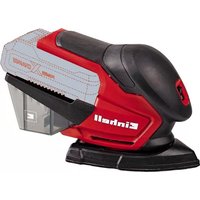


Pick your language and provide your email: we'll send you a specifically translated version.
| Product Type | Cordless Orbital Sander |
| Brand | Einhell |
| Model | TE-OS 18 Li |
| Battery System | 18 V Power X-Change (requires one 18 V Li-ion battery) |
| Sanding Pad Diameter | 125 mm (5") |
| Backing Pad Type | Hook-and-loop (Velcro) |
| No-Load Speed | 6,000 - 12,000 rpm (variable) |
| Oscillation Stroke | 2 mm |
| Sanding Motion | Orbital |
| Dust Extraction | Integrated dust box and vacuum adapter |
| Weight (without battery) | Approx. 1.3 kg |
| Dimensions (L x W x H) | Approx. 300 x 130 x 150 mm |
| Noise Level | Approx. 80 dB(A) |
| Vibration Level | Approx. 5.0 m/s² |
| Power Source | Cordless, battery-operated |
| Handle Design | Soft-grip handle |
| Speed Control | Thumbwheel adjustable |
| Dust Box Capacity | Approx. 0.5 L |
| Battery Compatible | Einhell Power X-Change series (18 V) |
| Charger Compatible | Einhell Power X-Change chargers (sold separately) |
| Applications | Wood, metal, plastic surfaces |
| Maintenance | Clean air vents; replace worn sandpaper |
| Safety Features | Double insulation, motor brake, lock-off switch |
| Spare Parts | Sanding pads, dust boxes, brushes available |
| Repairability | Modular construction with replaceable components |
Frequently Asked Questions - TE-OS 18 Li EINHELL
How do I attach sandpaper to the sander?
Match the holes of the sandpaper with the holes in the pad (if perforated) and press the hook-and-loop side firmly onto the pad. Ensure the sandpaper is centered and wrinkle-free.
What battery is compatible with the TE-OS 18 Li?
The sander uses any Einhell Power X-Change 18 V Li-ion battery. For best results, use a battery with at least 2.0 Ah capacity.
How do I adjust the sanding speed?
Use the thumbwheel on the sander to set the desired oscillation speed from 6,000 to 12,000 rpm. Turn it toward the higher numbers for faster sanding and lower for finer control.
How do I connect a vacuum cleaner for dust extraction?
Fit the dust adapter (included) onto the sander's dust outlet, then attach a compatible vacuum hose. Alternatively, use the integrated dust box for collection without a vacuum.
Can I use the sander for wet sanding?
No, the TE-OS 18 Li is designed for dry sanding only. Wet sanding can damage the motor and compromise electrical safety.
How do I clean the dust box?
Empty the dust box when it is about two-thirds full. Open the box, dispose of the dust, and tap out any residue. Alternatively, you can clean it with a slightly damp cloth, but ensure it is completely dry before reattaching.
What safety precautions should I take?
Always wear safety glasses and a dust mask. Keep your hands away from the moving pad. Disconnect the battery before changing sandpaper or cleaning. Ensure the workpiece is secure and never operate with a damaged power cord or battery.
How do I change the sanding pad?
Remove the existing sandpaper, then loosen the central screw on the pad with a Phillips screwdriver (counterclockwise). Lift the pad off the shaft and attach the new one, then tighten the screw clockwise.
Why does the sander run slowly under load?
A slow speed under load may indicate a weak battery or a clogged dust path. Charge the battery or use a higher Ah model. Also check that the sandpaper is not blocked with dust and that the air vents are clear.
How do I maintain the sander?
After each use, blow out dust from the motor housing and vents. Regularly clean the speed selector and check the sanding pad for wear. Store the sander in a dry place and keep the battery separate when not in use.
User questions about TE-OS 18 Li EINHELL
0 question about this device. Answer the ones you know or ask your own.
Ask a new question about this device
No questions yet. Be the first to ask one.
Download the instructions for your Sander in PDF format for free! Find your manual TE-OS 18 Li - EINHELL and take your electronic device back in hand. On this page are published all the documents necessary for the use of your device. TE-OS 18 Li by EINHELL.
USER MANUAL TE-OS 18 Li EINHELL



Manual assistant
Powered by Anthropic
Waiting for your message
Product information
Brand : EINHELL
Model : TE-OS 18 Li
Category : Sander