
ELECTRON - Paper Cutter FELLOWES - Free user manual and instructions
Find the device manual for free ELECTRON FELLOWES in PDF.


| Product Type | Electric Paper Cutter |
| Brand | FELLOWES |
| Model | ELECTRON |
| Cutting Capacity | Up to 15 sheets (80 g/m²) |
| Maximum Cutting Width | 310 mm (A4 size) |
| Dimensions (L x D x H) | approximately 50 x 30 x 10 cm |
| Weight | approximately 5 kg |
| Power Supply | Mains 220-240 V, 50 Hz |
| Power Consumption | 100 W |
| Motor | Electric, push-button control |
| Blade Type | Self-sharpening stainless steel |
| Guide | Adjustable side guide with scale |
| Main Functions | Cutting paper, photos, light cardboard |
| Safety | Blade lock in rest position, finger guard |
| Maintenance and Cleaning | Clean with a soft dry or slightly damp cloth; do not use solvents |
| Spare Parts and Repairability | Replacement blade available, disassembly by a professional |
| Warranty | 2 years |
| Included Accessories | Cutting guide, waste tray |
| General Information | FELLOWES electric paper cutter, model ELECTRON, designed for office use |
Frequently Asked Questions - ELECTRON FELLOWES
User questions about ELECTRON FELLOWES
0 question about this device. Answer the ones you know or ask your own.
Ask a new question about this device
Download the instructions for your Paper Cutter in PDF format for free! Find your manual ELECTRON - FELLOWES and take your electronic device back in hand. On this page are published all the documents necessary for the use of your device. ELECTRON by FELLOWES.
USER MANUAL ELECTRON FELLOWES
SafeCut™ Rotary Trimmers
Neutron™ / Neutron™ Plus Proton™ Electron™
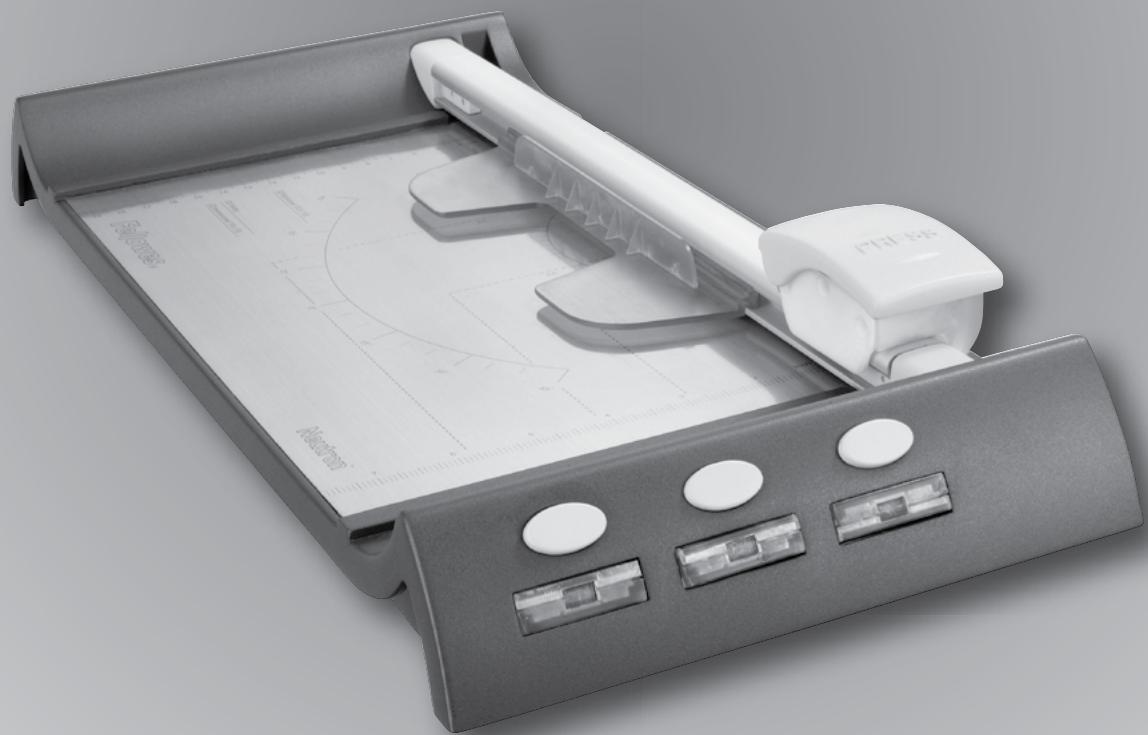
Please read these instructions before use.
IMPORTANT SAFETY INSTRUCTIONS — Read Before Using!

CAUTION
- Caution: blades are extremely sharp.
- SafeCut™ cassette encloses blades - do not try to extract blades manually.
- Always supervise children during use.
- Do not overload trimmer.
- Keep pets away from trimmer while in use.
- Do not open or attempt to repair, as this will void your warranty. Contact Customer Service if you have questions. Please note the warranty does not apply in cases of abuse, mishandling or unauthorized repair.
- Do not try to open SafeCut™ blade cartridges.
CUTTING PAPER AND PHOTOS
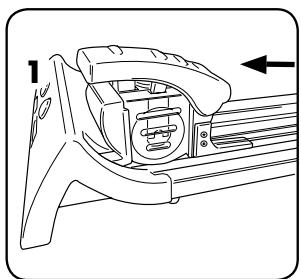
1. Slide cutting carriage to one end into lock position.
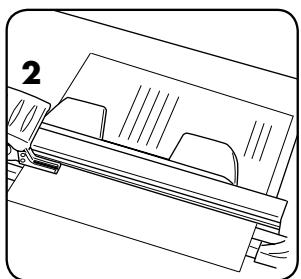
2. Place item (e.g. photo or paper) onto cutting table.
| CRC # | Model | Number of blades | Cutting Length (mm) | Cutting Length (inch) | Cutting capacity (sheets 20 lb) |
| 54104 | Electron 120 | 4 | 320 | 12 | 10 |
| 54105 | Electron 180 | 4 | 460 | 18 | 10 |
Electron™ SET-UP
To operate:
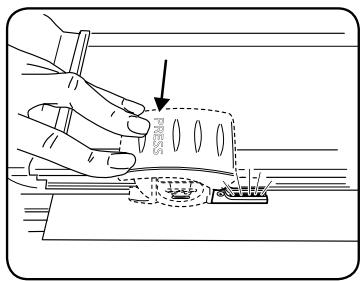
- Remove battery and cover
- Remove plastic film
- Re-insert battery and cover
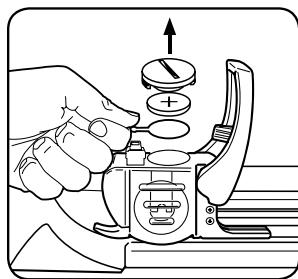
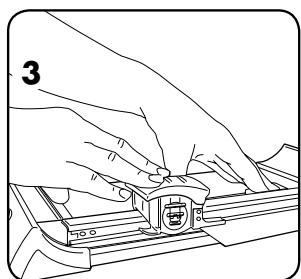
3. Hold paper steady with hand or clamping mechanism. To activate cutting blade, push down carriage handle. (Electron: when pressing handle down, LED will glow)
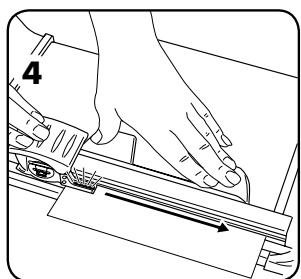
4. To cut, push handle downwards and slide carriage along until reaching the end of the bar. At the end of the bar, release the carriage and the clamping mechanism will release. For cutting larger capacities press blade harder on side nearest the cutting strip.
SAFECUT™ SAFETY FEATURES
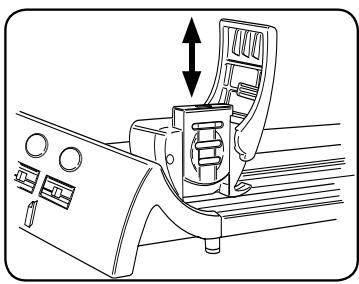
The SafeCut™ cartridge system allows users to change the cutting cartridge without touching the blades.
The SafeCut™ LED Guide on the Electron trimmer for illuminated precision. Safer than laser guides.
ACCESSORY PACKS
| 3 Creative SafeCut™ blades | Cutting capacity (sheets 20 lb) |
| ~ ~ ~ ~ ~ Wave Cut | 5 |
| ---- Perforate | 5 |
| ~ ~ ~ ~ ~ Fold (crease) | 3 |
To Order: us: 800-955-0959 Canada: 1-800-665-4339
| CRC# | Pack contents |
| 54113 | 3 Creative SafeCut™ blades (1x wave, 1x perforate, 1x fold) |
| 54114 | 2 Straight SafeCut™ blades |
| 54115 | 12” Cutting strips (x3) Strip will need to be trimmed to fit Neutron™ and Neutron Plus models |
| 54116 | 18” Cutting strips (x3) |
CHANGE SAFECUT CARTRIDGE
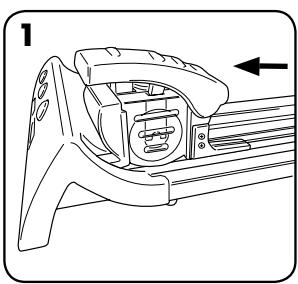
- Slide cutting carriage to one end into lock position.
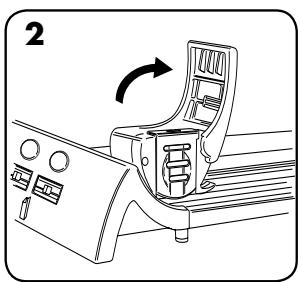
- Lift carriage handle up.
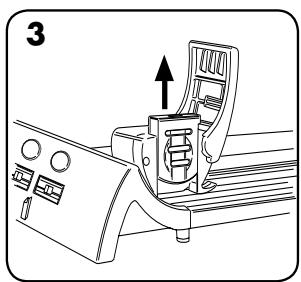
- Pull SafeCut™ cartridge upwards out of cutting carriage and insert new cartridge (push down to click into place).
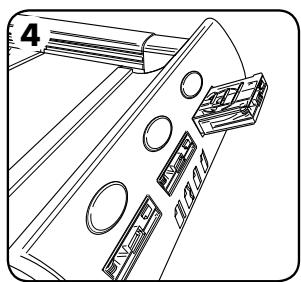
- Press yellow button to release cassette from base. Return into storage slot in base.
CHANGING CUTTING STRIP
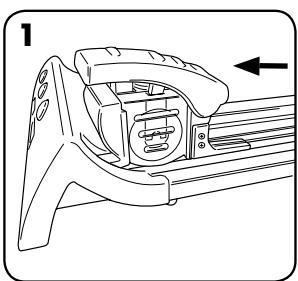
- Slide cutting carriage to one end into lock position.
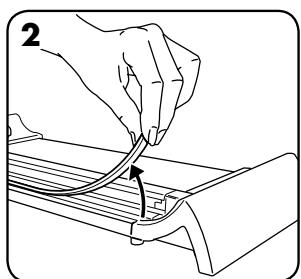
- Remove cutting strip off trimmer base.
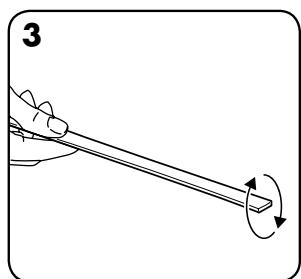
- Turn cutting strip over to use both sides.
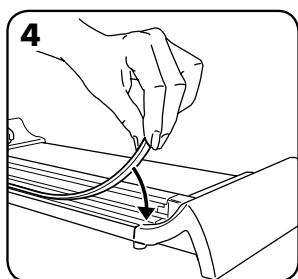
- Replacement strips available (see accessory details).
ELECTRON SAFECUT™ LED GUIDE
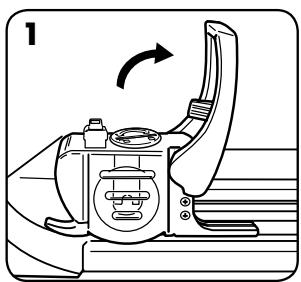
1. Slide cutting carriage to one end into lock position. Pull (swing) carriage handle up.
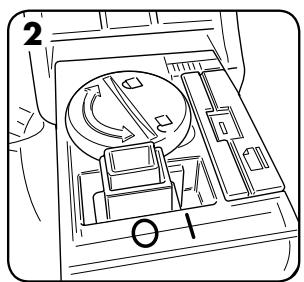
2. Turn switch to ON (I) position.

3. Pull (swing) carriage handle down.
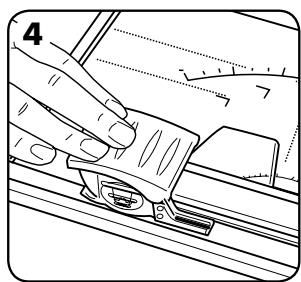
4. Press handle down to activate SafeCut™ LED Guide.
CHANGE BATTERY ON ELECTRON SAFECUT™ LED GUIDE
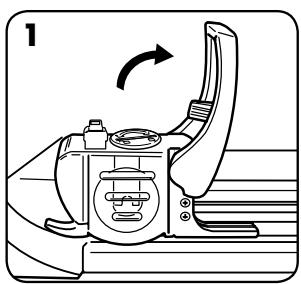
1. Slide cutting carriage to one end into lock position. Pull (swing) carriage handle up.
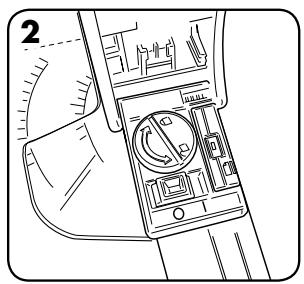
2. Unscrew battery cover with coin or screwdriver (left turn opens, right turn closes battery cover).
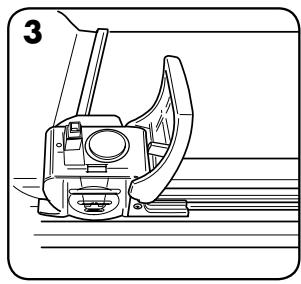
3. Remove old battery and replace with a new battery [type CR2032].
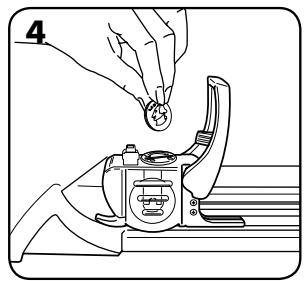
4. Close battery cover.
WARRANTY
Fellowes warrants all other parts of the machine to be free of defects in material and workmanship for 2 year from the date of purchase by the original consumer. If any part is found to be defective during the warranty period, your sole and exclusive remedy will be repair or replacement, at Fellowes' option and expense, of the defective part. This warranty does not apply in cases of abuse, mishandling, or unauthorized repair. ANY IMPLIED WARRANTY, INCLUDING THAT OF MERCHANTABILITY OR FITNESS FOR A PARTICULAR PURPOSE, IS HEREBY
LIMITED IN DURATION TO THE APPROPRIATE WARRANTY PERIOD SET FORTH ABOVE. In no event shall Fellowes be liable for any consequential or incidental damages attributable to this product. This warranty gives you specific legal rights. The duration, terms, and conditions of this warranty are valid worldwide, except where different limitations, restrictions, or conditions may be required by local law. For more details or to obtain service under this warranty, please contact us or your dealer. Accessories and consumables are excluded from this warranty.
Need Help?
Customer Service....
www.fellowes.com
Let our experts help you
with a solution.
Always call Fellowes
before contacting
your place of purchase.
Useful Phone Numbers
Help Line
| Australia | + 1-800-33-11-77 |
| Canada | + 1-800-665-4339 |
| Europe | 00-800-1810-1810 |
Fellows
| Australia | + 61-3-8336-9700 |
| Benelux | + 31-{0}-76-523-2090 |
| Canada | + 1-905-475-6320 |
| Deutschland | + 49-{0}-5131-49770 |
| España | + 34-91-748-05-01 |
| France | + 33-{0}-1-30-06-86-80 |
| Italia | + 39-071-730041 |
| México | + 1-800-234-1185 |
| United States | + 1-800-955-0959 |
| Japan | + 81-(0)-3-5496-2401 |
| Korea | + 82-2-3462-2884 |
| Malaysia | + 60-(0)-35122-1231 |
| Polska | + 48-(0)-22-771-47-40 |
| Singapore | + 65-6221-3811 |
| United Kingdom | + 44-(0)-1302-836836 |
| United States | + 1-630-893-1600 |
Fellowes
1789 Norwood Avenue, Itasca, Illinois 60143-1095 · USA · 630-893-1600
fellowes.com
Australia Benelux
Canada China
Deutschland
Espana
France Italia
Japan Korea
Polska Singapore
United Kingdom United States

- SafeCut™ Rotary Trimmers
- Neutron™ / Neutron™ Plus Proton™ Electron™
- IMPORTANT SAFETY INSTRUCTIONS — Read Before Using!
- CAUTION
- CUTTING PAPER AND PHOTOS
- Electron™ SET-UP
- SAFECUT™ SAFETY FEATURES
- ACCESSORY PACKS
- CHANGE SAFECUT CARTRIDGE
- CHANGING CUTTING STRIP
- ELECTRON SAFECUT™ LED GUIDE
- CHANGE BATTERY ON ELECTRON SAFECUT™ LED GUIDE
- WARRANTY
- Need Help?
- Useful Phone Numbers
Brand : FELLOWES
Model : ELECTRON
Category : Paper Cutter