K4 - Earphones EarFun - Free user manual and instructions
Find the device manual for free K4 EarFun in PDF.


Pick your language and provide your email: we'll send you a specifically translated version.
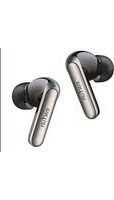
| Product Type | True Wireless Stereo (TWS) Earphones |
| Brand | EarFun |
| Model | K4 |
| Connectivity | Bluetooth 5.2 with stable transmission |
| Audio Codec | SBC, AAC, aptX support for high-quality streaming |
| Driver | 10mm dynamic drivers with rich bass |
| Playback Time (Earbuds) | Up to 6 hours on a single charge |
| Playback Time (with Case) | Up to 30 hours total using the charging case |
| Charging Port | USB-C fast charging |
| Charging Time | Approximately 2 hours for full charge |
| Water Resistance | IPX5 rated, sweatproof and splashproof |
| Earbud Weight | 4.5 grams per earbud for comfort |
| Case Weight | 35 grams lightweight and portable |
| Noise Reduction | ENC (Environmental Noise Cancellation) for calls |
| Control Method | Touch control for music, calls, and voice assistant |
| Voice Assistant | Compatible with Siri and Google Assistant |
| Accessories | Multiple ear tips and USB-C charging cable included |
| Maintenance | Clean regularly with a soft, dry cloth; avoid liquids |
| Safety Warning | Use certified chargers only; do not expose to extreme temperatures |
| Spare Parts | Replacement ear tips and cables available |
Frequently Asked Questions - K4 EarFun
How do I pair the EarFun K4 with my phone?
To pair, take the earbuds out of the charging case. They will enter pairing mode automatically. On your device, enable Bluetooth and select EarFun K4 from the list. If prompted, confirm the connection.
What can I do if the earbuds are not connecting?
Ensure the earbuds are charged and within range. Delete the previous connection from your device, put the earbuds back in the case, close it for 10 seconds, then retry. If issues persist, perform a reset by pressing the touch areas on both earbuds for 10 seconds.
How long does the battery last?
The K4 offers up to 6 hours of playback on a single charge, and the charging case provides an additional 24 hours, giving a total of 30 hours. Battery life varies with volume and usage.
Can I use the K4 for swimming?
No, the K4 has an IPX5 rating, meaning it is sweatproof and splashproof, but not fully waterproof. Do not submerge the earbuds or charging case in water.
How do I charge the earbuds and the case?
Place the earbuds in the case and close the lid. Connect the included USB-C cable to the charging port on the back of the case. The LED indicator shows charging status. A full charge takes about 2 hours.
How do I reset the EarFun K4?
To reset, place the earbuds in the case and keep the lid open. Press and hold the touch area on both earbuds for 10-15 seconds until the LEDs flash red and white, then release. This clears all paired devices and restores factory settings.
Can I use a single earbud for calls?
Yes, you can use either the left or right earbud independently. The K4 supports mono mode, allowing you to make calls with just one earbud while the other stays in the case.
How should I clean the earbuds?
Use a soft, dry microfiber cloth to wipe the exterior. For the ear tips, remove them and rinse with water, then dry thoroughly before reattaching. Avoid using liquids on the speaker mesh.
Are the touch controls customizable?
The touch controls are preset for functions like play/pause, track skipping, call management, and voice assistant activation. The EarFun Audio App may allow limited customization, depending on firmware version. Check the manual for details.
What if the earbuds are not charging?
First, ensure the charging pins on the earbuds and case are clean and dry. Check that the case itself has battery. Use the original USB-C cable and a compatible charger. If the issue continues, contact support.
User questions about K4 EarFun
0 question about this device. Answer the ones you know or ask your own.
Ask a new question about this device
No questions yet. Be the first to ask one.
Download the instructions for your Earphones in PDF format for free! Find your manual K4 - EarFun and take your electronic device back in hand. On this page are published all the documents necessary for the use of your device. K4 by EarFun.
USER MANUAL K4 EarFun



Manual assistant
Powered by Anthropic
Waiting for your message
Product information
Brand : EarFun
Model : K4
Category : Earphones