BBWLBKQ25 - Keyboard BlueBuilt - Free user manual and instructions
Find the device manual for free BBWLBKQ25 BlueBuilt in PDF.


Pick your language and provide your email: we'll send you a specifically translated version.
| Product type | Wireless keyboard |
| Brand | BlueBuilt |
| Model | BBWLBKQ25 |
| Key layout | AZERTY |
| Dimensions (L × W × H) | 44.5 × 13.5 × 2.5 cm |
| Weight | 580 g |
| Power supply | 2 AAA batteries |
| Connectivity | Wireless 2.4 GHz with USB receiver |
| Wireless range | 10 meters |
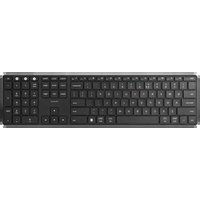
| Main functions | Comfortable typing, multimedia keys, wrist rest |
| Shortcut keys | Play, pause, volume, mute |
| Compatibility | Windows, macOS, Linux |
| Care and cleaning | Soft slightly damp cloth, unplug or remove batteries before cleaning |
| Safety | Do not expose to moisture or extreme temperatures |
| Spare parts | Replacement AAA batteries, replacement USB receiver |
| Repairability | Cleaning and battery replacement by the user |
| Warranty | 2 years |
Frequently Asked Questions - BBWLBKQ25 BlueBuilt
How to connect the keyboard to my computer?
Insert the USB receiver into an available port, turn on the keyboard and it connects automatically.
What to do if the keyboard doesn't work?
First check the batteries, then the position of the USB receiver, and move the keyboard closer to the computer.
How to clean the keyboard safely?
Remove the batteries, then use a slightly damp soft cloth to clean the surface.
Is the keyboard compatible with tablets or smartphones?
No, this keyboard is designed for desktop and laptop computers running Windows, macOS, or Linux.
How to change the batteries?
Open the battery compartment located under the keyboard, remove the used batteries and insert two AAA batteries respecting the polarity.
Can I use the keyboard while it's charging?
This keyboard operates with AAA batteries and is not rechargeable. Replace the batteries when they are low.
What do the multimedia keys mean?
The multimedia keys allow you to control the audio player: play, pause, volume, mute, etc.
Does the keyboard work on macOS?
Yes, it is compatible with macOS as well as Windows and Linux.
What is the range of the wireless keyboard?
The range can reach 10 meters in open field.
Is the keyboard AZERTY or QWERTY?
This model for the French market is in AZERTY. The keys are engraved accordingly.
User questions about BBWLBKQ25 BlueBuilt
0 question about this device. Answer the ones you know or ask your own.
Ask a new question about this device
No questions yet. Be the first to ask one.
Download the instructions for your Keyboard in PDF format for free! Find your manual BBWLBKQ25 - BlueBuilt and take your electronic device back in hand. On this page are published all the documents necessary for the use of your device. BBWLBKQ25 by BlueBuilt.
USER MANUAL BBWLBKQ25 BlueBuilt


Manual assistant
Powered by Anthropic
Waiting for your message
Product information
Brand : BlueBuilt
Model : BBWLBKQ25
Category : Keyboard