BBWLBKQ23 - Keyboard BlueBuilt - Free user manual and instructions
Find the device manual for free BBWLBKQ23 BlueBuilt in PDF.


Pick your language and provide your email: we'll send you a specifically translated version.
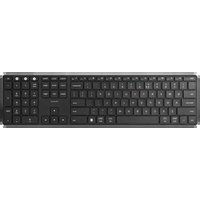
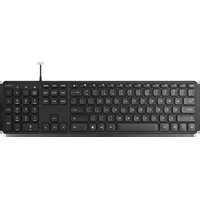
| Product type | Wired mechanical keyboard |
| Brand | BlueBuilt |
| Model | BBWLBKQ23 |
| Dimensions (L x W x H) | 440 x 130 x 40 mm |
| Weight | 950 g |
| Power supply | USB-C (5V, 500mA) |
| Number of keys | 104 |
| Backlighting | Per-key RGB |
| Interface | Detachable USB-C |
| Compatibility | Windows, macOS, Linux |
| Switch type | Blue mechanical |
| Anti-ghosting | Yes, N-key rollover |
| Chassis material | ABS plastic |
| Cable length | 1.8 m braided |
| Warranty | 2 years |
| Care and cleaning | Use a dry microfiber cloth |
| Safety | Do not expose to moisture; unplug before cleaning |
| Repairability | Hot-swappable switches |
| Spare parts available | USB-C cable, set of keycaps |
Frequently Asked Questions - BBWLBKQ23 BlueBuilt
How to connect the keyboard to my computer?
Simply plug the included USB-C cable into a USB port on your computer. The keyboard is automatically recognized without additional drivers.
How to clean the keyboard?
Unplug the keyboard. Use a slightly damp (not wet) microfiber cloth to wipe the surface. For spaces between keys, you can use a can of compressed air or a brush.
Can I change the keys?
Yes, this keyboard is equipped with hot-swappable switches and standard keycaps (Cherry MX compatible). You can remove them with a keycap puller and replace them with compatible models.
Is the keyboard compatible with macOS?
Yes, it works on macOS. However, some specific keys (like the Command key) may be reversed. You can reconfigure the keys in System Preferences.
How to adjust the RGB backlighting?
Use the Fn keys combined with the F1 to F12 keys to change lighting modes. You can also download the customization software from the BlueBuilt website to create your own effects.
What to do if a key does not work?
First check the USB connection. Test on another computer. If the problem persists, try removing and reinserting the defective key. If that does not help, contact BlueBuilt support (2-year warranty).
How to enable Num Lock?
Press the Num Lock key to enable/disable the numeric keypad. An indicator light confirms the status.
Is the cable detachable?
Yes, the USB-C cable is detachable. You can replace it with another standard USB-C cable. The connector is located at the back of the keyboard.
What is the warranty for this keyboard?
The BlueBuilt BBWLBKQ23 keyboard comes with a 2-year warranty against manufacturing defects. Keep your proof of purchase to claim the warranty.
Where can I download the customization software?
The software is available on the BlueBuilt official website in the Downloads section. It allows you to customize keys, RGB effects, and create macros.
User questions about BBWLBKQ23 BlueBuilt
0 question about this device. Answer the ones you know or ask your own.
Ask a new question about this device
No questions yet. Be the first to ask one.
Download the instructions for your Keyboard in PDF format for free! Find your manual BBWLBKQ23 - BlueBuilt and take your electronic device back in hand. On this page are published all the documents necessary for the use of your device. BBWLBKQ23 by BlueBuilt.
USER MANUAL BBWLBKQ23 BlueBuilt
Manual assistant
Powered by Anthropic
Waiting for your message
Product information
Brand : BlueBuilt
Model : BBWLBKQ23
Category : Keyboard