
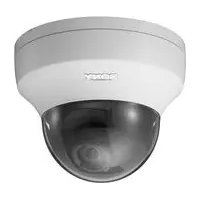
SNC-EB600B - Surveillance Camera SONY - Free user manual and instructions
Find the device manual for free SNC-EB600B SONY in PDF.


Pick your language and provide your email: we'll send you a specifically translated version.
| Product Type | IP Surveillance Camera |
| Brand | Sony |
| Model | SNC-EB600B |
| Image Sensor | 1/3-inch CMOS |
| Resolution | 1280x1024 (1.3 MP) |
| Lens | Fixed focal length, 3.6 mm |
| Minimum Illumination | 0.6 lx (color) |
| Network Interface | 10/100BASE-TX Ethernet |
| Compression | JPEG, H.264, MPEG-4 |
| Power Source | PoE (IEEE 802.3af) or 12V DC |
| Dimensions (W x H x D) | Approx. 72 x 62 x 130 mm |
| Weight | Approx. 420 g |
| Operating Temperature | -10°C to +50°C |
| Main Functions | IP video surveillance with remote viewing, motion detection, and ONVIF support |
| Maintenance and Cleaning | Clean lens with soft dry cloth; avoid using volatile solvents |
| Safety | Use only approved power supply; ensure proper grounding |
| Spare Parts and Repairability | Contact Sony support for replacement parts; repair by qualified personnel |
| General Information | Supports PoE, day/night operation, and auto iris |
Frequently Asked Questions - SNC-EB600B SONY
What is the default IP address of the SNC-EB600B?
The default IP address may vary. Check the instruction manual or use the Sony IP Setup tool to find the camera's current IP address.
How do I reset the camera to factory defaults?
Press the reset button on the device for a few seconds while powering on. This restores the factory network and security settings.
Can the SNC-EB600B operate without PoE?
Yes, it can be powered via a 12V DC adapter, but PoE simplifies installation by using a single cable for power and data.
Does the camera support audio recording?
No, the SNC-EB600B is video-only. It does not have a built-in microphone or audio line-in.
What smartphone apps are compatible for viewing?
You can use the iPRO Player app or a web browser on smartphones to view the live feed. ONVIF compatibility also supports third-party apps.
How do I set up motion detection?
Access the camera's web interface, navigate to Motion Detection settings, and draw areas where you want to trigger alerts. Sensitivity and threshold can be adjusted.
What is the maximum resolution and frame rate?
It supports up to 1280x1024 pixels at 30 fps (H.264) or 15 fps (JPEG). The exact frame rate depends on the compression mode.
Can I store recordings on a microSD card?
No, the SNC-EB600B does not have a memory card slot. Recording is done on a network video recorder (NVR) or PC software.
How do I clean the camera lens?
Use a soft, dry microfiber cloth to gently wipe the lens. Avoid water, chemicals, or abrasive materials that could damage the optical element.
Is the camera weatherproof?
No, the SNC-EB600B is designed for indoor use only. It should be installed in a sheltered location or inside a protective housing.
User questions about SNC-EB600B SONY
0 question about this device. Answer the ones you know or ask your own.
Ask a new question about this device
No questions yet. Be the first to ask one.
Download the instructions for your Surveillance Camera in PDF format for free! Find your manual SNC-EB600B - SONY and take your electronic device back in hand. On this page are published all the documents necessary for the use of your device. SNC-EB600B by SONY.
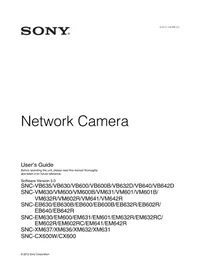
USER MANUAL SNC-EB600B SONY
Manual assistant
Powered by Anthropic
Waiting for your message
Product information
Brand : SONY
Model : SNC-EB600B
Category : Surveillance Camera