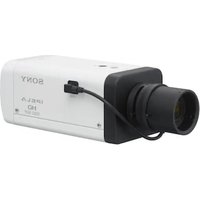
SNC-RS44N - Surveillance Camera SONY - Free user manual and instructions
Find the device manual for free SNC-RS44N SONY in PDF.


Pick your language and provide your email: we'll send you a specifically translated version.
| Product Type | Network surveillance camera |
| Brand | Sony |
| Model | SNC-RS44N |
| Image Sensor | 1/4" interline transfer CCD |
| Resolution | 720 x 540 pixels (approx.) |
| Minimum Illumination | 0.5 lx (color), 0.04 lx (B/W) |
| Lens Type | Auto iris varifocal, 2.8-10 mm |
| Digital Zoom | 4x |
| Day/Night Mode | Yes, with removable IR cut filter |
| Network Interface | 10/100BASE-TX Ethernet |
| Video Compression | MPEG-4, JPEG |
| Supported Protocols | TCP/IP, HTTP, SNMP, SMTP |
| Alarm I/O | 2 inputs / 1 output |
| Power Supply | 12 VDC or 24 VAC |
| Power Consumption | 8 W max |
| Dimensions (W x H x D) | 140 x 70 x 65 mm |
| Weight | 450 g |
| Operating Temperature | 0 °C to 50 °C |
| Storage Temperature | -20 °C to 60 °C |
| Mounting | Ceiling or wall bracket |
| Protection Rating | Indoor use only |
| Maintenance | Clean lens with soft dry cloth |
| Repairability | Modular components, user-replaceable lens |
Frequently Asked Questions - SNC-RS44N SONY
How do I reset the Sony SNC-RS44N to factory defaults?
To reset the camera, press and hold the reset button located on the bottom panel for 5 seconds. The unit will reboot and restore all settings to factory defaults, including the IP address. Use the default login admin / admin after reset.
Can the SNC-RS44N be used outdoors without additional housing?
No, the SNC-RS44N is designed for indoor use. To use it outdoors, you must install it in a suitable weatherproof housing that provides IP65 or higher protection and ensures proper temperature control.
What web browsers are compatible with the camera interface?
The camera's web interface is compatible with Internet Explorer 6.0 or higher. For other browsers like Firefox or Chrome, you may need to install additional plugins or use the RTSP stream with a media player such as VLC.
How do I set up motion detection on my camera?
Go to the Motion Detection section in the camera's web interface. Enable it, then define up to 4 detection zones by drawing rectangles on the video preview. Adjust the sensitivity and threshold to avoid false alarms. You can also schedule motion detection activity based on time.
What is the maximum number of simultaneous viewers?
The SNC-RS44N supports up to 20 simultaneous viewers when using MPEG-4 streaming at 30 fps. The actual number may vary depending on network bandwidth and video resolution settings. Overloading beyond this limit may cause frame drops.
How do I update the firmware on this camera?
Download the latest firmware from the Sony Support website. In the camera interface, go to Administration -> Firmware Update. Browse to the downloaded file and click Update. Keep power on during the process; if it fails, try resetting the camera and updating again.
How do I mount the camera correctly?
The camera can be mounted on a ceiling or wall. Use the provided template to mark drilling points. Secure the base plate with screws, then attach the camera body. Adjust the pan and tilt angles for the desired view. Ensure the mounting surface can support at least 3 kg.
Can I use Power over Ethernet (PoE) with this camera?
No, the SNC-RS44N does not have built-in PoE support. You must connect it to a power source using the included AC/DC adapter. If you prefer PoE, you can use a PoE splitters or a PoE injector that provides 12VDC output.
Why is my camera not connecting to the network?
Check that the Ethernet cable is securely connected and the link LED is lit. Verify that the camera's IP address is in the same subnet as your computer. Use the Sony IP Setup tool to find the camera's current IP. Also ensure there is no firewall blocking ports 80 (HTTP) and 34567 (video streaming).
How do I clean the lens and maintain the camera?
For cleaning, turn off the camera and use a soft, dry microfiber cloth to wipe the lens gently. If needed, moisten the cloth with a small amount of isopropyl alcohol. Avoid touching the lens with fingers. Keep the housing vents dust-free and check connections periodically.
User questions about SNC-RS44N SONY
0 question about this device. Answer the ones you know or ask your own.
Ask a new question about this device
No questions yet. Be the first to ask one.
Download the instructions for your Surveillance Camera in PDF format for free! Find your manual SNC-RS44N - SONY and take your electronic device back in hand. On this page are published all the documents necessary for the use of your device. SNC-RS44N by SONY.
USER MANUAL SNC-RS44N SONY

Manual assistant
Powered by Anthropic
Waiting for your message
Product information
Brand : SONY
Model : SNC-RS44N
Category : Surveillance Camera