
Bluebird SL - Microphone LOGITECH - Free user manual and instructions
Find the device manual for free Bluebird SL LOGITECH in PDF.


| Product Type | Condenser Microphone |
| Brand | Logitech |
| Model | Bluebird SL |
| Category | Microphone |
| Polar Pattern | Cardioid |
| Frequency Response | 20 Hz - 20 kHz |
| Sensitivity | -37 dBV/Pa (at 1 kHz) |
| Impedance | 150 Ω |
| Connector | 3-pin XLR |
| Phantom Power | 48V DC required |
| Included Accessories | Shock mount, pop filter, aluminum case |
| Dimensions (with mount) | 6.5 x 8.5 x 10.0 inches (approx.) |
| Weight | 1.1 lbs (500 g) approx. |
| Body Material | Zinc alloy with matte finish |
| Diaphragm | Large gold-sputtered diaphragm |
| Use Cases | Studio vocals, podcasting, streaming |
| Maintenance | Wipe with dry cloth; avoid moisture |
| Safety | Handle carefully; avoid drops |
| Repairability | Replaceable diaphragm assembly |
Frequently Asked Questions - Bluebird SL LOGITECH
User questions about Bluebird SL LOGITECH
0 question about this device. Answer the ones you know or ask your own.
Ask a new question about this device
Download the instructions for your Microphone in PDF format for free! Find your manual Bluebird SL - LOGITECH and take your electronic device back in hand. On this page are published all the documents necessary for the use of your device. Bluebird SL by LOGITECH.
USER MANUAL Bluebird SL LOGITECH
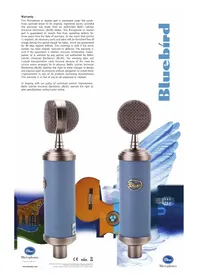
This Microphone or related part is warranted under the conditions outlined below to its original, registered owner, provided the purchase was made from an authorized Baltic Latvian Universal Electronics (BLUE) dealer. This Microphone or related part is guaranteed to remain free from operating defects for three years from the date of purchase. In the event that service is required, all necessary parts and labor will be furnished free of charge during this period except for tubes, which are guaranteed for 90 days against defects. This warranty is void if the serial number has been altered, removed or defaced. The warranty is void if the equipment is altered, misused, mishandled, maladjusted, or is serviced by any parties not authorized by Baltic Latvian Universal Electronics (BLUE). The warranty does not include transportation costs incurred because of the need for service unless arranged for in advance. Baltic Latvian Universal Electronics (BLUE) reserves the right to make changes in design and improve upon its products without obligation to install these improvements in any of its products previously manufactured. This warranty is in lieu of any or all expressed or implied.
In keeping with our policy of continued product improvement, Baltic Latvian Universal Electronics (BLUE) reserves the right to alter specifications without prior notice.



Congratulations on your purchase of the Bluebird! Here at Blue, we are known for designing and building the finest microphones available for studio, stage, film and broadcast use. Our microphones unite the heritage of the world's most respected classics with leading-edge technology, innovative engineering and inimitable styling. The Bluebird™ is a fine example of our years of microphone and capsule manufacturing experience.
To create the Bluebird, we've borrowed the best characteristics from many of our renowned microphone designs. With the Bluebird, you benefit from the immediacy of the Baby Bottle, the robust character of the Dragonfly, the shimmering high end of the Blueberry, the deep bottom of the Mouse, and the superlative, larger than life presence of the Kiwi all rolled into one, to bring you a microphone of exceptional sound quality, cutting-edge design and superior craftsmanship.

In order to familiarize yourself with the Bluebird's specialized and unique features, please take the time to read this manual and be sure to try the suggested recording tips. With proper care and use, the Bluebird will reward you with many years of recording enjoyment. Unlike other bluebirds you may know of, this one requires no feeding and there's no mess to clean up!

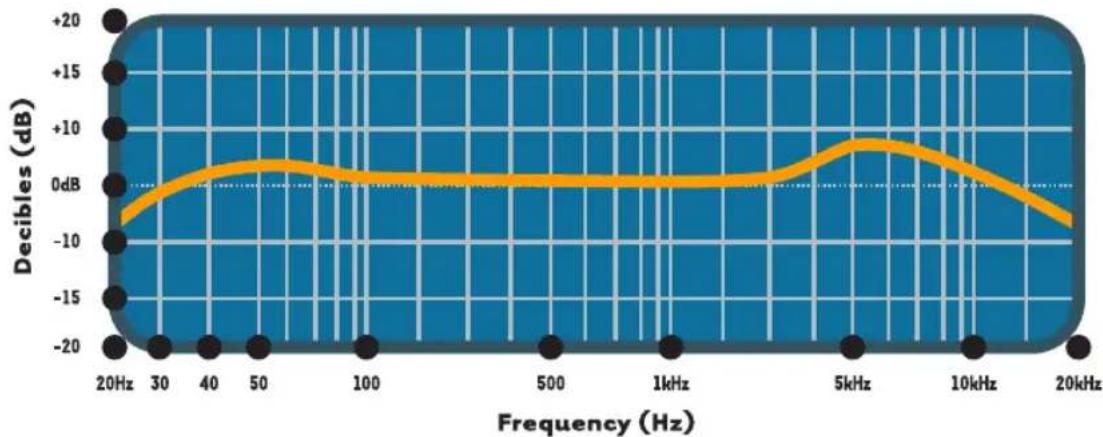
Bluebird Capsule Frequency Response
This frequency chart of the Bluebird capsule is only a start. It gives the recordist a basis of the sound provided. How the microphone reacts in a particular application will differ greatly because of many variables. Room acoustics, distance from sound source (proximity), tuning of the instrument and microphone cabling are only a few of the interacting issues. For an artist or engineer, how the microphones are used creates the basis of the sound.
The Bluebird is a pressure gradient large diaphragm condenser which employs an edge-terminated 6μ pure gold-sputtered mylar capsule membrane. Enclosed within its unique grille, the side-address capsule can be positioned in the smallest of spaces for very precise placement. Please note that unlike some Blue microphones, the Bluebird capsule is not designed to be removed or to rotate, swivel, or move in any direction.

Bluebird Capsule Polar Response
Compared to similar microphones, the Bluebird has a very low self noise specification (>7.5dB) and an very high output level (+12dBV), making it the perfect choice for today's high sample rate/deep word length digital platforms. Instead of integrated circuits (chips), the Bluebird employs a transformerless Class A discrete amplifier circuit to insure the most accurate and noise-free signal possible, with minimal distortion and coloration. What you hear at the input is what you get at the output. The Bluebird's tonal character makes it an ideal microphone for recording vocals, drums, electric guitar, piano, and most acoustic instruments including difficult sources like saxophones, flutes, and strings.
The Bluebird Accessory Pak includes a custom shockmount and pop filter. The shockmount is designed to isolate the microphone body from low frequency resonance (rumble), while the pop filter helps to eliminate sibilance and plosive sounds when used with vocals. For the best possible signal transmission from microphone output to preamp input, we recommend using Blue's 22-AWG Blueberry mic cable. Please note: Forceful positioning of the shockmount without loosening the thumbscrew can result in damage not covered by warranty.
The Bluebird requires +48V phantom power, which is provided by most mic preamps and mixing consoles. If your preamp or console input does not provide phantom power, you will need to purchase a separate +48V power supply. It is important to note that some units, though rated at +48V, may supply insufficient or unstable phantom power, which can result in distortion and/or degraded performance when used with a condenser microphone. Because of this, we have designed the Bluebird to deliver outstanding performance with a power supply as low as +35V!
To avoid damage to audio components when connecting the Bluebird to your microphone input, we recommend the following procedure:
- Set mic preamp gain to its nominal position ("off").
- Mute console master, stage monitor and mains feeds, headphones or foldback sends, and studio monitors.
- Connect the female end of your balanced XLR microphone cable to the Bluebird's output jack. Connect the male end to your balanced console input or balanced mic preamp input.
- Switch on phantom power.
- Un-mute all previously muted signal paths and adjust mic preamp gain as necessary.
Once the Bluebird is on the stand and powered up, make sure that the active, on-axis side of the capsule (the side aligned with and directly above the Blue logo) is facing the desired source. The Bluebird is a cardioid mic, and is designed to reject off-axis sound arriving at the back of the capsule.
Following are some application tips that will help you to get the most out of the Bluebird.

Here's a little-known secret — vocalists love singing into unique and impressive mics like the Bluebird. For a "big" vocal sound, position the vocalist within one to four inches of the capsule. There is
no need to worry about overloading the microphone, but be sure to use the supplied metal mesh pop filter to protect the diaphragm. Tilt the microphone upward (toward the forehead) for more projection and head tone, straight on at the mouth for maximum brightness and intelligibility, or down toward the chest for more robust full lows and smoother highs.

Because of its robust characteristics, the Bluebird is an excellent mic for any clean guitar sound. Position the capsule toward the center of the speaker to capture more highs, or toward the edge of the cone for a fuller sound with more bottom end. For overdriven or distorted tones, move the mic towards the outer edge of the cone, or back it away from the amp a foot or more to add a little room sound and soften the extreme high end. Give the Bluebird a try on electric bass, blues harmonica, and organ too!

Large diaphragm mics require careful placement when used on acoustic guitar, but the Bluebird's shimmering high end is well-suited to this job. For a balanced sound with plenty of sparkling high end, place the microphone facing the guitar neck, right where the neck joins the body (usually around the 12th – 14th frets). For starters, keep the mic as close as possible, and tilt the capsule toward the soundhole to capture a blend of low end and pick sound. If you need more lows, move the microphone closer to the soundhole. For more high end detail, move the Bluebird farther from the guitar, either at the same neck position, or above the instrument up by the guitarist's head.

Because of its natural highs and soft midrange characteristics, the Bluebird is an excellent choice for miking all members of the bowed string family. In general, the capsule should be positioned toward the instrument's bridge to pick up a blend of resonance and bow sound. On bass and cello, placement from 3 to 6 inches in front of the bridge is usually ideal. For violin and viola, it is preferable to position the microphone 1 to 2 feet above the instrument. Angle the capsule toward the bridge for more bow sound and low tones, or move the microphone toward the tuning pegs to capture a more diffuse, bright, and blended sound.

The Bluebird's slim profile and fast transient response offer numerous advantages when recording drums. For kit and hand drums, begin by placing the microphone two to four inches above the rim or hoop (where the head is secured to the shell). Angle the capsule toward the player's stick or hand to pick up more attack and definition. Positioning the capsule toward the shell will soften the sharp attack of a hand drum, or pick up more of the bright, crackling buzz from a snare. Moving the microphone closer to a drum generally increases the low end, shell resonance, and separation from other sound sources, while more distant placement emphasizes the interaction of the drum and the environment, producing a blended, airier sound.

The extended high end response of the Bluebird makes it an ideal choice for modern tonality when miking saxophones and other wind instruments. For soprano sax, clarinet, and related instruments, position the capsule directly
above and in front of the keys between the middle of the horn and the lowest pads. Try moving the mic up or down along the length of the body to adjust the balance of airy highs (toward the mouthpiece) and cutting midrange (toward the bell). On flute, start by placing the Bluebird above the middle of the instrument, and move the capsule closer to the mouthpiece if more highs and breath sound is desired. For other members of the saxophone family, start by placing the Bluebird two to six inches in front of the lip of the bell. Angle the capsule up toward the mouthpiece to capture more air, brightness, and high notes. For a mellower sound, orienting the capsule toward the floor emphasizes the low range of the sax, and tames the biting upper mids that project straight out of the bell.
We hope you enjoy your purchase and find the Bluebird to be an ideal mic for a wide spectrum of instrumentation and recording needs.
| Technical Data | |
| Transducer Type | Condenser, Pressure Gradient |
| Polar Pattern | Cardioid |
| Frequency Response | 20Hz - 20kHz |
| Sensitivity | 27.0mV/Pa at 1kHz (1Pa=94dB SPL) |
| Output Impedance | 50Ω |
| Rated Load Impedance | >1kΩ |
| Maximum SPL | 138 dB SPL (2.5kΩ, 0.5% THD) |
| S/N Ratio | 87 dB-A (IEC 651) |
| Noise Level | 7 dB-A (IEC 651) |
| Dynamic Range | 131 dB (@ 2.5kΩ) |
| Power Requirement | +48V DC Phantom Power (IEC 268-15) |
| Weight | 480g |
| Dimensions | 222mm x 45mm |

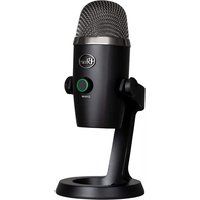

Brand : LOGITECH
Model : Bluebird SL
Category : Microphone