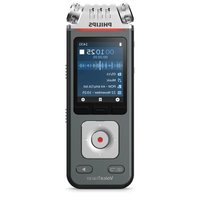
VoiceTracer DVT6115 - Audio recorder PHILIPS - Free user manual and instructions
Find the device manual for free VoiceTracer DVT6115 PHILIPS in PDF.


Pick your language and provide your email: we'll send you a specifically translated version.
| Product Type | Digital Voice Recorder |
| Brand | Philips |
| Model | VoiceTracer DVT6115 |
| Recording Formats | MP3, PCM (WAV) |
| Built-in Memory | 8 GB |
| Expandable Memory | microSD card slot (up to 32 GB) |
| Microphone | Built-in stereo microphones |
| Speaker | Integrated speaker |
| Display | Backlit LCD with status icons |
| Battery Type | 2 x AAA batteries (not included) |
| Battery Life | Up to 30 hours in MP3 mode (typical) |
| USB Connection | USB 2.0 High Speed |
| Audio Jack | 3.5 mm headphone jack |
| Voice Activation | VCVA (voice-controlled recording) |
| Playback Features | Variable speed playback, A-B repeat |
| Security | Password protection for recordings |
| Dimensions | Approx. 115 x 40 x 16 mm |
| Weight | Approx. 68 g (without batteries) |
| Included Accessories | USB cable, carrying pouch, quick start guide |
| System Compatibility | Windows 10/11, macOS |
| Cleaning and Care | Wipe with a soft dry cloth; never use liquid or solvent |
| Safety | Keep away from moisture and extreme heat; do not disassemble |
| Spare Parts and Repairability | Batteries and USB cables are user-replaceable; other repairs via authorized Philips service |
Frequently Asked Questions - VoiceTracer DVT6115 PHILIPS
How do I start a new recording on the VoiceTracer DVT6115?
Press the Record button to begin a new recording. The device will automatically save the file in the current folder. For best results, hold the device with the microphone aimed toward the source.
How do I transfer recordings to a computer?
Connect the device to your computer using the included USB cable. It appears as a removable drive, allowing you to copy the .MP3 or .WAV files directly to any folder.
What battery life can I expect?
With two AAA batteries, the recorder provides up to 30 hours of continuous recording in MP3 mode. Battery life varies with recording quality and volume.
Can I expand the storage capacity with a microSD card?
Yes, the DVT6115 has a microSD card slot that accepts cards up to 32 GB. The recorder automatically stores recordings on the card when it is inserted.
How do I protect a recording with a password?
Open the Settings menu, select Security, and then choose Password Protection. You can lock specific files or folders. The password is required to access them afterwards.
What is the VCVA feature and how do I use it?
VCVA (Voice Controlled Voice Activation) starts recording automatically when sound is detected and pauses when silence is detected. Enable it in the Record Settings menu to save battery and memory.
In which formats does the recorder save files?
The recorder supports two formats: MP3 for long recording times and PCM (WAV) for uncompressed, high-quality audio. You can choose the format in the recording menu.
Can I change playback speed?
Yes, during playback, use the Speed Control key to choose from several speeds (e.g., 0.5x, 1x, 2x). This is useful for dictation review.
Does the recorder come with a headphone jack?
Yes, there is a 3.5 mm headphone jack on the side. Plugging in headphones disconnects the built-in speaker automatically.
How do I clean and maintain the VoiceTracer?
Turn off the device and remove batteries before cleaning. Use a soft, dry cloth to wipe the exterior. Avoid contact with water or cleaning agents. Store at room temperature and keep the microphone area free of dust.
User questions about VoiceTracer DVT6115 PHILIPS
0 question about this device. Answer the ones you know or ask your own.
Ask a new question about this device
No questions yet. Be the first to ask one.
Download the instructions for your Audio recorder in PDF format for free! Find your manual VoiceTracer DVT6115 - PHILIPS and take your electronic device back in hand. On this page are published all the documents necessary for the use of your device. VoiceTracer DVT6115 by PHILIPS.
USER MANUAL VoiceTracer DVT6115 PHILIPS


Manual assistant
Powered by Anthropic
Waiting for your message
Product information
Brand : PHILIPS
Model : VoiceTracer DVT6115
Category : Audio recorder