WH63 E2 - Headset Yealink - Free user manual and instructions
Find the device manual for free WH63 E2 Yealink in PDF.


Pick your language and provide your email: we'll send you a specifically translated version.
| Product Type | Wireless DECT Headset |
| Brand | Yealink |
| Model | WH63 E2 |
| Connectivity | DECT (Digital Enhanced Cordless Telecommunications) |
| Wireless Range | Up to 150 m outdoors, 50 m indoors |
| Talk Time | Up to 13 hours |
| Standby Time | Up to 60 hours |
| Charging Time | Approximately 2.5 hours |
| Battery Type | Lithium-ion rechargeable |
| Audio Features | Wideband audio for crystal-clear calls |
| Microphone Type | Noise-canceling microphone |
| Headset Weight | Approx. 76 g |
| Base Station Dimensions | Approx. 111 x 95 x 40 mm |
| Base Station Weight | Approx. 82 g |
| Power Adapter | AC 100–240V input, 5V DC output |
| Compatibility | Works with desk phones, PCs (USB connection) |
| Operating Temperature | 0°C to 40°C |
| Storage Temperature | -20°C to +60°C |
| Warranty | 2 years (depending on region) |
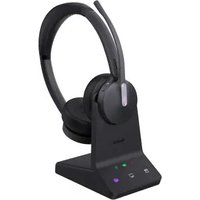
| Included Components | Headset, base station, power adapter, USB cable |
| Certification | CE, FCC, RoHS |
| Color | Black |
Frequently Asked Questions - WH63 E2 Yealink
How do I pair the headset with the base station?
Place the headset on the base station to charge it. The headset will automatically pair with the base station. If not, press and hold the pairing button on the base station for 3 seconds until the LED starts flashing, then place the headset in the cradle.
How do I charge the WH63 E2 headset?
Charge the headset by placing it in the base station cradle. Use the provided power adapter to connect the base station to a power outlet. A full charge takes approximately 2.5 hours.
Can I connect the WH63 E2 to my smartphone?
Yes, you can connect the base station to a smartphone via Bluetooth or using a USB cable to a computer. The headset supports both desk phone and softphone communication.
How do I adjust the volume on the headset?
Use the volume buttons located on the headset earpiece. Press the + button to increase volume and the - button to decrease volume during calls.
How do I mute the microphone?
Press the mute button on the headset. When muted, you will hear a beep and see a red LED indicator on the microphone boom.
How do I clean and maintain the headset?
Wipe the headset with a soft, dry cloth. Do not use liquids or solvents. Clean the ear cushions and microphone sponge regularly to maintain audio quality.
What is the wireless range of the WH63 E2?
The headset has a DECT range of up to 150 meters outdoors and 50 meters indoors, allowing freedom to move around your workspace.
How do I replace the battery in the headset?
To replace the battery, gently remove the ear cushion and unscrew the battery cover. Disconnect the old battery and connect the new lithium-ion battery, then reassemble. Always use a Yealink approved battery.
Is the WH63 E2 compatible with Microsoft Teams or Zoom?
Yes, the WH63 E2 is certified for Microsoft Teams and Zoom. It provides dedicated buttons for call control and integrates seamlessly with softphone applications.
How do I reset the headset to factory settings?
To reset, press and hold the call end button and the mute button simultaneously for 5 seconds until you hear a tone. The headset will restart and restore default settings.
User questions about WH63 E2 Yealink
0 question about this device. Answer the ones you know or ask your own.
Ask a new question about this device
No questions yet. Be the first to ask one.
Download the instructions for your Headset in PDF format for free! Find your manual WH63 E2 - Yealink and take your electronic device back in hand. On this page are published all the documents necessary for the use of your device. WH63 E2 by Yealink.
USER MANUAL WH63 E2 Yealink
Manual assistant
Powered by Anthropic
Waiting for your message
Product information
Brand : Yealink
Model : WH63 E2
Category : Headset