
BLUETOOTH HEADSET #F8T064 - Wireless Headphones BELKIN - Free user manual and instructions
Find the device manual for free BLUETOOTH HEADSET #F8T064 BELKIN in PDF.


| Product Type | Bluetooth Wireless Headset |
| Brand | Belkin |
| Model | BLUETOOTH HEADSET #F8T064 |
| Dimensions (L x W x H) | 60 x 18 x 11 mm |
| Weight | 10.6 g (without charger) |
| Battery Type | Rechargeable lithium-polymer, 120 mAh |
| Charging Time | 1.5 to 2 hours |
| Talk Time | Up to 7 hours (HV3 profile) |
| Standby Time | More than one week |
| Bluetooth Version | v1.1/v1.2 |
| Supported Profiles | Headset and Hands-Free |
| Range | Up to 10 meters |
| Operating Temperature | -20°C to 60°C |
| Control Buttons | Talk, Volume Up, Volume Down |
| LED Indicators | Blue and red (status, call, charging) |
| Package Contents | Headset, desktop charger, lanyard, ear cushions (x2), ear hook, replacement faceplates (x3), user manual |
| Warranty | 1 year limited |
| Care and Cleaning | Clean with a dry cloth, do not immerse in water |
| Safety | FCC and CE compliant, non-replaceable battery |
| Repairability | Battery not user-replaceable |
| Available Colors | Replacement faceplates included (not specified) |
Frequently Asked Questions - BLUETOOTH HEADSET #F8T064 BELKIN
User questions about BLUETOOTH HEADSET #F8T064 BELKIN
0 question about this device. Answer the ones you know or ask your own.
Ask a new question about this device
Download the instructions for your Wireless Headphones in PDF format for free! Find your manual BLUETOOTH HEADSET #F8T064 - BELKIN and take your electronic device back in hand. On this page are published all the documents necessary for the use of your device. BLUETOOTH HEADSET #F8T064 by BELKIN.
USER MANUAL BLUETOOTH HEADSET #F8T064 BELKIN
Experience the freedom of wireless communication
Experience the freedom of wireless communication
En
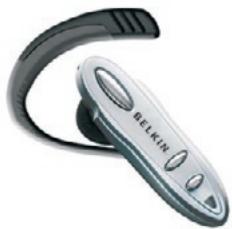
User Manual

Bluetooth
F8T064ea
P75048ea
Contents
Safety Approvals and Certification 2
Introduction 4
Headset Features 6
Charging the Headset 7
Wearing the Headset. 9
Switching the Headset On/Off 12
Pairing the Headset 12
Using the Headset 14
Accepting a Call 14
Ending a Call. 14
Rejecting a Call 15
Making a Call 15
Redialing the Last Number 16
Volume Control 16
Transferring a Call between Headset and Mobile Phone 16
Mute/Un-mute 17
Headset LED Indicator 18
Desktop Charger Indicator 18
Audio Tones 19
Specifications 20
Limited Warranty 21
Safety Approvals and Certification
Users are advised not to make changes or modify the device in any way. Changes or modifications not expressly approved by Belkin will void the warranty.
FCC Notices
This device complies with part 15 of the FCC rules. Operation is subject to the following two conditions:
(1)This device may not cause harmful interference, and
(2)This device must accept any interference received, including interference that may cause undesired operation.
FCC RF Exposure requirements:
This device and its antenna(s) must not be co-located or operation in conjunction with any other antenna or transmitter.
NOTE: THE MANUFACTURER IS NOT RESPONSIBLE FOR ANY RADIO OR TV INTERFERENCE CAUSED BY UNAUTHORIZED MODIFICATIONS TO THIS EQUIPMENT. SUCH MODIFICATIONS COULD VOID THE USER'S AUTHORITY TO OPERATE THE EQUIPMENT.
CE Statement
Important Notice: This device is a 2.4GHz FHSS Bluetooth headset, intended for office and home uses in all EU and EFTA member states.
The Bluetooth trademarks are owned by Bluetooth SIG, Inc., U.S.A. and licensed to Belkin.
En
Introduction
Congratulations on your purchase of a Belkin Bluetooth Headset. The Bluetooth Headset is quite light, weighing just about 10g. It has both Headset and Hands-Free profiles for more functions, and is compatible with more Bluetooth wireless technology mobile phones.
Read this user's guide carefully before you start using Belkin Bluetooth Headset.
Package Contents
In this package, you will find:
One Belkin Bluetooth Headset
One Neck strap
One Desktop charger
Two Ear cushions
One User's guide
Oneearhook
Three front covers for replacement
Bluetooth Wireless Technology
The Bluetooth wireless technology is set to revolutionize the personal connectivity market by providing freedom from wired connections. It is a specification for a small form-factor, low-cost radio solution providing links between mobile computers, mobile phones and other portable and handheld devices, and connectivity to the Internet. The Bluetooth Special Interest Group (SIG), comprised of leaders in the telecommunications, computing, and network industries, is driving development of the technology and bringing it to market. The Bluetooth SIG includes promoter companies 3Com, Ericsson, IBM, Intel, Lucent, Microsoft, Motorola, Nokia and Toshiba, and more than 2000 adopter companies.
Headset Features
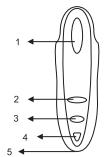
- Talk Button: Switches the headset on/off, answers/ends a call, pairs the headset with a device, and is used for voice dialing.
- Volume Up Button: Increases the speaker volume.
- Volume Down Button: Decreases the speaker volume.
- LED Indicator: Displays the status of the headset.
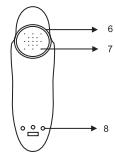
- Microphone: Picks up external audio.
- Earpiece: Holds the headset in the ear.
- Speaker: Plays incoming audio.
- Charging Port: Charges the battery.
Charging the Headset
The headset has a rechargeable battery. Before using the headset for the first time, you have to charge the headset battery for approximate 2 hours to get a full charge. A fully charged battery provides up to 7 hours of talk time and over 1 week of standby time.
When the battery is low, the LED indicator flashes red. The low battery warning indication will begin three minutes of talk time before the headset runs out of power.
You can recharge the headset at any time without waiting for the battery to be completely discharged. To keep the battery in good condition, please always recharge the headset within a month once the headset is fully discharged.
Before charging, make sure that the headset is at room temperature. The battery will not charge in very cold and very hot conditions.
NOTE: The headset battery is not replaceable.
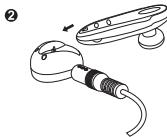
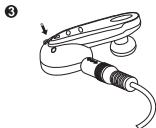
To charge the headset:
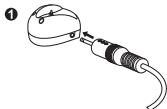
- Connect the AC adapter to the desktop charger, then plug into an electrical outlet.
- Place the headset in the desktop charger.
- During charging, the red indicator light on the desktop charger illuminates.
- When the battery is fully charged, the indicator light on the charger turns green.
- You can now remove the headset from the desktop charger, and disconnect the desktop charger from the AC adapter.
During charging, if an incoming call arrives while the headset is switched on, you can answer the call simply by removing the headset from the desktop charger.
Wearing the Headset
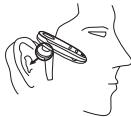
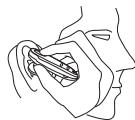
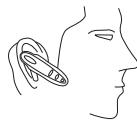
The Belkin Bluetooth Headset can be worn either on the right or left ear. The earpiece is adjustable, and the 90-degree, rotatable design ensures a snug yet comfortable fit in your ear. To put on the headset, please follow the instructions as below:
- Directly put the earpiece into your outer ear canal.
- Adjust the headset to fit your ear.
- The microphone should be positioned towards to your mouth.
1
2
3
The ear cushion supplied with the Belkin Bluetooth Headset provides additional comfort and Better fitting. To attach the ear cushion,
- Hold the headset firmly.
- Cover the earpiece with the ear cushion.
- The ear cushion is attached to the ready-to-wear headset.
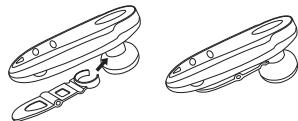
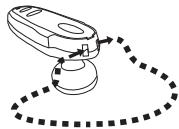
Wearing the Clip or shap
Easy to carring via Clip or carring strap.
1
2
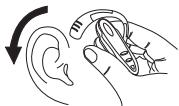
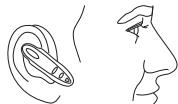
Putting on the Headset
- Put on the headset with the ear hook behind your ear.
- Make sure the microphone is pointing towards your mouth.
1
2
3
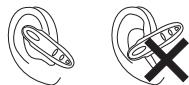
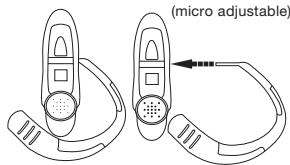
To adjust the ear hook for right-ear use
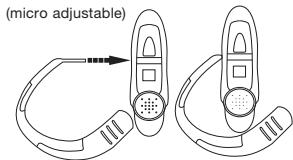
To adjust the ear hook for left-ear use
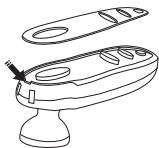
Changing cover
Suite your style and match your mood with Belkin cut-out-covers.
Pull out the current cover as shown, then push your favorite cover in.
Switching the Headset On/Off
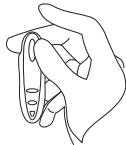
To switch the headset on
- Press the Talk button for about 5 seconds until you hear a low tone followed by a high tone. The LED indicator flashes blue four times.
- The headset switches on and enters standby mode. The LED indicator continuously flashes blue every 3 seconds.
To switch the headset off
- Press the Talk button for about 1 second until you hear a high tone followed by a low tone. The LED Indicator flashes red four times.
- The headset switches off and the LED indicator no longer blinks.
Pairing the Headset
Before using the headset, you must first pair it with a Bluetooth wireless technology enabled device, such as a Bluetooth mobile phone.
Pairing is necessary for two Bluetooth devices to connect each other wirelessly. After creating a paired link, you do not need to repeat the pairing process and the headset automatically links to the mobile phone when both devices are switched on. Paring must be performed every time you want to use the headset with a different Bluetooth mobile phone or other Bluetooth wireless technology enabled devices. The headset can be paired simultaneously with up to 8 mobile phones.
To initiate pairing between the headset and a Bluetooth mobile phone in close proximity:
- Please turn off the headset.
- Make certain the mobile phone is switched on.
- Press the Talk button to switch on the headset, and keep the Talk button pressed for 7 seconds until the LED indicator alternates between blue and red. The headset is now ready for pairing with the mobile phone.
- Perform a device discovery from the mobile phone. (For details on device discovery, please consult your phone's user's guide.)
- Once the mobile phone discovers the headset, the text Belkin appears on the phone's screen.
- Follow the phone instructions to accept pairing. When prompted to enter the passkey, enter the number : 0000.
- If time runs out after 60 seconds and the pairing fails, you will have to repeat the steps above. You can view the status from the phone's screen.
- On completing pairing, the phone's screen will notify you that the pairing was successful. The LED indicator continuously flashes blue, and the headset goes into standby mode.
- You can now make and answer calls through the headset.
Using the Headset
Before using the headset, make sure that (1) the headset is switched on and connected to a paired Bluetooth mobile phone; (2) the headset is within 10 meters of the phone; and (3) the phone's Bluetooth feature is on (see your phone's user's guide).
NOTE: The headset supports both Headset and Hands-Free profiles. Some mobile phones don't Support all functions listed below. Please consult your phone's user's guide.
Accepting a Call
When an incoming call comes, the headset rings and the LED indicator flashes blue at a 3-second interval. To receive the call from the headset, press the Talk button once. You can also answer the call by using your phone in the normal way. Please note that if the mobile phone rings first, wait until you hear a ring tone from the headset, and then press the Talk button to answer the call.
Ending a Call
To end a call, press the Talk button once on the headset or press the phone's END key. The headset returns to standby mode.
Rejecting a Call
When a call comes and you do not want to answer it, you can press the Talk button for 2 seconds to reject the call.
Making a Call
You can make a call through:
Voice activation
To use voice activation, the mobile phone must support voice dialing. For details on voice dialing, please see your phone's user's guide.
- Press the Talk button once on your headset.
- After a short tone sounds, speak the name of the person you wish to connect (if he or she has a voice tag in your phone).
- The phone automatically dials the number. You can see the details of the call from the phone's screen.
Dialing a phone number from your mobile phone
- Dial the phone number from the mobile phone's keypad.
- Press the key to send the call from your phone.
- The call automatically transfers to the headset.
Redialing the Last Number
To redial the last phone number, press either the Volume Down button for 3 seconds.
Volume Control
During a call, you can adjust the headset speaker volume. An audio tone is played for each volume up and volume down step.
To increase the volume, press the Volume Up button repeatedly until you reach the desired level. To decrease the volume, press the Volume Down button repeatedly until you reach the desired level.
Transferring a Call between Headset and Mobile Phone
To transfer a call from the headset to the mobile phone, initiate it from the mobile phone. (Refer to your phone's user's guide)
To transfer a call from the mobile phone to the headset, simply press the Volume up button once even if the headset is then switched on after a call has been initiated.
Mute/Un-mute
To mute the headset sound during a call, press the Volume Up button and the Volume Down button for 2 seconds, and you hear 1 tones repeated every 20 seconds. Upon activating the mute function, the person on the other side won't hear you, but you can hear all sound generated from the other side. To un-Mute, press the Volume Up button or the Volume Down button once.
Headset LED Indicator
| Status | Blue LED | Red LED | Interval | Remarks |
| Turning on | 4 times | |||
| Turning off | 4 times | |||
| Pairing mode | Flashes blue and red alternatively until the pairing is complete or time out. | |||
| Standby mode | 3 times | 3 times | 3 seconds | ■Flashes red when low battery |
| Incoming call | 3 times | 3 seconds | ||
| Talk mode | 4 times | 4 times | 3 seconds | ■Flashes red when low battery |
Desktop Charger Indicator
| Status | Red LED | Green LED |
| Charging in process | On | |
| Charging complete | On |
Audio Tones
| Switching on | Quick series of 2 tones, low to high | Switching off | Quick series of 2 tones, high to low |
| Pairing mode | 1 tones | Incoming call | A ring tone at a 2-second interval |
| Mute | 1 tones repeated every 20 seconds | Un-mute | Single tone |
| Low battery | 5 rapid tones every 20 seconds in standby mode | ||
Particularly, for Nokia mobile phones
All sounds generated from the mobile phone automatically transfer to the headset.
- When a call comes in, the headset uses the same ring tone as the mobile phone. If the mobile phone is set in vibration mode, you won't hear any ring tone from the headset.Standard
Specifications
| Standard | Compliant with Bluetooth specification v1.1 / v1.2 |
| Chipset | BlueCore2-Audio single chipset |
| Profile Supported | Bluetooth Headset & Hands-free profiles |
| Radio Frequency | 2402 MHz ~2480 MHz |
| Transmitter Power | Class 2 (max 4dBm) |
| Transmission Range | Up to 10 meters |
| Receiver Sensitivity | -78 dBm |
| Charger Power Supply | 5VDC / 200 mA |
| Temperature | Operating: -20°C to 60°C; Storage: -20°C to 60°C; Charging: 0°C to 45°C |
| Operation Voltage | 3.7V |
| Battery | Rechargeable 120mAh Lithium Polymer battery |
| Charging Time | 1.5 ~2 hours |
| Talk Time | HV1: Over 4 hours; HV3: Over 7 hours |
| Standby Time | More than 1 week |
| Dimension | 60(L)x18(W)x11(H) mm |
| Weight | 10.6g (not including desktop charger) |
HV1 mobile phones: Nokia 6310/6310i/8910/8910i
HV3 mobile phones: Ericsson T39/T68; Sony Ericsson T68i/P800/T610/Z600
Limited Warranty
Belkin One-year Product Warranty
Belkin warrants this product against defects in materials and workmanship for its warranty period. If a defect is discovered, Belkin will, at its option, repair or replace the product at no charge provided it is returned during the warranty period with transportation charges prepaid to the authorized Belkin dealer from whom you purchased the product. Repaired or replaced product will be returned to you at the same revision level as received or higher at Belkin's option. Belkin reserves the right to replace discounted product with an equivalent generation product. Proof of purchase may be required.
This warranty does not apply if the product has been damaged by accident, abuse, misuse or misapplication; if the product has been modified or dismantled without the written permission of Belkin; or if any Belkin serial number has been removed or defaced.
The warranty and remedies set forth above are exclusive and in lieu of all others, whether oral or written, expressed or implied. Belkin specifically disclaims any and all other warranties, including implied warranties of merchantability, fitness for a particular purpose, and non-infringement of third party rights are expressly excluded.
Belkin is not responsible for special, incidental or consequential damages resulting from any breach of warranty or under any other legal theory, including, without limitation, damages resulting from use of or reliance on this information presented, loss of profits or revenues or costs of replacement goods, even if informed in advance of the possibility of such damages.
BELKIN
www.belkin.com
Belkin Ltd.
Express Business Park, Shipton Way
Rushden NN10 6GL, United Kingdom
+44 (0) 1933 35 2000
+44 (0) 1933 31 2000 fax
Belkin GmbH
Hanebergstrasse 2
80637 Munich, Germany
+49 (0) 89 143405 0
+49 (0) 89 143405 100 fax
Belkin B.V.
Starparc Building, Boeing Avenue 333
1119 PH Schiphol-Rijk, The Netherlands
+31 (0) 206547300
+31 (0) 20 654 7349 fax
© 2005 Belkin Corporation. All rights reserved. All trade names are registered trademarks of respective manufacturers listed. The Bluetooth name and the Bluetooth trademarks are owned by Bluetooth SIG, Inc. and are used by Belkin Corporation under license. Mac, Mac OS, and Apple are trademarks of Apple Computer, Inc., registered in the U.S. and other countries.
BELKINBluetooth™ HeadSet
Express Business Park, Shipton Way Rushden NN10
6GL, Royaume-Uni
+44 (0) 1933 35 2000
+44 (0) 1933 31 2000 Fax
Belkin B.V.
Starparc Building, Boeing Avenue 333
Assistance Technique Belkin
Europe:0080022355460
Belkin GmbH
Hanebergstraße 2
Express Business Park, Shipton Way Rushden NN10
6GL, Reino Unido
+44 (0) 1933 35 2000
+44 (0) 1933 31 2000 fax
Belkin B.V.
Starparc Building Boeing Avenue 333
1119 PH Schiphol-Rijk, Paises Bajos
+31 (0) 206547300
+31 (0) 20 654 7349 fax
Belkin GmbH
Hanebergstrasse 2
© 2005 Belkin Corporation. All rights reserved. All trade names are registered trademarks of respective manufacturers listed. The Bluetooth name and the Bluetooth trademarks are owned by Bluetooth SIG, Inc. and are used by Belkin Corporation under license. Mac, Mac OS, and Apple are trademarks of Apple Computer, Inc., registered in the U.S. and other countries.