
BC-838 PLUS - Remote control IDK MULTIMEDIA - Free user manual and instructions
Find the device manual for free BC-838 PLUS IDK MULTIMEDIA in PDF.


| Product Type | Universal remote control with LCD screen |
| Brand | IDK MULTIMEDIA |
| Model | BC-838 PLUS |
| Dimensions (L x W x H) | 205 x 48 x 32 mm |
| Weight (without batteries) | 100 g |
| Power supply | 3 V (2 AAA alkaline batteries, LR3) |
| Infrared range | 7 m, ±20° |
| Operating temperature | 0 °C to +50 °C |
| Storage temperature | -25 °C to +125 °C |
| Number of controllable devices | Up to 8 A/V devices |
| Programming methods | Direct code, automatic search, group search, learning |
| Learning function | Copy functions from old remote (except SET key and device mode) |
| Special functions | Clock, alarm, channel scan, ShowView, volume lock/unlock, Shift function, teletext |
| Display | LCD screen with IR indicator, time, day, status |
| Memory retention | Settings are retained when changing batteries (except clock) |
| Care and cleaning | Clean with a soft, dry cloth. Do not use abrasive products. |
| Safety | Do not mix new and used batteries. Remove batteries if not used for a long time. Observe polarity. |
| Spare parts and repairability | Batteries replaceable by user. No internal parts repairable. In case of malfunction, contact customer service. |
| General information | Pre-programmed universal remote control with extensive database. Suitable for TV, VCR, DVD, CD, satellite, cable, etc. |
Frequently Asked Questions - BC-838 PLUS IDK MULTIMEDIA
User questions about BC-838 PLUS IDK MULTIMEDIA
0 question about this device. Answer the ones you know or ask your own.
Ask a new question about this device
Download the instructions for your Remote control in PDF format for free! Find your manual BC-838 PLUS - IDK MULTIMEDIA and take your electronic device back in hand. On this page are published all the documents necessary for the use of your device. BC-838 PLUS by IDK MULTIMEDIA.
USER MANUAL BC-838 PLUS IDK MULTIMEDIA
8-in-1 Universal Remote Control
Instruction Manual (P.11)
(13) Touche SET (REGLAGE)
Touche SHIFT (INVERSE)
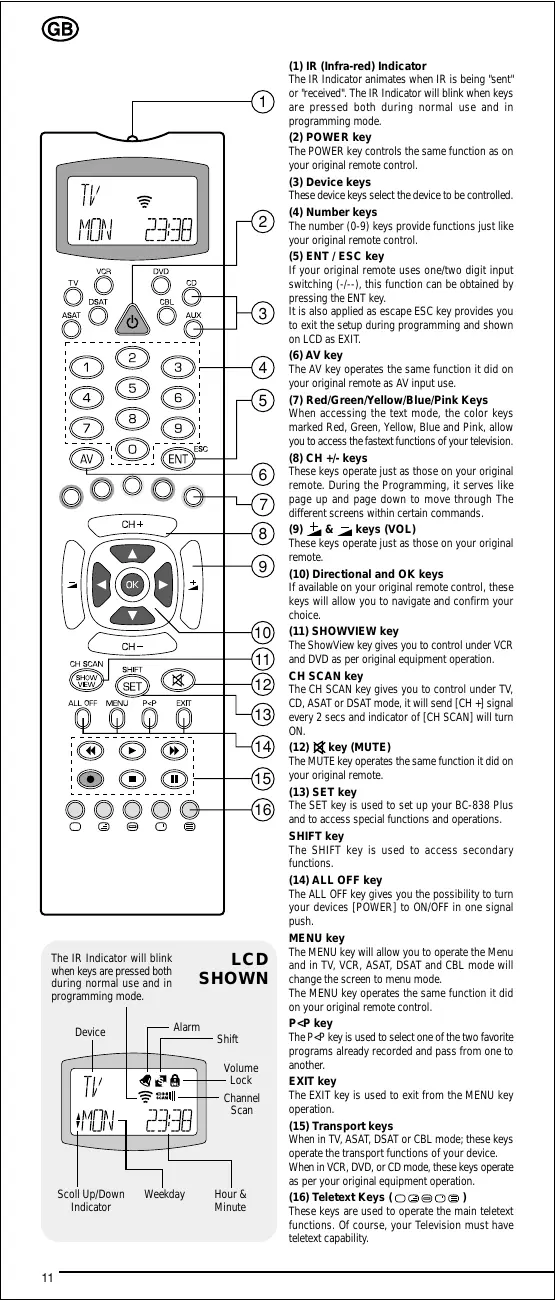
The IR Indicator animates when IR is being "sent" or "received". The IR Indicator will blink when keys are pressed both during normal use and in programming mode.
(2) POWER key
The POWER key controls the same function as on your original remote control.
(3) Device keys
These device keys select the device to be controlled.
(4) Number keys
The number (0-9) keys provide functions just like your original remote control.
(5) ENT/ESC key
If your original remote uses one/two digit input switching (- / - ) , this function can be obtained by pressing the ENT key. It is also applied as escape ESC key provides you to exit the setup during programming and shown on LCD as EXIT.
(6) AV key
The AV key operates the same function it did on your original remote as AV input use.
(7) Red/Green/Yellow/Blue/Pink Keys
When accessing the text mode, the color keys marked Red, Green, Yellow, Blue and Pink, allow you to access the fastest functions of your television.
(8) CH + / - keys
These keys operate just as those on your original remote. During the Programming, it serves like page up and page down to move through The different screens within certain commands.
(9) ± & keys (VOL)
These keys operate just as those on your original remote.
(10) Directional and OK keys
If available on your original remote control, these keys will allow you to navigate and confirm your choice.
(11) SHOWVIEW key
The ShowView key gives you to control under VCR and DVD as per original equipment operation.
CH SCAN key
The CH SCAN key gives you to control under TV, CD, ASAT or DSAT mode, it will send [CH +] signal every 2 secs and indicator of [CH SCAN] will turn ON.
(12) key (MUTE)
The MUTE key operates the same function it did on your original remote.
(13) SET key
The SET key is used to set up your BC-838 Plus and to access special functions and operations.
SHIFT key
The SHIFT key is used to access secondary functions.
(14) ALL OFF key
The ALL OFF key gives you the possibility to turn your devices [POWER] to ON/OFF in one signal push.
MENUKey
The MENU key will allow you to operate the Menu and in TV, VCR, ASAT, DSAT and CBL mode will change the screen to menu mode. The MENU key operates the same function it did on your original remote control.
P
The P < P key is used to select one of the two favorite programs already recorded and pass from one to another.
EXITkey
The EXIT key is used to exit from the MENU key operation.
(15) Transport keys
When in TV, ASAT, DSAT or CBL mode: these keys operate the transport functions of your device. When in VCR, DVD, or CD mode, these keys operate as per your original equipment operation.
(16) Teletext Keys (□□□
These keys are used to operate the main teletext functions. Of course, your Television must have teletext capability. Thank you for purchasing the BC-838 PLUS preprogrammed and learning universal remote control. Before you can use your new remote, you will need this manual to set up your new BC-838 PLUS to operate the specific A/V home entertainment and any infrared transmission equipment you wish to control.
CONTROLS UP TO 8 DEVICES
Your BC-838 PLUS is designed to let you use one remote to operate your Audio and Video equipment; any device designed to be operated by an infrared signal. Your BC-838 PLUS comes with wide range transmitter for maximum range and is capable for High Frequency Signal. You can choose any combination of eight devices you would like to operate.
LEARNING FEATURE
The BC-838 PLUS comes equipped with the unique "learning feature" (next to the regular Set Up), which means that you can copy almost any function from your original remote control onto your new BC-838 PLUS. This comes in handy, when after having setup your BC-838 PLUS you may find some functions from your original remote missing on your BC-838 PLUS keyboard.
BATTERY INSTALLATION / CHANGE
1. On the back of the BC-838 PLUS, pull the battery compartment cover. 2. Insert two (2) AAA new Alkaline batteries. 3. Match the batteries to the (+) and (-) marks inside the battery compartment. 4. Close the battery compartment. 
CLOCK SET UP
The BC-838 PLUS provides you to view the current status of Weekday and Clock. Simply follow below steps: 1. Press the [SET] key to for 3 seconds and the LCD will be shown CODE SETUP. 2. Press & release the [CH + ] for three (3) times to view the CLOCK SET page. 3. Upon the LCD shown as CLOCK SET, press the [SET] key once. 4 The HOUR of LCD will be blinks, press the [CH + ] or [CH - ] key to select desired HOUR. 5. Press the [SET] key once, the MINUTE of LCD will be blinks, press the [CH + ] or [CH - ] key to select desired MINUTE. 6. Press the [SET] key once, the WEEKDAY of LCD will be blinks, press the [CH + ] or [CH - ] key to select desired WEEKDAY. 7. Check the setting of Weekday and Clock, if it is OK then press the [SET] key to confirm and LCD shown as SUCCESS.  Press the [SET] key to for 3 seconds  Press & release the [CH + ] key for three (3) times  Press the [CH + ] or [CH - ] key to select desired Hour / Minute/ Weekday   Press the [SET] key to confirm
NOTE:
- Press the [SET] key to confirm and store the setting of weekday and clock. - During the set up of HOUR or MINUTE or WEEKDAY, you can leave the set up individually by pressing of the [ESC] key to escape and the LCD shown as EXIT and back to normal operation mode. - Press the [ESC] key for escape and the selected setting will not be stored.
SETTING UP BY DIRECT CODE
Example: To set up the BC-838 PLUS for your TV: 1. Make sure your TV is switched on (not on standby). 2. Press the [SET] key for 3 seconds and the LCD will be shown CODE SETUP. 3. Press & release the [SET] key and the LCD will be shown TV-001 page. 4. Press the [Device] key to select a desired mode (TV, VCR, SAT or AUD, etc...). In this case is [TV] key. 5. Enter the 3-Digit TV code from the code list for your brand equipment. * If you perform this procedure correctly, the LCD shown the code number and then SUCCESS * If not, the LCD shown as ERROR means that the code number may not correct. 6. Aim the BC-838 Plus at your TV and press the [POWER] key. Your TV should turn off. If none of the keys or only some of the keys operate your TV, please repeat Steps 1-5, trying each code listed for your brand until you find the one that operates your TV. 7. Your BC-838 Plus is now programmed to operate your TV. Write down your TV code on the Quick Code Reference as listed on this BC-838 Plus Instruction Manual for future reference. 8. To program other equipment, repeats the Steps 1-7 for your VCR, DVD, CD, ASAT, DSAT, CBL, and or your second TV or VCR or SAT, etc.. NOTE : To exit from the DIRECT CODE SETUP during the code entering, just press the [ESC] key once and back to normal operation mode.  Press the [SET] key to for 3 seconds  Press & release the [SET] key  Input 3 Digit TV code  Code error  Code accepted Write down the code no. for your device :
| TV | |
| VCR | |
| DVD | |
| SAT | |
| CD | |
| DECODER | |
| LD | |
| AUX |
IMPORTANT FOR AUTO ALL SEARCH AND GROUP SEARCH
Before the use of either Auto All Search or Group Search, please read careful of below requirement:
| Device Mode for TV | Assigned for TV searching. |
| Device Mode for VCR | Assigned for VCR searching. |
| Device Mode for DVD | Assigned for DVD searching. |
| Device Mode for CD | Assigned for CD searching. |
| Device Mode for ASAT | Assigned for ASAT searching. |
| Device Mode for DSAT | Assigned for DSAT searching. |
| Device Mode for CBL | Assigned for CBL/SAT searching. |
| Device Mode for AUX | Need to set up the selected device code first in order to search proper for assigned device |
SETTING UP BY AUTO ALL SEARCH
This Auto All Search method checks all its preprogrammed codes to find the code that will operate your equipment automatically. This method may take a few minutes. 1. Make sure your TV is switched on (not on standby). 2. Aim the BC-838 Plus at your TV. 3. Press the [SET] key to for 3 seconds and the LCD will be shown CODE SETUP. 4. Press & release the [CH + ] key once to view the CODE SRCH page. 5. Upon the LCD shown as CODE SRCH, press the [SET] key once, the LCD shown as TV ALL SRCH. 6. Press the [SET] key once, the LCD shown ALL TV -001 and the BC-838 Plus is now performed the auto search count from the code you set up before, for example TV 001... and so on. 7. If the TV turns off. This indicates that the BC-838 Plus is now set to your TV. 8. Press the [SET] key to save the working code. The LCD shown as SUCCESS and the BC-838 Plus is now ready to operate your TV. 9. To check the code, press the [POWER] key to ON position. Press the [CH + / - ],[VOL + / - ± ] , and other applicable keys. If no function, repeats Steps 1-11. 10. In any cases if you need to leave the Auto All Search, just press the [ESC] key to exit, the LCD will be shown as EXIT and back to normal operation mode. 11. To program other equipment, repeats the Steps 1-11 for your VCR, DVD, CD, ASAT, DSAT, CBL and or your second TV or VCR or SAT, etc..  Press the [SET] key to for 3 seconds  Press & release the [CH + ] key  Press the [SET] key once   Press the [SET] key to save the working code  Press the [SET] key once for AUTO SEARCH
SETTING UP BY GROUP SEARCH
This Group Search method checks all its preprogrammed codes to find the code that will operate your equipment. This method may take a few minutes. 1. Make sure your TV is switched on (not on standby). 2. Aim the BC-838 Plus at your TV. 3. Press the [SET] key to for 3 seconds and the LCD will be shown CODE SETUP. 4. Press & release the [CH + ] key once to view the CODE SRCH page. 5. Upon the LCD shown CODE SRCH, press the [SET] key once, the LCD shown as TV ALL SRCH. 6. Press [CH + ] to select the group for brand of the Group Search.
| Group | TV | VCR | SAT |
| Group 1 | Medion, Lifetec, Magnum, Micromaxx, Microstar, Tevion, Innovation, TCM, General, Technic, Video | Medion, Lifetec, Videoe, Micromaxx, Microstar, Tevion, Innovation, TCM, General, Technic | Medion, Lifetec, Micromaxx, Glaxis, Microstar, Innovation |
| Group 2 | Philips, Erres, PYE, Philico, Radiola | Philips, Philico | Philips, Philico |
| Group 3 | Sony, Akai, Panasonic, JVC, Sharp, Toshiba, Daewoo | Sony, Akai, Panasonic, JVC, Sharp, Toshiba, Daewoo | Pace, Echostar |
| Group 4 | Thomson, Brandt | Thomson, Brandt | Thomson, Brandt, Universum |
| Group 5 | Telefunken, Saba, Baird, Normende, Ferguson | Telefunken, Saba, Normende, Ferguson | Telefunken, Saba, Normende, Ferguson |
| Group 6 | Grundig, Blaupunkt | Grundig, Blaupunkt | Grundig |
| Group 7 | Nokia, Finlux, ITT | Nokia, Finlux, ITT | Nokia, Finlux, ITT, Hirschmann |
7. Once you selected, press the [SET] once, the LCD shown as GROP1TV-001 and the BC-838 Plus is now performed the Group Search count from the code you set up before, for example TV 001... and so on. 8. If the TV turns off, Press the [SET] key to save the working code. The LCD shown as SUCCESS and this indicates that the BC-838 Plus is now set to your TV. 9. To check the code, press the [POWER] key to ON position. Press the [CH + / - ],[VOL + / - ± ] , and other applicable keys. If no function, repeats Steps 1-9. 10. In any cases if you need to leave the Group Search, just press the [ESC] key to exit, the LCD will be shown as EXIT and back to normal operation mode. 11. To program other equipment, repeats the Steps 1-9 for your VCR, DVD, CD, ASAT, DSAT, CBL, and or your second TV or VCR or SAT.  Press the [SET] key to for 3 seconds  Press & release the [CH + ] key  Press the [SET] key once  Press the [SET] key to save the working code.  Press the [SET] key once for GROUP SEARCH  Press the [CH + J] key once 
SETTING UP BY LEARNING
The BC-838 Plus comes with a complete library of pre-programmed codes. After you have set up the BC-838 Plus for your device, you may find that there are one or more keys that you had on the original remote control, which do not have a place on the BC-838 Plus keypad. The BC-838 Plus offers a special learning feature that allows you to copy almost any function from your original remote control onto the keypad of the BC-838 Plus. Except the [SET] key and Device mode keys.
Before you start :
- Make sure your original remote control is working correctly. - Make sure neither your BC-838 Plus, nor your original remote control is pointing at your device.
To Learning (direct):
For example: To copy the "PIP" function from your original TV remote control onto the key of your BC-838 Plus.  1. Place the BC-838 Plus and your original remote control on a flat surface. Make sure the ends which you normally point at your device are facing each other. Point the original remote to the front center head of the BC-838 Plus (see picture below). Keep the remotes at a distance of 2 to 5cm 2. Press the [SET] key to for 3 seconds and the LCD will be shown CODE SETUP. 3. Press & release the [CH + ] key for two (2) times to view the LEARN MODE page. 4. Upon the LCD shown as LEARN MODE, press the SET] key once. The LCD now shown TV IR LEARN. Press the [Device] key to select a desired mode (TV, VCR, DVD, CD, ASAT, DSAT, CBL, etc...). In this case is [TV] key. 5. Press the [SET] key once and the BC-838 Plus LCD shown as TV LEARN KEY. 6. Press the "MUTE" key on the BC-838 Plus remote where you want to place the learned function, the LCD shown as TV LEARNING. 7. Press & hold the key that you want to copy (Example: PIP key on your original remote control). 8. After learning is OK, the LCD shown as SUCCESS for 3 seconds then shown as TV LEARN KEY If you want to copy other functions within the same mode, simply repeat steps 6 and 7 pressing the next key you want to copy by learning. 9. In step 6, by pressing the [SET] key or Device mode key, you will exit the learning mode and back to normal operation of BC-838 Plus.  Press the [SET] key to for 3 seconds  Press & release the [CH + ] key for tow (2) times  Press the [SET] key once  Press & hold the key that you want to copy  Press the [key  Press the [DEVICE] key to select a desired mode and then press the j[SET]key once  To delete a learned function: (To delete one single learned function, follow the steps below.) Example: to delete the "PIP" function learned on the "MUTE" key in TV mode: 1. Press the [SET] key to for 3 seconds and the LCD will be shown CODE SETUI 2. Press & release the [CH + ] key for two (2) times to view the LEARN MODE page. 3. Upon the LCD shown as LEARN MODE, press the SETJ key once. The LCD now shown TV IR LEARN. 4. Press the [CH-] key to the page of delete key and now the LCD shown as TV DELETE KEY. Press the [Device] key to select a desired mode (TV, VCR, DVD, CD, ASAT, DSAT, CBL, etc..). In this case is [TV] key. (**Press the [CH-] key once, it did backward to TV IR LEARN page.) 5. Press the [SET] key once and the BC-838 Plus LCD shown as TV DELETE KEY now performed the deleting process. Press the "MUTE" key on the BC-838 Plus remote where you want to delete the learned function. 6. After deleting is OK, the LCD shown as SUCEESS. 7. In step 5, by pressing the [SET] key or Device mode key, you will exit the deleting mode and back to normal operation of BC-838 Plus.  Press the [SET] key to for 3 seconds  Press & release the [CH + ] key for tow (2) times  Press the [SET] key once   Press the [DEVICE] key to select a desired mode, press the [SET] key once and then press the [OK] key  Press the [CH + ] key
To delete all learned functions :
Example: to delete all learned functions within the TV mode: 1. Press the [SET] key to for 3 seconds and the LCD will be shown CODE SETUP. 2. Press & release the [CH + ] key for two (2) times to view the LEARN MODE page. 3. Upon the LCD shown as LEARN MODE, press the [SET] key once. The LCD now shown as TV IR LEARN. 4. Press the [CH + ] key for two (2) times to the page of delete all keys and now the LCD shown as TV DELETE ALL. Press the [Device] key to select a desired mode (TV, VCR, DVD, CD, ASAT, DSAT, CBL, etc...). In this case is [TV] key. (** Press the [CH - ] key two (2) times, it did backward to TV IR LEARN page.) 5. Press the [SET] key once and the BC-838 Plus LCD hown as SUCCESS now performed all the deleting process. The LCD of BC-838 Plus will be shown as normal operation to show the status of device, weekday, and clock time.  Press the [SET] key to for 3 seconds  Press & release the [CH + ] key for two (2) times  Press the [SET] key once   Press the [DEVICE] key to select a desired mode, and then press the [SET] once  Press the [CH + ] key for two (2) times
NOTE:
- During the Learning process, if the LCD shown as ERROR means that the key was not learned. - During the Learning process, if the LCD shown as MEM FULL means that the system memory is full.
P
The BC-838 Plus allows you to select one of the two favorite programs already recorded and pass from one to another. For programming, simply follow below steps:
1. Press the [SET] key to for 3 seconds and the LCD will be shown CODE SETUP.
2. Press & release the [CH + ] key for four (4) times to view the P < P SET page.
3. Upon the LCD shown as P < P_SET , press the [SET] key once.
4. The LCD shown as TVPNOTE:
- Press the [CH+] or [CH-] key as forward or backward for VOL LOCK and VOL UNLOCK.
- Press the [SET] key to confirm and store the selected status of Volume Lock/Unlock.
- Press the [ESC] key for escape and the selected status will not be stored.
RESET ALL SETUP
The BC-838 Plus provides the reset all setup to let you back to internal setup to the factory default setting. Simply follow below steps:
1. Press the [SET] key to for 3 seconds and the LCD will be shown CODE SETUP.
2. Press & release the [CH + ] key for six (6) times to view the RESET ALL page.
3. Upon the LCD shown as RESET ALL, press the [SET] key once.
4. The LCD shown as CONFIRM, press the [SET] key to confirm and the BC-838 Plus will back to initial reset.

Press the [SET] key to for 3 seconds

Press & release the [CH + ] key for six (6) times

Press the [SET] key once
NOTE : Press the [ESC] key for escape and back to normal operation mode.
ALARM SETUP
The BC-838 Plus provides the built-in real time alarm setup to let you alert to special moment. You will never miss it. Simply follow below steps:
To Activate Alarm Setting
1. Press the [SET] key to for 3 seconds and the LCD will be shown CODE SETUP.
2. Press & release the [CH + ] key for seven (7) times to view the ALARM SET page.
3. Upon the LCD shown as ALARM SET, press the [SET] key once.
4. The LCD shown as ALARM ON, press the [SET] key to confirm and shown as ALARM 12:40
5. The HOUR of LCD will blinks, press the [CH + ] or [CH - ] key to select desired HOUR.
6. Press the [SET] key once, the MINUTE of LCD will blinks, press the [CH + ] or [CH - ] key to select desired MINUTE.
7. Press the [SET] key once, the LCD shown as SUCCESS and back to normal operation and the indicator of "ALARM" will be displayed.
8. The alarm is automatically activated after the setting procedure.

Press the [SET] key to for 3 seconds

Press & release the [CH + ] key for seven (7) times

Press the [SET] key once


Press the [SET] key to confirm

Presure the [CH + ] or [CH - ] key to select desired Hour / Minute
To Deactivate Alarm Setting
1. Press the [SET] key to for 3 seconds and the LCD will be shown CODE SETUP.
2. Press & release the [CH + ] key for seven (7) times to view the ALARM SET page.
3. Upon the LCD shown as ALARM SET, press the [SET] key once.
4. The LCD shown as ALARM ON, press the [CH + ] key to shown as ALARM OFF.
5. Press the [SET] key once, the LCD shown as SUCCESS and back to normal operation and the symbol of "ALARM" will be cancelled.
6. The alarm is automatically deactivated after the setting procedure.

Press the [SET] key to for 3 seconds

Press & release the [CH + ] key for seven (7) times

Press the [SET] key once


Press the [SET] key to confirm

Press the [CH + ] key
NOTE : Press the [ESC] key for escape and the selected setting will not be stored.
CH SCAN / SHOWVIEW
When using BC-838 Plus under TV or CD or ASAT or DSATmode, press [CH SCAN] key once. The indicator of "CH SCAN" will turn ON, the BC-838 Plus will send [CH + ] signal in every 2 seconds. It will be turning OFF if any key is pressed and the BC-838 Plus will stop channel scan.
If you press the [CH SCAN] key over 1 sec., it will send one time of [CH + ] signal only.
When using BC-838 Plus under VCR or DVD mode, press [SHOWVIEW] key once. It will drive you to perform the operation as per your original VCR or DVD.
SHIFT FUNCTION
You can operate the BC-838 Plus for secondary function as per your original remote control function. Simply press the "SHIFT" key once and the indicator of "SHIFT" turn ON. Then press on other key on BC-838 Plus to work on desired function.
NOTE : You may need to try out for each of the key once to find out desire function as per your original remote control.
TELETEXT AND FASTEXT
The function of TELETEXT and FASTEXT should operate exactly as your original remote.
RETAIN OF MEMORY
Upon changing the batteries or you are not on time to replace new batteries for BC-838 Plus, all your setting for devices code number, learned functions, etc... will be retained. You need not to worry about to start all over again for setup. (Except the Weekly, Hour, Minute, these are all required to set up again after you placed the new batteries on the BC-838 Plus).
TIME OUT
In the set up mode, if you did not press any key within 30 secs., the system will return to normal mode. In normal mode, if did not press any key within 15 seconds, the LCD will be shut down for power saving.
TECHNICAL SPECIFICATIONS

If at any time in the future you should need to dispose of this product please note that: Waste electrical products should not be disposed of with household waste. Please recycle where facilities exist. Check with your Local Authority or retailer for recycling advice. (Waste Electrical and Electronic Equipment Directive)
Made in China
Communication Mode : Infrared Power Requirement : 3V (2 x AAA, IEC-LR3, UM-4 size alkaline batteries) Effective Range : 7M, ±20 degrees Max. Operating Temperature : 0°C to +50°C Max. Storage Temperature : -25°C to +125°C Dimension : 48(W) x 32(H) x 205(L) mm Weight (without batteries) : 100 g. TV / TXT
BRAND Acme 003,044 Ada 013 Adc 003,009 Acura 009,074 Admiral 000,001,002,019,021,053,108 Adyson 003 Agazi 002 AGB 123 Aiko 003,004,009 Aiwa 008,184 Aki 004,006,008,009,011,051,061,068,069,070,086,133,141,169 Akiba 011 Akito 025 Akura 002,011,071 Alba 003,009,001,027,028,053,062,068,083,162,169,171 Albiral 037 Alkos 164 Allorgan 026,157 Allstar 051 Amplivison 003 Amstad 002,009,011,013,030,068,069,071,074,108,123 Anam 009,065,109 Anglo 009 Antitech 002,009,043,109 Ansonic 009,014 Arcam Delta 003 Arc En Ciel 045,126,139 Aristona 051,169 Amthurn Martin 158 ASA 000,016,017,018,021,110 Asberg 043,051 Astra 009 Asuka 002,003,011 Atlantic 003,051,157,169 Atori 009 Audiosonic 003,009,011,051,139,157,169 Auditon 003 Ausind 043 Autovox 000,002,003,043,101,125,157 Baird 111,139 Bang & Olufson 000,199 Basic Line 009,011,051 Baslide 003 Baur 076,118,132,141,169 Beko 007,034,083 Beon 051,169 Best 113 Bestar 051,115 Binatone 003 Black Diamond 171 Black Star 129 Blaupunkt 008,022,100,112,117,135,202 Blue Sky 011 Blue Star 120 Bondsec 129 Boots 003,025 BPL 120 Brandt 022,036,045,046,126,127,139 Brion Vega 000,051,169 Britannia 003 Bruns 000,007 BSR 026,131 BTC 011 Bush 009,011,019,024,025,027,028,051,062,068,107,115,120,131,132,139,167,169,171 Capsonic 002 Carrefour 027 Cascade 009 Cathay 051,169 Centurion 051,169 Century 000 CGE 043,053,129,131 Cimline 009,028 City 009 Clarinov 037,169 Clatronic 002,003,009,011,030,043,051,083,129 Concorde 009 Condor 003,051,083,198 Contec 003,009,027,029,030 Continenteledisior 022,036,045,046,111,126,139 Cosmel 009 Crosley 000,043,129,131 Croen 009,043,051,053,083,121,169 CS Electronics 003,011,129 CTC Clatronic 014 Cybercom 002,009,038,042,044,047,061,063,067,068,087,103,107,115,154,155,156,168,171,175,176,177,181,205,206,207,208,228 Cybertron 011 Daewoo 003,009,051,058,094,115,191 Dainchi 011 Dansai 002,051,169 Dantax 034,088,148,161,169,171 Datsura 121 Dayton 009 De Graaf 006,019,033 Decca 003,004,025,030,051,123,169 Desmet 051,169 Digiality 203 Dixi 009,051,169 DTS 009 Dual 002,003,009,038,042,044,047,061,063,067,068,087,089,103,107,115,125,126,131,139,154,155,156,160,168,171,175,176,177,181,205,206,207,208,228 Dual-Tec 003,009,131 Dumont 000,003,014,017,018 DUX 169 Dynatron 051,169 Elbe 037,108,157 Elicit 000 Electro Tech 009 Electa 120 Elin 00,016,018,051,169 Elite 011,051 Elman 014,131 BRAND Elta 009 Emerson 000,127,141 Erres 051,169 Etron 009 Euro-Feol 002 Euroline 088,149,169 Euromann 002,003,051 Europhon 003,014,025,051,123,131 Expert 13 Ferguson 009,115 Ferguson 035,036,037,050,052,081,095,111,127,163,169 Fidelity 003,019,068,074,095,096 Finlandia 006,019,068,074,095,096 Finlux 000,003,004,014,016,017,018,043,051,061,063,110,123,131,157,167,169 First Line 003,009,026,051,062,129 Fisher 003,006,006,018,027,029,040,083,131 Flint 051,148 Forgesteone 095 Formenti 000,001,003,043,125,131,133,169 Fortress 000,001 Frontech 002,009,019,021,068,118,129 Fujitsu 004,116,157 Funai 002,026 Gibco 051,083 IABC 003,027,131 GEC 003,004,021,041,051,123,132,141,169 Geloso 009,019,131 General Technic 009 Genexxa 011,021,051 Goldstar 003,009,012,019,051,084,093,129,131,169,171 Goodmans 002,004,009,027,028,051,068,093,111,117,153,169,171 Gorenje 083 GPM 011 Graetz 021,141,142 Granada 003,004,006,019,027,031,040,043,051,054,064,123,127,128,133,138,169 Grandin 009,011,120,169 Grundig 008,017,043,091,101,114,117,135,136 Haaz 228 Halifax 002,003 Hampton 003 Hanseatic 003,007,009,026,027,051,073,118,131,141,169 Hantarex 009,123 Harwood 171 Hauppauge 193 HCM 002,003,009,074,120 Iflixox 13 Hinarii 006,009,011,027,043,051,137,169,171 Hisawa 011,120,148 Hitachi 003,004,016,019,021,023,027,033,041,045,046,047,085,118,123,131,133,138,139,140,141,142,144 Hoshai 011 Hornyphon 051 Huanyu 009,115 Hygashi 003 Hyper 003,009,129,131 Hyson 002,003,051,120,169 ICE 002,003,009,011,051,068 Imperial 021,043,051,053,083,129,131 Indesit 024,101 Indiana 051,169 Ingelen 021 Ingersoll 009 Inno Hit 003,004,009,011,051,093,123,169 Innovation 002,009,061,067,068,087,103,107,111,115,154,156,168,171,175,176,177 Interbuy 009,109,129 Interfunk 000,021,051,129,139,141,169 Interview 002,003,014,09 Irrado 009,011,051,068,169 Isukai 011 ITC 003,131 ITS 011,051,068,120 ITT 009,021,031,061,132,133,141,142,143 ITV 009,088,169,171 JEC 164 JVC 027,051,068,081 Kaisui 003,009,011,120 Kamosonic 003 Kamp 003 Kapsch 021,157 Karcher 003,009,016,037,169 Kendo 014,019,028,108 Kennedy 131,157 Kingsley 003 Kneissel 174 Kolster 051 Konka 011,047,229 Korpel 051,169 Korting 000 Koyoda 009 KTV 003 Kuro 121 Kyoto 037 Lenco 009 Lenoir 009 Lesa 129 Leyco 002,004,026,051,169 LG 003,009,012,019,051,084,088,093,119,129,131,149,169,171 Liesenk 169 Life 002,009,061,067,068,087,103,107,111,115,154,156,168,171,175,176,177 Lifelec 002,009,038,042,044,047,061,063,067,068,087,103,107,111,115,154,155,156,168,171,175,176,177,181,205,296,207,208,228 Loewe 097,098 Loewe Opta 000,051,169 Logik 030 Luma 019,141,157,169 Lumaton 002,019,051,074,141,157,169 Lux May 051 Luxor 003,019,047,077,093,101,132,138,141,196 M-Electronic 003,009,061,067,068,087,103,107,111,115,154,156,168,171,175,176,177 TV / TXT
BRAND Magnadyne 000,014,123,129,131,169 Magnaton 003,014,043,123 Magnum 002,009,061,067,068,087,103,107,111,115,154,156,168,171,175,176,177 Mandor 002 Manesth 002,003,028,051,169 Marantz 051,169 Marelli 000 Mark 000,169 Matsui 003,004,009,013,019,025,026,027,028,030,051,062,068,091,123,147,148,164,169,173,180 Matsushita 065 Mcmichael 041 Mediator 014,030 Medion 002,009,038,042,044,047,061,063,067,068,087,103,107,115,154,155,156,168,171,175,176,177,181,205,206,207,208,228 Memorex 009 Memphis 004,009,113 Metz 000,075,135,151,152,201 Micromaxx 002,009,038,042,044,047,061,063,067,068,087,103,107,111,115,154,155,156,168,171,175,176,177,181,205,206,207,208,228 Microstar 002,009,038,042,044,047,061,063,067,068,087,103,107,111,115,154,155,156,168,171,175,176,177,181,203,206,207,208,228 Minerva 017,101,135 Minoka 051 Mitsubishi 000,027,030,051,054,055,060,098,101,135,170,171 Micromaxx 002,009,038,042,044,047,061,063,067,068,087,103,107,111,115,154,155,156,168,171,175,176,178,177,181,205,206,207,208,228 MTC 132 Multisystem 169 Multitech 003,009,014,019,027,043,045,129,131,169 Murphy 003,009,113,138 NAD 141 Naikoo 099 Naonis 003,043,073,093,123 National 043 NEC 027,056,185 Neckermann 000,003,008,019,022,043,045,129,131,169 NEI 051,068,113,169 Nesco 129 Newtech 009,051 New World 011 Nicamagic 003,051,169 Nikkai 002,003,004,011,051,113,164,169 Nobiko 003,014,017,043 Nogamatic 139 Nokia 021,031,063,067,077,132,133,141,142,143 Nordmende 000,021,024,036,045,046,051,111,126,127,139 Nordvision 169 Oceanic 003,141,142 Okano 083 Onceas 003 Onwa 069 Orbit 051 Orion 009,013,026,028,030,051,062,075,095,099,123,142,147,159,169,171 Ormond 171 Osaki 002,003,004,011,074,165 OSO 011 Osume 004,029 Ottoversand 001,003,008,027,051,076,111,118,120,121,131,132,139,141,169 Peal 003 Palladium 003,012,083 Panama 002,003,009,165 Panasonic 021,064,065,067,101,124,141,142,151,152,185 Patha Cinema 003,037,073,131 Pathar Marconi 022,037,045,046,126,139 Pausa 009 Perdio 004 Philico 000,043,053,129,131 Philharmonic 003,165 Philips 000,003,041,043,051,088,089,095,111,115,131,141,155,169,200,204 Phoenix 000,051,169 Phonola 003,061,169 Pioneer 010,021,036,051,139,145,169 Plantron 002,051 Poppy 009 Prandoni-Prince 019,123,141 Precision 003,165 Prima 009,021 Prinz 047 Protek 009,043,141 Profile 171 Profil-Tronic 051 Proline 004,051,062 Prosionic 003,015,042,088,107,161,169,171 Protech 002,003,009,014,051,113,129,131,132,165,169 Provision 169,171 PYE 051,068,169 Pymi 009 Quasar 129 Quelle 002,003,016,017,018,022,028,030,051,076,129,131,135,141,169,171 Questa 027 Radiola 051,169 Radiotone 007,051 Radiomarelli 000,123,129 Radianette 016,018 Rank 017 RBM 017 RCA 031 Rediffusion 141 Revox 051,169 REX 002,019,021,108,157 RF1 000,007 R-Line 051,169 BRAND Roadstar 002,009,011 Robotron 000 RIFT 000 Saba 000,021,036,045,046,058,111,123,126,127,139,141,142 Saccs 037 Saisho 002,003,009,013,028,030,095,123 Salora 019,021,031,047,061,093,107,108,118,121,128,131,132,138,141 Sambers 010,043,123 Samsung 002,003,004,009,030,051,083,090,093,104,105,160,165,169,172,192 Sandra 003 Sansui 051 Sanyo 003,004,006,016,018,027,029,030,031,040,043,073,127,131,160 SBR 041,095,169 Schaub Lorenz 031,141,142 Scheneider 033,011,051,068,071,125,131,139,160,169,177 SEG 002,003,014,027,043,088,129,131,169 Sei-Sinudyne 000,013,014,021,026,075,123 Seleco 019,021,027,108,131,157 Sencora 009 Sentra 164 Sharp 001,005,027,029,059,187,188 Shorai 036 Siarem 000,014,123,131 Sicatel 037 Siemens 008,022,029,135 Sierra 051 Siesta 160 Silver 027 Singer 000,014,129,131,228 Sinudyne 000,013,014,026,028,075,131,169 Skantic 030,138,136 Skyworth 228 Solavox 021,092 Sonitron 006,031 Sonoko 002,003,009,051,169 Sonolor 006,021 Sontec 051,160,169 Sony 004,009,028,029,030,076,106,127,130,165,182,183 Sound & Vision 011,014,123 Soundwave 051,169 Standard 003,009,011,051,165 Starlight 169 Stenway 120 Stern 019,021,157 Sunkai 009,026,062 Sunwood 009,051 Superbot 003 Supra 009 Susumu 011 Sutron 009 Sydney 003,165 Sylsine 169 Tandberg 026,157 Tandy 001,003,004,011,021,133,165 Tashiko 003,019,027,041,056,128,165 Tatung 003,004,025,051,123,165,169 TCM 002,009,038,042,044,047,061,063,067,068,087,103,107,111,115,154,155,156,168,171,175,176,177,181,205,206,207,208,228 TEC 003,009,129,131,133,165 Technics 055 Televisiona 037,036,045,111,126,139 Telefunken 022,035,036,050,051,052,078,079,101,108,111,126,127,139,163,166,190 Teletech 009,088,113,129,169 Teleton 003,118,132,157,165 Tevision 002,009,038,042,044,047,061,063,067,068,087,103,107,111,115,154,155,156,168,171,175,176,177,181,203,206,207,208,228 Tensai 011,018,026,051,168 Tesmet 051 Taxet 003,165 Thomson 003,022,036,045,046,050,051,052,058,101,102,111,126,127,139,163,166,185 Uher 000,018,035,037,054,081,095,111,127,141,164,169 Tokai 004,051 Tokyo 003 Tomashi 12 Toshiba 017,027,082,114,164,189 Towada 021,131 Trident 165 Triumph 013,082,123 Uher 021,043,051,157 Ultravox 000,003,014,129,131,133 United 088,169,171 Universum 022,016,018,051,061,083,102,110,122,129,131,169 Univix 037 Vestel 019,021,051,083,092,103,129,131,138,169,171,194,195,196 Vexa 009,169 Victor 027,051,065 Videologique 003,011 Videodat 129 Video System 051 Visola 003 Vision 051 Visorex 096 Vistar 133 Vortec 051,169 Voxson 000,019,021,043,051,108 Wallham 003,037,133,138,165 Watson 051,169 Watt Radio 003,014,037,131 Wega 000,027 Weltablick 051,169 Weston 131 Wharfedale 099 Whelfestinghouse 009,014,043,169 Yoko 002,003,009,011,051,165,169 Yorx 011 Zanussi 019,108,157 Aiwa 230,231,232,233,248 Akai 232,236,237,238,239,300,329 Akiba 275 Akura 232,244,275 Alba 233,245,246,247,248,250,275 Allorgan 311 Ambassador 250 Amstad 231,253,254 Anitech 275 ASA 256,257 Asuka 231,256,257,275 Baird 231,232,237,245,258,259 Basic Line 233,245,250,275 Baur 257,263 Bestar 245,250 Black Pantherline 245 Blaupunkt 257,260,261,262,263,271,309 Bondsec 250 Brandt 303,305 Brion Vega 264 Broksonic 277 Bush 233,245,246,247,248,275,288 Catron 250 CGE 231,232 Cimline 233,275 Clatronic 250 Combitech 248 Condor 245,250 Crown 245,250,275 Cybercom 233,248,262,311,319 Cybermaxx 319 Daewoo 245,250,265,274,319 Danski 275 Dantax 233 Daytron 245 De Graaf 257,266 Decca 231,232,257 Dual 232,233,248,257,262,311,319 Dumont 231,257,258,266 Elin 252 Elta 275 EMerson 301 ESC 245 Etzuko 275 Ferguson 232,259,271,278,281,294,305 Fidelity 231,312 Finlandia 257,258,266 Finlux 231,232,237,257,258,266,298 First Line 233,256,265,266,275,298 Fisher 258,279 Flint 233 Formenti-Pheonix 257 Frontech 250 Fujitsu 231 Funai 231 Galaxy 231 GBC 250,275 GEC 257 Geloso 275 General 250 General Technic 233,248,262,311 Goldhand 275 Goldstar 231,256 Goodmans 231,245,250,252,256,259,275,282,283 Graetz 232,258,264 Granada 240,257,258,266,271,285 Grandin 231,245,250,256,275 Grundig 243,257,260,263,270,271,272,273,275,276,286,287,288,290 Haaz 233 Hanseatic 256,257 HCM 275,288 Hinari 233,248,275,288,301 Hisawa 233 Hitachi 231,232,257,266,268 Hypson 233,275 Impego 250 Imperial 231 Innovation 233,248,262,311 Innohit 245,250,252,257,275 Interbuy 256 Intertunk 257,258 Irrision 231 Irridio 256,275 ITT 232,237,258,264,292,293 ITV 245,256 JVC 232,293,294,295,296,297 Kaisui 275 Karcher 257 Kendo 233,236,237,245,250,265,300 Kenwood 232 Korpel 275 Lenco 245 Leyco 275 Lifetec 233,248,262,311,319 LG 231,256 Loewe 262,267 Loewe Opta 256,257,271 Logik 252,275 Lumatron 245,274 Luxor 237,258,282,298 Magnasonic 258 Manesth 265,275 Marantz 257,271,282,299 Matsui 233,248,256,301 M Electronic 231 Mediator 257 Medion 233,248,262,311,319 Memorex 231,240,256,258,279 Memphis 275 Metz 261,262,263,267,271,273,325 BRAND Micromax 233,248,262,311,319 Microstar 233,248,262,311,319 Migros 231 Minerva 050,263,271 Mitsubishi 231,257,289,294,298 Multitech 231,250,257,275 Murphy 231 National 260,262 NEC 232,294,299 Neckermann 232,257,264,301 NEI 257 Nesco 275 Nikai 250,302 Nokia 232,237,240,252,258,264,292,300 Mordmende 232,293,294,303,305 Oceanic 231,232,240 Okano 233,300 Orion 233,234,246,248,283,301,304 Orson 231 Osaki 231,256,275 Ottoversand 257 Palladium 232,256,271,275,300 Panasonic 260,261,262,267,314,321,325 Pathe Cinema 301 Pathe Marconi 232 Pentax 256 Perdio 231 Philco 299 Philips 235,242,257,271,290,293,315,317,327 Phonolia 257 Pioneer 257,294 Portland 245,250 Prinz 231 Protek 275 Proline 231,288 Prosonic 233,245 PYE 257 Quartz 258 Quelle 231,257,258,263,264,271,301 Radiola 257 Rex 232,293 RIFT 250,257 Roadstar 245,252,256,275 Saba 232,281,293,303,305,324 Saisho 233,248,275,301 Salora 237,258,292,298 Samsung 252,311,312 Samurai 250 Sansui 232,244,294 Sanyo 258,279,284 Saville 248 SBR 257 Schaub Lorenz 231,232,237,258,264 Schneider 231,233,245,250,256,257,265,275 SEG 252,275 Seisinudyne 257 Selec 232 Sentra 250 Sontron 275 Sharp 240,241,282,328 Shintom 258,275 Shivaki 256 Siemens 256,258,263,271 Silva 256 Sinudyne 257 Solavox 250 Sonoko 245 Sonolor 240 Sortec 256 Sory 249,251,255,308,309,310,313,316 Standard 245 Strong 244 Sunrai 233 Sunstar 231 Suntronic 231 Sunwood 275 Taisho 233 Tandoberg 263,301 Tashiko 231,240 Tatung 231,232,257 TCM 233,248,262,311,319 TEC 260 Techics 260,262 Television 232 Telefunken 232,280,293,294,295,303,305,306,307,323,324 Tenosal 275 Tensai 231,256,275 Tevion 233,248,262,311,319 Thomson 232,242,293,294,295,305,323,324 Thorn 232,258,301 TIVO HDD 242,316 Tokai 256,275 Tonsai 275 Toshiba 232,257,265,293,298,319,320 Towada 275 Towika 275 Triumph 301 TVA 250 Uher 256,264 Ultravox 264 Untech 252 United Quick Star 245 Universum 231,237,239,253,256,257,263,271,290 Victor 294,295 Videoon 233,248,262,311 Weltblick 256 Whistewestinghouse 264 Yamishi 275 Yokan 275 Yoko 250,252,256,275 DVD
BRAND Accousticsolutions 383 Aiwa 377 Akai 369 Alba 350,381,384 Amstrad 350 Apex 357,384,390 A-Trend 347 Bush 350,381,382,384 Black Diamond 350 Brandt 373 Classic 383 Crownt 373 Cybercom 269,330,334,335,338,340,341,342,343,344,345,352,356,358,371,372,373,664 Cyberhome 347 Cytron 356 Daewoo 353,354,355 Denon 364,389 Denver 381 Dmtech 351 Dual 269,330,334,335,338,340,341,342,343,344,345,350,352,356,358,371,372,373,383,392,664 Elta 365,382 Emerson 375 Ferguson 373 Finlux 375 Fisher 378 GE 384 Golden Spherh 341 Goodmans 373,382 Goldstar 375 Go-Video 367 Gradient 373 Grundig 370,380,385 H & B 343 HarmOn/Kardon 395 Haaz 341,342 Hitachi 367,387 Innovation 356,371,372,373 Integra 374 JVC 361,662 Kendo 356 Kenwood 364,393 KLH 384 Koss 373 Lasonic 341 Lescon 376 Life 371,372,373 Lifetec 269,330,334,335,338,340,341,342,343,344,345,352,356,358,371,372,373,664 Limit 341 Linn 336 LG 375 Loewe 370 Magnavox 362 Marrantz 375,379 Matsui 373 MBO 396 Maxim 331 Medion 269,330,334,335,338,340,341,342,343,344,345,352,356,358,371,372,373,664 Metz 368 Micromaxx 269,330,334,335,338,340,341,342,343,344,345,352,356,358,371,372,373,664 Microsoft 399 Microstar 269,330,334,335,338,340,341,342,343,344,345,352,356,358,371,372,373,664 Mintek 384 Mitsubishi 350,366 Mustek 383 NAD 375,394 Nakamichi 398 Onkyo 374 Oritron 373 Pacific 356 Panasonic 364 Philips 362,370,397 Phillips Magnavox 362 Pioneer 368 Prism 335 Proline 373 Proscan 399 Prosonic 332,349 RCA 384,399 Reoc 341 REX 346 Saba 373 Salora 375 Sampo 341,386 Samsung 311,338,367 Sanyo 378 Schneider 350,351,352,356,373 Schwaiger 349 SEG 341,350,392 Sharp 371,394 Sherwood 391 Shinco 384 Skymaster 382,383 SM Electronic 382,383 Sony 363 Sylvania 339 TCM 269,330,334,335,338,340,341,342,343,344,345,352,356,358,371,372,373,664 Teac 341,368,384 Technics 364,399 Tevion 269,330,334,335,337,338,340,341,342,343,344,345,352,356,358,371,372,373,664 Theta Digital 368 Thomson 359,360,399 Toshiba 362 United 333,348 Universum 350 Wharfledale 376 Xenius 358 Yamaha 364,388 Yamaikawa 397 Zenith 375 SAT
BRAND AB 445 Akai 552 Alba 401,402,404,405,407,482,562 Aldes 405,408,409 Allsat 410,462,552 Allsonic 408,428 Ampere 422 Amstad 415,416,417,419,421,541,555,584 Ankaro 408,428 Antron 401,407 Apollo 401 Arcon 415,422,424,426,463 Armstrong 419 Asat 552 AST 435 Aston 406,594 Astra 419,429,431,432,502 Astro 407,409,428,439,441 Audioton 407,462 Axis 415,428,432,456 Barcom 424 Best 424,428 Blaupunkt 439 Boca 419,502,635 Brandt 535,566,567,574 Brain Wave 444 Broadcast 443 BT Satellite 420,574 Bush 402,404,410,446,482,562 Canal+ 569 Channel Master 405 Chaparral 507 Chess 547,586 Citycom 402,459 Clatronic 444 Clemens Kamphus 491 CNT 409 Columbus 477 Commlink 408 Comtech 456 Condor 428 Connexions 438,454 Contec 456,459 Cosat 462 Crown 419 Cybercom 412,413,423,428,493,504,511,566,583,586,587,618,619 Cybermaxx 618 Daeryung 438 Dansat 410 DDC 405 Decca 460 Delega 405 DEW 456 Diamond 461 Diskpress 424,454 Ditritrad 462 DNT 438,552 Dong Woo 501 Drank 463,557 Dual 412,413,423,428,493,504,511,566,583,586,587,618,619 Echostar 425,438,464,465,467,481,578,579,580,581,586 Einhell 404,408,417,419 Elekta 409 Elta 401,428,462,552 Emanon 401 Emme Esse 428,446,491 EP Sat 402 Eurodec 603 Eurosat 419 Eurosky 419,428 Eurospace 468 Eurostar 419 Exator 401,407 Ferguson 402,410,446,471,472,473,603 Fidelity 415,417 Finlandia 403 Finlux 402,429,475,480,487,608 Finnsat 456,603 Force 535,553,577 Foxtel 602 Fracarro 562 Francesatellite/TV 477 Freecom 401,489 FTE 420,489,496 Fuba 404,424,428,431,438,439,477,480,548,552 BRAND Galaxis 408,428,432,456,462,478,484,535,582,583 Galaxy 424 GMI 419 Goldstar 489 Gooding 483 Goodmans 402,482,526 Granada 429 Grothusen 401,489 Grundig 402,407,436,439,446,483,495,512,550,555,584,602 Hanseatic 504 Hantor 401,444,501 Hanuri 409 Heliocom 422 Hinari 405 Hirschmann 439,487,488,491,522,547,548,558 Hisawa 444 Hitachi 402,446,537 Houston 462 Huth 408,411,419,443,444,456,462,491 Humax 485,517,582 Hyundai 486 Imperial 482,562 Innovation 428,493,504,511,583,586,587,618,619 Intertronic 419 Intervision 462 ITT / Nokia 402,429,446,454,487,537,548 Johansson 444 JSR 462 JVC 483 Kathrein 439,441,459,496,498,499,507,549,552,607,617 Kosmos 489,491,496 KR 407 Kreiselmeyer 439 Kyostar 401 LabgEAR 513 Lasat 409,428,500,501,502,565,566,567 Lenco 401,420,489,503 Leng 444 Lennox 462 Lenson 479 Life 583 Lifesat 412,413,423,428,493,504,511,583,586,587,618,619 Lifetec 412,413,423,428,493,504,511,583,586,587,618,619 Lion 468 LG 489 Lorraine 489 Lupus 428 Luxor 417,429,537,548 Lyonnaise 603 Macab 603 Manhattan 402,403,409,446,462,633 Marantz 552 Masom 409 Maspro 402,446,471,483,507,558 Matsui 483,574 MB 504 Mediamark 419 Mediasat 432 Medion 412,412,423,428,493,504,511,566,583,586,587,618,619 Mega 552 Metronic 401,407,408,409,424,601,612,613,614,615,632 Metz 439 Micromaxx 412,413,423,428,493,504,511,583,586,587,618,619 Microstar 412,413,423,428,493,504,511,583,586,587,618,619 Micro Technology 468 Minerva 439,483 Mitsubishi 402,439,574 Mitsumi 502 Morgans 419,502,552 Morgan Sydeny 611 Multichoice 602 Multistar 496,501 Multitec 586,587 Muratto 437,489 Navex 444 NEC 509,510 Neuhaus 432,462,479 Nextwave 414,585 Nikko 419 Nokia 402,429,446,454,487,519,530,531,544,548,563,564 Nomex 622 Nordemende 401,402,405,409,472,549,603 Novis 444 Oceanic 461,468 Octagon 401,407,456 Okano 419,491,496 Optex 459,462 Orbit 435 Orbitech 401 Origio 468 Osat 407 Otto Versand 439 Pace 402,410,439,446,471,482,508,527,555,559,584 Pacific 461 Palcom 405,431,477,479 Palladium 419,483 Paltec 431 Panasonic 402,446,542,555,584 Panda 402,410 Philips 402,427,434,436,446,455,483,493,495,508,515,550,552,561,599,600,605 BRAND Phoenix 456,482 Phonotrend 408,462,491 Pioneer 620 Polsat 603 Polytron 459 Prediki 444 Premiere 462,544,564,569 Priesner 419 Profi 503 Promax 402 Prosat 404,405,408,482,562 Protek 461 Provision 409 Quadral 405,408,428 Quelle 417,439 Quiero 603 Radiola 552 Radix 438,630 Rainbow 407 Rediffusion 510 Redpoint 432 Redstar 428 RFT 408,552 Ruelach 503 Saba 407,409,446,468,471,472,543,556,562,565,571,572,573,575 Sabre 402 Sagem 603,604 Sakura 456,482 Salora 429,509,510,527 Samsung 401,426 SAT 405,415,435,437 Satcom 443,504,523 Satec 446 Safford 443 Satmaster 443 Satpartner 401,407,409,444,489,491 Schneider 428,455,511,583,586,587,618,635 Schwaiger 411,412,430,433,440,459,498,504,508,516,566,573,575,576,577,582,583,585,587,598,616,631,633,635 Seemann 419,432,438 SEG 401,428,444,504,540,631,634 Seleco 462 Siemens 439 Silva 489 Skardin 432 Sky Digital 555,584 Skymaster 408,504,546,547,586,587,588,589,590,591,592,621 Skymax 552 Skyvision 462 Sony 418,555,584 SR 419,482,502 Starland 586 Starring 444 Star Trak 401 Strong 401,407,428,454,489,545,562 Sumida 419 Sunstar 419,502,527 Tandberg 603 Tandy 402 Tantec 402,446,471,477,479 Tatung 460 TCM 412,413,423,428,493,504,511,583,586,587,618,619 Teco 419,502 Techniand 443 Technisat 438,479,528,529,623 Telanor 405 Telasat 504 Telefunken 401,446,560,565,566,567,574 Teleka 407,419,426,438 Telemaster 409 Telemax 500 Telesat 504 Telesstar 479 Telesves 402,610,611 Telewire 462 Tevion 412,413,423,428,493,504,511,566,583,586,587,618,619 Thomson 402,472,532,560,568,574,603 Thorens 461 Thorn 402,410,446,471,473 Tloko 459 Tonna 402,443,462 TPS 570 Triad 435,437,489,533 Triasat 480 Triax 439,479,565,609 Twinner 610,611 Uniden 534 Unisat 419,456 Unisor 424,444 Universum 439,475,483,487 Variostat 439 Vector 468 Ventana 552 Via Digital 568 Visosat 444,462,586,593,594,595,596,597 Vivanco 536,624 Vortec 401,426 V-Tech 435,437,515,537 Wewa 402 Wevasat 402 Winersat 444 Wisi 402,435,437,438,439,533,538,539,540,597,625,626,627,628,629 Wittenberg 415 Woorisat 409 Zehnder 409,424,428,429,496,498,541,631,632 Zodiac 407 CD
BRAND Adcom 648 Aiwa 649,650,651,751 Akai 653,654,655 Alba 656 Arcam 732 Bestar 659 BSR 660 Bush 661 Carrera 663 Condor 660 Cybercom 643,664,668,675,694,730,742,743,744, 745,746,747,801,802,803 Denon 665,666 Dual 643,648,664,668,675,694,730,742,743, 744,745,746,747,798,801,802,803 Emerson 648,659 Elta 667,668,693,694,745 Fisher 669 Genexxa 659,671,672,673,675,676,677 Goldstar 663 Goodmans 678,679 Grundig 680,697,698,732 Harmon Kardon 683 Hitachi 694,685,686 Innovation 730,742,743,744,745,746,747 JVC 662,687 Kenwood 669,688,689,690,762 Lifetec 643,664,668,675,694,730,742,743,744, 745,746,747,801,802,803 Linn 732 LG 663 Luxman 691 Magnum 730,742,743,744,745,746,747 Marantz 695,732 Matsui 696,732 Medion 645,744,648,665,694,730,742,743,744, 745,746,747,801,802,803 Memorex 648,659,677 Meridian 732 Micromega 732 Micromagxx 643,664,668,675,694,730,742,743,744, 745,746,747,801,802,803 Microstar 643,664,668,675,694,730,742,743,744, 745,746,747,801,802,803 BRAND Mission 732 NAD 671,733,735,736,737,800 Naim 732 Nakamichi 699,700 Onkyo 640,701,702,703,785,792 Panasonic 661,705 Phillips 647,706,732 Phillips CD-V 640 Pioneer 673,677,753 Proton 732 Quad 732 Realistic 648,659,675 Roadstar 706,708 Rotel 732 Saba 648 SAE 732 Samsung 768 Sansui 647,709,710,711,732 Schneider 627,660,732 Scott 659 Sharp 672,712,713,714 Sherwood 782 Singer 803 Skymaster 770 Sony 671,716,717,718,741,748,749,750 Tandberg 732 TCM 643,664,668,675,694,730,742,743,744,745,746,747,801,802,803 Teac 795 Technics 705,721,763,787 Telefunken 648 Tevion 643,664,668,675,694,730,742,743,744,745,745,747,801,802,803 Theorie&Anwendung 804 Thomson 642,648 Toshiba 722,723 Universum 732 Vector Research 663 Victor 687 Welletech 675,694,744 Yamaha 712,720,725,771 Yorx 708 DECODER
BRAND Cabletime 448,449,450 Cable and Wireless 606 CANAL+ 569 Clyde Cablevision 452 Cryptosviation 458 Filmet Cableencrypt 474 Filmet Comcrypt 474 Foxtel 602 GEC 452 Grundig 415,483 BRAND Jerrold 494,554 Movie Time 551 NTL 606 Optus 494 Race 606 Pioneer 415,518,521 Scientific Atlanta 524,525 STS 551 Tele+1 474 Visipass 487 LD
BRAND Denon 252 Desczo Vision 291 Elta 337 Grundig 318 Hitachi 291 Mitsubishi 318 NAD 318 BRAND Philips 319 Pioneer 291,318 Radiola 319 Sony 278 Telefanken 318 Thorn 322 AUX
BRAND AUDIO AMPLIFIERS / TUNERS / RECEIVERS Cybercom 641,775 Denon 779,781 Dual 641,775,797 Elta 667,668 Grundig 697,698,727 Harmonkardon 682 Kenwood 761 Lifetec 641,775 Linn 657 Marantz 727 Medion 641,775 Microstar 641,775 Micromaxx 641,775 NAD 735,736,737,738,799,800 Onkyo 785,792,793 Philips 646,727 Sansui 727 St Schneider 791 Sherwood 782 Sony 739,740,755,757,758,759,760 TCM 641,775 Teac 794,796 Technics 764,777,788 Tevion 641,775 Theorie&Anwending 805 Thomson 641,766 Yamaha 724,752,770,771,772 AUDIO TAPE PLAYERS Aiwa 790 Denon 780 Grundig 729,698 Harmon Kardon 681 Kenwood 761 BRAND Magnavox 729 Marantz 729 NAD 799 Onkyo 784 Philips 729 Sansui 729 Sherwood 783 Sony 754,755,756 Teac 794 Technics 764,777,786 Thomson 642 Yamaha 724,772 MINI SYSTEMS Awa 773,774 Cybercom 652,658,704,745 Dual 652,658,704,745,797 Elta 693,745 Lifetec 652,658,704,745 Medion 652,658,704,745 Microstar 652,658,704,745 Micromaxx 652,658,704,745 Pioneer 753 Samsung 768 Sharp 789 Sony 741 TCM 652,658,704,745 Tevion 652,658,704,745 Welletech 652 MISC Video CD 640 Audio Combi 644 DBS 6456 CDR 647,675 ATTENTION :
Vou ne devez pas vous débarrasser de cet apparéil ou de ses accumulateurs avec vos déchets menagers. Un système de collecte sélective pour ce type de produit est mis en place par les communes, vous devez vous renseigner auprès de votre mairie afin d'en connaître les emplacements. En effet, les produits électriques et électroniques contiennent des substances néfastes sur l'environnement ou la santé humaine et doivent être recyclées.

Ce symbole européen indique que les équipements électriques et Electroniques font l'objet d'une collecte sélective, il représentée une poubelle sur roue barrée d'une croix.
IDK Multimédia apporte tous les soins nécessaires à l'élaboration de ses produits.
Si toute fois vous rencontres un problème avec ce modele, ne le returnez pas au magasin où vous l'avez acheté sans instructions en ce sens de notre part.
Attention : le ticket de caisse est votre seule preuve d'achat ; conserveze-le soigneusement ainsi que tous les accessoires prsentés dans la boite. Si vous rapportez le produit, returnez-le à votre magasin complet dans son packaging d'origine arrivapagné d'une copie de votre preuve d'achat. Le recours en garantie ne sera valable qu'un an, et uniquement arrivapagné de cette preuve d'achat datee.
Contactez notre equipo de conseillers par tel ou par E-mail :
IDK MULTIMEDIA - Assistance Télophonique
Tel:0141448270
Fax:0141448278
technique@idkmultimedia.com