RMW128C - Wristwatch OREGON SCIENTIFIC - Free user manual and instructions
Find the device manual for free RMW128C OREGON SCIENTIFIC in PDF.


Pick your language and provide your email: we'll send you a specifically translated version.
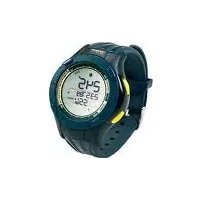
| Product Type | Wristwatch |
| Brand | Oregon Scientific |
| Model | RMW128C |
| Display Type | Digital LCD with backlight |
| Functions | Time, date, alarm, stopwatch, countdown timer |
| Water Resistance | 50 meters (5 ATM) |
| Battery Type | CR2032 lithium coin cell |
| Battery Life | Approximately 2 years |
| Case Diameter | 45 mm |
| Weight | 50 g |
| Case Material | Resin |
| Strap Material | Silicone |
| Strap Width | 20 mm |
| Backlight | Electro-luminescent |
| Time Format | 12/24 hour selectable |
| Warranty | 1 year limited |
| Cleaning | Wipe with soft dry cloth |
| Safety | Avoid extreme temperatures |
| Repairability | Battery replacement by professional recommended |
Frequently Asked Questions - RMW128C OREGON SCIENTIFIC
How do I set the time on my Oregon Scientific RMW128C wristwatch?
To set the time, press and hold the MODE button until the seconds flash. Use the STOP/START button to adjust the value and the RESET button to move to the next field. Press MODE to confirm and exit.
How do I set the alarm?
Press MODE until the alarm time appears. Press and hold STOP/START to enter editing mode. Use the same buttons to adjust hours and minutes, then press MODE to save.
Is the watch water-resistant?
The watch is water-resistant to 50 meters (5 ATM). It is suitable for swimming, but not for diving or high-pressure water activities.
How do I replace the battery?
Remove the back cover with a small screwdriver, take out the old CR2032 battery, and replace it with a new one, ensuring the positive side faces up. We recommend having the battery replaced by a professional to avoid damaging the seals.
What does the backlight button do?
Pressing the LIGHT button activates the electro-luminescent backlight, allowing you to read the display in low-light conditions. The backlight stays on for about 3 seconds.
How do I clean my wristwatch?
Wipe the case and strap with a soft, damp cloth. Do not use harsh chemicals or submerge the watch in water when cleaning.
Why is the display not working?
If the display is blank, the battery may be drained. Replace the battery as described above. If the problem persists, check if the key lock is enabled or contact customer support.
How do I switch between 12-hour and 24-hour time format?
In timekeeping mode, press and hold the STOP/START button for about 3 seconds to toggle between 12-hour and 24-hour formats.
What should I do if the watch gets wet?
After exposure to water, dry the watch with a soft cloth. If the watch has been in salt water, rinse it with fresh water and dry thoroughly.
Are replacement straps available?
Yes, replacement straps are available from authorized dealers. The strap width is a standard size, and you can also choose a compatible alternative from third-party sellers.
User questions about RMW128C OREGON SCIENTIFIC
0 question about this device. Answer the ones you know or ask your own.
Ask a new question about this device
No questions yet. Be the first to ask one.
Download the instructions for your Wristwatch in PDF format for free! Find your manual RMW128C - OREGON SCIENTIFIC and take your electronic device back in hand. On this page are published all the documents necessary for the use of your device. RMW128C by OREGON SCIENTIFIC.
USER MANUAL RMW128C OREGON SCIENTIFIC


Manual assistant
Powered by Anthropic
Waiting for your message
Product information
Brand : OREGON SCIENTIFIC
Model : RMW128C
Category : Wristwatch