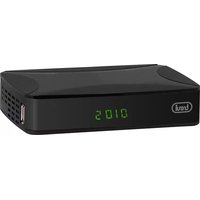
SAT 3387 FA - Digital decoder Trevi - Free user manual and instructions
Find the device manual for free SAT 3387 FA Trevi in PDF.


Pick your language and provide your email: we'll send you a specifically translated version.
| Type of product | Digital decoder |
| Brand | Trevi |
| Model | SAT 3387 FA |
| Decoder type | Satellite receiver |
| Video resolution | Full HD 1080p |
| Tuner | DVB-S2 |
| Connections | HDMI, SCART, USB, Coaxial, Ethernet |
| Power supply | 12V DC / 1A |
| Power consumption | 10 W max |
| Dimensions (W x D x H) | 150 x 80 x 40 mm |
| Weight | 0.3 kg |
| Main functions | Automatic channel search, channel list management, electronic program guide (EPG), teletext, parental lock, multimedia playback via USB |
| File playback support | MP3, MP4, AVI, JPEG |
| Remote control included | Yes |
| Antenna input | F-type connector |
| Warranty | 2 years (depending on country) |
| Cleaning and maintenance | Clean the casing with a soft, dry cloth. Do not use abrasive liquids. |
| Safety instructions | Keep away from moisture and heat sources; disconnect the power supply during lightning storms. |
| Spare parts and repairability | Remote control and power adapter are available for replacement; the device is not user-serviceable. |
| General information | User manual available in PDF format from the manufacturer's website. |
Frequently Asked Questions - SAT 3387 FA Trevi
How do I connect the SAT 3387 FA decoder to my TV?
Connect the decoder to your TV using an HDMI cable for the best quality. Alternatively, you can use a SCART cable if your TV does not have an HDMI input. Make sure both devices are turned off before connecting, then plug in the decoder's power supply.
How can I perform a channel search?
Press the Menu button on the remote control, go to Installation or Channel Search, and select Automatic Search. The decoder will scan for available channels and store them. Use Antenna Setup to configure your satellite dish before searching.
What should I do if the decoder does not switch on?
Check that the power adapter is securely connected to the decoder and to the mains outlet. Verify that the outlet is working by testing another device. If the problem persists, try resetting the decoder by unplugging it for 10 seconds and plugging it back in.
How do I update the firmware?
Firmware updates, if available, are usually performed via USB. Download the update file onto a USB stick from the manufacturer's website, insert the stick into the decoder's USB port, and select Software Update from the menu. Do not switch off the decoder during the update process.
The decoder is not finding any channels, what could be the issue?
First, ensure your satellite dish is properly aimed and the LNB is correctly connected to the decoder. Check the antenna settings in the menu (e.g., satellite name, transponder frequency). You may need to enter the correct parameters for your satellite provider or perform a manual search with the known transponder.
Can I play multimedia files from a USB drive?
Yes, the decoder supports playback of file formats such as MP3, MP4, AVI, and JPEG. Insert a USB drive into the port, then go to the Media Player option in the main menu to browse and play the content.
How do I set the language for the menu and audio?
Go to Settings or Preferences in the main menu, then select Language to choose the menu language. For audio tracks, use the Audio button on the remote control during playback to choose between available audio languages.
How can I reset the decoder to factory settings?
From the menu, go to Settings and select Factory Reset. Confirm the action to restore the decoder to its original settings. This will erase all channel lists and custom configurations.
Is it possible to record TV programs?
The SAT 3387 FA does not have a built-in hard drive or recording function. However, you can connect an external USB storage device and use the PVR (Personal Video Recorder) feature if supported, to record digital channels to the USB stick. Check the user manual for specific recording instructions.
Where can I find the user manual for this decoder?
The user manual is available for free in PDF format on the official Trevi website. You can also find it on manual-sharing websites like notice-facile.com, where you can view it online or download it.
User questions about SAT 3387 FA Trevi
0 question about this device. Answer the ones you know or ask your own.
Ask a new question about this device
No questions yet. Be the first to ask one.
Download the instructions for your Digital decoder in PDF format for free! Find your manual SAT 3387 FA - Trevi and take your electronic device back in hand. On this page are published all the documents necessary for the use of your device. SAT 3387 FA by Trevi.
USER MANUAL SAT 3387 FA Trevi


Manual assistant
Powered by Anthropic
Waiting for your message
Product information
Brand : Trevi
Model : SAT 3387 FA
Category : Digital decoder