HD 3395 DT - Digital decoder Trevi - Free user manual and instructions
Find the device manual for free HD 3395 DT Trevi in PDF.


Pick your language and provide your email: we'll send you a specifically translated version.
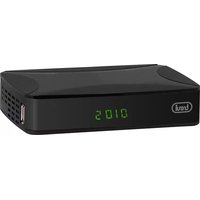
| Product Type | Digital Terrestrial Decoder (DVB-T/DVB-T2) |
| Brand | Trevi |
| Model | HD 3395 DT |
| Video Output | HDMI, Composite (RCA) |
| Audio Output | Digital Coaxial, Stereo RCA |
| Signal Input | RF Antenna (Coaxial) |
| Supported TV Standards | MPEG-2, MPEG-4, H.264 |
| Max Video Resolution | 1080p Full HD |
| USB Port | Yes, for media playback and firmware updates |
| Supported Media Formats | AVI, MKV, MP4, MP3, JPEG |
| Electronic Program Guide (EPG) | Yes, 7-day |
| Teletext | Yes |
| Parental Control | Yes, with PIN |
| Power Supply | 5V DC, 1A (external adapter) |
| Power Consumption | Approx. 5W max |
| Dimensions (W x D x H) | 150 x 90 x 30 mm |
| Weight | 250 g |
| Remote Control | Included (IR) |
| Display Type | LED indicator |
| Housing Material | ABS plastic |
| Color | Black |
| User Manual | English, French, Italian, German available in PDF |
| Spare Parts Availability | Remote control, power adapter via authorized service |
| Maintenance | Wipe with a soft, dry cloth; avoid solvents |
| Safety Warning | Do not expose to rain or moisture; keep ventilation slots clear |
Frequently Asked Questions - HD 3395 DT Trevi
How do I connect the Trevi HD 3395 DT decoder to my TV?
Use an HDMI cable for the best quality, or a composite RCA cable if your TV is older. Connect the antenna cable to the RF IN port on the decoder.
Why can't I find any channels when I scan?
Make sure the antenna is properly connected and pointed correctly. Then go to Menu > Channel Search and choose Auto Scan. Ensure the correct country is selected in the settings.
How do I update the firmware on this decoder?
Download the latest firmware from the Trevi support website onto a USB flash drive formatted in FAT32. Insert the USB drive into the decoder, then go to Menu > Upgrade and follow the on-screen instructions.
The remote control is not working. What can I do?
Check if the batteries are installed correctly and replace them if needed. Make sure there are no obstacles between the remote and the IR sensor on the front panel. Try pointing directly at the device from a distance of under 5 meters.
Can I play movie files from a USB drive?
Yes, the HD 3395 DT supports AVI, MKV, MP4 video formats, along with MP3 audio and JPEG photos. Connect the USB drive to the USB port and select Media Player from the main menu.
How do I reset the decoder to factory settings?
Go to Menu > Settings > Factory Default. Enter the default password 0000 if prompted. Confirm that you want to reset all settings to their original values.
Why is there no sound from the decoder?
Check if the mute button is activated on the remote. Verify the audio output settings match your TV connection. If using HDMI, ensure the TV is set to the correct input and the volume is not zero. For analog connections, check that the RCA cables are firmly connected.
Does the HD 3395 DT support high definition (HD) channels?
Yes, the decoder supports DVB-T2 which allows HD broadcasting. It can output 1080p resolution via HDMI for a sharp picture quality.
What is the default parental control PIN?
The default PIN is 0000. You can change it in Menu > Settings > Parental Lock. This feature lets you restrict access to certain channels by age rating.
How often should I clean the device and what should I avoid?
Clean the exterior with a soft, dry cloth only. Do not use liquid cleaners or sprays, as they may damage the electronics. Always unplug the power adapter before cleaning.
User questions about HD 3395 DT Trevi
0 question about this device. Answer the ones you know or ask your own.
Ask a new question about this device
No questions yet. Be the first to ask one.
Download the instructions for your Digital decoder in PDF format for free! Find your manual HD 3395 DT - Trevi and take your electronic device back in hand. On this page are published all the documents necessary for the use of your device. HD 3395 DT by Trevi.
USER MANUAL HD 3395 DT Trevi


Manual assistant
Powered by Anthropic
Waiting for your message
Product information
Brand : Trevi
Model : HD 3395 DT
Category : Digital decoder