
PKA-A-HA4 - Air-conditioner MITSUBISHI - Free user manual and instructions
Find the device manual for free PKA-A-HA4 MITSUBISHI in PDF.


| Product Type | Wall-mounted air conditioner (PKA-A·HA4) |
| Brand | MITSUBISHI |
| Model | PKA-A·HA4 |
| Power Supply | Single-phase, 208/230 V, 60 Hz |
| Dimensions (H x W x D) | 11-5/8 in x 35-3/8 in x 9-13/16 in |
| Net Weight | 29 lb |
| Minimum Circuit Ampacity (MCA) | 1 A |
| Maximum Overcurrent Protection (MOCP) | 15 A |
| Airflow (Low - Medium - High) | Dry: 320 - 370 - 425 CFM; Wet: 290 - 335 - 380 CFM |
| Sound Level (Low - Medium - High) | 36 - 40 - 43 dB |
| Fan Speeds | 3 speeds + Auto |
| Airflow Direction | Auto louvers with vertical oscillation (5 positions) Manual left/right adjustment |
| Air Filter | Standard filter, cleaning indicator every 100 hours of operation |
| Operating Modes | Cooling, heating (for reversible models), dehumidification, ventilation, auto |
| Remote Control | Wireless infrared (range ~7 m); wired optional |
| Timer Functions | Programmable On/Off (24h) |
| Emergency Function | Switch on indoor unit (cooling/heating) |
| Maintenance | Regular filter cleaning; reset indicator via remote control |
| Safety | Professional installation required; do not obstruct air inlets/outlets; do not touch with wet hands; stop immediately if anomaly occurs |
| Spare Parts | Available from authorized dealer |
| Instruction Manual | 28 pages, available for free download (EN/FR/ES) |
Frequently Asked Questions - PKA-A-HA4 MITSUBISHI
User questions about PKA-A-HA4 MITSUBISHI
0 question about this device. Answer the ones you know or ask your own.
Ask a new question about this device
Download the instructions for your Air-conditioner in PDF format for free! Find your manual PKA-A-HA4 - MITSUBISHI and take your electronic device back in hand. On this page are published all the documents necessary for the use of your device. PKA-A-HA4 by MITSUBISHI.
USER MANUAL PKA-A-HA4 MITSUBISHI
For safe and correct use, please read this operation manual thoroughly before operating the air-conditioner unit.
MANUEL D'UTILISATION
POUR L'UTILISATEUR
- Safety Precautions 2
- Parts Names 2
- Operation 3
- Timer 5
- Emergency Operation for IR wireless remote controller ....5
-
Care and Cleaning 5
-
Trouble Shooting 5
- Specifications 7
- Operation Manual for IR wireless remote controller............8
1. Safety Precautions
Before installing the unit, make sure you read all the "Safety Precautions".
The "Safety Precautions" provide very important points regarding safety. Make sure you follow them.
Please report to or take consent by the supply authority before connection to the system.
Symbols used in the text
Warning:
Describes precautions that should be observed to prevent danger of injury or death to the user.
Caution:
Describes precautions that should be observed to prevent damage to the unit.
Symbols used in the illustrations
: Indicates a part which must be grounded.
Warning:
- The unit must not be installed by the user. Ask the dealer or an authorized company to install the unit. If the unit is installed improperly, water leakage, electric shock or fire may result.
- Do not stand on, or place any items on the unit.
- Do not splash water over the unit and do not touch the unit with wet hands. An electric shock may result.
- Do not spray combustible gas close to the unit. Fire may result.
- Do not place a gas heater or any other open-flame appliance where it will be exposed to the air discharged from the unit. Incomplete combustion may result.
-
Do not remove the front panel or the fan guard from the outdoor unit when it is running.
-
When you notice exceptionally abnormal noise or vibration, stop operation, turn off the power switch, and contact your dealer.
- Never insert fingers, sticks etc. into the intakes or outlets.
- If you detect odd smells, stop using the unit, turn off the power switch and consult your dealer. Otherwise, a breakdown, electric shock or fire may result.
- This air conditioner is NOT intended for use by children or infirm persons without supervision.
- Young children must be supervised to ensure that they do not play with the air conditioner.
- If the refrigeration gas blows out or leaks, stop the operation of the air conditioner, thoroughly ventilate the room, and contact your dealer.
Caution:
- Do not use any sharp object to push the buttons, as this may damage the remote controller.
- Never block or cover the indoor or outdoor unit's intakes or outlets.
Disposing of the unit
When you need to dispose of the unit, consult your dealer.
2. Parts Names
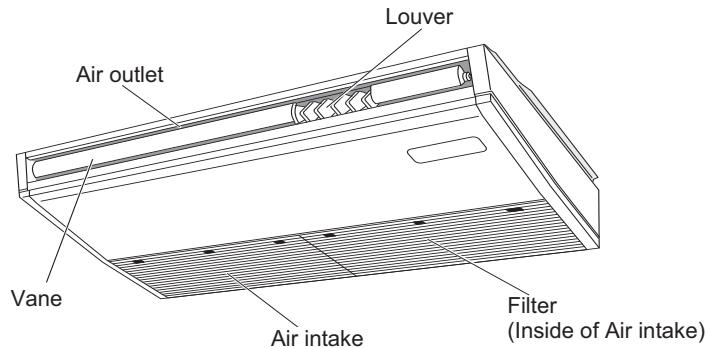
Indoor Unit
| PKA-A·HA4 | PCA-A·KA4 | |
| Fan speed | 3 speeds + Auto | 4 speeds + Auto |
| Vane | Auto with swing | Auto with swing |
| Louver | Manual | Manual |
| Filter | Normal | Long-life |
| Filter cleaning indication | 100 hr | 2,500 hr |
PKA-A·HA4
Wall Mounted
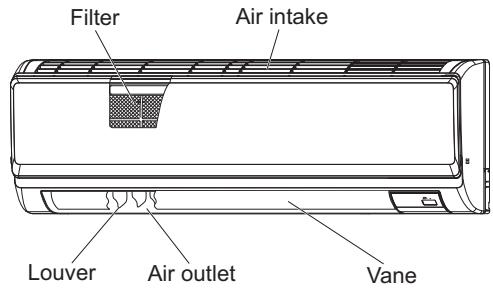
PCA-A·KA4
Ceiling Suspended
2. Parts Names
Remote controller (Optional parts)
| Radio frequency interface | Wired remote controller | IR wireless remote controller |
| RF thermostat | ||
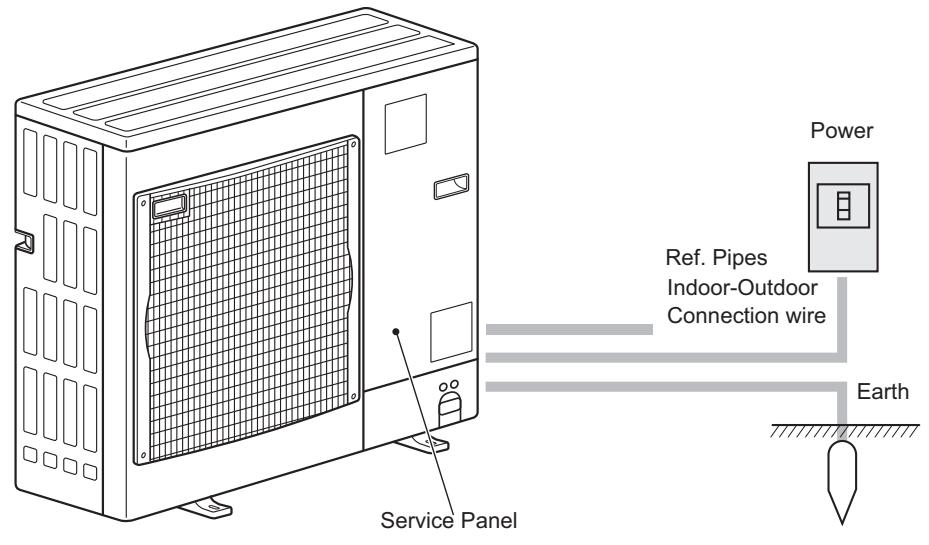
Outdoor unit
3. Operation
■ About the operation method, refer to the operation manual that comes each remote controller.
3.1. Turning ON/OFF
Note: Even if you press the ON/OFF button immediately after shutting down the operation is progress, the air conditioner will not start for about three minutes. This is to prevent the internal components from being damaged.
3.2. Operation mode select
Cool/Dry/Fan/Heat/Automatic (cool/heat)/Ventilation modes are available. Note:
- Heat and Automatic mode can not be available for cooling only units.
-
Ventilation mode: only indicated on the following condition. Wired remote controller is used and LOSSNAY is connected.
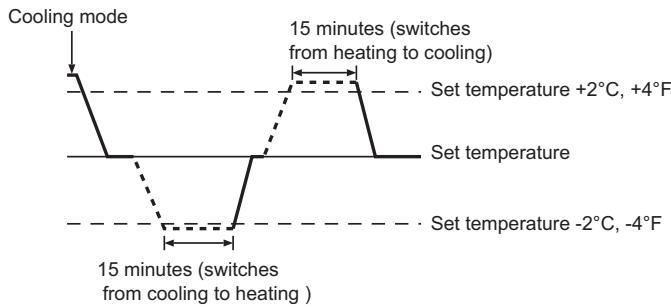
Automatic mode -
According to a set temperature, cooling operation starts if the room temperature is too hot and heating operation starts if the room temperature is too cold.
During automatic operation, if the room temperature changes and remains 2^ , 4^ or more above the set temperature for 15 minutes, the air conditioner switches to cooling mode. In the same way, if the room temperature remains 2^ , 4^ or more below the set temperature for 15 minutes, the air conditioner switches to heating mode.
3.3. Fan speed setting
Note:
- The number of available fan speeds depends on the type of unit connected.
- In the following cases, the actual fan speed generated by the unit will differ from the speed shown the remote controller display. 1. When the unit is in STANDBY or DEFROST states.
2. When the temperature of the heat exchanger is low in the heating mode. (e.g. immediately after heating operation starts)
3. In HEAT mode, when room temperature is higher than the temperature setting.
4. When the unit is in DRY mode.
3.4. Airflow direction setting
During swing operation, the directional indication on the screen does not change in sync with the directional vanes on the unit.
- Available directions depend on the type of unit connected.
-
In the following cases, the actual air direction will differ from the direction indicated on the remote controller display.
-
When the unit is in STANDBY or DEFROST states.
- Immediately after starting heater mode (while the system is waiting for the mode change to take effect).
- In heat mode, when room temperature is higher than the temperature setting.
<[Manual] To Change the Airflow's Left/Right Direction>
-
The louver button ⑦ cannot be used.
-
Stop the unit operation, hold the lever of the louver, and adjust to the desired direction.
- Do not set to the inside direction when the unit is in the cooling or drying mode because there is a risk of condensation and water dripping.
![MITSUBISHI PKA-A-HA4 - <[Manual] To Change the Airflow's Left/Right Direction> - 1](/content/2019/07/158973/images/dabea3c9dfc54ecac2ca1c9d2259966bb42a5751663f5585c3e2b289282efaac.jpg)
Caution:
When you operate the process above, be sure to take measures to avoid falls.
3.5. Ventilation
For LOSSNAY combination
The following 2 patterns of operation is available.
- Run the ventilator together with the indoor unit.
- Run the ventilator independently.
Note:
- With some model configurations, the fan on the indoor unit may come on even when you set the ventilator to run independently.
Note: (for IR wireless remote controller and RF thermostat)
- Running the ventilator independently is not available.
No indication on the remote controller.
Timer functions are different by each remote controller.
For details on how to operate the remote controller, refer to the appropriate operation manual included with each remote controller.
5. Emergency Operation for IR wireless remote controller
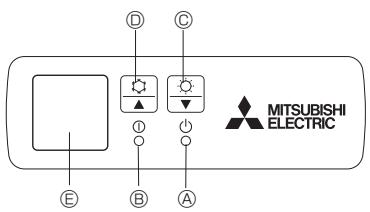
(For PCA-A·KA4)
Fig. 5-1
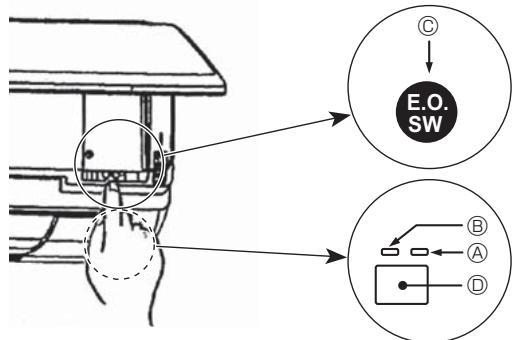
(For PKA-A·HA4)
Fig. 5-2
When the IR wireless remote controller cannot be used
When the batteries of the IR wireless remote controller run out or the IR wireless remote controller malfunctions, the emergency operation can be done using the emergency buttons.
[Fig. 5-1] DEFROST/STAND BY lamp
Operation lamp
Emergency operation switch (heating)
Emergency operation switch (cooling)
E Receiver
Starting operation
- To operate the cooling mode, press the button for more than 2 seconds.
- To operate the heating mode, press the button for more than 2 seconds.
Stopping operation
- To stop operation, press the button or the button for more than 2 seconds.
[Fig. 5-2] DEFROST/STAND BY lamp (Orange)
Operation lamp (Green)
Emergency operation switch (cooling/heating)
Receiver
- Each press of the emergency operation switch will toggle the operation mode.
- Check "COOL/HEAT" with the operation monitor display. (The orange lamp follows this monitor display for 5 seconds after pressing the emergency operation switch.)
![MITSUBISHI PKA-A-HA4 - [Fig. 5-2] DEFROST/STAND BY lamp (Orange) - 1](/content/2019/07/158973/images/ef1f534ebde74f1ef1910b6cc362bd135ac6b8c0f76108c9c0b8f213207673d7.jpg)
[Heat pump type]
![MITSUBISHI PKA-A-HA4 - [Fig. 5-2] DEFROST/STAND BY lamp (Orange) - 2](/content/2019/07/158973/images/0d3baa583948a2dfde28d5ab549d49e1472e6b87789456378bf8f0ecb240498e.jpg)
[Cooling only type]
Operation Monitor Display
| GREEN | ORANGE | ||
| STOP | ○ | ○ | The orange lamp follows the switch operation as indicated at the left for 5 seconds, and then it will return to the normal display. |
| COOL | ● | ○ | |
| HEAT | ● | ● |
Turning off Lighting
Note:
- Details of emergency mode are as shown below.
| Operation mode | COOL | HEAT |
| Set temperature | 24°C, 75°F | 24°C, 75°F |
| Fan speed | High | High |
| Airflow direction | Horizontal | Downward 4 (5) |
6. Care and Cleaning
Following indication shows that the filter needs cleaning.
- Wired remote controller: "FILTER"
RF thermostat : "Clean Filter"
- ASK authorized pepole to clean the filter.
■ When resetting "FILTER" or "Clean Filter" display. Resetting the indication, refer to the operation manual of each remote controller.
7. Trouble Shooting
Note:
- When 2 or more different types of indoor unit are controlled, the cleaning period differs with the type of filter. When the master unit cleaning period arrives, "FILTER" is displayed. When the filter display goes off, the cumulative time is reset. (only for wired remote controller)
- "FILTER" or "Clean Filter" indicates the cleaning period when the air conditioner was used under general indoor air conditions by criteria time. Since the degree of dirtiness depends on the environmental conditions, clean the filter accordingly.
- The filter cleaning period cumulative time differs with the model.
- This indication is not available for IR wireless remote controller.
| Having trouble? | Here is the solution. (Unit is operating normally.) | |||
| Air conditioner does not heat or cool well. | ■ Clean the filter. (Airflow is reduced when the filter is dirty or clogged.)■ Check the temperature adjustment and adjust the set temperature.■ Make sure that there is plenty of space around the outdoor unit. Is the indoor unit air intake or outlet blocked?■ Has a door or window been left open? | |||
| When heating operation starts, warm air does not blow from the indoor unit soon. | ■ Warm air does not blow until the indoor unit has sufficiently warmed up. | |||
| During heating mode, the air conditioner stops before the set room temperature is reached. | ■ When the outdoor temperature is low and the humidity is high, frost may form on the outdoor unit. If this occurs, the outdoor unit performs a defrosting operation. Normal operation should begin after approximately 10 minutes. | |||
| Having trouble? | Here is the solution. (Unit is operating normally.) | |||
| Airflow direction changes during operation or airflow direction cannot be set. | ■ During cooling mode, the vanes automatically move to the horizontal (down) position after 1 hour when the down (horizontal) airflow direction is selected. This is to prevent water from forming and dripping from the vanes.■ During heating mode, the vanes automatically move to the horizontal airflow direction when the airflow temperature is low or during defrost-ing mode. | |||
| When the airflow direction is changed, the vanes always move up and down past the set position before finally stopping at the position. | ■ When the airflow direction is changed, the vanes move to the set position after detecting the base position. | |||
| A flowing water sound or occasional hissing sound is heard. | ■ These sounds can be heard when refrigerant is flowing in the air conditioner or when the refrigerant flow is changing. | |||
| A cracking or creaking sound is heard. | ■ These sounds can be heard when parts rub against each due to expansion and contraction from temperature changes. | |||
| The room has an unpleasant odor. | ■ The indoor unit draws in air that contains gases produced from the walls, carpeting, and furniture as well as odors trapped in clothing, and then blows this air back into the room. | |||
| A white mist or vapor is emitted from the indoor unit. | ■ If the indoor temperature and the humidity are high, this condition may occur when operation starts.■ During defrosting mode, cool airflow may blow down and appear like a mist. | |||
| Water or vapor is emitted from the outdoor unit. | ■ During cooling mode, water may form and drip from the cool pipes and joints.■ During heating mode, water may form and drip from the heat ex-changer.■ During defrosting mode, water on the heat exchanger evaporates and water vapor may be emitted. | |||
| The operation indicator does not appear in the wired remote controller display. (*) | ■ Turn on the power switch. "®" will appear in the wired remote controller display. | |||
| "®" appears in the wired remote controller display. (*) | ■ During central control, "®" appears in the wired remote controller display and air conditioner operation cannot be started or stopped using the wired remote controller. | |||
| When restarting the air conditioner soon after stopping it, it does not operate even though the ON/OFF button is pressed. | ■ Wait approximately three minutes. (Operation has stopped to protect the air conditioner.) | |||
| Air conditioner operates without the ON/OFF button being pressed. (*) | ■ Is the on timer set? Press the ON/OFF button to stop operation.■ Is the air conditioner connected to a central wired remote controller? Consult the concerned people who control the air conditioner.■ Does "®" appear in the wired remote controller display? Consult the concerned people who control the air conditioner.■ Has the auto recovery feature from power failures been set? Press the ON/OFF button to stop operation. | |||
| Air conditioner stops without the ON/OFF button being pressed. (*) | ■ Is the off timer set? Press the ON/OFF button to restart operation.■ Is the air conditioner connected to a central wired remote controller? Consult the concerned people who control the air conditioner.■ Does "®" appear in the wired remote controller display? Consult the concerned people who control the air conditioner. | |||
| Wired remote controller timer operation cannot be set. (*) | ■ Are timer settings invalid? If the timer can be set, WEEKLY, SIMPLE, or AUTO OFF appears in the wired remote controller display. | |||
| "PLEASE WAIT" appears in the wired remote controller display. (*) | ■ The initial settings are being performed. Wait approximately 3 minutes. | |||
| An error code appears in the remote controller display. | ■ The protection devices have operated to protect the air conditioner.■ Do not attempt to repair this equipment by yourself. Turn off the power switch immediately and consult your dealer. Be sure to provide the dealer with the model name and information that appeared in the remote controller display. | |||
| Draining water or motor rotation sound is heard. | ■ When cooling operation stops, the drain pump operates and then stops. Wait approximately 3 minutes. | |||
| Noise is louder than specifications. | ■ The indoor operation sound level is affected by the acoustics of the particular room as shown in the following table and will be higher than the noise specification, which was measured in an echo-free room. | |||
| High sound-absorbing rooms | Normal rooms | Low sound-absorbing rooms | ||
| Location examples | Broadcasting studio, music room, etc. | Reception room, hotel lobby, etc. | Office, hotel room | |
| Noise levels | 3 to 7 dB | 6 to 10 dB | 9 to 13 dB | |
| Nothing appears in the IR wireless remote controller display, the display is faint, or signals are not received by the indoor unit unless the IR wireless remote controller is close. (*2) | ■ The batteries are low. Replace the batteries and press the Reset button.■ If nothing appears even after the batteries are replaced, make sure that the batteries are installed in the correct directions (+,-). | |||
| The operation lamp near the receiver for the IR wireless remote controller on the indoor unit is blinking. (*2) | ■ The self diagnosis function has operated to protect the air conditioner.■ Do not attempt to repair this equipment by yourself. Turn off the power switch immediately and consult your dealer. Be sure to provide the dealer with the model name. | |||
7. Trouble Shooting
| Having trouble? | Here is the solution. (Unit is operating normally.) |
| When dry mode starts, the set temperature changes. | ■ When Dry mode starts, the set temperature automatically changes to the optimum initial set temperature. |
1. Only for Wired remote controller
2. Only for IR wireless remote controller.
8. Specifications
| Model | PKA-A12HA4 | PKA-A18HA4 | |
| Power source (Phase, Voltage <V>, Frequency <Hz>) | Single 208/230, 60 | ||
| Fan motor | <FLA> | 0.33 | |
| MCA | <A> | 1 | 1 |
| MOCP | <A> | 15 | 15 |
| Dimension (Height) | <inch> | 11-5/8 | |
| Dimension (Width) | <inch> | 35-3/8 | |
| Dimension (Depth) | <inch> | 9-13/16 | |
| Airflow (Low-Middle-High) | DRY | 320-370-425 | |
| WET | 290-335-380 | ||
| Noise level (Low-Middle-High) | <dB> | 36-40-43 | |
| Net weight | <lbs> | 29 | |
| Model | PCA-A24KA4 | PCA-A30KA4 | PCA-A36KA4 | PCA-A42KA4 | |
| Power source (Phase, Voltage <V>, Frequency <Hz>) | Single 208/230, 60 | ||||
| Fan motor | <FLA> | 0.49 | 0.54 | 0.83 | 0.97 |
| MCA | <A> | 1 | 1 | 2 | 2 |
| MOCP | <A> | 15 | 15 | 15 | 15 |
| Dimension (Height) | <inch> | 9-1/6 | |||
| Dimension (Width) | <inch> | 50-3/8 | 63 | ||
| Dimension (Depth) | <inch> | 26-3/4 | |||
| Airflow (Low-Middle2-Middle1-High) | DRY | 530-565-600-670 | 565-600-635-705 | 775-850-920-990 | 810-885-955-1025 |
| WET | 495-530-565-635 | 530-565-600-670 | 705-775-850-920 | 740-810-885-955 | |
| Noise level (Low-Middle2-Middle1-High) | <dB> | 33-35-37-40 | 35-37-39-41 | 37-39-41-43 | 39-41-43-45 |
| Net weight | <lbs> | 71 | 79 | 84 | |
9.1 Parts Names
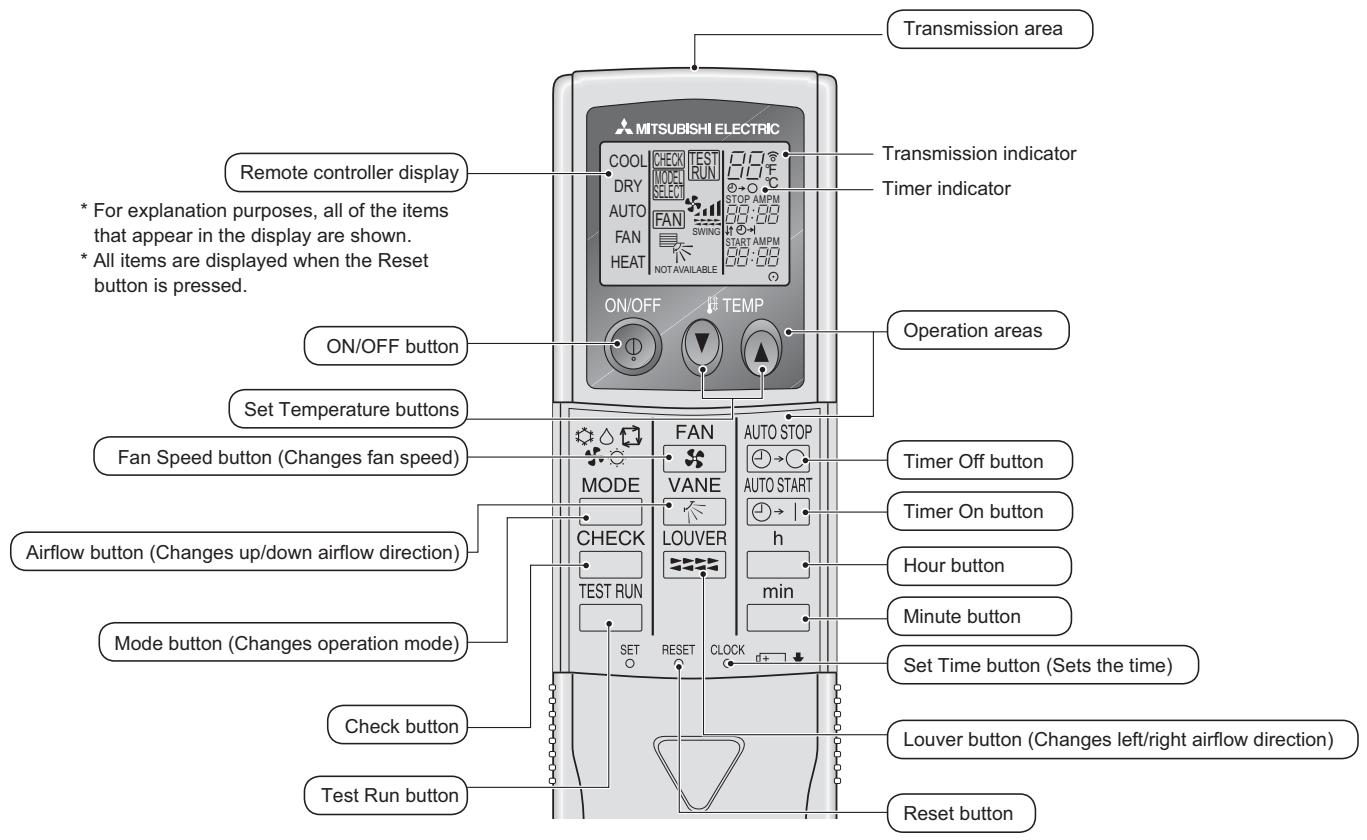
Note:
■ When using the IR wireless remote controller, point it towards the receiver on the indoor unit.
If the IR wireless remote controller is operated within approximately 2 minutes after power is supplied to the indoor unit, the indoor unit may beep twice as the unit is performing the initial automatic check.
The indoor unit beeps to confirm that the signal transmitted from the IR wireless remote controller has been received. Signals can be received up to approximately 7 meters in a direct line from the indoor unit in an area 45^ to the left and right of the unit. However, illumination such as fluorescent lights and strong light can affect the ability of the indoor unit to receive signals.
■ If the operation lamp near the receiver on the indoor unit is blinking, the unit needs to be inspected. Consult your dealer for service.
■ Handle the IR wireless remote controller carefully! Do not drop the IR wireless remote controller or subject it to strong shocks. In addition, do not get the IR wireless remote controller wet or leave it in a location with high humidity.
To avoid misplacing the IR wireless remote controller, install the holder included with the IR wireless remote controller on a wall and be sure to always place the IR wireless remote controller in the holder after use.
Battery installation/replacement
- Remove the top cover, insert 2 AAA batteries, and then install the top cover.
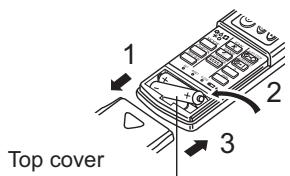
2 AAA batteries
Insert the negative (-) end of each battery first. Install the batteries in the correct directions (+, - )!
- Press the Reset button
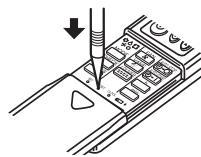
Press the Reset button with an object that has a narrow end.
9.2. Operation
9.2.1. Turning ON/OFF
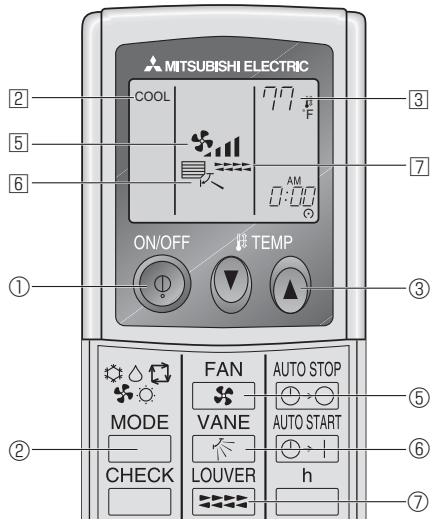
Press the ON/OFF button ①.
- The ON lamp and the display area come on.
Press the ON/OFF button ① again.
- The ON lamp and the display area go dark.
Note:
Even if you press the ON/OFF button immediately after shutting down the operation is progress, the air conditioner will not start for about three minutes. This is to prevent the internal components from being damaged.
9.2.2. Temperature setting
To decrease the room temperature:
Press button ③ to set the desired temperature.
The selected temperature is displayed 3.
To increase the room temperature:
Press button ③ to set the desired temperature.
The selected temperature is displayed 3.
- Available temperature ranges are as follows:
Cooling/Drying: 19 - 30 °C, 67 - 87 °F
Heating: 17 - 28 °C, 63 - 83 °F
Automatic: 19 - 28 °C, 67 - 83 °F
- The display ④ flashes either 8^ C - 39^ C , 46^ F - 102^ F to inform you if the room temperature is lower or higher than the displayed temperature. (This display does not appear on the wireless remote controller.)
9.2.3. Fan speed setting
Press the Fan Speed button ⑤ as many times as necessary while the system is running.
Each press changes the force. The currently selected speed is shown at 5.
- The change sequence, and the available settings, are as follows.
| FAN SPEED | Display |
| 4-speed + Auto | Speed 1 Speed 2 Speed 3 Speed 4 Auto |
| → ↑ → ↓ → ↓ → ↓ → ↓ → ↓ | |
| 3-speed + Auto | Speed 1 Speed 2 Speed 3 Auto |
| → ↑ → ↓ → ↓ → ↓ → ↓ → ↓ |
9.2.4. Airflow direction setting
■ With the unit running, press the Airflow Up/Down button 6 as necessary.
Each press changes the direction. The current direction is shown at 6.
- The change sequence, and the available settings, are as follows.
| Remote controller | Display |
| Wired type (PCA-KA4) (PKA-HA4) | Swing Auto 1 2 3 4 5 → □_ → □_ → □_ → □_ → □_ → □_ → □_ → □_ → □_ → □_ → □_ → □_ → □_ → □_ → □_ → □_ → □_ → □_ → □_ → □_ → □_ → □_ → □_ → □_ → □_ → □_ |
| IR Wireless remote controller | Swing 1 2 3 4 → □_ → □_ → □_ → □_ → □_ → □_ → □_ → □_ → □_ → □_ → □_ → □_ → □_ → □_ → □_ → □_ → □_ → □_ → □_ → □_ → □_ → □_ → □_ → □_ → ▫_ → ▫_ → ▫_ → ▫_ → ▫_ → ▫_ → ▫_ → ▫_ → ▫_ → ▫_ → ▫_ → ▫_ → ▫_ → ▫_ → ▫_ → ▫_ → ▫_ → ▫_ → ▫_ → ▫_ → ▫_ → ▫_ → ▫_ → ▫_ → ▫_ → ▪_ → ▪_ → ▪_ → ▪_ → ▪_ → ▪_ → ▪_ → ▪_ → ▪_ → ▪_ → ▪_ → ▪_ → ▪_ → ▪_ → ▪_ → ▪_ → ▪_ → ▪_ → ▪_ → ▪_ → ▪_ → ▪_ → ▪_ → ▪_ → ▪_ → ▼_ → ▼_ → ▼_ → ▼_ → ▼_ → ▼_ → ▼_ → ▼_ → ▼_ → ▼_ → ▼_ → ▼_ → ▼_ → ▼_ → ▼_ → ▼_ → ▼_ → ▼_ → ▼_ → ▼_ → ▼_ → ▼_ → ▼_ → ▼_ → ▼_ → ▲_ → ▲_ → ▲_ → ▲_ → ▲_ → ▲_ → ▲_ → ▲_ → ▲_ → ▲_ → ▲_ → ▲_ → ▲_ → ▲_ → ▲_ → ▲_ → ▲_ → ▲_ → ▲_ → ▲_ → ▲_ → ▲_ → ▲_ → ▲_ → ▲_ → △_ → △_ → △_ → △_ → △_ → △_ → △_ → △_ → △_ → △_ → △_ → △_ → △_ → △_ → △_ → △_ → △_ → △_ → △_ → △_ → △_ → △_ → △_ → △_ → △_ → ▹_ → ▹_ → ▹_ → ▹_ → ▹_ → ▹_ → ▹_ → ▹_ → ▹_ → ▹_ → ▹_ → ▹_ → ▹_ → ▹_ → ▹_ → ▹_ → ▹_ → ▹_ → ▹_ → ▹_ → ▹_ → ▹_ → ▹_ → ▹_ → ▹_ → △_ → △_ → △_ → △_ → △_ → △_ → △_ → △_ → △_ → △_ → △_ → △_ → △_ → △_ → △_ → △_ → △_ → △_ → △_ → △_ → △_ → △_ → △_ → △_ → ▝_ → ▝_ → ▝_ → ▝_ → ▝_ → ▝_ → ▝_ → ▝_ → ▝_ → ▝_ → ▝_ → ▝_ → ▝_ → ▝_ → ▝_ → ▝_ → ▝_ → ▝_ → ▝_ → ▝_ → ▝_ → ▝_ → ▝_ → ▝_ → ▝_ → △_ → △_ → △_ → △_ → △_ → △_ → △_ → △_ → △_ → △_ → △_ → △_ → △_ → △_ → △_ → △_ → △_ → △_ → △_ → △_ → △_ → △_ → △_ → △_ → ▸_ → ▸_ → ▸_ → ▸_ → ▸_ → ▸_ → ▸_ → ▸_ → ▸_ → ▸_ → ▸_ → ▸_ → ▸_ → ▸_ → ▸_ → ▸_ → ▸_ → ▸_ → ▸_ → ▸_ → ▸_ → ▸_ → ▸_ → ▸_ → ▸_ → ▝_ → ▝_ → ▝_ → ▝_ → ▝_ → ▝_ → ▝_ → ▝_ → ▝_ → ▝_ → ▝_ → ▝_ → ▝_ → ▝_ → ▝_ → ▝_ → ▝_ → ▝_ → ▝_ → ▝_ → ▝_ → ▝_ → ▝_ → ▝_ → ▸_ → ▸_ → ▸_ → ▸_ → ▸_ → ▸_ → ▸_ → ▸_ → ▸_ → ▸_ → ▸_ → ▸_ → ▸_ → ▸_ → ▸_ → ▸_ → ▸_ → ▸_ → ▸_ → ▸_ → ▸_ → ▸_ → ▸_ → ▸_ → △_ → △_ → △_ → △_ → △_ → △_ → △_ → △_ → △_ → △_ → △_ → △_ → △_ → △_ → △_ → △_ → △_ → △_ → △_ → △_ → △_ → △_ → △_ → △_ → ▿_ → ▿_ → ▿_ → ▿_ → ▿_ → ▿_ → ▿_ → ▿_ → ▿_ → ▿_ → ▿_ → ▿_ → ▿_ → ▿_ → ▿_ → ▿_ → ▿_ → ▿_ → ▿_ → ▿_ → ▿_ → ▿_ → ▿_ → ▿_ → ▿_ → △_ → △_ → △_ → △_ → △_ → △_ → △_ → △_ → △_ → △_ → △_ → △_ → △_ → △_ → △_ → △_ → △_ → △_ → △_ → △_ → △_ → △_ → △_ → △_ → ▲_ → ▲_ → ▲_ → ▲_ → ▲_ → ▲_ → ▲_ → ▲_ → ▲_ → ▲_ → ▲_ → ▲_ → ▲_ → ▲_ → ▲_ → ▲_ → ▲_ → ▲_ → ▲_ → ▲_ → ▲_ → ▲_ → ▲_ → ▲_ → ▱_ → ▱_ → ▱_ → ▱_ → ▱_ → ▱_ → ▱_ → ▱_ → ▱_ → ▱_ → ▱_ → ▱_ → ▱_ → ▱_ → ▱_ → ▱_ → ▱_ → ▱_ → ▱_ → ▱_ → ▱_ → ▱_ → ▱_ → ▱_ → ▱_ → ▲_ → ▲_ → ▲_ → ▲_ → ▲_ → ▲_ → ▲_ → ▲_ → ▲_ → ▲_ → ▲_ → ▲_ → ▲_ → ▲_ → ▲_ → ▲_ → ▲_ → ▲_ → ▲_ → ▲_ → ▲_ → ▲_ → ▲_ → ▲_ → ▵_ → ▵_ → ▵_ → ▵_ → ▵_ → ▵_ → ▵_ → ▵_ → ▵_ → ▵_ → ▵_ → ▵_ → ▵_ → ▵_ → ▵_ → ▵_ → ▵_ → ▵_ → ▵_ → ▵_ → ▵_ → ▵_ → ▵_ → ▵_ → ▵_ → ▸_ → ▸_ → ▸_ → ▸_ → ▸_ → ▸_ → ▸_ → ▸_ → ▸_ → ▸_ → ▸_ → ▸_ → ▸_ → ▸_ → ▸_ → ▸_ → ▸_ → ▸_ → ▸_ → ▸_ → ▸_ → ▸_ → ▸_ → ▸_ → ▹_ → ▹_ → ▹_ → ▹_ → ▹_ → ▹_ → ▹_ → ▹_ → ▹_ → ▹_ → ▹_ → ▹_ → ▹_ → ▹_ → ▹_ → ▹_ → ▹_ → ▹_ → ▹_ → ▹_ → ▹_ → ▹_ → ▹_ → ▹_ → ▸_ → ▸_ → ▸_ → ▸_ → ▸_ → ▸_ → ▸_ → ▸_ → ▸_ → ▸_ → ▸_ → ▸_ → ▸_ → ▸_ → ▸_ → ▸_ → ▸_ → ▸_ → ▸_ → ▸_ → ▸_ → ▸_ → ▸_ → ▸_ → ▷_ → ▷_ → ▷_ → ▷_ → ▷_ → ▷_ → ▷_ → ▷_ → ▷_ → ▷_ → ▷_ → ▷_ → ▷_ → ▷_ → ▷_ → ▷_ → ▷_ → ▷_ → ▷_ → ▷_ → ▷_ → ▷_ → ▷_ → ▷_ → ▷_ → ▸_ → ▸_ → ▸_ → ▸_ → ▸_ → ▸_ → ▸_ → ▸_ → ▸_ → ▸_ → ▸_ → ▸_ → ▸_ → ▸_ → ▸_ → ▸_ → ▸_ → ▸_ → ▸_ → ▸_ → ▸_ → ▸_ → ▸_ → ▸_ → ▻_ → ▻_ → ▻_ → ▻_ → ▻_ → ▻_ → ▻_ → ▻_ → ▻_ → ▻_ → ▻_ → ▻_ → ▻_ → ▻_ → ▻_ → ▻_ → ▻_ → ▻_ → ▻_ → ▻_ → ▻_ → ▻_ → ▻_ → ▻_ → ▻_ → ▸_ → ▸_ → ▸_ → ▸_ → ▸_ → ▸_ → ▸_ → ▸_ → ▸_ → ▸_ → ▸_ → ▸_ → ▸_ → ▸_ → ▸_ → ▸_ → ▸_ → ▸_ → ▸_ → ▸_ → ▸_ → ▸_ → ▸_ → ▸_ → ▤_ → ▤_ → ▤_ → ▤_ → ▤_ → ▤_ → ▤_ → ▤_ → ▤_ → ▤_ → ▤_ → ▤_ → ▤_ → ▤_ → ▤_ → ▤_ → ▤_ → ▤_ → ▤_ → ▤_ → ▤_ → ▤_ → ▤_ → ▤_ → ▤_ → ▦_ → ▦_ → ▦_ → ▦_ → ▦_ → ▦_ → ▦_ → ▦_ → ▦_ → ▦_ → ▦_ → ▦_ → ▦_ → ▦_ → ▦_ → ▦_ → ▦_ → ▦_ → ▦_ → ▦_ → ▦_ → ▦_ → ▦_ → ▦_ → ▦_ → ▧_ → ▧_ → ▧_ → ▧_ → ▧_ → ▧_ → ▧_ → ▧_ → ▧_ → ▧_ → ▧_ → ▧_ → ▧_ → ▧_ → ▧_ → ▧_ → ▧_ → ▧_ → ▧_ → ▧_ → ▧_ → ▧_ → ▧_ → ▧_ → ▧_ → ▴_ → ▴_ → ▴_ → ▴_ → ▴_ → ▴_ → ▴_ → ▴_ → ▴_ → ▴_ → ▴_ → ▴_ → ▴_ → ▴_ → ▴_ → ▴_ → ▴_ → ▴_ → ▴_ → ▴_ → ▴_ → ▴_ → ▴_ → ▴_ → ▴_ → ▵_ → ▴_ → ▴_ → ▵_ → ▴_ → ▴_ → ▵_ → ▴_ → ▵_ → ▴_ → ▵_ → ▴_ → ▵_ → ▴_ → ▵_ → ▴_ → ▵_ → ▴_ → ▵_ → ▴_ → ▵_ → ▴_ → ▵_ → ▴_ → ▵_ → ▴_ → ▵_ → ▴_ → ▵_ → ▴_ → ▵_ → ▵_ → ▴_ → ▵_ → ▴_ → ▵_ → ▴_ → ▵_ → ▴_ → ▵_ → ▴_ → ▵_ → ▴_ → ▵_ → ▴_ → ▵_ → ▴_ → ▵_ → ▴_ → ▵_ → ▴_ → ▵_ → ▴_ → ▵_ → ▴_ → ▻_ → ▵_ → ▴_ → ▵_ → ▴_ → ▵_ → ▴_ → ▵_ → ▴_ → ▵_ → ▴_ → ▵_ → ▴_ → ▵_ → ▴_ → ▵_ → ▴_ → ▵_ → ▴_ → ▵_ → ▴_ → ▵_ → ▴_ → ▵_ → ▴_ → ▪_ → ▵_ → ▴_ → ▵_ → ▴_ → ▵_ → ▴_ → ▵_ → ▴_ → ▵_ → ▴_ → ▵_ → ▴_ → ▵_ → ▴_ → ▵_ → ▴_ → ▵_ → ▴_ → ▵_ → ▴_ → ▵_ → ▴_ → ▵_ → ▴_ → ▸_ → ▵_ → ▴_ → ▵_ → ▴_ → ▵_ → ▴_ → ▵_ → ▴_ → ▵_ → ▴_ → ▵_ → ▴_ → ▵_ → ▴_ → ▵_ → ▴_ → ▵_ → ▴_ → ▵_ → ▴_ → ▵_ → ▴_ → ▵_ → ▴_ → ▴_ → ▵_ → ▴_ → ▵_ → ▴_ → ▵_ → ▴_ → ▵_ → ▴_ → ▵_ → ▴_ → ▵_ → ▴_ → ▵_ → ▴_ → ▵_ → ▴_ → ▵_ → ▴_ → ▵_ → ▴_ → ▪_ → ▵_ → ▴_ → ▪_ → ▵_ → ▴_ → ▵_ → ▴_ → ▵_ → ▴_ → ▵_ → ▴_ → ▵_ → ▴_ → ▵_ → ▴_ → ▵_ → ▴_ → ▵_ → ▴_ → ▵_ → ▴_ → ▵_ → ▴_ → ▵_ → ▵_ → ▴_ → ▵_ → ▵_ → ▴_ → ▵_ → ▴_ → ▵_ → ▴_ → ▵_ → ▴_ → ▵_ → ▴_ → ▵_ → ▴_ → ▵_ → ▴_ → ▵_ → ▴_ → ▵_ → ▴_ → ▵_ → ▴_ → ▵_ → ▵_ → ▴_ → ▵_ → ▻ |
9.3 Timer
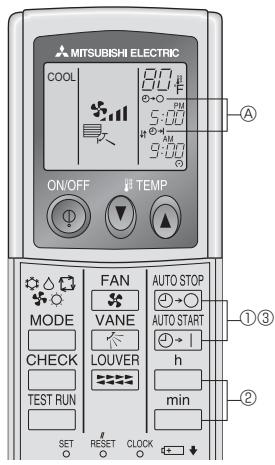
① Press the AUTO STOP or AUTO START button (TIMER SET).
- Time can be set while the following symbol is blinking.
OFF timer: A -O is blinking.
ON timer: A -I is blinking.
② Use the and buttons to set the desired time.
③ Cancelling the timer.
To cancel the OFF timer, press the AUTO STOP button.
To cancel the ON timer, press the AUTO START button.
- It is possible to combine both OFF and ON timers.
- Pressing the ① ON/OFF button of the remote controller during timer mode to stop the unit will cancel the timers.
-
If the current time has not been set, the timer operation cannot be used.
-
Consignes de sécurité 10
- Nomenclature. 10
- Fonctionnement 11
- Minuterie 13
- Fonctionnement d'urgence de la télécommande sans fil infrarouge 13
| Interface radiofréquence (RF) | Télécommande à fil | Télécommande sans fil infrarouge |
| Thermostat RF | MITSURISH ELECTRIC TEMP ON/OFF ON/OFF ON/OFF ON/OFF ON/OFF ON/OFF ON/OFF ON/OFF ON/OFF ON/OFF ON/OFF ON/OFF ON/OFF ON/OFF ON/OFF ON/OFF ON/OFF ON/OFF ON/OFF ON/OFF ON/OFF ON/OFF ON/OFF ON/OFF ON/OFF ON/OFT ON/OFT ON/OFT ON/OFT ON/OFT ON/OFT ON/OFT ON/OFT ON/OFT ON/OFT ON/OFT ON/OFT ON/OFT ON/OFT ON/OFT ON/OFT ON/OFT ON/OFT ON/OFT ON/OFT ON/OFT ON/OFT ON/OFT ON/OFT ON/OFT ON/OFF ON/OFF ON/OFF ON/OFF ON/OFF ON/OFF ON/OFF ON/OFF ON/OFF ON/OFF ON/OFF ON/OFF ON/OFF ON/OFF ON/OFF ON/OFF ON/OFF ON/OFF ON/OFF ON/OFF ON/OFF ON/OFF ON/OFF ON/OFF ON/OF ON/OF ON/OF ON/OF ON/OF ON/OF ON/OF ON/OF ON/OF ON/OF ON/OF ON/OF ON/OF ON/OF ON/OF ON/OF ON/OF ON/OF ON/OF ON/OF ON/OF ON/OF ON/OF ON/OF ON/OF ON/OE ON/OF ON/OF ON/OF ON/OF ON/OF ON/OF ON/OF ON/OF ON/OF ON/OF ON/OF ON/OF ON/OF ON/OF ON/OF ON/OF ON/OF ON/OF ON/OF ON/OF ON/OF ON/OF ON/OF ON/OF ON/OI ON/OF ON/OF ON/OF ON/OF ON/OF ON/OF ON/OF ON/OF ON/OF ON/OF ON/OF ON/OF ON/OF ON/OF ON/OF ON/OF ON/OF ON/OF ON/OF ON/OF ON/OF ON/OF ON/OF ON/OF ON/OIF ON/OF ON/OF ON/OF ON/OF ON/OF ON/OF ON/OF ON/OF ON/OF ON/OF ON/OF ON/OF ON/OF ON/OF ON/OF ON/OF ON/OF ON/OF ON/OF ON/OF ON/OF ON/OF ON/OF ON/OF ON/OFI ON/OF ON/OF ON/OF ON/OF ON/OF ON/OF ON/OF ON/OF ON/OF ON/OF ON/OF ON/OF ON/OF ON/OF ON/OF ON/OF ON/OF ON/OF ON/OF ON/OF ON/OF ON/OF ON/OF ON/OF ON/OO ON/OF ON/OF ON/OF ON/OF ON/OF ON/OF ON/OF ON/OF ON/OF ON/OF ON/OF ON/OF ON/OF ON/OF ON/OF ON/OF ON/OF ON/OF ON/OF ON/OF ON/OF ON/OF ON/OF ON/OF ON/Of ON/OF ON/OF ON/OF ON/OF ON/OF ON/OF ON/OF ON/OF ON/OF ON/OF ON/OF ON/OF ON/OF ON/OF ON/OF ON/OF ON/OF ON/OF ON/OF ON/OF ON/OF ON/OF ON/OF ON/OF ON/OJ ON/OF ON/OF ON/OF ON/OF ON/OF ON/OF ON/OF ON/OF ON/OF ON/OF ON/OF ON/OF ON/OF ON/OF ON/OF ON/OF ON/OF ON/OF ON/OF ON/OF ON/OF ON/OF ON/OF ON/OF ON/OV ON/OF ON/OF ON/OF ON/OF ON/OF ON/OF ON/OF ON/OF ON/OF ON/OF ON/OF ON/OF ON/OF ON/OF ON/OF ON/OF ON/OF ON/OF ON/OF ON/OF ON/OF ON/OF ON/OF ON/OF ON/OU ON/OF ON/OF ON/OF ON/OF ON/OF ON/OF ON/OF ON/OF ON/OF ON/OF ON/OF ON/OF ON/OF ON/OF ON/OF ON/OF ON/OF ON/OF ON/OF ON/OF ON/OF ON/OF ON/OF ON/OF ON/O F ON/OF ON/OF ON/OF ON/OF ON/OF ON/OF ON/OF ON/OF ON/OF ON/OF ON/OF ON/OF ON/OF ON/OF ON/OF ON/OF ON/OF ON/OF ON/OF ON/OF ON/OF ON/OF ON/OF ON/OF ON/OFO ON/OF ON/OF ON/OF ON/OF ON/OF ON/OF ON/OF ON/OF ON/OF ON/OF ON/OF ON/OF ON/OF ON/OF ON/OF ON/OF ON/OF ON/OF ON/OF ON/OF ON/OF ON/OF ON/OF ON/OF ON/O/F ON/OF ON/OF ON/OF ON/OF ON/OF ON/OF ON/OF ON/OF ON/OF ON/OF ON/OF ON/OF ON/OF ON/OF ON/OF ON/OF ON/OF ON/OF ON/OF ON/OF ON/OF ON/OF ON/OF ON/OF ON/O(F) ON/OF ON/OF ON/OF ON/OF ON/OF ON/OF ON/OF ON/OF ON/OF ON/OF ON/OF ON/OF ON/OF ON/OF ON/OF ON/OF ON/OF ON/OF ON/OF ON/OF ON/OF ON/OF ON/OF ON/OF ON/OF |
Unité externe
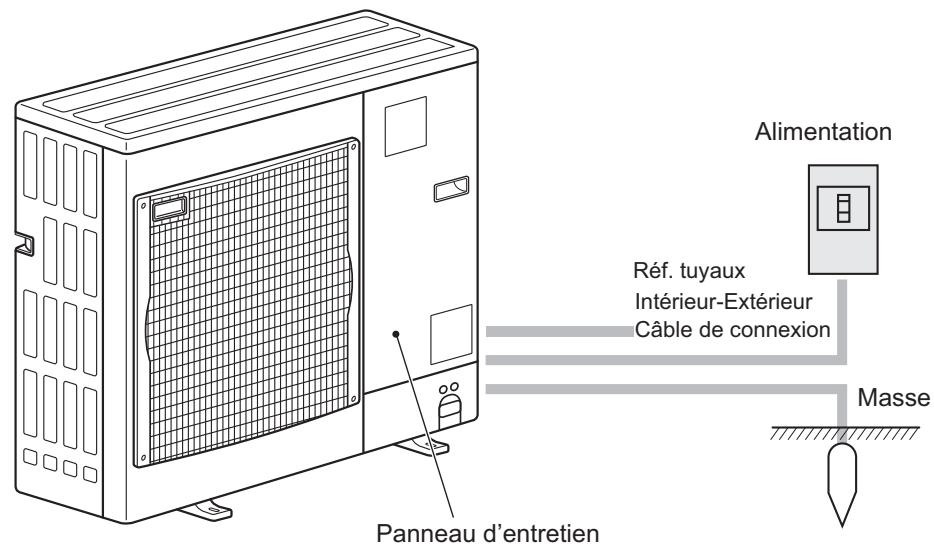
3. Fonctionnement
This product is designed and intended for use in the residential, commercial and light-industrial environment.
Please be sure to put the contact address/telephone number on this manual before handing it to the customer.
- Safety Precautions
- Symbols used in the text
- Symbols used in the illustrations
- Warning:
- Caution:
- Disposing of the unit
- Parts Names
- PKA-A·HA4
- PCA-A·KA4
- Operation
- Operation mode select
- Fan speed setting
- Airflow direction setting
- <[Manual] To Change the Airflow's Left/Right Direction>
- Ventilation
- For LOSSNAY combination
- Emergency Operation for IR wireless remote controller
- When the IR wireless remote controller cannot be used
- [Fig. 5-2] DEFROST/STAND BY lamp (Orange)
- Care and Cleaning
- Trouble Shooting
- Specifications
- Parts Names
- Note:
- Battery installation/replacement
- Operation
- Turning ON/OFF
- Temperature setting
- Fan speed setting
- Airflow direction setting
- Timer
- Fonctionnement
Brand : MITSUBISHI
Model : PKA-A-HA4
Category : Air-conditioner